ZenML

Mastering MLOps for Seamless AI Deployment

If you’ve spent time working with machine learning projects, you know the struggles: models that work perfectly on a laptop collapse in production, workflows turn into unreadable scripts, and sharing your results with teammates is a nightmare. That’s where ZenML comes in—offering a unified, open-source MLOps framework to help you orchestrate, automate, and scale end-toend machine learning workflows. In this guide, we’ll take a deep dive into ZenML, from its fundamental architecture to complex, real-world uses. Expect code, visuals, practical examples, and an expert eye toward making this the most thorough ZenML resource you’ll find.

What Is ZenML?

ZenML is an open-source MLOps framework that acts like the nervous system of your machine learning lifecycle. It structures and automates the entire ML workflow—so you don’t need to worry about spaghetti-code pipelines, missing dependencies, or lost experiment results. Instead, your code, models, and metadata are versioned, modular, and instantly reproducible, whether you’re running locally, on Kubernetes, or in a multi-cloud environment.

But ZenML is much more than just a pipeline runner. It’s the result of years of frustration in the ML world, distilled into a tool designed for both code-first engineers and team-driven collaboration. The framework’s guiding philosophy is "keep ML workflows zen"—organized, traceable, and robust enough for real-world deployment, audit, and improvement.
Why Use ZenML?

  • End-to-End Workflow Abstraction: ZenML lets you focus on what matters: building models and improving performance, not wrestling with unreliable scripts and disconnected tools. 
  • Reproducibility as a First-Class Citizen: Every run is tracked, every parameter is logged, and every artifact is versioned so that anyone, anywhere, anytime, can re-create your results. 
  • Collaboration and Scalability: It’s optimized for team-based development, letting data scientists, engineers, and business folks all interact with the same reproducible, composable workflows and results. 
  • Infrastructure Agnostic: Develop locally and scale to the cloud, or swap out orchestrators and artifact stores with a single command. 
  • Extensive Integrations: Plug in to the tools you already use—whether it’s MLflow for experiment tracking, S3/GCS/Azure for storage, Kubeflow or Airflow for orchestration, or the leading ML frameworks.

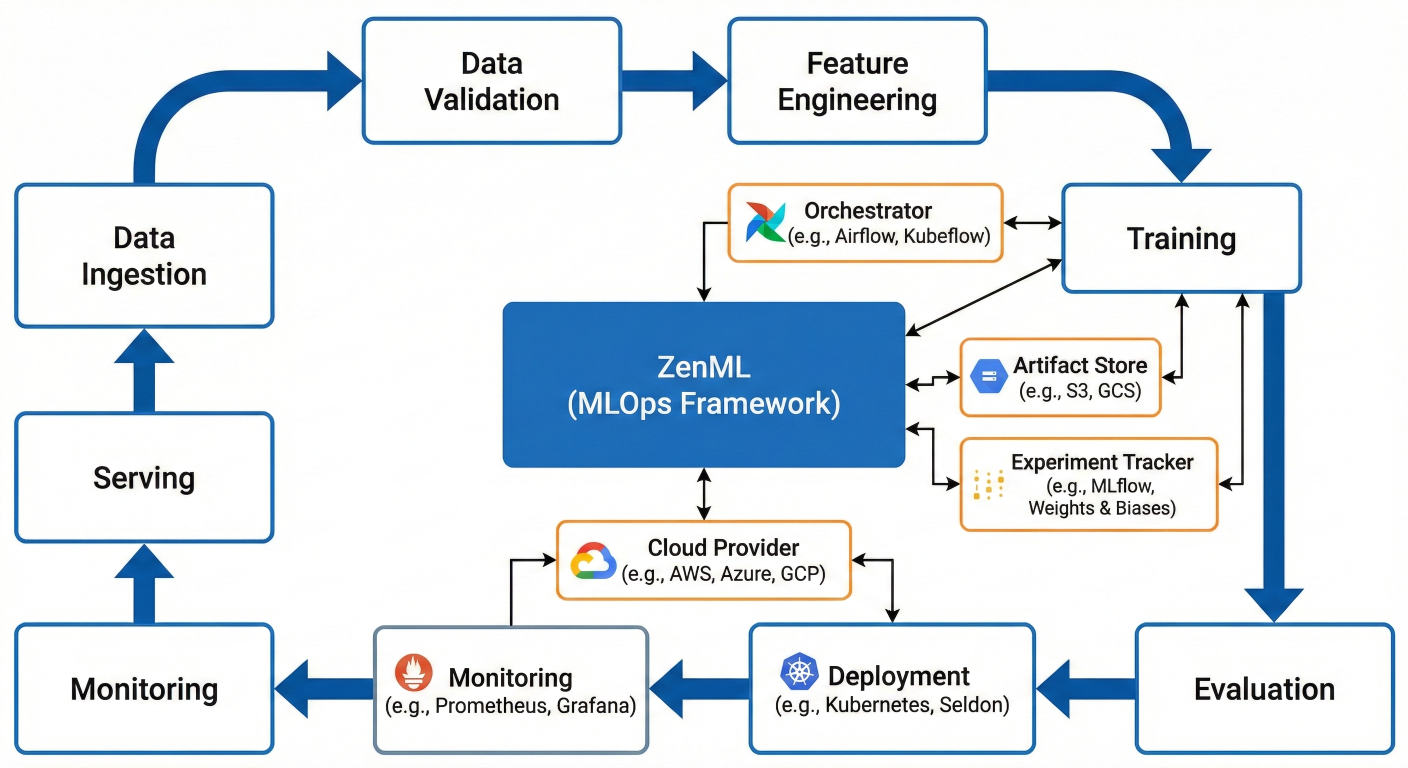
High-level block diagram showing how ZenML fits into the ML lifecycle, with labeled pipeline steps and integrations (e.g., orchestrator, step, artifact store, experiment tracker, deployment, monitoring, serving, cloud providers).

ZenML Architecture: Deep Dive into the Core Components

Let’s peel back the layers and see how ZenML is built for scale and flexibility.

The Heart: ZenML Pipelines

Think of a pipeline as a flowchart of reusable "steps," lined up from raw data to deployed model. Each step is a modular Python function with typed input/output, enabling you to build, debug, test, and re-use these building blocks.

Example: 

You can create one pipeline for experimentation (fast local runs, basic metrics), and another for production (with data validation, monitoring, A/B testing, and CI/CD triggers), all using the same steps and logic.

Steps: Modular, Atomic Units

Every step does one thing—like transforming data, training a model, evaluating metrics, or serving predictions. Steps are decorated Python functions, making them testable, reusable, and easy to document.

Steps:

  • Take defined inputs and produce defined outputs 
  • Require fixed data types (enforcing structure and reliability) 
  • Are isolated (failures or retries won’t break the rest of your workflow) 
  • Can be developed and tested independently, speeding up development

Artifact Store: The Central Filesystem of MLOps

Artifacts—like datasets, feature matrices, model binaries, and results—are the physical outputs of your steps. The artifact store is a versioned, pluggable storage backend supporting local disks, cloud storage (S3, GCS, Azure), and even advanced filesystems such as MinIO.

ZenML ensures:

  • Versioned Data: Every artifact is tracked and always accessible. 
  • Integration: Compatible with popular storage and cloud providers. 
  • Lineage Tracking: Know exactly which artifacts were created when, and by which runs or pipeline steps.

Stack: Orchestrate Your Environment

The ZenML "stack" is your configuration hub. It connects pipeline code to real infrastructure, specifying:
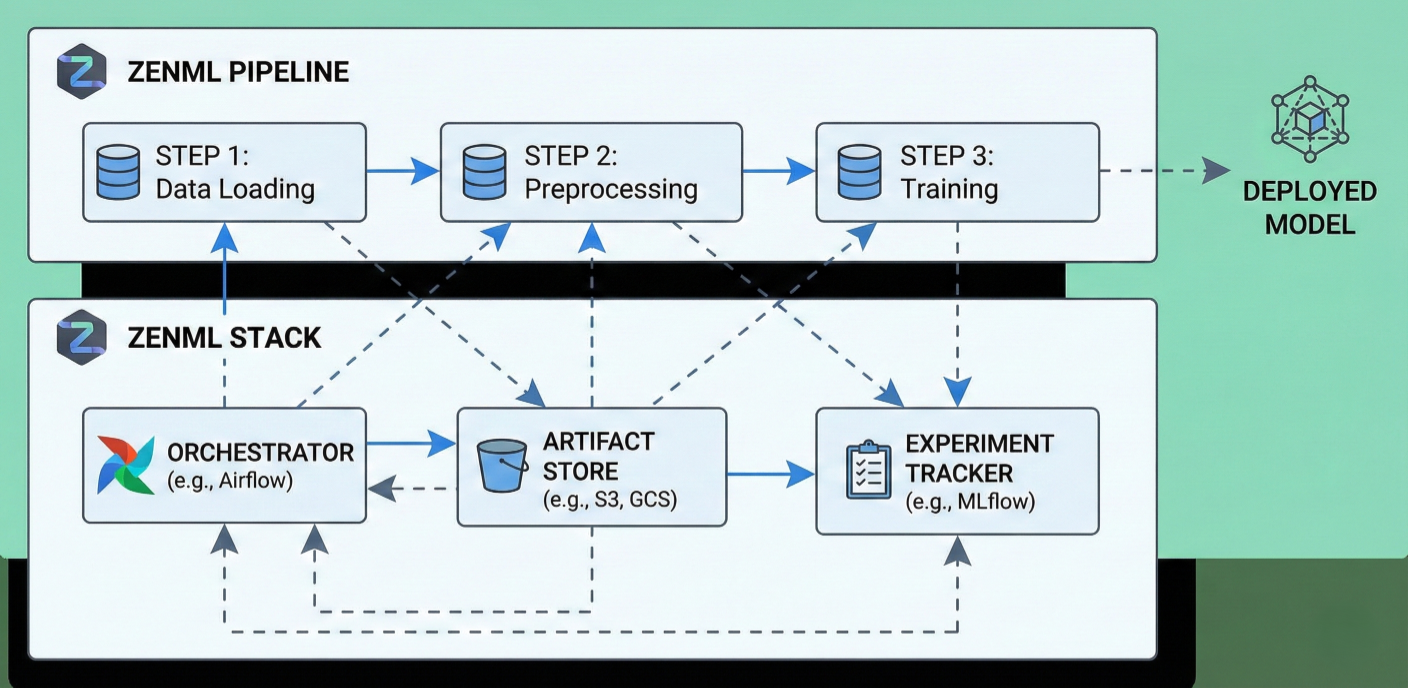
  • The orchestrator (what runs your pipeline: local, Kubernetes, Airflow, etc.) 
  • The artifact store (where outputs live) 
  • Container registries (for Dockerized runs) 
  • Experiment trackers (for run and metric logging) 
  • Model registries (saving validated models ready for deployment) 
  • Secrets managers (store authentication keys, credentials securely) 
  • And more: feature stores, model deployment, and custom plugins as you scale.

Diagram showing a ZenML pipeline: steps, stack, artifact store, experiment tracker, orchestrator, with arrows showing flow and dependencies.

Getting Started with ZenML

First things first: let’s get ZenML running in your environment.

Prerequisites

  • Python 3.8 or later 
  • pip, venv, or conda for dependency management 
  • (Optionally) Docker, if you want to run pipelines in containers

Installation and Initialization

Responsive IDE Code Block
   Bash
pip install zenml
zenml init

This command scaffolds your project to make it ZenML-aware, creating an internal .zenml folder with all config and metadata.

First Run:

Fire up your ZenML dashboard to explore runs, stacks, and more

Responsive IDE Code Block
   Bash
zenml up

Visit localhost:8237 for the dashboard UI.

Quick Start: Smallest Complete ZenML Pipeline

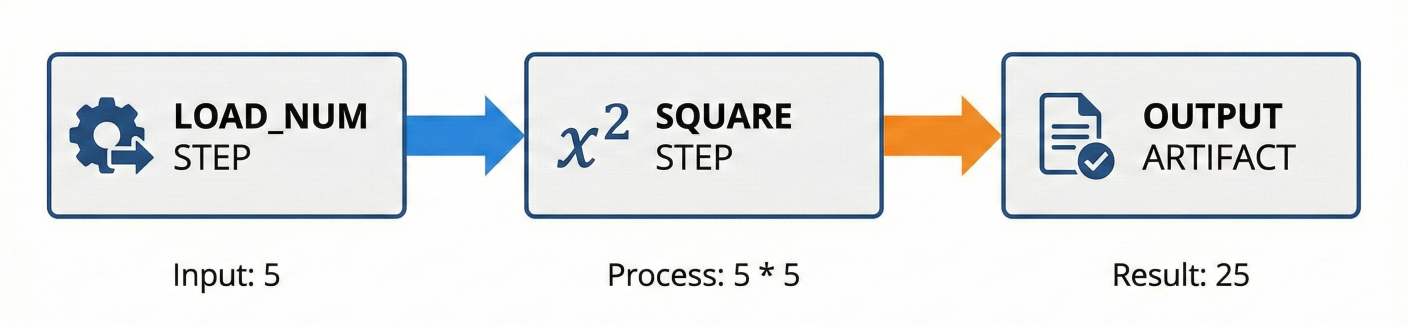
Let’s build a pipeline that ingests numbers, multiplies them, and outputs the result:

Responsive IDE Code Block
   Python
from zenml.pipelines import pipeline
from zenml.steps import step

# Step to load a number
@step
def load_num() -> int:
    return 10

# Step to square the number
@step
def square(num: int) -> int:
    return num * num

# Define a simple math pipeline
@pipeline
def simple_math_pipeline(load_num, square):
    n = load_num()
    result = square(n)
    return result

pipeline_instance = simple_math_pipeline(load_num=load_num(), square=square())
pipeline_instance.run()

Features to note:
  • Type-annotated input/output makes it robust and checks data flow. 
  • Each run is tracked: you’ll see artifacts saved, inputs/outputs, timestamps, logs—all in the ZenML dashboard.

Pipeline illustration for the math example: load_num step -> square step -> output artifact.

Building Advanced and Modular Pipelines

ZenML pipelines aren’t just for toy projects—real ML workflows involve multiple steps, dynamic branching, data validation, metrics aggregation, and sometimes multiple models.

Let’s expand with more realistic steps:

Example: Full ML Pipeline for Image Classification

Lorem Ipsum is simply dummy text of the printing and typesetting industry. Lorem Ipsum has been the industry's standard dummy text ever since the 1500s, when an unknown printer took a galley of type and scrambled it to make a type specimen book.

What this pipeline does:

  • Fetches and preprocesses image data 
  • Trains a logistic regression model 
  • Evaluates accuracy 
  • Tracks every step, artifact, parameter, and output

You can swap out individual steps (e.g., change preprocess logic, switch model type) without rewriting the rest, reusing code across projects and teams.
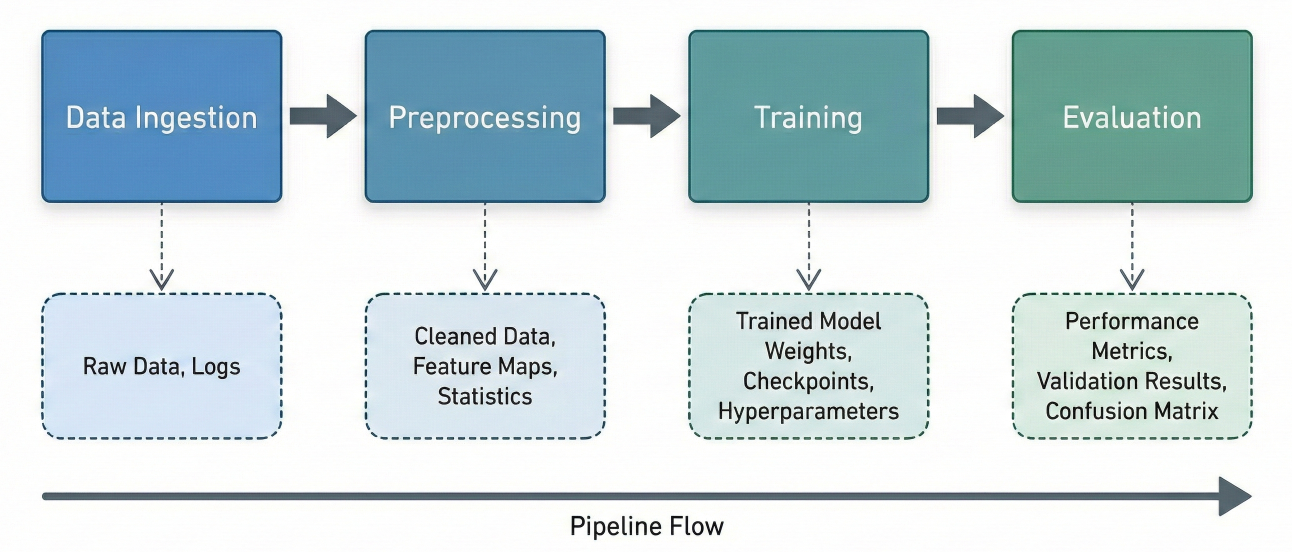
Block diagram of a typical ML pipeline: Data Ingestion → Preprocessing → Training → Evaluation steps, each producing tracked artifacts.

Orchestration: Run Pipelines Anywhere

Orchestrators Supported by ZenML

  • Local: Ideal for quick feedback loops, debugging, and iterative development.
  •  Airflow: For enterprises managing scheduled workflows at scale with complex dependencies. 
  • Kubeflow Pipelines: Native Kubernetes orchestration, distributed compute, and autoscaling. 
  • AWS Step Functions, Google Vertex AI Pipelines: For managed, production-grade ML in the cloud. 
  • Custom Plug-ins: Build or connect your own orchestrator if needed.

Why does orchestration matter?

Running code locally is fast, but fragile. Real-world workloads quickly outgrow your laptop. ZenML abstracts away the backend, so today’s experiment becomes tomorrow’s cloud job— with a swap of the orchestrator in your stack config.

Lorem Ipsum is simply dummy text of the printing and typesetting industry. Lorem Ipsum has been the industry's standard dummy text ever since the 1500s, when an unknown printer took a galley of type and scrambled it to make a type specimen book.

No code changes, no drama
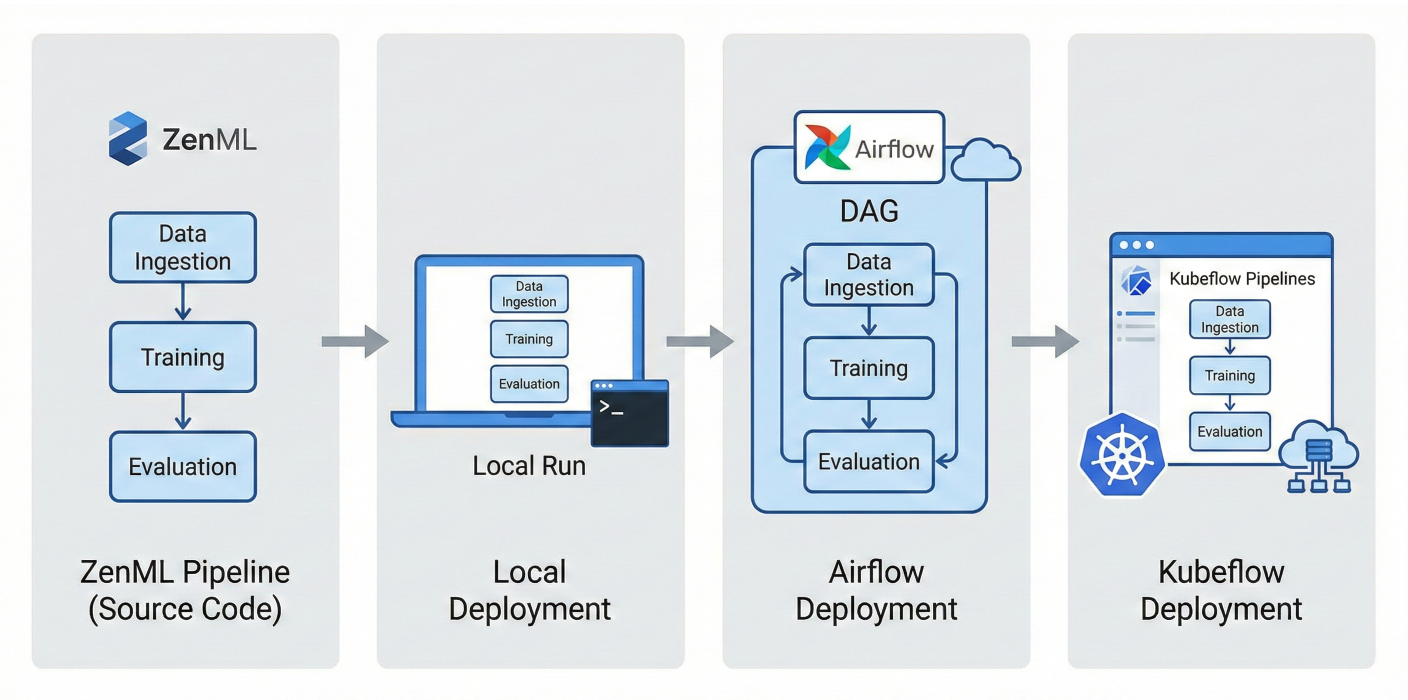
ZenML pipeline deployment illustration: showing the same pipeline deployed locally, then on Airflow, then on Kubeflow.

Artifact Lineage & Experiment Tracking

Artifact Versioning

For every pipeline run:

  • Inputs (e.g., dataset versions, hyperparameters) are hashed and stored. 
  • Outputs (models, predictions, metrics) are artifacts saved to the artifact store. 
  • Metadata (run logs, timestamps, dependencies) is recorded.

The result? You always know, for every model version:
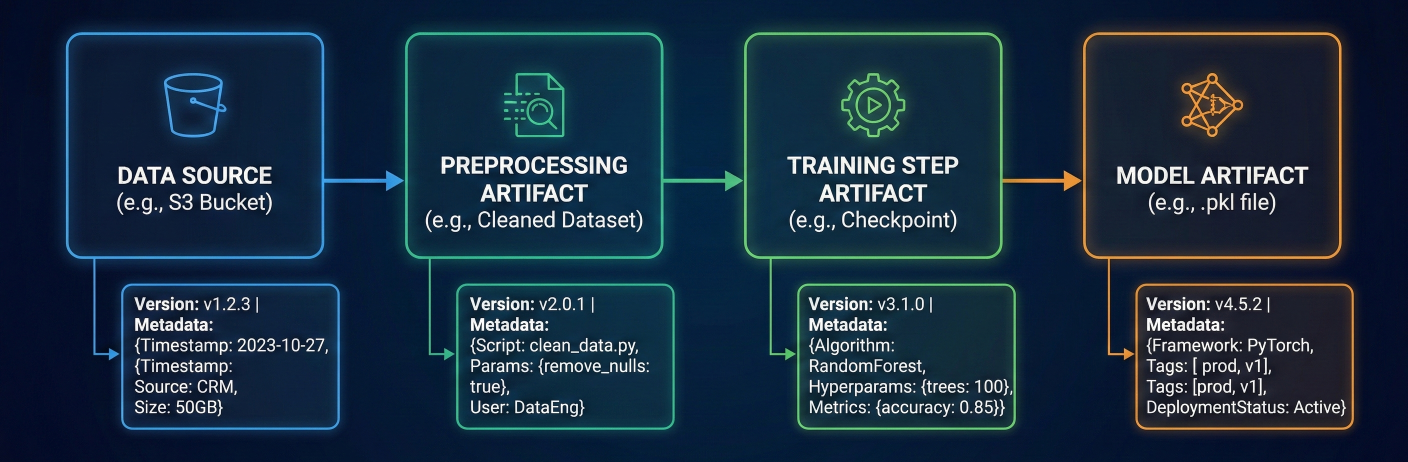
  • Which dataset was used 
  • Which code and config ran 
  • What parameters and dependencies were active 
  • Who triggered the run and when

Lineage tracking diagram: Data Source → Preprocessing Artifact → Training Step Artifact → Model Artifact, all versioned with metadata.

Experiment Tracking Integrations

ZenML has native experiment tracking, but also plugs in with:

  • MLflow: log parameters, metrics, artifacts, and visualizations 
  • Weights & Biases: experiment dashboards, hyperparameter sweeps, team collaboration 
  • TensorBoard: for deep learning metric tracking and visualization 
  • Neptune.ai, CometML, and others: via extensible plug-in system

Code snippet: MLflow Integration

Responsive IDE Code Block
   Python
from zenml.integrations.mlflow.steps import mlflow_tracking_step

@pipeline
def my_pipeline(..., mlflow_tracking):
    ...
    mlflow_tracking(...)

Just add the tracker to your stack, call the tracking step, and all key info gets logged.

Reproducibility and Auditability: MLOps Superpowers

A reproducible ML system means you can:

  • Debug production failures quickly (re-run the exact failed pipeline) 
  • Deliver on compliance (prove exactly how a prediction or model was created) 
  • Accelerate research (collaborators can re-run your experiments with identical results) 
  • Build trust (your results can be demonstrated, not just claimed)

ZenML nails this by:

  • Versioning everything (inputs, code, runs, dependencies, artifacts) 
  • Attaching metadata and logs to every step 
  • Providing easy artifact/package download, so anyone can re-run or review any step, anywhere

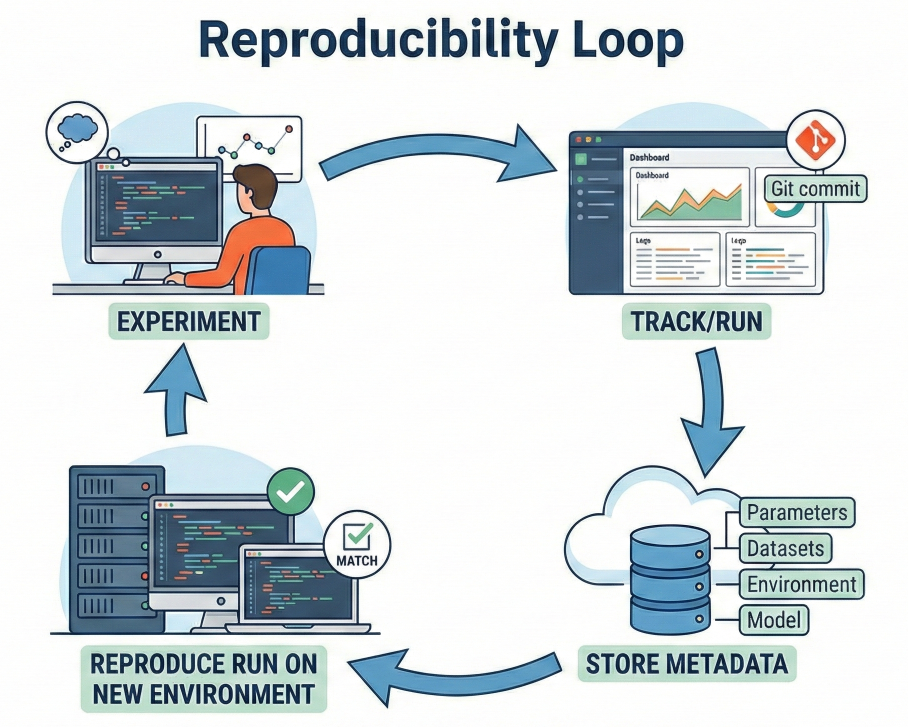
Diagram: ‘Reproducibility loop’ showing experiment, track/run, store metadata, reproduce run on new environment

Integrations Galore: Meeting You Where You Work

ZenML is not an island—it’s built to work with the best tools in the industry:

  • Artifact Storage: S3, GCS, Azure Blob, MinIO, local disk, NFS, and more. 
  • Experiment Tracking: MLflow, Weights & Biases, TensorBoard, Neptune, Comet. 
  • Infrastructure: Kubernetes, Docker, Airflow, Kubeflow.
  • Serving & Deployment: Seldon Core, KFServing, BentoML, AWS Sagemaker, TFX, FastAPI. 
  • Data Validation: Great Expectations, TensorFlow Data Validation. 
  • Monitoring: Prometheus, Grafana, custom plugins. 
  • Model Registry: MLflow Registry, S3 tagging, custom.

Plug-in System:

You can extend ZenML with your own flavors and integrations by developing plug-ins. See the ZenML docs for creating custom orchestrators, artifact stores, and more.
Scaling ZenML: From Laptop to Cloud and Team

Cloud-Native Productivity

  • Develop Locally: Iterate and debug in your notebook or local Python.
  •  Seamless Scaling: Swap orchestrators and artifact stores to move workloads to Kubernetes, Airflow, or managed cloud (AWS, GCP, Azure). 
  • Cloud Stacks: Define stacks for dev, staging, and production; switch with a single command.

Team Collaboration

  • Shared Artifact Stores: Datasets, models, and runs reside in a cloud store everyone accesses. 
  • Experiment Visibility: The ZenML dashboard and integrations let team members view and comment on runs, metrics, code, and decisions. 
  • Access Management: Secure access to secrets, sensitive artifacts, and tracked runs using integrated secrets managers.

CI/CD for ML: Real Automation

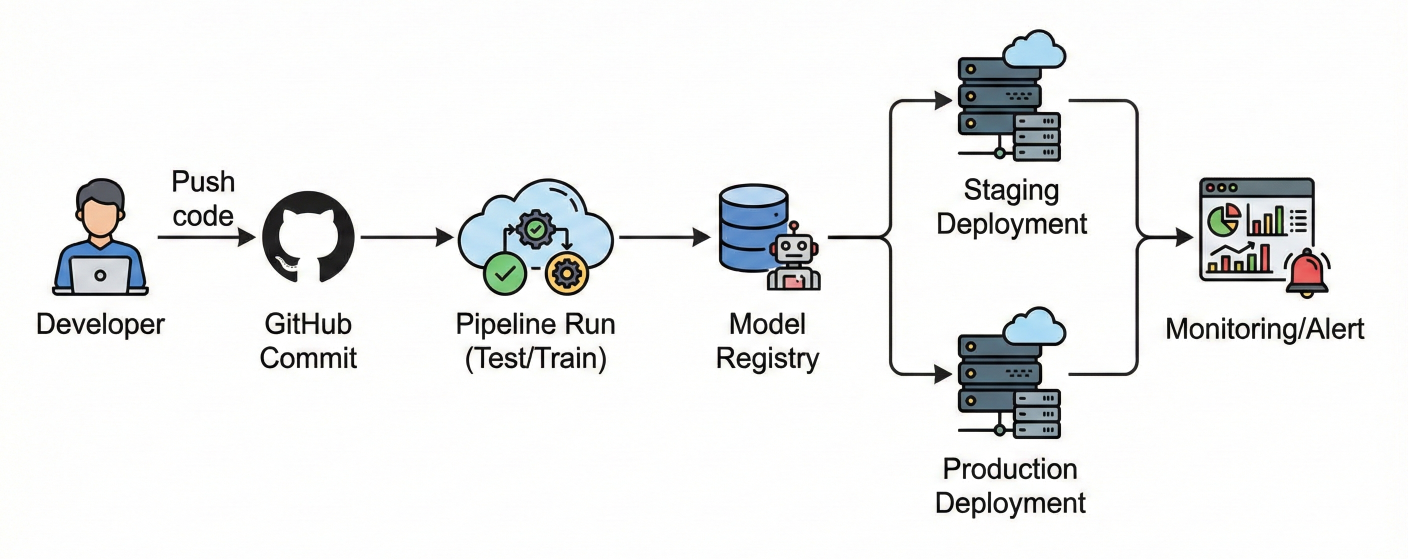
  • Automated Training: Trigger pipelines on pull requests, data updates, or schedule 
  • Model Testing: Run TDD/BDD-style tests for pipelines (e.g., check for data drift, regression, accuracy drops) 
  • Promotion & Deployment: When a pipeline passes tests, register models automatically, deploy to production with versioning and rollback support. 
  • Monitoring & Retraining: Add monitoring steps for model drift, data anomaly, or outlier detection, automatically triggering retraining if thresholds are exceeded

CI/CD pipeline diagram: GitHub commit → Pipeline run (test/train) → Model registry → Staging/production deployment → Monitoring/alert

Monitoring and Model Management

ZenML empowers you to:

  • Monitor deployed models (latency, performance, drift) 
  • Aggregate and visualize pipeline metrics 
  • Establish alerts for failures or anomalies 
  • Link monitoring data back to pipeline steps for easy debugging 
  • Implement feedback loops: automate retraining or rollback when needed

Advanced Use Cases

Custom Steps and Dynamic Pipelines

  • Custom Preprocessing: Build advanced transformation steps (feature engineering, outlier detection, NLP, image augmentations). 
  • Conditional Branching: Pipelines can have dynamic branching: e.g., select model architecture based on data characteristics. 
  • Hyperparameter Optimization: Use ZenML with Optuna or Ray Tune for integrated, reproducible hyperparameter sweeps. 
  • Model Ensembles: Build pipelines that combine predictions from multiple models, track ensemble artifacts, and compare performance.

Data and Feature Management

  • Integrate with feature stores (Feast, Tecton) 
  • Track provenance and dataset versions 
  • Automate data validation and schema enforcement in pipelines

Real-Time and Batch Inference

  • Serve models for both real-time APIs and batch prediction jobs 
  • Use pipeline steps dedicated to prediction/serving, ensuring consistent pre/postprocessing

Security and Compliance

  • Secrets Management: ZenML supports enterprise-level credential storage (using AWS Secrets Manager, HashiCorp Vault, Azure Key Vault, etc.). 
  • Audit Trails: Every pipeline step is logged, making compliance with industry standards (GDPR, HIPAA, etc.) much easier. 
  • Isolation: Run steps in containers or VMs for security and consistency
  • Reproducible Reporting: Generate full reports detailing each run, supporting regulatory and client requirements.

Reference ZenML Ecosystem Project Examples

  • Fraud Detection at Scale: End-to-end credit card fraud training pipeline across distributed data centers, with auto-retraining and drift detection. 
  • Medical Imaging: HIPAA-compliant image pipeline with validated preprocessing and audit trails. 
  • Retail Forecasting: Real-time inventory forecasting using batch and streaming pipelines, integrated with cloud storage and on-prem analytics. 
  • Finance: Automated regulatory reporting and explainability audits using tracked artifacts and reproducibility.

The Developer & Ops Experience

  • Local to Cloud with a Flag: No major refactoring—develop on laptop, then use the same codebase with Airflow/Kubeflow orchestrator on cloud 
  • Versioned Everything: Return to any run, download the artifact, debug or restart from that run version 
  • Testable, Modular Steps: CI pipelines can run step-level tests just like normal Python functions 
  • Consistent APIs: Whether using TensorFlow, PyTorch, or custom models, pipeline and step definitions remain unchanged

Best Practices: Getting the Most from ZenML

  • Atomic Steps: Each step does one job; keep them focused, small, and testable. 
  • Typed Inputs and Outputs: Enforce data contracts to avoid pipeline breakage.
  • Stack Separation: Use isolated stacks for dev, staging, and production—avoid nasty surprises. 
  • CI-Driven Pipelines: Validate code and data continuously; never “ship” unvalidated results. 
  • Version Control: Use Git for pipelines and code, ZenML for runs and artifacts

Wrapping Up: Unleash the Power of Zen-Driven MLOps

ZenML isn’t just a tool—it's an MLOps superpower. It eliminates pipeline spaghetti, builds bulletproof reproducibility, supercharges your collaboration, and sets you (and your team) up for ML deployment success. Whether you’re already scaling AI models in production, or just want to bring order to your ML chaos, ZenML is the toolkit designed for teams who want to do MLOps right.

Don’t wait:

Download ZenML, initialize your first pipeline, plug in your favorite tools, and experience what growing, scalable ML pipelines should feel like!

SaratahKumar C

Founder & CEO, Psitron Technologies