There are no items in your cart
Add More
Add More
| Item Details | Price | ||
|---|---|---|---|

Master the art of creating stateful, self-correcting AI agents that work together to solve complex problems
Imagine an AI system that doesn't just process information once and move on, but can think, reconsider, collaborate with other AI agents, and even pause to ask for human input when needed. This isn't science fiction—it's what LangGraph makes possible today.
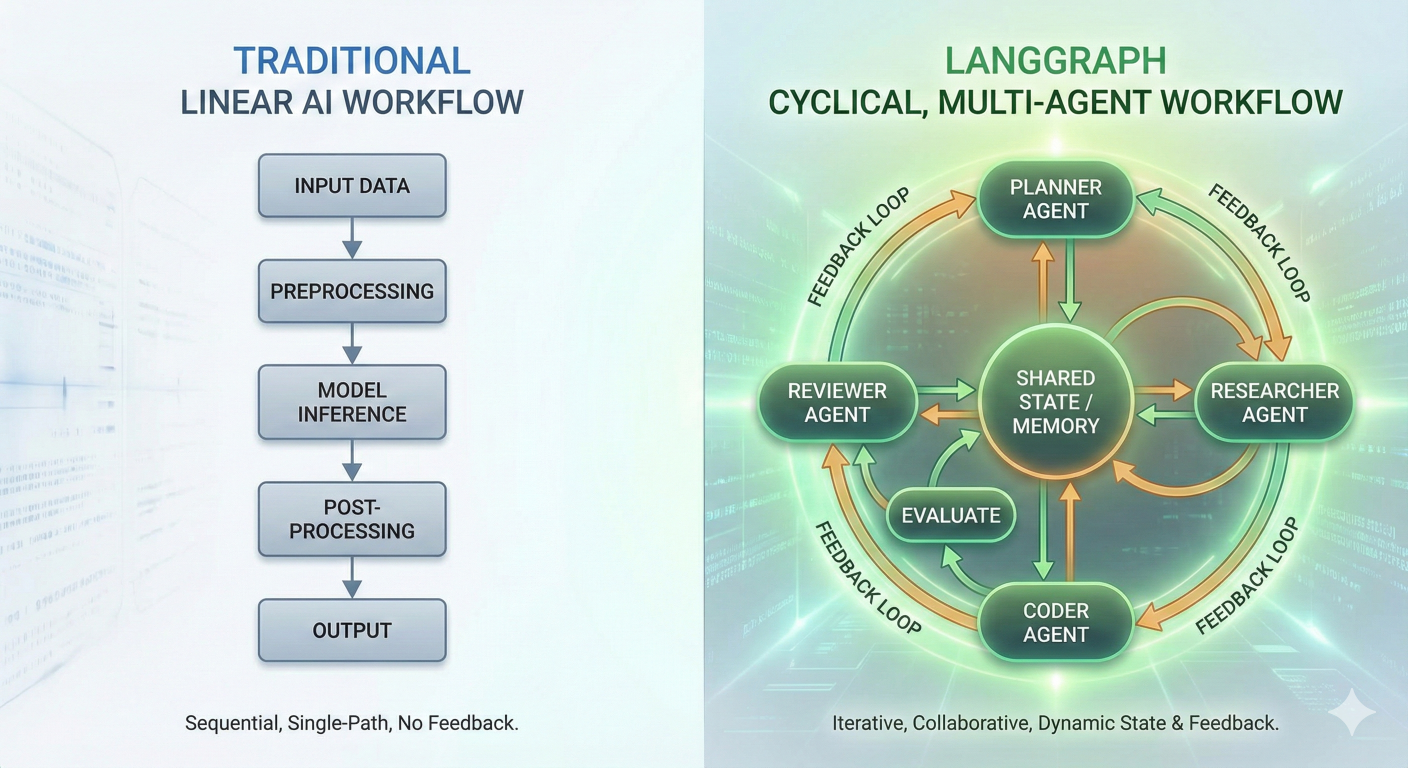
Diagram showing traditional linear AI workflow vs. LangGraph's cyclical, multi-agent workflow with nodes, edges, and feedback loops
While traditional AI applications follow a simple linear path—input → processing → output—the real world demands something more sophisticated. Complex problems require iteration, collaboration, and the ability to course-correct when things don't go as planned. That's where LangGraph comes in, transforming how we build AI agents from simple chains into intelligent, stateful systems.
Whether you're an intermediate developer looking to level up your AI skills or a seasoned engineer exploring the cutting edge of agent orchestration, this guide will give you everything you need to master LangGraph.
LangGraph isn't just another AI framework—it's a paradigm shift. Built by the LangChain team, LangGraph addresses the fundamental limitations of linear AI workflows by introducing graphbased agent orchestration.
Think of traditional LangChain as a well-organized assembly line: each component performs a specific task and passes the result to the next component in a predetermined sequence. LangGraph, on the other hand, is like a team of specialists who can communicate with each other, revisit previous decisions, and adapt their approach based on intermediate results.
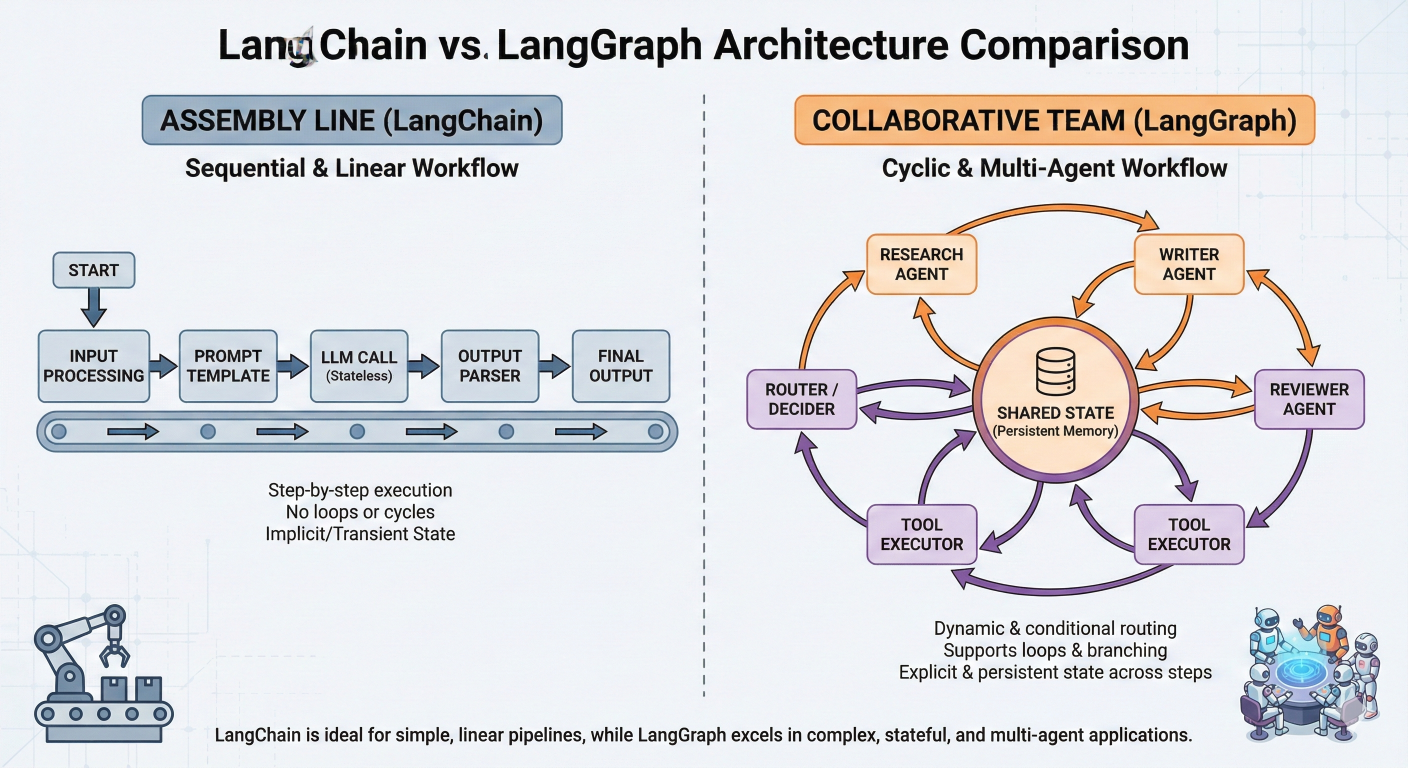
Assembly line (LangChain) vs. collaborative team (LangGraph)
Nodes in LangGraph are where the actual work happens. Each node is essentially a Python function that:
Here's a simple example of a node that processes user input:
# Example: TypedDict-based processing node
from typing import TypedDict
from langchain_openai import ChatOpenAI

class State(TypedDict):
    messages: list
    user_input: str
    processed_data: str

def process_input_node(state: State) -> State:
    """Process user input and extract key information."""
    user_message = state["user_input"]
    # Perform processing (this could be LLM calls, data retrieval, etc.)
    processed = f"Processed: {user_message}"
    return {
        **state,
        "processed_data": processed,
        "messages": state["messages"] + [{"role": "system", "content": processed}]
    }
What makes nodes powerful is their flexibility. A node can:
Edges define how information flows between nodes and, more importantly, how your AI system makes decisions about what to do next. LangGraph supports several types of edges:
Normal Edges: Direct connections between nodes
# Always go from node A to node B
workflow.add_edge("analyze_input", "generate_response")
Conditional Edges: Smart routing based on the current state
def routing_function(state: State) -> str:
    if state["requires_human_review"]:
        return "human_review"
    elif state["confidence_score"] < 0.7:
        return "retry_analysis"
    else:
        return "finalize_output"

workflow.add_conditional_edges(
    "analyze_input",
    routing_function,
    {
        "human_review": "human_review_node",
        "retry_analysis": "analysis_node",
        "finalize_output": "output_node"
    }
)
This is where LangGraph's power really shines. Your AI system can make intelligent decisions about its own workflow, creating truly adaptive behavior.
State in LangGraph is like the shared memory of your AI system. It's a data structure that travels through your graph, accumulating information and context as it goes. Unlike stateless functions, LangGraph maintains this state throughout the entire workflow, enabling:
Here's how you define state structure:
# AgentState TypedDict for tracking conversation and tool outputs
from typing import TypedDict, List, Optional

class AgentState(TypedDict):
    # Input and output
    query: str
    final_answer: Optional[str]

    # Conversation history
    messages: List[dict]

    # Tool results
    search_results: Optional[str]
    database_results: Optional[dict]

    # Metadata
    iteration_count: int
    confidence_score: float
    requires_human_input: bool
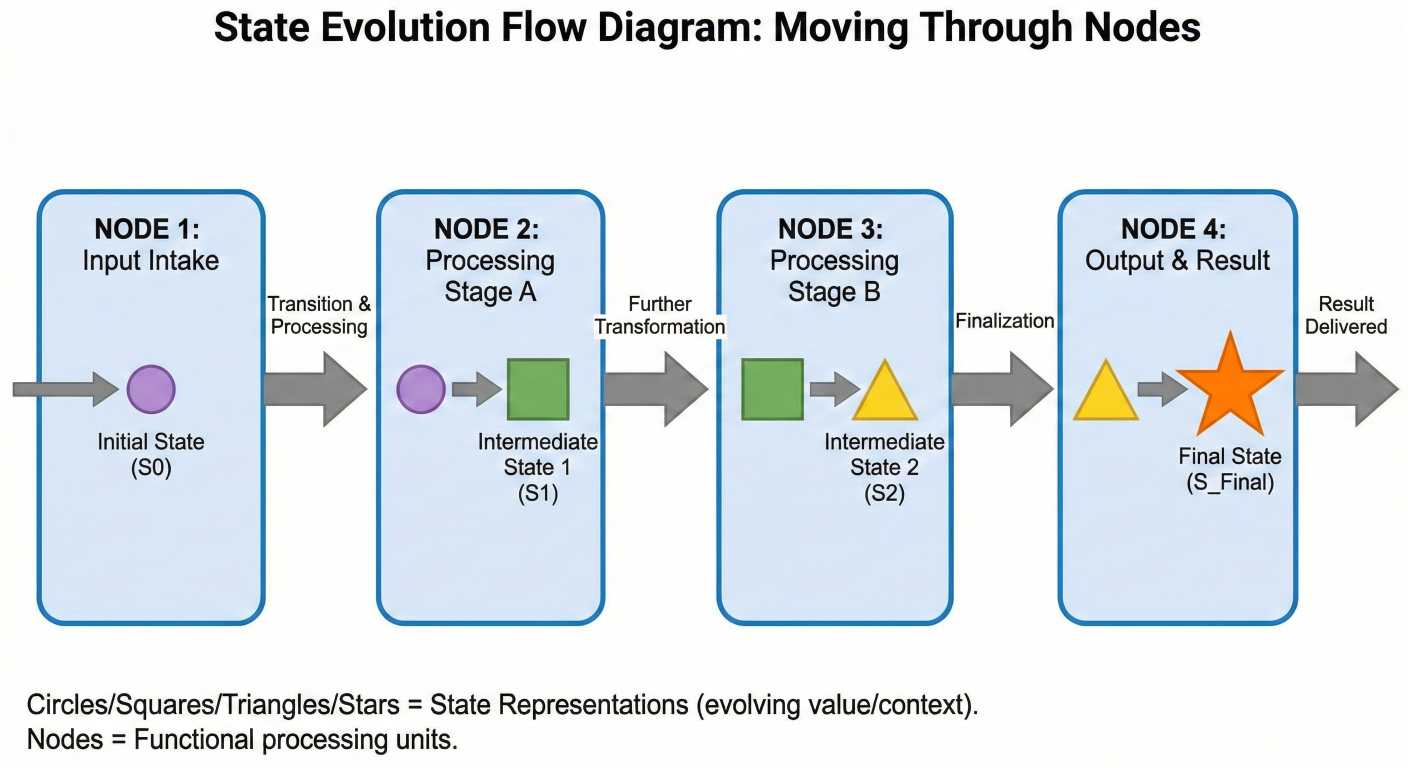
How state evolves as it moves through different nodes
Understanding when to use LangGraph versus traditional LangChain is crucial for building effective AI systems.
| Aspect |
LangChain (LCEL) |
LangGraph |
| Workflow | Linear, sequential | Cyclical, branching |
| State Management | Stateless by default | First-class persistent state |
| Use Cases | Simple RAG, Q&A, text processing | Self-correcting agents, multi-agent system |
| Complexity | Lower learning curve | More complex but powerful |
| Error Handling | Limited Recovery options | Built-in retry and correction mechanism |
| Human Interaction | Difficult to implement | Native support for human-in-the-loop |
One of LangGraph's most powerful features is its native support for cycles—the ability for workflows to loop back on themselves. This enables sophisticated patterns like self-reflection, iterative refinement, and adaptive problem-solving.
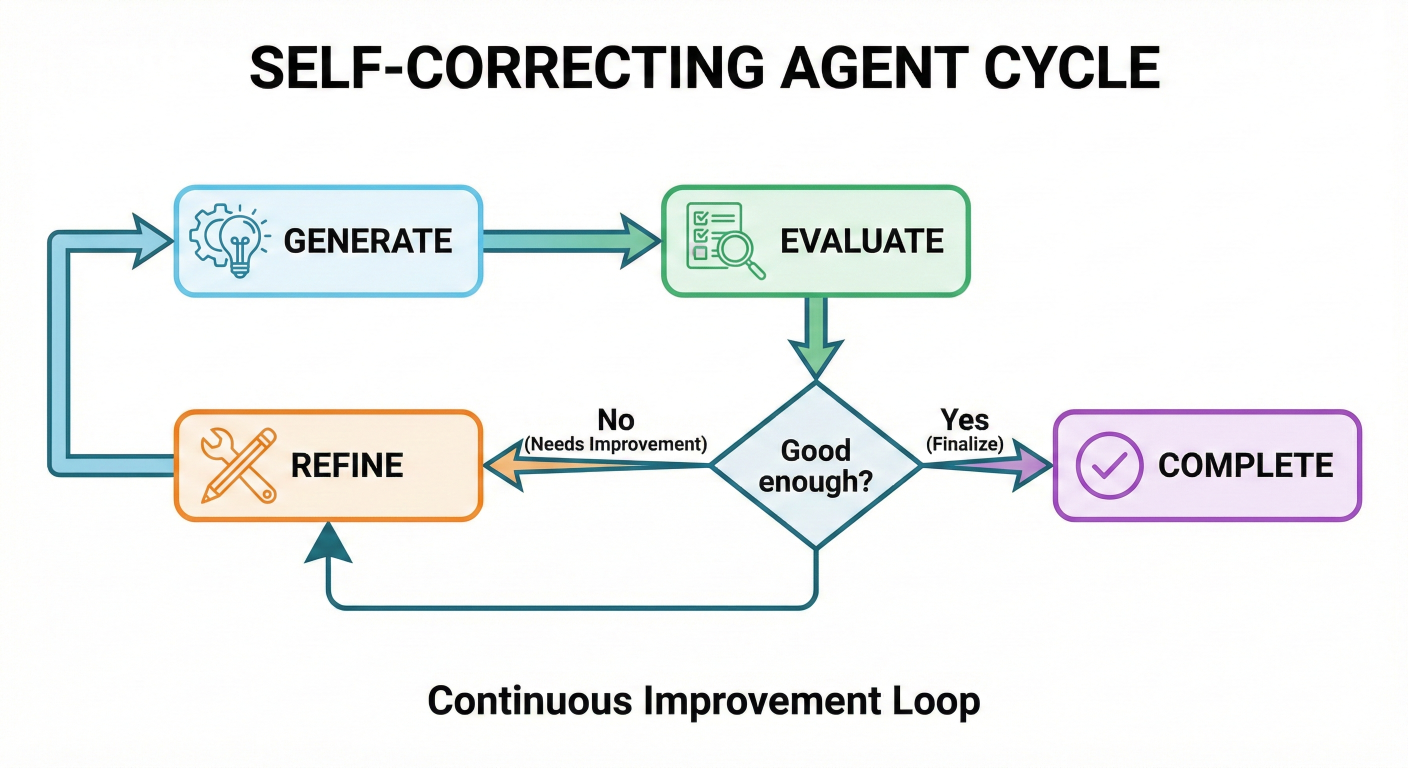
Self-correcting agent cycle showing generate → evaluate → refine → generate loop
Let's build a practical example that demonstrates the power of cycles. This agent generates code, tests it, and refines it until it works correctly:
# LangGraph iterative code generation example from langgraph.graph import StateGraph, END, START from typing import TypedDict, Literal import subprocess import sys
class CodeGenState(TypedDict):
user_request: str
generated_code: str
error_message: str
iteration_count: int
max_iterations: int
success: bool
def generate_code_node(state: CodeGenState) -> CodeGenState:
"""Generate Python code based on user request."""
llm = ChatOpenAI(model="gpt-4")
prompt = f"""
Generate Python code for: {state['user_request']}
{'Previous attempt failed with error: ' + state['error_message'] if state['error_message'] else ''}
Return only the Python code, no explanations.
"""
response = llm.invoke(prompt)
return {
**state,
"generated_code": response.content,
"iteration_count": state["iteration_count"] + 1
}
def test_code_node(state: CodeGenState) -> CodeGenState:
"""Test the generated code for syntax and runtime errors."""
try:
compile(state["generated_code"], '' , 'exec')
exec(state["generated_code"])
return {**state, "success": True, "error_message": ""}
except Exception as e:
return {**state, "success": False, "error_message": str(e)}
def should_continue(state: CodeGenState) -> Literal['generate', 'end']:
"""Decide whether to continue iterating or finish."""
if state["success"]:
return "end"
elif state["iteration_count"] >= state["max_iterations"]:
return "end"
else:
return "generate"
workflow = StateGraph(CodeGenState)
workflow.add_node("generate", generate_code_node)
workflow.add_node("test", test_code_node)
workflow.set_entry_point("generate")
workflow.add_edge("generate", "test")
workflow.add_conditional_edges(
"test",
should_continue,
{"generate": "generate", "end": END}
)
app = workflow.compile()
result = app.invoke({
"user_request": "Create a function that calculates the fibonacci sequence",
"generated_code": "",
"error_message": "",
"iteration_count": 0,
"max_iterations": 3,
"success": False
})
print("Final code:", result["generated_code"])
print("Success:", result["success"])
This example showcases how cycles enable iterative improvement—the agent keeps refining its output until it achieves the desired result or reaches a maximum number of attempts.
One of LangGraph's standout features is its built-in support for human-in-the-loop workflows. This isn't just about stopping and asking questions—it's about creating AI systems that understand their own limitations and can seamlessly collaborate with humans.
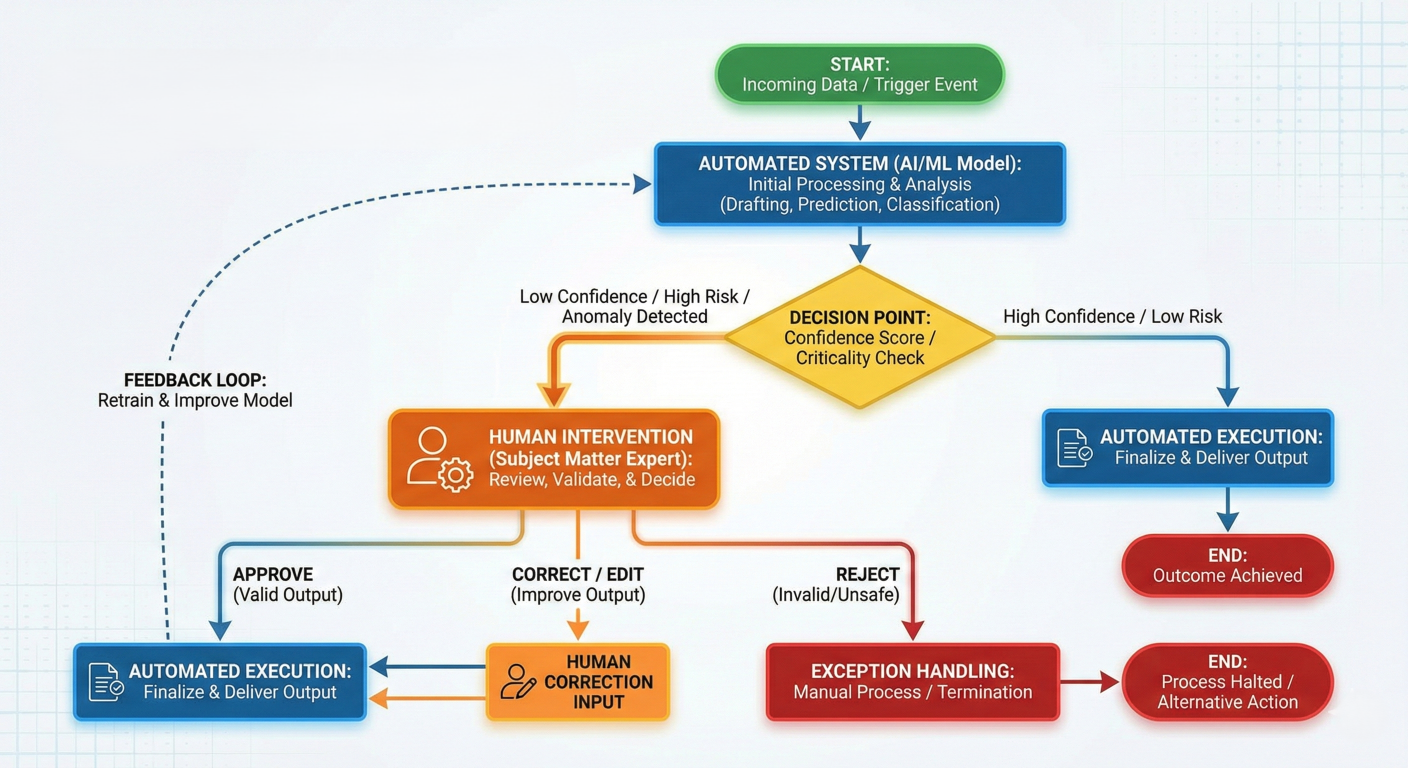
Human-in-the-loop process showing decision points where human input is required
1. Persistent Execution State: LangGraph's persistence layer saves the complete graph state after each step, allowing workflows to pause indefinitely and resume exactly where they left off.
2. Strategic Interruption Points: You can interrupt workflows either dynamically (based on conditions) or statically (at predetermined points).
3. Flexible Integration: Human oversight can be added at any point in the workflow without restructuring the entire system.
Here's a practical example of an AI agent that handles sensitive operations and requires human approval:
# LangGraph workflow example with human approval
from langgraph.graph import StateGraph, END
from langgraph.checkpoint.sqlite import SqliteSaver
from langgraph import interrupt
from typing import TypedDict, Optional

class ApprovalState(TypedDict):
    user_request: str
    proposed_action: str
    human_approval: Optional[bool]
    action_result: Optional[str]
    risk_level: str

def analyze_request_node(state: ApprovalState) -> ApprovalState:
    """Analyze the user request and determine risk level."""
    request = state["user_request"]
    # Simulate risk assessment
    risk_level = "high" if any(word in request.lower()
        for word in ["delete", "remove", "drop", "destroy"]) else "low"
    proposed_action = f"Execute: {request}"
    return {
        **state,
        "proposed_action": proposed_action,
        "risk_level": risk_level
    }

def human_approval_node(state: ApprovalState) -> ApprovalState:
    """Request human approval for high-risk actions."""
    if state["risk_level"] == "high":
        # This will pause the workflow and wait for human input
        approval = interrupt(
            f"High-risk action detected: {state['proposed_action']}. Do you approve? (yes/no)"
        )
        return { **state, "human_approval": approval.lower() == "yes" }
    else:
        # Auto-approve low-risk actions
        return { **state, "human_approval": True }

def execute_action_node(state: ApprovalState) -> ApprovalState:
    """Execute the action if approved."""
    if state["human_approval"]:
        # Simulate action execution
        result = f"Successfully executed: {state['proposed_action']}"
    else:
        result = "Action cancelled by human operator"
    return { **state, "action_result": result }

def should_execute(state: ApprovalState) -> str:
    """Decide whether to execute or cancel based on approval."""
    return "execute" if state["human_approval"] else "cancel"

# Build workflow with persistence
memory = SqliteSaver.from_conn_string(":memory:")
workflow = StateGraph(ApprovalState)
workflow.add_node("analyze", analyze_request_node)
workflow.add_node("approval", human_approval_node)
workflow.add_node("execute", execute_action_node)
workflow.add_node("cancel", lambda state: {**state, "action_result": "Cancelled"})
workflow.set_entry_point("analyze")
workflow.add_edge("analyze", "approval")
workflow.add_conditional_edges("approval", should_execute, {"execute": "execute", "cancel": "cancel"})
workflow.add_edge("execute", END)
workflow.add_edge("cancel", END)

# Compile with checkpointing
app = workflow.compile(checkpointer=memory)
# To use this workflow with human intervention:
# Start the workflow
thread_config = {"configurable": {"thread_id": "approval-001"}}
result = app.invoke({"user_request": "Delete all user data from the database"}, config=thread_config)
# The workflow will pause at the interrupt point
# To resume with human input:
from langgraph.constants import Command
# Resume with approval
app.invoke(Command(resume="yes"), config=thread_config)
# Handle multi-turn conversation node
def conversation_node(state):
    """Handle multi-turn conversations with humans."""
    while not state["conversation_complete"]:
        human_response = interrupt(f"Question: {state['current_question']}")
        state = process_human_response(state, human_response)
    return state
# Function for human review and editing of agent's work
def review_and_edit_node(state):
    """Allow humans to review and edit the agent's work."""
    edited_content = interrupt(
        f"Please review and edit this content:\n{state['draft_content']}"
    )
    return {
        **state,
        "final_content": edited_content,
        "human_reviewed": True
    }
Multi-agent systems represent the pinnacle of LangGraph's capabilities. Instead of building monolithic AI applications, you create teams of specialized agents that work together to solve complex problems.
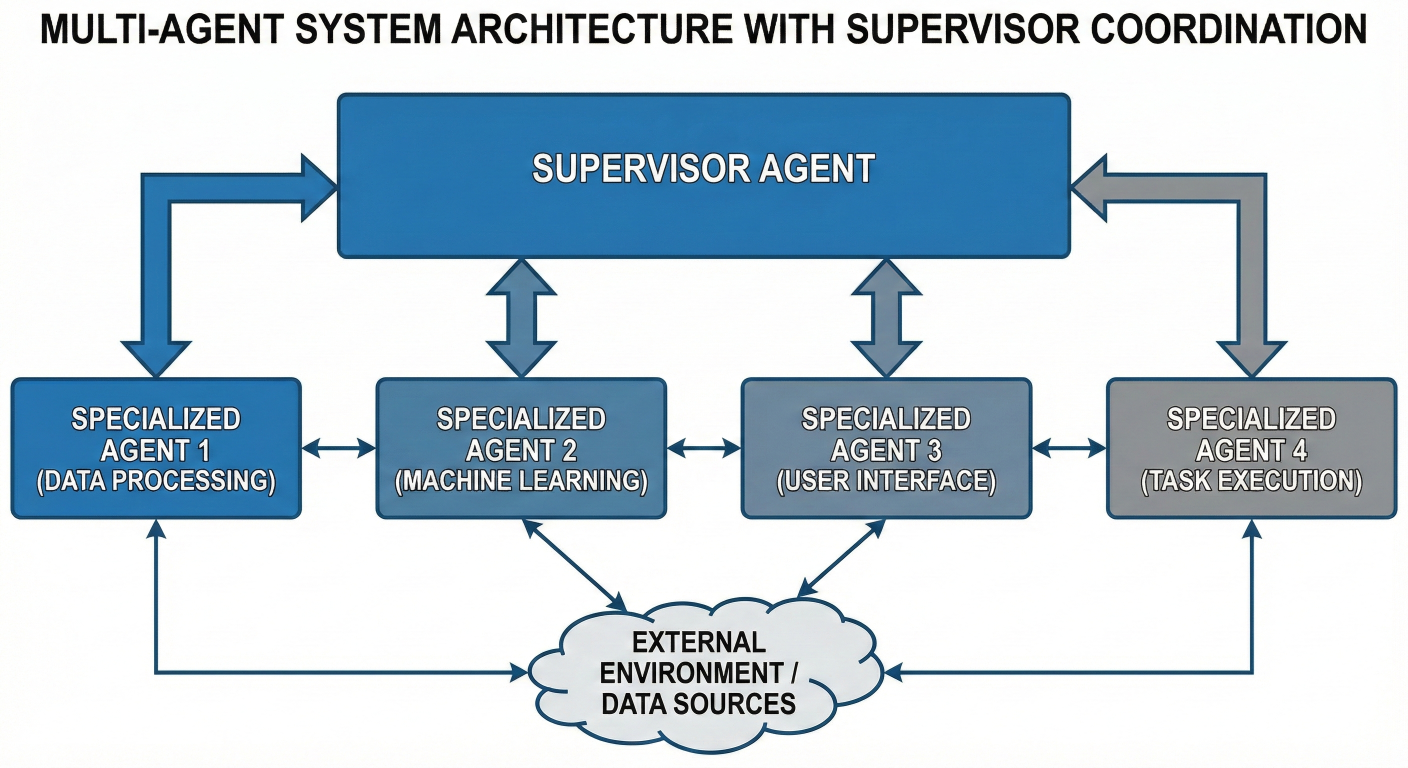
Multi-agent system with supervisor coordinating specialized agents
1. Specialized Agents: Each agent focuses on a specific domain or capability
2. Communication Protocols: Well-defined ways for agents to share information
3. Coordination Mechanisms: Systems to manage workflow and prevent conflicts
4. Shared State: Common data structures that all agents can read and modify
Let's create a sophisticated system where multiple AI agents collaborate to research a topic and write a comprehensive article:
# LangGraph and LangChain research & writing agents
from langgraph.graph import StateGraph, END
from typing import TypedDict, List, Dict
from langchain_openai import ChatOpenAI
from langchain_community.tools import DuckDuckGoSearchRun

class ResearchState(TypedDict):
    topic: str
    research_plan: List[str]
    research_results: Dict[str, str]
    outline: List[str]
    draft_sections: Dict[str, str]
    final_article: str
    current_task: str
    agent_messages: List[dict]

class ResearchAgent:
    """Agent specialized in gathering and analyzing information."""
    def __init__(self):
        self.llm = ChatOpenAI(model="gpt-4")
        self.search_tool = DuckDuckGoSearchRun()

    def create_research_plan(self, state: ResearchState) -> ResearchState:
        """Create a comprehensive research plan for the topic."""
        prompt = f"""Create a detailed research plan for the topic: {state['topic']}
Break down the research into 5-7 specific subtopics that need investigation.
Each subtopic should be a specific aspect that contributes to understanding the m
Return as a JSON list of strings."""
        response = self.llm.invoke(prompt)
        research_plan = eval(response.content) # In production, use proper JSON parsing
        return {
            **state,
            "research_plan": research_plan,
            "current_task": "research_execution"
        }

    def conduct_research(self, state: ResearchState) -> ResearchState:
        """Execute the research plan by gathering information."""
        research_results = {}
        for subtopic in state["research_plan"]:
            search_query = f"{state['topic']} {subtopic}"
            search_results = self.search_tool.run(search_query)
            analysis_prompt = f"""Analyze the following search results for the subtopic "{subtopic}":
{search_results}
Provide a concise summary of the key findings, facts, and insights.
Focus on information that would be valuable for writing about {state['topic']}"""
            analysis = self.llm.invoke(analysis_prompt)
            research_results[subtopic] = analysis.content
        return {
            **state,
            "research_results": research_results,
            "current_task": "outline_creation"
        }

class WritingAgent:
    """Agent specialized in structuring and writing content."""
    def __init__(self):
        self.llm = ChatOpenAI(model="gpt-4")

    def create_outline(self, state: ResearchState) -> ResearchState:
        """Create a structured outline based on research results."""
        research_summary = "\n\n".join([
            f"**{topic}**: {findings}"
            for topic, findings in state["research_results"].items()
        ])
        prompt = f"""Based on the following research findings about {state['topic']},
create a comprehensive article outline:
{research_summary}
The outline should:
1. Have a logical flow from introduction to conclusion
2. Include 5-7 main sections
3. Each section should build upon previous sections
4. Cover all important aspects discovered in the research
Return as a JSON list of section titles."""
# Multi-Agent Workflow for AI Article Generation
response = self.llm.invoke(prompt)
outline = eval(response.content)  # In production, use proper JSON parsing
return {
  **state,
  "outline": outline,
  "current_task": "content_writing"
}
def write_sections(self, state: ResearchState) -> ResearchState:
    """Write detailed content for each section of the outline."""
    draft_sections = {}
    for section_title in state["outline"]:
        relevant_research = []
        for topic, findings in state["research_results"].items():
            if any(keyword in section_title.lower() for keyword in topic.lower().split()):
                relevant_research.append(f"**{topic}**: {findings}")
        section_prompt = f"""
Write a comprehensive section titled "{section_title}" for an article about {{
Use the following research findings:
{chr(10).join(relevant_research)}
The section should:
- Be informative and well-structured
- Include specific details and examples from the research
- Be approximately 300-500 words
- Flow naturally with the overall article structure
"""
        section_content = self.llm.invoke(section_prompt)
        draft_sections[section_title] = section_content.content
    return {
      **state,
      "draft_sections": draft_sections,
      "current_task": "article_assembly"
    }

# EditorAgent to review and assemble the article
class EditorAgent:
    """Agent specialized in reviewing, editing, and finalizing content."""
    def __init__(self):
        self.llm = ChatOpenAI(model="gpt-4")

    def assemble_article(self, state: ResearchState) -> ResearchState:
        """Combine all sections into a cohesive final article."""
        intro_prompt = f"""
Write an engaging introduction for an article about {state['topic']}.
The article will cover: {', '.join(state['outline'])}
The introduction should hook the reader and provide a clear overview
of what they'll learn.
"""
        introduction = self.llm.invoke(intro_prompt).content

        article_parts = [introduction]
        for section_title in state["outline"]:
            article_parts.append(f"\n## {section_title}\n")
            article_parts.append(state["draft_sections"][section_title])

        conclusion_prompt = f"""
Write a compelling conclusion for the article about {state['topic']}.
Summarize the key points and provide actionable takeaways.
"""
        conclusion = self.llm.invoke(conclusion_prompt).content
        article_parts.append(f"\n## Conclusion\n{conclusion}")

        final_article = "".join(article_parts)
        return {
          **state,
          "final_article": final_article,
          "current_task": "completed"
        }

# Instantiate agents and build workflow
research_agent = ResearchAgent()
writing_agent = WritingAgent()
editor_agent = EditorAgent()
workflow = StateGraph(ResearchState)
workflow.add_node("plan_research", research_agent.create_research_plan)
workflow.add_node("conduct_research", research_agent.conduct_research)
workflow.add_node("create_outline", writing_agent.create_outline)
workflow.add_node("write_sections", writing_agent.write_sections)
workflow.add_node("assemble_article", editor_agent.assemble_article)
workflow.set_entry_point("plan_research")
workflow.add_edge("plan_research", "conduct_research")
workflow.add_edge("conduct_research", "create_outline")
workflow.add_edge("create_outline", "write_sections")
workflow.add_edge("write_sections", "assemble_article")
workflow.add_edge("assemble_article", END)
multi_agent_app = workflow.compile()

# Example usage
result = multi_agent_app.invoke({
  "topic": "The Future of Artificial Intelligence in Healthcare",
  "research_plan": [],
  "research_results": {},
  "outline": [],
  "draft_sections": {},
  "final_article": "",
  "current_task": "planning",
  "agent_messages": []
})
print("Research completed!")
print("Article length:", len(result["final_article"]))
print("\nFirst 500 characters:")
print(result["final_article"][:500] + "...")
# Supervisor node coordinating multiple agents
def supervisor_node(state: MultiAgentState) -> MultiAgentState:
    """Coordinate multiple specialized agents."""
    task_type = analyze_task(state["current_request"])
    if task_type == "research":
        return {"next_agent": "research_agent", **state}
    elif task_type == "analysis":
        return {"next_agent": "analysis_agent", **state}
    else:
        return {"next_agent": "general_agent", **state}
def agent_communication_node(state: CollaborativeState) -> CollaborativeState:
    """Enable agents to share findings and coordinate efforts."""
    shared_knowledge = aggregate_agent_outputs(state["agent_outputs"])
    return {
        **state,
        "shared_knowledge": shared_knowledge,
        "collaboration_round": state["collaboration_round"] + 1
    }
Let's build a comprehensive research assistant that demonstrates multiple LangGraph concepts in a single, practical application. This assistant will:
1. Plan research strategies based on user queries
2. Execute searches and gather information
3. Analyze and synthesize findings
4. Self-correct when results are insufficient
5. Generate comprehensive reports with citations
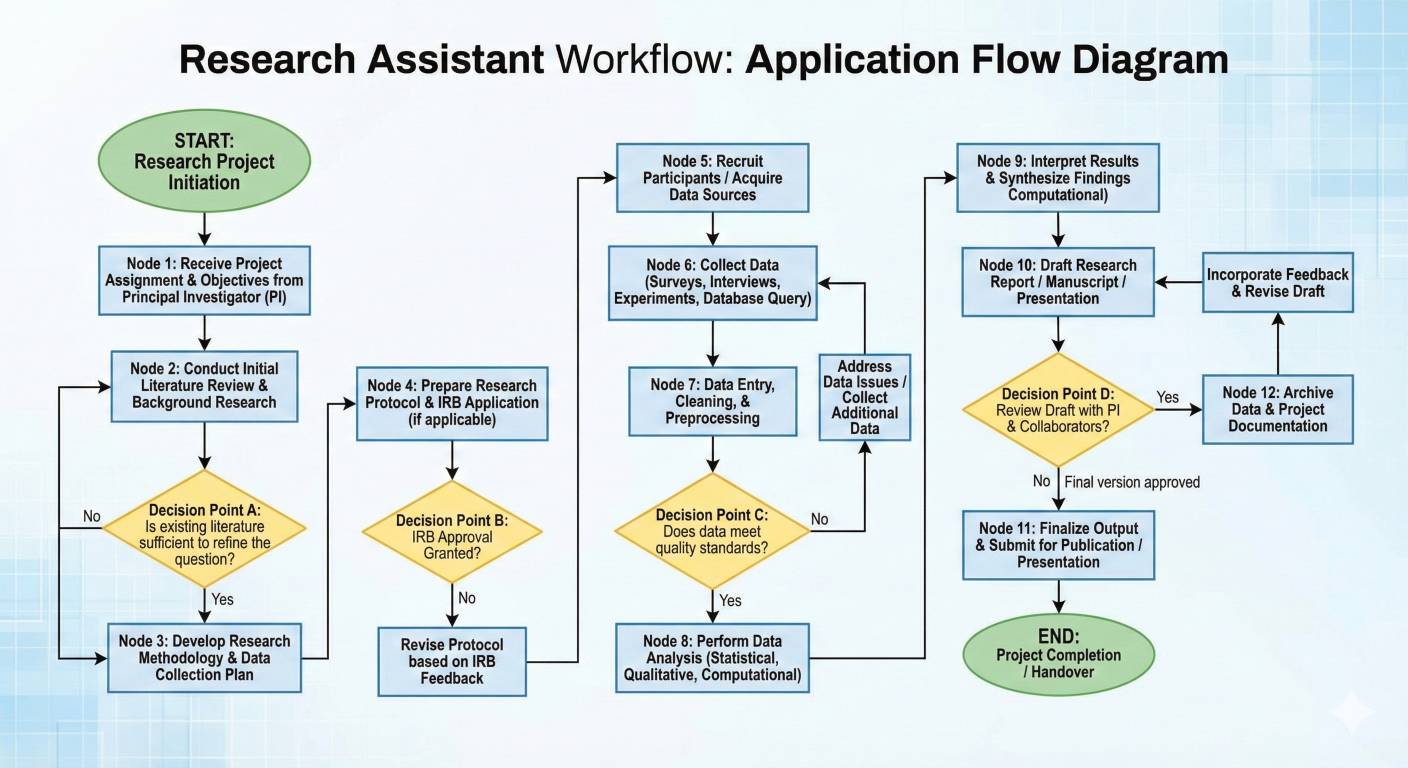
Research assistant workflow showing all nodes and decision points
from langgraph.graph import StateGraph, END, START
from langgraph.checkpoint.sqlite import SqliteSaver
from typing import TypedDict, List, Dict, Optional
from langchain_openai import ChatOpenAI
from langchain_community.tools import DuckDuckGoSearchRun
import json
import re

class ResearchAssistantState(TypedDict):
    # Input
    user_query: str
    # Planning phase
    research_strategy: List[str]
    search_queries: List[str]
    # Research phase
    search_results: Dict[str, str]
    raw_information: List[str]
    # Analysis phase
    key_findings: List[str]
    information_gaps: List[str]
    credibility_scores: Dict[str, float]
    # Quality control
    research_quality: str  # "insufficient", "adequate", "comprehensive"
    iteration_count: int
    max_iterations: int
    # Output
    final_report: str
    citations: List[str]
    confidence_level: float

def research_planner_node(state: ResearchAssistantState) -> ResearchAssistantState:
    """Create a comprehensive research strategy."""
    llm = ChatOpenAI(model="gpt-4", temperature=0.3)
    planning_prompt = f"""
You are an expert research strategist. Create a comprehensive research plan for this
"{state['user_query']}"
Your plan should include:
1. 3-5 different search strategies to gather diverse perspectives
2. Specific search queries that will yield the most relevant information
3. Key aspects to investigate thoroughly
Consider different types of sources: academic, news, industry reports, expert opinion
Return your response as JSON with this structure:
{{
"research_strategies": ["strategy1", "strategy2", ...],
"search_queries": ["query1", "query2", ...]
}}
"""
    response = llm.invoke(planning_prompt)
    try:
        plan = json.loads(response.content)
        return {
            **state,
            "research_strategy": plan["research_strategies"],
            "search_queries": plan["search_queries"],
            "iteration_count": state.get("iteration_count", 0)
        }
    except json.JSONDecodeError:
        # Fallback to simple planning
        return {
            **state,
            "research_strategy": [f"Comprehensive search about {state['user_query']}"],
            "search_queries": [state["user_query"]],
            "iteration_count": state.get("iteration_count", 0)
        }
        def information_gatherer_node(state: ResearchAssistantState) -> ResearchAssistantState:
    """Execute search queries and gather information."""
    search_tool = DuckDuckGoSearchRun()
    search_results = {}
    raw_information = []
    for query in state["search_queries"]:
        try:
            results = search_tool.run(query)
            search_results[query] = results
            raw_information.append(f"Query: {query}\nResults: {results}")
        except Exception as e:
            search_results[query] = f"Search failed: {str(e)}"
    return {
        **state,
        "search_results": search_results,
        "raw_information": raw_information
    }

def information_analyzer_node(state: ResearchAssistantState) -> ResearchAssistantState:
    """Analyze gathered information for quality and completeness."""
    llm = ChatOpenAI(model="gpt-4", temperature=0.2)
    all_information = "\n\n".join(state["raw_information"])
    analysis_prompt = f"""
Analyze the following research information for the query: "{state['user_query']}"
Information gathered:
{all_information}
Please provide:
1. Key findings (3-7 main points)
2. Information gaps (what's missing or unclear)
3. Overall quality assessment: "insufficient", "adequate", or "comprehensive"
4. Credibility assessment of sources (scale 0-1)
Return as JSON:
{{
"key_findings": ["finding1", "finding2", ...],
"information_gaps": ["gap1", "gap2", ...],
"research_quality": "adequate",
"overall_credibility": 0.8
}}
"""
    response = llm.invoke(analysis_prompt)
    try:
        analysis = json.loads(response.content)
        return {
            **state,
            "key_findings": analysis["key_findings"],
            "information_gaps": analysis.get("information_gaps", []),
            "research_quality": analysis["research_quality"],
            "credibility_scores": {"overall": analysis.get("overall_credibility", 0.7)}
        }
    except json.JSONDecodeError:
        return {
            **state,
            "key_findings": ["Analysis parsing failed - raw results available"],
            "information_gaps": ["Unable to identify gaps"],
            "research_quality": "adequate",
            "credibility_scores": {"overall": 0.5}
        }

def quality_controller_node(state: ResearchAssistantState) -> ResearchAssistantState:
    """Determine if research quality is sufficient or needs improvement."""
    has_sufficient_findings = len(state["key_findings"]) >= 3
    has_minimal_gaps = len(state["information_gaps"]) <= 2
    meets_credibility_threshold = state["credibility_scores"]["overall"] >= 0.6
    under_iteration_limit = state["iteration_count"] < state.get("max_iterations", 2)
    if (state["research_quality"] == "comprehensive" or
        (has_sufficient_findings and has_minimal_gaps and meets_credibility_threshold)):
        quality_status = "sufficient"
    elif under_iteration_limit:
        quality_status = "needs_improvement"
    else:
        quality_status = "sufficient"
    return {**state, "research_quality": quality_status}

def research_enhancer_node(state: ResearchAssistantState) -> ResearchAssistantState:
    """Improve research by addressing identified gaps."""
    llm = ChatOpenAI(model="gpt-4", temperature=0.3)
    enhancement_prompt = f"""
The research for "{state['user_query']}" has these gaps:
{chr(10).join(state['information_gaps'])}
Current findings:
{chr(10).join(state['key_findings'])}
Create 2-3 additional, more specific search queries to address these gaps:
"""
    response = llm.invoke(enhancement_prompt)
    additional_queries = [
        line.strip("- ").strip()
        for line in response.content.split("\n")
        if line.strip() and not line.startswith("Based on")
    ][:3]
    return {
        **state,
        "search_queries": state["search_queries"] + additional_queries,
        "iteration_count": state["iteration_count"] + 1
    }
    def report_generator_node(state: ResearchAssistantState) -> ResearchAssistantState:
    """Generate a comprehensive final report."""
    llm = ChatOpenAI(model="gpt-4", temperature=0.4)
    report_prompt = f"""
Create a comprehensive research report for: "{state['user_query']}"
Key findings to include:
{chr(10).join([f"• {finding}" for finding in state['key_findings']])}
Research quality: {state['research_quality']}
Credibility level: {state['credibility_scores']['overall']:.1%}
Structure the report with:
1. Executive Summary
2. Key Findings (detailed)
3. Analysis and Insights
4. Limitations and Gaps (if any)
5. Conclusions and Recommendations
Make it informative, well-structured, and actionable.
Use a professional but accessible tone.
"""
    report = llm.invoke(report_prompt)
    # Generate citations based on search queries used
    citations = [
        f"Search query: '{query}' - Results analyzed"
        for query in state["search_queries"]
    ]
    confidence_level = min(
        state["credibility_scores"]["overall"] +
        (0.1 if state["research_quality"] == "comprehensive" else 0.0),
        0.95
    )
    return {
        **state,
        "final_report": report.content,
        "citations": citations,
        "confidence_level": confidence_level
    }

# Define routing functions
def should_enhance_research(state: ResearchAssistantState) -> str:
    """Decide whether to enhance research or proceed to report generation."""
    if state["research_quality"] == "needs_improvement":
        return "enhance"
    else:
        return "generate_report"

# Build the complete workflow
workflow = StateGraph(ResearchAssistantState)
# Add all nodes
workflow.add_node("plan_research", research_planner_node)
workflow.add_node("gather_info", information_gatherer_node)
workflow.add_node("analyze_info", information_analyzer_node)
workflow.add_node("check_quality", quality_controller_node)
workflow.add_node("enhance_research", research_enhancer_node)
workflow.add_node("generate_report", report_generator_node)

# Define the workflow structure
workflow.set_entry_point("plan_research")
workflow.add_edge("plan_research", "gather_info")
workflow.add_edge("gather_info", "analyze_info")
workflow.add_edge("analyze_info", "check_quality")

# Conditional routing based on quality assessment
workflow.add_conditional_edges(
    "check_quality",
    should_enhance_research,
    {
        "enhance": "enhance_research",
        "generate_report": "generate_report"
    }
)

# Create feedback loop for research enhancement
workflow.add_edge("enhance_research", "gather_info")  # Loop back to gather more info
workflow.add_edge("generate_report", END)

# Compile with persistence for potential human-in-the-loop
memory = SqliteSaver.from_conn_string(":memory:")
research_assistant = workflow.compile(checkpointer=memory)
# Example 1: Technical research
result = research_assistant.invoke({
    "user_query": "What are the latest developments in quantum computing for 2024?",
    "max_iterations": 2,
    "research_strategy": [],
    "search_queries": [],
    "search_results": {},
    "raw_information": [],
    "key_findings": [],
    "information_gaps": [],
    "credibility_scores": {},
    "research_quality": "",
    "iteration_count": 0,
    "final_report": "",
    "citations": [],
    "confidence_level": 0.0
})

print("Research Assistant Results:")
print(f"Confidence Level: {result['confidence_level']:.1%}")
print(f"Iterations Required: {result['iteration_count']}")
print(f"Final Report Length: {len(result['final_report'])} characters")
print("\nExecutive Summary:")
print(result['final_report'][:500] + "..."
      if len(result['final_report']) > 500
      else result['final_report'])
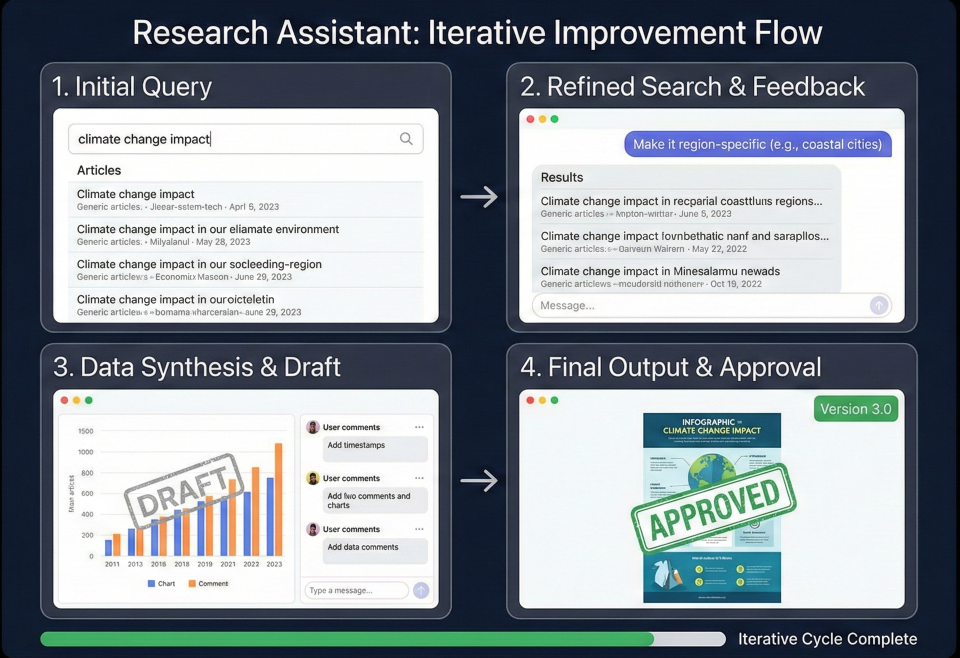
Research assistant in action showing iterative improvement process
LangGraph isn't just an academic exercise—it's powering real production systems across various industries. Let's explore some compelling use cases that demonstrate its practical value.
class CustomerSupportState(TypedDict):
    customer_query: str
    issue_category: str
    complexity_score: int
    attempted_solutions: List[str]
    customer_satisfaction: Optional[int]
    requires_human_escalation: bool
    resolution_status: str

def classify_issue_node(state: CustomerSupportState) -> CustomerSupportState:
    """Classify and assess the complexity of customer issues."""
    llm = ChatOpenAI(model="gpt-4")
    classification_prompt = f"""
Classify this customer support query and rate its complexity (1-10):
Query: {state['customer_query']}
Provide:
1. Issue category (billing, technical, account, product)
2. Complexity score (1-10, where 10 is most complex)
3. Suggested initial approach
Format as JSON.
"""
    response = llm.invoke(classification_prompt)
    # Parse response and update state
    # Implementation details...
    return updated_state

def automated_resolution_node(state: CustomerSupportState) -> CustomerSupportState:
    """Attempt automated resolution based on knowledge base."""
    # Implement knowledge base lookup and solution generation
    pass

def escalation_decision_node(state: CustomerSupportState) -> str:
    """Decide whether to escalate to human agent."""
    if (state['complexity_score'] > 7 or
        len(state['attempted_solutions']) > 2 or
        state.get('customer_satisfaction', 5) < 3):
        return "escalate_to_human"
    else:
        return "continue_automated"
class ModerationState(TypedDict):
    content: str
    content_type: str # text, image, video
    toxicity_score: float
    policy_violations: List[str]
    confidence_level: float
    moderation_action: str # approve, flag, reject
    human_review_required: bool

def initial_screening_node(state: ModerationState) -> ModerationState:
    """Quick automated screening for obvious violations."""
    # Implement fast screening logic
    pass

def detailed_analysis_node(state: ModerationState) -> ModerationState:
    """Deep analysis using multiple ML models."""
    # Implement comprehensive analysis
    pass

def human_review_routing(state: ModerationState) -> str:
    """Route uncertain cases to human moderators."""
    if state['confidence_level'] < 0.8:
        return "human_review"
    else:
        return "automated_action"
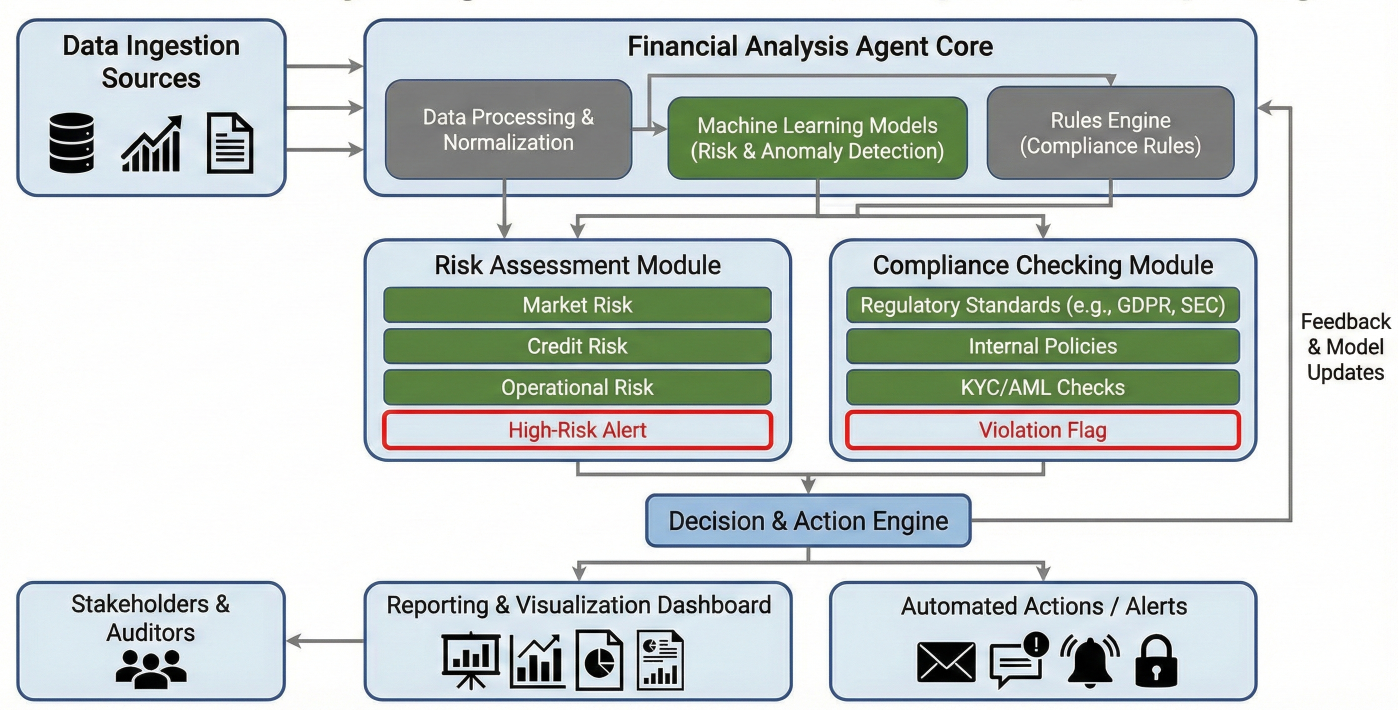
Financial analysis agent workflow showing risk assessment, compliance checking, and reporting
class FinancialAnalysisState(TypedDict):
    company_data: Dict['str', any]
    market_data: Dict['str', any]
    financial_ratios: Dict['str', float]
    risk_factors: List['str']
    compliance_status: bool
    investment_recommendation: str
    confidence_score: float
    regulatory_alerts: List['str']

def data_validation_node(state: FinancialAnalysisState) -> FinancialAnalysisState:
    """Validate and clean financial data."""
    # Implement data validation and cleaning
    pass

def ratio_analysis_node(state: FinancialAnalysisState) -> FinancialAnalysisState:
    """Calculate key financial ratios and metrics."""
    company_data = state['company_data']
    ratios = {
        'debt_to_equity': company_data['total_debt'] / company_data['total_equity'],
        'current_ratio': company_data['current_assets'] / company_data['current_liabiliti'],
        'roe': company_data['net_income'] / company_data['shareholders_equity'],
        'gross_margin': (company_data['revenue'] - company_data['cogs']) / company_data[
    }
    return {**state, 'financial_ratios': ratios}

def risk_assessment_node(state: FinancialAnalysisState) -> FinancialAnalysisState:
    """Assess various risk factors."""
    risk_factors = []
    # Market risk
    if state['financial_ratios']['debt_to_equity'] > 2.0:
        risk_factors.append("High leverage risk")
    # Liquidity risk
    if state['financial_ratios']['current_ratio'] < 1.0:
        risk_factors.append("Liquidity concerns")
    # Profitability risk
    if state['financial_ratios']['roe'] < 0.05:
        risk_factors.append("Low return on equity")
    return {**state, 'risk_factors': risk_factors}

def compliance_check_node(state: FinancialAnalysisState) -> FinancialAnalysisState:
    """Check regulatory compliance requirements."""
    # Implement compliance checking logic
    regulatory_alerts = []
    # Example compliance checks
    if state['financial_ratios']['debt_to_equity'] > 3.0:
        regulatory_alerts.append("Debt ratio exceeds regulatory guidelines")
    compliance_status = len(regulatory_alerts) == 0
    return {
        **state,
        'compliance_status': compliance_status,
        'regulatory_alerts': regulatory_alerts
    }
Sometimes you need to create nodes dynamically based on runtime conditions:
def dynamic_agent_creator(state: DynamicState) -> DynamicState:
    """Create specialized agents based on task requirements."""
    task_type = state['current_task_type']
    if task_type == "data_analysis":
        # Create data analysis nodes
        workflow.add_node("analyze_data", create_data_analysis_node(state['data_specs']))
    elif task_type == "content_creation":
        # Create content nodes
        workflow.add_node("create_content", create_content_node(state['content_requiremen']))
    return state
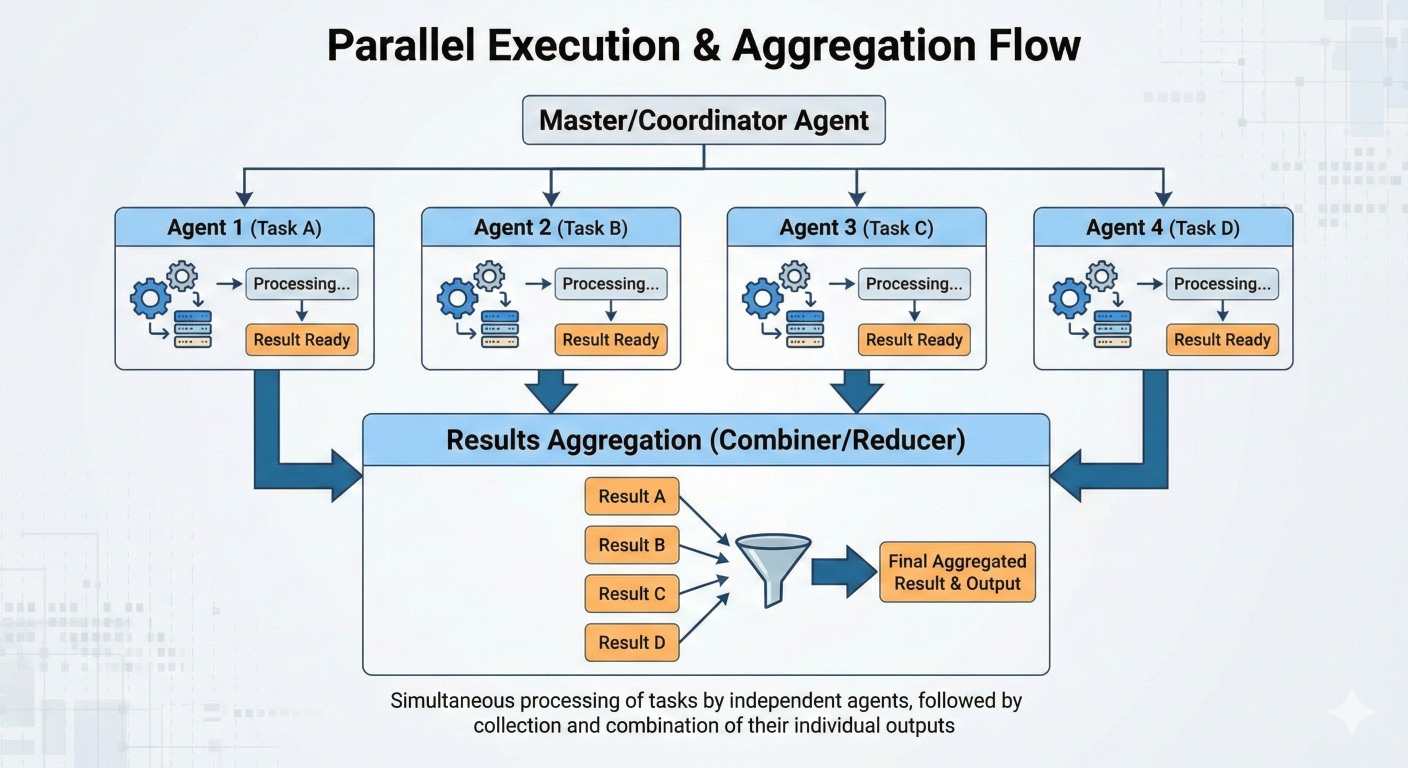
Parallel execution showing multiple agents working simultaneously and results aggregation
def parallel_processing_node(state: ParallelState) -> ParallelState:
    """Coordinate parallel execution of multiple tasks."""
    tasks = state['parallel_tasks']
    # LangGraph automatically handles parallel execution when multiple nodes
    # are connected to the same predecessor
    return {
        **state,
        'tasks_dispatched': True,
        'execution_start_time': time.time()
    }

# In workflow definition:
workflow.add_node("task_1", process_task_1)
workflow.add_node("task_2", process_task_2)
workflow.add_node("task_3", process_task_3)
workflow.add_node("aggregator", aggregate_results)

# These will run in parallel
workflow.add_edge("dispatcher", "task_1")
workflow.add_edge("dispatcher", "task_2")
workflow.add_edge("dispatcher", "task_3")

# Results feed into aggregator
workflow.add_edge("task_1", "aggregator")
workflow.add_edge("task_2", "aggregator")
workflow.add_edge("task_3", "aggregator")
# Error handling and retry logic example
def error_handling_node(state: ErrorAwareState) -> ErrorAwareState:
    """Handle errors gracefully and implement recovery strategies."""
    try:
        # Attempt main processing
        result = risky_operation(state['input_data'])
        return {**state, 'result': result, 'error_count': 0}
    except ValueError as e:
        # Handle specific error types
        if state['error_count'] < 3:
            return {
                **state,
                'error_count': state['error_count'] + 1,
                'last_error': str(e),
                'retry_required': True
            }
        else:
            return {
                **state,
                'processing_failed': True,
                'final_error': str(e)
            }
    except Exception as e:
        # Handle unexpected errors
        return {
            **state,
            'critical_error': True,
            'error_details': str(e)
        }

def retry_logic_routing(state: ErrorAwareState) -> str:
    """Route based on error conditions."""
    if state.get('retry_required') and state['error_count'] < 3:
        return "retry_processing"
    elif state.get('processing_failed'):
        return "error_recovery"
    else:
        return "continue_processing"
from langgraph.checkpoint.sqlite import SqliteSaver
from langgraph.checkpoint.memory import MemorySaver

class ContextAwareState(TypedDict):
    conversation_history: List[dict]
    user_preferences: Dict[str, any]
    session_context: Dict[str, any]
    long_term_memory: Dict[str, any]

def context_manager_node(state: ContextAwareState) -> ContextAwareState:
    """Manage conversation context and user preferences."""
    # Update conversation history
    if 'current_message' in state:
        state['conversation_history'].append(state['current_message'])
    # Limit history to last 10 messages for efficiency
    if len(state['conversation_history']) > 10:
        state['conversation_history'] = state['conversation_history'][-10:]
    # Extract and update user preferences
    preferences = extract_user_preferences(state['conversation_history'])
    state['user_preferences'].update(preferences)
    # Maintain session context
    state['session_context']['last_updated'] = time.time()
    return state

# Use with persistent checkpointing
persistent_memory = SqliteSaver.from_conn_string("conversation_memory.db")
context_aware_app = workflow.compile(checkpointer=persistent_memory)
LangGraph provides excellent debugging capabilities through its integration with LangSmith:
# LangChain LangSmith tracing example
import os
from langsmith import traceable

# Enable LangSmith tracing
os.environ["LANGCHAIN_TRACING_V2"] = "true"
os.environ["LANGCHAIN_API_KEY"] = "your_api_key"
os.environ["LANGCHAIN_PROJECT"] = "langgraph-debugging"

@traceable(name="custom_node_tracing")
def traced_node(state: TracedState) -> TracedState:
    """Node with detailed tracing for debugging."""
    # Add custom metadata for tracing
    trace_metadata = {
        "node_name": "traced_node",
        "input_size": len(str(state)),
        "processing_start": time.time()
    }
    # Your node logic here
    result = process_data(state)
    # Log processing time
    trace_metadata["processing_time"] = time.time() - trace_metadata["processing_start"]
    return {**result, "_trace_metadata": trace_metadata}
# Bad: Storing large objects in state
class InEfficientState(TypedDict):
    large_document: str  # Could be millions of characters
    processing_results: List[dict]  # Could be thousands of items

# Good: Using references and pagination
class EfficientState(TypedDict):
    document_id: str  # Reference to stored document
    document_chunk_index: int  # Current chunk being processed
    processing_summary: dict  # Condensed results
    temp_results_key: str  # Reference to temporary storage
from functools import lru_cache
import hashlib

@lru_cache(maxsize=128)
def cached_expensive_operation(input_hash: str, operation_type: str):
    """Cache expensive operations to avoid recomputation."""
    # Expensive operation here
    return result

def optimized_node(state: OptimizedState) -> OptimizedState:
    """Node that uses caching for expensive operations."""
    # Create hash of input for caching
    input_data = state['input_data']
    input_hash = hashlib.md5(str(input_data).encode()).hexdigest()

    # Try cache first
    cached_result = cached_expensive_operation(input_hash, "analysis")
    if cached_result:
        return {**state, 'result': cached_result, 'cache_hit': True}
    else:
        # Perform expensive operation
        result = expensive_analysis(input_data)
        return {**state, 'result': result, 'cache_hit': False}
# Asynchronous LangChain node example
import asyncio
from langchain_openai import ChatOpenAI

async def async_llm_node(state):
    """Asynchronous node for better performance."""
    llm = ChatOpenAI(model="gpt-4")
    # Process multiple requests concurrently
    tasks = [
        llm.ainvoke(prompt) for prompt in state['prompts']
    ]
    results = await asyncio.gather(*tasks)
    return {
        **state,
        'llm_results': [r.content for r in results]
    }

# Use async compilation
async_workflow = workflow.compile()
# Deploy your graph to LangGraph Cloud
from langgraph_cli import deploy

def deploy_to_cloud():
    """Deploy LangGraph application to production."""
    # Configuration for deployment
    deployment_config = {
        "graph_name": "research_assistant",
        "environment": "production",
        "scaling": {
            "min_replicas": 2,
            "max_replicas": 10,
            "target_cpu": "70%"
        },
        "memory_limit": "2Gi",
        "timeout": 300
    }
    # Deploy the compiled graph
    deploy(research_assistant, config=deployment_config)
# Metrics collection and monitored node example
from langgraph.checkpoint.postgres import PostgresSaver
from prometheus_client import Counter, Histogram, generate_latest

GRAPH_EXECUTIONS = Counter('langgraph_executions_total',
'Total graph executions', ['graph_name', 'status'])
EXECUTION_TIME = Histogram('langgraph_execution_duration_seconds',
'Graph execution time', ['graph_name'])

def monitored_node(state):
    """Node with comprehensive monitoring."""
    start_time = time.time()
    try:
        # Your node logic
        result = process_node_logic(state)
        GRAPH_EXECUTIONS.labels(graph_name='research_assistant', status='success').inc()
        return result
    except Exception as e:
        GRAPH_EXECUTIONS.labels(graph_name='research_assistant', status='failure').inc()
        raise
    finally:
        execution_time = time.time() - start_time
        EXECUTION_TIME.labels(graph_name='research_assistant').observe(execution_time)
from cryptography.fernet import Fernet
import os

class SecureState(TypedDict):
    encrypted_data: str
    user_permissions: List[str]
    audit_trail: List[dict]

def secure_processing_node(state: SecureState) -> SecureState:
    """Process sensitive data with encryption and audit logging."""
    # Initialize encryption
    encryption_key = os.environ.get('ENCRYPTION_KEY')
    cipher = Fernet(encryption_key)
    # Decrypt data for processing
    decrypted_data = cipher.decrypt(state['encrypted_data'].encode())
    # Audit logging
    audit_entry = {
        "timestamp": time.time(),
        "action": "data_processed",
        "user_permissions": state['user_permissions'],
        "node": "secure_processing_node"
    }
    # Process data
    result = process_sensitive_data(decrypted_data)
    # Re-encrypt result
    encrypted_result = cipher.encrypt(result.encode()).decode()
    return {
        **state,
        'encrypted_data': encrypted_result,
        'audit_trail': state['audit_trail'] + [audit_entry]
    }
import pytest
from unittest.mock import Mock, patch

class TestResearchAssistant:
    def test_research_planner_node(self):
        """Test the research planning functionality."""
        # Arrange
        initial_state = {
            'user_query': 'What is machine learning?',
            'research_strategy': [],
            'search_queries': []
        }
        # Act
        result = research_planner_node(initial_state)
        # Assert
        assert len(result['research_strategy']) > 0
        assert len(result['search_queries']) > 0
        assert 'machine learning' in str(result['search_queries']).lower()

    @patch('langchain_community.tools.DuckDuckGoSearchRun')
    def test_information_gatherer_node(self, mock_search):
        """Test information gathering with mocked search."""
        # Arrange
        mock_search.return_value.run.return_value = "Sample search results"
        initial_state = {
            'search_queries': ['machine learning basics', 'AI applications'],
            'search_results': {},
            'raw_information': []
        }
        # Act
        result = information_gatherer_node(initial_state)
        # Assert
        assert len(result['search_results']) == 2
        assert len(result['raw_information']) == 2
def test_complete_research_workflow():
    """Test the entire research workflow end-to-end."""
    # Arrange
    initial_state = {
        'user_query': "What are the benefits of renewable energy?",
        'max_iterations': 1,
        'research_strategy': [],
        'search_queries': [],
        'search_results': {},
        'raw_information': [],
        'key_findings': [],
        'information_gaps': [],
        'credibility_scores': {},
        'research_quality': "",
        'iteration_count': 0,
        'final_report': "",
        'citations': [],
        'confidence_level': 0.0
    }
    # Act
    result = research_assistant.invoke(initial_state)
    # Assert
    assert result['final_report'] != ""
    assert result['confidence_level'] > 0.0
    assert len(result['citations']) > 0
    assert result['iteration_count'] >= 0
Problem: State not persisting between nodes
# Common mistake - returning incomplete state
def broken_node(state: State) -> State:
    result = process_data(state['input'])
    # ❌ Lost other state properties
    return {'output': result}

# Correct approach - preserve existing state
def fixed_node(state: State) -> State:
    result = process_data(state['input'])
    # ✅ Preserves all state
    return {**state, 'output': result}
Problem: Conditional edges creating endless cycles
# Problematic routing
def bad_routing(state: State) -> str:
    if state['attempts'] < 5:
        return "retry" # Could loop forever
    return "end"

# Better routing with safeguards
def safe_routing(state: State) -> str:
    if state['attempts'] < 5 and not state.get('force_exit', False):
        return "retry"
    return "end"
Problem: State growing too large
# Memory-efficient state management
def memory_conscious_node(state: LargeState) -> LargeState:
    # Process data in chunks
    chunk_size = 1000
    results = []
    for i in range(0, len(state['large_dataset']), chunk_size):
        chunk = state['large_dataset'][i:i+chunk_size]
        result = process_chunk(chunk)
        results.append(result)
    # Clear processed data to free memory
    del chunk
    # Store summary instead of raw data
    return {
        **state,
        'processing_summary': aggregate_results(results),
        'large_dataset': [] # Clear large dataset
    }
The field of AI agent development is rapidly evolving. Here are key trends shaping the future:
LangGraph represents a fundamental shift in how we build AI applications—from simple, linear processes to sophisticated, intelligent systems that can reason, collaborate, and adapt. Throughout this comprehensive guide, you've discovered:
The future of AI development belongs to those who can build systems that don't just process information, but truly understand, reason, and collaborate. With LangGraph, you now have the tools and knowledge to create AI agents that can:
The transformation from simple AI tools to intelligent agent systems isn't just a technological upgrade—it's a paradigm shift that mirrors how human teams solve complex problems. Just as effective human teams combine individual expertise, clear communication, and adaptive strategies, LangGraph enables you to build AI systems with the same sophisticated coordination capabilities.
The examples, patterns, and strategies in this guide provide your foundation, but the real learning happens when you start building. Each agent you create, each workflow you optimize, and each challenge you overcome contributes to the growing body of knowledge around intelligent systems.
The future is being built by developers like you—those willing to move beyond the comfortable constraints of linear thinking and embrace the complex, cyclical, collaborative nature of real intelligence. LangGraph gives you the tools. The community provides the support. Your imagination sets the limits.
Ready to build the future of AI? Your journey to agent mastery starts with your next commit.
This guide will be continuously updated as LangGraph evolves. Bookmark it, share it with your team, and return often as you advance in your AI agent development journey.

SaratahKumar C
 Launch your Graphy