There are no items in your cart
Add More
Add More
| Item Details | Price | ||
|---|---|---|---|

1. Understanding Amazon Q: Core Purpose and Enterprise Solutions
2. Technical Architecture Deep Dive: RAG, Data Connectors, and Security
3. Feature Analysis: Developer, Business Intelligence, and Contact Center Applications
4. Integration Examples and SDK Implementation
5. Enterprise Security, Governance, and Compliance
6. Getting Started and Next Steps
Amazon Q represents AWS's most comprehensive generative AI assistant designed specifically for enterprise environments. At its core, Amazon Q addresses three fundamental challenges that organizations face in the digital transformation era: knowledge fragmentation, productivity bottlenecks, and security complexity.
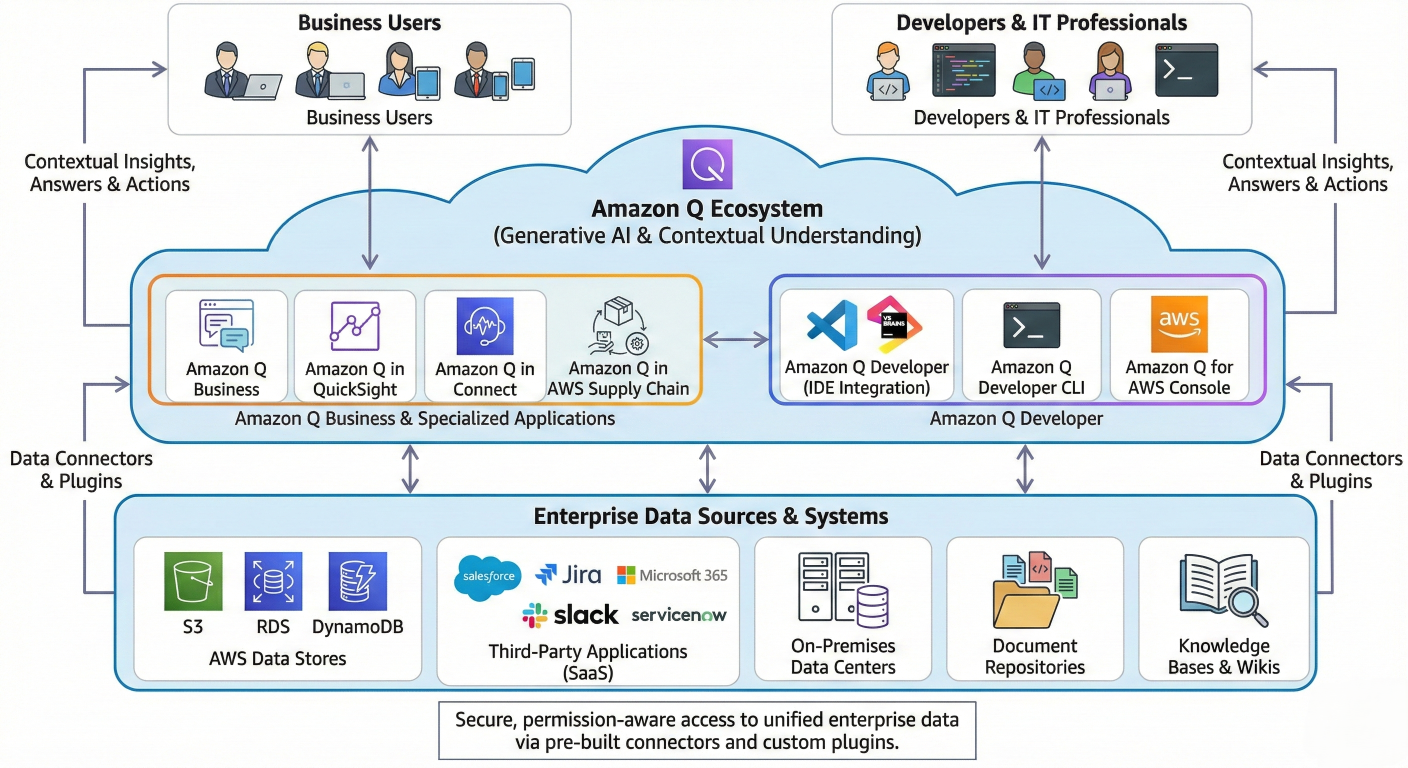
Architecture Diagram: High-level overview of Amazon Q ecosystem showing Business, Developer, and specialized applications connecting to enterprise data sources
Amazon Q is a fully managed, generative AI-powered assistant that transforms how work gets done across entire organizations. Unlike consumer-focused AI tools, Amazon Q is purpose-built to securely leverage enterprise data while maintaining strict governance and compliance standards. The platform serves as an intelligent intermediary between employees and their organization's collective knowledge, enabling natural language interactions with complex business systems.
The core problems Amazon Q solves include:
Knowledge Accessibility Challenges: Organizations typically store critical information across disparate systems - from Confluence wikis and SharePoint sites to Salesforce records and internal databases. Employees waste significant time navigating these silos, with studies showing that knowledge workers spend up to 20% of their workweek searching for information.
Development Velocity Constraints: Software development teams struggle with context switching between documentation, code reviews, security scanning, and deployment processes. Amazon Q Developer addresses these friction points by providing AI-powered assistance directly within development workflows.
Customer Service Complexity: Contact center agents juggle multiple applications while customers wait for answers. Amazon Q in Connect delivers real-time recommendations and automated responses, reducing average handle times and improving first-contact resolution rates.
Amazon Q operates on a sophisticated Retrieval-Augmented Generation (RAG) architecture that combines the power of large language models with real-time access to enterprise data sources. This approach ensures responses are grounded in factual, up-to-date information rather than relying solely on training data that may be outdated or irrelevant to specific business contexts.
The platform's enterprise focus manifests in several key areas:
Data Sovereignty: All customer data remains within their AWS account boundaries, with processing occurring in specified regions according to compliance requirements.
Permission Inheritance: Amazon Q respects existing access controls, ensuring users only receive information they're authorized to view based on their organizational roles and permissions.
Audit Transparency: Every interaction generates detailed logs for compliance monitoring, with clear citation tracking for all information sources
Amazon Q's technical architecture centers on an advanced RAG implementation that significantly enhances traditional approaches. The system operates through four interconnected stages that transform static enterprise data into dynamic, conversational intelligence.
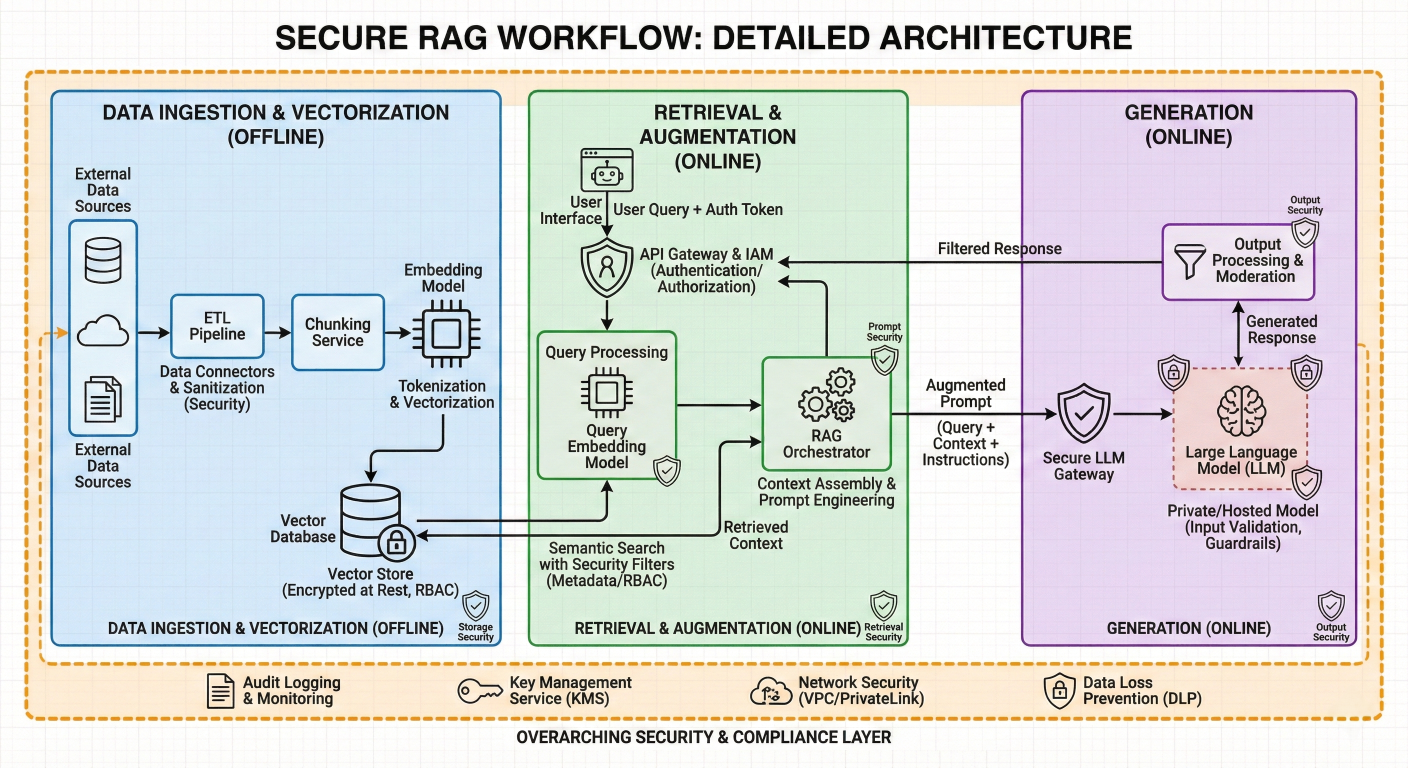
Technical Architecture Diagram: Detailed RAG workflow showing data ingestion, vectorization, retrieval, augmentation, and generation phases with security layers
The data ingestion process begins with Amazon Q's extensive connector ecosystem, supporting over 40 enterprise data sources including Microsoft 365, Salesforce, Confluence, SharePoint, Amazon S3, and specialized industry systems. Each connector employs sophisticated parsing algorithms that understand document structure, metadata relationships, and access permissions.
During ingestion, documents undergo several transformations:
Content Extraction: Advanced parsing engines extract text, images, and structured data while preserving formatting and metadata relationships.
Semantic Chunking: Documents are intelligently segmented into coherent chunks that maintain contextual meaning, typically ranging from 500-1500 tokens depending on content type.
Vector Embedding Generation: Each chunk is processed through embedding models (such as Amazon Titan or Cohere) to create high-dimensional vector representations that capture semantic meaning.
Permission Mapping: Access control metadata is preserved and linked to each data chunk, ensuring downstream retrieval respects organizational security policies.
Amazon Q employs agentic retrieval strategies that go beyond simple similarity searches. When users submit queries, the system orchestrates multiple retrieval approaches:
Multi-step Reasoning: For complex queries requiring information synthesis from multiple sources, Amazon Q breaks down the request into sub-queries and retrieves relevant information iteratively.
Contextual Expansion: The system considers conversation history, user roles, and organizational context to expand queries and retrieve more relevant information.
Source Diversification: To provide comprehensive answers, Amazon Q retrieves information from multiple data sources and types, ensuring balanced perspectives
The augmentation phase represents Amazon Q's most sophisticated capability. Retrieved information is synthesized with the user's original query through advanced prompt engineering techniques:
Contextual Prioritization: Information is ranked based on relevance, recency, and user permissions before being included in the final prompt.
Citation Preparation: Source attribution is prepared during augmentation, ensuring every generated response can be traced back to authoritative sources.
Conflict Resolution: When retrieved information contains contradictions, Amazon Q employs reasoning algorithms to identify discrepancies and provide balanced responses
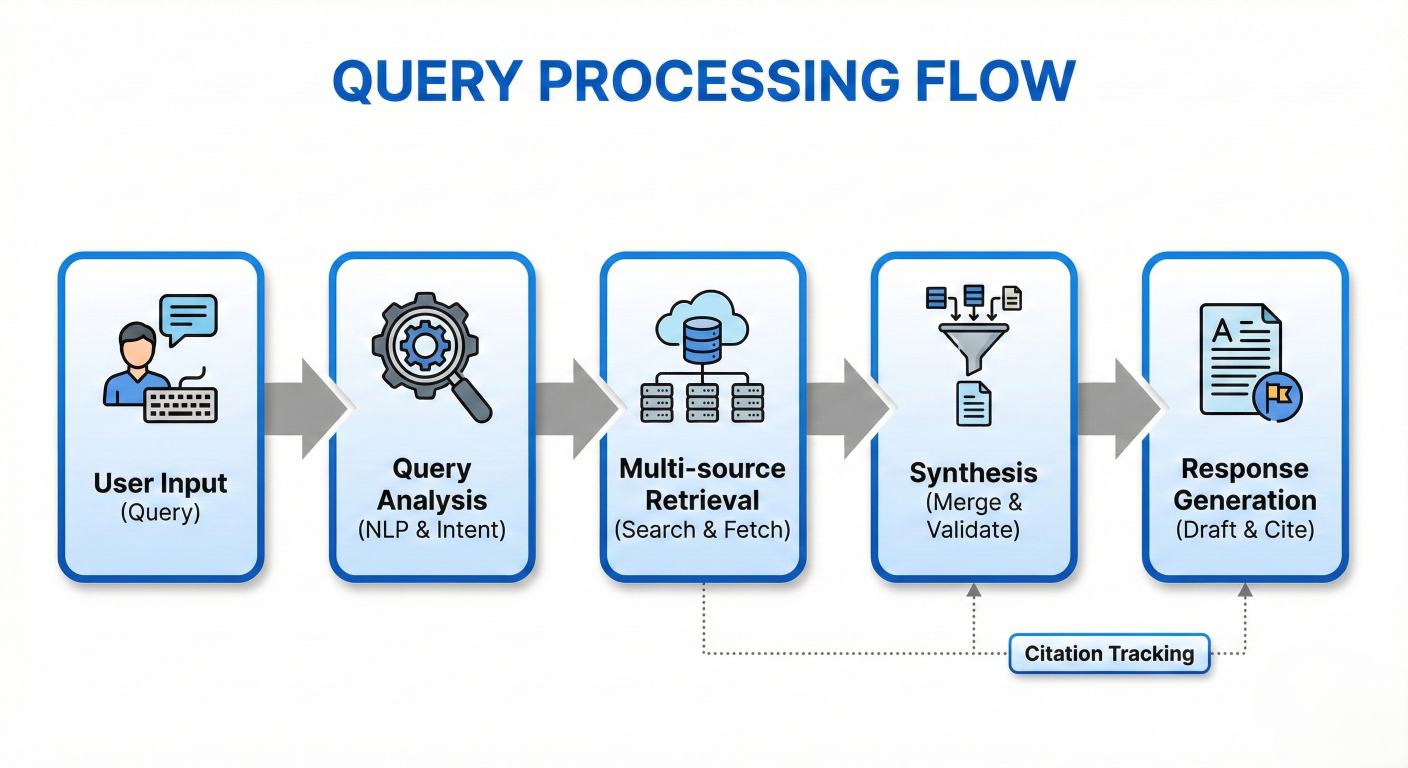
Process Flow Diagram: Step-by-step visualization of query processing, showing user input → query analysis → multi-source retrieval → synthesis → response generation with citation tracking
Amazon Q's data connector architecture provides seamless integration with enterprise systems through both managed and custom connector options. The platform's connector framework ensures secure, scalable data synchronization while maintaining performance standards.
Managed Connectors include:
Custom Connector Framework: Organizations with unique data sources can leverage Amazon Q's custom connector APIs to integrate proprietary systems. The framework provides standardized authentication, data transformation, and synchronization capabilities.
Setting up effective knowledge bases requires careful consideration of data organization, access patterns, and performance requirements:
Data Source Prioritization: Implement tiered data sources based on query frequency and business criticality. Frequently accessed information should be indexed with higher priority and shorter refresh intervals.
Metadata Enrichment: Enhance documents with business context, ownership information, and classification tags to improve retrieval accuracy.
Incremental Synchronization: Configure connectors for delta synchronization to minimize processing overhead while ensuring data freshness.
Amazon Q implements defense-in-depth security that protects data at every architectural layer:
Infrastructure Security: Built on AWS's security-validated infrastructure with SOC 2 Type II, ISO 27001, and regional compliance certifications.
Data Encryption: All data is encrypted in transit using TLS 1.2+ and at rest using AWS KMS with customer-managed keys option.
Network Isolation: VPC deployment options ensure data processing occurs within customercontrolled network boundaries.
One of Amazon Q's most sophisticated features is its permission-aware retrieval system. The platform maintains detailed permission mappings that ensure users only access information they're authorized to view:
Identity Integration: Seamless integration with enterprise identity providers (Active Directory, SAML, OIDC) ensures consistent access control.
Dynamic Permission Filtering: Query results are filtered in real-time based on user permissions, preventing unauthorized data exposure.
Audit Trail Generation: Every access attempt generates detailed audit logs for compliance monitoring and security analysis.
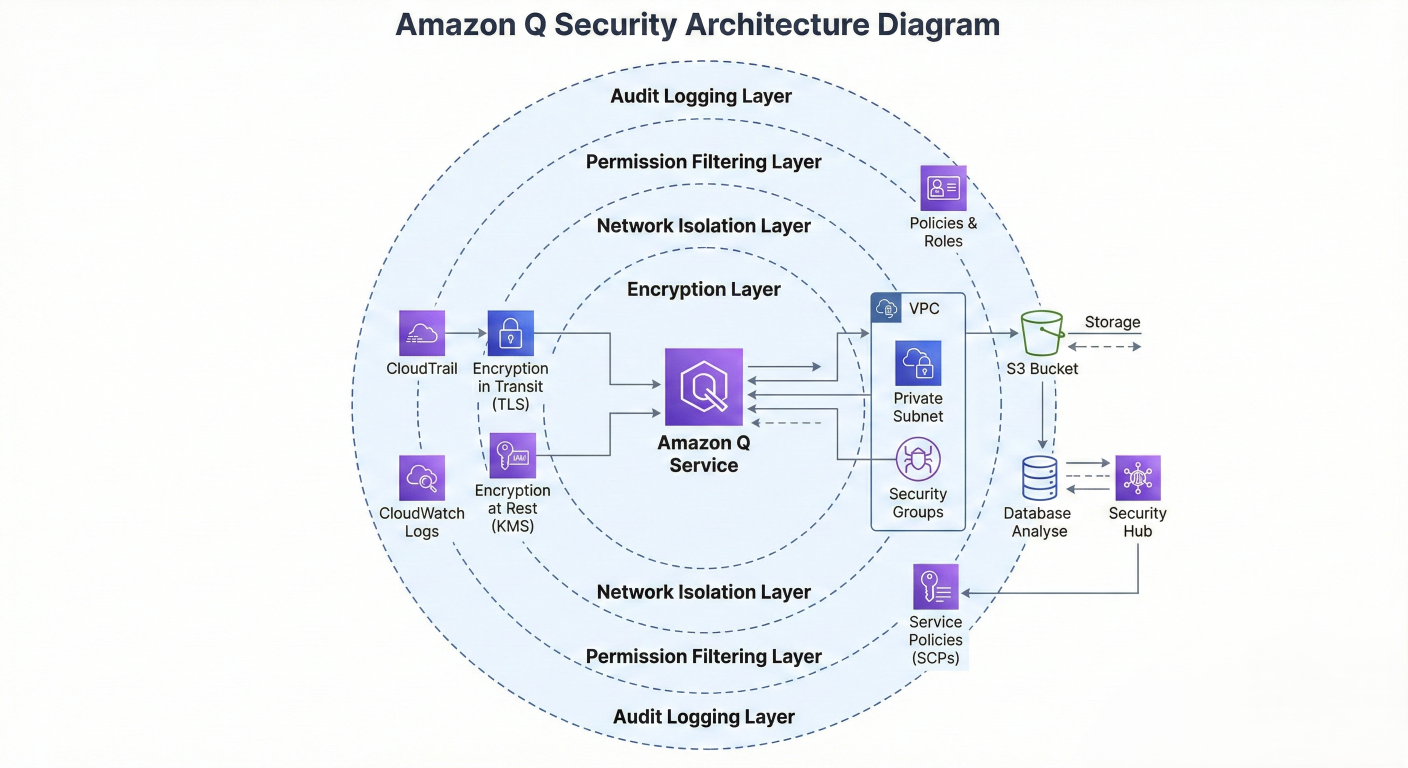
Security Architecture Diagram: Comprehensive view of Amazon Q's security layers including encryption, network isolation, permission filtering, and audit logging
Amazon Q Developer represents a paradigm shift in software development assistance, providing comprehensive AI-powered support throughout the entire development lifecycle.
Amazon Q Developer's code generation capabilities extend far beyond simple autocomplete functionality:
Multi-language Support: Native support for Python, Java, JavaScript, TypeScript, C#, Go, Rust, PHP, Ruby, Kotlin, C, C++, Shell scripting, SQL, and more.
Context-Aware Suggestions: The system analyzes surrounding code context, project structure, and coding patterns to provide highly relevant suggestions.
Full Function Generation: Using the /dev command, developers can describe complex features in natural language and receive complete implementations
/dev Create a new REST API endpoint /api/authenticate to handle user authentication. This endpoint should accept POST requests with user credentials and return a JWT token upon successful authentication. Additionally, update the user management system to integrate with the new authentication endpoint and enforce authentication for relevant API endpoints.
Architecture Understanding: Amazon Q Developer can analyze entire codebases to provide architectural insights and recommendations for improvements.
Security scanning represents one of Amazon Q Developer's most valuable enterprise features. The platform employs thousands of security detectors across multiple programming languages to identify vulnerabilities proactively.
Real-time Security Analysis: As developers write code, Amazon Q continuously scans for security vulnerabilities, providing immediate feedback on potential issues.
Comprehensive Vulnerability Detection: The system identifies various security issues including:
Automated Remediation: For many detected vulnerabilities, Amazon Q provides automated fix suggestions with clear explanations of the security implications:
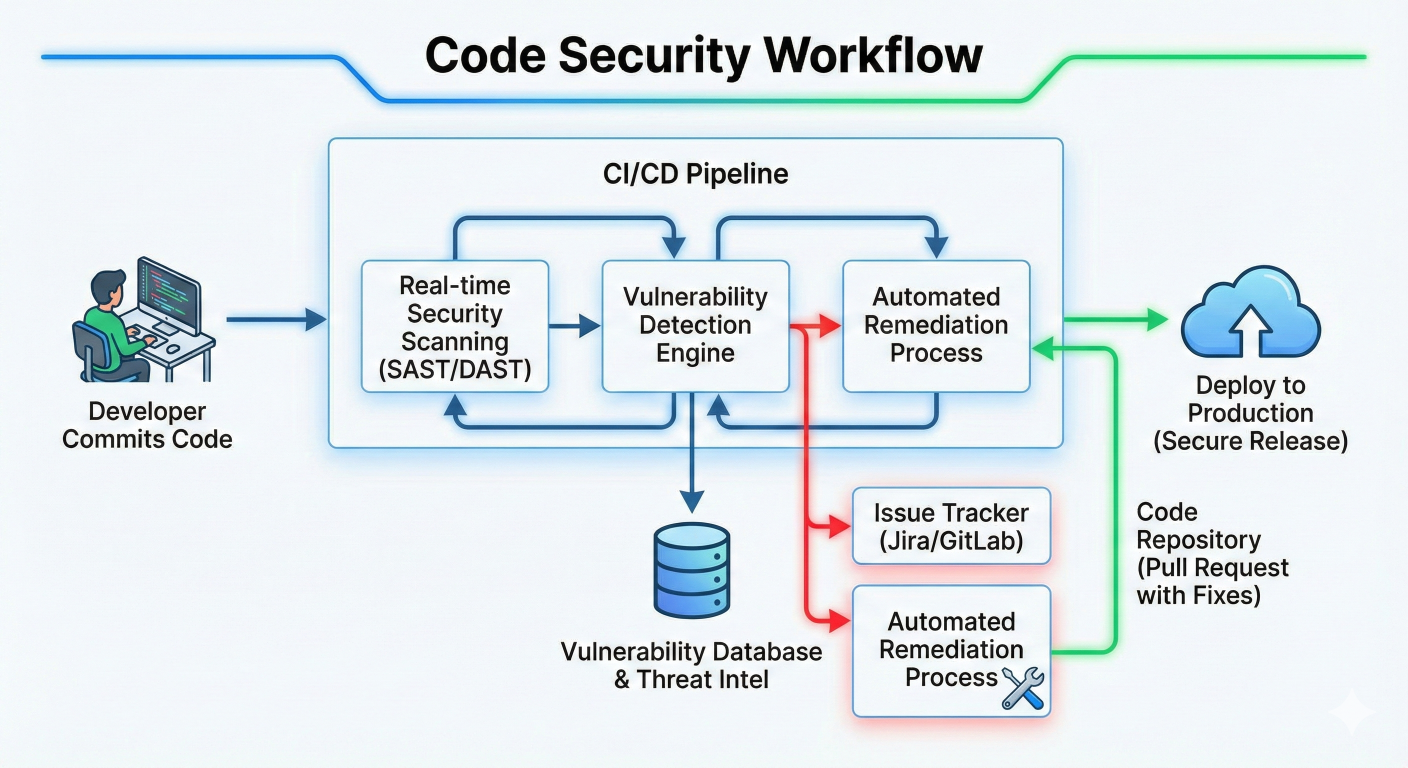
Code Security Workflow Diagram: Visual representation of real-time security scanning, vulnerability detection, and automated remediation process
# Example: Hard-coded password detection and remediation
# BEFORE (Vulnerable code flagged by Amazon Q)
db_connection = mysql.connector.connect(
    host="localhost",
    user="admin",
    password="hardcoded_password123"  # CWE-798 detected
)

# AFTER (Amazon Q suggested fix)
import os
db_connection = mysql.connector.connect(
    host="localhost",
    user="admin",
    password=os.environ.get("DB_PASSWORD")  # Secure environment variable usage
)
Security Education: Beyond fixing issues, Amazon Q provides detailed explanations of security vulnerabilities, helping developers understand and prevent similar issues in future code.
Amazon Q Developer integrates seamlessly with popular development environments:
IDE Support: Native plugins for VS Code, JetBrains IDEs (IntelliJ, PyCharm, etc.), AWS Cloud9, and command-line interfaces.
CI/CD Integration: Automated code review and security scanning within continuous integration pipelines.
Documentation Generation: Automatic generation of code documentation, including API documentation, README files, and architectural diagrams.
Amazon Q in QuickSight transforms business intelligence by making advanced analytics accessible to non-technical users through natural language interfaces.
Natural Language Query Processing: Business users can ask questions in plain English and receive sophisticated visualizations and insights
"Show me quarterly revenue trends by product category for the last two years, highlighting any seasonal patterns or anomalies"
Executive Summary Generation: Automatic creation of executive summaries that synthesize key insights from dashboards and datasets. These summaries identify trends, outliers, and actionable recommendations without requiring manual analysis.
Dynamic Data Storytelling: Amazon Q generates compelling narratives that combine structured data insights with unstructured context from business documents
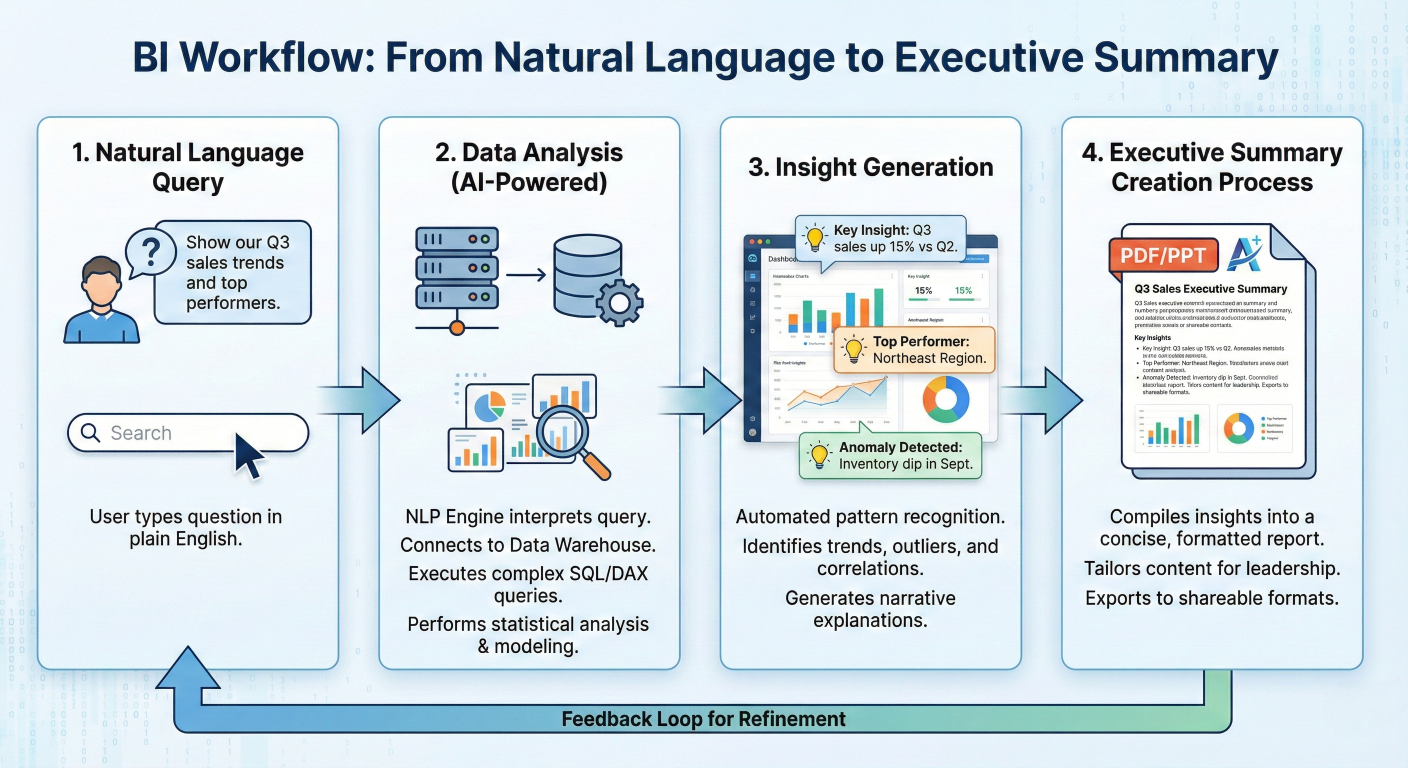
BI Workflow Diagram: Visualization showing natural language query → data analysis → insight generation → executive summary creation process
A breakthrough capability of Amazon Q in QuickSight is its ability to unify structured and unstructured data insights:
Multi-source Analysis: Queries can simultaneously analyze numerical data from databases and contextual information from documents, emails, and reports.
Contextual Enhancement: Business insights are enriched with relevant background information from company documents, policies, and external sources.
Source Transparency: All insights include clear citations linking back to both structured datasets and unstructured source materials
AI-Powered Dashboard Creation: Describe desired visualizations in natural language, and Amazon Q generates appropriate charts, graphs, and interactive elements.
Insight Discovery: Automated identification of patterns, correlations, and anomalies in datasets that might not be apparent through manual analysis.
Collaborative Analytics: Share insights, create presentations, and generate reports that combine data visualizations with narrative explanations.
Amazon Q in Connect revolutionizes customer service by providing real-time AI assistance to both agents and customers.
Real-time Recommendations: During customer interactions, Amazon Q automatically detects issues and provides agents with relevant information, step-by-step guides, and recommended actions.
Knowledge Base Integration: Seamless access to company policies, procedures, troubleshooting guides, and historical case data through natural language queries:
Agent query: "What's the cancellation policy for enterprise customers?" Amazon Q response: "Enterprise customers can cancel their subscription with 30 days written notice. No termination fees apply for contracts over 12 months. [Source: Enterprise_Policies_2024.pdf]"
Cross-application Workflow: Agents can perform actions across multiple systems (Salesforce, ServiceNow, Jira) without context switching, improving efficiency and reducing resolution times
Intelligent Chatbot Integration: Customers receive personalized, context-aware responses based on their account information, purchase history, and company knowledge bases.
Seamless Agent Escalation: When self-service reaches limits, Amazon Q preserves full conversation context for smooth handoffs to human agents.
Multi-channel Support: Consistent AI assistance across voice, chat, email, and messaging platforms.
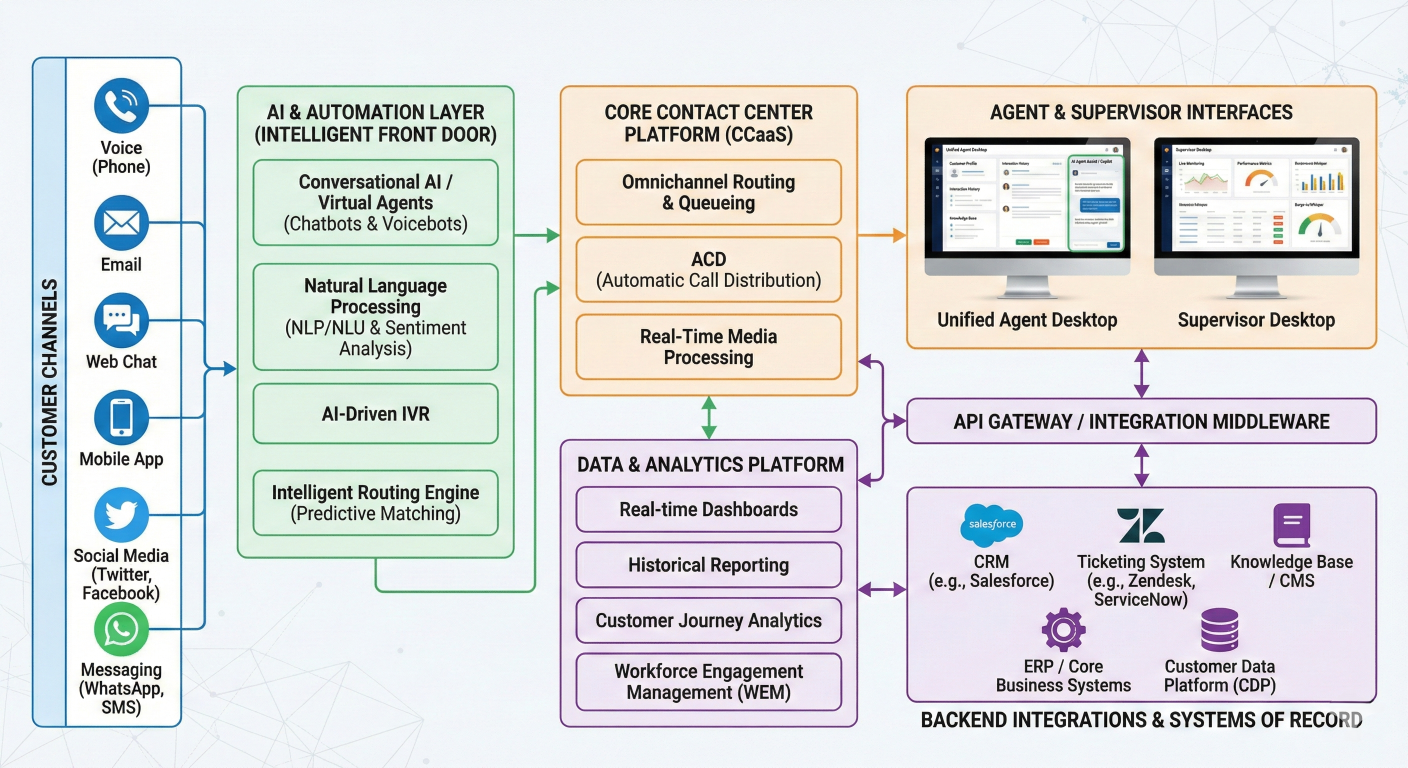
Contact Center Architecture Diagram: Comprehensive view showing customer channels, AI processing, agent interfaces, and backend integrations
Amazon Q's industrial applications demonstrate significant ROI potential for manufacturing organizations:
Maintenance Optimization: Field technicians can access equipment manuals, maintenance procedures, and troubleshooting guides through conversational interfaces:
Technician query: "Provide a bulleted list of daily maintenance required for the drill machine" Amazon Q response: • Check and clean air filters • Inspect drill bits for wear and damage • Lubricate moving parts according to schedule • Verify safety systems functionality • Record operational parameters in maintenance log [Source: GenAI_Drill_Machine_Manual.pdf]
Production Planning Support: Integration with ERP systems and manufacturing documentation enables intelligent production optimization recommendations.
Quality Assurance Enhancement: Access to quality standards, inspection procedures, and historical quality data helps maintain consistent product standards.
Knowledge Transfer: Capture and disseminate tribal knowledge from experienced workers to newer employees, addressing skills gap challenges
Regulatory Guidance: Quick access to relevant regulations, compliance procedures, and audit requirements across different jurisdictions and industries.
Documentation Management: Intelligent organization and retrieval of compliance documents, certifications, and audit trails.
Training and Certification: AI-powered training modules that adapt to individual learning needs and track compliance certification status.
Amazon Q provides comprehensive programmatic access through well-designed APIs and SDKs that enable seamless integration with existing enterprise applications.
The Amazon Q Connect JavaScript library (QConnectJS) enables custom widget development and integration:
// ES6+ Integration Example
import { QConnectClient, GetRecommendations, QueryAssistant } from "amazon-q-connectjs";

// Initialize the client
const qConnectClient = new QConnectClient({
  instanceUrl: "https://my-instance-domain.my.connect.aws",
  endpoint: "https://connect.us-east-1.amazonaws.com", // Optional override
  maxAttempts: 3, // Retry configuration
  logger: customLogger // Optional custom logging
});

// Query the assistant for customer support
const queryParams = {
  assistantId: "assistant-12345",
  queryText: "How do I reset a customer password?",
  sessionId: "session-67890"
};

try {
  const response = await qConnectClient.queryAssistant(queryParams);

  // Process the response
  console.log("Answer:", response.results[0].document.content.text);
  console.log("Sources:", response.results[0].document.contentReferences);

} catch (error) {
  console.error("Query failed:", error);
}

// Get real-time recommendations during customer interactions
const getRecommendations = async (contactId, sessionId) => {
  const params = {
    assistantId: "assistant-12345",
    sessionId: sessionId,
    waitTimeSeconds: 1
  };

  const recommendations = await qConnectClient.getRecommendations(params);
  return recommendations.recommendations;
};
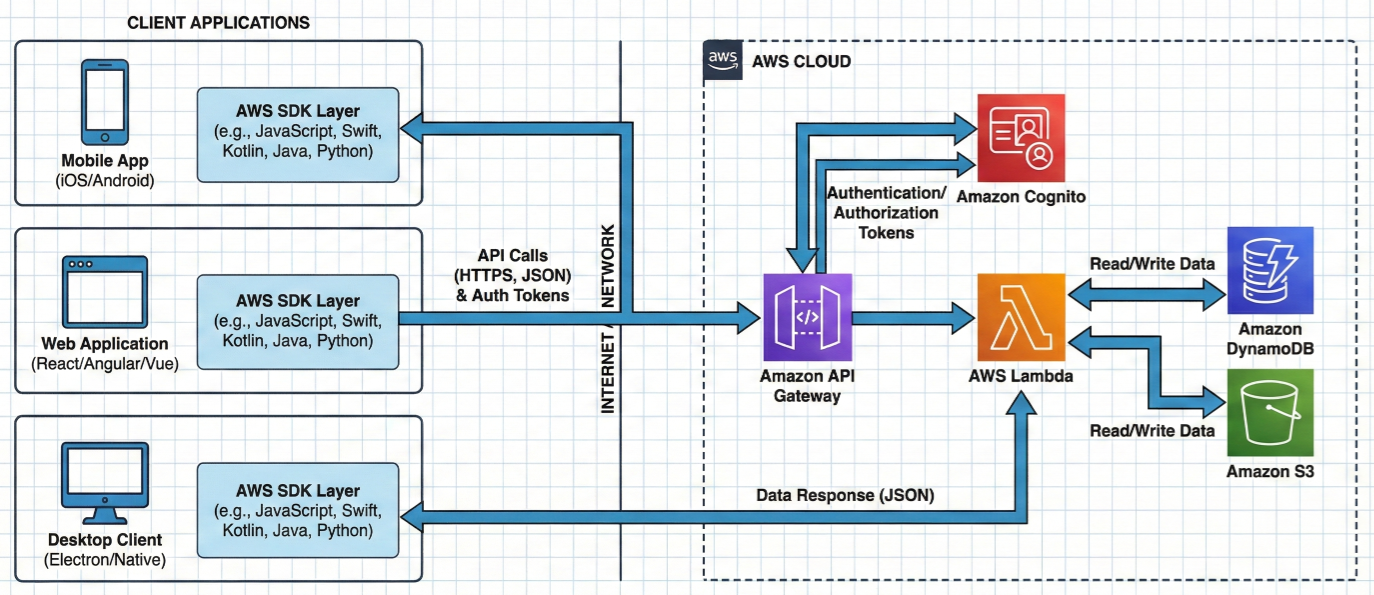
SDK Integration Diagram: Visual representation of application integration architecture showing client applications, SDK layers, AWS services, and data flow
Setting up custom data sources requires careful configuration using the CreateDataSource API:
# AWS CLI example for creating a custom data source
aws qbusiness create-data-source \
  --application-id "app-12345678-1234-1234-1234-123456789012" \
  --index-id "idx-12345678-1234-1234-1234-123456789012" \
  --display-name "Corporate Knowledge Base" \
  --configuration '{
    "type": "CUSTOM",
    "connectionConfiguration": {
      "repositoryEndpointMetadata": {
        "BucketName": "my-corporate-documents"
      }
    },
    "repositoryConfigurations": {
      "document": {
        "fieldMappings": [
          {
            "dataSourceFieldName": "title",
            "indexFieldName": "_document_title"
          },
          {
            "dataSourceFieldName": "content",
            "indexFieldName": "_document_body"
          }
        ]
      }
    },
    "inclusionPatterns": ["*.pdf", "*.docx", "*.txt"],
    "exclusionPatterns": ["*temp*", "*draft*"]
  }' \
  --vpc-configuration '{
    "subnetIds": ["subnet-12345", "subnet-67890"],
    "securityGroupIds": ["sg-abcdef"]
  }' \
  --tags Key=Environment,Value=Production
Enterprise Application Integration: Amazon Q can be embedded within existing business applications through iframe integration or direct API calls:
# Python integration example for enterprise applications
import boto3
import json
from botocore.exceptions import ClientError

class AmazonQIntegration:
    def __init__(self, region_name='us-east-1'):
        self.client = boto3.client('qbusiness', region_name=region_name)
        self.application_id = 'app-12345678-1234-1234-1234-123456789012'

    def query_business_data(self, user_query, user_id, session_id=None):
        """
        Query Amazon Q Business with enterprise context
        """
        try:
            response = self.client.chat_sync(
                applicationId=self.application_id,
                userMessage=user_query,
                userId=user_id,
                sessionId=session_id,
                userGroups=['employees', 'managers'],  # User permissions
                chatMode='RETRIEVAL_MODE',
                chatModeConfiguration={
                    'pluginConfiguration': {
                        'pluginId': 'builtin.web-search'
                    }
                }
            )

            return {
                'answer': response['systemMessage'],
                'sources': response.get('sourceAttributions', []),
                'session_id': response['conversationId']
            }

        except ClientError as e:
            print(f"Error querying Amazon Q: {e}")
            return None

    def create_custom_plugin(self, plugin_config):
        """
        Create custom plugins for specialized business logic
        """
        return self.client.create_plugin(
            applicationId=self.application_id,
            displayName=plugin_config['name'],
            type='SERVICE_NOW',  # or CUSTOM
            serverUrl=plugin_config['server_url'],
            authConfiguration={
                'basicAuthConfiguration': {
                    'secretArn': plugin_config['secret_arn'],
                    'roleArn': plugin_config['role_arn']
                }
            }
        )

# Usage example
q_integration = AmazonQIntegration()

# Query with business context
result = q_integration.query_business_data(
    user_query="What's our return policy for enterprise customers?",
    user_id="john.doe@company.com",
    session_id="session-123"
)

if result:
    print(f"Answer: {result['answer']}")
    print(f"Sources: {[source['title'] for source in result['sources']]}")
Automated Ticket Resolution: Integration with ServiceNow and Jira for intelligent ticket routing and resolution:
// Automated customer service workflow
const handleCustomerQuery = async (customerQuery, customerId) => {
  // Step 1: Query Amazon Q for initial response
  const qResponse = await qConnectClient.queryAssistant({
    assistantId: "support-assistant",
    queryText: customerQuery,
    sessionId: `customer-${customerId}`
  });

  // Step 2: Check if human escalation is needed
  if (qResponse.confidence < 0.8) {
    // Create support ticket automatically
    const ticketData = {
      subject: `Customer Query: ${customerQuery.substring(0, 50)}...`,
      description: customerQuery,
      customerId: customerId,
      aiSuggestion: qResponse.results[0].document.content.text,
      sources: qResponse.results[0].document.contentReferences
    };

    await createSupportTicket(ticketData);
    return {
      type: 'escalated',
      message: 'Your query has been escalated to our support team.',
      ticketId: ticketData.ticketId
    };
  }

  return {
    type: 'resolved',
    answer: qResponse.results[0].document.content.text,
    sources: qResponse.results[0].document.contentReferences
  };
};
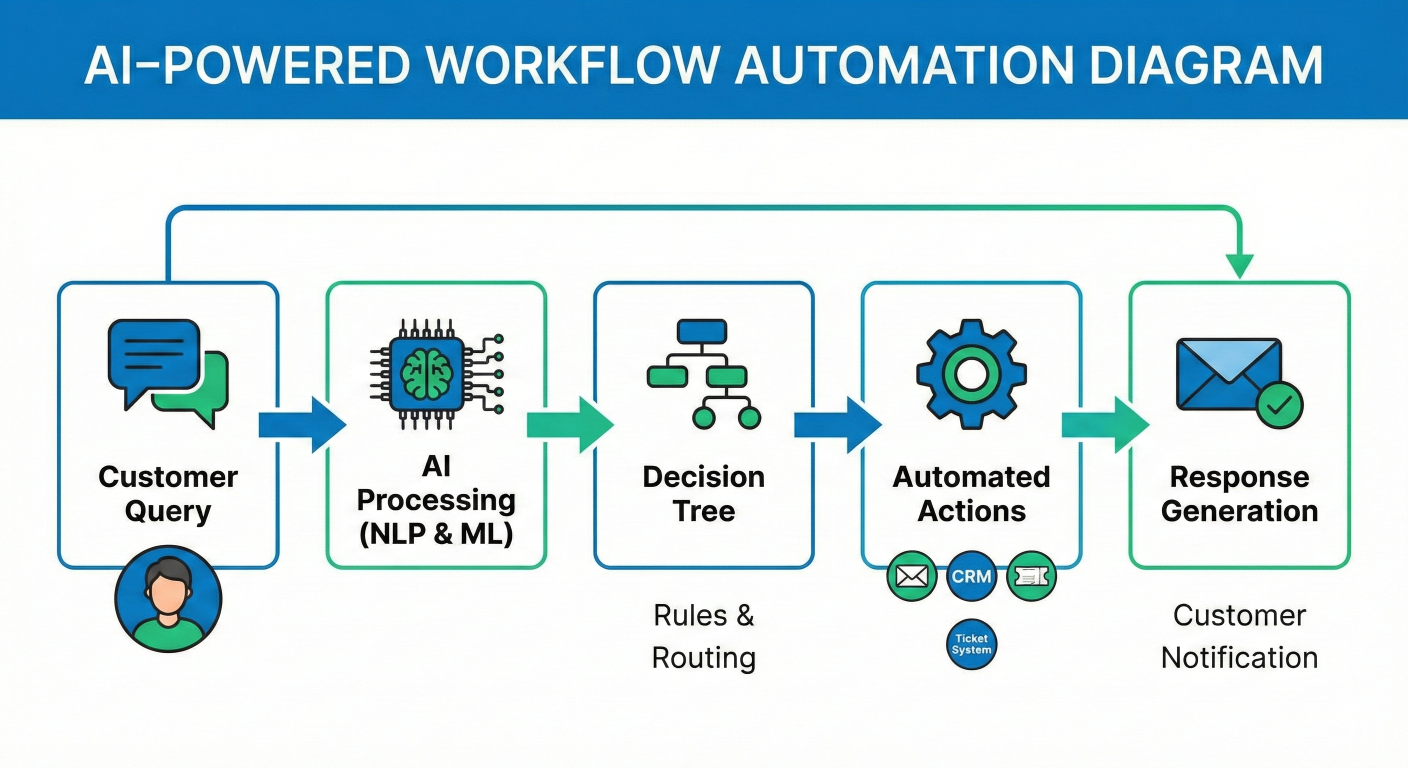
Workflow Automation Diagram: End-to-end process flow showing customer query → AI processing → decision tree → automated actions → response generation
Automated Code Review Integration: Amazon Q Developer can be integrated into CI/CD pipelines for automated code quality and security reviews:
# GitHub Actions integration example
name: Amazon Q Code Review

on:
  pull_request:
    branches: [main, develop]

jobs:
  amazon-q-review:
    runs-on: ubuntu-latest
    steps:
      - uses: actions/checkout@v3

      - name: Setup Amazon Q CLI
        run: |
          pip install amazon-q-developer-cli
          echo "${{ secrets.AWS_CREDENTIALS }}" > ~/.aws/credentials

      - name: Run Security Scan
        run: |
          q-dev scan --project-path . --output-format json > security-results.json

      - name: Generate Code Review
        run: |
          q-dev review --files $(git diff --name-only origin/main) \
            --context "Focus on security, performance, and maintainability" \
            --output review-comments.md

      - name: Post Review Comments
        uses: actions/github-script@v6
        with:
          script: |
            const fs = require('fs');
            const review = fs.readFileSync('review-comments.md', 'utf8');

            github.rest.pulls.createReview({
              owner: context.repo.owner,
              repo: context.repo.repo,
              pull_number: context.issue.number,
              body: review,
              event: 'COMMENT'
            });
Amazon Q implements enterprise-grade security controls that meet the most stringent organizational requirements. The platform's security architecture encompasses data protection, access control, network security, and compliance monitoring.
Customer-Controlled Encryption Keys: Organizations can maintain complete control over encryption keys using AWS KMS, enabling immediate data access revocation when needed:
// Example: AWS Encryption Configuration
{
  "encryptionConfiguration": {
    "kmsKeyId": "arn:aws:kms:us-east-1:123456789012:key/12345678-1234-1234-1234-123456789012",
    "encryptionAtRest": true,
    "encryptionInTransit": true,
    "customerManagedKey": true
  }
}
Granular Permission System: Amazon Q's permission architecture ensures principle of least privilege through multiple control layers:
Identity Integration: Seamless integration with enterprise identity providers including:
Dynamic Permission Filtering: Real-time permission evaluation ensures users only access authorized information:
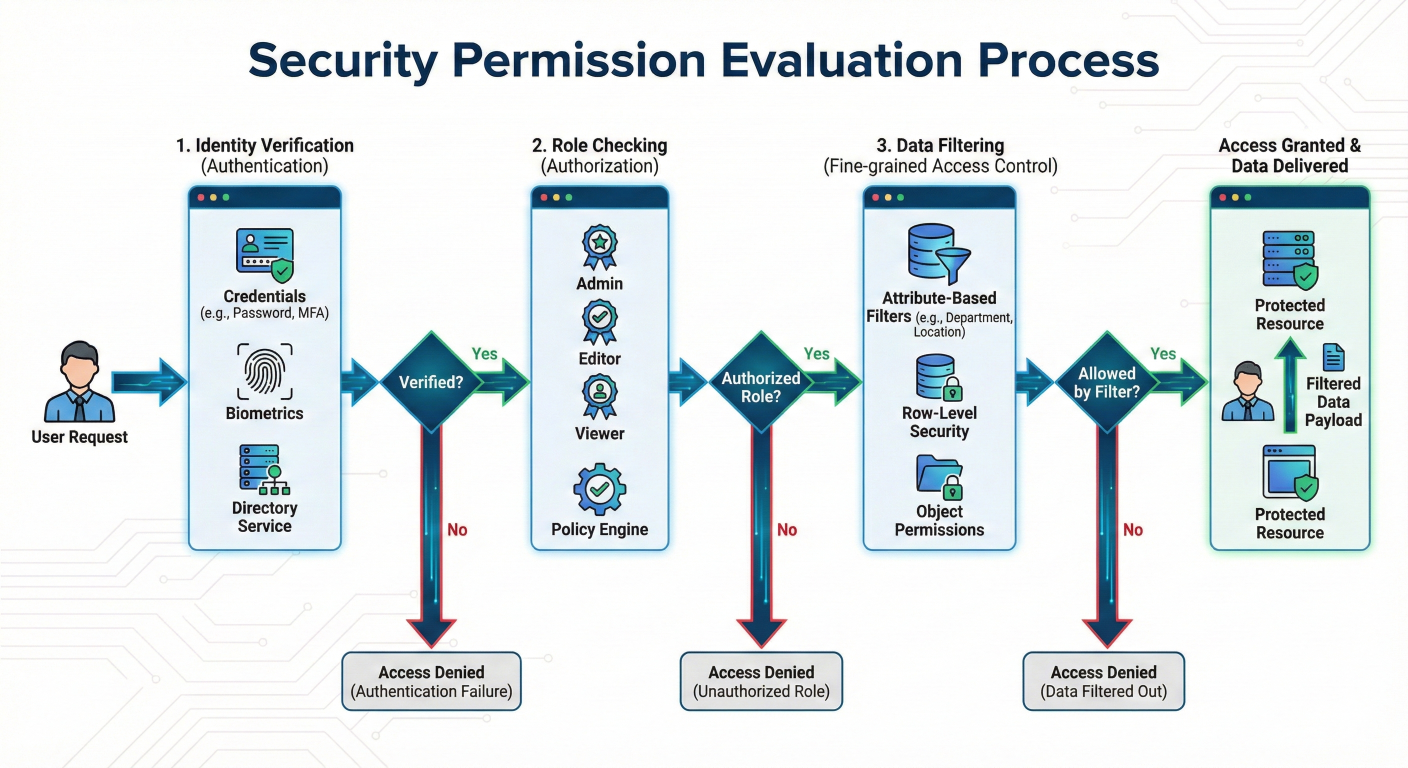
Security Permission Flow Diagram: Detailed visualization of permission evaluation process from user request through identity verification, role checking, and data filtering
# Example permission configuration
permission_config = {
    "userGroups": {
        "executives": {
            "accessLevel": "ALL_DOCUMENTS",
            "dataCategories": ["financial", "strategic", "operational"],
            "restrictions": []
        },
        "managers": {
            "accessLevel": "DEPARTMENT_DOCUMENTS",
            "dataCategories": ["operational", "team_specific"],
            "restrictions": ["exclude_confidential"]
        },
        "employees": {
            "accessLevel": "PUBLIC_DOCUMENTS",
            "dataCategories": ["general", "training"],
            "restrictions": ["exclude_internal", "exclude_confidential"]
        }
    },
    "documentClassification": {
        "confidential": {"minimumRole": "executive"},
        "internal": {"minimumRole": "manager"},
        "public": {"minimumRole": "employee"}
    }
}
Virtual Private Cloud (VPC) Integration: Amazon Q supports deployment within customercontrolled network environments:
Private Endpoint Configuration: Ensure all communication remains within your private network:
# VPC Endpoint configuration for Amazon Q
aws ec2 create-vpc-endpoint \
  --vpc-id vpc-12345678 \
  --service-name com.amazonaws.us-east-1.qbusiness \
  --vpc-endpoint-type Interface \
  --subnet-ids subnet-12345678 subnet-87654321 \
  --security-group-ids sg-12345678 \
  --private-dns-enabled \
  --policy-document '{
    "Statement": [
      {
        "Effect": "Allow",
        "Principal": "*",
        "Action": [
          "qbusiness:Chat",
          "qbusiness:ListConversations",
          "qbusiness:GetApplication"
        ],
        "Resource": "*",
        "Condition": {
          "StringEquals": {
            "aws:PrincipalArn": "arn:aws:iam::123456789012:role/AmazonQBusinessRole"
          }
        }
      }
    ]
  }'
Automated Data Retention: Amazon Q supports configurable retention policies that automatically manage data lifecycle according to organizational requirements:
Retention Policy Configuration:
{
  "dataRetentionPolicy": {
    "conversationHistory": {
      "retentionPeriodDays": 90,
      "autoDeleteEnabled": true,
      "archiveBeforeDelete": true
    },
    "documentIndexes": {
      "retentionPeriodDays": 2555,  // 7 years for compliance
      "versioningEnabled": true,
      "compressionEnabled": true
    },
    "auditLogs": {
      "retentionPeriodDays": 3650,  // 10 years for audit compliance
      "immutableStorage": true,
      "crossRegionReplication": true
    },
    "userInteractionData": {
      "retentionPeriodDays": 365,
      "anonymizationAfterDays": 180,
      "purgeUserDataEnabled": true
    }
  }
}
Automated PII Detection and Redaction: Integration with classification services ensures sensitive information is properly handled:
BlueXP Classification Integration: For NetApp customers, Amazon Q integrates with BlueXP classification to automatically identify and redact personally identifiable information (PII):
# Data protection configuration
dataProtectionConfig:
  piiDetection:
    enabled: true
    redactionLevel: "PARTIAL"  # FULL, PARTIAL, or MASK
    detectionTypes:
      - "SSN"
      - "CREDIT_CARD"
      - "EMAIL_ADDRESS"
      - "PHONE_NUMBER"
      - "CUSTOM_PATTERNS"

  dataClassification:
    enabled: true
    classificationLevels:
      - name: "PUBLIC"
        retention: 365
        encryption: "STANDARD"
      - name: "INTERNAL"
        retention: 2555
        encryption: "ENHANCED"
      - name: "CONFIDENTIAL"
        retention: 3650
        encryption: "CUSTOMER_MANAGED"
Amazon Q supports multiple compliance standards essential for enterprise deployments:
Supported Compliance Frameworks:
Comprehensive Audit Trail: Every interaction with Amazon Q generates detailed audit logs:
{
  "auditLogEntry": {
    "timestamp": "2024-01-15T10:30:00Z",
    "userId": "john.doe@company.com",
    "sessionId": "sess-12345678",
    "action": "QUERY_ASSISTANT",
    "query": "What is our data retention policy?",
    "dataSources": [
      "corporate_policies.pdf",
      "compliance_handbook.docx"
    ],
    "permissionsApplied": [
      "employee",
      "finance_team"
    ],
    "responseGenerated": true,
    "sourcesCited": 3,
    "processingTimeMs": 1250,
    "complianceFlags": [],
    "ipAddress": "10.0.1.45",
    "userAgent": "Amazon Q Business Widget v2.1"
  }
}
Real-time Compliance Monitoring: Integration with AWS CloudTrail and CloudWatch enables continuous compliance monitoring:
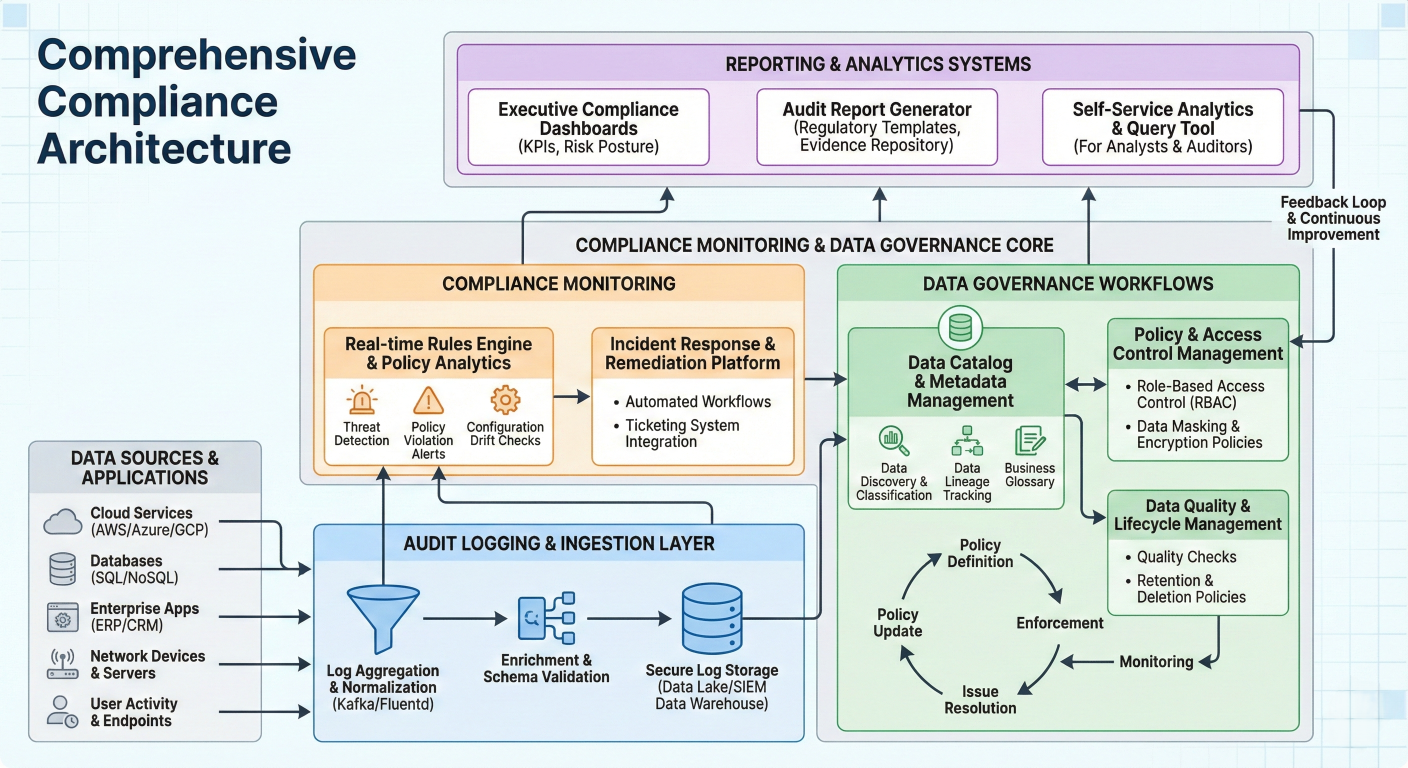
Compliance Architecture Diagram: Comprehensive view showing audit logging, compliance monitoring, data governance workflows, and reporting systems
GDPR Compliance Features:
Advanced Privacy Controls:
# GDPR compliance implementation
class GDPRComplianceManager:
    def __init__(self, amazon_q_client):
        self.client = amazon_q_client

    def export_user_data(self, user_id):
        """Export all user data for GDPR portability requests"""
        return {
            "conversations": self.client.list_conversations(userId=user_id),
            "preferences": self.client.get_user_preferences(userId=user_id),
            "audit_trail": self.client.get_audit_logs(userId=user_id),
            "data_sources_accessed": self.client.get_user_data_access(userId=user_id)
        }

    def delete_user_data(self, user_id, verification_token):
        """Complete user data deletion for right to be forgotten"""
        if self.verify_deletion_request(verification_token):
            # Delete from all systems
            self.client.delete_user_conversations(userId=user_id)
            self.client.delete_user_preferences(userId=user_id)
            self.client.anonymize_audit_logs(userId=user_id)
            return {"status": "completed", "timestamp": datetime.utcnow()}

    def generate_privacy_report(self, date_range):
        """Generate privacy compliance reports"""
        return self.client.generate_compliance_report(
            reportType="privacy",
            dateRange=date_range,
            includeMetrics=["data_processed", "requests_fulfilled", "deletions_completed"]
        )
Amazon Q offers generous free tier access that enables organizations to explore capabilities without initial investment:
Amazon Q Developer Free Tier:
Amazon Q Business Evaluation:
Step 1: AWS Account Setup and Authentication:
# Create AWS Builder ID (free account)
# Visit: https://profile.aws.amazon.com/

# Install Amazon Q CLI
pip install amazon-q-developer-cli

# Authenticate with AWS Builder ID
q auth login

# Verify installation
q --version
Step 2: Amazon Q Developer Setup:
For VS Code integration:
1. Install Amazon Q extension from VS Code marketplace
2. Authenticate with AWS Builder ID
3. Choose Free or Pro tier licensing
4. Start coding with AI assistance
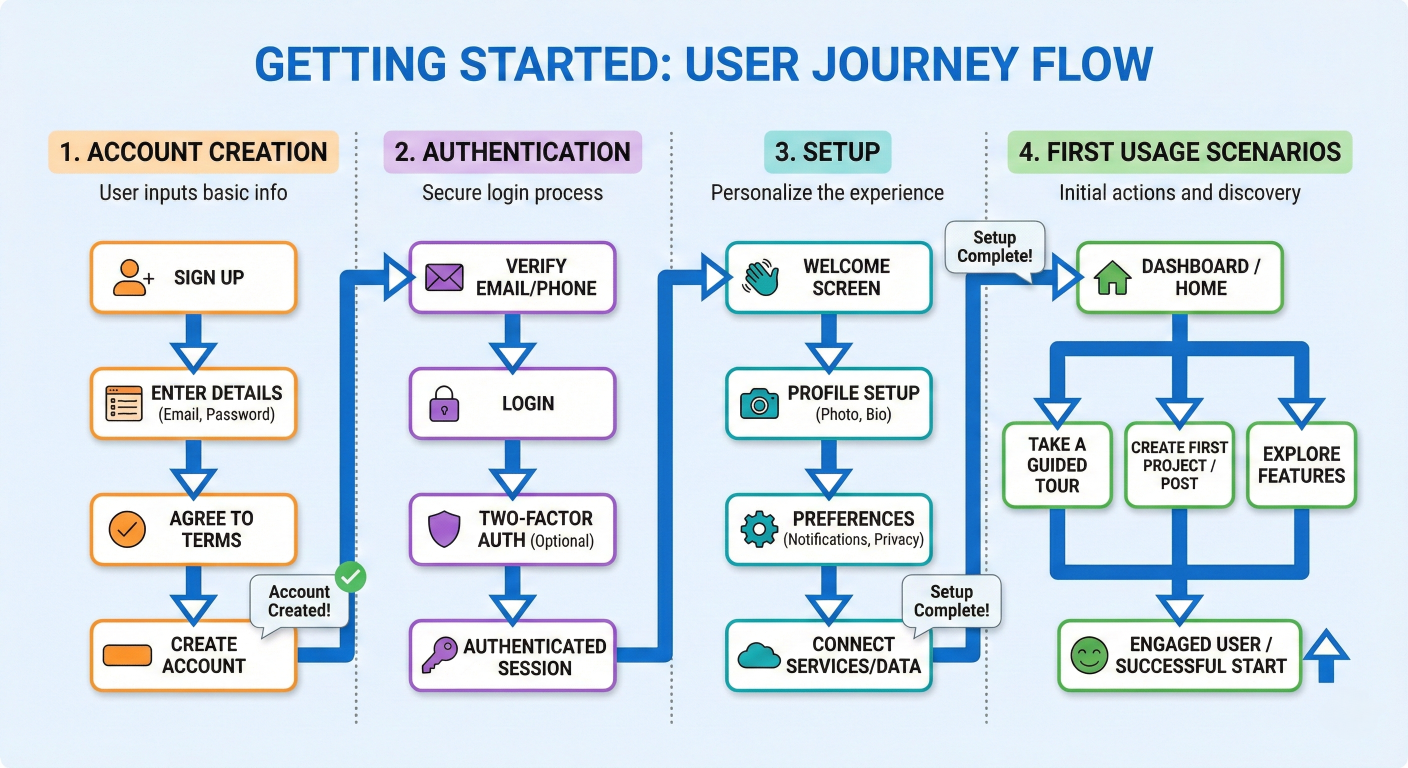
Getting Started Flow Diagram: Step-by-step visual guide showing account creation, authentication, setup, and first usage scenarios
Step 3: Amazon Q Business Application Creation:
# Create Amazon Q Business application
aws qbusiness create-application \
  --display-name "Corporate AI Assistant" \
  --description "Enterprise knowledge assistant for employee productivity" \
  --instance-type "starter" \
  --identity-configuration '{
    "type": "SAML",
    "samlConfiguration": {
      "metadataXML": "$(cat saml-metadata.xml)",
      "roleArn": "arn:aws:iam::123456789012:role/AmazonQBusinessSAMLRole",
      "userIdAttribute": "email",
      "userGroupAttribute": "groups"
    }
  }' \
  --tags Key=Environment,Value=Production Key=Department,Value=IT
Foundational Learning Path:
1. AWS Cloud Practitioner Certification: Foundational understanding of cloud concepts and AWS services
2. AI/ML Fundamentals: Introduction to artificial intelligence and machine learning on AWS
3. Amazon Q Specific Training: Specialized training modules covering Amazon Q deployment and management
Professional Development Path:
# AWS Certification Path Visualization
graph LR
    A[AWS Cloud Practitioner] --> B[AWS Solutions Architect Associate]
    B --> C[AWS AI/ML Specialty]
    C --> D[Amazon Q Expert Certification]

    A --> E[AWS Developer Associate]
    E --> F[Amazon Q Developer Specialization]

    A --> G[AWS SysOps Administrator]
    G --> H[Amazon Q Enterprise Administration]
AWS Skill Builder: Free access to 600+ digital courses curated by AWS experts:
AWS Workshops and Labs:
Phase 1: Pilot Implementation (30-60 days):
Phase 2: Department Rollout (60-120 days):
Phase 3: Enterprise Scale (120+ days):
Key Performance Indicators:
# ROI measurement framework
roi_metrics = {
    "productivity_improvements": {
        "time_saved_per_query": "average 3-5 minutes",
        "knowledge_retrieval_speed": "10x faster than manual search",
        "development_velocity": "25-40% increase in code delivery",
        "customer_resolution_time": "20-30% reduction"
    },
    "cost_benefits": {
        "training_cost_reduction": "50-70% decrease in onboarding time",
        "support_ticket_automation": "30-40% reduction in L1 tickets",
        "documentation_maintenance": "60% reduction in manual updates",
        "compliance_audit_efficiency": "80% faster audit preparation"
    },
    "quality_improvements": {
        "security_vulnerability_detection": "90% faster identification",
        "knowledge_accuracy": "95% citation accuracy",
        "customer_satisfaction": "15-25% improvement",
        "employee_satisfaction": "30% improvement in tool satisfaction"
    }
}
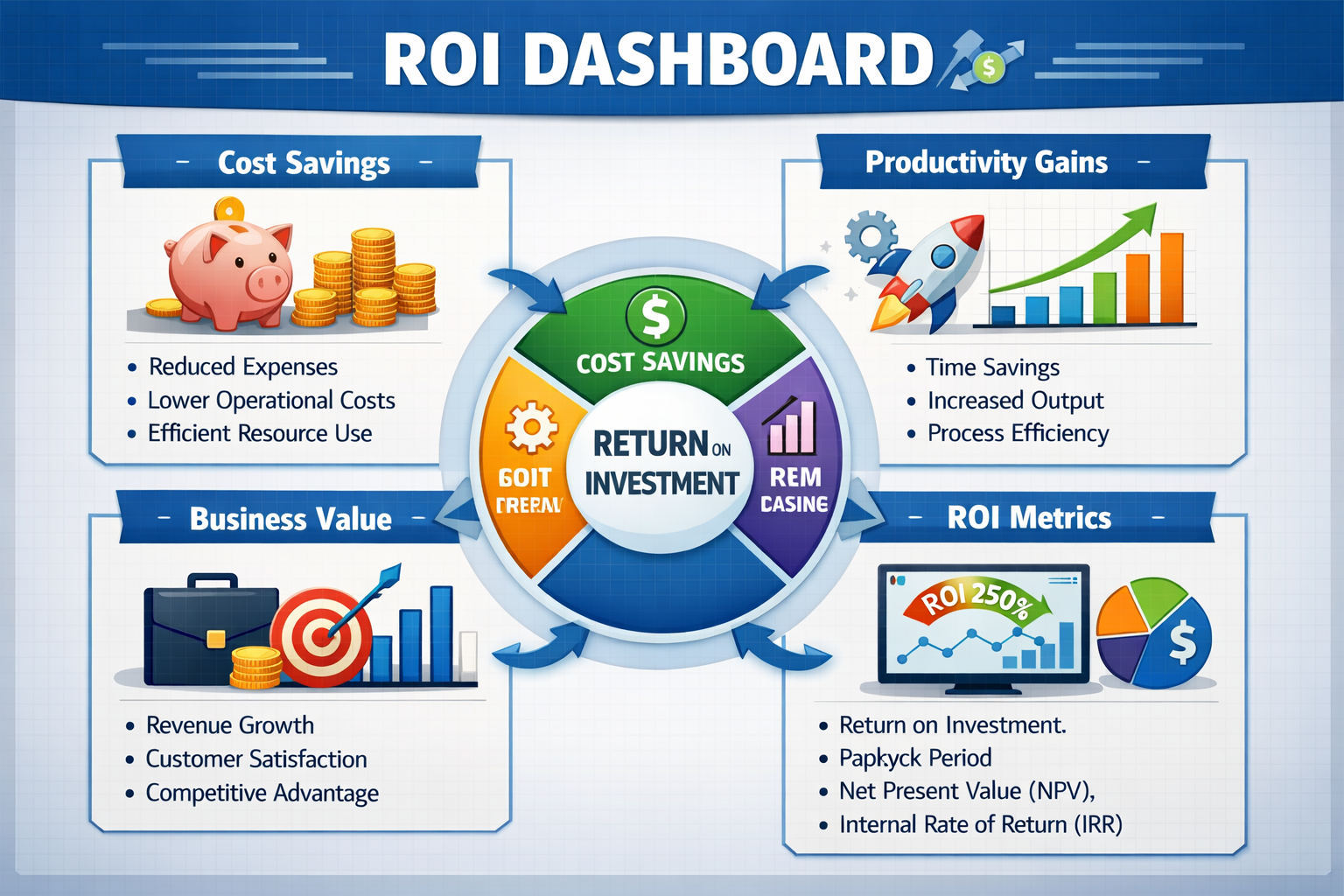
ROI Dashboard Diagram: Visual representation of key metrics, cost savings, productivity gains, and business value measurement
1. Assessment and Planning: Evaluate current knowledge management gaps and identify high-impact use cases
2. Stakeholder Alignment: Secure executive sponsorship and establish cross-functional implementation team
3. Technical Preparation: Review security requirements, data sources, and integration needs
4. Pilot User Selection: Identify early adopters across different business functions
The future of enterprise productivity lies in intelligent AI assistants that understand your business context, respect your security requirements, and scale with your organization's needs. Amazon Q represents the most comprehensive generative AI platform available for enterprise deployment, offering immediate value through improved knowledge access, enhanced development productivity, and superior customer service capabilities.
1. Explore the Free Tier: Begin with Amazon Q Developer's generous free tier to experience AI-powered development assistance
2. Request a Business Demo: Schedule a personalized demonstration of Amazon Q Business with your specific use cases and data sources
3. Join the AWS Training Program: Enroll in AWS Skill Builder courses to build expertise in generative AI and Amazon Q implementation
4. Connect with AWS Experts: Engage with AWS Solutions Architects to design your custom Amazon Q deployment strategy
The organizations that embrace intelligent AI assistance today will define the competitive landscape of tomorrow. Amazon Q provides the secure, scalable, and sophisticated platform needed to transform how your workforce interacts with information, creates software, and serves customers.
Transform your enterprise. Accelerate your innovation. Start with Amazon Q.

SaratahKumar C
 Launch your Graphy