There are no items in your cart
Add More
Add More
| Item Details | Price | ||
|---|---|---|---|

In 2026, the paradigm has shifted. We have moved from "AI as a Chatbot" to "AI as an Agent."
This guide is your bible for Claude Code, Anthropic’s terminal-based AI coding assistant. This isn't just another autocomplete tool; it's an autonomous agent that lives in your shell. It explores your file system, runs your tests, manages your git branches, and—with the latest Opus 4.6 update—even orchestrates teams of other agents to solve complex architectural problems.
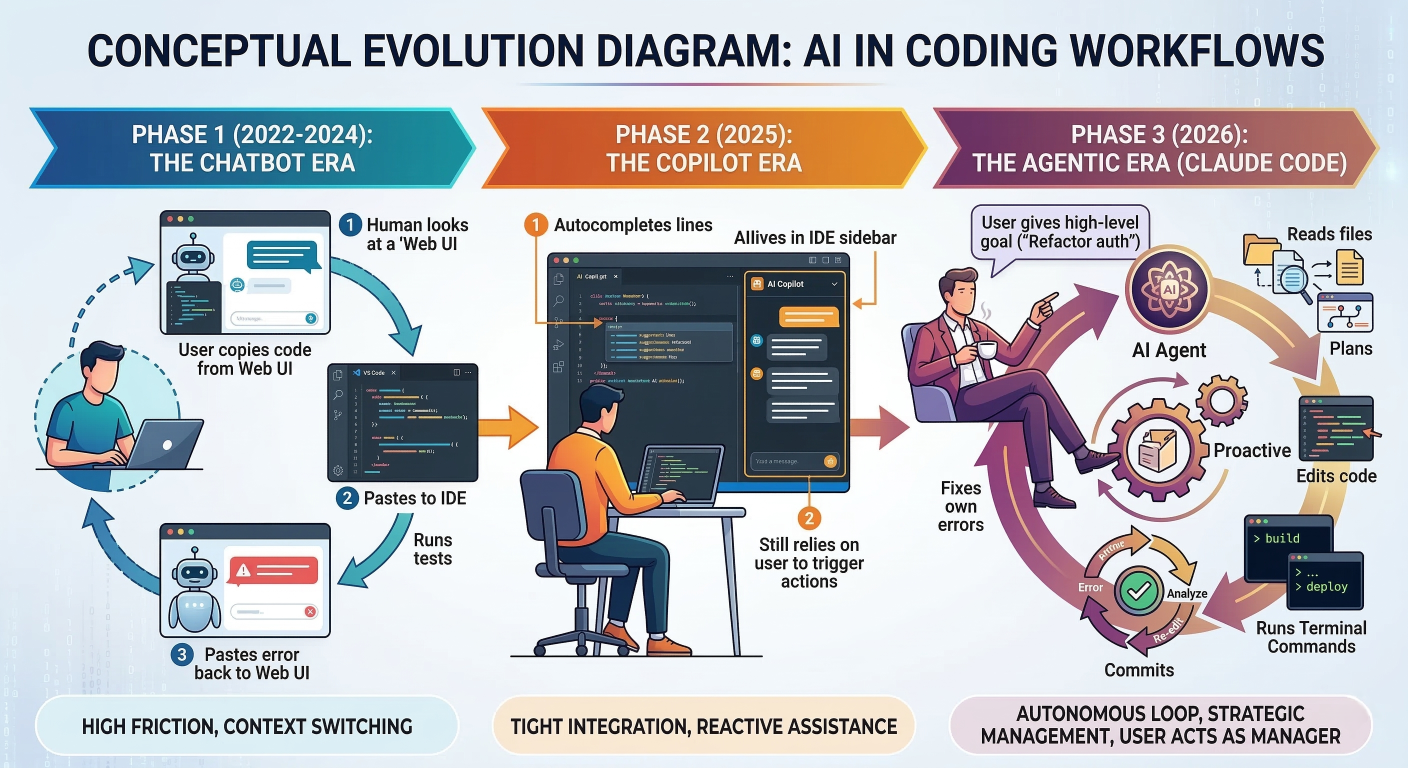
The core difference lies in the feedback loop. In a traditional workflow, if the AI writes broken code, you have to catch it, copy the error, and feed it back. Claude Code closes this loop. It writes the code, runs the compiler, sees the error, analyzes the stack trace, and fixes it—all without you lifting a finger.
CLAUDE.md.Getting started with Claude Code isn't as simple as downloading an .exe. Because this tool has deep access to your terminal and file system, setting up the environment correctly is critical for both security and performance.
Before we run a single command, let's make sure your machine is ready. Claude Code is a heavy lifter. It spins up local servers, manages file watchers, and potentially runs Docker containers for MCP tools.
api.anthropic.com.Historically, Claude Code was distributed purely as an npm package. However, as of version 2.1.15, Anthropic has moved towards standalone binaries.
Why the shift? Using npm install -g ties the tool to your local Node version. If you update Node, you might break Claude. Native binaries (managed by Homebrew or WinGet) are self-contained, include their own runtime, and—crucially—support a background auto-updater service.
If you are on a Mac or using Linuxbrew, this is the gold standard.
# 1. Update Homebrew to ensure you get the latest formula
brew update

# 2. Install the Cask (for macOS) or Formula (for Linux)
brew install --cask claude-code
Pro Tip: Homebrew installations do not auto-update by default on all systems. To ensure you aren't missing critical security patches or features like the new "Agent Teams," get into the habit of running:
brew upgrade claude-code
If you are on Windows, avoid the native Command Prompt if you can. The "Unix-like" nature of most AI coding tasks (grep, awk, sed) makes WSL2 a superior playground
1. Prepare WSL2:
wsl --install
# Reboot your machine if prompted!
2. Install the Environment (inside Ubuntu):
# Update package lists
sudo apt update && sudo apt upgrade -y

# Install Git (Claude needs this for version control ops)
sudo apt install git -y

# Install NVM (Node Version Manager) - Flexible way to handle Node
curl -o- https://raw.githubusercontent.com/nvm-sh/nvm/v0.39.7/install.sh | bash
source ~/.bashrc
nvm install --lts
3. Install Claude Code:
brew install -g @anthropic-ai/claud-code
Note: Even though we just said native is better, inside WSL, the npm route is often smoother due to binary compatibility issues with Linux logic on Windows file systems.
Troubleshooting Windows Auth Loops: A common bug in WSL is the "Auth Loop" where the browser doesn't open.
claude auth login runs, if the browser doesn't pop up, look for the URL in the terminal output. Copy that manually into your Chrome/Edge browser in Windows. The token callback usually works across the localhost boundary.If you must use native Windows (perhaps for.NET development):
win getinstall Anthropic.ClaudeCode
Just remember: winget installations also don't auto-update. Run winget upgrade Anthropic.ClaudeCode periodically.
Once installed, you can't just start coding. You need to shake hands with the mothership.
claude auth login
This initiates an OAuth 2.0 flow.
Navigate to your project folder. It’s time to introduce Claude to your code.
cd ~/my-awesome-project
claude init
What is happening here?
package.json and tsconfig.json. This is a TypeScript project.".claude/ directory. This is where it stores project-specific memory, task logs, and the new "Agent Mailboxes" (more on that later).CLAUDE.md Generation: It asks to generate a CLAUDE.md file. ALWAYS SAY YES. We will dedicate a whole chapter to this file, but essentially, it’s the instruction manual you write for the AI.You are now sitting at your terminal. You type claude. The prompt changes. You are no longer in bash or zsh; you are in the Claude REPL (Read-Eval-Print Loop).3.1 The REPL ExperienceThe interface is designed to be minimal but information-dense.
ls -la), the output streams here.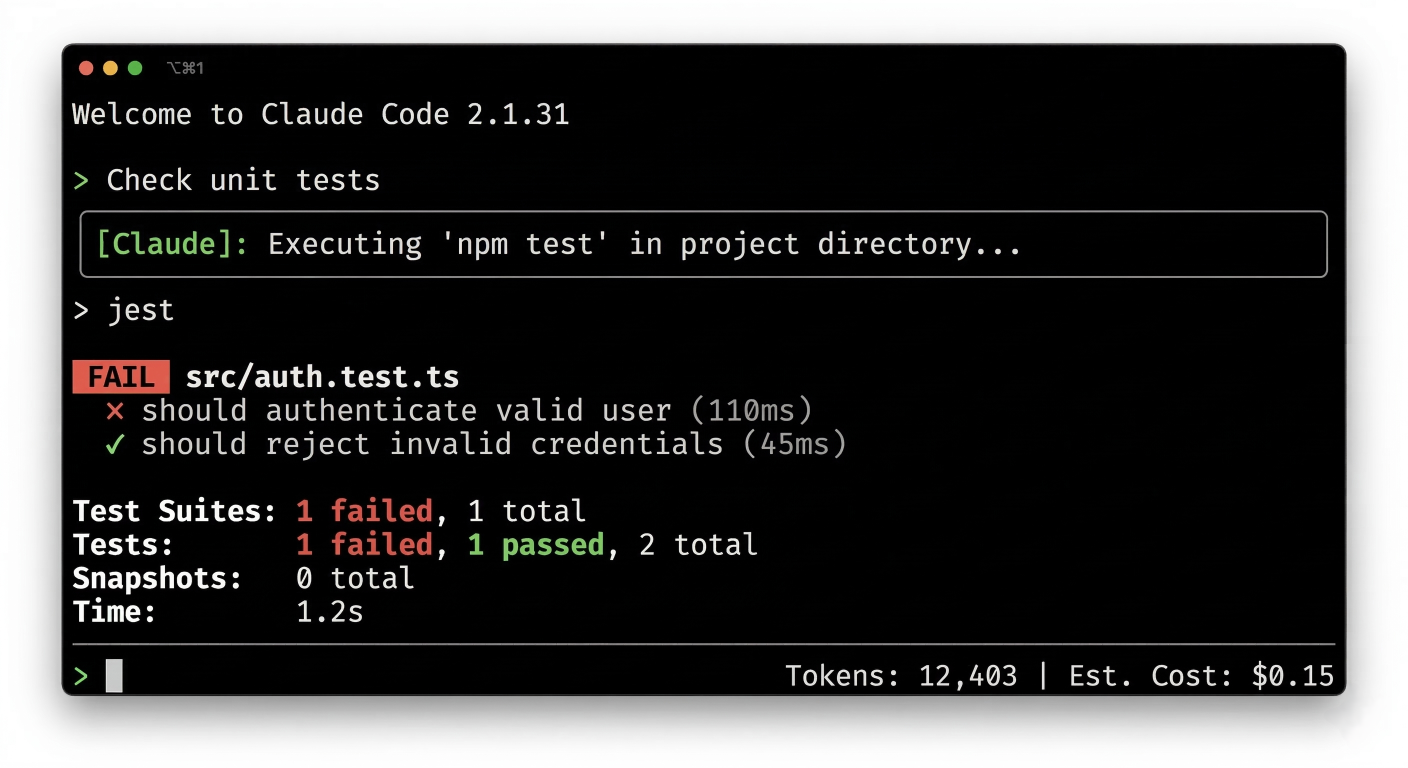
Detailed description about picture/Architecture/Diagram: Screenshot of the Claude Code CLI interface. Top: "Welcome to Claude Code 2.1.31". Middle: Conversation history. User asks "Check unit tests". Action Block: Executing npm test. Output: "FAIL src/auth.test.ts". Bottom: Input prompt ">" with token usage indicator (e.g., 12,403 tokens) and cost estimate ($0.15).
This is the most important concept for new users. Claude Code is powerful—it can delete files, push to git, and execute binary scripts. To keep you safe, it has tiered permission modes. You can cycle through these with Shift+Tab.
index.ts..." -> Done.rm, curl, npm install). This prevents it from accidentally nuking your drive or downloading malware.ls, grep, ReadFile, but cannot use WriteFile or Bash.You don't always want to interactively chat. Sometimes you want to pipe data in or run a quick script. Claude Code has a rich flag ecosystem.
| Flag | Name | The "Why" | Example Scenario |
| -p | Print Mode | Runs a single query and exits. Perfect for scripting. | claude -p "Explain this error" |
| -c | Continue | Resume the last conversation in this folder. | You close the terminal by mistake. claude -c brings you back. |
| --resume <ID> | Resume Session | Jumps back into a specific past session. | Returning to a task from last week. |
| --dangerously-skip-permissions | Danger Mode | Bypasses ALL prompts. | CI/CD Pipelines only. Never use this on your local machine unless you love chaos. |
| --max-budget-usd | Budget Cap | Stops the bot if it burns too much cash. | claude --max-budget--usd 5.00 prevents $50 refactors. |
| /compact |
Compact Context | Not a flag, but a slash command. Compresses history. | Use this when you hit the token limit but want to keep going. |
Just like Discord or Slack, Claude Code supports "Slash Commands" to trigger meta-actions.
/clear: Wipes the context window but keeps the session open. Use this when the AI starts getting confused or hallucinating files./init: Re-runs the initialization wizard./bug: Found a crash? This packages your session logs and sends them to Anthropic. Privacy Warning: This sends your prompts and code snippets to the mothership./cost: Paranoid about the bill? Type this to see the exact spend for the current session.To master Claude Code, you need to understand how it "thinks." It isn't magic; it's a structured loop of Thought, Action, and Observation.
When you type "Fix the bug in the login page," Claude doesn't just guess code. It enters a loop:
ExecuteTool("Bash", "ls -R src/").ls, captures the output, and feeds it back to the LLM. "Okay, I see src/auth/login.ts."ExecuteTool("ReadFile", "src/auth/login.ts").With the release of Claude Opus 4.6, this loop got a massive upgrade. The model now engages in "Extended Thinking" or "Ultrathink".
This creates a slower, but significantly more reliable agent. It plans more carefully, sustains tasks for longer horizons, and—crucially—catches its own mistakes during the "Self-Correction" phase.
The biggest bottleneck in 2026 isn't intelligence; it's Context Window. Even with Opus 4.6's 1 Million token beta window, codebases are huge.
Strategies for Management:
/compact: This command asks Claude to summarize the conversation so far and replace the raw logs with the summary, freeing up space.CLAUDE.md ProtocolIf there is one section of this guide you memorize, make it this one. CLAUDE.md is the single biggest lever you have to improve performance.
CLAUDE.md?Think of CLAUDE.md as the "System Prompt" for your specific project. When Claude initializes in a directory, it looks for this file and injects its content into the very beginning of its context window. It is "Project Memory".
It is NOT:
It IS:
A perfect CLAUDE.md follows this structure
Let's write one together for a hypothetical Next.js + Tailwind + Supabase project.
1. Project Overview (WHAT)
src/app: Routes and Pages (Server Components by default).src/components/ui: Shadcn/ui reusable components.src/lib/supabase: Database clients.any. Use zod for all schema validation.const definitions..css files.Result pattern. Do not throw exceptions in business logic.npm run devnpm run type-check (Run this before any commit!)npm run lintnpm test (Vitest)docs/agent/schema.mddocs/agent/deploy.mdNotice Section 4 in the example above? That is a pro move. If you paste your entire database schema into CLAUDE.md, you waste tokens on every single query, even when you are just fixing a CSS bug.Instead, use Progressive Disclosure. Tell Claude where the information is.
CLAUDE.md, ignores the schema docs, and fixes the CSS. Cheap.CLAUDE.md, sees the pointer to docs/agent/schema.md, reads that file, and then executes. Smart.Imagine asking a junior engineer to "Refactor the entire billing system." They will likely freeze, get overwhelmed, or make a mess. They need to break it down. Similarly, if you ask a single Claude session to do a massive task, its context window fills up with ls and cat commands, and it becomes "confused" (hallucinates).
Sub-agents are transient. They are born, they do a job, they report back, and they die.How it works:
SpawnAgent(task="Analyze dependencies in src/legacy").Configuring Sub-Agents:
You can define specialized sub-agents in your ~/.claude/config.json or pass them via CLI flags.
# Spawning a specialized Security Auditor on the fly
claude --agents '{"auditor": {"description": "Security focused reviewer", "prompt": "You are a ruthless security auditor. Find vulnerabilities.", "model": "opus"}}'
Introduced in early 2026, Agent Teams are persistent. They don't just die after one task; they collaborate.
The Architecture:
It’s delightfully simple. Agents communicate by writing JSON files to the disk.
~/.claude/teams/{team-name}/inboxes/{agent-name}.json.To use this, you must enable the experimental flag.
1. Enable the Feature: Edit
~/.claude/settings.json:
{
  "env": {
    "CLAUDE_CODE_EXPERIMENTAL_AGENT_TEAMS": "1"
  }
}
2. Start a Team Session:
claude --temmate-mode tmux
Note: Using tmux mode is highly recommended. It splits your terminal window so you can physically see Agent A and Agent B working in different panes. It looks like a sci-fi movie hacking scene.
3. The Prompt:
"Create a team to build a Todo App. One agent on Frontend (React), one on Backend (Node/Express). You are the Lead. Coordinate them."
4. The Result:
Claude will spawn two new panes. You will see the Backend agent setting up Express while the Frontend agent runs
npx create-next-app. They will message each other:
This is the holy grail of Agentic Engineering.
- Backend Agent: "Lead, I have defined the API schema at /api/todos."
- Frontend Agent: "Copy that. I will generate the TypeScript interfaces from that schema."
It follows a Client-Host-Server model.
stdio (standard input/output).The easiest way to get started is with Docker. Docker has released an MCP Toolkit that containers these servers.
Why use Docker?
Security. If you install a random "Jira MCP Server" from the internet, do you want it running natively on your laptop? No. Run it in a container.
Setup Guide:
claude mcp list
You should see
MCP_DOCKERconnected.
Now you can say:
"Check my open PRs on GitHub and summarize the comments." Claude will delegate this to the Docker container, fetch the data, and summarize it.
Let’s build a real one. A "Weather Server" that lets Claude fetch the temperature.
Prerequisites:
npm install @modelcontextprotocol/sdk zod
weather-server.ts):import { McpServer } from "@modelcontextprotocol/sdk/server/mcp.js";
import { StdioServerTransport } from "@modelcontextprotocol/sdk/server/stdio.js";
import { z } from "zod";
// 1. Initialize Server
const server = new McpServer({
name: "my-weather-server",
version: "1.0.0"
});
// 2. Define the Tool
server.tool(
"get_weather",
{ city: z.string() },
async ({ city }) => {
// In reality, fetch from an API here
const fakeTemps: Record<string, string> = {
"London": "15C",
"San Francisco": "20C",
"Mumbai": "30C"
};
const temp = fakeTemps[city] || "Unknown";
// Return structured content
return {
content:
};
}
);
// 3. Connect Transport
const transport = new StdioServerTransport();
await server.connect(transport);
Connecting it to Claude:
# Add MCP weather server
claude mcp add my-weather -- node weather-server.js
Now, inside Claude, if you ask "Is it hot in Mumbai?", Claude will see the get_weather tool, call it, and answer "Yes, it's 30C".
With great power comes great responsibility. Giving an AI write access to your file system is risky. Hooks are your firewall.
Hooks are scripts that run at specific lifecycle events:
PreToolUse: Before a tool runs (e.g., before Bash executes).PostToolUse: After a tool runs (e.g., after WriteFile).UserPromptSubmit: Before your message is sent to the LLM.We want to prevent Claude from accidentally reading our .env file and sending our API keys to the LLM cloud. We can write a PreToolUse hook to block this.
The Guard Script (~/.claude/hooks/block-secrets.py):
import sys
import json

def main():

    # 1. Read the tool input from stdin
    try:
        input_data = json.load(sys.stdin)

    except json.JSONDecodeError:
        sys.exit(0) # Not a valid tool call, ignore

    # 2. Check if the tool is reading a file
    if input_data.get('tool') == 'ReadFile':
        path = input_data.get('args', {}).get('path', '')

        # 3. Block sensitive patterns
        sensitive_files = ['.env', 'id_rsa', 'secrets.json']

        for secret in sensitive_files:
            if secret in path:

                # Print error to stderr (Claude sees this)
                print(f"SECURITY BLOCK: Access to '{path}' is denied.", file=sys.stderr)

                # Exit code 2 = BLOCK the action
                sys.exit(2)

    # Exit code 0 = ALLOW the action
    sys.exit(0)


if __name__ == "__main__":
    main()
Registering the Hook (~/.claude/settings.json):
Lorem Ipsum is simply dummy text of the printing and typesetting industry. Lorem Ipsum has been the industry's standard dummy text ever since the 1500s, when an unknown printer took a galley of type and scrambled it to make a type specimen book.
Now, if you ask Claude "Read the.env file," the script runs, sees the path, and returns Exit Code 2. Claude sees the "SECURITY BLOCK" message and tells you: "I cannot read that file due to security restrictions.".
You can also use PostToolUse hooks to clean up after Claude.
WriteFile.prettier --write <filename>. This ensures that every file Claude touches is automatically formatted to your standards before you even see it.This is the "Boss Fight" of AI coding. Refactoring a 10-year-old monolithic codebase that no one understands.
Do not just say "Refactor this class." That is how you break production. You need a strategy.
Step 1: Characterization (The Golden Master)
Before changing a single line, ask Claude to write a test that captures the current behavior of the system, bugs and all.
"Create a test suite for
LegacyBilling.ts. I don't care about correctness right now; I care about preserving the current output for every input. We need a baseline."
Step 2: The Refactor Loop
Once the tests pass (locking in the current behavior), you start the loop.
If the legacy codebase has 1,000 files, you cannot load them all.
ls -R and grep first. Let Claude explore the structure before reading content.calculateTax. Do not read the whole file, just the function signatures."MAP.md file where it writes down its findings as it explores. This externalizes its memory, so even if the context window flushes, the knowledge is saved on disk.You have options. Cursor (the IDE fork) and Aider (the OG CLI tool) are the main competitors. How does Claude Code stack up?
We look at Terminal-Bench 2.0, the industry standard for evaluating agentic coding.
| Feature |
Claude Code (Opus 4.6) |
Cursor (GPT-4o/Claude) | Aider |
| Agentic Score | 69.9% (Top Tier) | ~65% | 62.9% |
| Primary Interface | Terminal (Shell) | IDE (VS Code Fork) | Terminal (Chat) |
| Workflow Style | Manager-Worker. You define the goal; Claude executes the plan. | Pair Programmer. You type; Cursor autocompletes/edits inline. | Git-Centric. "Chat with your git repo." |
| Multi-Agent | Native Agent Teams (High capability). | Limited (Composer mode). | No native teams. |
| Token Efficiency |
High. (5.5x fewer tokens than Cursor for same task). |
Low. (Very verbose system prompts). | Medium. |
Q: Claude keeps deleting my code!
git! Claude Code is not a replacement for version control. Always commit before a big task.--max-budget-usd flag. Also, optimize your CLAUDE.md. If Claude has to read 50 files to understand your stack, that’s on you. Tell it the stack in the md file.~/.claude/projects/{project-id}/agents/. They are just JSONL (JSON Lines) files. You can cat them to see exactly what your sub-agents were whispering to each other.We are standing at the precipice of a new way of working. Claude Code is not just a tool; it is a glimpse into a future where software engineers are Orchestrators of Intelligence rather than typists of syntax.
By mastering the CLI, engineering your Context with CLAUDE.md, and deploying Agent Teams, you can multiply your output—not by 10%, but by 10x.
The learning curve is steeper than a chat window. You have to learn the flags. You have to write the hooks. You have to manage the permissions. But the reward is an autonomous partner that works with you, not just for you.
Don't just read about it. Do it.
brew install --cask claude-code (or your OS equivalent).claude init.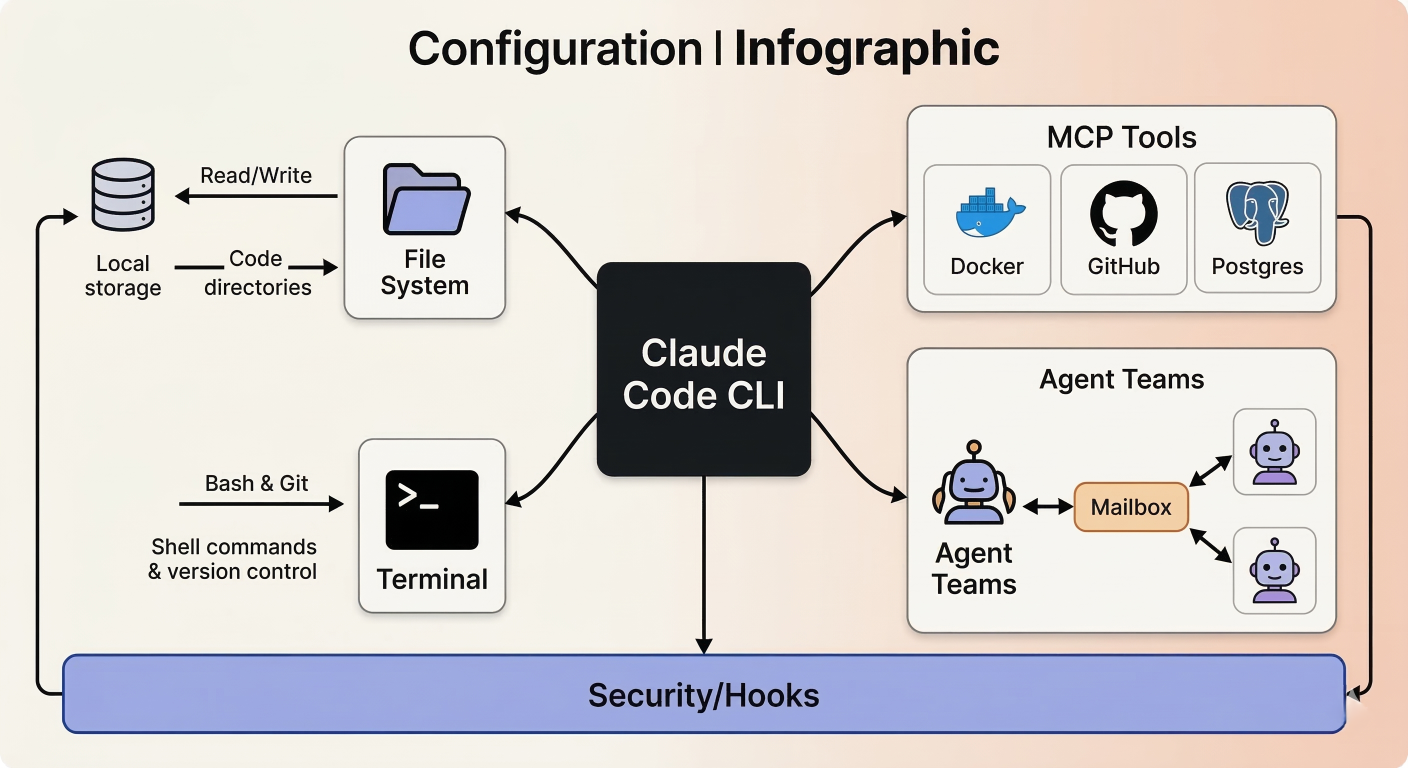
A final summary infographic. Central Hub: "Claude Code CLI". Spokes connecting to:

SaratahKumar C
 Launch your Graphy