There are no items in your cart
Add More
Add More
| Item Details | Price | ||
|---|---|---|---|

Picture this: It's Monday morning at Netflix, and data scientists need to deploy a new recommendation algorithm that'll be used by 260+ million subscribers worldwide. The model needs to process billions of data points, run on hundreds of machines, and integrate with existing production systems – all while maintaining perfect reproducibility and monitoring capabilities.
This isn't science fiction. It's exactly the type of challenge that led Netflix to create Metaflow, their open-source framework that's revolutionizing how data scientists build, deploy, and manage ML workflows at massive scale
If you've ever felt the pain of wrestling with complex MLOps tooling, spending months moving models from prototype to production, or losing track of experimental results, you're about to discover a game-changing solution. Metaflow isn't just another workflow orchestrator – it's a human-centric framework designed by data scientists who've felt your pain and solved it.
Netflix didn't build Metaflow in an ivory tower. They created it after running thousands of ML projects across diverse domains and learning what actually breaks in production. Their data science teams were struggling with:
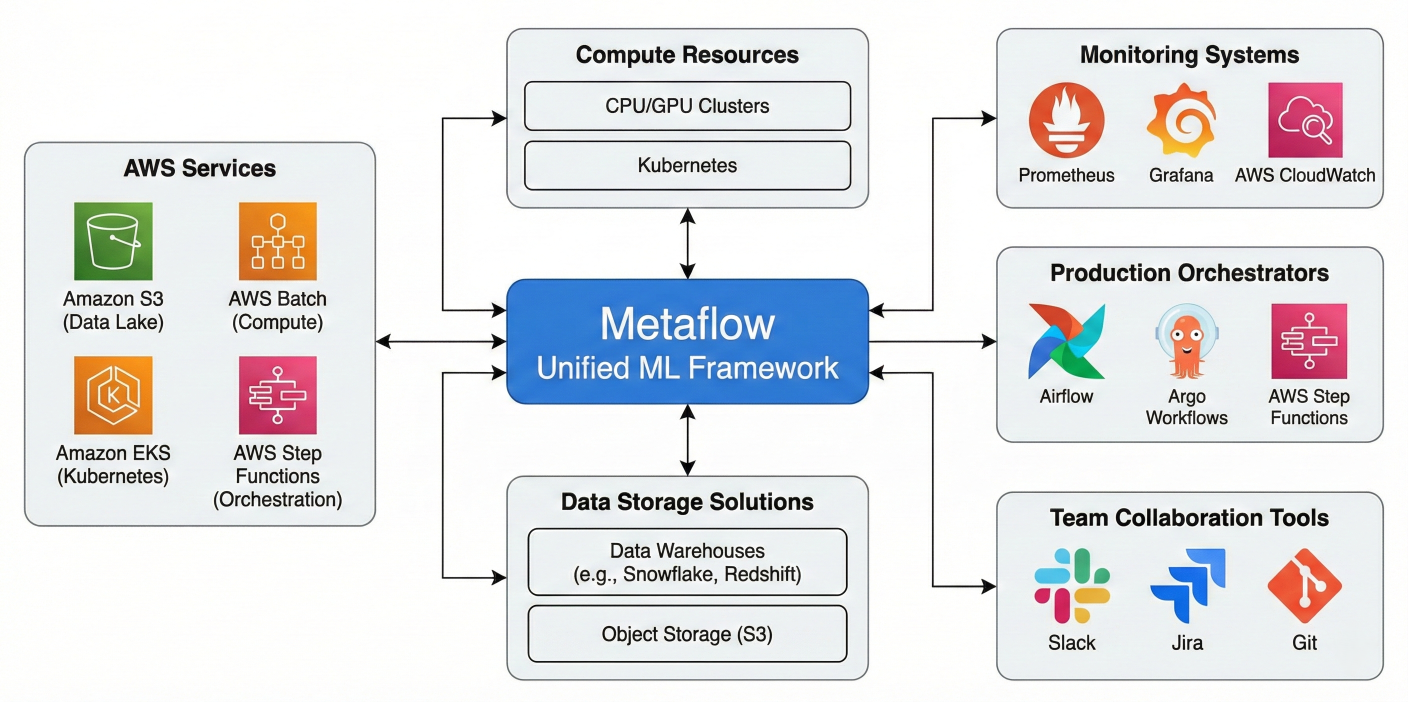
Architecture diagram showing Metaflow's position in the comprehensive ML infrastructure ecosystem, highlighting seamless integration with AWS services, data storage solutions, compute resources, production orchestrators, monitoring systems, and team collaboration tools
The result? Metaflow has been battle-tested with impressive scale metrics:
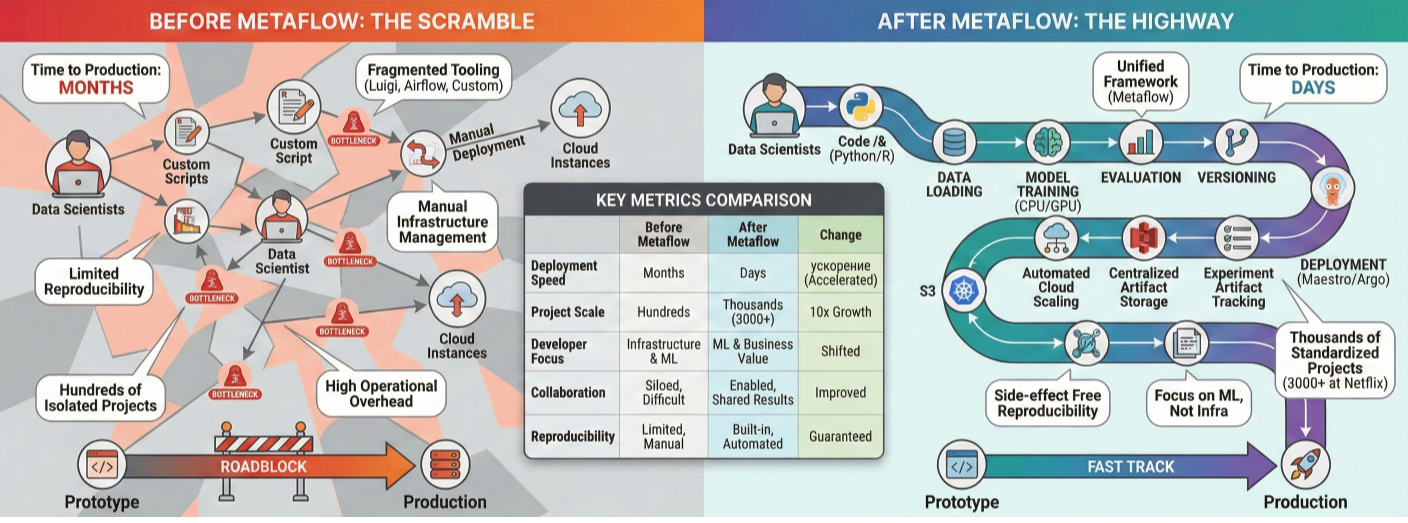
Infographic showing Netflix's ML scale statistics and before/after Metaflow adoption metrics
Metaflow addresses the biggest pain points in ML development through four core principles:
Usability First: No YAML files, complex DSLs, or configuration hell. Write workflows in plain Python using simple decorators that feel natural
Effortless Scalability: The same code runs on your laptop and scales to thousands of cloud instances with zero changes
Built-in Reproducibility: Automatic versioning of code, data, parameters, and environment dependencies without extra configuration
Production-Ready by Design: Deploy to enterprise orchestrators (AWS Step Functions, Kubernetes, Argo) with a single command
Metaflow implements the dataflow paradigm, which models your ML pipeline as a directed acyclic graph (DAG) of operations. This isn't just theoretical – it's the same paradigm used by systems like Apache Beam, TensorFlow, and modern distributed databases.
Think of your workflow as a sophisticated assembly line where:
Every Metaflow workflow must have these essential components:
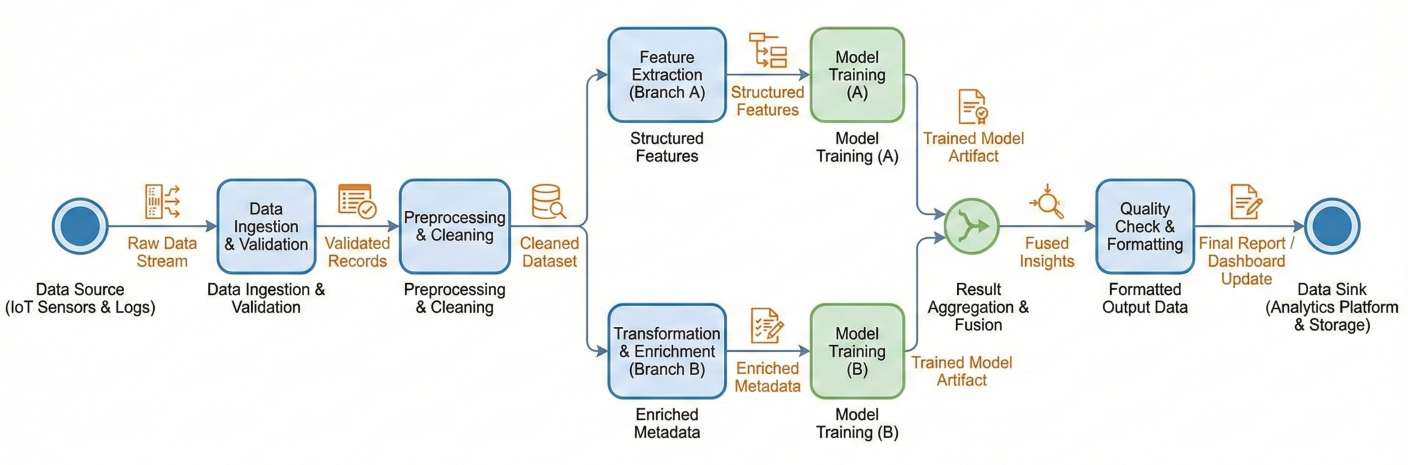
Detailed flowchart showing dataflow paradigm with nodes, edges, data artifacts flowing between steps, and parallel branches merging back together
Let's build a comprehensive ML workflow that demonstrates real-world patterns:
from metaflow import FlowSpec, step, Parameter, resources, batch, card
import pandas as pd
import numpy as np
from sklearn.ensemble import RandomForestClassifier
from sklearn.model_selection import train_test_split
from sklearn.metrics import classification_report
import logging

class ProductionMLFlow(FlowSpec):
    """
    A production-ready ML workflow demonstrating Metaflow best practices.
    This flow handles data loading, preprocessing, model training,
    evaluation, and deployment preparation.
    """

    # Parameters allow runtime configuration
    model_type = Parameter('model-type',
                           help='Type of model to train',
                           default='random_forest')

    test_size = Parameter('test-size',
                          help='Proportion of data for testing',
                          default=0.2)
                          random_seed = Parameter('random-seed',
    help='Random seed for reproducibility',
    default=42)

@step
def start(self):
    """
    Initialize the workflow and load configuration.
    This step sets up logging and validates parameters.
    """
    # Configure logging for the entire workflow
    logging.basicConfig(
        level=logging.INFO,
        format='%(asctime)s - %(levelname)s - %(message)s'
    )
    logging.info(f"Starting ML workflow with model_type: {self.model_type}")
    logging.info(f"Test size: {self.test_size}, Random seed: {self.random_seed}")

    # Store configuration as artifacts
    self.config = {
        'model_type': self.model_type,
        'test_size': self.test_size,
        'random_seed': self.random_seed,
        'timestamp': pd.Timestamp.now().isoformat()
    }
    self.next(self.load_data)

@resources(memory=4000, cpu=2)
@step
def load_data(self):
    """
    Load and perform initial data validation.
    In production, this would connect to your data warehouse.
    """
    logging.info("Loading dataset...")

    # Simulate loading from a data warehouse
    # In production: self.raw_data = pd.read_sql(query, connection)
    np.random.seed(self.random_seed)
    n_samples = 10000

    # Generate realistic synthetic dataset
    self.raw_data = pd.DataFrame({
        'feature_1': np.random.normal(0, 1, n_samples),
        'feature_2': np.random.normal(2, 1.5, n_samples),
        'feature_3': np.random.exponential(2, n_samples),
        'feature_4': np.random.uniform(0, 10, n_samples)
    })

    # Create target variable with realistic signal
    self.raw_data['target'] = (
        (self.raw_data['feature_1'] > 0.5) &
        (self.raw_data['feature_2'] > 2.5)
    )
    ).astype(int)
# Data quality checks
self.data_quality = {
    'n_rows': len(self.raw_data),
    'n_features': len(self.raw_data.columns) - 1,
    'missing_values': self.raw_data.isnull().sum().sum(),
    'target_balance': self.raw_data['target'].mean()
}
logging.info(f"Loaded {self.data_quality['n_rows']} rows with "
             f"{self.data_quality['n_features']} features")
logging.info(f"Target balance: {self.data_quality['target_balance']:.3f}")
self.next(self.preprocess_data)

@step
def preprocess_data(self):
    """
    Handle data preprocessing and feature engineering.
    Keeps preprocessing logic separate from model training.
    """
    logging.info("Preprocessing data...")

    # Feature engineering
    self.processed_data = self.raw_data.copy()
    self.processed_data['feature_interaction'] = (
        self.processed_data['feature_1'] * self.processed_data['feature_2']
    )
    self.processed_data['feature_ratio'] = (
        self.processed_data['feature_3'] / (self.processed_data['feature_4'] + 1e-6)
    )

    # Handle outliers (simple capping)
    for col in ['feature_1', 'feature_2', 'feature_3']:
        q99 = self.processed_data[col].quantile(0.99)
        q01 = self.processed_data[col].quantile(0.01)
        self.processed_data[col] = self.processed_data[col].clip(q01, q99)

    # Create train/test split
    feature_cols = [col for col in self.processed_data.columns if col != 'target']
    X = self.processed_data[feature_cols]
    y = self.processed_data['target']

    self.X_train, self.X_test, self.y_train, self.y_test = train_test_split(
        X, y, test_size=self.test_size, random_state=self.random_seed,
        stratify=y
    )

    self.preprocessing_stats = {
        'train_size': len(self.X_train),
        'test_size': len(self.X_test),
        'n_features': len(feature_cols),
        'train_target_mean': self.y_train.mean(),
        'test_target_mean': self.y_test.mean()
    }

    logging.info(f"Train set: {self.preprocessing_stats['train_size']} samples")
    logging.info(f"Test set: {self.preprocessing_stats['test_size']} samples")

    self.next(self.train_model)
    @resources(memory=8000, cpu=4)
@step
def train_model(self):
    """
    Train the machine learning model.
    In production, this might use distributed training.
    """
    logging.info(f"Training {self.model_type} model...")

    if self.model_type == 'random_forest':
        # Use robust hyperparameters for production
        self.model = RandomForestClassifier(
            n_estimators=100,
            max_depth=10,
            min_samples_split=5,
            min_samples_leaf=2,
            random_state=self.random_seed,
            n_jobs=-1  # Use all available CPUs
        )
    else:
        raise ValueError(f"Unsupported model type: {self.model_type}")

    # Track training time
    import time
    start_time = time.time()
    self.model.fit(self.X_train, self.y_train)
    self.training_time = time.time() - start_time

    # Get feature importance for interpretability
    self.feature_importance = dict(zip(
        self.X_train.columns,
        self.model.feature_importances_
    ))

    logging.info(f"Model training completed in {self.training_time:.2f} seconds")
    self.next(self.evaluate_model)


@card(type='default')
@step
def evaluate_model(self):
    """
    Evaluate model performance and generate comprehensive metrics.
    The @card decorator creates an HTML report.
    """
    logging.info("Evaluating model performance...")

    # Generate predictions
    self.train_predictions = self.model.predict(self.X_train)
    self.test_predictions = self.model.predict(self.X_test)

    # Calculate comprehensive metrics
    from sklearn.metrics import accuracy_score, precision_score, recall_score, f1_score
    self.metrics = {
        'train_accuracy': accuracy_score(self.y_train, self.train_predictions),
        'test_accuracy': accuracy_score(self.y_test, self.test_predictions),
        'test_precision': precision_score(self.y_test, self.test_predictions),
        'test_recall': recall_score(self.y_test, self.test_predictions),
        'test_f1': f1_score(self.y_test, self.test_predictions)
    }
    # Check for overfitting
self.overfitting_check = {
    'accuracy_diff': self.metrics['train_accuracy'] - self.metrics['test_accuracy'],
    'is_overfitting': (self.metrics['train_accuracy'] - self.metrics['test_accuracy']) > 0.1
}
# Generate detailed classification report
self.classification_report = classification_report(
    self.y_test, self.test_predictions, output_dict=True
)
logging.info(f"Test accuracy: {self.metrics['test_accuracy']:.3f}")
logging.info(f"Test F1-score: {self.metrics['test_f1']:.3f}")
if self.overfitting_check['is_overfitting']:
    logging.warning("Potential overfitting detected!")
self.next(self.prepare_deployment)

@step
def prepare_deployment(self):
    """
    Prepare model artifacts and metadata for deployment.
    """
    logging.info("Preparing deployment artifacts...")

    # Create deployment package metadata
    self.deployment_metadata = {
        'model_type': self.model_type,
        'training_timestamp': self.config['timestamp'],
        'performance_metrics': self.metrics,
        'feature_names': list(self.X_train.columns),
        'training_data_shape': self.X_train.shape,
        'preprocessing_stats': self.preprocessing_stats,
        'data_quality': self.data_quality
    }

    # Model validation checks for deployment
    self.deployment_checks = {
        'min_accuracy_met': self.metrics['test_accuracy'] >= 0.7,
        'not_overfitting': not self.overfitting_check['is_overfitting'],
        'balanced_predictions': 0.3 <= np.mean(self.test_predictions) <= 0.7
    }
    self.deployment_ready = all(self.deployment_checks.values())

    if self.deployment_ready:
        logging.info("✅ Model passed all deployment checks")
    else:
        logging.warning("❌ Model failed deployment validation")
        failed_checks = [k for k, v in self.deployment_checks.items() if not v]
        logging.warning(f"Failed checks: {failed_checks}")
    self.next(self.end)
    @step
def end(self):
    """
    Finalize workflow and log summary statistics.
    """
    logging.info("Workflow completed successfully!")

    # Create comprehensive summary
    self.workflow_summary = {
        'status': 'completed',
        'model_ready_for_deployment': self.deployment_ready,
        'final_test_accuracy': self.metrics['test_accuracy'],
        'total_training_time': self.training_time,
        'data_processed': self.data_quality['n_rows'],
        'top_features': sorted(
            self.feature_importance.items(),
            key=lambda x: x[^2_1],
            reverse=True
        )[:3]
    }

    print("\n"  + "="*50)
    print("WORKFLOW SUMMARY")
    print("="*50)
    print(f"Model Type: {self.model_type}")
    print(f"Test Accuracy: {self.metrics['test_accuracy']:.3f}")
    print(f"Deployment Ready: {self.deployment_ready}")
    print(f"Training Time: {self.training_time:.2f}s")
    print("Top Features:")

    for feature, importance in self.workflow_summary['top_features']:
        print(f" - {feature}: {importance:.3f}")

    print("="*50)

if __name__ == '__main__':
    ProductionMLFlow()
One of Metaflow's most powerful features is automatic data artifacts. Notice how self.raw_data created in load_data is automatically available in preprocess_data? This isn't just variable passing – it's a sophisticated data management system that:
Automatic Persistence: Every instance variable (self.variable) is automatically serialized and stored
Version Control: Each run gets a unique ID, and all artifacts are versioned
Type Flexibility: Handles Python objects, DataFrames, NumPy arrays, ML models, and custom objects
Cross-Step Access: Artifacts flow seamlessly between steps without manual serialization
Failure Recovery: Failed runs can be resumed from the last successful step
Client API Access: Query and analyze artifacts from any previous run
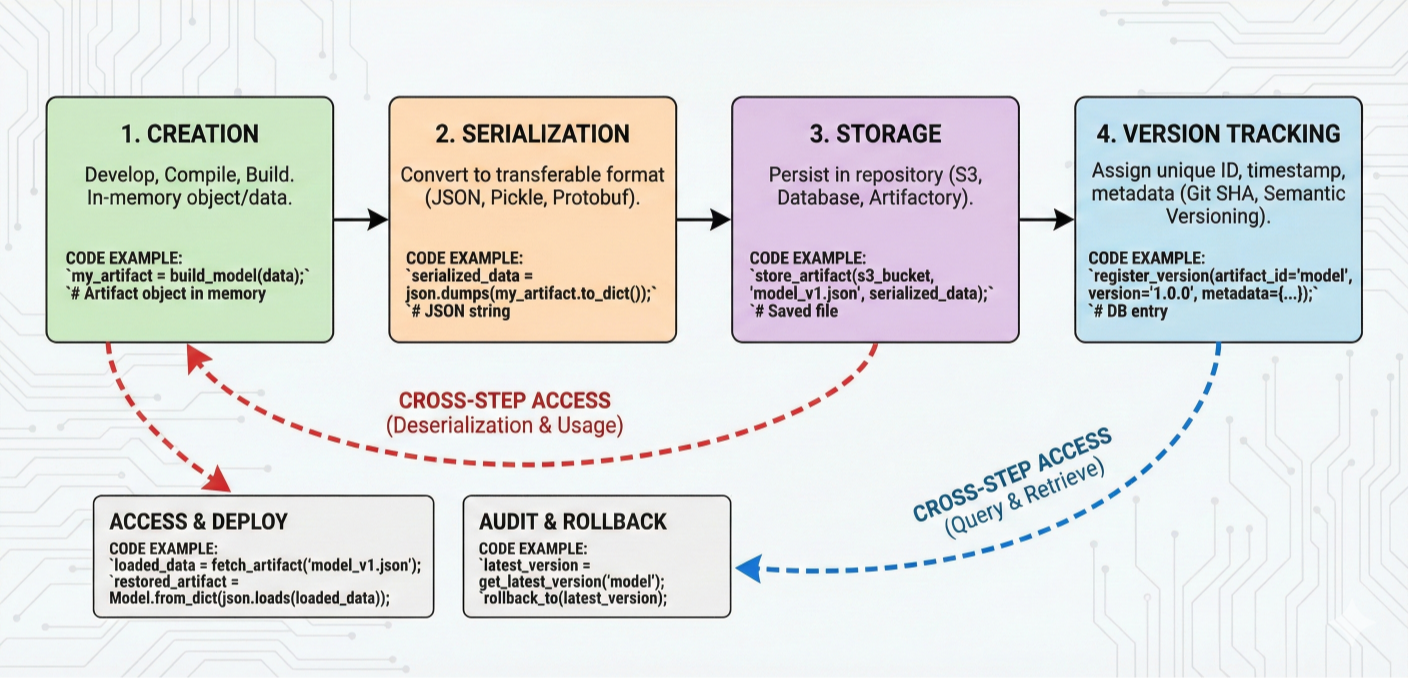
Detailed diagram showing artifact lifecycle: creation, serialization, storage, version tracking, and cross-step access with code examples
Getting started with Metaflow is remarkably straightforward. The framework is designed to work immediately on your laptop without requiring any infrastructure:
# Basic installation
pip install metaflow

# Verify installation
python -c "from metaflow import FlowSpec; print('Metaflow installed successfully!')"
For development environments with specific requirements:
# Install with specific Python version management
conda create -n metaflow-env python=3.9
conda activate metaflow-env
pip install metaflow

# Development installation with additional tools
pip install metaflow[dev]
Create this test to ensure everything works correctly:
# test_installation.py
from metaflow import FlowSpec, step, Parameter
import sys
import platform

class InstallationTestFlow(FlowSpec):
    """Test flow to verify Metaflow installation and basic functionality."""

    message = Parameter('message',
                        help='Test message to pass through workflow',
                        default='Hello Metaflow!')

    @step
    def start(self):
        """Test basic functionality and environment info."""
        print(f"✅ Metaflow is working!")
        print(f"Python version: {sys.version}")
        print(f"Platform: {platform.system()} {platform.release()}")
        print(f"Test message: {self.message}")

        # Test artifact creation
        self.system_info = {
            'python_version': sys.version,
            'platform': platform.system(),
            'message': self.message
        }
        self.next(self.process)

    @step
    def process(self):
        """Test artifact passing between steps."""
        print(f"Received system info: {self.system_info}")
        print("✅ Artifact passing works!")

        # Test simple data processing
        self.processed_data = [i**2 for i in range(5)]
        print(f"Processed data: {self.processed_data}")
        self.next(self.end)

    @step
    def end(self):
        """Finalize test."""
        print("✅ Installation test completed successfully!")
        print(f"Final artifact check: {len(self.processed_data)} items processed")

if __name__ == '__main__':
    InstallationTestFlow()
Run the test:
python test_installation.py run
For serious development work, set up a comprehensive local environment:
# Create project directory structure
mkdir metaflow-project && cd metaflow-project
mkdir -p {flows,data,notebooks,config,tests}

# Initialize git and set up .gitignore
git init
cat > .gitignore << EOF
# Metaflow artifacts
.metaflow/
metaflow_profile.json
# Python
__pycache__/
*.py[cod]
*$py.class
*.egg-info/
dist/
build/
# Data files
data/raw/
data/processed/
*.csv
*.parquet
# Jupyter
.ipynb_checkpoints/
# Environment
.env
.venv/
venv/
EOF

# Set up development environment
python -m venv venv
source venv/bin/activate # On Windows: venv\Scripts\activate
pip install metaflow jupyter pandas scikit-learn matplotlib seaborn
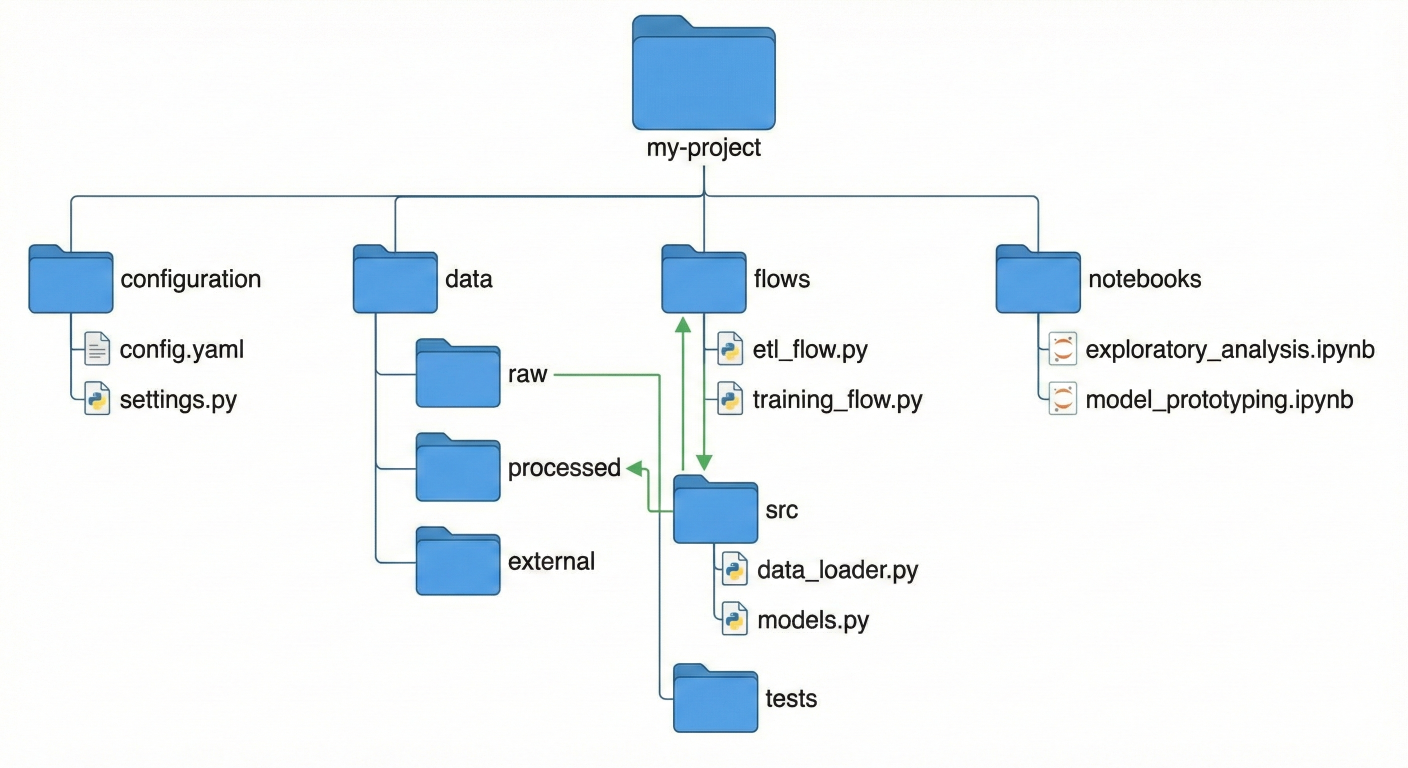
Directory structure diagram showing recommended project organization with flows, data, notebooks, and configuration folders
When you're ready to scale beyond your laptop, Metaflow provides multiple cloud deployment options:
The fastest way to get Metaflow running on AWS:
# Install AWS CLI and configure credentials
pip install awscli
aws configure

# Deploy Metaflow infrastructure using CloudFormation
# This creates S3 bucket, Batch compute environment, and metadata service
metaflow configure aws

# Test cloud deployment
metaflow status
For production environments, you'll want more control over the deployment:
S3 for Data Storage: All artifacts, including intermediate data and models, are stored in versioned S3 buckets
AWS Batch for Compute: Scalable containerized compute that can spin up from 0 to thousands of instances
Metadata Service: Tracks all runs, experiments, and artifact lineage
Step Functions Integration: Production-grade workflow orchestration with automatic retries and monitoring
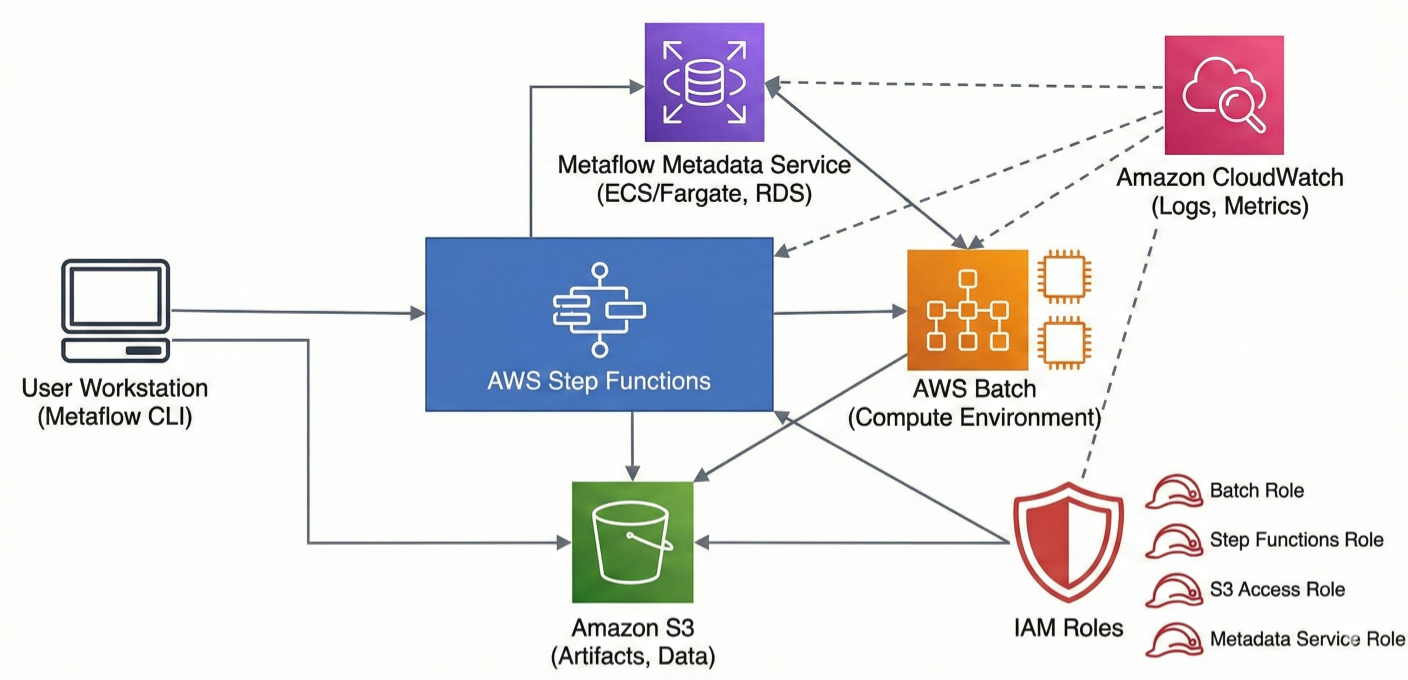
AWS architecture diagram showing complete Metaflow deployment with S3, Batch, metadata service, Step Functions, CloudWatch, and IAM roles
Metaflow's decorator system is where the framework truly shines. You can transform any Python function into a scalable, cloud-ready step with simple decorators that handle complex infrastructure concerns transparently.
from metaflow import FlowSpec, step, resources, batch, retry, timeout

class AdvancedResourceFlow(FlowSpec):

    @resources(memory=32000, cpu=8)
    @step
    def memory_intensive_step(self):
        """This step gets 32GB RAM and 8 CPUs automatically."""
        # Process large datasets that require significant memory
        import pandas as pd
        import numpy as np

        # Simulate memory-intensive operation
        large_array = np.random.random((10000, 10000))
        df = pd.DataFrame(large_array)

        # Perform complex aggregations
        self.results = {
            'mean': df.mean().mean(),
            'std': df.std().mean(),
            'memory_used': large_array.nbytes / 1e9  # GB
        }
        print(f"Processed {large_array.nbytes/1e9:.2f} GB of data")
        self.next(self.gpu_step)

    @batch(gpu=1, memory=16000, image='tensorflow/tensorflow:latest-gpu')
    @step
    def gpu_step(self):
        """This step runs on AWS Batch with a GPU and TensorFlow."""
        import tensorflow as tf
        print(f"GPU available: {tf.config.list_physical_devices('GPU')}")

        # Simulate GPU computation
        with tf.device('/GPU:0'):
            a = tf.random.normal([1000, 1000])
            b = tf.random.normal([1000, 1000])
            result = tf.matmul(a, b)

        self.gpu_computation_result = {
            'matrix_size': [1000, 1000],
            'result_mean': float(tf.reduce_mean(result)),
            'gpu_used': len(tf.config.list_physical_devices('GPU')) > 0
        }
        self.next(self.resilient_step)

    @retry(times=3)
    @timeout(seconds=300)
    @step
    def resilient_step(self):
        """This step automatically retries on failure and has a timeout."""
        import random
        import time

        # Simulate potentially flaky external API call
        if random.random() < 0.3:
            raise Exception("Simulated API failure")

        # Simulate work
        time.sleep(2)
        self.api_result = {
            'status': 'success',
            'data_retrieved': True,
            'timestamp': time.time()
        }
        print("Successfully completed resilient operation")
        self.next(self.end)

    @step
    def end(self):
        print("Advanced resource flow completed!")
from metaflow import FlowSpec, step, conda, pypi

class DependencyManagementFlow(FlowSpec):

    @conda(libraries={'tensorflow': '2.13.0', 'pandas': '1.5.0', 'scikit-learn': '1.3.0'})
    @step
    def conda_step(self):
        """This step runs with specific conda environment."""
        import tensorflow as tf
        import pandas as pd
        from sklearn.ensemble import RandomForestClassifier

        print(f"TensorFlow version: {tf.__version__}")
        print(f"Pandas version: {pd.__version__}")

        # These exact versions are guaranteed to be available
        self.env_info = {
            'tensorflow_version': tf.__version__,
            'pandas_version': pd.__version__
        }

        self.next(self.pypi_step)

    @pypi(packages={'requests': '2.31.0', 'beautifulsoup4': '4.12.2'})
    @step
    def pypi_step(self):
        """This step uses PyPI packages."""
        import requests
        from bs4 import BeautifulSoup

        # Make HTTP request with exact package versions
        response = requests.get('https://httpbin.org/json')
        self.web_data = {
            'status_code': response.status_code,
            'content_length': len(response.text),
            'requests_version': requests.__version__
        }
        print(f"Web request completed: {response.status_code}")

        self.next(self.end)

    @step
    def end(self):
        print("Dependency management flow completed!")
        print(f"Environment info: {self.env_info}")
        print(f"Web data: {self.web_data}")
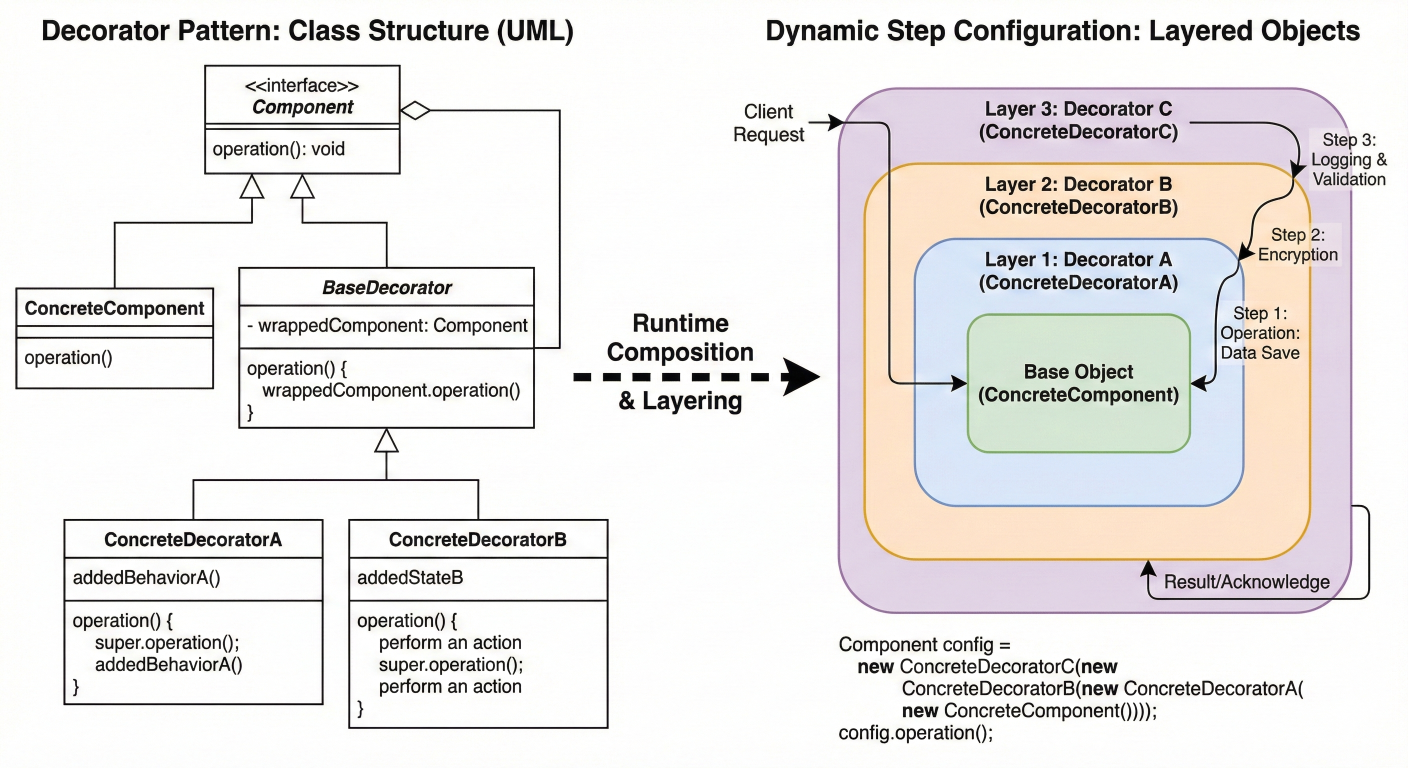
Diagram showing decorator layering and how different decorators compose to create comprehensive step configurations
One of Metaflow's most powerful features is its sophisticated support for parallel execution:
# Simulate varying processing times import time processing_time = np.random.uniform(1, 5) time.sleep(processing_time) self.processing_time = processing_time print(f"Completed {dataset['id']} in {processing_time:.1f}s") self.next(self.join_results) @step def join_results(self, inputs): """Combine results from all parallel branches.""" print("Joining results from parallel processing...") # Collect all results self.all_results = [] total_processing_time = 0 for input_task in inputs: self.all_results.append(input_task.analysis_result) total_processing_time += input_task.processing_time # Create summary statistics self.summary = { 'total_datasets': len(self.all_results), 'total_processing_time': total_processing_time, 'average_processing_time': total_processing_time / len(self.all_results), 'total_samples_processed': sum(r['original_size'] for r in self.all_results), 'overall_mean': np.mean([r['mean'] for r in self.all_results]), 'total_outliers': sum(r['outliers'] for r in self.all_results)}print(f"Processed {self.summary['total_samples_processed']} total samples")print(f"Found {self.summary['total_outliers']} outliers across all datasets")print(f"Average processing time: {self.summary['average_processing_time']:.2f}s") self.next(self.end) @step def end(self): print("Parallel processing completed!") print(f"Summary: {self.summary}")
class ConditionalBranchingFlow(FlowSpec):
    @step
    def start(self):
        """Analyze data to determine processing path."""
        # Simulate data quality assessment
        import random
        self.data_quality_score = random.uniform(0, 1)
        self.data_size = random.randint(1000, 100000)
        print(f"Data quality score: {self.data_quality_score:.3f}")
        print(f"Data size: {self.data_size}")
        # Branch based on data characteristics
        if self.data_quality_score > 0.8:
            self.next(self.high_quality_processing)
        elif self.data_quality_score > 0.5:
            self.next(self.standard_processing)
        else:
            self.next(self.data_cleaning_required)

    @step
    def high_quality_processing(self):
        """Process high-quality data with advanced algorithms."""
        print("Using advanced processing for high-quality data")
        self.processing_method = "advanced_ml"
        self.confidence_level = 0.95
        self.next(self.finalize_processing)

    @step
    def standard_processing(self):
        """Standard processing for medium-quality data."""
        print("Using standard processing")
        self.processing_method = "standard_ml"
        self.confidence_level = 0.85
        self.next(self.finalize_processing)

    @step
    def data_cleaning_required(self):
        """Clean and preprocess poor-quality data."""
        print("Data cleaning required before processing")
        self.processing_method = "cleaned_then_standard"
        self.confidence_level = 0.75
        # Simulate data cleaning
        self.cleaning_applied = True
        print("Data cleaning completed")
        self.next(self.finalize_processing)

    @step
    def finalize_processing(self, inputs):
        """Finalize processing regardless of which branch was taken."""
        # Note: inputs parameter handles multiple possible predecessor steps
        self.final_result = {
            'original_quality_score': self.data_quality_score,
            'processing_method': self.processing_method,
            'confidence_level': self.confidence_level,
            'data_size': self.data_size
        }
        if hasattr(self, 'cleaning_applied'):
            self.final_result['cleaning_applied'] = True
        print(f"Processing completed using: {self.processing_method}")
        print(f"Final confidence: {self.confidence_level}")
        self.next(self.end)

    @step
    def end(self):
        print("Conditional branching flow completed!")
        print(f"Final result: {self.final_result}")
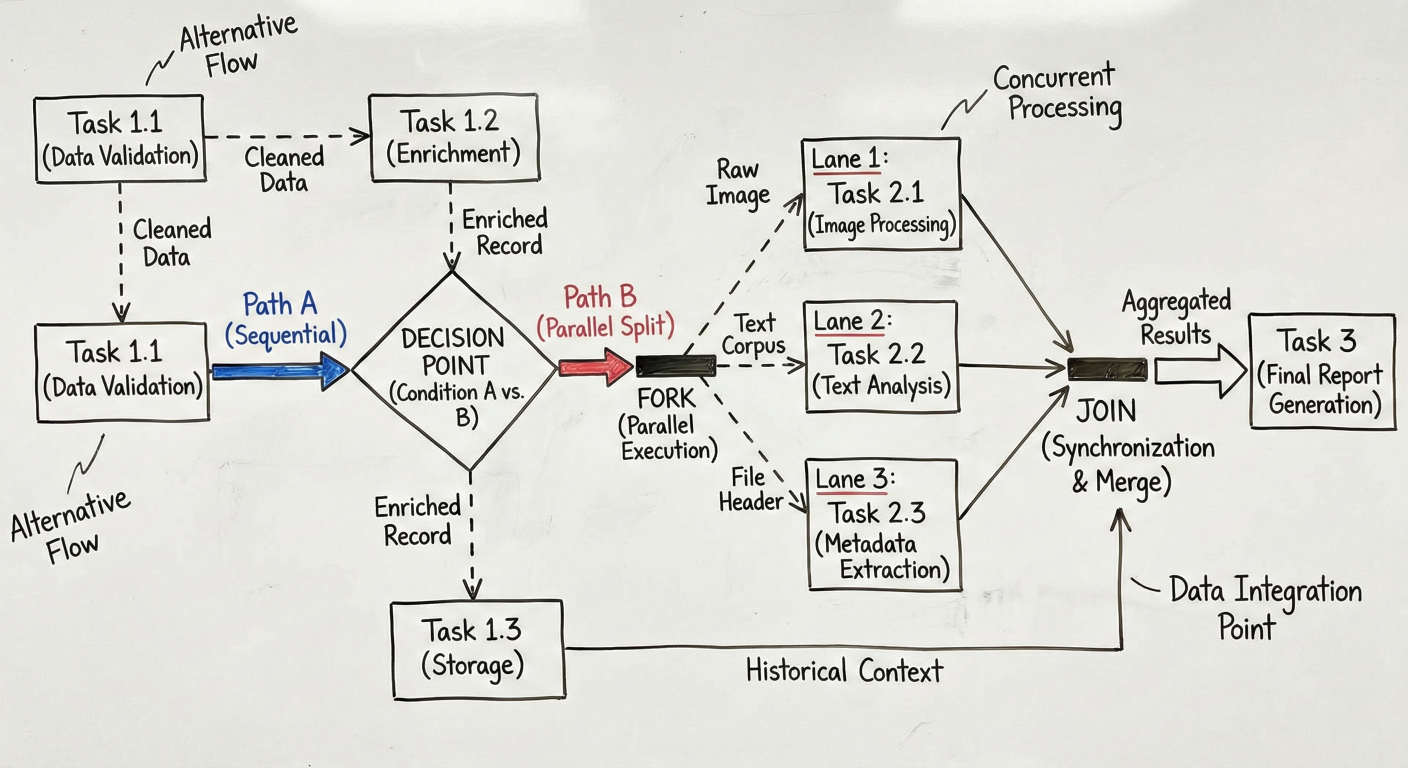
Complex branching diagram showing conditional paths, parallel execution, and join patterns with data flow annotations
One of Metaflow's biggest competitive advantages is the seamless transition from development to production. The same code that runs on your laptop can be deployed to production orchestrators with minimal changes – a capability that sets it apart from competitors.
AWS Step Functions provides a fully managed, highly available production environment:
# Deploy your flow to Step Functions
python production_ml_flow.py step-functions create

# Schedule the flow to run daily at 2 AM
python production_ml_flow.py step-functions create --schedule "cron(0 2 * * ? *)"

# Deploy with specific IAM role and resource tags
python production_ml_flow.py step-functions create \
--role arn:aws:iam::123456789012:role/MetaflowRole \
--tag project=ml-pipeline \
--tag environment=production
This single command:
For teams using Kubernetes infrastructure:
# Deploy to Kubernetes with Argo Workflows
python production_ml_flow.py argo-workflows create

# Deploy with specific resource quotas and namespaces
python production_ml_flow.py argo-workflows create \
--namespace production-ml \
--cpu-limit 10 \
--memory-limit 50Gi
Benefits of Kubernetes deployment:
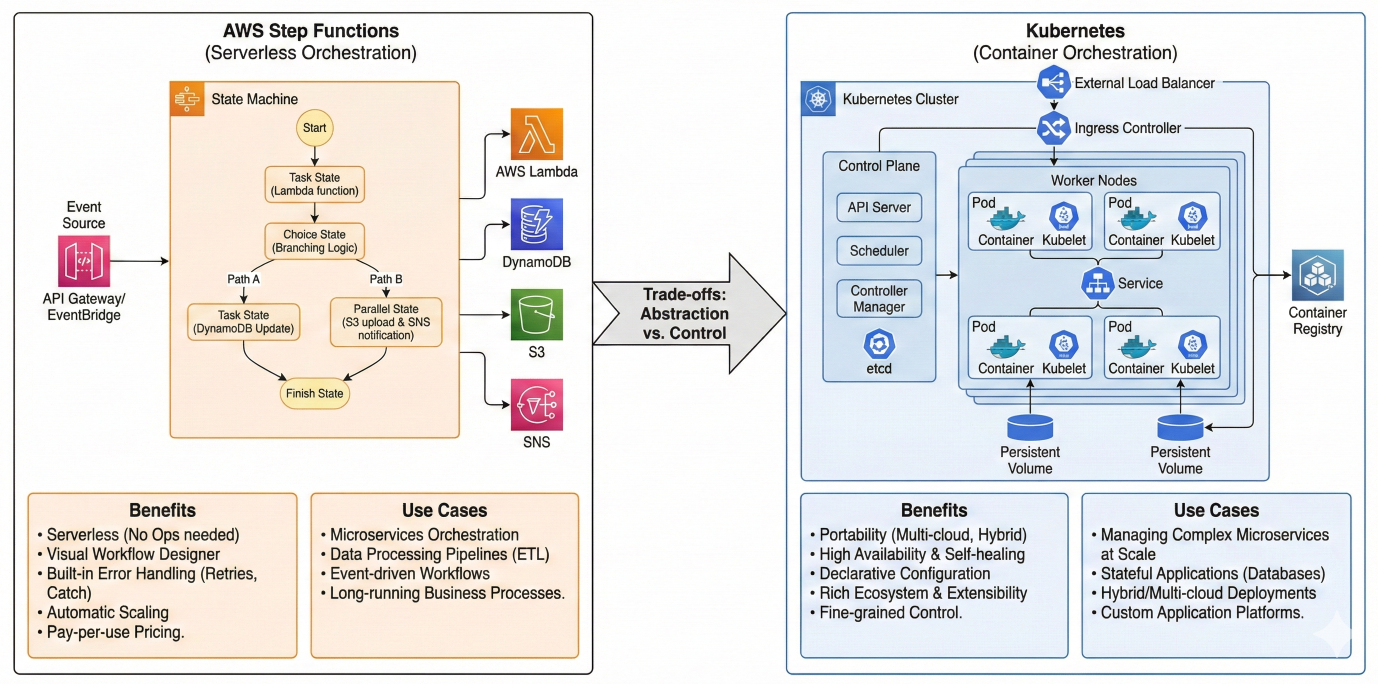
Production architecture diagram comparing Step Functions vs Kubernetes deployment options with their respective benefits and use cases
Netflix recently introduced a powerful configuration system that separates infrastructure concerns from business logic:
# config.toml
[model]
type = "random_forest"
n_estimators = 100
max_depth = 10

[data]
source = "s3://production-data/latest/"
batch_size = 1000

[resources]
memory = 16000
cpu = 4

[schedule]
cron = "0 2 * * ? *" # Daily at 2 AM

[alerts]
slack_webhook = "https://hooks.slack.com/services/..."
email_recipients = ["team@company.com"]
from metaflow import FlowSpec, step, Config, resources, schedule, config_expr

# Use configuration in decorators and flow logic
@schedule(cron=config_expr("config.schedule.cron"))
class ConfigurableMLFlow(FlowSpec):
    config = Config("config", default="config.toml", parser=tomllib.loads)

    @resources(memory=config.resources.memory, cpu=config.resources.cpu)
    @step
    def start(self):
        print(f"Model type: {self.config.model.type}")
        print(f"Data source: {self.config.data.source}")
        # Configuration is available throughout the flow
        self.model_config = dict(self.config.model)
        self.next(self.load_data)

    @step
    def load_data(self):
        """Load data using configuration parameters."""
        data_source = self.config.data.source
        batch_size = self.config.data.batch_size
        print(f"Loading data from {data_source} in batches of {batch_size}")
        # Implementation details...
        self.next(self.train_model)

    @step
    def train_model(self):
        """Train model using configuration parameters."""
        model_type = self.config.model.type
        if model_type == "random_forest":
            from sklearn.ensemble import RandomForestClassifier
            self.model = RandomForestClassifier(
                n_estimators=self.config.model.n_estimators,
                max_depth=self.config.model.max_depth
            )
        # Training logic...
        self.next(self.end)

    @step
    def end(self):
        # Send alerts using configuration
        slack_webhook = self.config.alerts.slack_webhook
        if slack_webhook:
            self.send_completion_notification(slack_webhook)

    def send_completion_notification(self, webhook):
        """Send Slack notification about completion."""
        import requests
        message = {"text": f"ML Pipeline completed successfully! Model: {self.config.model.type}"}
        requests.post(webhook, json=message)
For enterprise deployments, use environment-specific configurations:
# Development environment
python flow.py --config-file dev-config.toml run

# Staging environment
python flow.py --config-file staging-config.toml argo-workflows create --namespace stagin

# Production environment
python flow.py --config-file prod-config.toml step-functions create
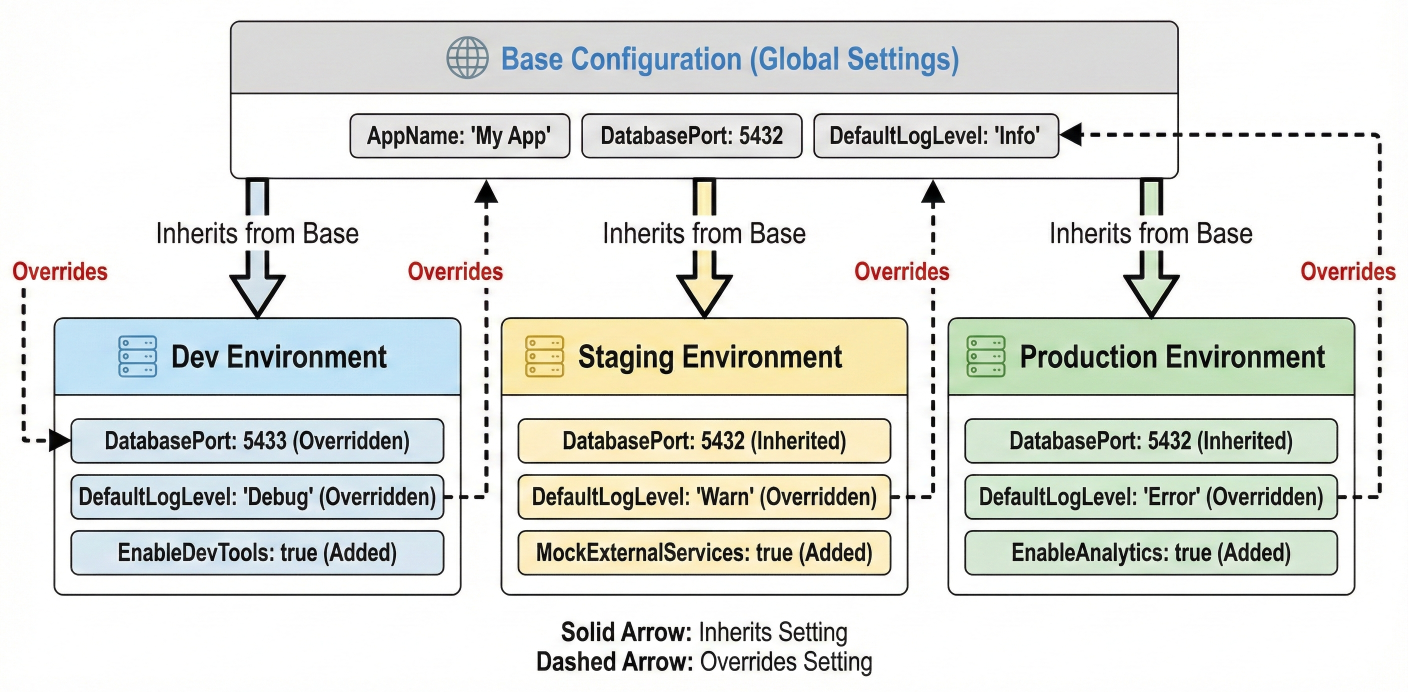
Configuration hierarchy diagram showing how dev, staging, and production configs inherit and override base settings
Implement structured logging throughout your workflows:
import logging
import json
from datetime import datetime
from metaflow import FlowSpec, step, current

# Configure structured logging
class StructuredLogger:
    def __init__(self, name):
        self.logger = logging.getLogger(name)
        handler = logging.StreamHandler()
        formatter = logging.Formatter(
            '{"timestamp": "%(asctime)s", "level": "%(levelname)s", '
            '"logger": "%(name)s", "message": %(message)s}'
        )
        handler.setFormatter(formatter)
        self.logger.addHandler(handler)
        self.logger.setLevel(logging.INFO)

    def log_structured(self, level, message, **kwargs):
        """Log structured data as JSON."""
        log_data = {
            "message": message,
            "flow_name": getattr(current, 'flow_name', 'unknown'),
            "run_id": getattr(current, 'run_id', 'unknown'),
            "step_name": getattr(current, 'step_name', 'unknown'),
            "task_id": getattr(current, 'task_id', 'unknown'),
            **kwargs
        }
        getattr(self.logger, level)(json.dumps(log_data))

class MonitoredMLFlow(FlowSpec):
    def __init__(self):
        super().__init__()
        self.logger = StructuredLogger(self.__class__.__name__)

    @step
    def start(self):
        self.logger.log_structured(
            "info",
            "Flow started",
            data_size=10000,
            environment="production"
        )
        # Track performance metrics
        import time
        self.start_time = time.time()
        self.next(self.process_data)

    @step
    def process_data(self):
        import time
        # Simulate data processing with monitoring
        step_start = time.time()
        try:
            # Simulate processing
            processed_records = 10000
            time.sleep(2)  # Simulate work
            step_duration = time.time() - step_start
            self.logger.log_structured(
                "info",
                "Data processing completed",
                records_processed=processed_records,
                processing_time_seconds=step_duration,
                throughput_records_per_second=processed_records / step_duration
            )
        except Exception as e:
            self.logger.log_structured(
                "error",
                "Data processing failed",
                error_message=str(e),
                error_type=type(e).__name__
            )
            raise
        self.next(self.end)

    @step
    def end(self):
        total_duration = time.time() - self.start_time
        self.logger.log_structured(
            "info",
            "Flow completed",
            total_duration_seconds=total_duration,
            status="success"
        )
Create custom HTML reports that integrate with your monitoring systems:
from metaflow import FlowSpec, step, card
from metaflow.cards import Markdown, Table, Image
import matplotlib.pyplot as plt
import pandas as pd
import base64
from io import BytesIO

class ReportingFlow(FlowSpec):
    @card(type='default')
    @step
    def start(self):
        """Generate comprehensive performance report."""

        # Create sample performance data
        dates = pd.date_range('2024-01-01', periods=30, freq='D')
        performance_data = pd.DataFrame({
            'date': dates,
            'accuracy': 0.85 + 0.1 * np.random.randn(30).cumsum() / 30,
            'throughput': 1000 + 100 * np.random.randn(30),
            'latency': 50 + 10 * np.random.randn(30)
        })

        # Generate performance plots
        fig, axes = plt.subplots(2, 2, figsize=(12, 10))
        fig.suptitle('ML Model Performance Dashboard', fontsize=16)

        # Accuracy over time
        axes[0,0].plot(performance_data['date'], performance_data['accuracy'])
        axes[0,0].set_title('Model Accuracy Trend')
        axes[0,0].set_ylabel('Accuracy')

        # Throughput distribution
        axes[0,1].hist(performance_data['throughput'], bins=15, alpha=0.7)
        axes[0,1].set_title('Throughput Distribution')
        axes[0,1].set_xlabel('Records/Hour')

        # Latency over time
        axes[1,0].plot(performance_data['date'], performance_data['latency'], color='red')
        axes[1,0].set_title('Response Latency')
        axes[1,0].set_ylabel('Latency (ms)')

        # Performance correlation
        axes[1,1].scatter(performance_data['accuracy'], performance_data['latency'], alpha=0.6)
        axes[1,1].set_title('Accuracy vs Latency')
        axes[1,1].set_xlabel('Accuracy')
        axes[1,1].set_ylabel('Latency (ms)')

        plt.tight_layout()

        # Convert plot to base64 for embedding
        buffer = BytesIO()
        plt.savefig(buffer, format='png', dpi=150, bbox_inches='tight')
        buffer.seek(0)
        plot_data = base64.b64encode(buffer.getvalue()).decode()
        plt.close()

        # Create performance summary table
        summary_stats = performance_data.describe().round(3)

        # Build rich HTML report using Metaflow cards
        current.card.append(Markdown("# ML Model Performance Report"))
        current.card.append(Markdown(f"**Report Generated:** {datetime.now().strftime('%Y-%m-%d %H:%M:%S')}"))
        current.card.append(Markdown("## Key Metrics Summary"))
        current.card.append(Table([
            ["Metric", "Current", "Target", "Status"],
            ["Average Accuracy", f"{performance_data['accuracy'].mean():.3f}", "0.850", "✓"],
            ["Average Throughput", f"{performance_data['throughput'].mean():.0f}", "1000", "✓"],
            ["Average Latency", f"{performance_data['latency'].mean():.1f}ms", "<60ms", "✓"]
        ]))
        current.card.append(Markdown("## Performance Trends"))
        current.card.append(Image.from_matplotlib(fig))
        current.card.append(Markdown("## Detailed Statistics"))
        current.card.append(Table.from_dataframe(summary_stats))

        # Store data for further processing
        self.performance_data = performance_data.to_dict('records')
        self.summary_metrics = {
            'avg_accuracy': float(performance_data['accuracy'].mean()),
            'avg_throughput': float(performance_data['throughput'].mean()),
            'avg_latency': float(performance_data['latency'].mean()),
            'report_generated': datetime.now().isoformat()
        }
        self.next(self.end)

    @step
    def end(self):
        print("Performance report generated successfully!")
        print(f"Summary metrics: {self.summary_metrics}")
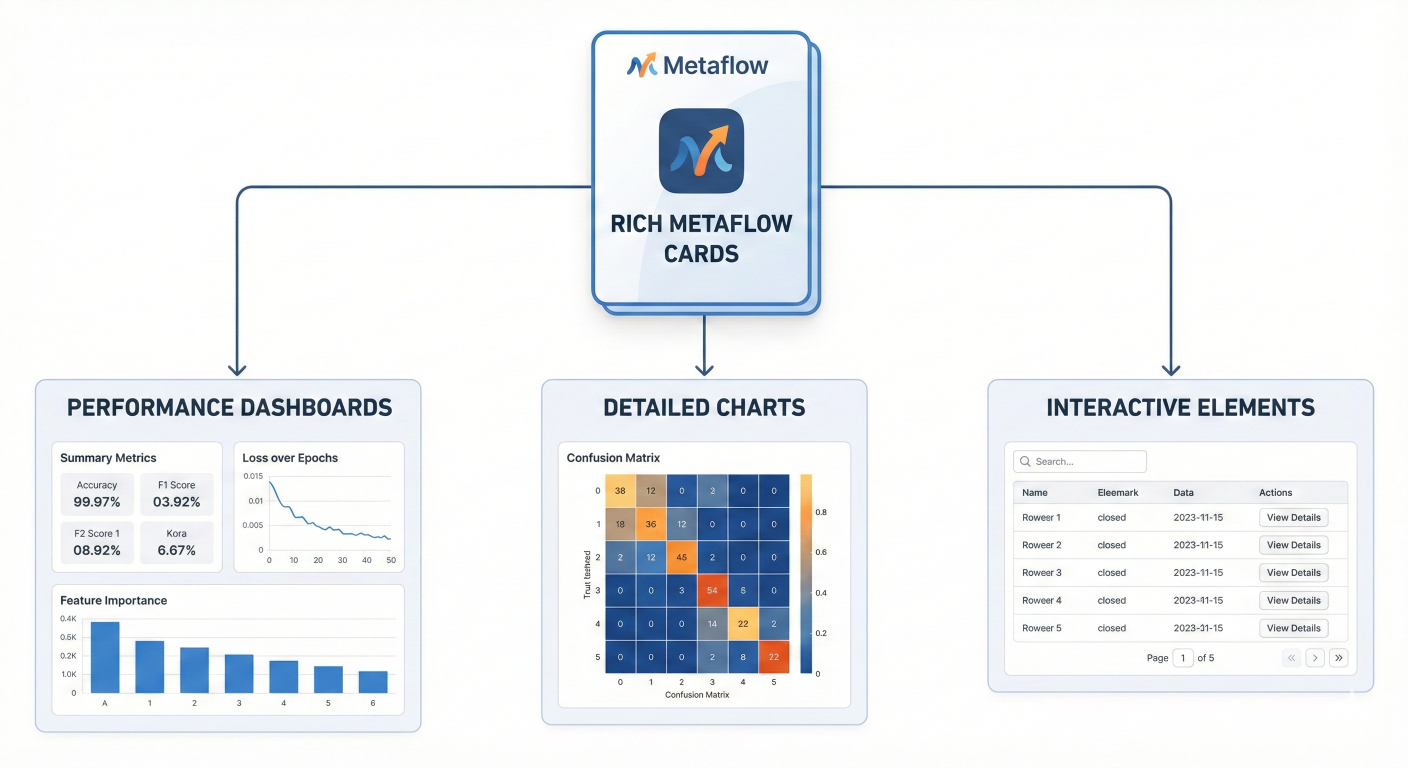
Screenshot examples of rich Metaflow cards showing performance dashboards, charts, and interactive elements
Metaflow provides enterprise-grade secrets management through the @secrets decorator:
from metaflow import FlowSpec, step, secrets
import os

class SecureDataFlow(FlowSpec):

    @secrets(sources=['database-credentials', 'api-keys'])
    @step
    def start(self):
        """Access external services using securely managed credentials."""
        # Credentials are automatically available as environment variables
        db_host = os.environ['DB_HOST']
        db_user = os.environ['DB_USER']
        db_password = os.environ['DB_PASSWORD']
        api_key = os.environ['API_KEY']

        print(f"Connecting to database at {db_host} as {db_user}")
        print(f"API key available: {'*' * len(api_key)}")

        # Use credentials to connect to services
        self.db_connection = self.create_secure_connection(db_host, db_user, db_password)
        self.api_client = self.create_api_client(api_key)
        self.next(self.process_secure_data)

    def create_secure_connection(self, host, user, password):
        """Create secure database connection."""
        # In production, use proper database connection libraries
        return {'host': host, 'user': user, 'connected': True}

    def create_api_client(self, api_key):
        """Create authenticated API client."""
        return {'api_key_hash': hash(api_key), 'authenticated': True}

    @step
    def process_secure_data(self):
        """Process data using secure connections."""
        print(f"Database connected: {self.db_connection['connected']}")
        print(f"API authenticated: {self.api_client['authenticated']}")
        # Process sensitive data...
        self.processed_records = 5000
        self.next(self.end)

    @step
    def end(self):
        print(f"Securely processed {self.processed_records} records")
# Store secrets in AWS Secrets Manager
aws secretsmanager create-secret \
    --name database-credentials \
    --secret-string '{"DB_HOST":"prod-db.company.com","DB_USER":"ml_service","DB_PASSWORD":"secure_password_123"}'

aws secretsmanager create-secret \
    --name api-keys \
    --secret-string '{"API_KEY":"sk-1234567890abcdef"}'

# Deploy flow with secrets access
python secure_flow.py --with 'secrets:sources=["database-credentials","api-keys"]' step-functions create
Metaflow provides sophisticated team collaboration features through namespaces:
# Different team members can work in isolated namespaces
export METAFLOW_USER_NAMESPACE="alice"
python ml_flow.py run

export METAFLOW_USER_NAMESPACE="bob"
python ml_flow.py run

# Production namespace for deployed flows
export METAFLOW_USER_NAMESPACE="production"
python ml_flow.py step-functions create
from metaflow import FlowSpec, step, namespace

@namespace("ml-experiments")
class ExperimentFlow(FlowSpec):
    """Flow isolated to the ml-experiments namespace."""

    @step
    def start(self):
        # This run is isolated from other namespaces
        print(f"Running in namespace: {current.namespace}")
        self.next(self.end)

    @step
    def end(self):
        pass

# Query runs from specific namespaces
from metaflow import Flow, namespace

# Access production runs
with namespace("production"):
    production_runs = Flow('MLPipeline').runs()

# Access experiment runs
with namespace("ml-experiments"):
    experiment_runs = Flow('ExperimentFlow').runs()
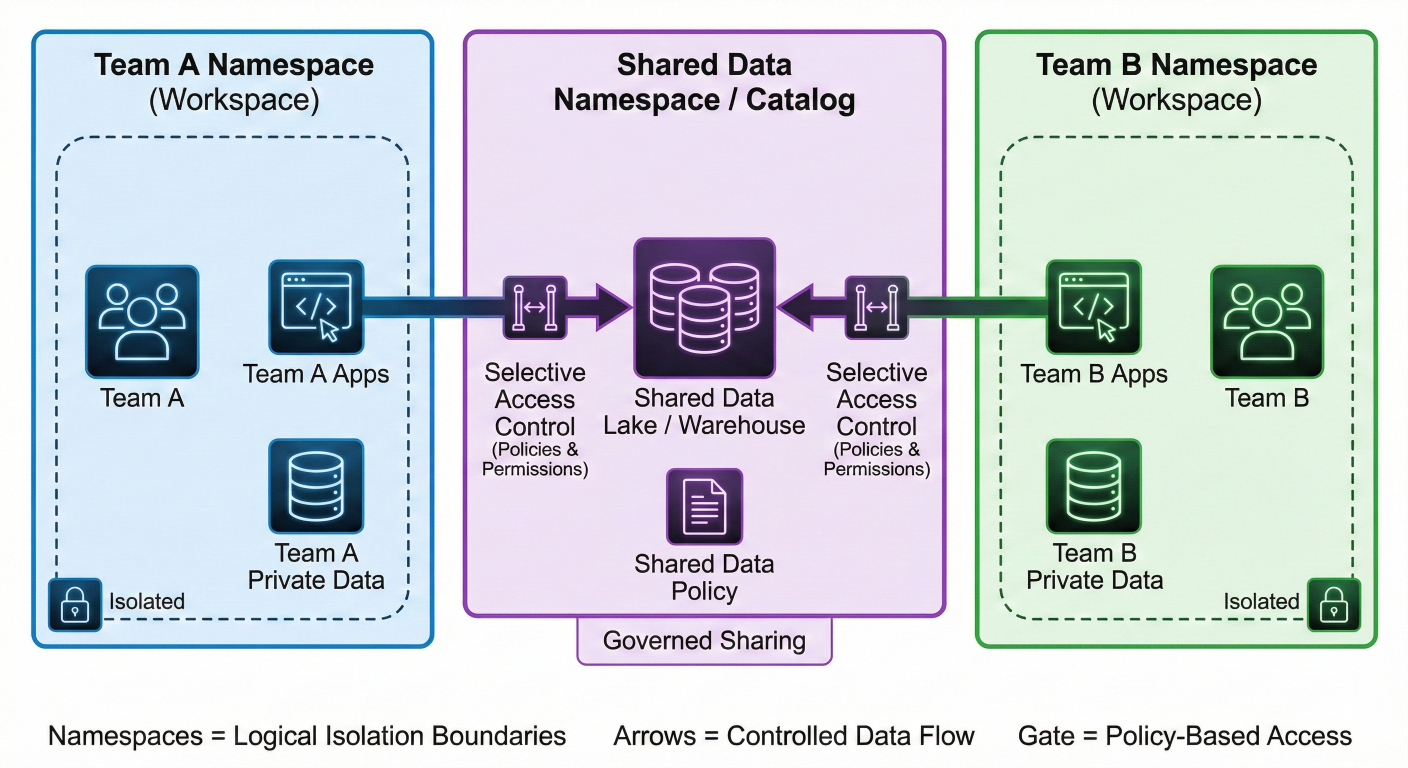
Team collaboration diagram showing how namespaces isolate different team workspaces while enabling selective data sharing
Metaflow provides powerful debugging capabilities that work both locally and in production:
# If a flow fails at step 'train_model', fix the code and resume
python ml_flow.py resume --step train_model

# Resume with different parameters
python ml_flow.py resume --step train_model --model-type xgboost

# Resume and run only specific steps for testing
python ml_flow.py resume --step train_model --step evaluate_model
Create a debugging notebook that can access any flow run's artifacts:
# debug_notebook.ipynb
%load_ext autoreload
%autoreload 2

from metaflow import Flow, get_metadata
import pandas as pd

# Access the latest run of your flow
latest_run = Flow('ProductionMLFlow').latest_run

# Access any artifact from any step
training_data = latest_run['preprocess_data'].task.data.X_train
model = latest_run['train_model'].task.data.model
metrics = latest_run['evaluate_model'].task.data.metrics

# Debug interactively
print(f"Training data shape: {training_data.shape}")
print(f"Model type: {type(model)}")
print(f"Model accuracy: {metrics['test_accuracy']}")

# Test model predictions interactively
sample_predictions = model.predict(training_data[:10])
print(f"Sample predictions: {sample_predictions}")

# Access artifacts from specific run IDs
specific_run = Flow('ProductionMLFlow')['123']
historical_metrics = specific_run['evaluate_model'].task.data.metrics
from metaflow import FlowSpec, step, catch, retry
import logging

class RobustMLFlow(FlowSpec):

    @retry(times=3, minutes_between_retries=5)
    @catch(var='api_error')
    @step
    def fetch_external_data(self):
        """Fetch data from external API with robust error handling."""

        try:
            # Simulate API call that might fail
            import random
            if random.random() < 0.3:
                raise ConnectionError("API temporarily unavailable")

            # Simulate successful data fetch
            self.external_data = {
                'records': 10000,
                'timestamp': pd.Timestamp.now().isoformat(),
                'source': 'external_api'
            }

            logging.info(f"Successfully fetched {self.external_data['records']} records")

        except Exception as e:
            logging.error(f"Failed to fetch external data: {str(e)}")

            # Fallback to cached data
            self.external_data = {
                'records': 8000,
                'timestamp': pd.Timestamp.now().isoformat(),
                'source': 'cached_fallback'
            }

            logging.info("Using cached fallback data")

        self.next(self.validate_data)

    @step
    def validate_data(self):
        """Validate data quality with comprehensive checks."""

        # Check if we encountered API errors
        if hasattr(self, 'api_error') and self.api_error:
            logging.warning(f"API error occurred: {self.api_error}")

        # Perform data validation
        validation_results = {
            'data_source': self.external_data['source'],
            'record_count': self.external_data['records'],
            'is_fallback': self.external_data['source'] == 'cached_fallback',
            'quality_score': 0.9 if self.external_data['source'] == 'external_api' else 0.7
        }

        # Fail fast if data quality is too low
        if validation_results['quality_score'] < 0.5:
            raise ValueError(f"Data quality too low: {validation_results['quality_score']}")

        self.validation_results = validation_results
        logging.info(f"Data validation passed: {validation_results}")

        self.next(self.end)

    @step
    def end(self):
        print("Robust flow completed successfully!")
        print(f"Final validation: {self.validation_results}")
# tests/test_ml_flow.py
import pytest
import pandas as pd
import numpy as np
from unittest.mock import Mock, patch
from metaflow import FlowSpec
from flows.production_ml_flow import ProductionMLFlow

class TestProductionMLFlow:

    def test_data_loading_step(self):
        """Test data loading functionality."""
        flow = ProductionMLFlow()

        # Mock the step execution
        flow.random_seed = 42
        flow.load_data()

        # Validate outputs
        assert hasattr(flow, 'raw_data')
        assert isinstance(flow.raw_data, pd.DataFrame)
        assert len(flow.raw_data) > 0
        assert 'target' in flow.raw_data.columns
        assert flow.data_quality['n_rows'] == len(flow.raw_data)

    def test_preprocessing_step(self):
        """Test data preprocessing logic."""
        flow = ProductionMLFlow()

        # Set up mock data
        flow.raw_data = pd.DataFrame({
            'feature_1': np.random.normal(0, 1, 100),
            'feature_2': np.random.normal(2, 1.5, 100),
            'feature_3': np.random.exponential(2, 100),
            'feature_4': np.random.uniform(0, 10, 100),
            'target': np.random.choice([0, 1], 100)
        })
        flow.test_size = 0.2
        flow.random_seed = 42

        flow.preprocess_data()

        # Validate preprocessing outputs
        assert hasattr(flow, 'X_train')
        assert hasattr(flow, 'X_test')
        assert hasattr(flow, 'y_train')
        assert hasattr(flow, 'y_test')

        # Check feature engineering
        assert 'feature_interaction' in flow.processed_data.columns
        assert 'feature_ratio' in flow.processed_data.columns

        # Validate split ratios
        total_samples = len(flow.X_train) + len(flow.X_test)
        test_ratio = len(flow.X_test) / total_samples
        assert abs(test_ratio - flow.test_size) < 0.05  # Allow small variance

    @patch('sklearn.ensemble.RandomForestClassifier.fit')
    def test_model_training_step(self, mock_fit):
        """Test model training with mocked sklearn."""
        flow = ProductionMLFlow()

        # Set up minimal required data
        flow.model_type = 'random_forest'
        flow.random_seed = 42
        flow.X_train = pd.DataFrame(np.random.randn(100, 4))
        flow.y_train = pd.Series(np.random.choice([0, 1], 100))

        # Mock the model fitting
        mock_model = Mock()
        mock_model.feature_importances_ = np.array([0.3, 0.2, 0.3, 0.2])
        mock_fit.return_value = mock_model

        flow.train_model()

        # Validate training process
        assert hasattr(flow, 'model')
        assert hasattr(flow, 'training_time')
        assert hasattr(flow, 'feature_importance')
        assert flow.training_time > 0
# Integration test for full flow execution
class TestFlowIntegration:

    def test_full_flow_execution(self):
        """Test complete flow execution."""
        from metaflow import Flow

        # Run the flow programmatically
        flow = ProductionMLFlow()

        # Set parameters for testing
        flow.model_type = 'random_forest'
        flow.test_size = 0.2
        flow.random_seed = 42

        # Execute all steps
        try:
            flow.start()
            flow.load_data()
            flow.preprocess_data()
            flow.train_model()
            flow.evaluate_model()
            flow.prepare_deployment()
            flow.end()

            # Validate final state
            assert flow.deployment_ready is not None
            assert flow.metrics['test_accuracy'] > 0
            assert len(flow.workflow_summary) > 0

        except Exception as e:
            pytest.fail(f"Full flow execution failed: {str(e)}")

# Performance and load testing
class TestFlowPerformance:

    def test_memory_usage_stays_reasonable(self):
        """Test that memory usage doesn't explode."""
        import psutil
        import os

        process = psutil.Process(os.getpid())
        initial_memory = process.memory_info().rss / 1024 / 1024  # MB

        # Run flow multiple times
        for _ in range(5):
            flow = ProductionMLFlow()
            flow.model_type = 'random_forest'
            flow.random_seed = 42

            flow.start()
            flow.load_data()
            flow.preprocess_data()

            current_memory = process.memory_info().rss / 1024 / 1024  # MB
            memory_increase = current_memory - initial_memory

            # Memory shouldn't increase by more than 500MB per iteration
            assert memory_increase < 500, f"Memory usage increased by {memory_increase}MB"

# Run tests
if __name__ == "__main__":
    pytest.main([__file__, "-v"])
# tests/test_data_properties.py
import pytest
from hypothesis import given, strategies as st
import pandas as pd
import numpy as np
from flows.production_ml_flow import ProductionMLFlow

class TestDataProperties:

    @given(
        n_samples=st.integers(min_value=100, max_value=10000),
        test_size=st.floats(min_value=0.1, max_value=0.5),
        random_seed=st.integers(min_value=1, max_value=1000)
    )
    def test_preprocessing_preserves_data_properties(self, n_samples, test_size, random_seed):
        """Test that preprocessing maintains data integrity across parameter ranges."""

        flow = ProductionMLFlow()

        # Generate test data with known properties
        np.random.seed(random_seed)
        flow.raw_data = pd.DataFrame({
            'feature_1': np.random.normal(0, 1, n_samples),
            'feature_2': np.random.normal(2, 1.5, n_samples),
            'feature_3': np.random.exponential(2, n_samples),
            'feature_4': np.random.uniform(0, 10, n_samples),
            'target': np.random.choice([0, 1], n_samples)
        })

        flow.test_size = test_size
        flow.random_seed = random_seed

        flow.preprocess_data()

        # Property: Total samples should be preserved
        total_original = len(flow.raw_data)
        total_processed = len(flow.X_train) + len(flow.X_test)
        assert total_original == total_processed

        # Property: Test size ratio should be approximately correct
        actual_test_ratio = len(flow.X_test) / total_processed
        assert abs(actual_test_ratio - test_size) < 0.05

        # Property: No missing values should be introduced
        assert flow.X_train.isnull().sum().sum() == 0
        assert flow.X_test.isnull().sum().sum() == 0

        # Property: Feature engineering should add expected columns
        expected_features = ['feature_interaction', 'feature_ratio']
        for feature in expected_features:
            assert feature in flow.processed_data.columns
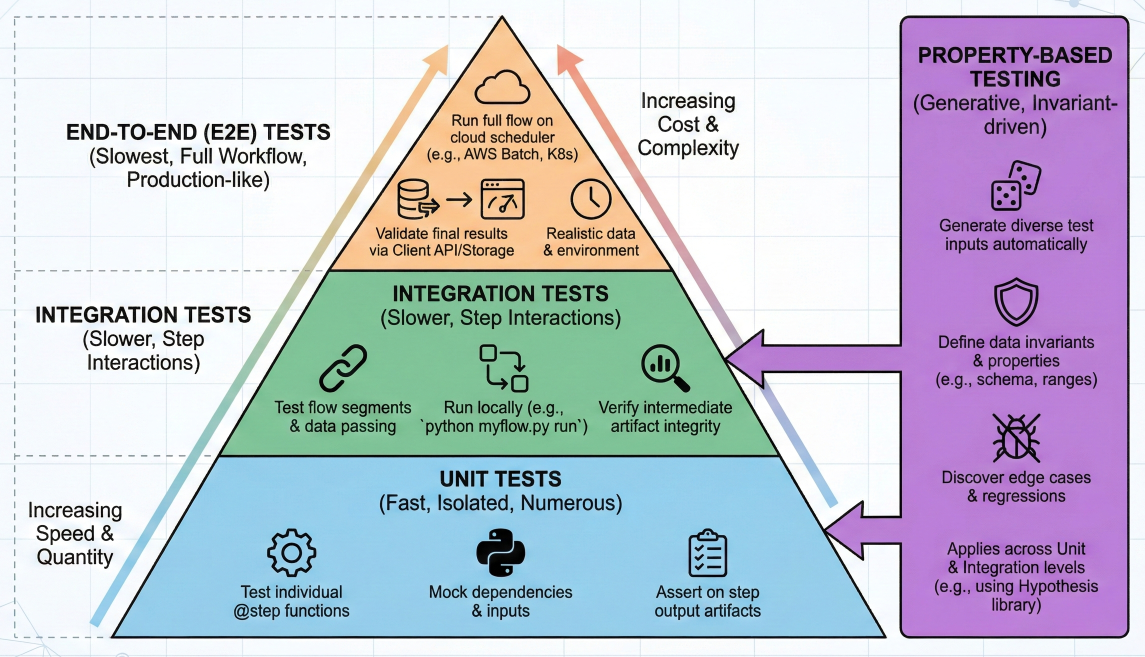
Testing pyramid diagram showing unit tests, integration tests, and property-based tests for Metaflow workflows
Netflix has recently introduced sophisticated resource tracking capabilities to help teams optimize cloud costs:
from metaflow import FlowSpec, step, track_resources, resources
import numpy as np
import time

class ResourceOptimizedFlow(FlowSpec):

    @track_resources
    @resources(memory=8000, cpu=2)
    @step
    def cpu_intensive_step(self):
        """Monitor CPU usage patterns."""

        print("Starting CPU-intensive computation...")

        # Simulate different CPU usage patterns
        for i in range(5):
            # CPU burst
            result = np.random.random((1000, 1000)) @ np.random.random((1000, 1000))
            print(f"Completed computation {i+1}/5")
            time.sleep(1)  # Brief pause

        self.cpu_results = {
            'computation_completed': True,
            'matrix_operations': 5,
            'final_result_shape': result.shape
        }

        self.next(self.memory_intensive_step)

    @track_resources
    @resources(memory=16000, cpu=1)
    @step
    def memory_intensive_step(self):
        """Monitor memory usage patterns."""

        print("Starting memory-intensive operation...")

        # Gradually increase memory usage
        data_arrays = []
        for i in range(10):
            # Allocate 500MB chunks
            chunk = np.random.random((62500, 100))  # ~500MB
            data_arrays.append(chunk)
            print(f"Allocated chunk {i+1}/10 ({(i+1)*500}MB total)")
            time.sleep(0.5)

        # Process the data
        combined_data = np.concatenate(data_arrays, axis=0)
        result_stats = {
            'mean': float(np.mean(combined_data)),
            'std': float(np.std(combined_data)),
            'total_size_gb': combined_data.nbytes / 1e9
        }

        # Clean up memory
        del data_arrays, combined_data

        self.memory_results = result_stats
        print(f"Processed {result_stats['total_size_gb']:.2f}GB of data")

        self.next(self.io_intensive_step)

    @track_resources
    @resources(memory=4000, cpu=1)
    @step
    def io_intensive_step(self):
        """Monitor I/O usage patterns."""

        print("Starting I/O-intensive operations...")

        # Simulate file I/O operations
        import tempfile
        import os

        with tempfile.TemporaryDirectory() as temp_dir:
            files_created = 0

            for i in range(100):
                # Write data to files
                file_path = os.path.join(temp_dir, f"data_{i}.txt")
                with open(file_path, 'w') as f:
                    f.write(f"Sample data {i}\n" * 1000)
                files_created += 1

                if i % 20 == 0:
                    print(f"Created {files_created} files...")

            # Read data back
            total_content_length = 0
            for i in range(100):
                file_path = os.path.join(temp_dir, f"data_{i}.txt")
                with open(file_path, 'r') as f:
                    content = f.read()
                    total_content_length += len(content)

        self.io_results = {
            'files_processed': files_created,
            'total_content_mb': total_content_length / 1e6,
            'io_operations_completed': True
        }

        print(f"Processed {self.io_results['total_content_mb']:.2f}MB across {files_created} files")

        self.next(self.end)

    @step
    def end(self):
        """Summarize resource usage insights."""

        print("\n" + "="*50)
        print("RESOURCE OPTIMIZATION SUMMARY")
        print("="*50)
        print("CPU Step Results:", self.cpu_results['computation_completed'])
        print(f"Memory Step: Processed {self.memory_results['total_size_gb']:.2f}GB")
        print(f"I/O Step: {self.io_results['files_processed']} files, {self.io_results['total_content_mb']:.1f}MB")
        print("\n📊 Check the Metaflow cards for detailed resource usage analytics!")
        print("💰 Resource recommendations will help optimize costs for future runs")
        print("="*50)
When you run this flow, the @track_resources decorator automatically generates comprehensive reports showing:
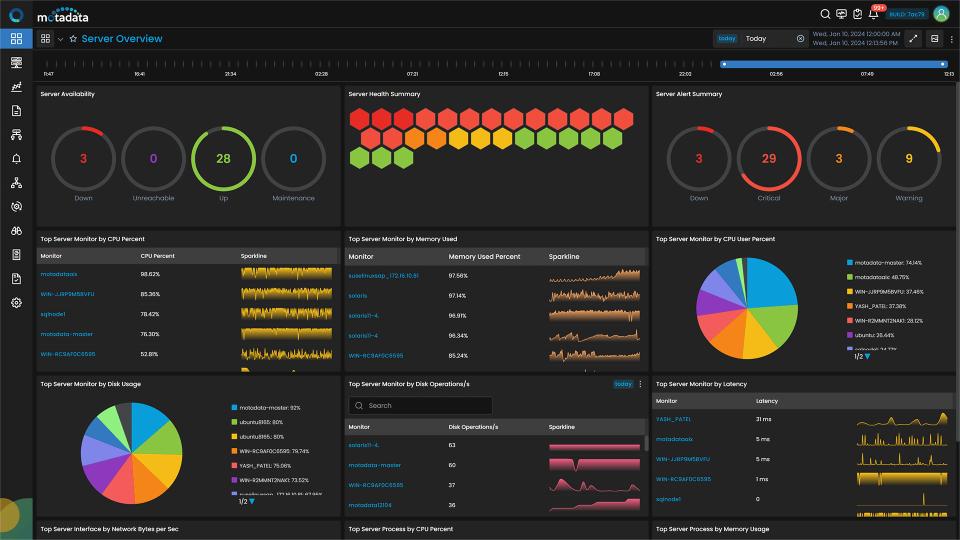
Resource optimization dashboard showing CPU/memory/I/O usage over time with cost projections and instance recommendations
from metaflow import FlowSpec, step, resources, batch

class CostOptimizedFlow(FlowSpec):

    @batch(queue="spot", # Use spot instances for cost savings
           cpu=2,
           memory=8000,
           use_tmpfs=True)  # Use faster temporary storage
    @step
    def spot_processing_step(self):
        """Use spot instances for non-critical processing."""

        print("Running on cost-optimized spot instance")

        # Implement checkpoint logic for spot interruptions
        checkpoint_frequency = 100

        for i in range(1000):
            # Process data in small chunks
            result = self.process_chunk(i)

            # Save checkpoints regularly
            if i % checkpoint_frequency == 0:
                self.save_checkpoint(i, result)
                print(f"Checkpoint saved at iteration {i}")

        self.spot_results = {'iterations_completed': 1000}
        self.next(self.on_demand_processing)

    @batch(queue="on_demand",  # Use on-demand for critical processing
           cpu=8,
           memory=32000)
    @step
    def on_demand_processing(self):
        """Use on-demand instances for time-critical processing."""

        print("Running on reliable on-demand instance")

        # Time-critical processing that can't tolerate interruptions
        critical_result = self.perform_critical_computation()

        self.on_demand_results = critical_result
        self.next(self.end)

    def process_chunk(self, chunk_id):
        """Simulate chunk processing."""
        import time
        time.sleep(0.01)  # Simulate work
        return f"chunk_{chunk_id}_processed"

    def save_checkpoint(self, iteration, result):
        """Save processing checkpoint."""
        # In production, save to S3 or persistent storage
        pass

    def perform_critical_computation(self):
        """Simulate critical computation."""
        import time
        time.sleep(5)  # Simulate intensive work
        return {'status': 'success', 'computation_id': '12345'}

    @step
    def end(self):
        print("Cost-optimized processing completed!")
        print(f"Spot results: {self.spot_results}")
        print(f"On-demand results: {self.on_demand_results}")
# cost_config.toml

[compute.development]
provider = "aws"
instance_type = "spot"
max_cost_per_hour = 0.50

[compute.staging]
provider = "aws"
instance_type = "on_demand"
max_cost_per_hour = 2.00

[compute.production]
provider = "azure"  # Use different cloud for production
instance_type = "reserved"
max_cost_per_hour = 5.00

[alerts.cost]
daily_budget = 100.00
monthly_budget = 2000.00
notification_emails = ["finance@company.com", "devops@company.com"]
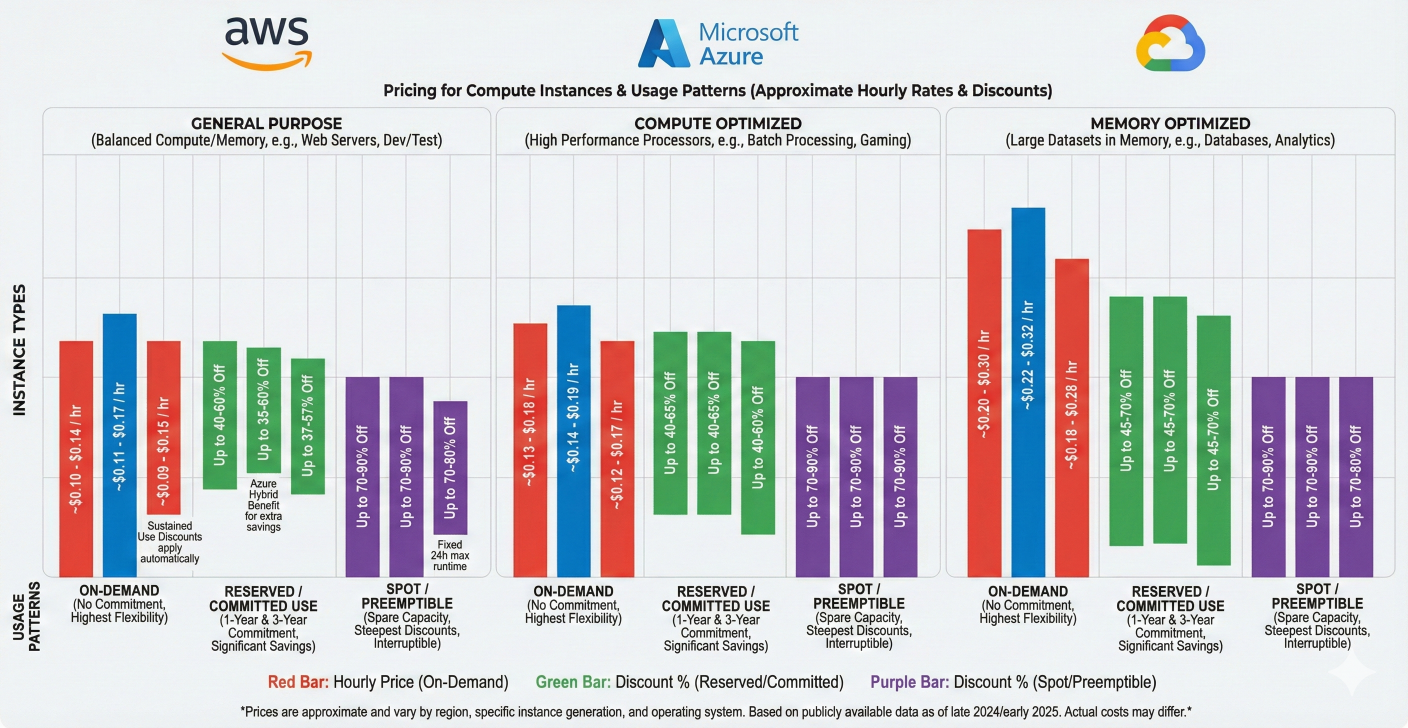
Multi-cloud cost comparison chart showing AWS vs Azure vs GCP pricing for different instance types and usage patterns
Metaflow excels at integrating with various data sources while maintaining the separation between data access and feature engineering:
from metaflow import FlowSpec, step, secrets, resources
import pandas as pd
import sqlalchemy as sa
from contextlib import contextmanager

class DatabaseIntegratedFlow(FlowSpec):

    @secrets(sources=['postgres-credentials'])
    @resources(memory=8000, cpu=2)
    @step
    def start(self):
        """Connect to database and load raw data."""

        # Credentials automatically available from secrets manager
        db_url = f"postgresql://{os.environ['DB_USER']}:{os.environ['DB_PASSWORD']}@{os.environ['DB_HOST']}/{os.environ['DB_NAME']}"

        self.db_engine = sa.create_engine(db_url, pool_size=5, max_overflow=10)

        # Load data with proper SQL practices
        query = """
        SELECT
            customer_id,
            transaction_date,
            amount,
            category,
            merchant_id,
            is_weekend,
            hour_of_day
        FROM transactions
        WHERE transaction_date >= %s
          AND transaction_date < %s
          AND amount > 0
        ORDER BY transaction_date
        """

        # Use parameterized queries for security
        start_date = '2024-01-01'
        end_date = '2024-02-01'

        self.raw_transactions = pd.read_sql(
            query,
            self.db_engine,
            params=[start_date, end_date],
            parse_dates=['transaction_date']
        )

        print(f"Loaded {len(self.raw_transactions)} transactions")

        self.next(self.feature_engineering)

    @step
    def feature_engineering(self):
        """Perform feature engineering in Python, not SQL."""

        df = self.raw_transactions.copy()

        # Time-based features
        df['day_of_week'] = df['transaction_date'].dt.dayofweek
        df['month'] = df['transaction_date'].dt.month
        df['is_month_end'] = df['transaction_date'].dt.day > 25

        # Customer aggregation features
        customer_stats = df.groupby('customer_id').agg({
            'amount': ['mean', 'std', 'count'],
            'category': 'nunique'
        }).round(2)

        customer_stats.columns = ['_'.join(col) for col in customer_stats.columns]
        customer_stats = customer_stats.reset_index()

        self.feature_data = df.merge(customer_stats, on='customer_id', how='left')

        category_encoding = df.groupby('category')['amount'].mean().to_dict()
        self.feature_data['category_avg_amount'] = self.feature_data['category'].map(category_encoding)

        print(f"Created {len(self.feature_data.columns)} features")

        self.next(self.model_training)

    @resources(memory=16000, cpu=4)
    @step
    def model_training(self):
        """Train model using engineered features."""

        feature_columns = [col for col in self.feature_data.columns
                          if col not in ['customer_id', 'transaction_date', 'amount']]

        X = self.feature_data[feature_columns]
        y = (self.feature_data['amount'] > self.feature_data['amount'].quantile(0.8)).astype(int)

        X = X.fillna(X.mean())

        from sklearn.ensemble import RandomForestClassifier
        from sklearn.model_selection import train_test_split
        from sklearn.metrics import classification_report

        X_train, X_test, y_train, y_test = train_test_split(X, y, test_size=0.2, random_state=42)

        self.model = RandomForestClassifier(n_estimators=100, random_state=42)
        self.model.fit(X_train, y_train)

        predictions = self.model.predict(X_test)
        self.model_metrics = classification_report(y_test, predictions, output_dict=True)

        print(f"Model accuracy: {self.model_metrics['accuracy']:.3f}")

        self.next(self.write_results_to_db)

    @secrets(sources=['postgres-credentials'])
    @step
    def write_results_to_db(self):
        """Write model results back to database."""

        db_url = f"postgresql://{os.environ['DB_USER']}:{os.environ['DB_PASSWORD']}@{os.environ['DB_HOST']}/{os.environ['DB_NAME']}"
        engine = sa.create_engine(db_url)

        results_df = pd.DataFrame({
            'model_run_id': [self.run_id] * len(self.feature_data),
            'customer_id': self.feature_data['customer_id'],
            'prediction_score': self.model.predict_proba(
                self.feature_data[[col for col in self.feature_data.columns
                                 if col not in ['customer_id', 'transaction_date', 'amount']]].fillna(0)
            )[:, 1],
            'prediction_date': pd.Timestamp.now()
        })

        try:
            results_df.to_sql('model_predictions', engine, if_exists='append', index=False)
            print(f"Wrote {len(results_df)} predictions to database")
        except Exception as e:
            print(f"Failed to write to database: {e}")
            self.failed_db_write = True
            self.backup_predictions = results_df.to_dict('records')

        self.next(self.end)

    @step
    def end(self):
        """Finalize workflow."""

        summary = {
            'transactions_processed': len(self.raw_transactions),
            'features_created': len(self.feature_data.columns),
            'model_accuracy': self.model_metrics['accuracy'],
            'predictions_generated': len(self.feature_data)
        }

        if hasattr(self, 'failed_db_write'):
            summary['database_write_failed'] = True
            summary['backup_predictions_count'] = len(self.backup_predictions)

        print("Database integration flow completed!")
        print(f"Summary: {summary}")
from metaflow import FlowSpec, step, secrets, retry, timeout
import requests
import asyncio
import aiohttp
from datetime import datetime, timedelta

class APIIntegratedFlow(FlowSpec):

    @secrets(sources=['api-credentials'])
    @retry(times=3, minutes_between_retries=2)
    @timeout(seconds=300)
    @step
    def start(self):
        """Fetch data from multiple APIs concurrently."""

        # Get API credentials from secrets
        api_key = os.environ['API_KEY']
        base_url = os.environ['API_BASE_URL']

        # Define API endpoints to query
        endpoints = [
            f"{base_url}/customers",
            f"{base_url}/orders",
            f"{base_url}/products",
            f"{base_url}/inventory"
        ]

        # Fetch data concurrently for better performance
        self.api_data = asyncio.run(self.fetch_concurrent_data(endpoints, api_key))

        print(f"Fetched data from {len(self.api_data)} endpoints")

        self.next(self.process_api_data)

    async def fetch_concurrent_data(self, endpoints, api_key):
        """Fetch data from multiple endpoints concurrently."""

        async def fetch_endpoint(session, endpoint):
            headers = {'Authorization': f'Bearer {api_key}'}
            try:
                async with session.get(endpoint, headers=headers) as response:
                    if response.status == 200:
                        data = await response.json()
                        return {'endpoint': endpoint, 'data': data, 'status': 'success'}
                    else:
                        return {'endpoint': endpoint, 'error': f'HTTP {response.status}', 'status': 'error'}
            except Exception as e:
                return {'endpoint': endpoint, 'error': str(e), 'status': 'error'}

        async with aiohttp.ClientSession() as session:
            tasks = [fetch_endpoint(session, endpoint) for endpoint in endpoints]
            results = await asyncio.gather(*tasks)
            return results
            @step
def process_api_data(self):
    """Process and validate API responses."""

    processed_data = {}

    for api_result in self.api_data:
        endpoint_name = api_result['endpoint'].split('/')[-1]

        if api_result['status'] == 'success':
            data = api_result['data']

            # Validate and clean data
            if endpoint_name == 'customers':
                processed_data['customers'] = self.validate_customers(data)
            elif endpoint_name == 'orders':
                processed_data['orders'] = self.validate_orders(data)
            elif endpoint_name == 'products':
                processed_data['products'] = self.validate_products(data)
            elif endpoint_name == 'inventory':
                processed_data['inventory'] = self.validate_inventory(data)

            print(f"✅ Successfully processed {endpoint_name}: {len(data)} records")
        else:
            print(f"❌ Failed to process {endpoint_name}: {api_result['error']}")

    self.processed_api_data = processed_data
    self.next(self.real_time_analysis)

def validate_customers(self, data):
    """Validate customer data structure."""
    required_fields = ['id', 'email', 'created_at']
    validated = []

    for record in data:
        if all(field in record for field in required_fields):
            # Add data quality score
            record['data_quality_score'] = 1.0 if '@' in record['email'] else 0.5
            validated.append(record)

    return validated
def validate_orders(self, data):
    """Validate order data structure."""
    required_fields = ['id', 'customer_id', 'total_amount', 'order_date']
    validated = []

    for record in data:
        if all(field in record for field in required_fields):
            # Add computed fields
            record['order_month'] = record['order_date'][:7]  # YYYY-MM
            record['is_large_order'] = record['total_amount'] > 100
            validated.append(record)

    return validated


def validate_products(self, data):
    """Validate product data structure."""
    required_fields = ['id', 'name', 'category', 'price']
    validated = []

    for record in data:
        if all(field in record for field in required_fields):
            # Add price category
            price = record['price']
            if price < 20:
                record['price_category'] = 'low'
            elif price < 100:
                record['price_category'] = 'medium'
            else:
                record['price_category'] = 'high'

            validated.append(record)

    return validated


def validate_inventory(self, data):
    """Validate inventory data structure."""
    required_fields = ['product_id', 'quantity', 'location']
    validated = []

    for record in data:
        if all(field in record for field in required_fields):
            # Add stock status
            quantity = record['quantity']
            if quantity == 0:
                record['stock_status'] = 'out_of_stock'
            elif quantity < 10:
                record['stock_status'] = 'low_stock'
            else:
                record['stock_status'] = 'in_stock'

            validated.append(record)

    return validated


@step
def real_time_analysis(self):
    """Perform real-time business intelligence analysis."""

    customers = self.processed_api_data.get('customers', [])
    orders = self.processed_api_data.get('orders', [])
    products = self.processed_api_data.get('products', [])
    inventory = self.processed_api_data.get('inventory', [])

    # Real-time metrics calculation
    current_time = datetime.now()
    last_hour = current_time - timedelta(hours=1)

    # Calculate real-time KPIs
    self.real_time_metrics = {
        'total_customers': len(customers),
        'total_orders': len(orders),
        'total_products': len(products),
        'out_of_stock_items': len([item for item in inventory if item['stock_status'] == 'out_of_stock']),
        'low_stock_items': len([item for item in inventory if item['stock_status'] == 'low_stock']),
        'high_value_customers': len([c for c in customers if c['data_quality_score'] == 1.0]),
        'large_orders': len([o for o in orders if o.get('is_large_order', False)]),
        'analysis_timestamp': current_time.isoformat()
    }

    # Generate alerts
    alerts = []
    if self.real_time_metrics['out_of_stock_items'] > 10:
        alerts.append(f"⚠️ {self.real_time_metrics['out_of_stock_items']} items are out of stock")

    if self.real_time_metrics['low_stock_items'] > 20:
        alerts.append(f"📉 {self.real_time_metrics['low_stock_items']} items are low on stock")

    self.alerts = alerts

    print(f"Real-time analysis completed at {current_time}")
    for alert in alerts:
        print(alert)

    self.next(self.end)


@step
def end(self):
    """Finalize API integration workflow."""

    print("\n" + "="*50)
    print("API INTEGRATION SUMMARY")
    print("="*50)
    print(f"Data Sources: {len(self.api_data)} APIs")
    print(f"Customers: {self.real_time_metrics['total_customers']}")
    print(f"Orders: {self.real_time_metrics['total_orders']}")
    print(f"Products: {self.real_time_metrics['total_products']}")
    print(f"Inventory Alerts: {len(self.alerts)}")
    print(f"Analysis Time: {self.real_time_metrics['analysis_timestamp']}")

    if self.alerts:
        print("\nACTIVE ALERTS:")
        for alert in self.alerts:
            print(f"  {alert}")

    print("="*50)
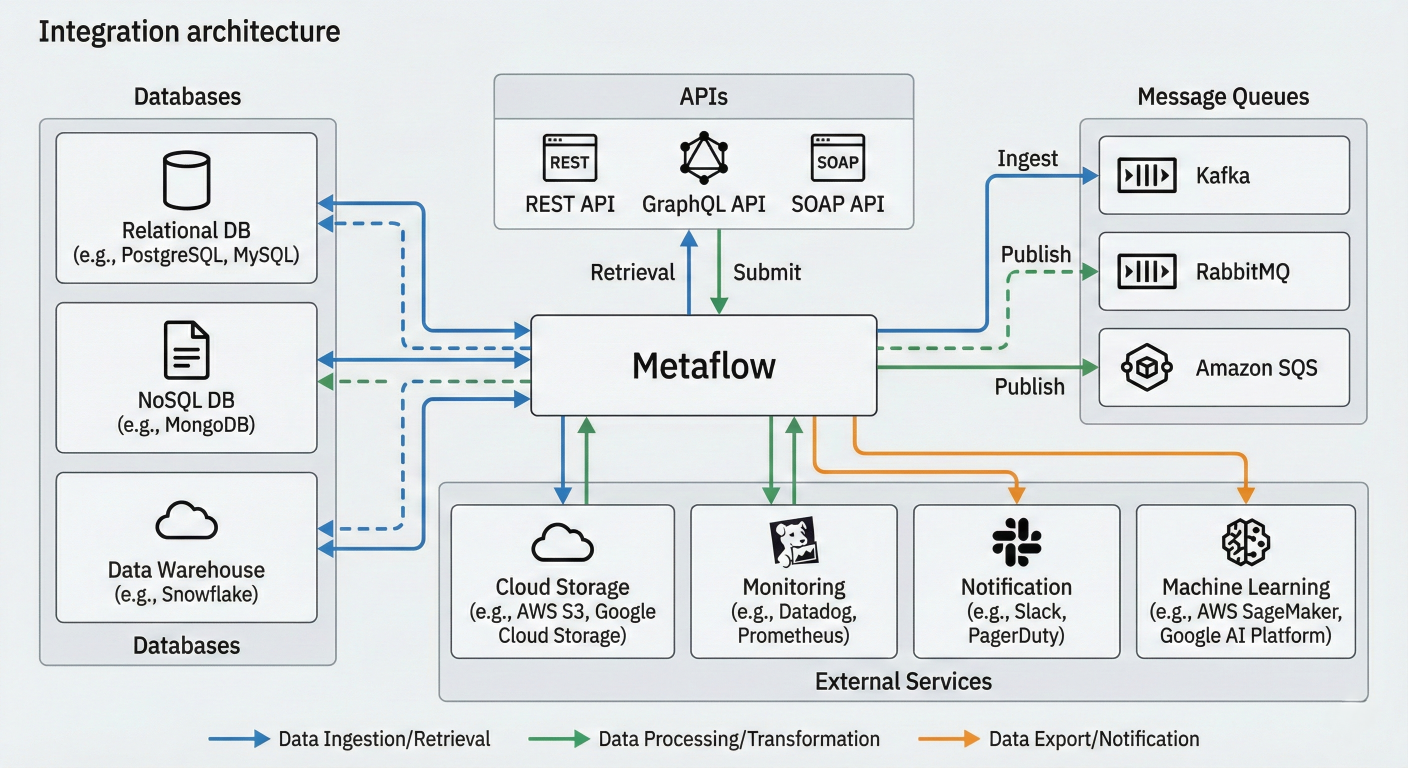
Integration architecture diagram showing Metaflow connecting to databases, APIs, message queues, and external services with data flow patterns
Traditional MLOps approaches force data scientists to become infrastructure experts, spending more time configuring YAML files than solving business problems. Metaflow flips this equation by making simple things simple while keeping complex deployments possible. The numbers tell the story:
The framework's battle-tested credentials are impressive:
Seamless Scalability: The same Python code runs on your laptop and scales to thousands of cloud instances
Automatic Everything: Versioning, dependency management, resource allocation, and error recovery happen transparently
Production-Ready by Design: Deploy to enterprise orchestrators with a single command, no code changes required
Human-Centric API: Natural Python patterns that feel familiar to data scientists, not infrastructure engineers
Enterprise Security: Built-in secrets management, access control, and compliance features
The Metaflow ecosystem continues to expand rapidly:
The roadmap ahead is exciting:
The ML infrastructure landscape is evolving rapidly, and Metaflow positions you at the forefront of this transformation. Whether you're a solo data scientist or part of a large enterprise team, the framework's human-centric approach will accelerate your journey from idea to production.
Beginners: Start with the Metaflow Sandbox – no installation required. Experience the framework's capabilities in your browser and see why thousands of data scientists are making the switch.
Intermediate Practitioners: Clone the full-stack ML tutorial and build your first end-to-end pipeline in under an hour.
Enterprise Teams: Schedule a consultation with the Outerbounds team to discuss custom deployment strategies and enterprise features.
Open Source Contributors: Join the vibrant community on GitHub and Slack to shape the future of ML infrastructure.
The data science field is at an inflection point. Teams that adopt modern, human-centric infrastructure will build faster, deploy more reliably, and scale more effectively than those stuck with legacy toolchains. Metaflow doesn't just provide tools – it provides a competitive advantage.
Ready to transform your ML workflow? The revolution in ML infrastructure has begun, and Metaflow is leading the charge. Join thousands of practitioners who are already building the future of data science, one flow at a time.

SaratahKumar C
 Launch your Graphy