There are no items in your cart
Add More
Add More
| Item Details | Price | ||
|---|---|---|---|

If you're building machine learning models, you've probably experienced the pain of manual deployments, inconsistent environments, and the dreaded "it works on my machine" problem. That's where MLOps comes to the rescue – and GitHub Actions makes implementing it surprisingly straightforward.
MLOps (Machine Learning Operations) applies DevOps principles to machine learning workflows, automating everything from model training to deployment and monitoring. With GitHub Actions, you can create robust CI/CD pipelines that automatically test, build, and deploy your ML models whenever you push code changes
In this comprehensive guide, we'll explore how to build production-ready MLOps pipelines using GitHub Actions. You'll learn to automate model training, implement proper testing strategies, manage model versioning, and deploy models with confidence.
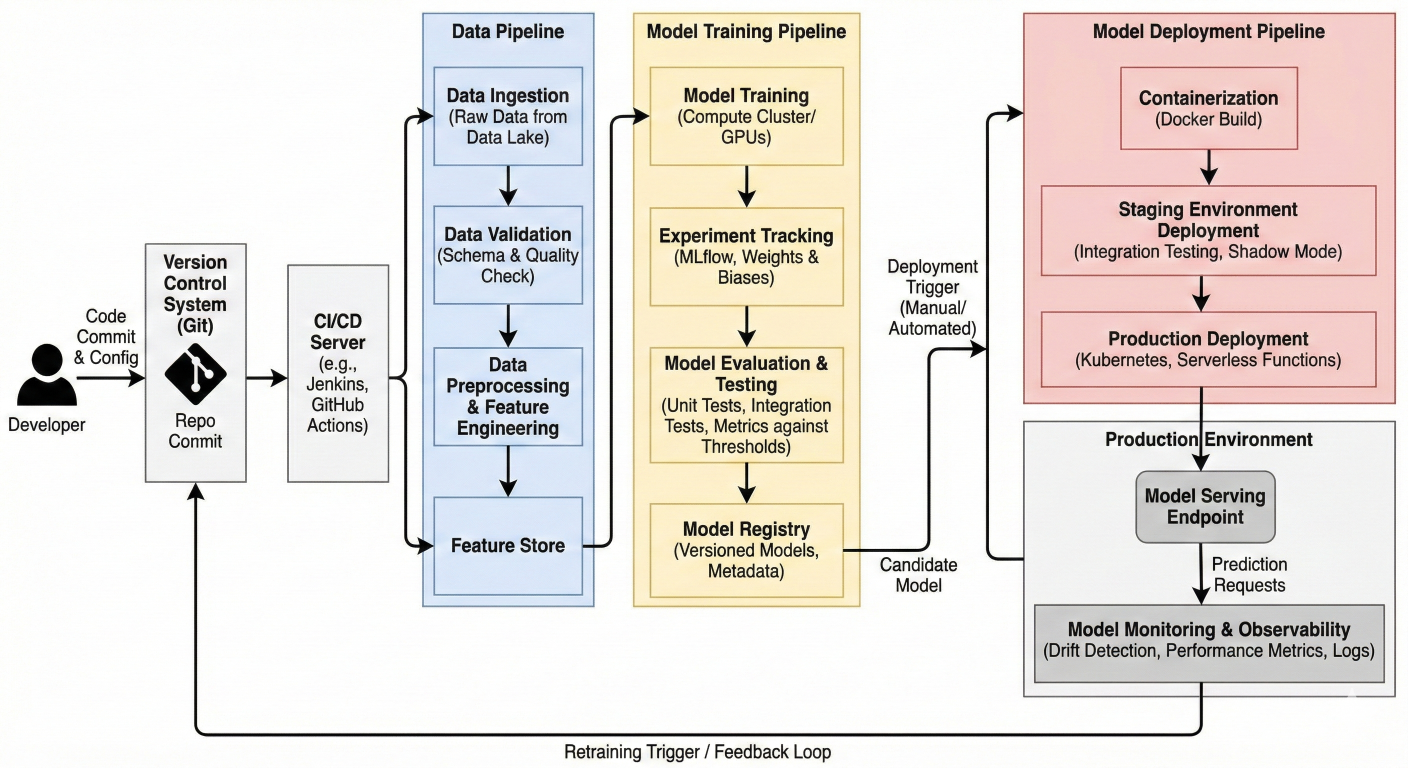
MLOps pipeline architecture diagram showing the flow from code commit to model deployment, including stages like data validation, training, testing, and deployment
Traditional software CI/CD focuses on code, but machine learning adds extra complexity. You're not just dealing with application code – you're managing data, models, experiments, and the relationships between them
Here's what makes ML CI/CD unique:
Every ML application has three critical components that need continuous integration:
1. Data Pipeline: Processes and validates incoming data
2. Model Training Pipeline: Trains and evaluates models
3. Model Serving Pipeline: Deploys and serves model predictions
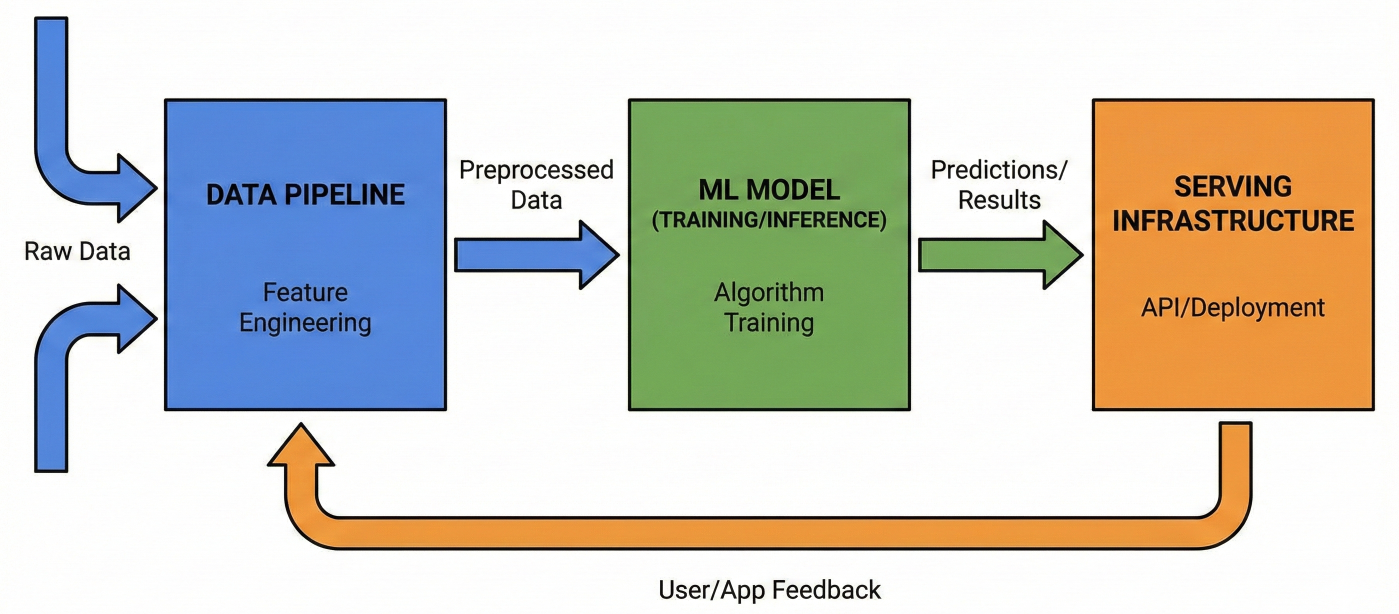
Diagram showing the three components of ML applications with their interconnections and data flow
Before diving into GitHub Actions workflows, let's organize your repository properly. Here's a recommended structure that works well with automated pipelines:
ml-project/
├── .github/
│   └── workflows/
│       ├── ci.yml
│       ├── cd.yml
│       └── model-training.yml
├── data/
│   ├── raw/
│   ├── processed/
│   └── .gitignore
├── models/
│   └── .gitignore
├── src/
│   ├── data/
│   │   ├── make_dataset.py
│   │   └── validate_data.py
│   ├── features/
│   │   └── build_features.py
│   ├── models/
│   │   ├── train_model.py
│   │   ├── predict_model.py
│   │   └── evaluate_model.py
│   └── deployment/
│       └── deploy_model.py
├── tests/
│   ├── test_data.py
│   ├── test_model.py
│   └── test_api.py
├── requirements.txt
├── dvc.yaml
└── README.md
This structure separates concerns clearly and makes it easy to create targeted workflows for different aspects of your ML pipeline
Let's start with a basic workflow that demonstrates core MLOps principles. Create .github/workflows/mlops-pipeline.yml:
name: MLOps Pipeline
run-name: ${{ github.actor }} is running MLOps pipeline 🚀
on:
  push:
    branches: [main, develop]
  pull_request:
    branches: [main]
env:
  PYTHON_VERSION: '3.9'

jobs:
  data-validation:
    runs-on: ubuntu-latest
    steps:
      - name: Checkout repository
        uses: actions/checkout@v4
      - name: Set up Python
        uses: actions/setup-python@v4
        with:
          python-version: ${{ env.PYTHON_VERSION }}
      - name: Cache dependencies
        uses: actions/cache@v3
        with:
          path: ~/.cache/pip
          key: ${{ runner.os }}-pip-${{ hashFiles('**/requirements.txt') }}
      - name: Install dependencies
        run: |
          python -m pip install --upgrade pip
          pip install -r requirements.txt
      - name: Validate data quality
        run: |
          python src/data/validate_data.py
          echo "Data validation completed"
      - name: Upload data validation report
        uses: actions/upload-artifact@v3
        with:
          name: data-validation-report
          path: reports/data_validation.html

  model-training:
    needs: data-validation
    runs-on: ubuntu-latest
    steps:
      - name: Checkout repository
        uses: actions/checkout@v4
      - name: Set up Python
        uses: actions/setup-python@v4
        with:
          python-version: ${{ env.PYTHON_VERSION }}
      - name: Install dependencies
        run: |
          python -m pip install --upgrade pip
          pip install -r requirements.txt
      - name: Train model
        run: |
          python src/models/train_model.py
      - name: Evaluate model
        run: |
          python src/models/evaluate_model.py
      - name: Upload model artifacts
        uses: actions/upload-artifact@v3
        with:
          name: trained-model
          path: models/
      - name: Upload evaluation results
        uses: actions/upload-artifact@v3
        with:
          name: evaluation-results
          path: reports/model_evaluation.json

  model-testing:
    needs: model-training
    runs-on: ubuntu-latest
    steps:
      - name: Checkout repository
        uses: actions/checkout@v4
      - name: Download model artifacts
        uses: actions/download-artifact@v3
        with:
          name: trained-model
          path: models/
      - name: Set up Python
        uses: actions/setup-python@v4
        with:
          python-version: ${{ env.PYTHON_VERSION }}
      - name: Install dependencies
        run: |
          python -m pip install --upgrade pip
          pip install -r requirements.txt
      - name: Run model tests
        run: |
          python -m pytest tests/test_model.py -v
      - name: Test model API
        run: |
          python -m pytest tests/test_api.py -v
This workflow demonstrates the core MLOps pattern: validate data, train model, test model. Each job depends on the previous one, ensuring your pipeline fails fast if something goes wrong
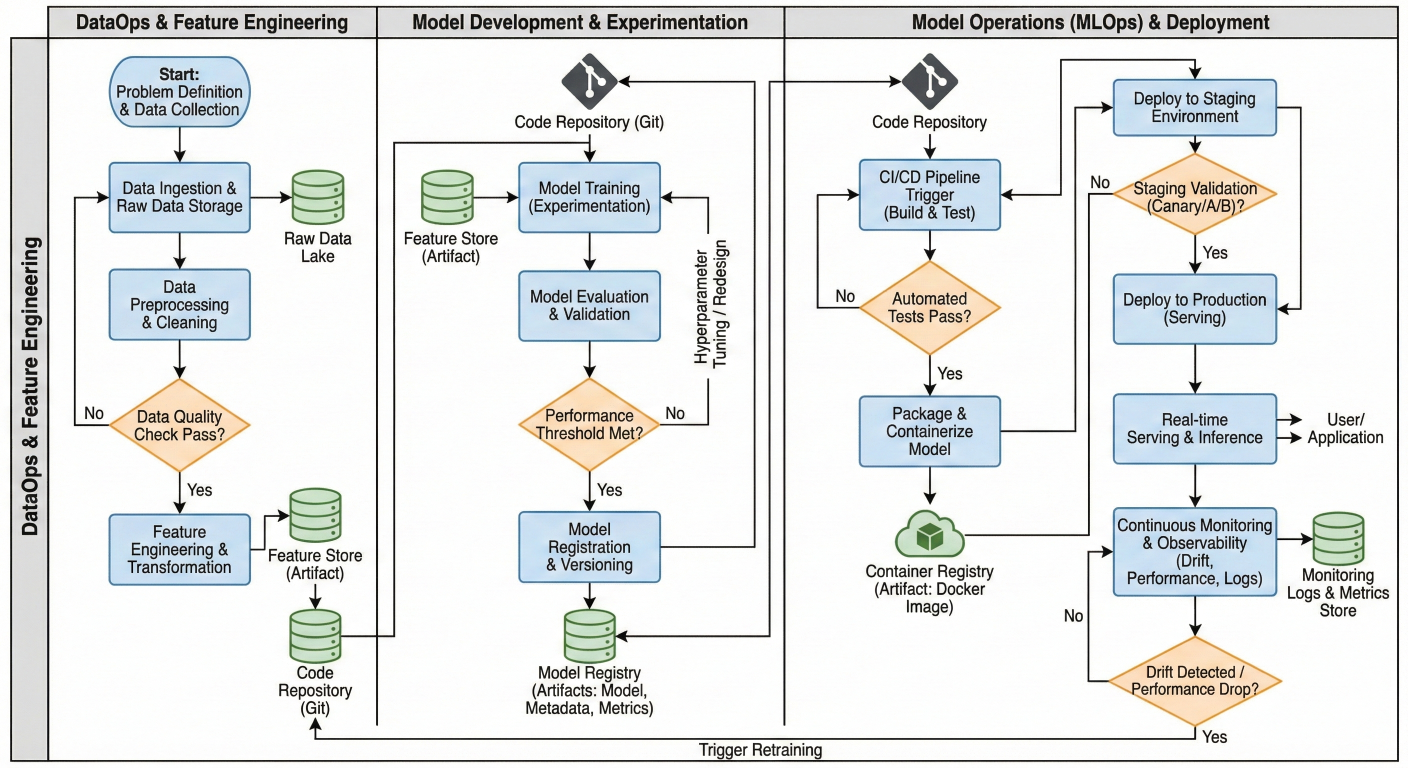
Flowchart showing the sequential execution of jobs in the MLOps workflow with decision points and artifact handling
Matrix strategies let you test your models across different configurations simultaneously. This is particularly useful for testing different Python versions, model parameters, or deployment environments:
name: jobs
cross-environment-testing:
  strategy:
    matrix:
      python-version: [3.8, 3.9, 3.10]
      model-type: [linear, random_forest, xgboost]
      os: [ubuntu-latest, windows-latest]
    fail-fast: false
    max-parallel: 4
  runs-on: ${{ matrix.os }}
  steps:
    - name: Checkout code
      uses: actions/checkout@v4
    - name: Set up Python ${{ matrix.python-version }}
      uses: actions/setup-python@v4
      with:
        python-version: ${{ matrix.python-version }}
    - name: Train ${{ matrix.model-type }} model
      run: |
        python src/models/train_model.py --model-type ${{ matrix.model-type }}
      env:
        MODEL_TYPE: ${{ matrix.model-type }}
        PYTHON_VERSION: ${{ matrix.python-version }}
The fail-fast: false setting ensures all combinations complete even if some fail, giving you a complete picture of compatibility issues.
You can make your workflows smarter by using conditional execution based on file changes or other criteria
jobs:
  check-changes:
    runs-on: ubuntu-latest
    outputs:
      data-changed: ${{ steps.changes.outputs.data }}
      model-changed: ${{ steps.changes.outputs.model }}
    steps:
      - uses: actions/checkout@v4
      - uses: dorny/paths-filter@v2
        id: changes
        with:
          filters: |
            data:
              - 'data/**'
              - 'src/data/**'
            model:
              - 'src/models/**'
              - 'requirements.txt'
  retrain-model:
    needs: check-changes
    if: needs.check-changes.outputs.data == 'true' || needs.check-changes.outputs.model
    runs-on: ubuntu-latest
    steps:
      - name: Conditional model retraining
        run: |
          echo "Retraining model due to changes"
          python src/models/train_model.py
This approach saves compute resources by only retraining models when necessary.
Data Version Control (DVC) is essential for reproducible ML workflows. Here's how to integrate it with GitHub Actions:
name: jobs:
  data-pipeline:
    runs-on: ubuntu-latest
    steps:
      - name: Checkout repository
        uses: actions/checkout@v4

      - name: Set up Python
        uses: actions/setup-python@v4
        with:
          python-version: '3.9'

      - name: Install DVC
        run: |
          pip install dvc[s3] # or [gcs], [azure] depending on your storage

      - name: Configure DVC remote
        run: |
          dvc remote modify origin --local access_key_id ${{ secrets.AWS_ACCESS_KEY_ID }}
          dvc remote modify origin --local secret_access_key ${{ secrets.AWS_SECRET_ACCES }}

      - name: Pull data from DVC remote
        run: |
          dvc pull

      - name: Process data
        run: |
          python src/data/make_dataset.py

      - name: Update DVC pipeline
        run: |
          dvc repro # Reproduces the pipeline, only running changed stages

      - name: Push updated data
        run: |
          dvc push
Implement automated data validation to catch issues early:
data-quality-checks:
  runs-on: ubuntu-latest
  steps:
    - name: Checkout repository
      uses: actions/checkout@v4
    - name: Set up Python
      uses: actions/setup-python@v4
      with:
        python-version: '3.9'
    - name: Install dependencies
      run: |
        pip install pandas great-expectations evidently
    - name: Run data validation
      run: |
        python -c "
        import pandas as pd
        from evidently import ColumnMapping
        from evidently.report import Report
        from evidently.metric_preset import DataDriftPreset
        # Load reference and current data
        reference_data = pd.read_csv('data/reference/reference_data.csv')
        current_data = pd.read_csv('data/raw/current_data.csv')
        # Create drift report
        report = Report(metrics=[DataDriftPreset()])
        report.run(reference_data=reference_data, current_data=current_data)
        report.save_html('reports/data_drift_report.html')
        "
    - name: Upload drift report
      uses: actions/upload-artifact@v3
      with:
        name: data-drift-report
        path: reports/data_drift_report.html
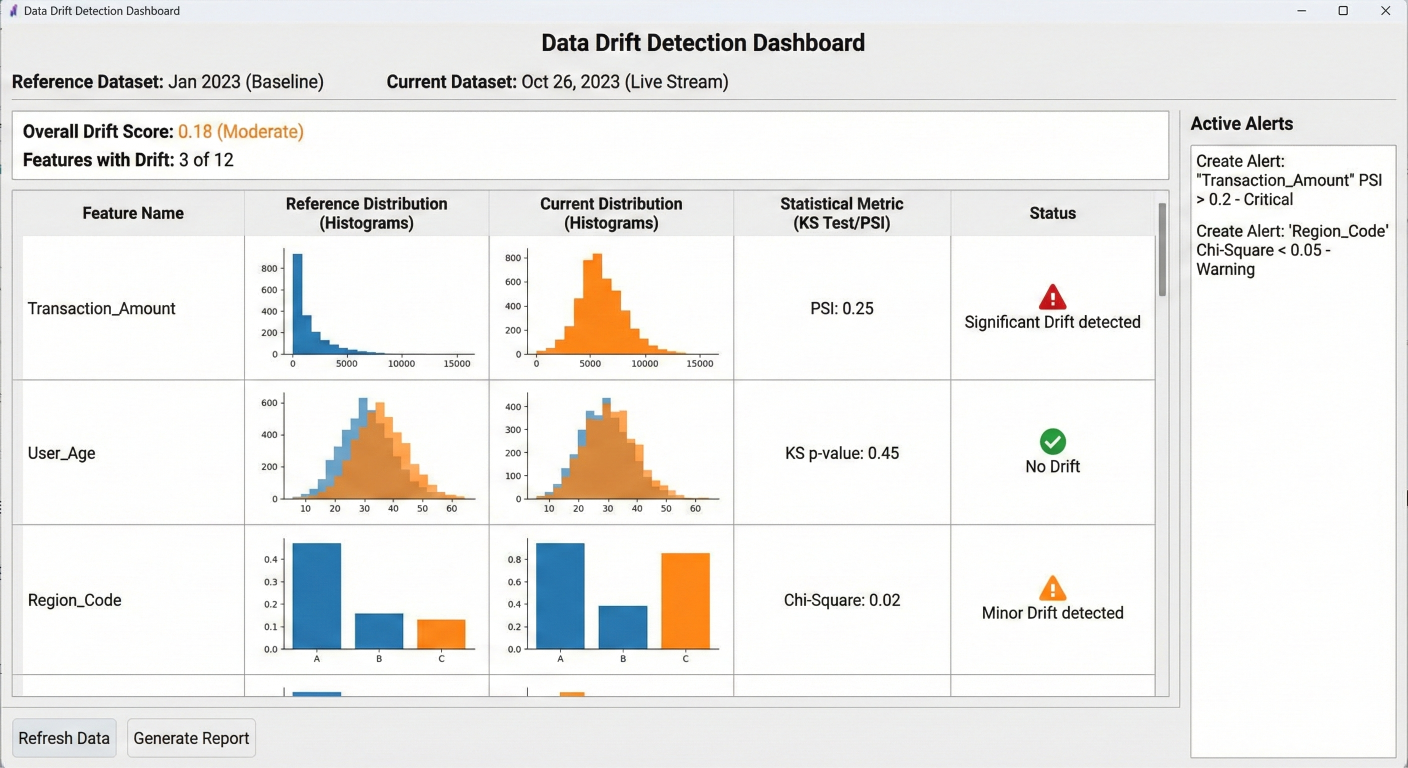
Data drift detection dashboard showing statistical comparisons between reference and current datasets with alerts for significant changes
Create workflows that automatically experiment with different model parameters:
jobs:
  hyperparameter-tuning:
    runs-on: ubuntu-latest
    strategy:
      matrix:
        learning_rate: [0.01, 0.1, 0.2]
        max_depth: [3, 5, 7]
        n_estimators: [100, 200]
    steps:
      - name: Checkout repository
        uses: actions/checkout@v4
      - name: Set up Python
        uses: actions/setup-python@v4
        with:
          python-version: '3.9'
      - name: Install dependencies
        run: |
          pip install -r requirements.txt
          pip install mlflow
      - name: Train model with hyperparameters
        run: |
          python src/models/train_model.py \
          --learning-rate ${{ matrix.learning_rate }} \
          --max-depth ${{ matrix.max_depth }} \
          --n-estimators ${{ matrix.n_estimators }}
        env:
          MLFLOW_TRACKING_URI: ${{ secrets.MLFLOW_TRACKING_URI }}
          MLFLOW_TRACKING_USERNAME: ${{ secrets.MLFLOW_USERNAME }}
          MLFLOW_TRACKING_PASSWORD: ${{ secrets.MLFLOW_PASSWORD }}
      - name: Upload model artifacts
        uses: actions/upload-artifact@v3
        with:
          name: model-lr${{ matrix.learning_rate }}-depth${{ matrix.max_depth }}-est${{ matrix.n_estimators }}
          path: models/
For deep learning models, you'll need GPU support. GitHub now offers GPU runners, but you can also use self-hosted runners:
jobs:
  gpu-training:
    runs-on: [self-hosted, gpu] # Or use gpu-runner for GitHub-hosted GPU
    steps:
      - name: Checkout repository
        uses: actions/checkout@v4

      - name: Set up Python
        uses: actions/setup-python@v4
        with:
          python-version: '3.9'

      - name: Install CUDA dependencies
        run: |
          pip install torch torchvision torchaudio --index-url https://download.pytorch.o
          pip install -r requirements.txt

      - name: Check GPU availability
        run: |
          python -c "import torch; print(f'CUDA available: {torch.cuda.is_available()}')"
          nvidia-smi

      - name: Train deep learning model
        run: |
          python src/models/train_deep_model.py --use-gpu

    timeout-minutes: 120 # Set appropriate timeout for long-running training
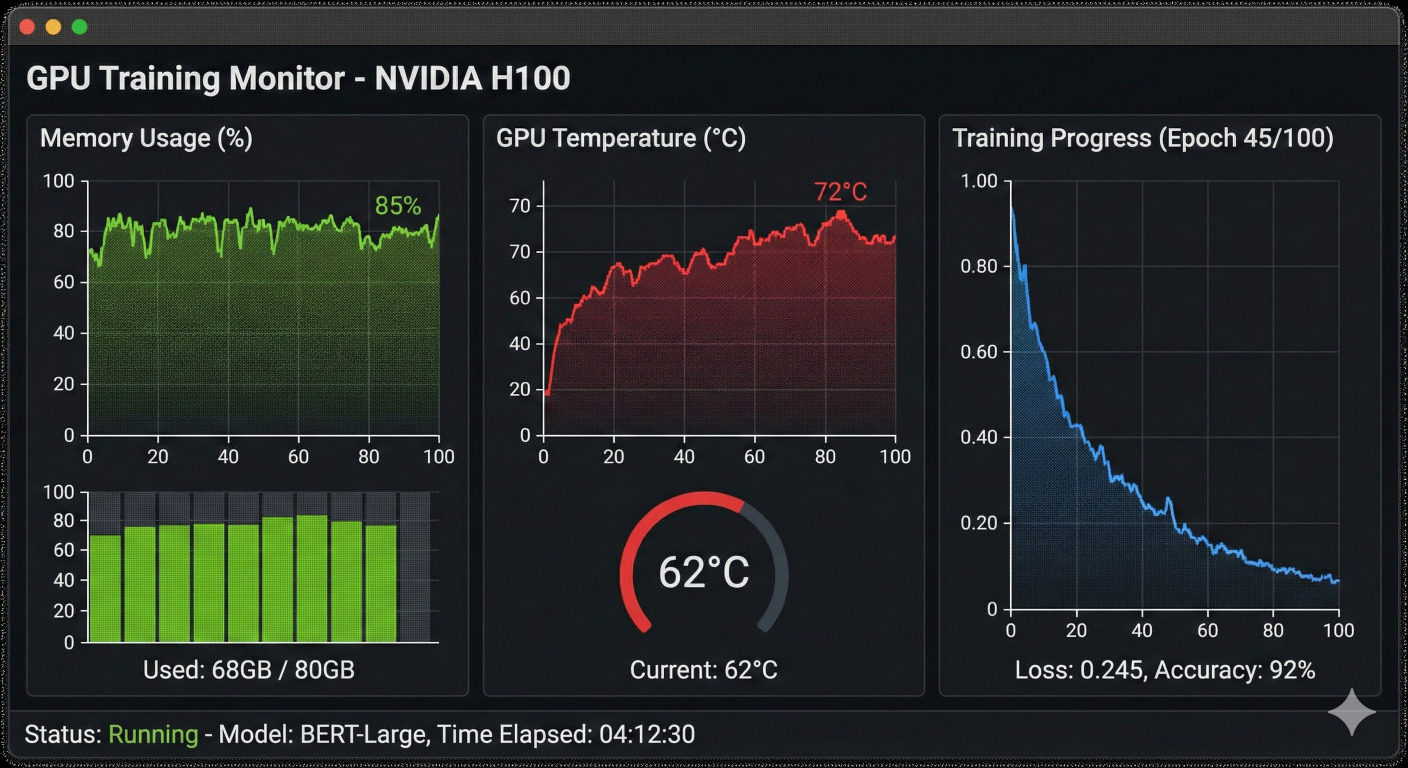
GPU utilization monitoring dashboard showing memory usage, temperature, and training progress during model training
Proper model versioning is crucial for MLOps. Here's how to implement semantic versioning for your models:
jobs:
  model-registry:
    runs-on: ubuntu-latest
    outputs:
      model-version: ${{ steps.version.outputs.version }}
    steps:
      - name: Checkout repository
        uses: actions/checkout@v4
      - name: Generate model version
        id: version
        run: |
          # Generate semantic version based on git tags and commits
          if git describe --tags --exact-match 2>/dev/null; then
            VERSION=$(git describe --tags --exact-match)
          else
            LATEST_TAG=$(git describe --tags --abbrev=0 2>/dev/null || echo "v0.0.0")
            COMMIT_COUNT=$(git rev-list --count HEAD ^${LATEST_TAG} 2>/dev/null || echo "")
            SHORT_SHA=$(git rev-parse --short HEAD)
            VERSION="${LATEST_TAG}-${COMMIT_COUNT}-${SHORT_SHA}"
          fi
          echo "version=${VERSION}" >> $GITHUB_OUTPUT
          echo "Generated version: ${VERSION}"
      - name: Register model in MLflow
        run: |
          python -c "
import mlflow
import mlflow.sklearn
import joblib
# Set tracking URI
mlflow.set_tracking_uri('${{ secrets.MLFLOW_TRACKING_URI }}')
# Load the trained model
model = joblib.load('models/model.pkl')
# Create a new MLflow run
with mlflow.start_run():
    # Log model metrics
    mlflow.log_param('version', '${{ steps.version.outputs.version }}')
    mlflow.log_param('git_commit', '${{ github.sha }}')
    # Register the model
    mlflow.sklearn.log_model(
        model,
        'model',
        registered_model_name='production-model'
    )
"
        env:
          MLFLOW_TRACKING_USERNAME: ${{ secrets.MLFLOW_USERNAME }}
          MLFLOW_TRACKING_PASSWORD: ${{ secrets.MLFLOW_PASSWORD }}
Compare new models against existing ones before deployment:
model-comparison:
  needs: [model-training, model-registry]
  runs-on: ubuntu-latest
  steps:
    - name: Download current model
      uses: actions/download-artifact@v3
      with:
        name: trained-model
        path: models/current/
    - name: Download baseline model
      run: |
        # Download the production model for comparison
        python -c "
        import mlflow
        import mlflow.sklearn
        mlflow.set_tracking_uri('${{ secrets.MLFLOW_TRACKING_URI }}')
        # Get the latest production model
        client = mlflow.tracking.MlflowClient()
        latest_version = client.get_latest_versions('production-model', stages=['Produc
        # Download the model
        model_uri = f'models:/production-model/{latest_version.version}'
        model = mlflow.sklearn.load_model(model_uri)
        import joblib
        joblib.dump(model, 'models/baseline/model.pkl')
        "
      env:
        MLFLOW_TRACKING_USERNAME: ${{ secrets.MLFLOW_USERNAME }}
        MLFLOW_TRACKING_PASSWORD: ${{ secrets.MLFLOW_PASSWORD }}
    - name: Compare model performance
      run: |
        python src/models/compare_models.py \
        --current-model models/current/model.pkl \
        --baseline-model models/baseline/model.pkl \
        --output reports/model_comparison.json
    - name: Check if new model is better
      id: comparison
      run: |
        python -c "
        import json
        with open('reports/model_comparison.json') as f:
          results = json.load(f)
        current_score = results['current_model']['f1_score']
        baseline_score = results['baseline_model']['f1_score']
        if current_score > baseline_score:
          print('deploy=true')
          print('deploy=true' >> '$GITHUB_OUTPUT')
        else:
          print('deploy=false')
          print('deploy=false' >> '$GITHUB_OUTPUT')
        "
    - name: Upload comparison report
      uses: actions/upload-artifact@v3
      with:
        name: model-comparison-report
        path: reports/model_comparison.json
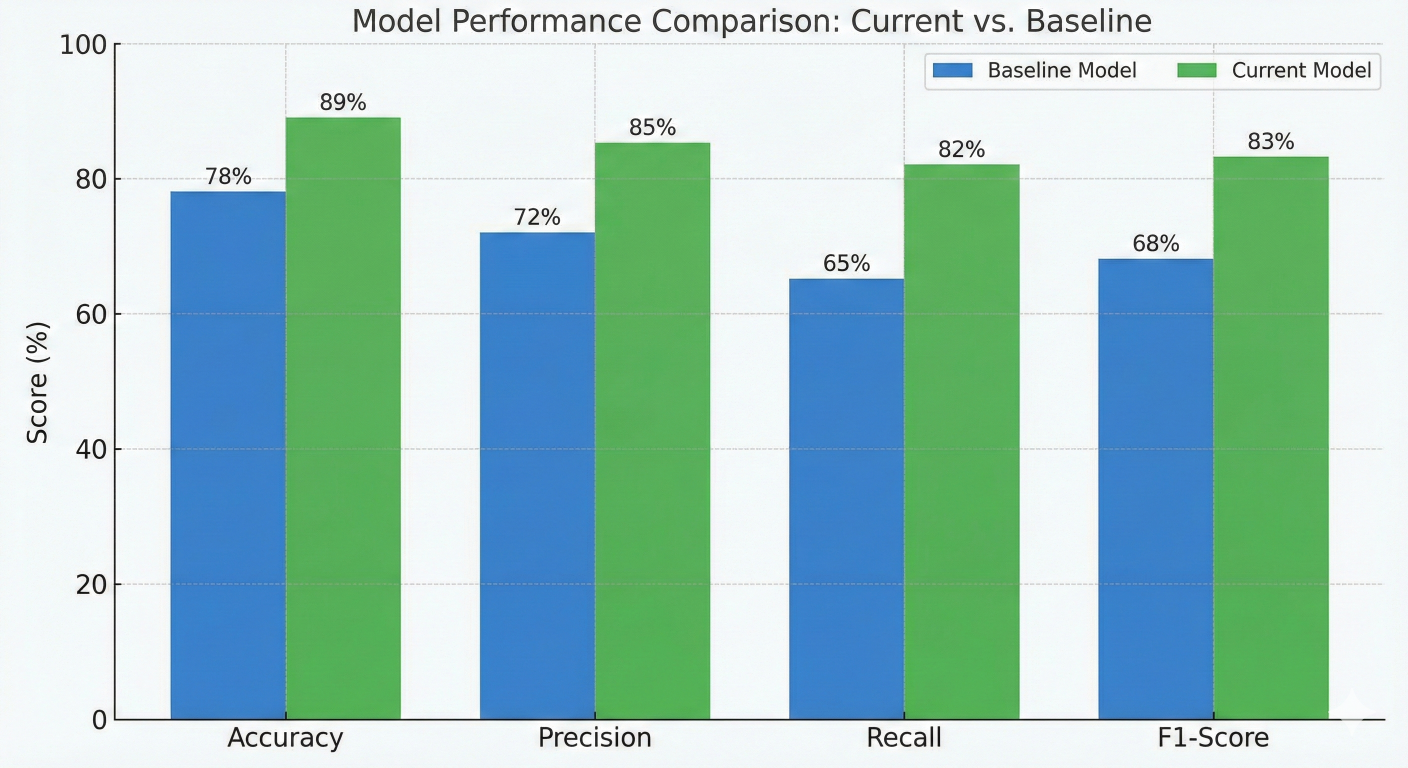
Model performance comparison chart showing accuracy, precision, recall, and F1-score metrics for current vs baseline models
Blue-green deployment minimizes downtime by running two identical environments:
blue-green-deployment:
  if: needs.model-comparison.outputs.deploy == 'true'
  runs-on: ubuntu-latest
  environment: production
  steps:
    - name: Checkout repository
      uses: actions/checkout@v4
    - name: Deploy to green environment
      run: |
        # Deploy new model to green environment
        docker build -t model-service:${{ needs.model-registry.outputs.model-version }}
        docker tag model-service:${{ needs.model-registry.outputs.model-version }} mode
        # Deploy to staging/green environment
        kubectl set image deployment/model-service-green \
        model-service=model-service:green
        # Wait for green deployment to be ready
        kubectl rollout status deployment/model-service-green
    - name: Health check on green environment
      run: |
        # Test the green environment
        python tests/test_green_deployment.py
    - name: Switch traffic to green
      run: |
        # Switch the load balancer to point to green
        kubectl patch service model-service -p '{"spec":{"selector":{"version":"green"}}}'
    - name: Promote green to blue
      run: |
        # Tag the green deployment as the new blue
        docker tag model-service:green model-service:blue
        # Update blue deployment
        kubectl set image deployment/model-service-blue \
        model-service=model-service:blue
Canary deployment gradually rolls out new models to a subset of users:
canary-deployment:
  if: needs.model-comparison.outputs.deploy == 'true'
  runs-on: ubuntu-latest
  environment: production
  steps:
  - name: Deploy canary version
    run: |
      # Deploy new model version with 10% traffic
      kubectl apply -f - <name: Monitor canary metrics
    run: |
      # Monitor key metrics during canary deployment
      python scripts/monitor_canary.py \
        --version ${{ needs.model-registry.outputs.model-version }} \
        --duration 600 # Monitor for 10 minutes
  - name: Promote or rollback
    run: |
      # Check if canary metrics are acceptable
      if python scripts/check_canary_health.py; then
        kubectl argo rollouts promote model-service-rollout
        echo "Canary promoted successfully"
      else
        kubectl argo rollouts abort model-service-rollout
        echo "Canary deployment aborted due to poor metrics"
        exit 1
      fi
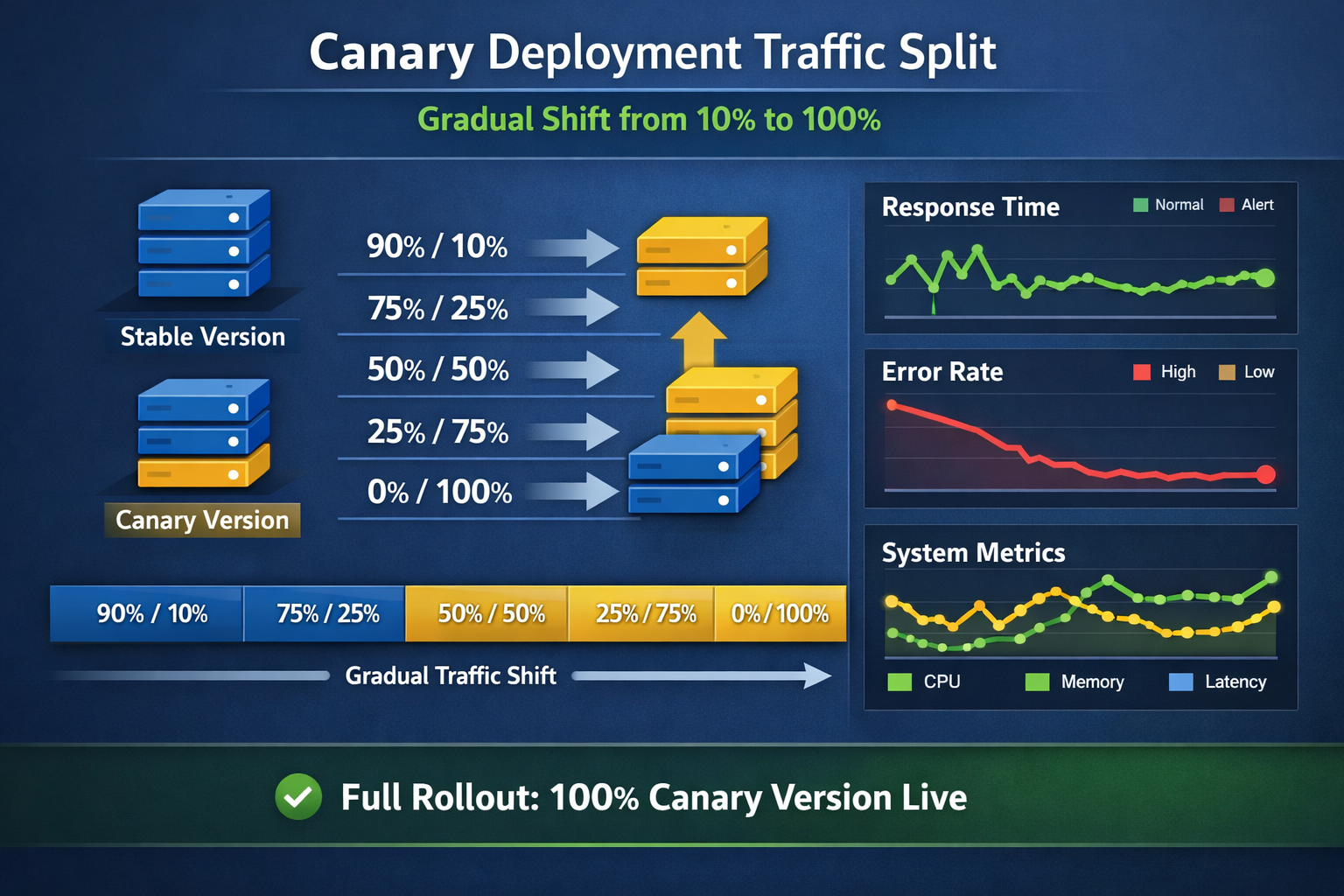
Canary deployment traffic split visualization showing gradual traffic shifting from 10% to 100% with monitoring metrics
Never hardcode credentials in your workflows. Use GitHub secrets for sensitive data:
jobs:
  secure-deployment:
    runs-on: ubuntu-latest
    environment: production
    steps:
      - name: Configure AWS credentials
        uses: aws-actions/configure-aws-credentials@v2
        with:
          aws-access-key-id: ${{ secrets.AWS_ACCESS_KEY_ID }}
          aws-secret-access-key: ${{ secrets.AWS_SECRET_ACCESS_KEY }}
          aws-region: us-east-1
      - name: Deploy to AWS SageMaker
        run: |
          python src/deployment/deploy_to_sagemaker.py
        env:
          MODEL_BUCKET: ${{ secrets.MODEL_BUCKET }}
          SAGEMAKER_ROLE: ${{ secrets.SAGEMAKER_EXECUTION_ROLE }}
          API_KEY: ${{ secrets.ML_API_KEY }}
Use different environments for different deployment stages:
jobs:
  deploy-staging:
    runs-on: ubuntu-latest
    environment: staging
    steps:
      - name: Deploy to staging
        run: |
          echo "Deploying to staging environment"
        env:
          API_URL: ${{ vars.STAGING_API_URL }}

  deploy-production:
    needs: deploy-staging
    runs-on: ubuntu-latest
    environment: production
    steps:
      - name: Deploy to production
        run: |
          echo "Deploying to production environment"
        env:
          API_URL: ${{ vars.PRODUCTION_API_URL }}
Set up monitoring for data drift and model performance degradation:
jobs:
monitoring-pipeline:
  runs-on: ubuntu-latest
  if: github.ref == 'refs/heads/main'
  steps:
    - name: Checkout repository
      uses: actions/checkout@v4
    - name: Set up Python
      uses: actions/setup-python@v4
      with:
        python-version: '3.9'
    - name: Install monitoring dependencies
      run: |
        pip install evidently mlflow pandas requests
    - name: Fetch production data
      run: |
        python -c "
        import requests
        import pandas as pd
        # Fetch recent predictions and features from production
        response = requests.get('${{ secrets.PRODUCTION_API_URL }}/metrics/recent-data'
        production_data = pd.DataFrame(response.json())
        production_data.to_csv('data/production_recent.csv', index=False)
        "
    - name: Detect data drift
      run: |
        python scripts/detect_drift.py \
        --reference-data data/reference/training_data.csv \
        --current-data data/production_recent.csv \
        --output reports/drift_report.html
    - name: Check model performance
      run: |
        python scripts/monitor_performance.py \
        --model-endpoint ${{ secrets.PRODUCTION_API_URL }} \
        --test-data data/test/test_data.csv \
        --output reports/performance_report.json
    - name: Send alerts if issues detected
      run: |
        python -c "
        import json
        import requests
        # Check for performance degradation
        with open('reports/performance_report.json') as f:
            perf_report = json.load(f)
        if perf_report['current_accuracy'] < 0.85: # Threshold
            payload = {
                'text': f'🚨 Model performance alert: Accuracy dropped to {perf_report['current_accuracy']}'
            }
            requests.post('${{ secrets.SLACK_WEBHOOK_URL }}', json=payload)
        "
Implement triggers for automatic model retraining based on performance or data changes:
name: Continuous Training
on:
  schedule:
    - cron: '0 2 * * 1' # Weekly on Monday at 2 AM
  workflow_dispatch: # Manual trigger
  repository_dispatch:
    types: [performance-degradation, data-drift-detected]
jobs:
  check-retrain-triggers:
    runs-on: ubuntu-latest
    outputs:
      should-retrain: ${{ steps.check.outputs.retrain }}
    steps:
      - name: Check retraining conditions
        id: check
        run: |
          python -c "
          import json
          import requests
          from datetime import datetime, timedelta
          # Check if performance has degraded
          response = requests.get('${{ secrets.MONITORING_API }}/performance')
          current_metrics = response.json()
          # Check if enough new data is available
          response = requests.get('${{ secrets.DATA_API }}/new-data-count')
          data_info = response.json()
          should_retrain = (
            current_metrics['accuracy'] < 0.85 or # Performance threshold
            data_info['new_samples'] > 1000 or # New data threshold
            '${{ github.event_name }}' == 'repository_dispatch' # Manual trigger
          )
          print(f'retrain={str(should_retrain).lower()}')
          print(f'retrain={str(should_retrain).lower()}' >> '$GITHUB_OUTPUT')
          "
  retrain-model:
    needs: check-retrain-triggers
    if: needs.check-retrain-triggers.outputs.should-retrain == 'true'
    uses: ./.github/workflows/model-training.yml
    secrets: inherit
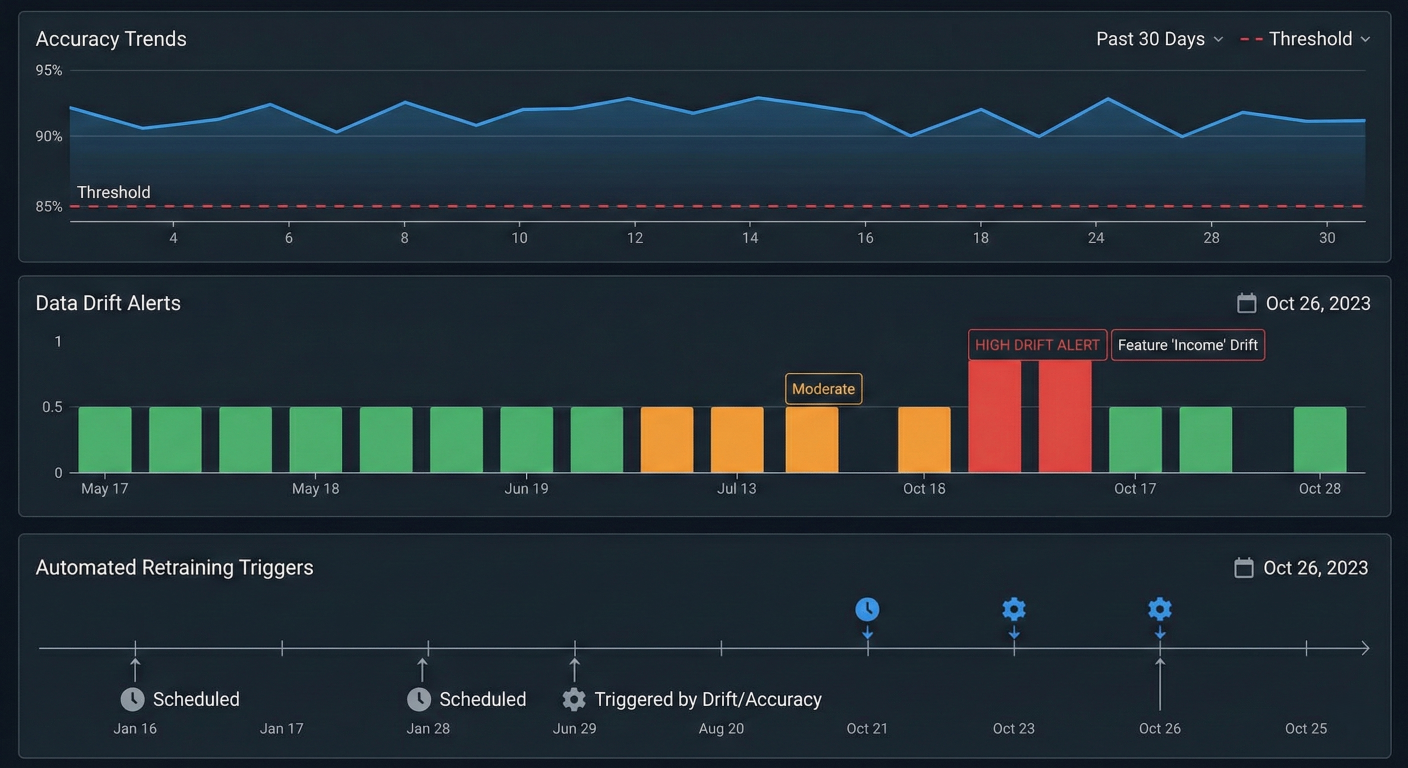
Model monitoring dashboard showing accuracy trends, data drift alerts, and automated retraining triggers over time
jobs:
  ml-model-testing:
    runs-on: ubuntu-latest
    steps:
      - name: Checkout repository
        uses: actions/checkout@v4
      - name: Set up Python
        uses: actions/setup-python@v4
        with:
          python-version: '3.9'
      - name: Install dependencies
        run: |
          pip install -r requirements.txt
          pip install pytest deepchecks great-expectations
      - name: Unit tests for model functions
        run: |
          python -m pytest tests/unit/ -v
      - name: Integration tests for model pipeline
        run: |
          python -m pytest tests/integration/ -v
      - name: Data validation tests
        run: |
          python -m pytest tests/data/ -v
      - name: Model behavior tests
        run: |
          python -c "
          # Load model and test behavior
          import joblib
          import numpy as np
          import pandas as pd
          model = joblib.load('models/model.pkl')
          X_test = pd.read_csv('data/test/known_examples.csv')
          y_expected = pd.read_csv('data/test/known_labels.csv')
          predictions = model.predict(X_test)
          accuracy = (predictions == y_expected.values.ravel()).mean()
          assert accuracy > 0.9, f'Model accuracy on known examples: {accuracy:.2f}'
          print('All model behavior tests passed!')
          "
      - name: Model fairness tests
        run: |
          python tests/fairness/test_model_fairness.py
      - name: Performance tests
        run: |
          python -c "
          import time
          import joblib
          import pandas as pd
          model = joblib.load('models/model.pkl')
          X_test = pd.read_csv('data/test/performance_test.csv')
          start_time = time.time()
          predictions = model.predict(X_test)
          end_time = time.time()
          latency_per_sample = (end_time - start_time) / len(X_test)
          assert latency_per_sample < 0.01, f'Model too slow: {latency_per_sample:.4f}s per sample'
          print(f'Model latency: {latency_per_sample:.4f}s per sample')
"Set up A/B testing to compare model versions in production:
ab-testing-setup:
  runs-on: ubuntu-latest
  if: github.ref == 'refs/heads/main'
  steps:
    - name: Configure A/B test
      run: |
        python -c "
        import requests
        import json
        # Configure A/B test with 50/50 split
        config = {
          'experiment_name': 'model_v${{ needs.model-registry.outputs.model-version }}',
          'control_version': 'production',
          'treatment_version': '${{ needs.model-registry.outputs.model-version }}',
          'traffic_split': 0.5,
          'duration_days': 7,
          'success_metrics': ['accuracy', 'latency', 'user_satisfaction']
        }
        response = requests.post(
          '${{ secrets.AB_TEST_API }}/experiments',
          json=config,
          headers={'Authorization': 'Bearer ${{ secrets.AB_TEST_TOKEN }}'}
        )
        if response.status_code == 201:
            print('A/B test configured successfully')
        else:
            print('Failed to configure A/B test')
            exit(1)
        "
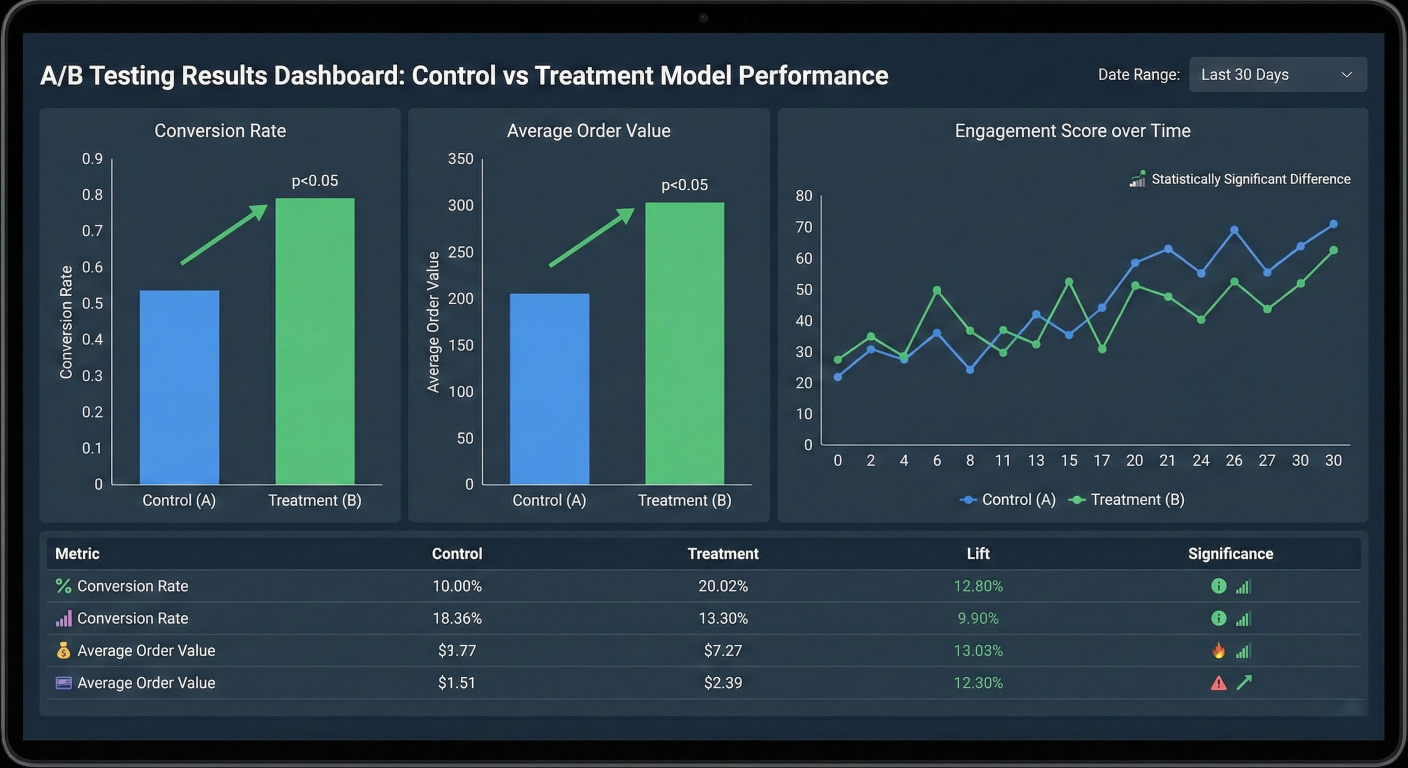
A/B testing results dashboard comparing control vs treatment model performance with statistical significance indicators
1. Use Caching Strategically: Cache dependencies and intermediate results to speed up workflows:
- name: Cache pip dependencies
  uses: actions/cache@v3
  with:
    path: ~/.cache/pip
    key: ${{ runner.os }}-pip-${{ hashFiles('**/requirements.txt') }}
    restore-keys: |
      ${{ runner.os }}-pip-
- name: Cache trained models
  uses: actions/cache@v3
  with:
    path: models/cache/
    key: model-${{ hashFiles('src/models/train_model.py', 'data/processed/train.csv') }}
2. Fail Fast: Structure your workflows to catch errors early:
jobs:
  quick-checks:
    runs-on: ubuntu-latest
    steps:
      - name: Lint code
        run: flake8 src/
      - name: Type check
        run: mypy src/
  expensive-training:
    needs: quick-checks # Only run if quick checks pass
    runs-on: [self-hosted, gpu]
    steps:
      - name: Train model
        run: python src/models/train_model.py
3. Use Conditional Workflows: Only run expensive operations when necessary:
# GitHub Actions: Conditional Model Training
- name: Check if model training needed
  id: check_training
  run: |
    if git diff --name-only HEAD~1 | grep -E "(src/models/|data/)" > /dev/null; then
      echo "needs_training=true" >> $GITHUB_OUTPUT
    else
      echo "needs_training=false" >> $GITHUB_OUTPUT
    fi

- name: Train model
  if: steps.check_training.outputs.needs_training == 'true'
  run: python src/models/train_model.py
Implement robust error handling in your workflows:
jobs:
  resilient-training:
    runs-on: ubuntu-latest
    strategy:
      matrix:
        attempt: [1, 2, 3] # Retry up to 3 times
    steps:
      - name: Train model with retry logic
        run: |
          python -c "
          import sys
          import time
          import random
          attempt = ${{ matrix.attempt }}
          try:
              # Simulate training that might fail
              if random.random() < 0.3 and attempt < 3: # 30% chance of failure
                  raise Exception('Training failed')
              # Actual training code would go here
              print(f'Training succeeded on attempt {attempt}')
          except Exception as e:
              if attempt < 3:
                  print(f'Attempt {attempt} failed: {e}')
                  sys.exit(1) # Will retry with next matrix value
              else:
                  print(f'All attempts failed: {e}')
                  sys.exit(1)
          "
        continue-on-error: ${{ matrix.attempt < 3 }}
Optimize resource usage for cost and efficiency:
jobs:
  resource-aware-training:
    runs-on: ubuntu-latest
    timeout-minutes: 120 # Prevent runaway processes
    steps:
      - name: Monitor resource usage
        run: |
          # Start resource monitoring in background
          (while true; do
            echo "$(date): CPU: $(top -bn1 | grep load | awk '{printf "%.2f%%", $(NF-2)}')"
            sleep 30
          done) &
          MONITOR_PID=$!
          # Run training
          python src/models/train_model.py
          # Stop monitoring
          kill $MONITOR_PID
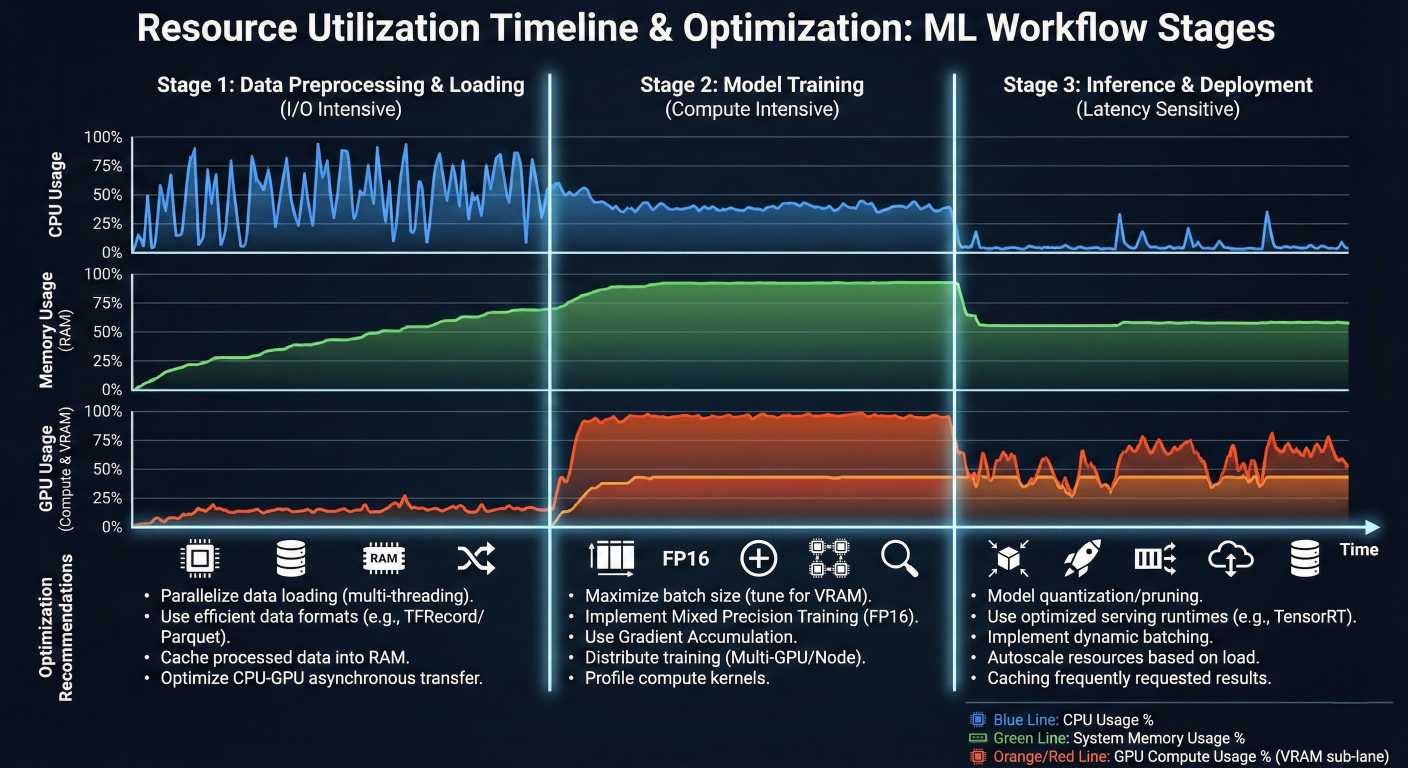
Resource utilization timeline showing CPU, memory, and GPU usage during different workflow stages with optimization recommendations
Let's put it all together with a complete, production-ready MLOps pipeline:
  name: Production MLOps Pipeline
  run-name: MLOps Pipeline - ${{ github.event.head_commit.message }}
  on:
    push:
      branches: [main]
      paths-ignore:
        - 'docs/**'
        - '*.md'
    pull_request:
      branches: [main]
    schedule:
      - cron: '0 2 * * 1' # Weekly retraining
    workflow_dispatch:
  env:
    PYTHON_VERSION: '3.9'
    MODEL_NAME: 'fraud-detection-model'
    REGISTRY_URL: 'your-registry.com'

  jobs:
    setup:
      runs-on: ubuntu-latest
      outputs:
        python-version: ${{ env.PYTHON_VERSION }}
        should-deploy: ${{ steps.check.outputs.should-deploy }}
      steps:
        - name: Checkout
          uses: actions/checkout@v4
        - name: Check deployment conditions
          id: check
          run: |
            if [[ "${{ github.ref }}" == "refs/heads/main" && "${{ github.event_name }}" == "push" ]]; then
              echo "should-deploy=true" >> $GITHUB_OUTPUT
            else
              echo "should-deploy=false" >> $GITHUB_OUTPUT
            fi

    code-quality:
      runs-on: ubuntu-latest
      steps:
        - name: Checkout
          uses: actions/checkout@v4
        - name: Set up Python
          uses: actions/setup-python@v4
          with:
            python-version: ${{ env.PYTHON_VERSION }}
        - name: Install quality tools
          run: |
            pip install flake8 black isort mypy
        - name: Code formatting check
          run: |
            black --check src/
            isort --check-only src/
        - name: Linting
          run: |
            flake8 src/
        - name: Type checking
          run: |
            mypy src/

    data-validation:
      needs: code-quality
      runs-on: ubuntu-latest
      steps:
        - name: Checkout
          uses: actions/checkout@v4
        - name: Set up Python
          uses: actions/setup-python@v4
          with:
            python-version: ${{ env.PYTHON_VERSION }}
        - name: Install dependencies
          run: |
            pip install -r requirements.txt
            pip install dvc[s3]
        - name: Configure DVC
          env:
            AWS_ACCESS_KEY_ID: ${{ secrets.AWS_ACCESS_KEY_ID }}
            AWS_SECRET_ACCESS_KEY: ${{ secrets.AWS_SECRET_ACCESS_KEY }}
          run: |
            dvc remote modify origin --local access_key_id $AWS_ACCESS_KEY_ID
            dvc remote modify origin --local secret_access_key $AWS_SECRET_ACCESS_KEY
        - name: Pull latest data
          run: |
            dvc pull
        - name: Validate data quality
          run: |
            python src/data/validate_data.py --input data/raw/ --output reports/
        - name: Upload validation report
          uses: actions/upload-artifact@v3
          with:
            name: data-validation-report
            path: reports/data_validation.html
            model-training:
    needs: data-validation
    runs-on: [self-hosted, gpu] # Use GPU for training
    steps:
      - name: Checkout
        uses: actions/checkout@v4
      - name: Download validation report
        uses: actions/download-artifact@v3
        with:
          name: data-validation-report
          path: reports/
      - name: Set up Python
        uses: actions/setup-python@v4
        with:
          python-version: ${{ env.PYTHON_VERSION }}
      - name: Install dependencies
        run: |
          pip install -r requirements.txt
          pip install mlflow dvc[s3]
      - name: Pull data
        env:
          AWS_ACCESS_KEY_ID: ${{ secrets.AWS_ACCESS_KEY_ID }}
          AWS_SECRET_ACCESS_KEY: ${{ secrets.AWS_SECRET_ACCESS_KEY }}
        run: |
          dvc pull
      - name: Train model
        env:
          MLFLOW_TRACKING_URI: ${{ secrets.MLFLOW_TRACKING_URI }}
          MLFLOW_TRACKING_USERNAME: ${{ secrets.MLFLOW_USERNAME }}
          MLFLOW_TRACKING_PASSWORD: ${{ secrets.MLFLOW_PASSWORD }}
        run: |
          python src/models/train_model.py \
          --experiment-name "github-actions-${{ github.run_id }}" \
          --model-name ${{ env.MODEL_NAME }} \
          --git-commit ${{ github.sha }}
      - name: Upload model artifacts
        uses: actions/upload-artifact@v3
        with:
          name: trained-model
          path: |
            models/
            reports/training_report.json

  model-testing:
    needs: model-training
    runs-on: ubuntu-latest
    steps:
      - name: Checkout
        uses: actions/checkout@v4
      - name: Download model artifacts
        uses: actions/download-artifact@v3
        with:
          name: trained-model
          path: ./
      - name: Set up Python
        uses: actions/setup-python@v4
        with:
          python-version: ${{ env.PYTHON_VERSION }}
      - name: Install dependencies
        run: |
          pip install -r requirements.txt
          pip install pytest
      - name: Run comprehensive tests
        run: |
          python -m pytest tests/ -v --tb=short \
          --junitxml=reports/test-results.xml \
          --cov=src --cov-report=xml
      - name: Upload test results
        uses: actions/upload-artifact@v3
        if: always()
        with:
          name: test-results
          path: |
            reports/test-results.xml
            coverage.xml

  model-evaluation:
    needs: model-testing
    runs-on: ubuntu-latest
    outputs:
      deploy-approved: ${{ steps.evaluation.outputs.approved }}
    steps:
      - name: Checkout
        uses: actions/checkout@v4
      - name: Download model artifacts
        uses: actions/download-artifact@v3
        with:
          name: trained-model
          path: ./
      - name: Set up Python
        uses: actions/setup-python@v4
        with:
          python-version: ${{ env.PYTHON_VERSION }}
      - name: Install dependencies
        run: |
          pip install -r requirements.txt
          pip install mlflow
      - name: Evaluate against baseline
        id: evaluation
        env:
          MLFLOW_TRACKING_URI: ${{ secrets.MLFLOW_TRACKING_URI }}
          MLFLOW_TRACKING_USERNAME: ${{ secrets.MLFLOW_USERNAME }}
          MLFLOW_TRACKING_PASSWORD: ${{ secrets.MLFLOW_PASSWORD }}
        run: |
          python src/models/evaluate_model.py \
          --model-path models/model.pkl \
          --baseline-model production \
          --output reports/evaluation.json
          # Check if new model is better than baseline
  APPROVED=$(python -c "import json
  with open('reports/evaluation.json') as f
  eval_results = json.load(f)
  current_f1 = eval_results['current_model']['f1_score']
  baseline_f1 = eval_results['baseline_model']['f1_score']
  # Deploy if new model is at least 1% better
  approved = current_f1 > baseline_f1 * 1.01
  print(str(approved).lower())
  ")
  echo "approved=$APPROVED" >> $GITHUB_OUTPUT

  # Upload evaluation report
  - name: Upload evaluation report
    uses: actions/upload-artifact@v3
    with:
      name: evaluation-report
      path: reports/evaluation.json

  # Security scan
  security-scan:
    needs: model-evaluation
    runs-on: ubuntu-latest
    steps:
      - name: Checkout
        uses: actions/checkout@v4
      - name: Run security scan
        uses: github/super-linter@v4
        env:
          DEFAULT_BRANCH: main
          GITHUB_TOKEN: ${{ secrets.GITHUB_TOKEN }}
          VALIDATE_PYTHON: true
          VALIDATE_DOCKERFILE: true
      - name: Scan for secrets
        uses: trufflesecurity/trufflehog@main
        with:
          path: ./
          base: main
          head: HEAD

  # Deploy to staging
  deploy-staging:
    needs: [setup, model-evaluation, security-scan]
    if: needs.setup.outputs.should-deploy == 'true' && needs.model-evaluation.outputs.dep
    runs-on: ubuntu-latest
    environment: staging
    steps:
      - name: Checkout
        uses: actions/checkout@v4
      - name: Download model artifacts
        uses: actions/download-artifact@v3
        with:
          name: trained-model
          path: ./
      - name: Build Docker image
        run: |
          docker build -t ${{ env.REGISTRY_URL }}/${{ env.MODEL_NAME }}:staging-${{ github.sha }}
      - name: Deploy to staging
        run: |
          # Deploy to staging environment
          python src/deployment/deploy.py \
            --environment staging \
            --image ${{ env.REGISTRY_URL }}/${{ env.MODEL_NAME }}:staging-${{ github.sha }}
      - name: Run smoke tests
        run: |
          python tests/integration/test_staging_deployment.py

  # Deploy to production
  deploy-production:
    needs: deploy-staging
    runs-on: ubuntu-latest
    environment: production
    steps:
      - name: Checkout
        uses: actions/checkout@v4
      - name: Deploy to production with blue-green strategy
        run: |
          python src/deployment/blue_green_deploy.py \
            --image ${{ env.REGISTRY_URL }}/${{ env.MODEL_NAME }}:staging-${{ github.sha }} \
            --environment production
      - name: Update model registry
        env:
          MLFLOW_TRACKING_URI: ${{ secrets.MLFLOW_TRACKING_URI }}
          MLFLOW_TRACKING_USERNAME: ${{ secrets.MLFLOW_USERNAME }}
          MLFLOW_TRACKING_PASSWORD: ${{ secrets.MLFLOW_PASSWORD }}
        run: |
          python -c "import mlflow
  client = mlflow.tracking.MlflowClient()
  # Promote model to production stage
  client.transition_model_version_stage(
    name='${{ env.MODEL_NAME }}',
    version='latest',
    stage='Production'
  )
  "
  post-deployment-monitoring:
    needs: deploy-production
    runs-on: ubuntu-latest
    steps:
      - name: Setup monitoring alerts
        run: |
          python src/monitoring/setup_alerts.py \
          --model-name ${{ env.MODEL_NAME }} \
          --environment production \
          --webhook-url ${{ secrets.SLACK_WEBHOOK_URL }}
This comprehensive pipeline demonstrates all the key concepts we've covered, from data validation to security scanning to blue-green deployment.
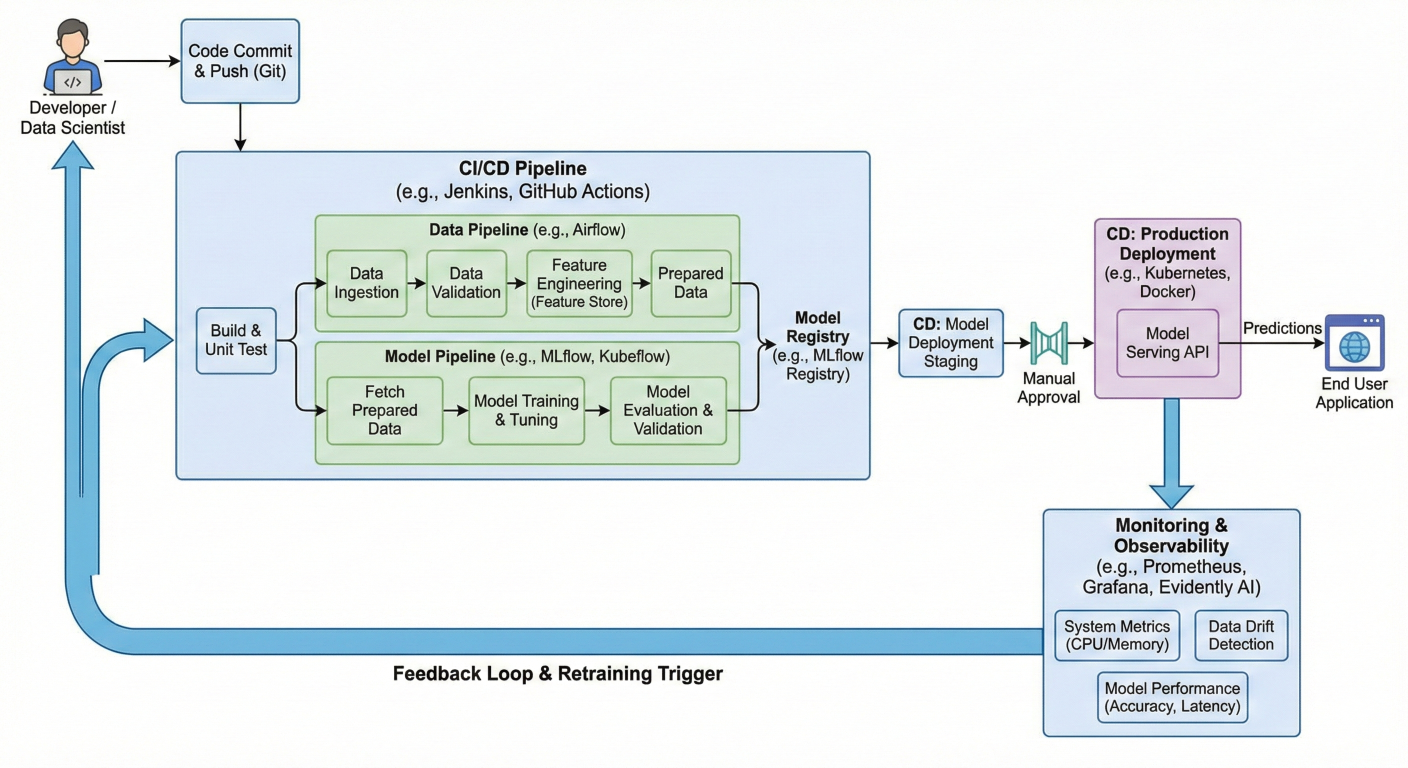
Complete MLOps pipeline flow diagram showing all stages from code commit to production deployment with monitoring feedback loops
When workflows fail, here's how to diagnose and fix common issues:
1. Enable Debug Logging:
env:
  ACTIONS_STEP_DEBUG: true
  ACTIONS_RUNNER_DEBUG: true
2. Use Conditional Steps for Debugging:
# GitHub Actions debug step
- name: Debug information
if: failure()
run: |
  echo "Job failed. Collecting debug info..."
  pip list
  ls -la models/
  cat logs/training.log
3. Handle Resource Constraints:
# Check available resources
echo "Available disk space:"
df -h
echo "Available memory:"
free -h
echo "CPU info:"
nproc
Monitor and optimize your workflow performance:
# Benchmark training time
start_time=$(date +%s)
python src/models/train_model.py
end_time=$(date +%s)
duration=$((end_time - start_time))
echo "Training completed in $duration seconds"
# Set benchmark for future runs
if [ $duration -gt 3600 ]; then
  echo "::warning::Training took longer than expected ($duration seconds)"
fi
Once you've mastered the basics, consider these advanced topics:
1. Multi-Model Orchestration: Managing multiple models with dependencies
2. Feature Stores Integration: Automating feature pipeline management
3. Model Explainability: Automated generation of model interpretation reports
4. Federated Learning: Distributed training across multiple environments
5. MLOps for Real-time Systems: Streaming data and online learning
To deepen your MLOps knowledge:
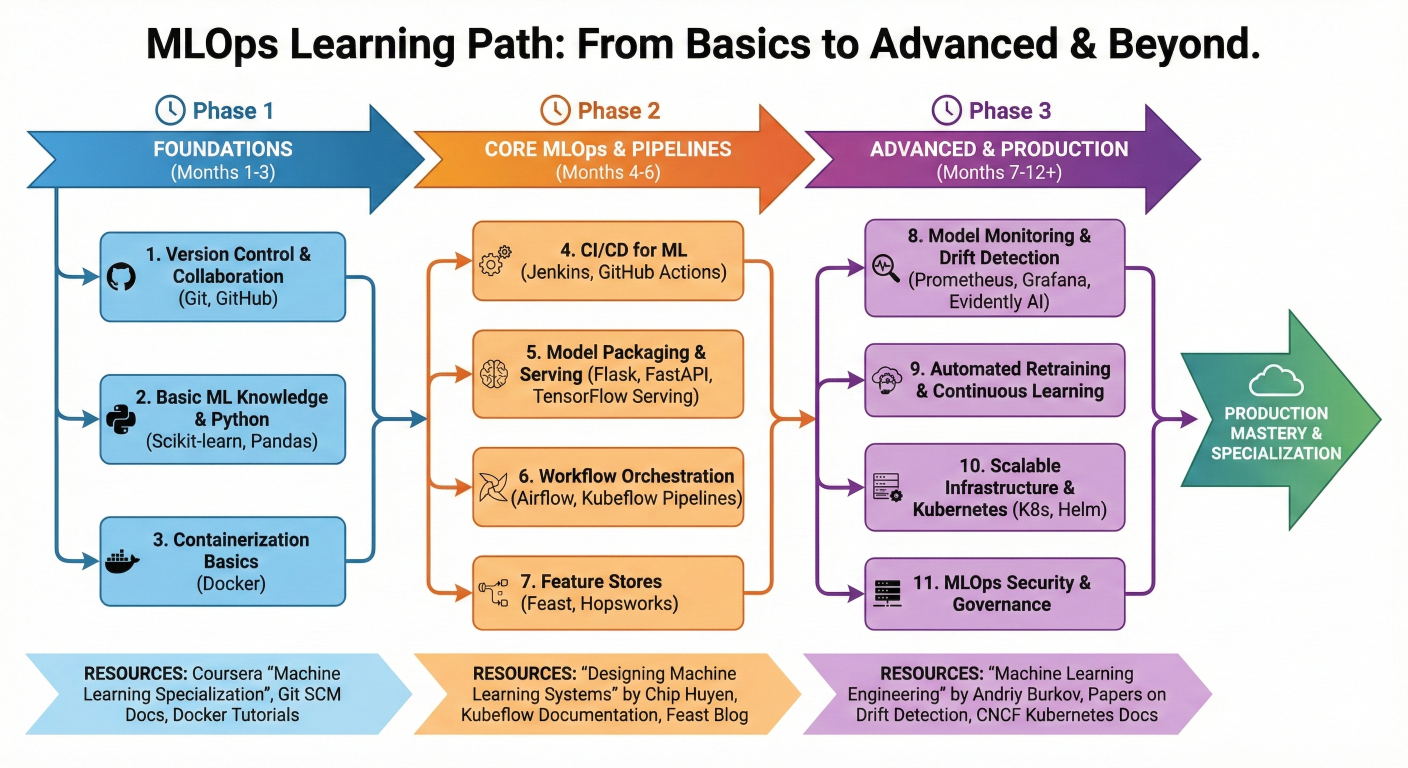
Learning path diagram showing progression from basic MLOps concepts to advanced topics with recommended resources and timeline
GitHub Actions provides a powerful, flexible platform for implementing MLOps pipelines that can scale from simple experiments to production-grade systems. By following the patterns and practices outlined in this guide, you can:
✅ Automate your entire ML lifecycle from data validation to model deployment
✅ Ensure consistency across different environments and team members
✅ Catch issues early with comprehensive testing and validation
✅ Deploy with confidence using proven strategies like blue-green and canary deployments
✅ Monitor and maintain model performance in production
The key to successful MLOps implementation is starting simple and gradually adding complexity. Begin with basic CI/CD for your models, then incrementally add features like automated retraining, advanced deployment strategies, and comprehensive monitoring.
Remember that MLOps is not just about tools – it's about culture, processes, and collaboration between data scientists, engineers, and operations teams. GitHub Actions simply provides the automation layer that makes these practices scalable and reliable.
Ready to transform your machine learning workflows? Start by implementing a basic GitHub Actions pipeline for your next ML project. Try the workflows provided in this guide, adapt them to your needs, and gradually build up to a full MLOps implementation
Want to accelerate your MLOps journey? Consider enrolling in our comprehensive MLOps Mastery Course where you'll build real-world projects using GitHub Actions and other industry standard tools. You'll learn advanced techniques, best practices, and get hands-on experience with production-grade MLOps systems.

SaratahKumar C
 Launch your Graphy