

There are no items in your cart
Add More
Add More
| Item Details | Price | ||
|---|---|---|---|
Large Language Models (LLMs) have revolutionized artificial intelligence, but building production-ready applications with them presents unique challenges. Enter LangChain—an open-source framework that has emerged as the go-to solution for developers seeking to harness the full potential of LLMs in real-world applications.
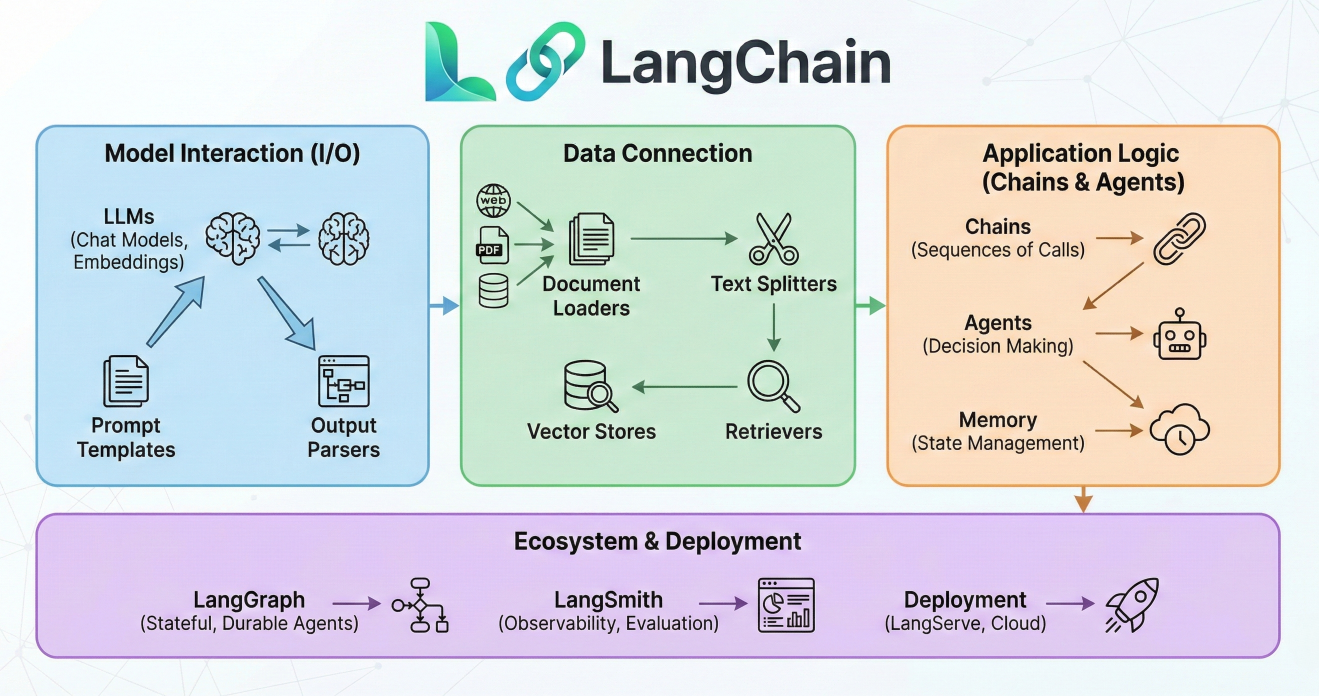
LangChain logo and framework overview infographic
LangChain is more than just another AI library; it's a comprehensive orchestration framework designed to simplify every stage of the LLM application lifecycle. By providing a modular, composable architecture, LangChain enables developers to build sophisticated AI applications that can reason, remember, and interact with external data sources.
Working with LLMs in production environments reveals several critical challenges that LangChain addresses
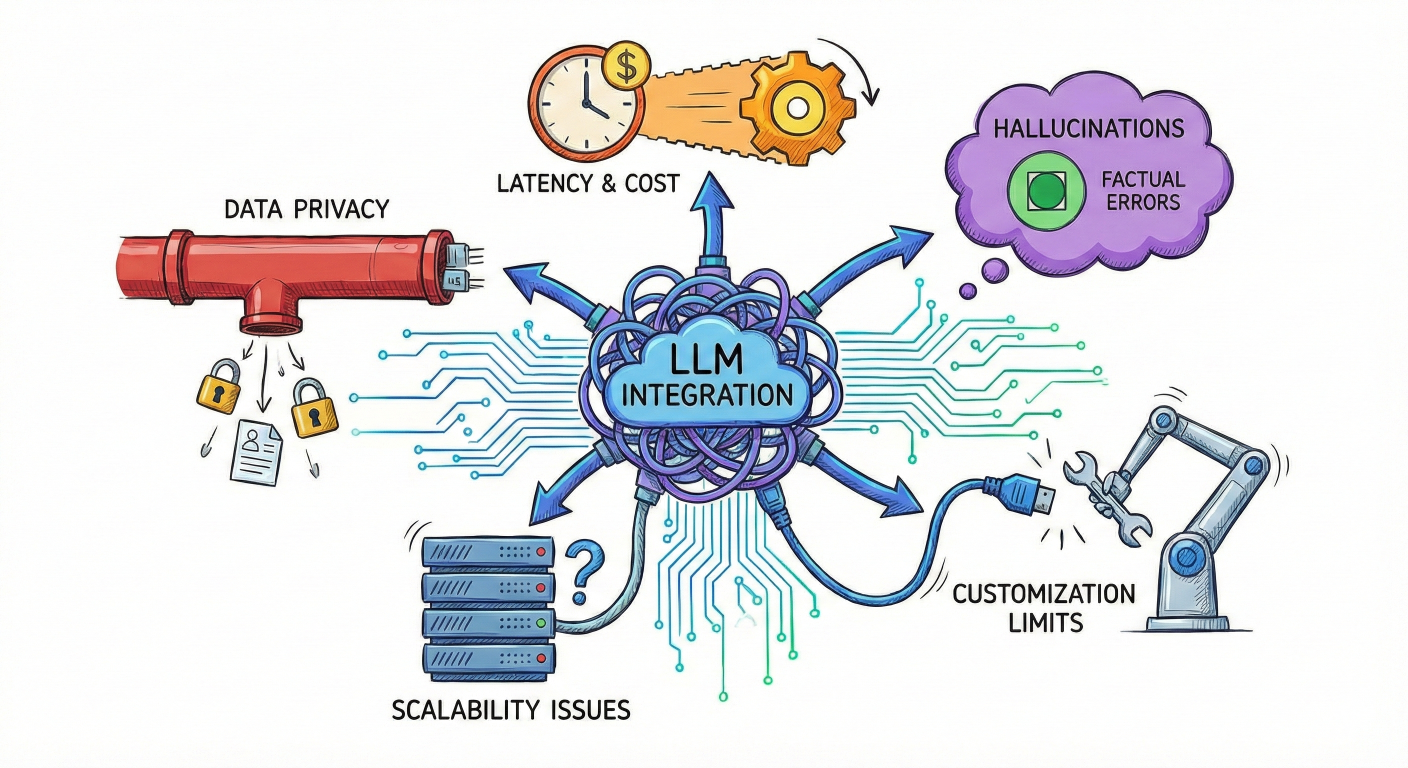
Problem illustration showing typical LLM integration challenges
Prompt Management Complexity: Raw LLM interactions require repetitive prompt structures, making it difficult to maintain consistency and optimize performance across different use cases.
Memory and Context Limitations: LLMs are stateless by nature, lacking the ability to remember previous interactions or maintain conversation context without manual state management.
Data Integration Barriers: Connecting LLMs to external data sources, APIs, and databases requires significant custom development work
Model Vendor Lock-in: Switching between different LLM providers (OpenAI, Anthropic, Google, etc.) typically requires substantial code modifications
Output Processing Challenges: LLM responses often need structured parsing and formatting, which varies significantly between models and use cases.
Scalability and Error Handling: Production applications require robust error handling, rate limiting, and performance monitoring that's challenging to implement from scratch.
LangChain transforms LLM development by providing several key advantages:
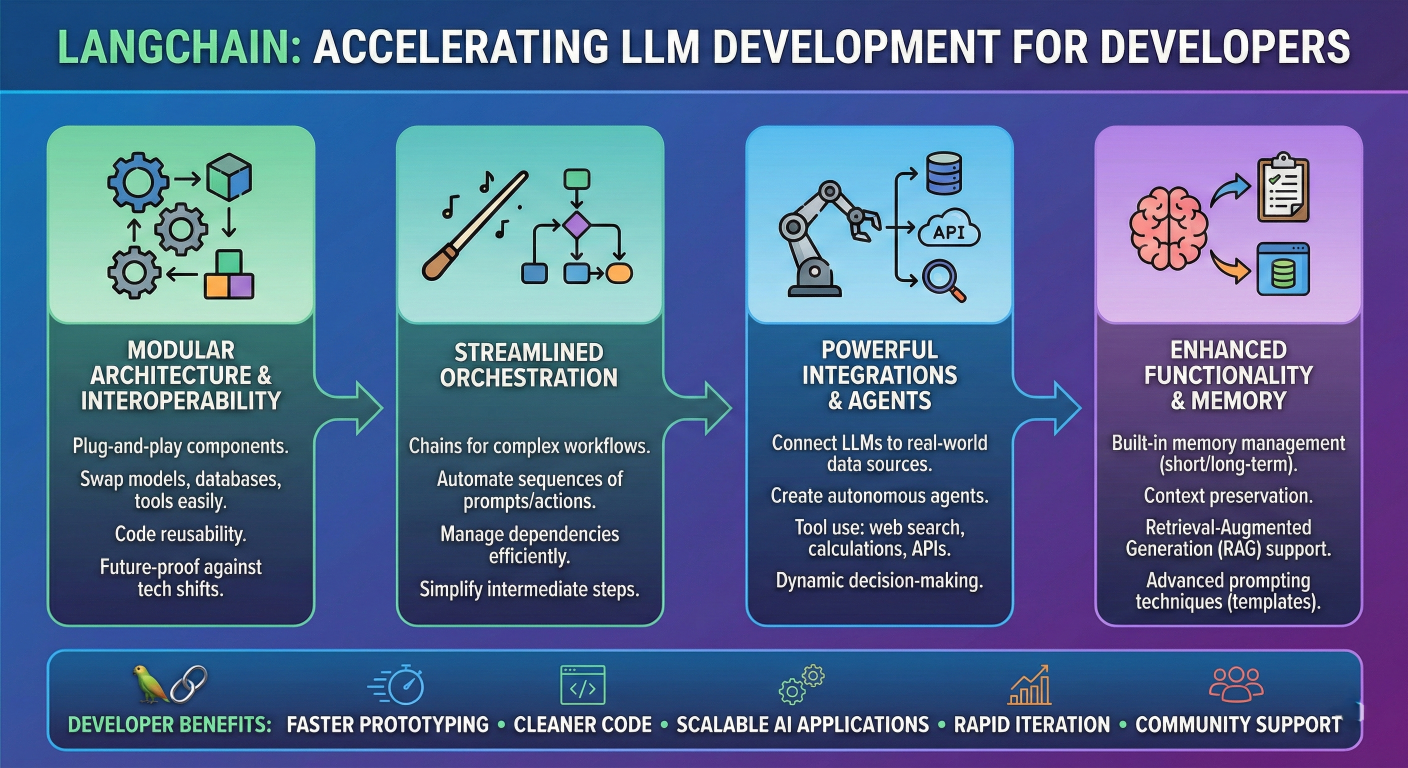
LangChain benefits infographic showing developer advantages
Modular Architecture: Build applications using reusable components that can be mixed and matched for different use cases.
Provider Agnosticism: Switch between LLM providers with minimal code changes, avoiding vendor lock-in.
Rich Ecosystem: Access to over 600 integrations with databases, APIs, vector stores, and external services.
Production-Ready Features: Built-in support for monitoring, debugging, streaming responses, and error handling.
Rapid Prototyping: Accelerate development with pre-built chains, agents, and templates for common AI patterns
LangChain's architecture follows a modular, layered design that promotes composability and reusability. The framework consists of six core building blocks that work together to create sophisticated LLM applications.
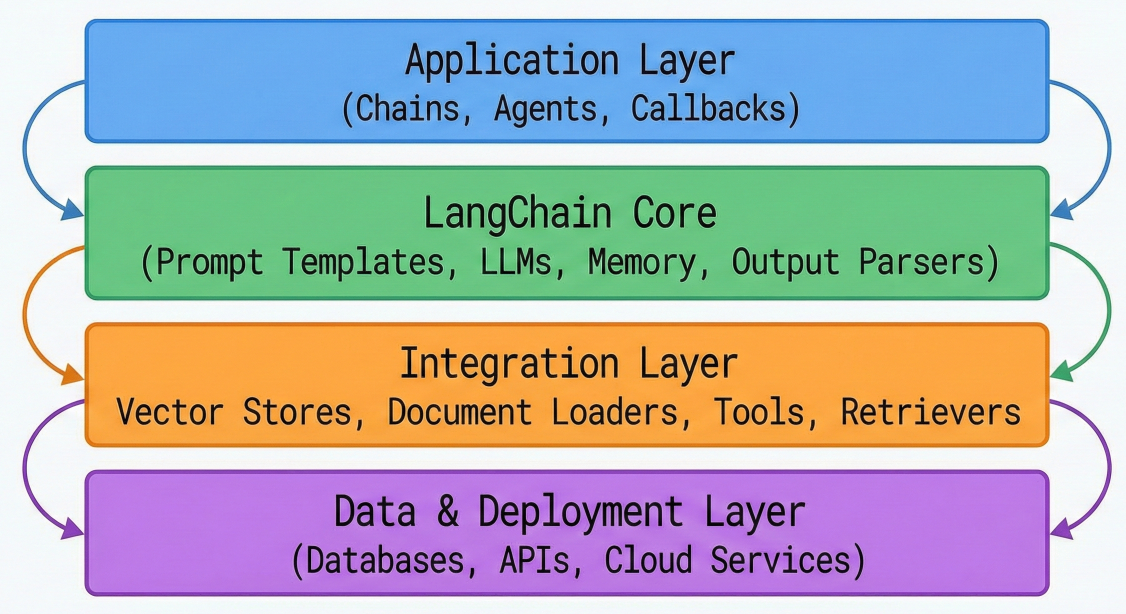
LangChain architecture diagram showing layered structure with component interactions
1. Model I/O: Manages interactions with language models, including prompt formatting, response parsing, and streaming capabilities.
2. Memory: Provides persistence mechanisms for maintaining conversation context and application state across interactions.
3. Retrieval: Handles document loading, text splitting, embedding generation, and vector store operations for external knowledge integration.
4. Agents: Enables autonomous decision-making systems that can use tools and APIs to accomplish complex tasks.
5. Chains: Orchestrates sequences of operations, combining multiple components into cohesive workflows.
6. Callbacks: Provides hooks for logging, monitoring, and debugging application behavior throughout execution.
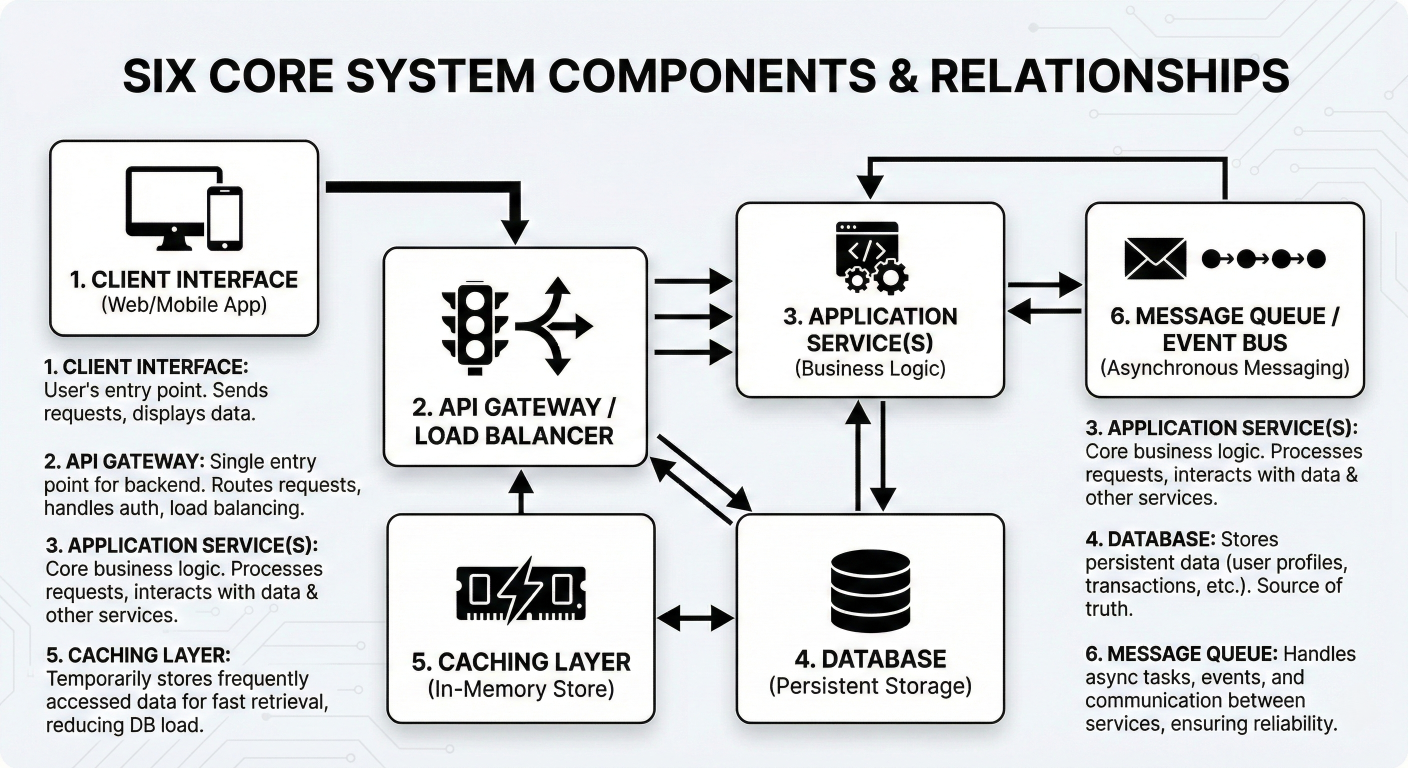
Six core components block diagram with detailed descriptions and relationships
The power of LangChain lies in how these components work together to create sophisticated workflows. Here's a practical example showing component interaction:
from langchain.chat_models import ChatOpenAI
from langchain.prompts import ChatPromptTemplate
from langchain.memory import ConversationBufferMemory
from langchain.chains import ConversationChain

# Model I/O Component - LLM Interface
llm = ChatOpenAI(
    model="gpt-4",
    temperature=0.7,
    max_tokens=2000
)

# Prompts Component - Template Management
prompt_template = ChatPromptTemplate.from_messages([
    ("system", "You are a helpful AI assistant specialized in {domain}."),
    ("human", "{user_input}"),
    ("ai", "{ai_response}")
])

# Memory Component - Conversation Context
memory = ConversationBufferMemory(
    return_messages=True,
    memory_key="chat_history"
)

# Chains Component - Workflow Orchestration
conversation_chain = ConversationChain(
    llm=llm,
    prompt=prompt_template,
    memory=memory,
    verbose=True
)

# Execute the chain
response = conversation_chain.run(
    domain="software development",
    user_input="How do I implement error handling in Python?"
)
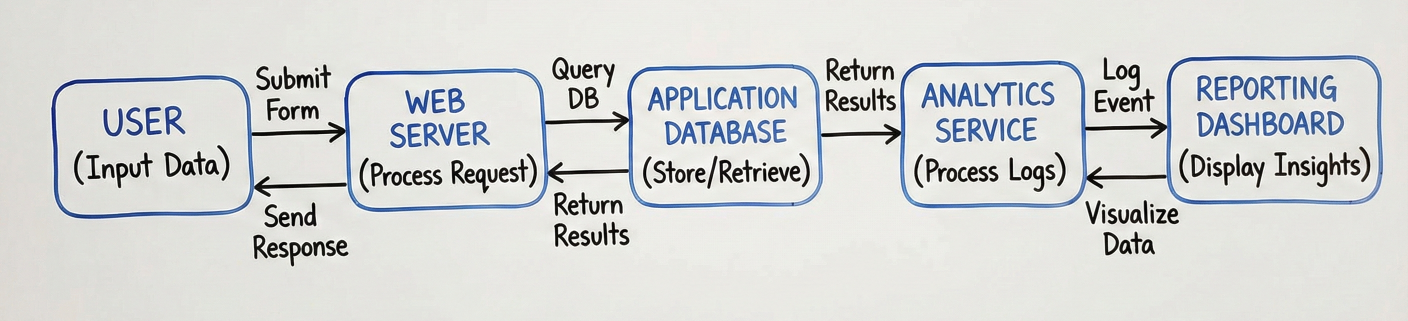
Data flow diagram showing how components pass information through the chain
The Models component serves as the foundation of any LangChain application, providing a unified interface to interact with various LLMs. This abstraction layer is crucial for building provider-agnostic applications
LangChain supports two primary model types:
LLMs (Large Language Models): Text-in, text-out interfaces for models like GPT-3.5, Claude, and Llama.
Chat Models: Message-based interfaces optimized for conversational AI applications.
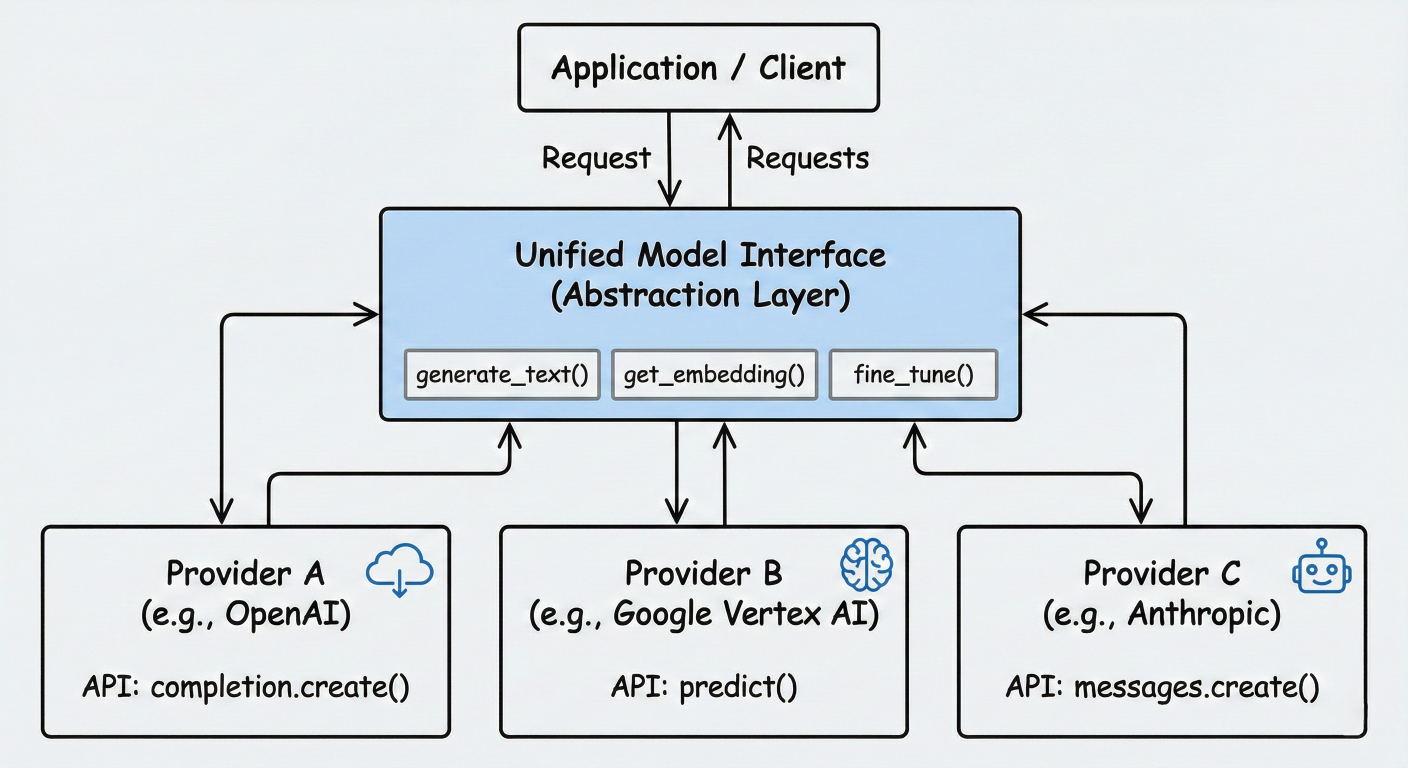
Model interface abstraction diagram showing unified API across providers
Here's how to initialize different model types:
# LLM Interface
from langchain.llms import OpenAI, Anthropic, HuggingFacePipeline

# OpenAI LLM
openai_llm = OpenAI(
    model_name="gpt-3.5-turbo-instruct",
    temperature=0.9,
    max_tokens=1000
)

# Chat Model Interface
from langchain.chat_models import ChatOpenAI, ChatAnthropic

# OpenAI Chat Model
chat_model = ChatOpenAI(
    model="gpt-4",
    temperature=0.7,
    max_tokens=2000,
    streaming=True
)

# Anthropic Chat Model
claude_model = ChatAnthropic(
    model="claude-3-sonnet-20240229",
    temperature=0.5,
    max_tokens=4000
)
One of LangChain's most powerful features is its ability to switch between model providers with minimal code changes
# Configuration-based model selection
import os
from langchain.chat_models import ChatOpenAI, ChatAnthropic, ChatOllama

def get_chat_model(provider="openai", **kwargs):
    """Factory function for model selection"""
    if provider == "openai":
        return ChatOpenAI(**kwargs)
    elif provider == "anthropic":
        return ChatAnthropic(**kwargs)
    elif provider == "ollama":
        return ChatOllama(**kwargs)
    else:
        raise ValueError(f"Unsupported provider: {provider}")

# Usage - switch providers via configuration
MODEL_PROVIDER = os.getenv("MODEL_PROVIDER", "openai")
model = get_chat_model(
    provider=MODEL_PROVIDER,
    temperature=0.7,
    max_tokens=2000
)

# The rest of your application remains unchanged
response = model.invoke("Explain quantum computing in simple terms.")
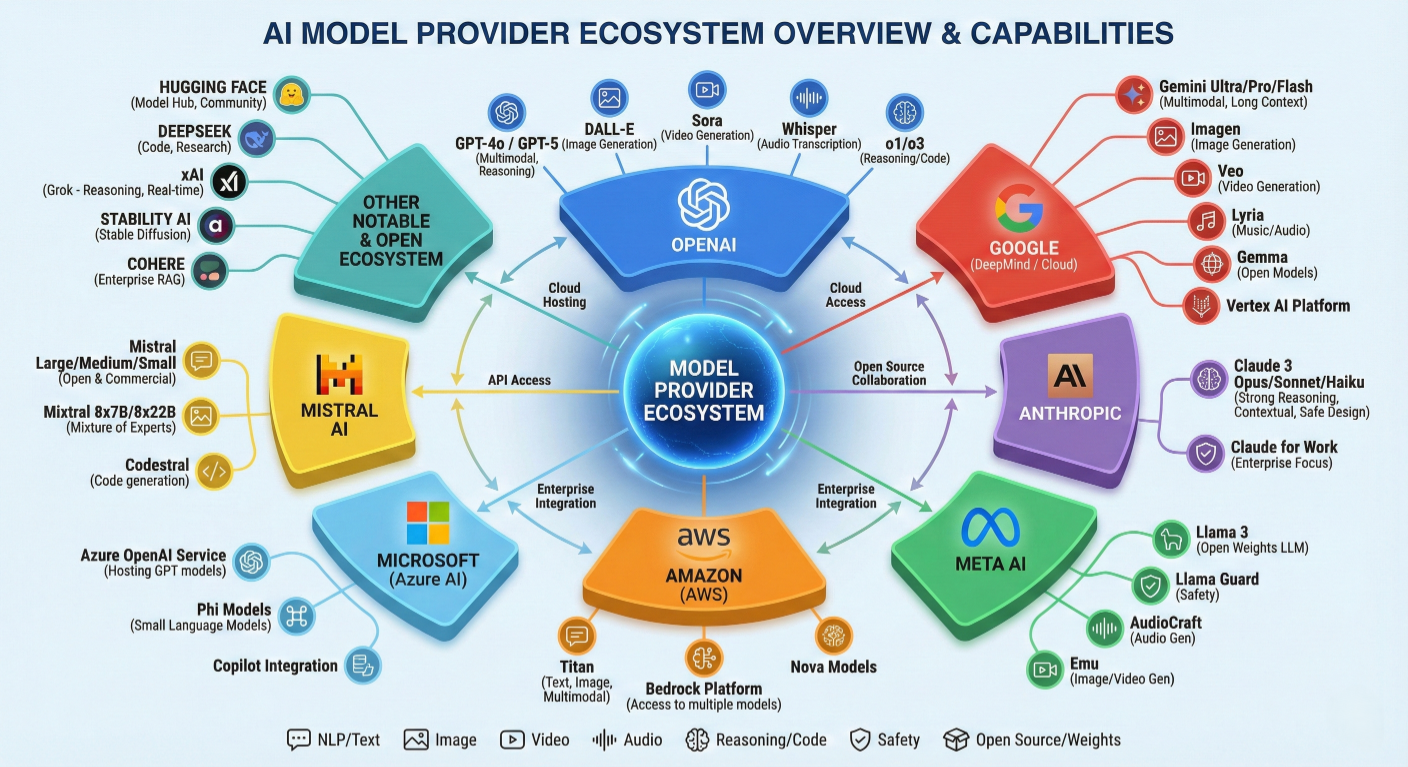
Model provider ecosystem overview showing supported providers and their capabilities
LangChain provides extensive configuration options for fine-tuning model behavior:
from langchain.chat_models import ChatOpenAI
from langchain.callbacks.streaming_stdout import StreamingStdOutCallbackHandler

# Advanced model configuration
advanced_model = ChatOpenAI(
    model="gpt-4-turbo-preview",
    temperature=0.7, # Creativity vs consistency
    max_tokens=4000, # Maximum response length
    presence_penalty=0.1, # Reduce repetition
    frequency_penalty=0.1, # Encourage topic diversity
    top_p=0.9, # Nucleus sampling
    streaming=True, # Enable streaming responses
    callbacks=[StreamingStdOutCallbackHandler()],
    request_timeout=60, # Request timeout in seconds
    max_retries=3, # Retry failed requests
)

# Model with custom headers and parameters
custom_model = ChatOpenAI(
    model="gpt-4",
    openai_api_key="your-api-key",
    openai_organization="your-org-id",
    model_kwargs={
        "stop": ["\n\n", "Human:", "Assistant:"],
        "logit_bias": {50256: -100} # Prevent specific tokens
    }
)
Prompt engineering is crucial for LLM success, and LangChain's Prompts component provides powerful tools for creating, managing, and optimizing prompts
PromptTemplates enable dynamic prompt generation with variable substitution:
from langchain.prompts import PromptTemplate

# Basic prompt template
basic_template = PromptTemplate(
    input_variables=["topic", "audience"],
    template="""
Write a comprehensive explanation about {topic}
suitable for {audience}.
Include practical examples and key takeaways.
"""
)

# Generate prompt with specific values
prompt = basic_template.format(
    topic="machine learning",
    audience="high school students"
)
print(prompt)
For conversational applications, use ChatPromptTemplate:
from langchain.prompts import (
ChatPromptTemplate,
SystemMessagePromptTemplate,
HumanMessagePromptTemplate,
AIMessagePromptTemplate
)

# System message template
system_template = SystemMessagePromptTemplate.from_template(
"You are an expert {role} with {years} years of experience. "
"Provide detailed, accurate information while maintaining a {tone} tone."
)

# Human message template
human_template = HumanMessagePromptTemplate.from_template(
"Question: {question}\n"
"Context: {context}\n"
"Please provide a comprehensive answer."
)

# Combine into chat prompt
chat_prompt = ChatPromptTemplate.from_messages([
system_template,
human_template
])

# Use with variables
messages = chat_prompt.format_prompt(
role="software architect",
years="15",
tone="professional yet approachable",
question="How should I design a microservices architecture?",
context="Building a e-commerce platform expecting high traffic"
).to_messages()
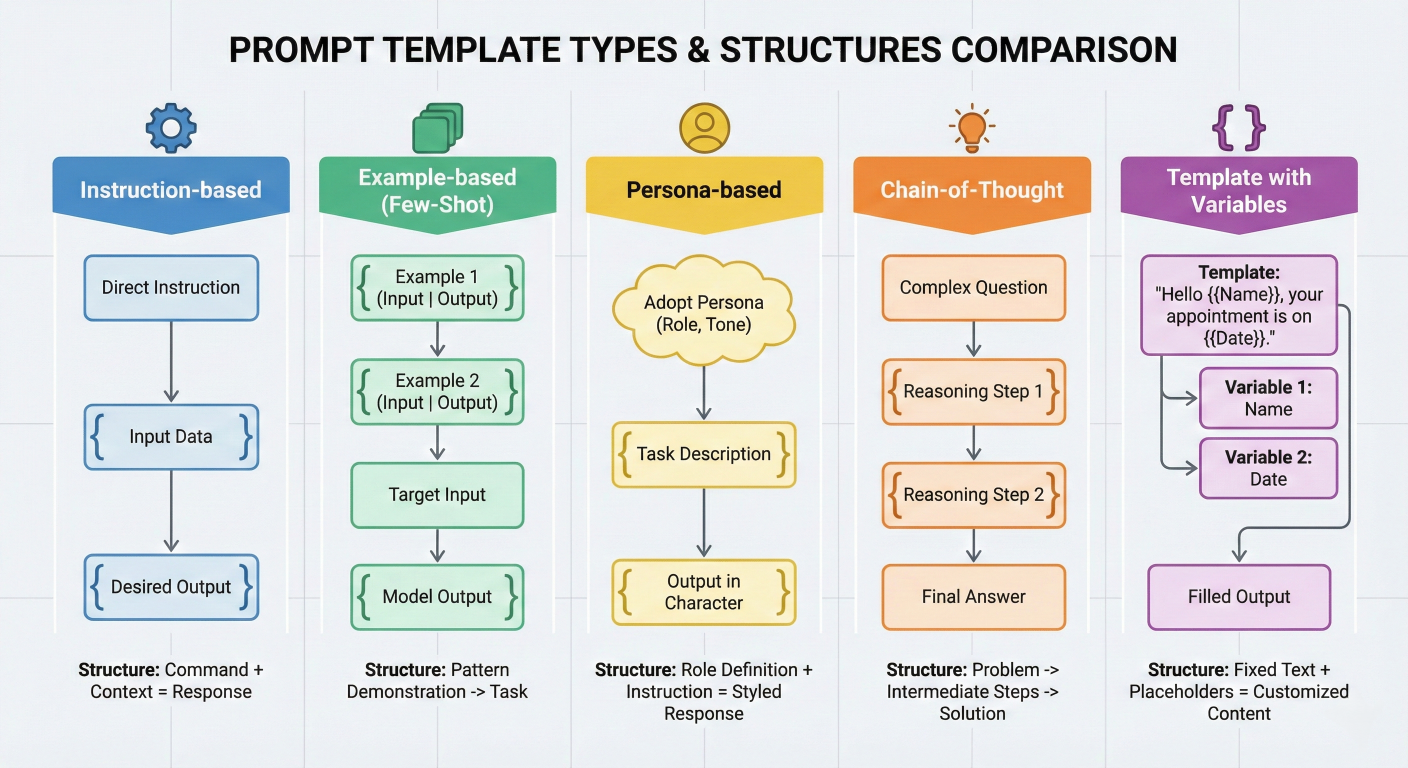
Prompt template types comparison chart showing different template structures
LangChain supports few-shot prompting for improved model performance:
from langchain.prompts import FewShotPromptTemplate, PromptTemplate

# Example data for few-shot learning
examples = [
    {
        "input": "What is the capital of France?",
        "output": "The capital of France is Paris, a city known for its art, fashion, and..."
    },
    {
        "input": "What is the largest planet?",
        "output": "Jupiter is the largest planet in our solar system, with a diameter of..."
    }
]

# Template for each example
example_template = PromptTemplate(
    input_variables=["input", "output"],
    template="Human: {input}\nAI: {output}"
)

# Few-shot prompt template
few_shot_prompt = FewShotPromptTemplate(
    examples=examples,
    example_prompt=example_template,
    suffix="Human: {input}\nAI:",
    input_variables=["input"]
)

# Generate few-shot prompt
prompt = few_shot_prompt.format(input="What is the smallest country?")
print(prompt)
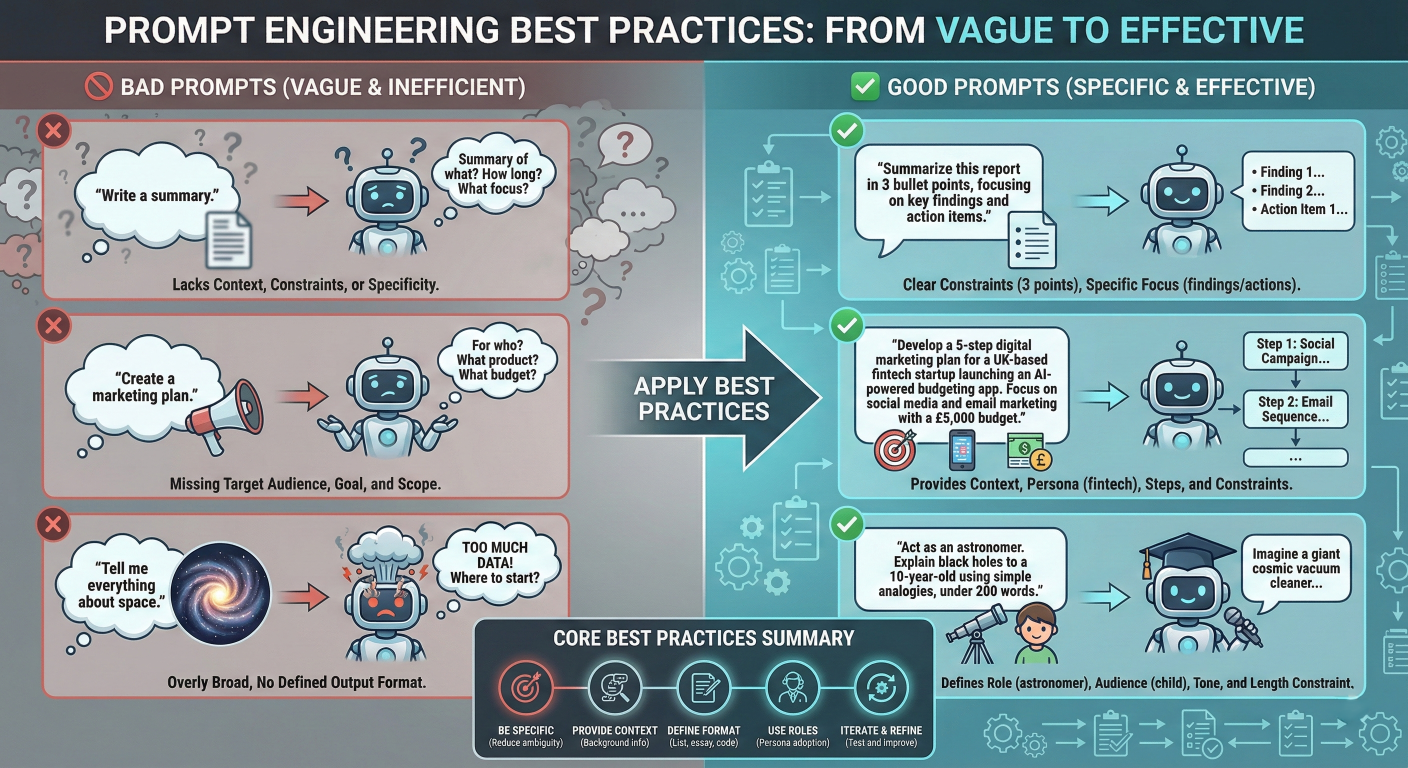
Prompt engineering best practices infographic with examples
cot_template = PromptTemplate(
    input_variables=["problem"],
    template="""
Solve this step by step:
Problem: {problem}
Let me think through this carefully:
Step 1: [Identify what we know]
Step 2: [Identify what we need to find]
Step 3: [Apply relevant principles or formulas]
Step 4: [Calculate the answer]
Step 5: [Verify the result]
Final Answer:
"""
)
# PromptTemplate example for role-based instructions
from langchain.prompts import PromptTemplate

role_based_template = PromptTemplate(
    input_variables=['role', 'task', 'constraints'],
    template="""
You are a {role}. Your task is to {task}.
Important constraints:
{constraints}
Approach this systematically and provide actionable insights.
"""
)
Chains are the backbone of LangChain, enabling the creation of complex workflows by connecting multiple components. They represent sequences of calls to language models, tools, or other chains.
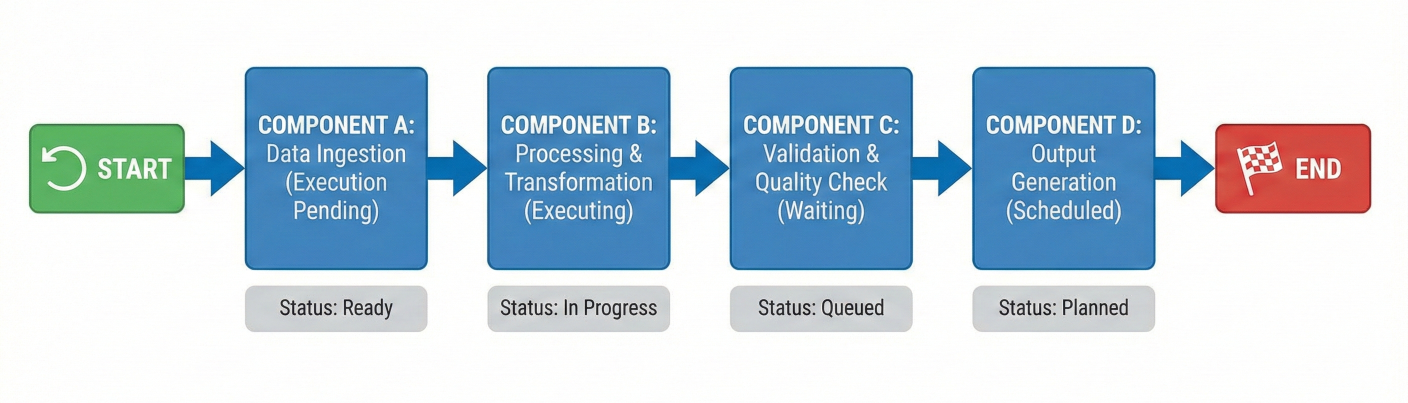
Chain workflow diagram showing sequential component execution
LLMChain: The most basic chain combining a prompt template with an LLM:
# LangChain marketing tagline example
from langchain.chains import LLMChain
from langchain.chat_models import ChatOpenAI
from langchain.prompts import PromptTemplate

# Create components
llm = ChatOpenAI(temperature=0.7)
prompt = PromptTemplate(
    input_variables=["product", "company"],
    template="Write a marketing tagline for {product} by {company}."
)

# Create LLMChain
marketing_chain = LLMChain(
    llm=llm,
    prompt=prompt,
    output_key="tagline"
)

# Execute chain
result = marketing_chain.run(
    product="eco-friendly water bottles",
    company="GreenTech Solutions"
)
Connect multiple chains to create complex workflows:
from langchain.chains import SimpleSequentialChain, LLMChain
# First chain: Generate product features
feature_prompt = PromptTemplate(
    input_variables=["product"],
    template="List 5 key features of {product}:"
)
feature_chain = LLMChain(llm=llm, prompt=feature_prompt)

# Second chain: Create marketing copy
marketing_prompt = PromptTemplate(
    input_variables=["features"],
    template="Based on these features: {features}\nWrite compelling marketing copy:"
)
marketing_chain = LLMChain(llm=llm, prompt=marketing_prompt)

# Combine chains
overall_chain = SimpleSequentialChain(
    chains=[feature_chain, marketing_chain],
    verbose=True
)

# Execute sequential workflow
result = overall_chain.run("smart home security system")
Create specialized chains for specific use cases:
from langchain.chains.base import Chain
from typing import Dict, Any

class ContentModerationChain(Chain):
    """Custom chain for content moderation"""
    llm: Any
    prompt: PromptTemplate

    @property
    def input_keys(self) -> List[str]:
        return ["content"]

    @property
    def output_keys(self) -> List[str]:
        return ["is_safe", "reason", "confidence"]

    def _call(self, inputs: Dict[str, Any]) -> Dict[str, Any]:
        content = inputs["content"]
        # Format prompt
        formatted_prompt = self.prompt.format(content=content)
        # Get LLM response
        response = self.llm(formatted_prompt)
        # Parse response (simplified)
        lines = response.strip().split('\\n')
        is_safe = "safe" in lines[0].lower()
        reason = lines[1] if len(lines) > 1 else ""
        confidence = float(lines[2]) if len(lines) > 2 else 0.5
        return {
            "is_safe": is_safe,
            "reason": reason,
            "confidence": confidence
        }

# Usage
moderation_prompt = PromptTemplate(
    input_variables=["content"],
    template="""
Analyze this content for safety and appropriateness:
Content: {content}
Respond in this format:
Safety: [Safe/Unsafe]
Reason: [Brief explanation]
Confidence: [0.0-1.0]
"""
)

moderation_chain = ContentModerationChain(
    llm=llm,
    prompt=moderation_prompt
)
Agents represent LangChain's most sophisticated component, enabling the creation of autonomous systems that can reason about problems, use tools, and make decisions dynamically.
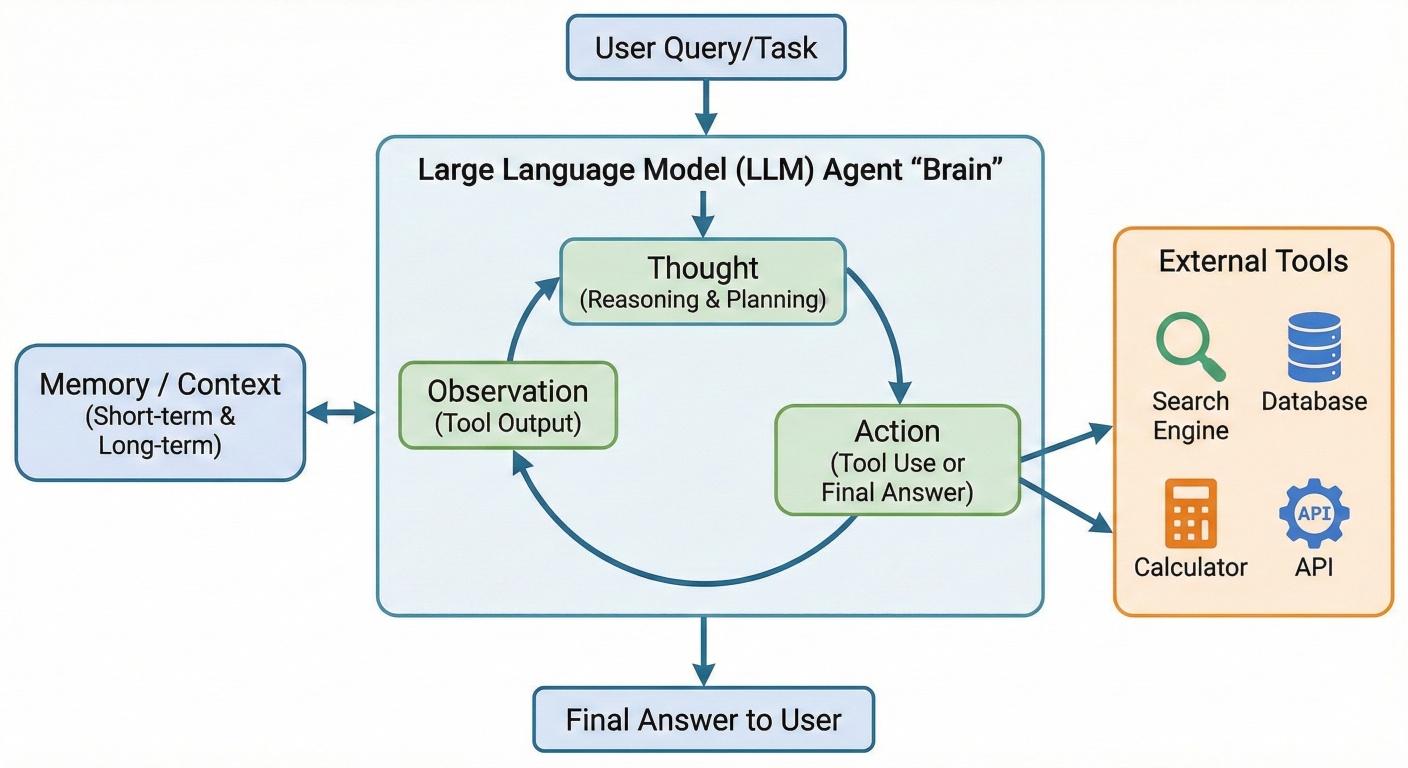
Agent architecture diagram showing decision-making flow with tools
Agents consist of three core elements:
1. LLM: The reasoning engine that decides what actions to take
2. Tools: External functions or APIs the agent can use
3. Agent Executor: The runtime that manages the agent's execution loop
The ReAct (Reasoning + Acting) pattern is fundamental to LangChain agents:
from langchain.agents import initialize_agent, AgentType
from langchain.tools import Tool
from langchain.chat_models import ChatOpenAI
import requests

# Define tools for the agent
def search_wikipedia(query: str) -> str:
    """Search Wikipedia for information"""
    url = f"https://en.wikipedia.org/api/rest_v1/page/summary/{query}"
    response = requests.get(url)
    if response.status_code == 200:
        data = response.json()
        return data.get('extract', 'No information found')
    return "Search failed"

def calculate(expression: str) -> str:
    """Safely evaluate mathematical expressions"""
    try:
        result = eval(expression)  # Note: Use safe evaluation in production
        return str(result)
    except Exception as e:
        return f"Calculation error: {str(e)}"

# Create tool objects
tools = [
    Tool(
        name="Wikipedia Search",
        func=search_wikipedia,
        description="Search Wikipedia for factual information about topics, people, place"
    ),
    Tool(
        name="Calculator",
        func=calculate,
        description="Perform mathematical calculations. Input should be a valid mathemati"
    )
]

# Initialize LLM
llm = ChatOpenAI(temperature=0, model="gpt-4")

# Create agent
agent = initialize_agent(
    tools=tools,
    llm=llm,
    agent=AgentType.ZERO_SHOT_REACT_DESCRIPTION,
    verbose=True,
    max_iterations=5,
    early_stopping_method="generate"
)

# Use the agent
response = agent.run(
    "What is the population of Tokyo, and what would be 10% of that number?"
)
Build specialized tools for your domain:
from langchain.tools import BaseTool
from typing import Optional
import json

class DatabaseQueryTool(BaseTool):
    name = "database_query"
    description = "Execute SQL queries on the company database to retrieve information"

    def _run(self, query: str) -> str:
        """Execute the database query"""
        # Implement your database connection logic
        try:
            # Simulated database response
            mock_results = {
                "SELECT * FROM users": "Found 1250 users",
                "SELECT COUNT(*) FROM orders": "Total orders: 8,430"
            }
            return mock_results.get(query, "Query executed successfully")
        except Exception as e:
            return f"Database error: {str(e)}"

    async def _arun(self, query: str) -> str:
        """Async version of the tool"""
        return self._run(query)

class EmailTool(BaseTool):
    name = "send_email"
    description = "Send emails to specified recipients with subject and body"

    def _run(self, recipient: str, subject: str, body: str) -> str:
        """Send email"""
        # Implement your email sending logic
        return f"Email sent to {recipient} with subject '{subject}'"

    async def _arun(self, recipient: str, subject: str, body: str) -> str:
        return self._run(recipient, subject, body)

# Use custom tools
custom_tools = [DatabaseQueryTool(), EmailTool()]

custom_agent = initialize_agent(
    tools=custom_tools,
    llm=llm,
    agent=AgentType.STRUCTURED_CHAT_ZERO_SHOT_REACT_DESCRIPTION,
    verbose=True
)
Create collaborative agent systems:
from langchain.agents import AgentExecutor
from langchain.memory import ConversationBufferMemory

class ResearchAgent:
    def __init__(self, llm):
        self.tools = [
            # Research-specific tools
            Tool(name="web_search", func=self.web_search,
                 description="Search the web for current information"),
            Tool(name="academic_search", func=self.academic_search,
                 description="Search academic databases for research papers")
        ]
        self.agent = initialize_agent(self.tools, llm,
                                      AgentType.ZERO_SHOT_REACT_DESCRIPTION)

    def web_search(self, query: str) -> str:
        # Implement web search logic
        return f"Web search results for: {query}"

    def academic_search(self, query: str) -> str:
        # Implement academic search logic
        return f"Academic papers found for: {query}"

class WritingAgent:
    def __init__(self, llm):
        self.tools = [
            Tool(name="grammar_check", func=self.grammar_check,
                 description="Check and correct grammar in text"),
            Tool(name="style_analysis", func=self.style_analysis,
                 description="Analyze writing style and suggest improvements")
        ]
        self.agent = initialize_agent(self.tools, llm,
                                      AgentType.ZERO_SHOT_REACT_DESCRIPTION)

    def grammar_check(self, text: str) -> str:
        return f"Grammar checked: {text[:50]}..."

    def style_analysis(self, text: str) -> str:
        return f"Style analysis complete for text"

# Orchestrate multi-agent workflow
research_agent = ResearchAgent(llm)
writing_agent = WritingAgent(llm)

def collaborative_content_creation(topic: str):
    # Research phase
    research_results = research_agent.agent.run(
        f"Research comprehensive information about {topic}"
    )
    # Writing phase
    final_content = writing_agent.agent.run(
        f"Write a well-structured article based on this research: {research_results}"
    )
    return final_content
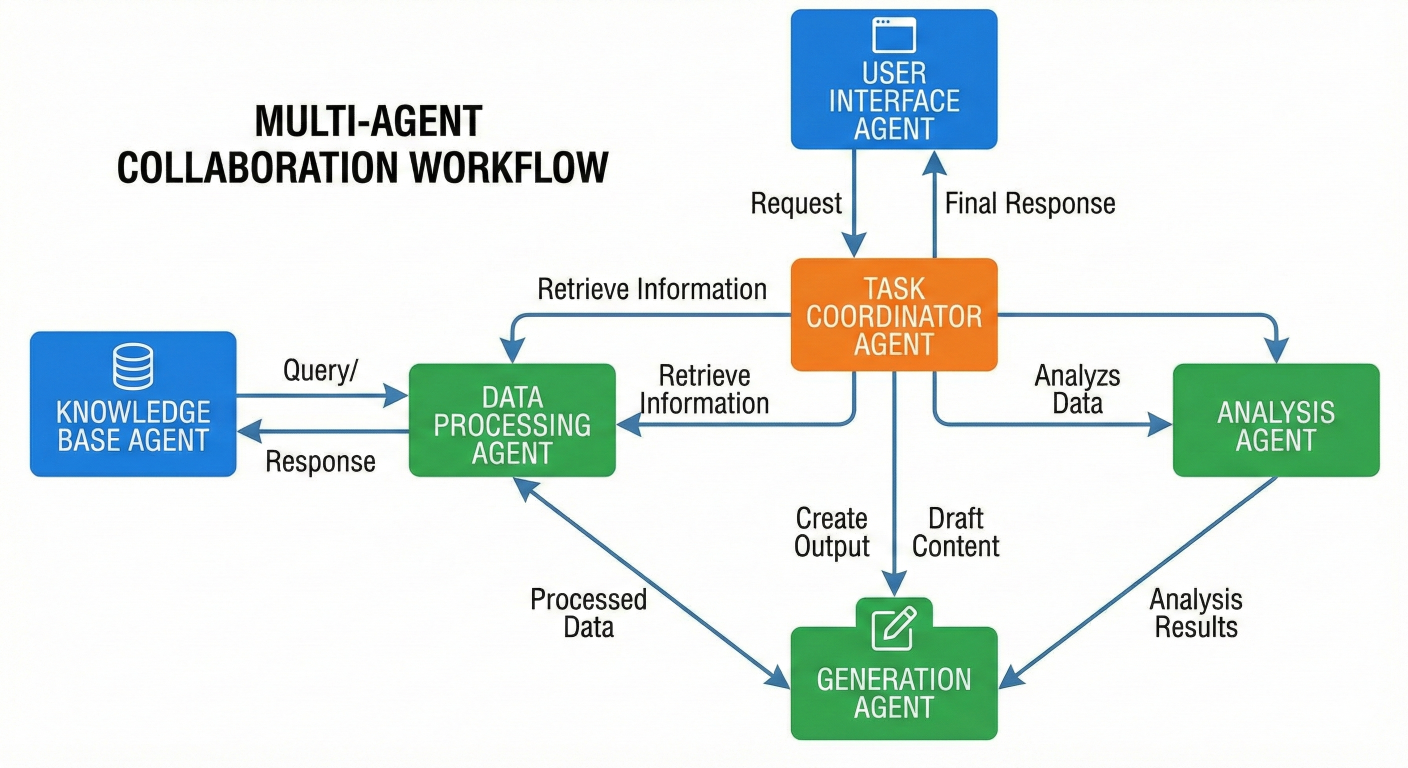
Multi-agent collaboration diagram showing workflow between different agent types
Memory is crucial for creating applications that can maintain context across interactions. LangChain provides various memory types to suit different use cases.
ConversationBufferMemory: Stores the entire conversation history:
from langchain.memory import ConversationBufferMemory
from langchain.chains import ConversationChain

# Basic conversation memory
memory = ConversationBufferMemory()

# Save conversation context
memory.save_context(
    {"input": "Hi, I'm working on a Python project"},
    {"output": "Great! I'd be happy to help with your Python project. What are you workin"}
)

memory.save_context(
    {"input": "I need help with error handling"},
    {"output": "Error handling is crucial for robust Python code. What specific type of e"}
)

# Load memory variables
print(memory.load_memory_variables({}))

# Use with conversation chain
conversation = ConversationChain(
    llm=ChatOpenAI(),
    memory=memory,
    verbose=True
)

response = conversation.predict(input="Can you show me an example?")
ConversationSummaryMemory: Maintains a summary of the conversation:
from langchain.memory import ConversationSummaryMemory
# Summary-based memory for long conversations
summary_memory = ConversationSummaryMemory(
  llm=ChatOpenAI(),
  max_token_limit=1000
)
# This will automatically summarize older parts of the conversation
# when the token limit is exceeded
long_conversation = ConversationChain(
  llm=ChatOpenAI(),
  memory=summary_memory,
  verbose=True
)
ConversationBufferWindowMemory: Keeps only the last k interactions:
from langchain.memory import ConversationBufferWindowMemory
# Keep only last 5 interactions
window_memory = ConversationBufferWindowMemory(k=5)
windowed_conversation = ConversationChain(
    llm=ChatOpenAI(),
    memory=window_memory,
    verbose=True
)
For semantic memory that can retrieve relevant past information:
from langchain.memory import VectorStoreRetrieverMemory
from langchain.vectorstores import Chroma
from langchain.embeddings import OpenAIEmbeddings

# Create vector store for memory
embeddings = OpenAIEmbeddings()
vectorstore = Chroma(
    collection_name="memory",
    embedding_function=embeddings
)

# Vector-based memory
vector_memory = VectorStoreRetrieverMemory(
    retriever=vectorstore.as_retriever(search_kwargs={"k": 3}),
    memory_key="relevant_context"
)

# Use in conversation
vector_conversation = ConversationChain(
    llm=ChatOpenAI(),
    memory=vector_memory,
    verbose=True
)
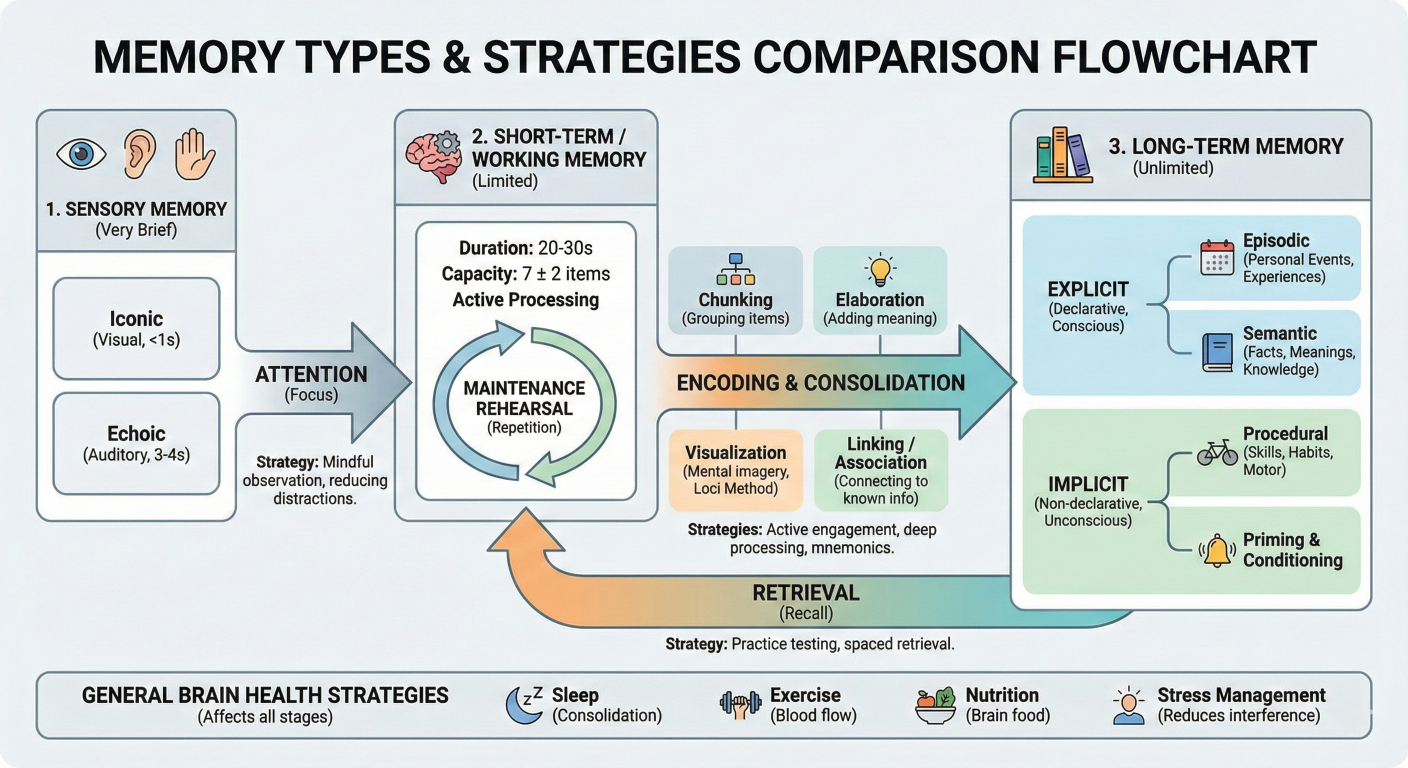
Memory types comparison diagram showing different memory strategies
Store memory across sessions:
import json
import os
from langchain.memory import ConversationBufferMemory

class PersistentMemory:
    def __init__(self, file_path: str):
        self.file_path = file_path
        self.memory = ConversationBufferMemory()
        self.load_memory()

    def load_memory(self):
        """Load memory from file"""
        if os.path.exists(self.file_path):
            try:
                with open(self.file_path, 'r') as f:
                    data = json.load(f)
                # Restore conversation history
                for exchange in data.get('history', []):
                    self.memory.save_context(
                        exchange['input'],
                        exchange['output']
                    )
            except Exception as e:
                print(f"Error loading memory: {e}")

    def save_memory(self):
        """Save memory to file"""
        history = []
        if hasattr(self.memory, 'chat_memory'):
            for message in self.memory.chat_memory.messages:
                if message.type == 'human':
                    history.append({'input': {'input': message.content}})
                elif message.type == 'ai':
                    if history:
                        history[-1]['output'] = {'output': message.content}
        with open(self.file_path, 'w') as f:
            json.dump({'history': history}, f)

    def add_interaction(self, user_input: str, ai_response: str):
        """Add new interaction and save"""
        self.memory.save_context(
            {"input": user_input},
            {"output": ai_response}
        )
        self.save_memory()

# Usage
persistent_memory = PersistentMemory("conversation_history.json")
Now let's explore how to build complete, real-world applications using LangChain. We'll cover several practical examples that demonstrate the framework's capabilities.
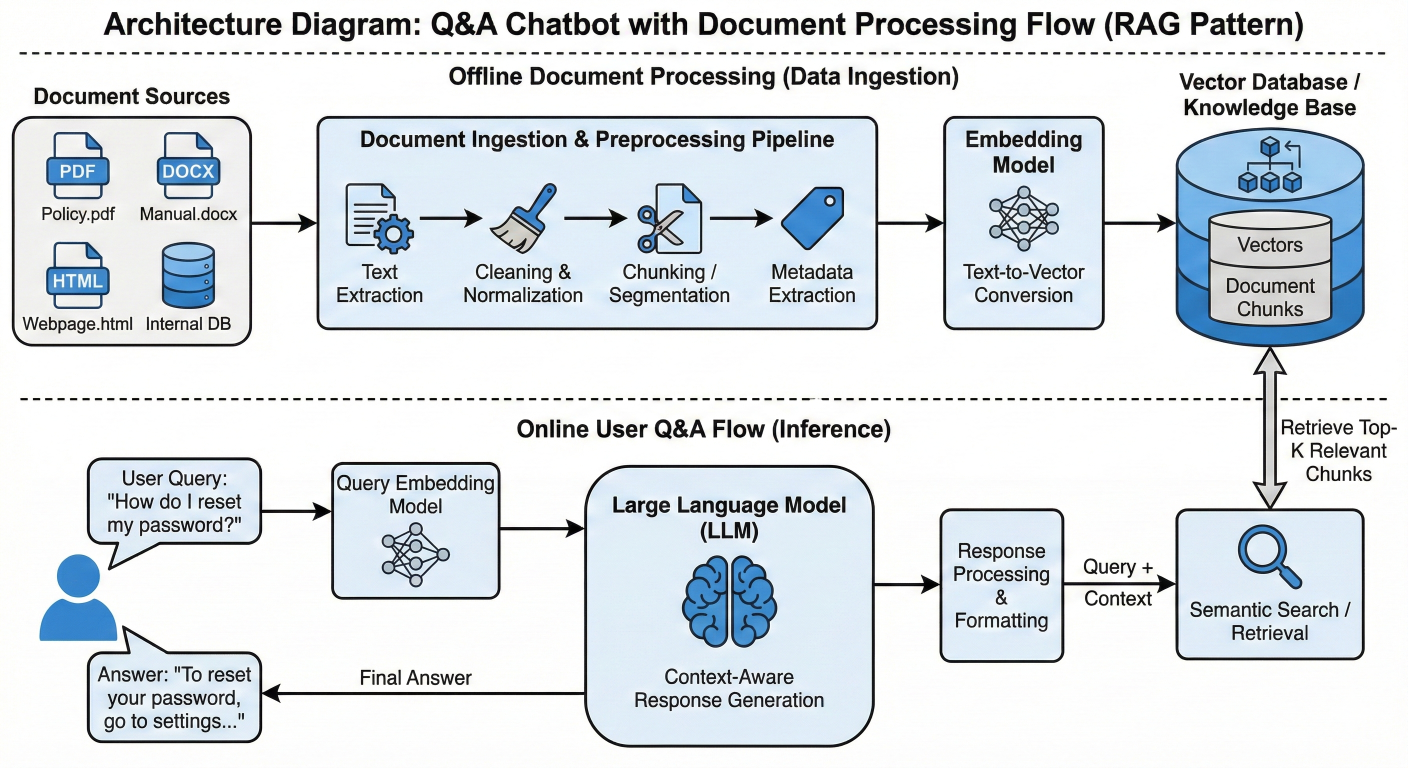
Q&A chatbot architecture diagram showing document processing flow
Building a Q&A chatbot that can answer questions based on your documents:
# LangChain DocumentQABot example
from langchain.document_loaders import PyPDFLoader, TextLoader
from langchain.text_splitter import RecursiveCharacterTextSplitter
from langchain.embeddings import OpenAIEmbeddings
from langchain.vectorstores import Chroma
from langchain.chains import RetrievalQA
from langchain.chat_models import ChatOpenAI

class DocumentQABot:
    def __init__(self, model_name="gpt-3.5-turbo"):
        self.llm = ChatOpenAI(model_name=model_name, temperature=0.1)
        self.embeddings = OpenAIEmbeddings()
        self.vectorstore = None
        self.qa_chain = None

    def load_documents(self, file_paths):
        """Load and process documents"""
        documents = []
        for file_path in file_paths:
            if file_path.endswith('.pdf'):
                loader = PyPDFLoader(file_path)
            elif file_path.endswith('.txt'):
                loader = TextLoader(file_path)
            else:
                continue
            documents.extend(loader.load())
        return documents

    def setup_vectorstore(self, documents):
        """Create vector store from documents"""
        text_splitter = RecursiveCharacterTextSplitter(
            chunk_size=1000,
            chunk_overlap=200,
            length_function=len
        )
        texts = text_splitter.split_documents(documents)
        self.vectorstore = Chroma.from_documents(
            documents=texts,
            embedding=self.embeddings,
            persist_directory='./chroma_db'
        )
        self.qa_chain = RetrievalQA.from_chain_type(
            llm=self.llm,
            chain_type='stuff',
            retriever=self.vectorstore.as_retriever(search_kwargs={'k': 4}),
            return_source_documents=True
        )

    def ask_question(self, question: str):
        """Answer question based on documents"""
        if not self.qa_chain:
            return "Please load documents first"
        result = self.qa_chain({'query': question})
        return {
            'answer': result['result'],
            'sources': [doc.metadata for doc in result['source_documents']]
        }

# Usage example
qa_bot = DocumentQABot()
documents = qa_bot.load_documents([
    'company_handbook.pdf',
    'product_documentation.txt'
])
qa_bot.setup_vectorstore(documents)
response = qa_bot.ask_question('What is our company\'s vacation policy?')
print(f"Answer: {response['answer']}")
print(f"Sources: {response['sources']}")
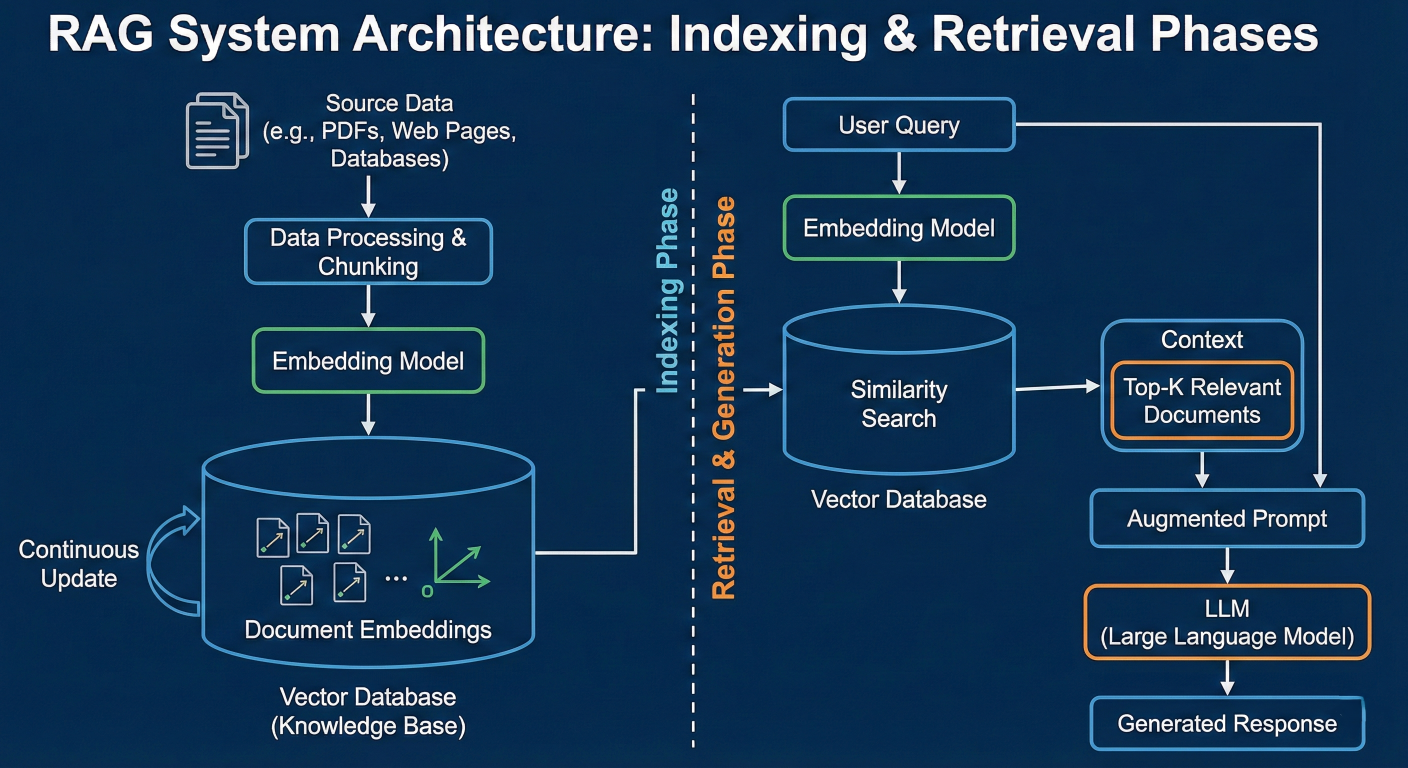
RAG system architecture diagram showing indexing and retrieval phases
A comprehensive RAG implementation for enhanced information retrieval:
# LangChain Advanced RAG System
from langchain.chains import ConversationalRetrievalChain
from langchain.memory import ConversationBufferMemory
from langchain.prompts import PromptTemplate

class AdvancedRAGSystem:
    def __init__(self):
        self.llm = ChatOpenAI(model="gpt-4", temperature=0.3)
        self.embeddings = OpenAIEmbeddings()
        self.vectorstore = None
        self.memory = ConversationBufferMemory(
            memory_key="chat_history",
            return_messages=True
        )

    def create_custom_prompt(self):
        """Create custom prompt for RAG"""
        template = """
You are an AI assistant that answers questions based on provided context.
Context information:
{context}
Chat History:
{chat_history}
Current Question: {question}
Instructions:
1. Answer based primarily on the provided context
2. If the context doesn't contain enough information, say so clearly
3. Provide specific details and examples when available
4. Maintain conversation continuity using chat history
Answer:
"""
        return PromptTemplate(
            input_variables=["context", "chat_history", "question"],
            template=template
        )

    def setup_rag_chain(self, vectorstore):
        """Setup RAG chain with custom prompt"""
        self.vectorstore = vectorstore
        custom_prompt = self.create_custom_prompt()
        self.rag_chain = ConversationalRetrievalChain.from_llm(
            llm=self.llm,
            retriever=vectorstore.as_retriever(
                search_type="mmr",
                search_kwargs={
                    'k': 6,
                    'fetch_k': 20,
                    'lambda_mult': 0.5
                }
            ),
            memory=self.memory,
            combine_docs_chain_kwargs={'prompt': custom_prompt},
            return_source_documents=True,
            verbose=True
        )

    def chat(self, question: str):
        """Interactive chat with RAG"""
        if not self.rag_chain:
            return "RAG system not initialized"
        result = self.rag_chain({"question": question})
        return {
            "answer": result["answer"],
            "sources": [
                {
                    "content": doc.page_content[:200] + "...",
                    "metadata": doc.metadata
                }
                for doc in result["source_documents"]
            ]
        }

# Usage
rag_system = AdvancedRAGSystem()
# Assuming vectorstore is already created from your documents
# rag_system.setup_rag_chain(your_vectorstore)
# Interactive chat
# response = rag_system.chat("How does the RAG system work?")
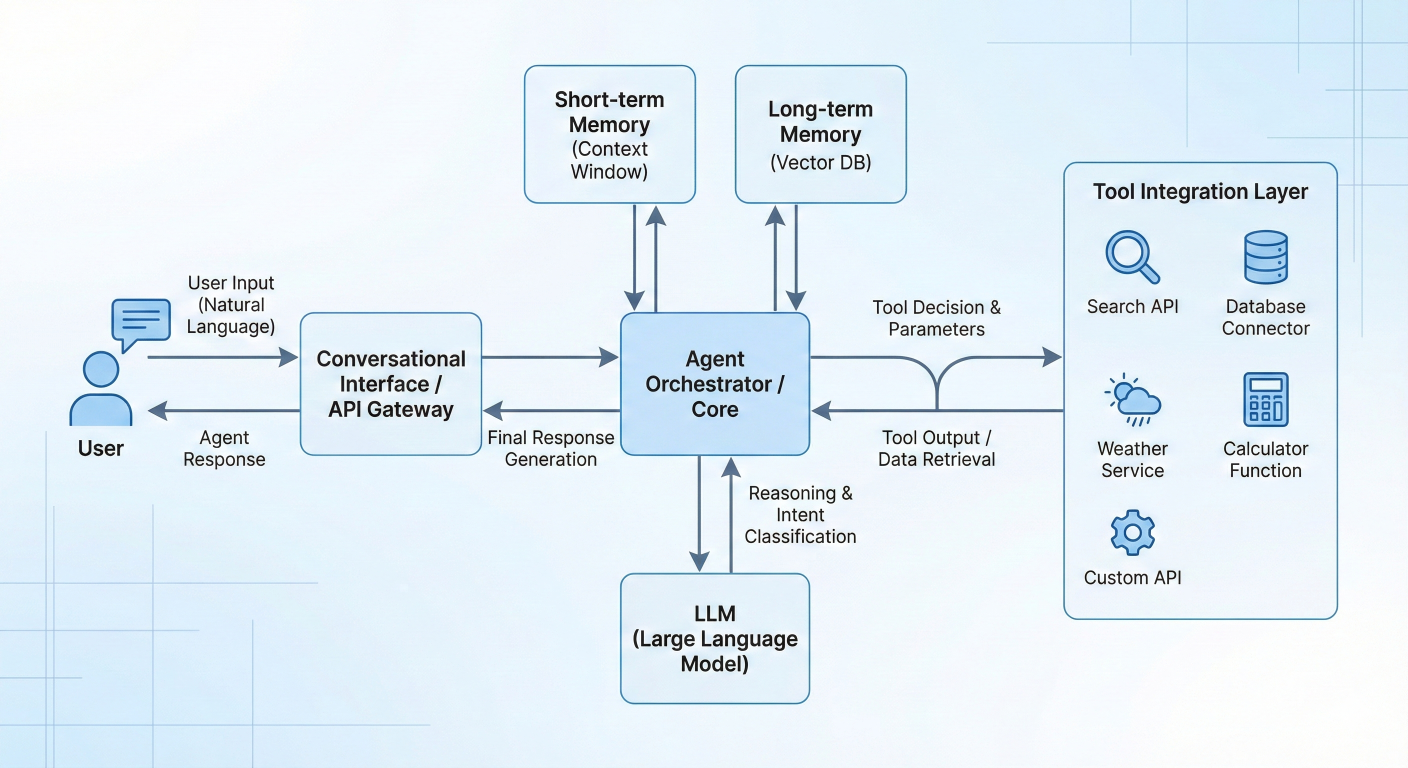
Conversational agent workflow diagram showing tool integration
Building a conversational agent with multiple capabilities:
# LangChain SmartAssistant example
from langchain.agents import create_react_agent, AgentExecutor
from langchain.tools import Tool
from langchain import hub
from langchain.memory import ConversationBufferWindowMemory
import requests

class SmartAssistant:
    def __init__(self):
        self.llm = ChatOpenAI(model="gpt-4", temperature=0.7)
        self.memory = ConversationBufferWindowMemory(
            k=10,
            memory_key="chat_history",
            return_messages=True
        )
        self.setup_tools()
        self.setup_agent()

    def setup_tools(self):
        """Define tools for the agent"""
        def get_weather(location: str) -> str:
            """Get current weather for a location"""
            # Mock weather API call
            return f"The weather in {location} is sunny, 72°F"

        def search_web(query: str) -> str:
            """Search the web for information"""
            # Mock web search
            return f"Search results for '{query}': [Recent web information would go here]"

        def calculate_math(expression: str) -> str:
            """Perform mathematical calculations"""
            try:
                result = eval(expression)
                return f"The result is: {result}"
            except:
                return "Invalid mathematical expression"

        def send_reminder(message: str, time: str) -> str:
            """Set a reminder"""
            return f"Reminder set: '{message}' for {time}"

        self.tools = [
            Tool(name="weather", func=get_weather, description="Get current weather information for any location."),
            Tool(name="web_search", func=search_web, description="Search the internet for current information about any topic."),
            Tool(name="calculator", func=calculate_math, description="Perform mathematical calculations. Input should be valid math."),
            Tool(name="reminder", func=send_reminder, description="Set reminders. Input should be 'message,time' format.")
        ]

    def setup_agent(self):
        """Setup the conversational agent"""
        prompt = hub.pull("hwchase17/react-chat")
        agent = create_react_agent(self.llm, self.tools, prompt)
        self.agent_executor = AgentExecutor(
            agent=agent,
            tools=self.tools,
            memory=self.memory,
            verbose=True,
            handle_parsing_errors=True,
            max_iterations=3
        )

    def chat(self, message: str):
        """Chat with the smart assistant"""
        try:
            response = self.agent_executor.invoke({
                "input": message,
                "chat_history": self.memory.chat_memory.messages
            })
            return response["output"]
        except Exception as e:
            return f"I encountered an error: {str(e)}. Please try rephrasing your request"

# Usage example
assistant = SmartAssistant()
# Example conversations
print(assistant.chat("What's the weather like in New York?"))
print(assistant.chat("Can you calculate 15 * 23 + 45?"))
print(assistant.chat("Set a reminder to call mom at 3 PM"))
print(assistant.chat("Search for recent news about artificial intelligence"))
Build a system for comprehensive document analysis:
# Document analysis using LangChain
from langchain.chains.summarize import load_summarize_chain
from langchain.chains import AnalyzeDocumentChain
from langchain.document_loaders import UnstructuredFileLoader

class DocumentAnalyzer:
    def __init__(self):
        self.llm = ChatOpenAI(model="gpt-4", temperature=0.2)

    def analyze_document(self, file_path: str):
        """Comprehensive document analysis"""
        # Load document
        loader = UnstructuredFileLoader(file_path)
        document = loader.load()[0]
        results = {}

        # 1. Summarization
        summary_chain = load_summarize_chain(
            llm=self.llm,
            chain_type="map_reduce"
        )
        results["summary"] = summary_chain.run([document])

        # 2. Key point extraction
        key_points_prompt = PromptTemplate(
            input_variables=["text"],
            template="""
Extract the 5 most important key points from this document:
{text}
Key Points:
1.
2.
3.
4.
5.
"""
        )
        key_points_chain = LLMChain(llm=self.llm, prompt=key_points_prompt)
        results["key_points"] = key_points_chain.run(document.page_content)

        # 3. Sentiment analysis
        sentiment_prompt = PromptTemplate(
            input_variables=["text"],
            template="""
Analyze the sentiment and tone of this document:
{text}
Provide:
- Overall sentiment: [Positive/Negative/Neutral]
- Tone: [Professional/Casual/Technical/etc.]
- Confidence: [High/Medium/Low]
- Key emotional indicators:
"""
        )
        sentiment_chain = LLMChain(llm=self.llm, prompt=sentiment_prompt)
        results["sentiment"] = sentiment_chain.run(document.page_content)

        # 4. Question generation
        question_prompt = PromptTemplate(
            input_variables=["text"],
            template="""
Generate 5 thoughtful questions that someone might ask about this document:
{text}
Questions:
"""
        )
        question_chain = LLMChain(llm=self.llm, prompt=question_prompt)
        results["generated_questions"] = question_chain.run(document.page_content)

        return results

# Usage
analyzer = DocumentAnalyzer()
# analysis = analyzer.analyze_document("business_report.pdf")
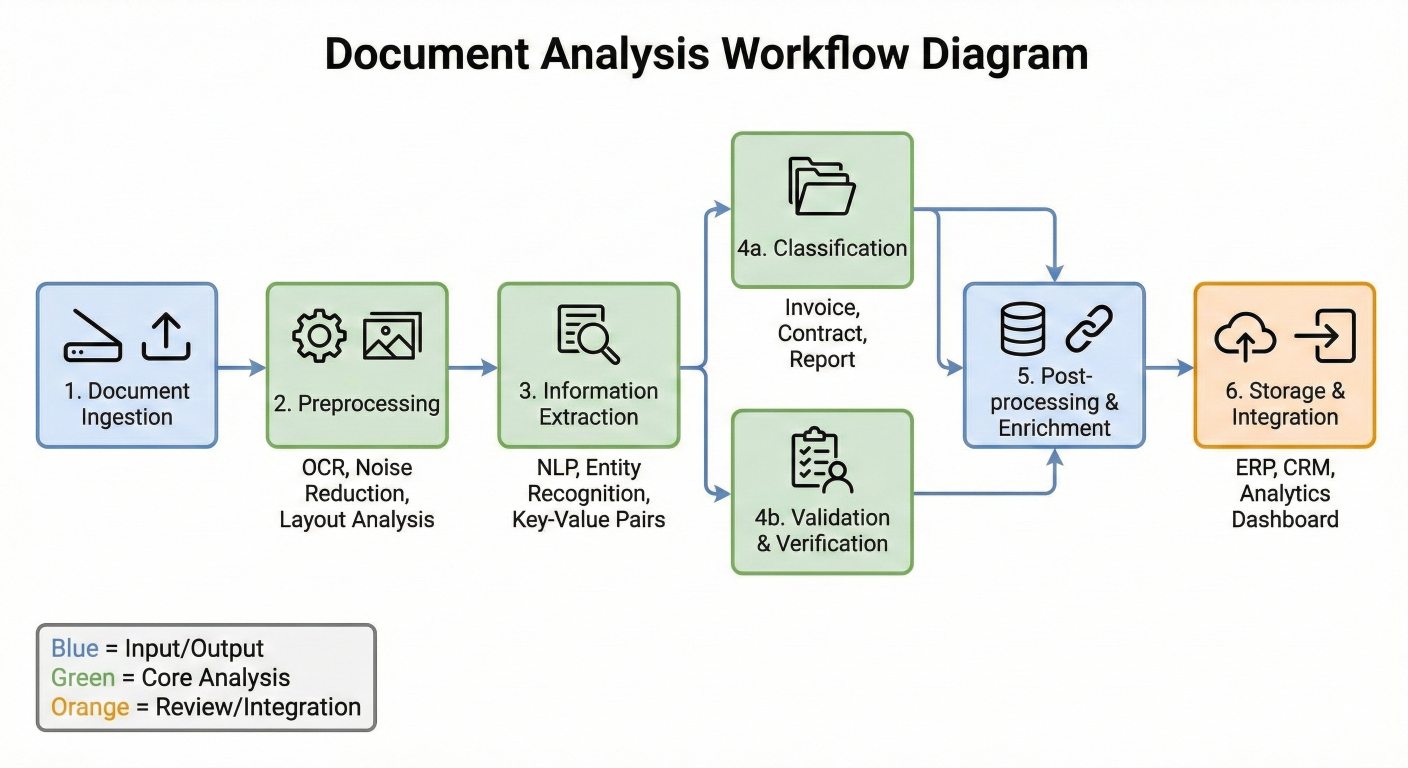
Document analysis workflow diagram showing different analysis stages
Implement robust error handling in your LangChain applications:
# Custom error handling callback for LangChain LLM calls
from langchain.callbacks.base import BaseCallbackHandler
from langchain.schema import LLMResult
import logging
import time
from typing import Any, Dict, List

class ErrorHandlingCallbackHandler(BaseCallbackHandler):
    """Custom callback handler for error tracking"""
    def __init__(self):
        self.errors = []
        self.start_time = None

    def on_llm_start(self, serialized: Dict[str, Any], prompts: List[str], **kwargs):
        self.start_time = time.time()

    def on_llm_error(self, error: BaseException, **kwargs):
        self.errors.append({
            "error": str(error),
            "timestamp": time.time(),
            "type": type(error).__name__
        })
        logging.error(f"LLM Error: {error}")

    def on_llm_end(self, response: LLMResult, **kwargs):
        if self.start_time:
            duration = time.time() - self.start_time
            logging.info(f"LLM call completed in {duration:.2f}s")

class RobustLLMChain:
    def __init__(self, llm, prompt, max_retries=3):
        self.llm = llm
        self.prompt = prompt
        self.max_retries = max_retries
        self.callback_handler = ErrorHandlingCallbackHandler()

    # Execute chain with retry logic
    def run_with_retry(self, **kwargs):
        last_error = None
        for attempt in range(self.max_retries):
            try:
                chain = LLMChain(
                    llm=self.llm,
                    prompt=self.prompt,
                    callbacks=[self.callback_handler]
                )
                result = chain.run(**kwargs)
                return result
            except Exception as e:
                last_error = e
                if attempt < self.max_retries - 1:
                    wait_time = (attempt + 1) * 2
                    time.sleep(wait_time)
                    continue
                else:
                    raise last_error
        raise last_error

# Usage example
robust_chain = RobustLLMChain(
    llm=ChatOpenAI(model="gpt-4"),
    prompt=PromptTemplate(
        input_variables=["topic"],
        template="Write a brief explanation about {topic}"
    )
)

try:
    result = robust_chain.run_with_retry(topic="quantum computing")
except Exception as e:
    print(f"Chain failed after retries: {e}")
Optimize your LangChain applications for production:
# LLM Caching and Optimized Service
from langchain.cache import InMemoryCache, SQLiteCache
from langchain.globals import set_llm_cache
import asyncio
from concurrent.futures import ThreadPoolExecutor

# Enable caching to reduce API calls
set_llm_cache(InMemoryCache()) # or SQLiteCache(database_path=".langchain.db")

class OptimizedLLMService:
    def __init__(self):
        self.llm = ChatOpenAI(
            model="gpt-3.5-turbo", # Use appropriate model for your use case
            temperature=0.1,
            max_tokens=1000,
            request_timeout=30,
            max_retries=3
        )
        self.executor = ThreadPoolExecutor(max_workers=5)

    async process_batch(self, inputs: List[str]):
        """Process multiple inputs concurrently"""
        loop = asyncio.get_event_loop()
        tasks = [
            loop.run_in_executor(
                self.executor,
                self.llm.invoke,
                input_text
            )
            for input_text in inputs
        ]
        results = await asyncio.gather(*tasks, return_exceptions=True)
        return results

    def optimize_prompt_for_model(self, prompt: str, model_type: str):
        """Optimize prompts based on model capabilities"""
        if model_type == "gpt-3.5-turbo":
            # Shorter, more direct prompts for faster model
            return f"Brief answer: {prompt}"
        elif model_type == "gpt-4":
            # More detailed prompts for capable model
            return f"Detailed analysis: {prompt}\n\nProvide comprehensive explanation wit"
        return prompt
# Usage
service = OptimizedLLMService()
# results = asyncio.run(service.process_batch(["Question 1", "Question 2", "Question 3"]))
Implement comprehensive monitoring for your LangChain applications:
# LangChain Monitoring Example
from langchain.callbacks import get_openai_callback
import json
from datetime import datetime

class LangChainMonitor:
    def __init__(self):
        self.metrics = {
            "total_calls": 0,
            "total_tokens": 0,
            "total_cost": 0.0,
            "average_response_time": 0.0,
            "errors": []
        }

    def log_chain_execution(self, chain, inputs, output_file="metrics.json"):
        """Monitor chain execution with detailed metrics"""
        with get_openai_callback() as cb:
            start_time = time.time()
            try:
                result = chain.run(inputs)
                execution_time = time.time() - start_time

                # Update metrics
                self.metrics["total_calls"] += 1
                self.metrics["total_tokens"] += cb.total_tokens
                self.metrics["total_cost"] += cb.total_cost

                # Calculate rolling average response time
                current_avg = self.metrics["average_response_time"]
                new_avg = (current_avg * (self.metrics["total_calls"] - 1) + execution_time) / self.metrics["total_calls"]
                self.metrics["average_response_time"] = new_avg

                # Log successful execution
                execution_log = {
                    "timestamp": datetime.now().isoformat(),
                    "success": True,
                    "execution_time": execution_time,
                    "tokens_used": cb.total_tokens,
                    "cost": cb.total_cost,
                    "input_length": len(str(inputs)),
                    "output_length": len(str(result))
                }
                self.save_metrics(output_file)
                return result

            except Exception as e:
                # Log error
                error_log = {
                    "timestamp": datetime.now().isoformat(),
                    "error": str(e),
                    "inputs": str(inputs)[:200] # Truncate for privacy
                }
                self.metrics["errors"].append(error_log)
                self.save_metrics(output_file)
                raise e

    def save_metrics(self, filename):
        """Save metrics to file"""
        with open(filename, 'w') as f:
            json.dump(self.metrics, f, indent=2)

    def get_performance_summary(self):
        """Generate performance summary"""
        return {
            "total_api_calls": self.metrics["total_calls"],
            "total_tokens_consumed": self.metrics["total_tokens"],
            "total_cost_usd": round(self.metrics["total_cost"], 4),
            "average_response_time_seconds": round(self.metrics["average_response_time"], 4),
            "error_rate": len(self.metrics["errors"]) / max(self.metrics["total_calls"], 1),
            "recent_errors": self.metrics["errors"][-5:] # Last 5 errors
        }

# Usage
monitor = LangChainMonitor()
# Example monitored chain execution
chain = LLMChain(llm=ChatOpenAI(), prompt=your_prompt)
result = monitor.log_chain_execution(chain, {"topic": "AI development"})

# Get performance insights
summary = monitor.get_performance_summary()
print(json.dumps(summary, indent=2))
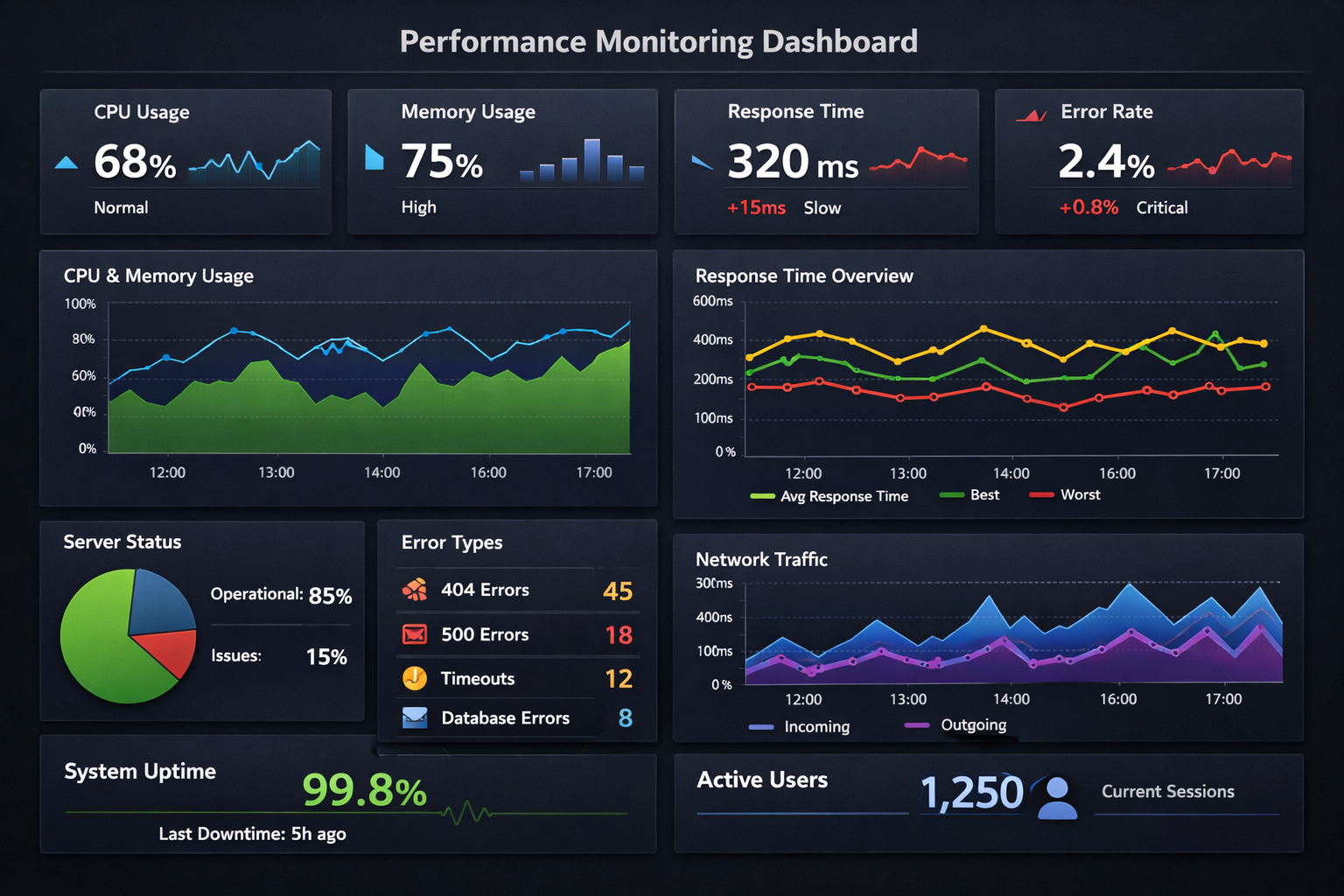
Performance monitoring dashboard visualization showing key metrics
LangChain represents a paradigm shift in how we build applications with Large Language Models. By providing a comprehensive, modular framework, it eliminates many of the traditional barriers to LLM application development while enabling sophisticated use cases that were previously complex to implement.
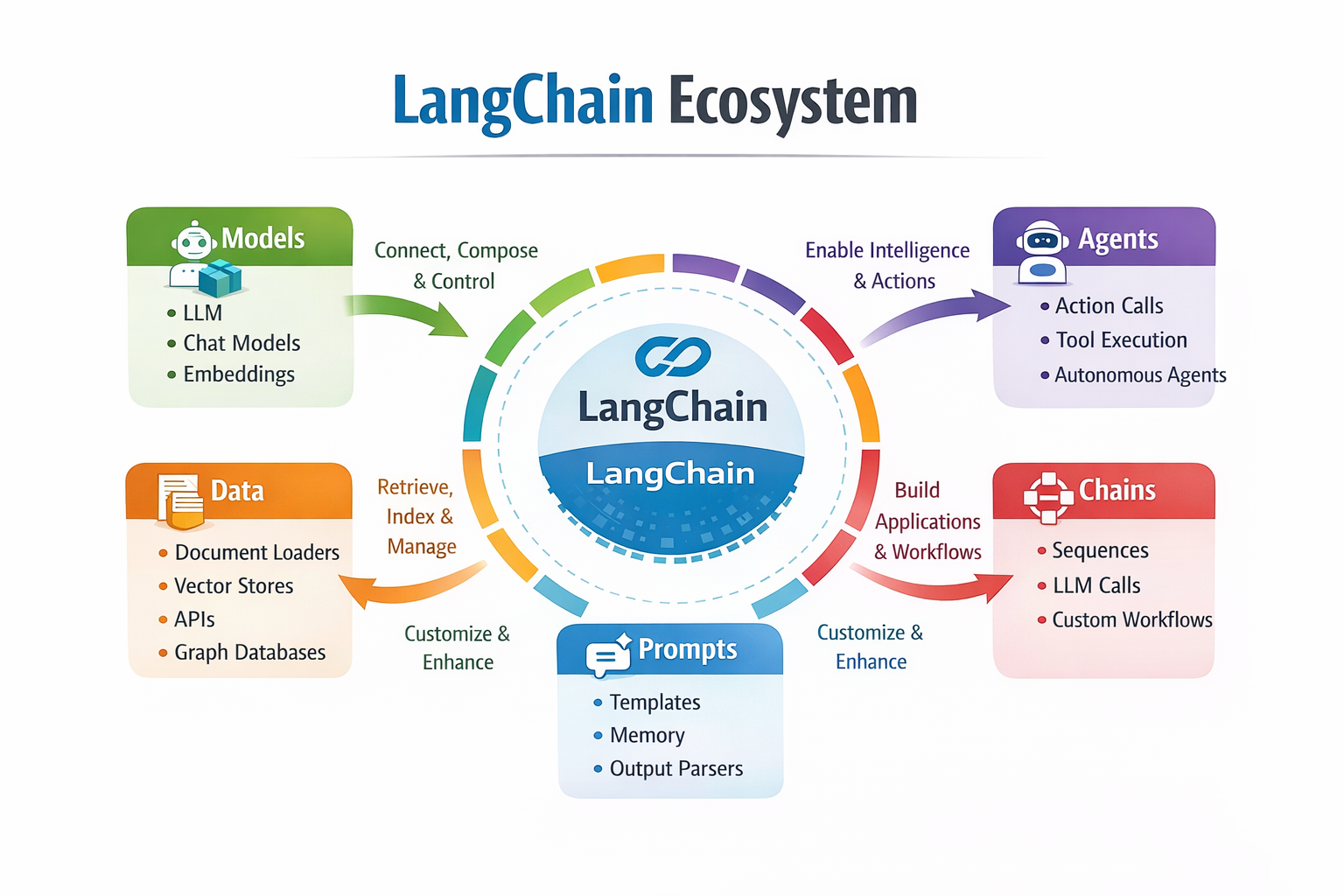
LangChain ecosystem summary diagram showing all components and their relationships
1. Modular Architecture: LangChain's six core components (Models, Prompts, Chains, Agents, Memory, and Retrieval) provide a solid foundation for any LLM application.
2. Provider Agnosticism: The framework's abstraction layer allows easy switching between different LLM providers, preventing vendor lock-in.
3. Production-Ready Features: Built-in support for monitoring, error handling, caching, and scaling makes LangChain suitable for enterprise applications.
4. Rich Ecosystem: With over 600 integrations, LangChain can connect to virtually any external service or data source.
5. Rapid Development: Pre-built components and patterns accelerate development cycles while maintaining code quality.
1. Modular Architecture: LangChain's six core components (Models, Prompts, Chains, Agents, Memory, and Retrieval) provide a solid foundation for any LLM application.
2. Provider Agnosticism: The framework's abstraction layer allows easy switching between different LLM providers, preventing vendor lock-in.
3. Production-Ready Features: Built-in support for monitoring, error handling, caching, and scaling makes LangChain suitable for enterprise applications.
4. Rich Ecosystem: With over 600 integrations, LangChain can connect to virtually any external service or data source.
5. Rapid Development: Pre-built components and patterns accelerate development cycles while maintaining code quality
To continue your LangChain journey:
1. Start Small: Begin with simple chains and gradually add complexity as you become more comfortable with the framework.
2. Explore the Documentation: The official LangChain documentation is comprehensive and regularly updated.
3. Join the Community: Participate in the LangChain community on GitHub and Discord for support and collaboration.
4. Experiment with Examples: Try the code examples in this guide and modify them for your specific use cases.
5. Build Real Projects: Apply your knowledge by building practical applications that solve real problems.
The future of AI application development is here, and LangChain is leading the way. Whether you're building simple chatbots or complex autonomous agents, this framework provides the tools and abstractions needed to turn your ideas into reality.
Remember, the key to mastering LangChain is practice and experimentation. Start building, iterate quickly, and don't be afraid to explore the vast possibilities this powerful framework offers.
Follow the LangChain project on GitHub and subscribe to their blog for the latest updates, features, and best practices in LLM application development.
 Launch your Graphy