There are no items in your cart
Add More
Add More
| Item Details | Price | ||
|---|---|---|---|

Machine learning (ML) models are transforming industries, but getting them from experimental notebooks into reliable, production-ready systems is often a complex journey. This is where MLOps comes in. If you're an intermediate AI or Cloud practitioner, you've likely encountered the challenges of managing ML models at scale. Let's explore how Google Cloud's Vertex AI steps up to simplify this intricate process, making your machine learning operations smoother and more efficient.
In the world of artificial intelligence, building a great model is just the first step. The real challenge lies in continuously deploying, managing, and maintaining that model in a dynamic production environment. This is precisely the problem that MLOps aims to solve.
MLOps, short for Machine Learning Operations, represents a set of practices designed to automate and simplify the entire machine learning workflow and deployment process. Think of it as the application of DevOps principles—which unify software development (Dev) with system operations (Ops)—specifically tailored for machine learning. This culture and practice bring together ML application development with ML system deployment and ongoing operations. Organizations adopt MLOps to automate and standardize processes across the complete ML lifecycle, encompassing everything from initial model development and rigorous testing to seamless integration, reliable release, and efficient infrastructure management.
The Challenges of Traditional ML Development and the Need for Operational Rigor
Productionizing machine learning models is notoriously difficult. The ML lifecycle involves numerous complex components, including data ingestion, data preparation, model training, meticulous model tuning, robust model deployment, continuous model monitoring, and ensuring model explainability. Furthermore, it demands significant collaboration and smooth hand-offs between diverse teams, such as Data Engineering, Data Science, and ML Engineering. Without a structured MLOps approach, ML projects frequently encounter hurdles like slow deployment cycles, a lack of reproducibility, inconsistent model performance, and immense difficulty in managing various model versions.
Historically, data scientists might develop models in isolation and then hand them over to engineering teams for deployment. This often creates a disconnect, as models are not static entities; they constantly interact with evolving application code and real-world data. If these components are not managed cohesively, problems like model drift, prediction errors, and slow update cycles inevitably arise. By treating ML assets with the same rigor as other software assets in a continuous integration and continuous delivery (CI/CD) environment, MLOps compels this crucial integration. This means that changes in data, code, or model versions can trigger coordinated updates, leading to higher quality, faster releases, and significantly reduced operational friction. This represents a fundamental shift in how ML projects are managed and delivered.
Adopting MLOps practices offers substantial advantages for any organization leveraging machine learning:
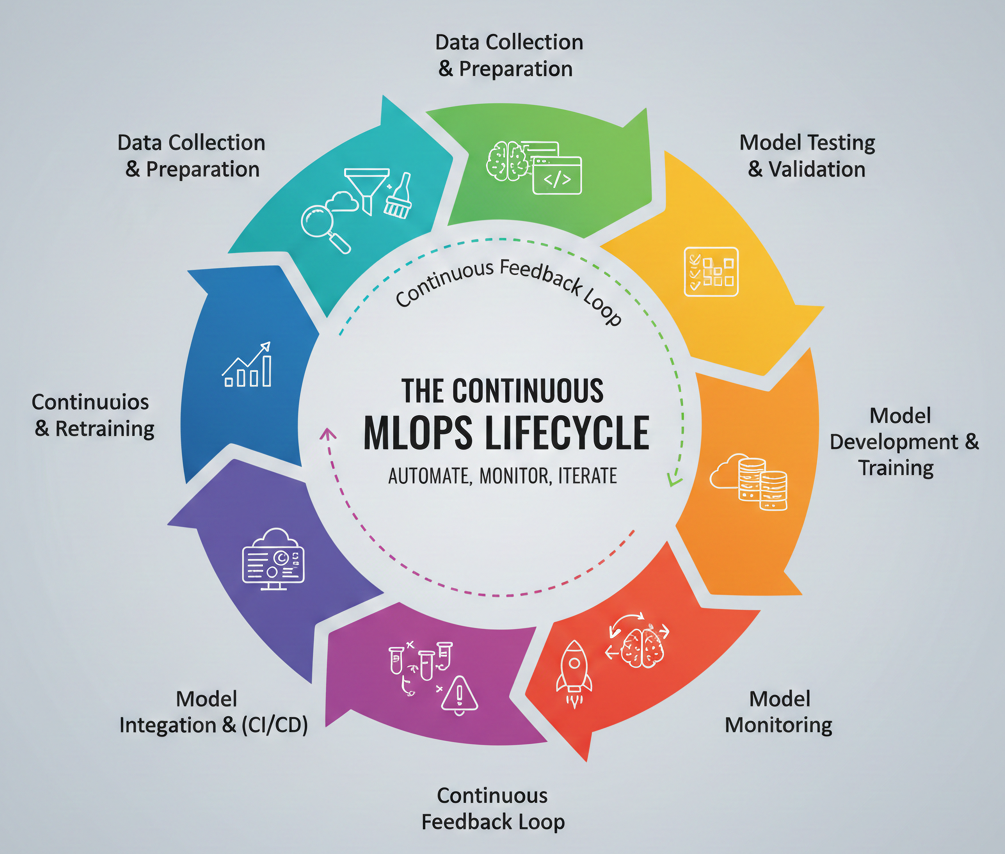
The Continuous MLOps Lifecycle (Data Collection & Preparation -> Model Development & Training -> Model Testing & Validation -> Model Deployment -> Continuous Integration & Delivery -> Model Monitoring -> Model Retraining)
Detailed Description: This diagram should visually represent the cyclical nature of MLOps. It starts with data, flows through development, deployment, and then loops back through monitoring and retraining, emphasizing the continuous feedback loop. Each stage should be clearly labeled, with arrows indicating the flow.
The concept of MLOps maturity levels (Level 0, 1, 2) illustrates a clear progression in an organization's ML capabilities. Many organizations start with manual, ad-hoc processes (Level 0), where data scientists might manually hand off models for deployment. This approach is unsustainable when attempting to scale ML initiatives. The inherent complexities of the ML lifecycle—from data ingestion and preparation to training, tuning, deployment, monitoring, explainability, and the necessary team hand-off—demand a high degree of automation. Vertex AI, with its comprehensive suite of integrated tools, directly addresses these pain points. It provides the necessary infrastructure and services to implement continuous training, robust monitoring, and multiple automated pipelines, effectively propelling an organization towards higher MLOps maturity (Level 2). This signifies that Vertex AI is not merely a collection of services, but a strategic pathway that enables organizations to achieve advanced MLOps capabilities and unlock greater business value from their AI investments.
Imagine a single platform where you can manage every aspect of your machine learning projects, from raw data to deployed models, without juggling multiple tools. That's the promise of Vertex AI.
Vertex AI is Google Cloud's unified machine learning (ML) platform, meticulously designed to help you train and deploy ML models, and even customize large language models (LLMs) for your AI applications. It seamlessly combines data engineering, data science, and ML engineering workflows, empowering your teams to collaborate effectively using a common toolset and to scale your applications by leveraging the inherent benefits of Google Cloud's infrastructure.
The unified nature of Vertex AI brings several compelling advantages:
The "unified platform" aspect of Vertex AI is more than just a convenience; it represents a strategic design choice aimed at dismantling the traditional silos that frequently exist between data scientists, ML engineers, and DevOps/IT teams. MLOps inherently demands a collaborative function involving multiple disciplines. When each team operates with disparate tools and platforms, it introduces friction, complicates hand-offs, and ultimately slows down the entire ML lifecycle. By offering a common toolset and integrated workflows, Vertex AI significantly reduces tool sprawl and the need for constant context switching. This fosters seamless collaboration and a shared understanding across the ML lifecycle, directly contributing to improved productivity and accelerating time to production. The implication is that Vertex AI functions as a centralized collaboration hub, enabling a more cohesive and efficient MLOps practice.
Vertex AI provides a rich set of capabilities to support your ML endeavors:
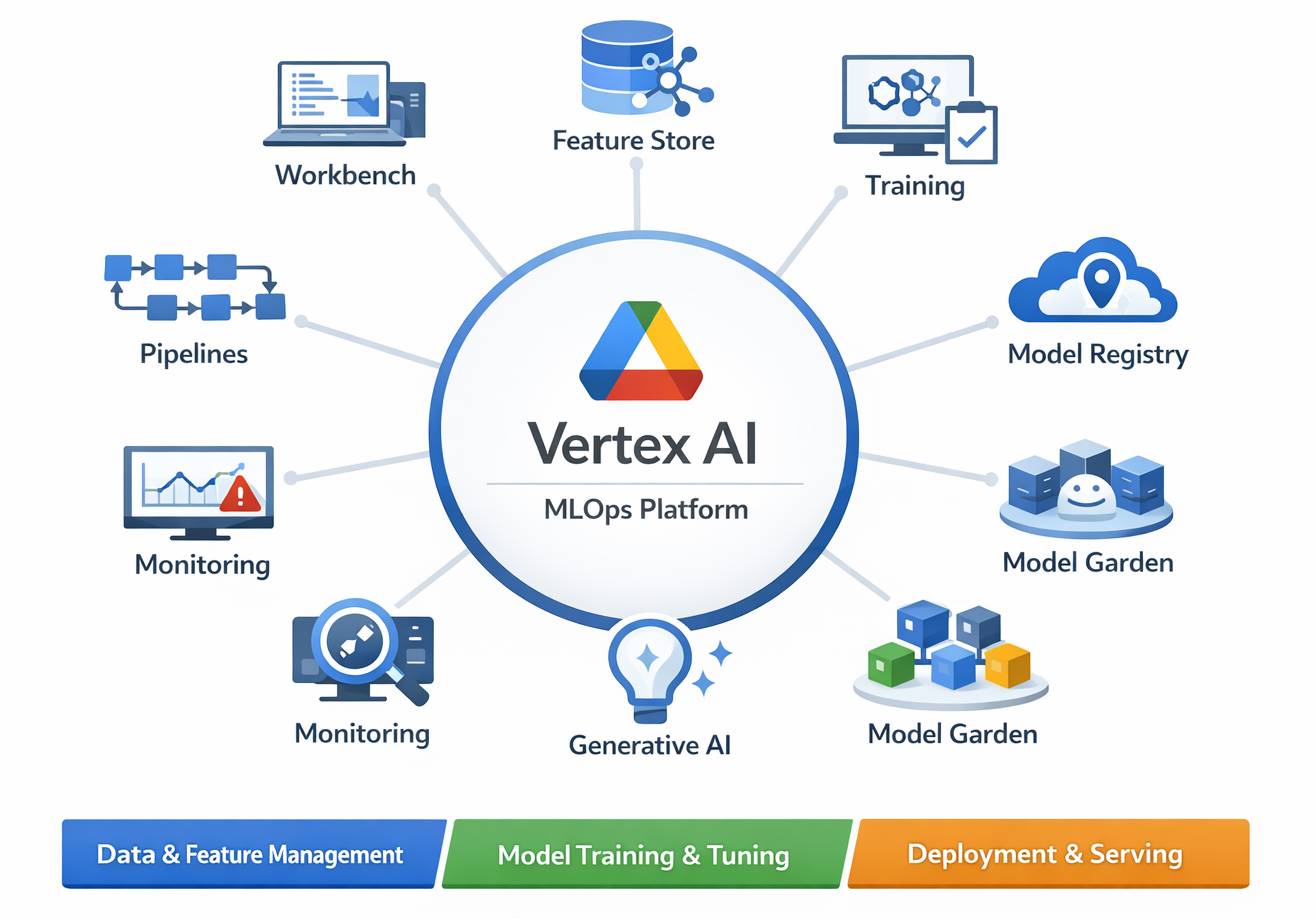
Diagram: High-Level Vertex AI Platform Overview (showing integrated services like Workbench, Feature Store, Training, Model Registry, Endpoints, Monitoring, Pipelines, Generative AI, Model Garden)
Detailed Description: This diagram should illustrate Vertex AI as a central hub, with spokes connecting to its various integrated services. The core MLOps components should be clearly visible as part of this unified ecosystem.
Now, let's get into the specifics of how Vertex AI empowers you at each stage of your MLOps journey, making the complex simple.
The foundation of any successful machine learning model is high-quality, relevant data. Without it, even the most sophisticated algorithms will struggle.
Importance of Data Quality and Feature Consistency
Successful ML models fundamentally begin with meticulously collected, cleaned, and validated data. Data preparation involves gathering training data from diverse sources, performing exploratory data analysis (EDA) to deeply understand its characteristics, cleaning inconsistencies, and validating its quality. The quality of your input data directly and profoundly impacts the performance of your model.
Vertex AI Workbench for Interactive Data Exploration and Preprocessing
Vertex AI Workbench provides managed JupyterLab environments, offering a familiar and powerful interface for interactively exploring and preprocessing your data. It integrates seamlessly with Google Cloud Storage and BigQuery, allowing you to easily access and process large datasets without the need to switch between different platforms or manage data movement manually.
Scaling Data Workloads with Dataproc Serverless Spark
For handling truly massive datasets and executing complex data transformations, you can leverage Dataproc Serverless Spark directly from a Vertex AI Workbench notebook. This capability allows you to run Spark workloads efficiently without the operational overhead of managing your own Dataproc clusters, scaling compute resources automatically as needed.
To enhance prediction accuracy, Vertex AI offers Data Labeling services that help generate high-quality training data. You can import both labeled and unlabeled data, and then add new labels or delete existing ones from previously imported datasets, ensuring your models learn from precise annotations.
The Vertex AI Feature Store is a game-changer for MLOps, acting as a centralized, fully managed repository for organizing, storing, and serving your machine learning features.
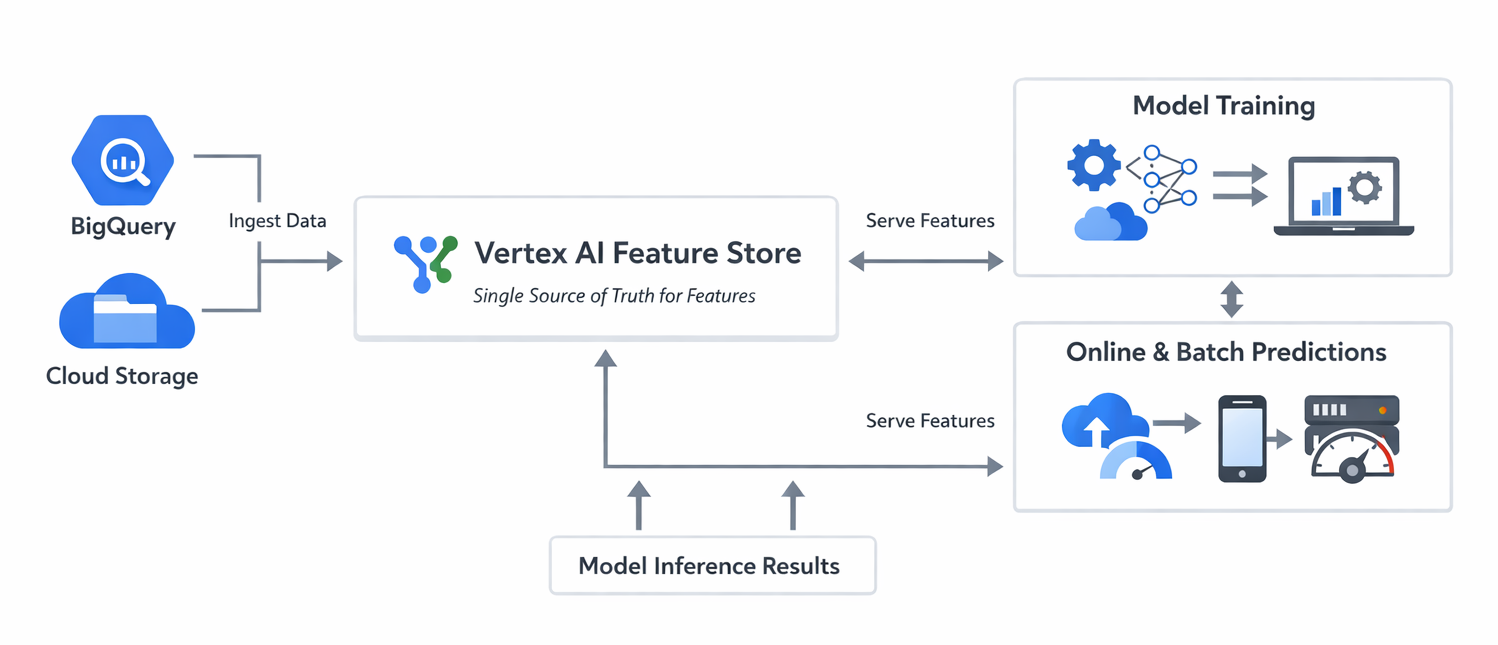
Diagram: Vertex AI Feature Store Architecture and Flow (showing data sources feeding into Feature Store, then features being served for training and online/batch inference)
Detailed Description: This diagram should illustrate data flowing from various sources (BigQuery, Cloud Storage) into the Feature Store. From the Feature Store, features are then shown being consumed by both model training processes and online/batch prediction endpoints, highlighting the single source of truth for features.
The deep integration of data preparation tools like Vertex AI Workbench with core Google Cloud data services (Cloud Storage, BigQuery) and powerful processing engines (Dataproc Serverless Spark) within the Vertex AI ecosystem is not just a matter of convenience; it directly enables higher data quality and faster iteration cycles. Data preparation is the foundational step in any ML project. If data scientists are required to constantly switch between different platforms or manage complex data pipelines outside their primary ML environment, it introduces friction, increases the potential for errors, and slows down the pace of experimentation. By providing a unified environment for data exploration, preprocessing, and large-scale data wrangling, Vertex AI ensures that the crucial "bedrock of robust models" is built upon a consistent and efficient foundation. This approach reduces the cognitive load on data scientists, allowing them to dedicate more focus to feature engineering and less to infrastructure concerns, which ultimately leads to superior data quality and more rapid model development.
Training-serving skew is a notoriously difficult problem in production machine learning, frequently causing models to underperform despite excellent offline metrics. This occurs when the data distribution used for training a model diverges from the data distribution encountered during production inference. A common cause is the use of different code paths or logic for generating features in training versus serving environments. The Vertex AI Feature Store directly and systematically addresses this challenge by enforcing consistency in feature values between training and serving. It achieves this by ensuring that a feature value is "imported once... and that same value is reused for both training and serving". This establishment of a single source of truth for features directly leads to the mitigation of skew, resulting in more reliable and predictable model performance in production. This represents a critical operational advantage that extends beyond mere feature management.
Beyond its technical benefits, the Feature Store's capability to "re-use ML features at scale and increase the velocity of developing and deploying new ML applications" positions it as a strategic asset for any organization. Feature engineering is often a time-consuming effort, frequently duplicated across different ML projects and teams. Without a centralized repository, teams might repeatedly create the same features, leading to wasted effort and inconsistencies. A shared, discoverable Feature Store allows teams to leverage existing, validated features, thereby avoiding redundant work and standardizing feature definitions. This has a direct and positive ripple effect on an organization's overall ML project velocity, efficiency, and its capacity to rapidly innovate with new ML applications.
Once your data is ready, the next step is to train your machine learning model. Vertex AI provides flexible options to suit various expertise levels and project requirements.
Lorem Ipsum is simply dummy text of the printing and typesetting industry. Lorem Ipsum has been the industry's standard dummy text ever since the 1500s, when an unknown printer took a galley of type and scrambled it to make a type specimen book.
Effective experimentation is key to developing robust models. Vertex AI provides powerful tools to manage this process:
The co-existence and seamless integration of AutoML and Custom Training within Vertex AI represent a strategic design choice that democratizes ML development. MLOps requires collaboration across diverse skill sets. Data scientists or domain experts, for instance, might not possess deep coding knowledge but need to rapidly iterate on models for initial prototyping or specific use cases like image classification. AutoML provides this intuitive, code-free pathway. Conversely, experienced ML engineers demand granular control over model architecture, frameworks, and intricate training logic for complex, custom solutions. Custom Training offers precisely this level of flexibility. By supporting both approaches, Vertex AI removes a significant barrier to entry, fostering broader adoption and participation in ML initiatives across an organization, and ensuring that different teams can contribute effectively to the MLOps lifecycle.
Vertex AI Experiments, TensorBoard, and especially Vertex ML Metadata extend beyond simply tracking metrics; they establish a robust framework for ensuring the reproducibility and auditability of ML experiments. This is paramount for building trustworthy and compliant AI systems. In complex ML development, reproducing past results can be challenging due to subtle changes in data, code, or hyperparameters. This lack of reproducibility hinders effective debugging, thorough validation, and compliance efforts. Vertex AI Experiments allows for the tracking of various training runs, while TensorBoard facilitates visualization. Crucially, Vertex ML Metadata "lets you record the metadata, parameters, and artifacts that are used in your ML system" and enables querying of that metadata. This capability constructs a detailed "lineage graph" that illustrates precisely how a model was produced, allowing teams to understand the exact conditions under which any experiment was conducted. This is vital for debugging issues, ensuring regulatory compliance, and fostering confidence in ML models, thereby transforming MLOps from mere automation into a practice characterized by accountability and transparency.
Let's look at how you can set up a custom training job, specifying the Docker image, machine type, and training script.
# Example: Simplified Custom Training Job Setup
from google.cloud import aiplatform

# Initialize Vertex AI SDK
aiplatform.init(project='your-gcp-project-id', location='us-central1')

# Define your custom training job
job = aiplatform.CustomContainerTrainingJob(
    display_name='my-custom-model-training',
    container_uri='gcr.io/your-gcp-project-id/my-custom-trainer:latest',
    model_serving_container_image_uri='us-docker.pkg.dev/vertex-ai/prediction/tf2-cpu.2-8:latest', # Or your custom serving image
)

# Run the training job
model = job.run(
    replica_count=1,
    machine_type='n1-standard-4',
    accelerator_type='NVIDIA_TESLA_T4',
    accelerator_count=1,
    args=['--epochs=10', '--batch_size=32'] # Arguments passed to your training script
)

print(f"Training job completed. Model resource name: {model.resource_name}")
Explanation: This snippet demonstrates how Vertex AI's SDK simplifies launching a custom training job. You specify your container image (which holds your training code and dependencies), desired compute resources (machine type, GPU/TPU), and any arguments for your training script. Vertex AI then handles the underlying infrastructure, allowing you to concentrate on your model's logic.
Once a model is trained, managing its lifecycle becomes paramount. This includes versioning, tracking, and preparing it for deployment.
The Vertex AI Model Registry serves as a central repository where you can manage the entire lifecycle of your machine learning models. It provides a comprehensive overview of your models, enabling you to organize, track, and train new versions efficiently.
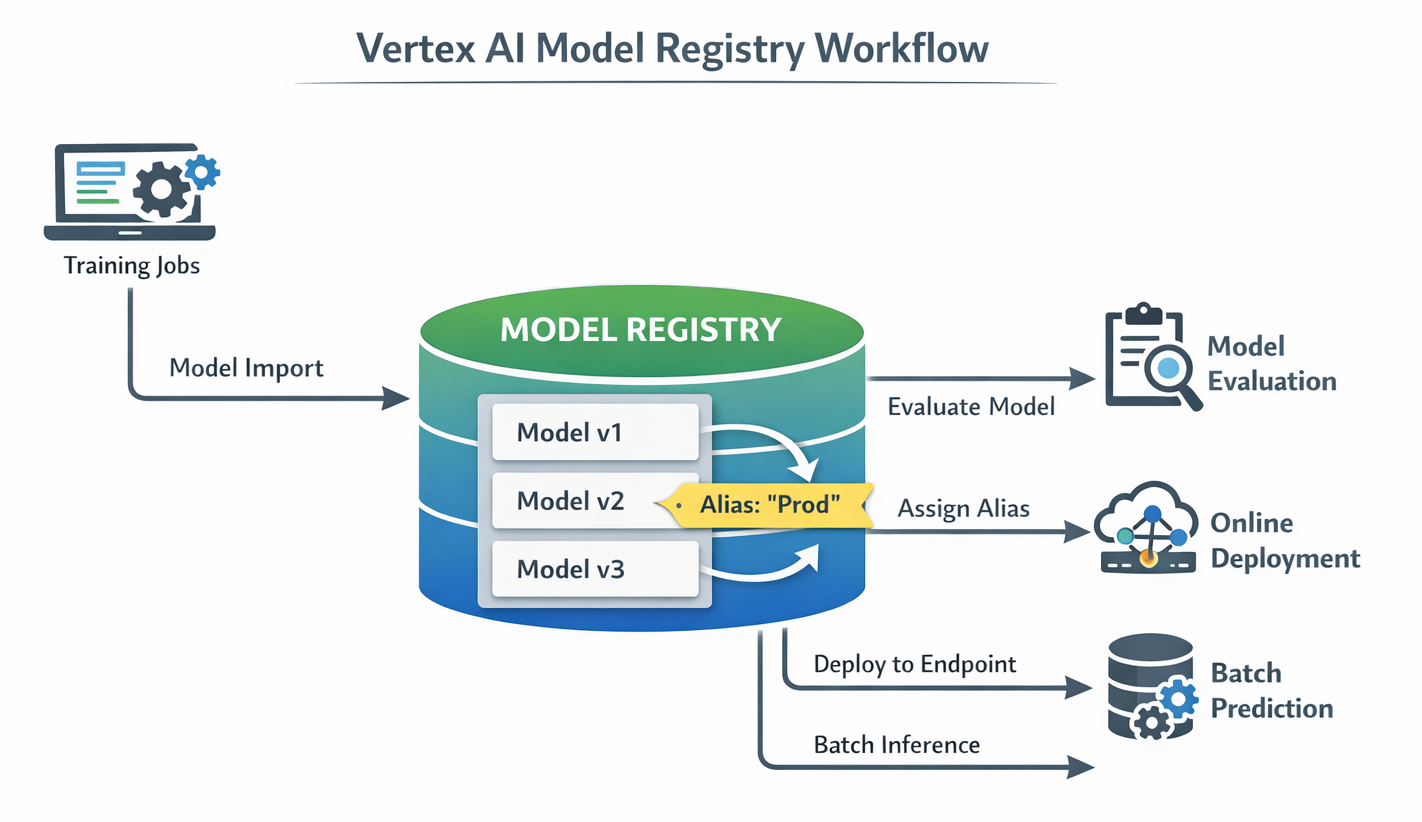
Diagram: Vertex AI Model Registry Workflow (showing Model Import, Versioning, Aliases, Model Evaluation, and Deployment to Endpoints/Batch Prediction)
Detailed Description: This diagram should illustrate the Model Registry as a central hub. Arrows should show models being imported (from training jobs), new versions being created, aliases being assigned, and then models being pushed out for evaluation or deployment (online/batch). It highlights the lifecycle management aspect.
The Vertex AI Model Registry is more than just a storage location for models; it serves as a critical component for establishing robust governance and standardization across an organization's ML assets. This directly addresses the common challenge of "model sprawl," where numerous models, versions, and experiments become scattered across disparate environments. Without a centralized management system, this lack of oversight can lead to chaos, making it difficult to track which model is currently in production and challenging to ensure compliance or consistency. The Model Registry provides a "single organized platform for model lineage, discovery, and lifecycle management". This enables enhanced control, simplifies model discovery, and establishes a standardized process for promoting models from experimental stages to full production deployment. It is a key enabler for achieving higher MLOps maturity (Level 2) by providing the necessary structure for managing machine learning at scale.
After your model is trained and registered, the next crucial step is to make its predictions available to applications and users. Vertex AI offers flexible methods for serving your models, tailored to different latency and throughput requirements.
Two Primary Methods for Getting InferencesVertex AI provides two main approaches for obtaining inferences from your models, accommodating diverse operational needs [6, 18, 19]:
Endpoint resource. This process associates dedicated compute resources with your model, ensuring it can serve online inferences with minimal latency.Here's how you can programmatically deploy a registered model to a Vertex AI Endpoint using the Python SDK:
# Example: Deploying a Model to an Endpoint
from google.cloud import aiplatform

# Initialize Vertex AI SDK
aiplatform.init(project='your-gcp-project-id', location='us-central1')

# Assuming 'model' is an aiplatform.Model object from a previous training step or Model Registry lookup
# model = aiplatform.Model('projects/your-gcp-project-id/locations/us-central1/models/your-model-id')

# Create an endpoint
endpoint = aiplatform.Endpoint.create(
    display_name='my-model-endpoint',
    project='your-gcp-project-id',
    location='us-central1'
)

# Deploy the model to the endpoint
deployed_model = endpoint.deploy(
    model=model,
    deployed_model_display_name='my-deployed-model-version-1',
    machine_type='n1-standard-2',
    min_replica_count=1,
    max_replica_count=2,
    traffic_split={"0": 100} # Direct 100% traffic to this model
)

print(f"Model deployed to endpoint: {endpoint.resource_name}")
print(f"Deployed model ID: {deployed_model.id}")
Explanation: This code demonstrates how to programmatically create an endpoint and deploy a model to it using the Vertex AI SDK. You specify the machine type, scaling parameters (minimum and maximum replicas), and even the traffic distribution. This provides fine-grained control over your serving infrastructure, ensuring optimal performance and cost efficiency.
Model resource, and the results are stored in a specified output location, such as a Cloud Storage bucket or a BigQuery table.Here's an example of how to initiate an asynchronous batch prediction job:
# Example: Running a Custom Training Job in Vertex AI
from google.cloud import aiplatform

# Initialize Vertex AI SDK
aiplatform.init(project='your-gcp-project-id', location='us-central1')

# Define the custom training job
training_job = aiplatform.CustomContainerTrainingJob(
    display_name='my-custom-training-job',
    container_uri='gcr.io/your-project/trainer-image:latest',
    model_serving_container_image_uri='gcr.io/your-project/predictor-image:latest'
)

# Run the job
model = training_job.run(
    dataset=None,  # or a dataset object if needed
    model_display_name='my-trained-model',
    replica_count=1,
    machine_type='n1-standard-4',
    args=['--epochs', '10']
)

print(f"Model trained and uploaded: {model.resource_name}")
Explanation: This snippet illustrates how to initiate an asynchronous batch prediction job.You provide the locations of your input data and specify where the predictions should be stored. Vertex AI then efficiently manages the compute resources required to process the data, scaling as needed.
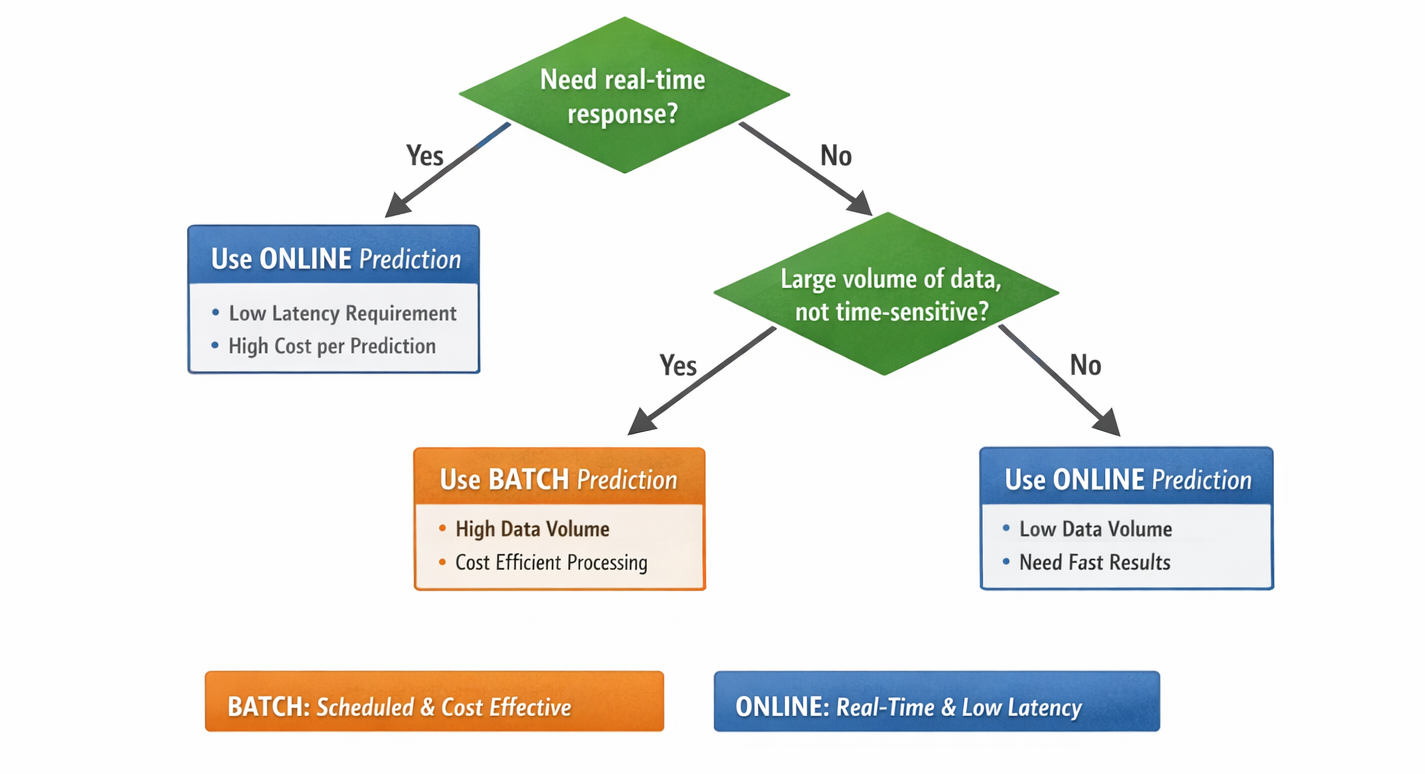
Diagram: Online vs. Batch Prediction Decision Flow (showing decision points based on latency, cost, and data volume)
Detailed Description: This flow chart should guide the reader on when to choose online vs. batch predictions. Decision points could include "Need real-time response?" (Yes -> Online, No -> Batch) and "Large volume of data, not time-sensitive?" (Yes -> Batch, No -> Online).
The provision of both online (Endpoints) and batch prediction options within Vertex AI demonstrates a sophisticated understanding of real-world ML serving requirements. This flexibility allows for significant operational adaptability and cost optimization. Not all machine learning predictions necessitate real-time, low-latency responses. For use cases such as nightly reports, large-scale data processing, or periodic analytics, maintaining an always-on endpoint would represent an unnecessary cost. Batch predictions are considerably more cost-effective for these scenarios, as they only consume compute resources when actively processing data. Conversely, interactive applications (e.g., personalized recommendations, fraud detection) demand immediate, low-latency inference, which is precisely what online endpoints are designed to provide. By offering both capabilities, Vertex AI empowers organizations to select the most appropriate and cost-efficient serving mechanism for each specific business use case, directly impacting their bottom line and overall operational efficiency.
Features like traffic splitting on online endpoints are more than just technical capabilities; they represent a direct application of Continuous Delivery (CD) principles to machine learning. This enables controlled, low-risk model rollouts. Deploying a new ML model directly to 100% of production traffic carries inherent risks. Even thoroughly tested models can exhibit unexpected behaviors in real-world scenarios. Traffic splitting facilitates gradual rollouts, such as canary deployments or A/B testing, where a small percentage of incoming traffic is routed to the new model while the majority continues to be served by the stable, existing version. This allows for real-time monitoring of the new model's performance and its impact on users before a full rollout. This capability directly reduces deployment risk, helps ensure continuous service quality, and aligns ML deployment practices with mature software engineering methodologies, thereby minimizing any potential negative business impact.
Deploying a model isn't the end of the MLOps journey; it's just the beginning of its life in production. Models need continuous care to remain effective.
The Inevitability of Model Decay (Data Drift, Concept Drift)
Models deployed in production are optimized to perform best on inference input data that is similar to the data used during their training. However, real-world data is constantly changing and evolving. When incoming inference data deviates significantly from the training baseline—a phenomenon known as data drift—or when the underlying relationship between features and the target variable changes—termed concept drift—the model's performance can inevitably deteriorate, even if the model's code itself hasn't been altered.
Vertex AI Model Monitoring acts as your model's vigilant health check in production, providing automated oversight to ensure sustained performance:
Vertex AI Model Monitoring is not merely a diagnostic tool; it is a critical enabler of proactive maintenance for ML models, ensuring they continue to deliver business value over time by addressing the inevitable issue of model decay. Unlike traditional software, ML models degrade over time due to shifts in real-world data distributions (data drift) or changes in the underlying relationships (concept drift). If left unmonitored, this leads to silent performance degradation, inaccurate predictions, and a direct loss of business value. Vertex AI Model Monitoring provides the "eyes and ears" in production, automatically detecting these issues and sending timely alerts. This capability shifts the operational paradigm from reactive firefighting (responding to complaints about model performance) to proactive management (automatically identifying and addressing performance degradation before it impacts users). By triggering automated retraining pipelines, Vertex AI ensures that models remain relevant and accurate, thereby sustaining their return on investment and driving continuous improvement.
Setting up model monitoring involves defining your training data baseline, specifying prediction types, and setting thresholds for acceptable skew and drift. You can also configure alerts and the monitoring frequency. This ensures your models are continuously evaluated in production.
# Example: Setting Up Model Monitoring (Conceptual)
from google.cloud import aiplatform

# Initialize Vertex AI SDK
aiplatform.init(project='your-gcp-project-id', location='us-central1')

# Assuming 'endpoint' is an aiplatform.Endpoint object and 'model' is the deployed model
# endpoint = aiplatform.Endpoint('projects/your-gcp-project-id/locations/us-central1/endpoints/your-endpoint-id')
# model = endpoint.list_models() # Get the deployed model from the endpoint

# Define your training dataset URI (e.g., BigQuery table or GCS path)
training_data_uri = "bq://your-gcp-project-id.your_dataset.your_training_table"

# Define your monitoring configuration
# This is a simplified representation; actual setup involves more detailed configs
# For full details, refer to Vertex AI documentation [23]
model_monitor_config = {
    "model_deployment_monitoring_objective_configs": [
        {
            "deployed_model_id": model.id,
            "objective_config": {
                "training_dataset": {
                    "bigquery_source": {"input_uri": training_data_uri},
                    "data_format": "table", # or "csv", "jsonl"
                },
                "prediction_type": "classification", # or "regression"
                "skew_detection_config": {
                    "skew_thresholds": {"feature_name_1": 0.01, "feature_name_2": 0.05},
                },
                "drift_detection_config": {
                    "drift_thresholds": {"feature_name_1": 0.01, "feature_name_2": 0.05},
                },
            },
        }
    ],
    "model_deployment_monitoring_schedule_config": {
        "monitor_interval": "86400s", # Run daily
    },
    "model_monitoring_alert_config": {
        "email_alert_config": {"user_emails": ["your-email@example.com"]},
    },
    "logging_sampling_strategy": {"random_sample_config": {"sample_rate": 0.1}},
}

# Create the model monitor (this is a high-level representation)
# In practice, you'd use aiplatform.ModelDeploymentMonitoringJob.create()
# or configure via the Console [23]
# For a detailed example, refer to Vertex AI samples [24]
print("Model monitoring setup initiated. Check Vertex AI Console for full configuration.")
Explanation: This code snippet provides a conceptual overview of setting up model monitoring. It involves defining your training data baseline, specifying the prediction type (e.g., classification or regression), and setting thresholds for acceptable levels of skew and drift in your production data. You can also configure email alerts to notify you when these thresholds are exceeded and define the frequency at which monitoring jobs run. This setup ensures that your models are continuously evaluated in production, allowing for timely intervention when performance degradation is detected.[23, 24]
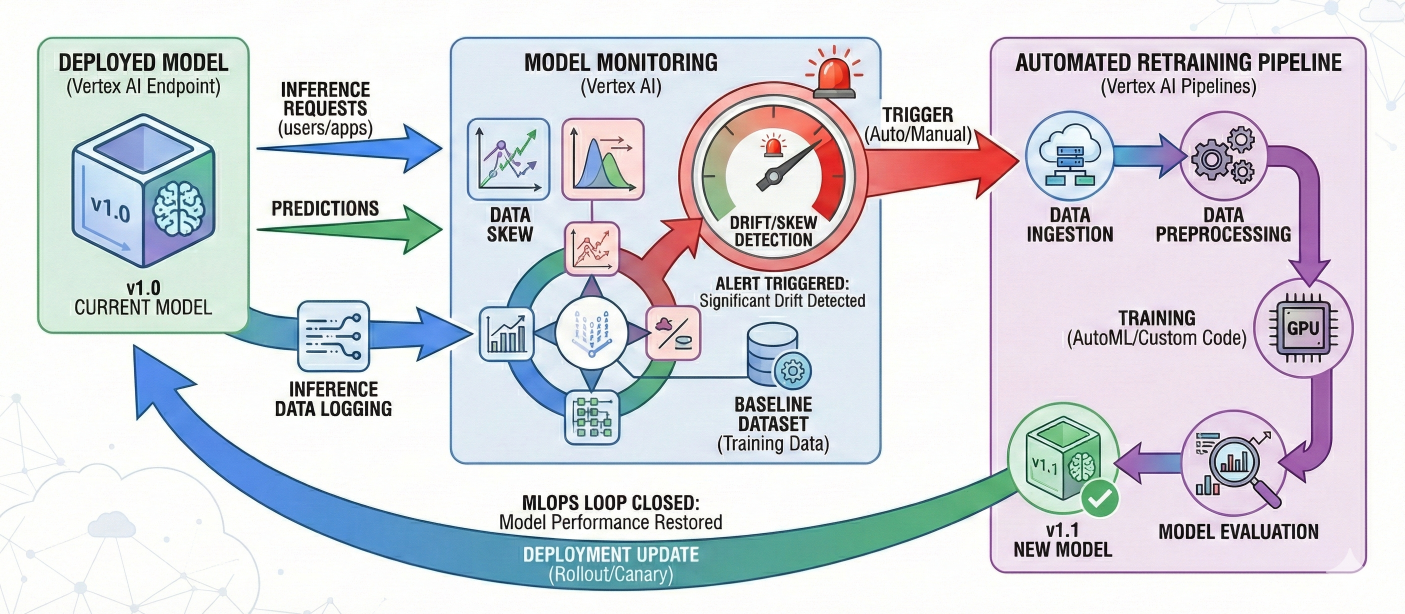
Diagram: Vertex AI Model Monitoring and Automated Retraining Loop
Detailed Description: This diagram should show a deployed model serving predictions. A monitoring component continuously checks inference data against a baseline. If drift/skew is detected, an alert is triggered, which then automatically or manually initiates a retraining pipeline, leading to a new model version that replaces the old one, thus closing the MLOps loop.
Manual processes are the enemy of scale and consistency in MLOps. Automation is the key to unlocking the full potential of your ML investments.
Manually training and serving your models can be incredibly time-consuming and prone to errors, especially when these processes need to be repeated frequently for updates or new experiments. Automation is a core principle of MLOps, enabling repeatability, consistency, and scalability across every stage of the ML pipeline. It transforms ad-hoc tasks into predictable, reliable workflows.
Vertex AI Pipelines is a powerful service that helps you automate, monitor, and govern your ML systems in a serverless manner by orchestrating your entire ML workflows.
Vertex AI Pipelines functions as the orchestration backbone that binds all other disparate Vertex AI MLOps services into a cohesive, automated, and repeatable workflow. While individual MLOps tools like Feature Store, Model Registry, and Monitoring are powerful on their own, their true potential is realized when they are integrated into a seamless workflow. Without a central orchestrator, teams would still be manually stitching together these services, which would negate many of the benefits of automation. Vertex AI Pipelines, by enabling users to define the entire ML lifecycle as a Directed Acyclic Graph (DAG) of interconnected tasks, serves as this essential "glue." It automates the hand-offs between data preparation, training, evaluation, deployment, and monitoring, thereby enabling true continuous integration and continuous delivery for machine learning. This transformation converts manual, error-prone, and time-consuming processes into highly efficient, scalable, and auditable operations, directly accelerating an organization's path to MLOps maturity.
The deep emphasis on Vertex ML Metadata for tracking artifacts and lineage within pipelines elevates MLOps beyond mere automation to a realm of accountability, transparency, and robust debugging. In complex ML systems, particularly those in regulated industries, automation alone is insufficient. It is crucial to understand precisely how a model was produced: the exact version of data used, the specific code, the parameters applied, and all intermediate artifacts involved. Without this comprehensive lineage, debugging performance issues, ensuring compliance, or reproducing past results becomes an opaque process. Vertex ML Metadata provides this detailed "lineage graph", making every step of the pipeline auditable. This capability is vital for building trust in AI systems, facilitating rapid debugging when issues arise, and meeting stringent regulatory requirements, thereby fundamentally strengthening the operational rigor of MLOps.
This example demonstrates a basic pipeline with data creation, AutoML training, and model deployment steps using Google Cloud Pipeline Components.
# Example: Simple Vertex AI Pipeline (Conceptual)
import kfp
from google.cloud import aiplatform
from google_cloud_pipeline_components.v1.dataset import ImageDatasetCreateOp
from google_cloud_pipeline_components.v1.automl.training_job import AutoMLImageTrainingJobRunOp
from google_cloud_pipeline_components.v1.endpoint import EndpointCreateOp, ModelDeployOp

# Initialize Vertex AI SDK
aiplatform.init(project='your-gcp-project-id', location='us-central1')

# Define your pipeline as a Python function
@kfp.dsl.pipeline(
    name="automl-image-classification-pipeline",
    pipeline_root="gs://your-bucket-name/pipeline_root"
)
def image_classification_pipeline(project_id: str):
    # 1. Create an Image Dataset
    dataset_create_op = ImageDatasetCreateOp(
        project=project_id,
        display_name="my-flowers-dataset",
        gcs_source="gs://cloud-samples-data/vision/automl_classification/flowers/all_data_v2.csv",
        import_schema_uri=aiplatform.schema.dataset.ioformat.image.single_label_classification,
    )

    # 2. Train an AutoML Image Classification Model
    training_job_run_op = AutoMLImageTrainingJobRunOp(
        project=project_id,
        display_name="train-flowers-automl-model",
        prediction_type="classification",
        model_type="CLOUD", # Use Google's managed AutoML service
        dataset=dataset_create_op.outputs["dataset"], # Input from previous step
        model_display_name="flowers-classification-model",
        training_fraction_split=0.8,
        validation_fraction_split=0.1,
        test_fraction_split=0.1,
        budget_milli_node_hours=1000, # Budget for AutoML training
    )

    # 3. Create an Endpoint
    create_endpoint_op = EndpointCreateOp(
        project=project_id,
        display_name="flowers-prediction-endpoint",
    )

    # 4. Deploy the Trained Model to the Endpoint
    model_deploy_op = ModelDeployOp(
        model=training_job_run_op.outputs["model"], # Input from training step
        endpoint=create_endpoint_op.outputs["endpoint"], # Input from endpoint creation step
        automatic_resources_min_replica_count=1,
        automatic_resources_max_replica_count=1,
    )

# To compile and run the pipeline (uncomment and replace placeholders):
# kfp.compiler.Compiler().compile(image_classification_pipeline, 'image_classification_pipeline.json')
# job = aiplatform.PipelineJob(
#     display_name="image-classification-run",
#     template_path='image_classification_pipeline.json',
#     parameter_values={'project_id': 'your-gcp-project-id'},
#     enable_caching=False # Set to True for faster re-runs of unchanged steps
# )
# job.run()
# print(f"Pipeline job submitted: {job.resource_name}")
Explanation: This Python code outlines a simple MLOps pipeline using the Kubeflow Pipelines SDK and Google Cloud Pipeline Components.[21] It defines a sequence of steps: first, creating an image dataset; second, training an AutoML image classification model using that dataset; third, creating a prediction endpoint; and finally, deploying the trained model to that endpoint. The crucial aspect is how the outputs of one step seamlessly become the inputs for the subsequent step, forming the Directed Acyclic Graph (DAG) that dictates the workflow's execution order.
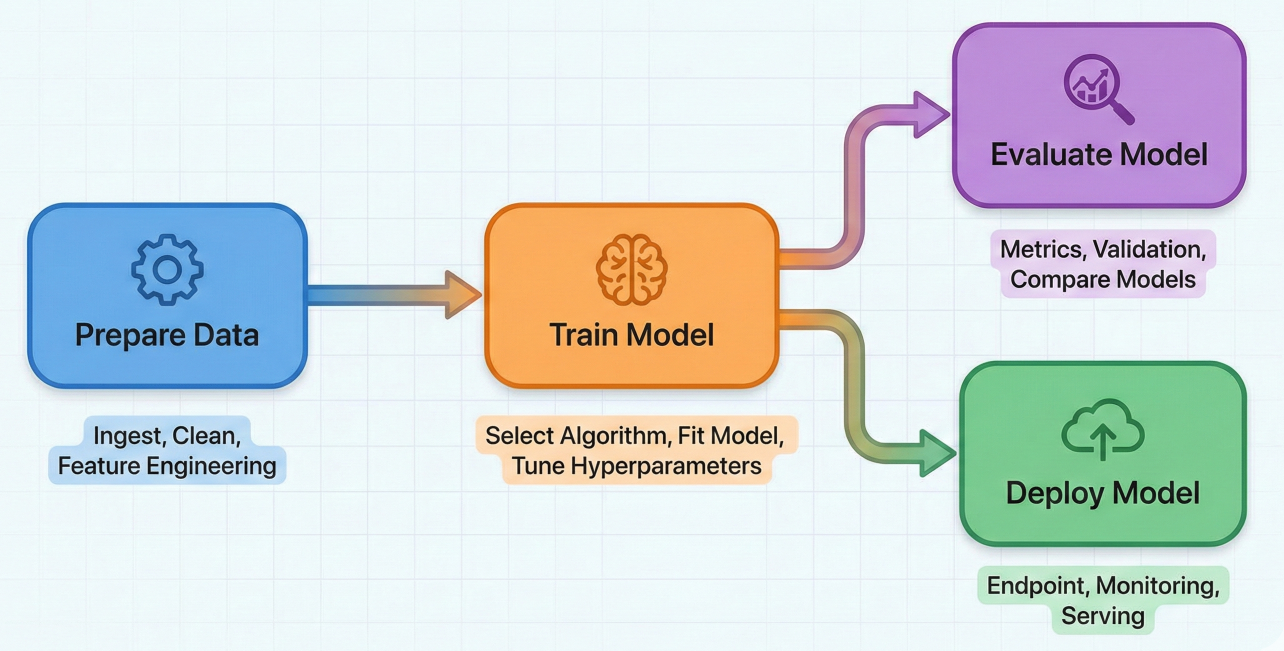
Diagram: Example Vertex AI Pipeline DAG (showing interconnected tasks: Data Prep -> Train Model -> Evaluate Model -> Deploy Model, with arrows indicating dependencies)
Detailed Description: This diagram should visually represent a Directed Acyclic Graph (DAG) for an ML pipeline. Each node in the graph represents a pipeline task (e.g., "Prepare Data," "Train Model," "Evaluate Model," "Deploy Model"). Arrows should clearly show the dependencies between tasks, for example, "Train Model" depends on "Prepare Data," and "Evaluate Model" and "Deploy Model" both depend on "Train Model."
To summarize, here's how the core Vertex AI MLOps tools align with the stages of your machine learning operations:
| Tool name | Primary Function | MLOps Stage(s) Supported | Key Benefit for MLOps |
| Vertex AI Workbench | Interactive data exploration, preprocessing, development | Data prep, Model Development | Unified development environment, quick iteration |
| Vertex AI Feature Store | Centralized feature management, serving, sharing | Data Prep, Model Serving | Feature consistency, skew mitigation, reuse |
| Vertex AI Training | Centralized feature management, serving, sharing | Model Development | Flexibility (no-code to full control), scalability |
| Vertex AI Experiments | Track and compare ML experiments | Model Development | Reproducibility, informed model selection |
| Vertex AI Model Registry | Central repository for model versions, management | Model Management | Governance, version control, streamlined deployment |
| Vertex AI Endpoints | Online (real-time) model serving | Model Deployment | Low-latency inference, autoscaling, traffic splitting |
| Vertex AI Batch Prediction | Asynchronous batch model serving | Model Deployment | Cost-effective large-scale inference |
| Vertex AI Model Monitoring | Detect data/concept drift, training-serving skew | Model Monitoring | Proactive performance maintenance, alerts |
| Vertex AI Pipelines | Orchestrate end-to-end ML workflows | Automation, CI/CD/CT | Automated, reproducible, auditable ML lifecycle |
| Vertex ML Metadata | Track artifacts, parameters, lineage | Reproducibility, Governance, Auditing | Auditing, debugging, understanding workflow history |
Vertex AI's unified platform and comprehensive MLOps tools are not just theoretical constructs; they are actively driving innovation across various industries, empowering businesses to deploy scalable AI/ML solutions that deliver tangible impact.
For the manufacturing industry, Vertex AI provides critical capabilities for operational efficiency:
Financial institutions can harness the full potential of AI with Vertex AI, developing robust solutions tailored for their unique challenges:
In healthcare, Vertex AI offers powerful tools to improve patient care and operational efficiency:
The ability of Vertex AI to cater to diverse industry-specific applications demonstrates its versatility and its crucial role in accelerating the adoption and operationalization of AI beyond generic use cases. While many AI platforms offer general-purpose ML capabilities, the true value of AI often lies in its application to specific industry challenges, such as fraud detection in finance or predictive maintenance in manufacturing. Vertex AI's comprehensive MLOps toolkit allows organizations not only to build models but also to reliably deploy and manage these tailored solutions at scale. This means businesses can move beyond mere prototypes to production-grade AI systems that directly address their unique operational needs, thereby driving tangible business value and competitive advantage. The platform's capacity to handle various data types (tabular, image, video) and support both AutoML and custom training further enhances its applicability across different industry verticals, making it a powerful enabler for domain-specific AI transformation.
We've explored how Google Cloud's Vertex AI provides a truly unified and comprehensive platform for the entire MLOps lifecycle. From robust data preparation with Feature Store and Workbench, to flexible model training (AutoML and Custom Training), centralized model management in the Model Registry, scalable deployment options (Endpoints and Batch Prediction), and critical continuous monitoring with automated retraining, Vertex AI has you covered.
This platform is designed to streamline complex ML workflows, foster collaboration across teams, ensure reproducibility of your experiments, and enable proactive model maintenance. All of this is achieved while leveraging Google Cloud's inherently scalable and fully managed infrastructure.
By adopting Vertex AI for your MLOps practices, you can significantly reduce operational complexity, accelerate your time to market for machine learning solutions, and ensure your AI investments continue to deliver measurable value over time. It's about moving your ML projects from experimental curiosities to reliable, impactful production systems that drive real business outcomes.
Ready to put these MLOps principles into practice and transform your ML initiatives? The best way to learn is by doing!
Your journey to streamlined, scalable, and successful MLOps begins now with Vertex AI!

SaratahKumar C
 Launch your Graphy