There are no items in your cart
Add More
Add More
| Item Details | Price | ||
|---|---|---|---|

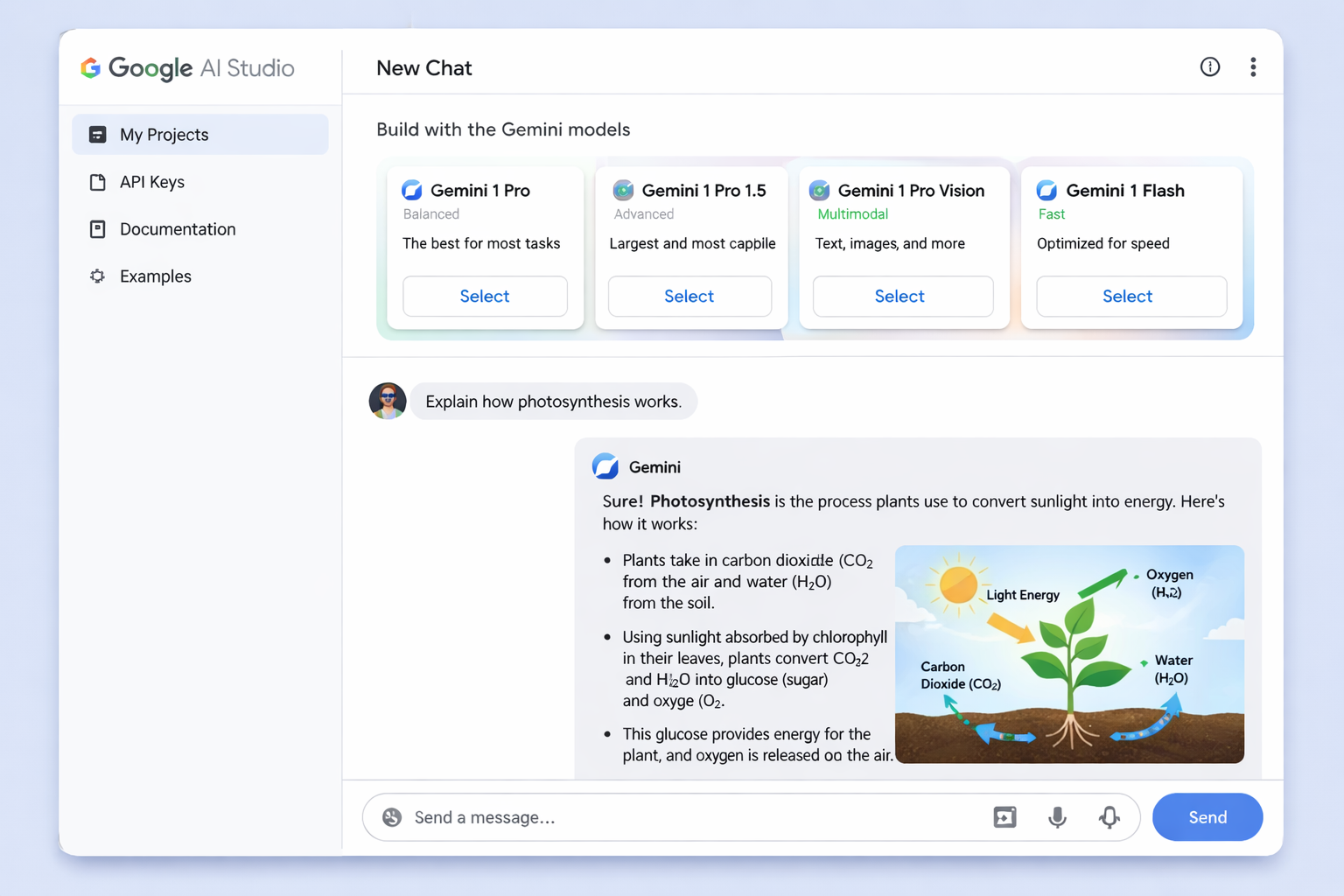
Hero image showing Google AI Studio interface with multiple Gemini models and chat interface
Google AI Studio has revolutionized how developers, researchers, and businesses interact with AI models, offering a powerful yet accessible platform for experimenting with Google's cuttingedge Gemini family of models. Whether you're prototyping your first AI application or transitioning from experimentation to production deployment, this comprehensive guide will take you through every aspect of Google AI Studio, from basic prompt design to advanced implementation strategies.
Google AI Studio represents Google's answer to the growing demand for accessible yet powerful AI development tools. Launched alongside the Gemini Pro API, AI Studio serves as a browser based integrated development environment (IDE) that eliminates the traditional barriers to AI experimentation
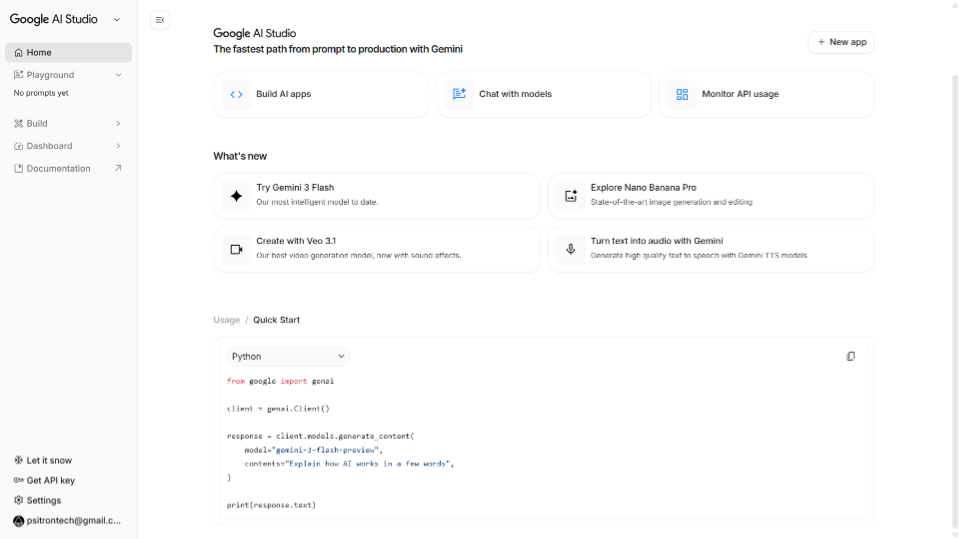
Screenshot of Google AI Studio dashboard showing the main interface with prompt area, model selection, and settings panel
At its essence, Google AI Studio is designed to be the fastest way to start building with Gemini, Google's next-generation family of multimodal generative AI models. Unlike complex development environments that require extensive setup, AI Studio runs entirely in your browser, making it accessible to everyone from seasoned developers to curious newcomers.
The platform's core value lies in its unified approach to AI development. Rather than juggling multiple tools for different AI tasks, you get everything in one place: chat interfaces, structured prompts, media generation, and even full application development capabilities.
Google AI Studio provides access to 15+ unique Gemini models, including the state-of-the-art Gemini 2.5 Pro and 2.5 Flash preview models. Each model is optimized for specific use cases:
One of AI Studio's most powerful features is its native multimodal support. You can seamlessly work with:
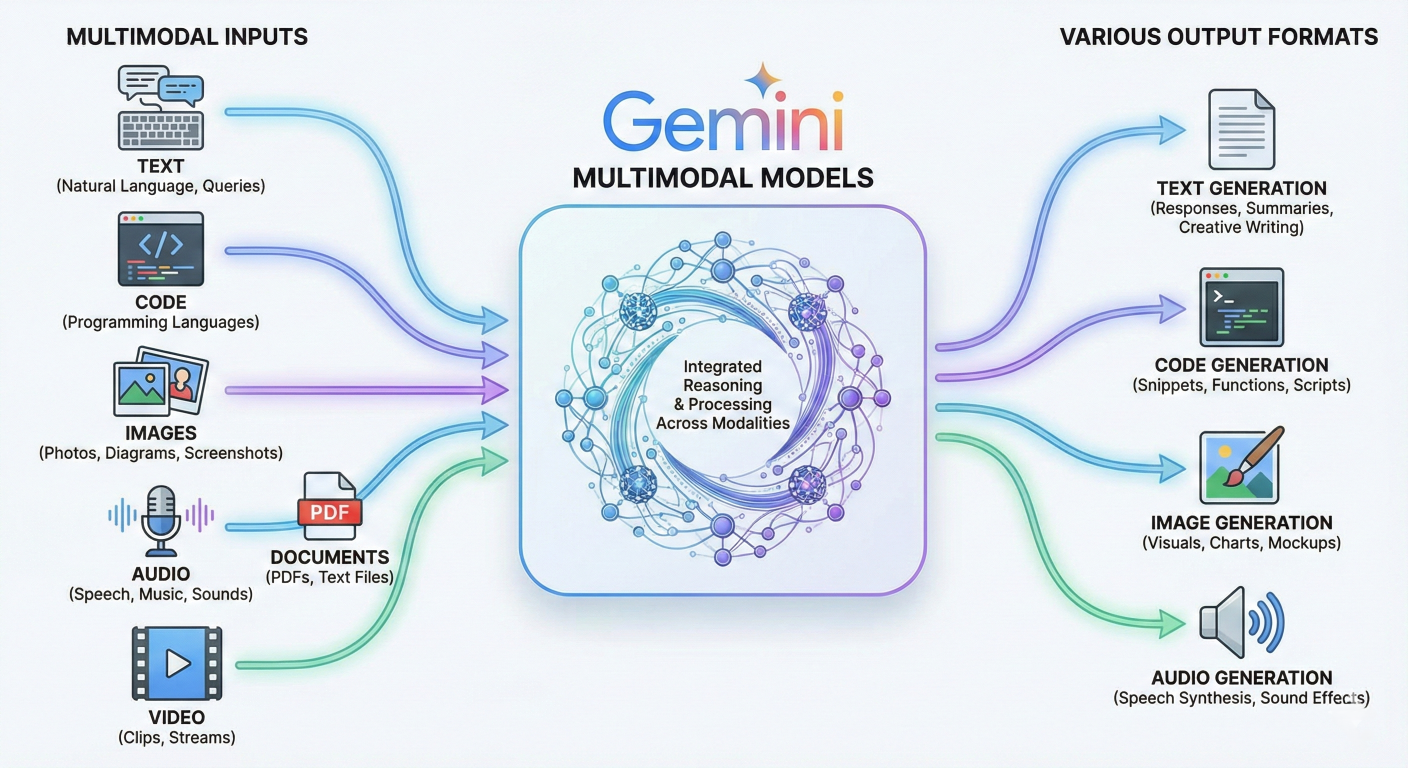
Diagram showing multimodal input types flowing into Gemini models and various output formats
The platform's zero-setup approach means you can start building immediately:
Effective prompt engineering is the foundation of successful AI applications. Google AI Studio provides sophisticated tools for crafting, testing, and refining prompts that produce consistent, high-quality results.
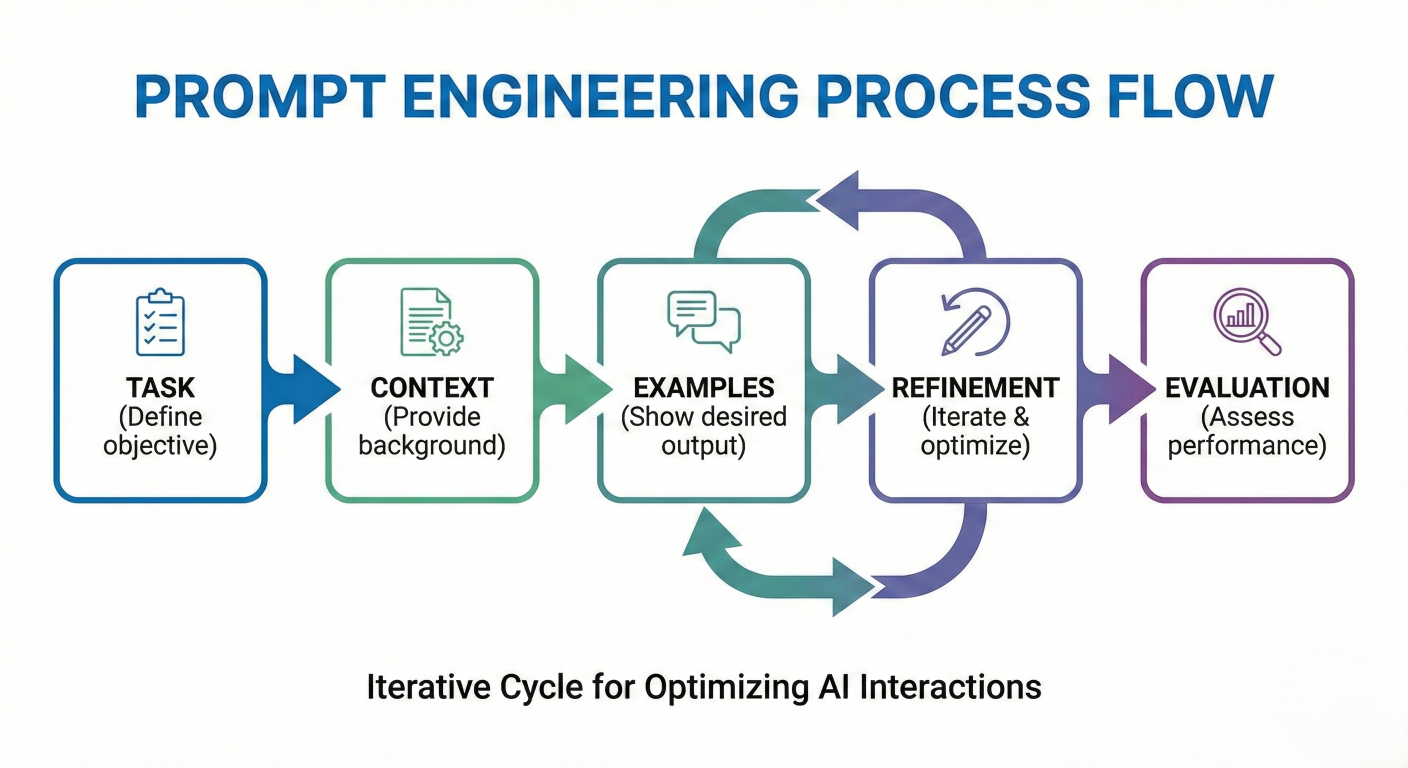
Flow diagram showing the prompt engineering process: Task → Context → Examples → Refinement → Evaluation
Start with a clear, specific instruction about what you want the AI to accomplish:
# Example: Improving prompt specificity

Poor: "Help with writing"
Better: "Write a product description for a wireless Bluetooth speaker"
Best: "Write a compelling 150-word product description for a premium wireless Bluetooth speaker targeting audiophiles, emphasizing sound quality, battery life, and design"
Provide relevant background information that helps the model understand your requirements:
# Context provided for role-play scenario
context = "You are a technical product manager at a consumer electronics company.
Our target audience consists of music enthusiasts aged 25-40 who value both
performance and aesthetics in their audio equipment."
Define the role you want the AI to embody for more targeted responses:
# Persona Definition
Persona: "Act as an experienced copywriter specializing in premium electronics marketing, with deep knowledge of audio technology and consumer psychology."
Clearly define the desired output structure:
# 1. Attention-grabbing headline
"Revolutionize Your Workflow with Our AI-Powered Platform"

# 2. Key features (3 bullet points)
- Seamless automation of repetitive tasks
- Real-time analytics and insights
- Scalable architecture for growing teams

# 3. Emotional appeal paragraph
"Imagine having a partner that works tirelessly, never makes mistakes, and helps you focus on what truly matters — innovation and growth. Our platform isn’t just software, it’s your productivity ally."

# 4. Technical specifications summary
Specs:
- Cloud-native deployment
- Supports Python, REST APIs, and SQL integrations
- Optimized for high-volume data processing

# 5. Call-to-action
"Start your free trial today and experience the future of work efficiency."
Include specific examples to guide the model's understanding:
# Example: Focus on experiential benefits instead of only technical specs
"Similar to how Apple describes the AirPods Pro:
'Immersive sound that puts you at the center of songs and calls'
- focus on the experiential benefits rather than just technical specs."
For complex reasoning tasks, explicitly request step-by-step thinking:
# Before providing your final answer, think through this problem step by step:
1. Analyze the requirements
2. Consider potential solutions
3. Evaluate trade-offs
4. Provide your recommendation with reasoning
Provide multiple examples to establish patterns:
# Example: Generate product taglines

# Product and Tagline mapping
print("Product: Smartphone → Tagline: 'Intelligence that adapts to you'")
print("Product: Laptop → Tagline: 'Power that moves with you'")
print("Product: Headphones → Tagline: [Your response here]")
Leverage specialized knowledge domains:
"As a senior software architect with 15 years of experience in scalable web applications, review this system design and suggest improvements for handling 1 million concurrent users."
One of Google AI Studio's most powerful features is its ability to generate structured, machinereadable output instead of free-form text. This capability is essential for building applications that need to process AI responses programmatically.
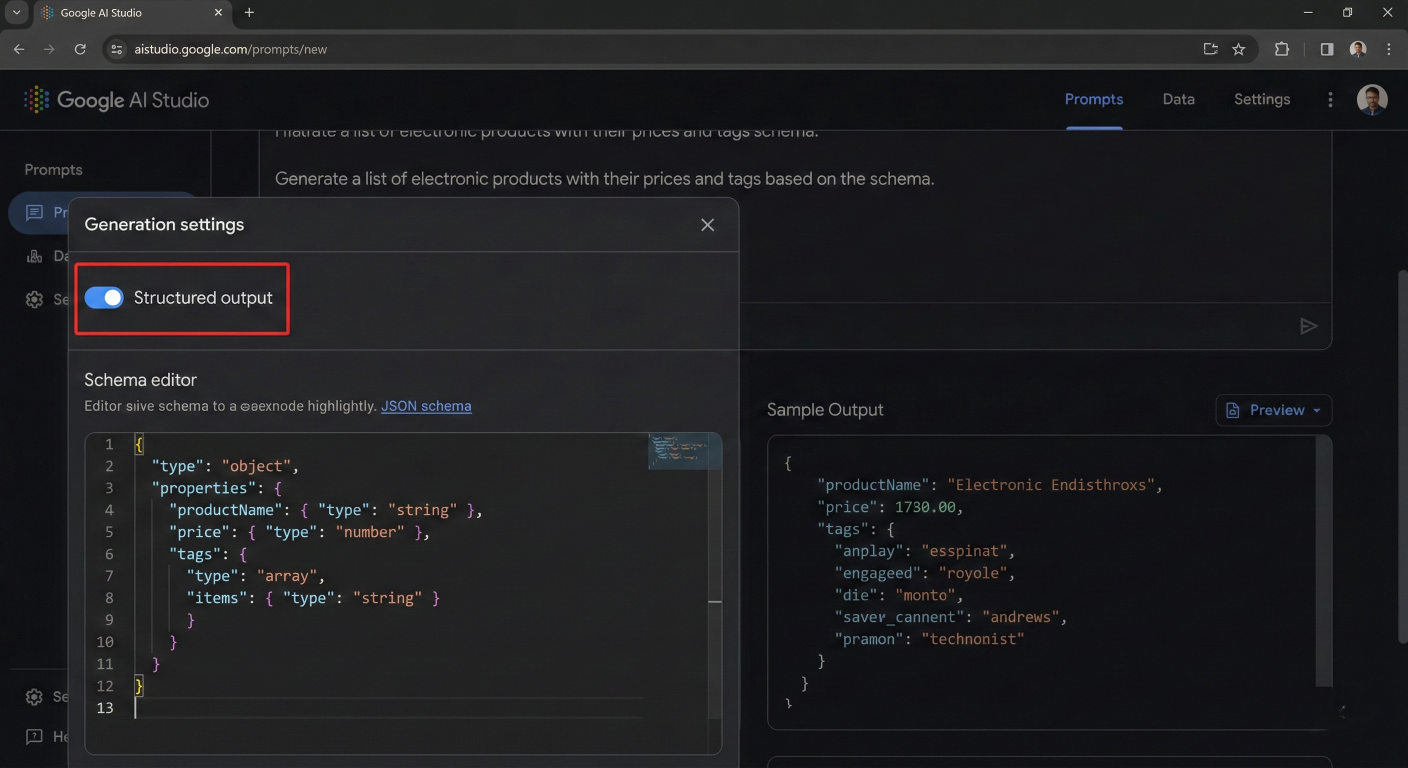
Screenshot showing the structured output toggle and schema editor in Google AI Studio
Structured output ensures that model responses always adhere to a specific schema, typically in JSON format. This eliminates the need for complex parsing logic and makes AI responses directly usable by other systems.
In the Run Settings panel, locate the "Tools" section and toggle on "JSON Mode".
Use either the visual editor or code editor to specify your output structure. Here's a comprehensive example:
{
  "type": "object",
  "properties": {
    "analysis": {
      "type": "object",
      "properties": {
        "summary": {
          "type": "string",
          "description": "Brief overview of the analysis"
        },
        "key_findings": {
          "type": "array",
          "items": {
            "type": "object",
            "properties": {
              "finding": {"type": "string"},
              "impact": {"type": "string"},
              "confidence": {"type": "number", "minimum": 0, "maximum": 1}
            },
            "required": ["finding", "impact", "confidence"]
          }
        },
        "recommendations": {
          "type": "array",
          "items": {
            "type": "object",
            "properties": {
              "action": {"type": "string"},
              "priority": {"type": "string", "enum": ["high","medium","low"]},
              "timeline": {"type": "string"}
            },
            "required": ["action", "priority", "timeline"]
          }
        },
        "metrics": {
          "type": "object",
          "properties": {
            "accuracy_score": {"type": "number"},
            "processing_time": {"type": "number"},
            "data_points_analyzed": {"type": "integer"}
          },
          "required": ["accuracy_score", "processing_time", "data_points_analyzed"]
        }
      },
      "required": ["summary", "key_findings", "recommendations", "metrics"]
    }
  },
  "required": ["analysis"]
}
Use the preview feature to ensure your schema produces the expected output format:
# Sample Prompt: "Analyze the quarterly sales data for our e-commerce platform, focusing on customer retention trends and revenue patterns."

# Expected Output Structure:
{
  "analysis": {
    "summary": "Q3 sales showed 23% growth with improved customer retention",
    "key_findings": [
      {
        "finding": "Customer retention improved by 15%",
        "impact": "Increased lifetime value by $340 per customer",
        "confidence": 0.92
      }
    ],
    "recommendations": [
      {
        "action": "Expand successful retention programs",
        "priority": "high",
        "timeline": "Q4 2025"
      }
    ],
    "metrics": {
      "accuracy_score": 0.94,
      "processing_time": 2.3,
      "data_points_analyzed": 15420
    }
  }
}
For complex data relationships:
# JSON schema for user profile and preferences
{
  "type": "object",
  "properties": {
    "user_profile": {
      "type": "object",
      "properties": {
        "personal_info": {
          "type": "object",
          "properties": {
            "name": {"type": "string"},
            "age": {"type": "integer"},
            "location": {"type": "string"}
          }
        },
        "preferences": {
          "type": "object",
          "properties": {
            "categories": {
              "type": "array",
              "items": {"type": "string"}
            },
            "price_range": {
              "type": "object",
              "properties": {
                "min": {"type": "number"},
                "max": {"type": "number"}
              }
            }
          }
        }
      }
    }
  }
}
Grounding transforms AI models from static knowledge repositories into dynamic, webconnected assistants capable of providing real-time, accurate information. Google AI Studio supports multiple grounding options that dramatically enhance the accuracy and relevance of AI responses.
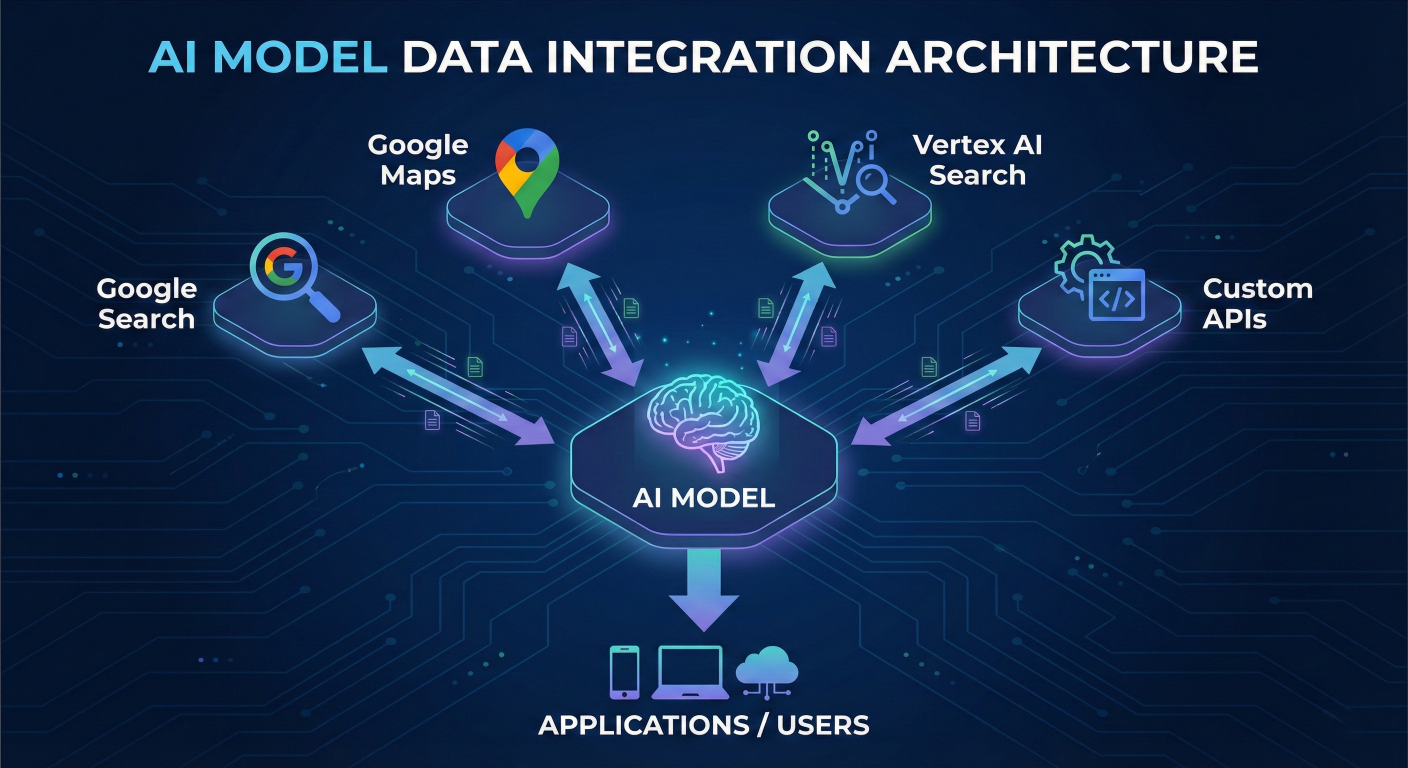
Architecture diagram showing AI model connected to various data sources: Google Search, Maps, Vertex AI Search, and custom APIs
Grounding is the process of connecting model output to verifiable sources of information. When you enable grounding, the model intelligently determines when external data is needed and automatically fetches relevant information to inform its responses.
Google Search grounding connects Gemini models to the entire web, providing access to current information beyond the model's training data.
# Configure Google GenAI client and grounded generation
from google import genai
from google.genai import types

# Initialize the client
client = genai.Client()

# Configure grounding tool
grounding_tool = types.Tool(
    google_search=types.GoogleSearch()
)

# Configure generation with grounding
config = types.GenerateContentConfig(
    tools=[grounding_tool]
)

# Generate grounded response
response = client.models.generate_content(
    model="gemini-2.5-flash",
    contents="What are the latest developments in quantum computing announced this week?",
    config=config,
)

# Print the response with current information and citations
print(response.text)
# Grounding with geographic customization
grounding_tool = types.Tool(
    google_search=types.GoogleSearch(
        dynamic_retrieval_config=types.DynamicRetrievalConfig(
            mode="UNSPECIFIED",  # Let model decide when to ground
            dynamic_threshold=0.3  # Confidence threshold for grounding
        )
    )
)

# Enable search suggestions for enhanced results
config = types.GenerateContentConfig(
    tools=[grounding_tool],
    system_instruction="Always provide citations for factual claims and prefer recent sources when available."
)
Maps grounding enables AI applications to understand and respond to location-based queries with real-world accuracy.
Implementation Example:
# Configure Maps grounding
maps_grounding_tool = types.Tool(
    google_maps=types.GoogleMaps(
        # Access to 250+ million businesses worldwide
        include_business_info=True,
        include_reviews=True,
        include_photos=True
    )
)

config = types.GenerateContentConfig(
    tools=[maps_grounding_tool]
)

response = client.models.generate_content(
    model="gemini-2.5-flash",
    contents="Find me the best Italian restaurants in downtown San Francisco with outdoor seating and parking availability.",
    config=config,
)
For enterprise applications requiring access to proprietary data:
# Configure custom data grounding
vertex_search_tool = types.Tool(
    vertex_ai_search=types.VertexAISearch(
        project_id="your-project-id",
        location="us-central1",
        data_store_id="your-datastore-id",
        # Include your company's knowledge base
        search_config={
            "max_results": 10,
            "filter": "document_type:technical_manual"
        }
    )
)
Choose the appropriate grounding method based on your use case:
Structure prompts to maximize grounding effectiveness:
# Effective and Less Effective Prompt Examples
# Keep comments intact as in original program

effective_prompt = "What are the current market trends for electric vehicle sales in Europe, including recent policy changes affecting the industry?"

less_effective_prompt = "Tell me about EVs"
Always request and utilize citation information:
# Extract grounding metadata
if response.candidates[0].grounding_metadata:
    for citation in response.candidates[0].grounding_metadata.grounding_chunks:
        print(f"Source: {citation.web.uri}")
        print(f"Title: {citation.web.title}")
Function calling represents one of the most powerful features in Google AI Studio, enabling models to interact with external tools and APIs instead of generating only text responses. This capability transforms AI from a conversational interface into an active agent capable of performing real-world actions.
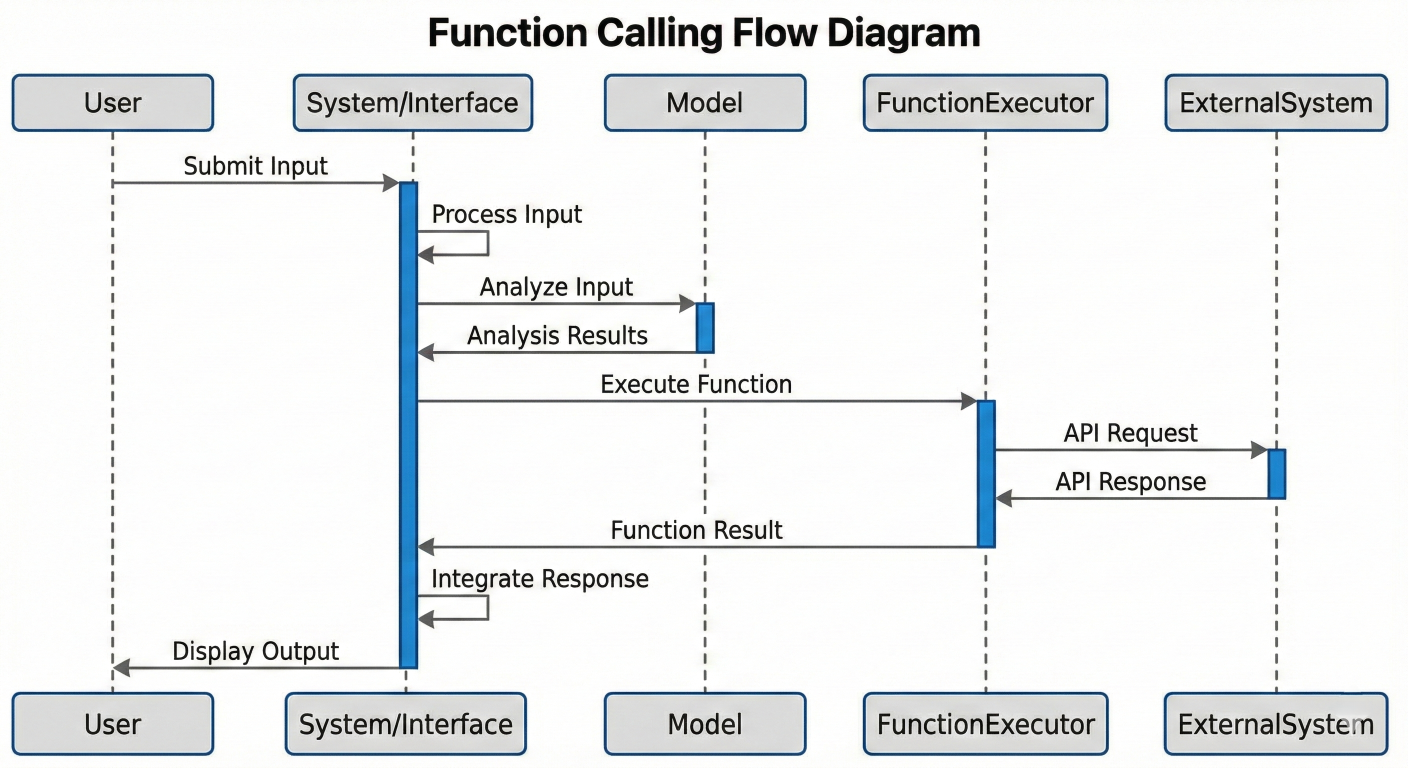
Sequence diagram showing function calling flow: User Input → Model Analysis → Function Call → External System → Response Integration → Final Output
Function calling works by providing the model with function declarations that describe available tools and their parameters. When the model determines that a function call is necessary to fulfill a user's request, it generates a structured function call instead of a text response.
Step 1: Define Function Declarations
import { GoogleGenAI, Type } from '@google/genai';

// Configure comprehensive function declaration
const smartHomeFunctionDeclaration = {
  name: 'control_smart_home',
  description: 'Control various smart home devices including lights, temperature, music, and security systems.',
  parameters: {
    type: Type.OBJECT,
    properties: {
      device_type: {
        type: Type.STRING,
        enum: ['lights', 'thermostat', 'music', 'security', 'appliances'],
        description: 'Type of device to control'
      },
      action: {
        type: Type.STRING,
        enum: ['turn_on', 'turn_off', 'set_level', 'increase', 'decrease', 'schedule'],
        description: 'Action to perform on the device'
      },
      parameters: {
        type: Type.OBJECT,
        properties: {
          brightness: {
            type: Type.NUMBER,
            minimum: 0,
            maximum: 100,
            description: 'Light brightness percentage'
          },
          temperature: {
            type: Type.NUMBER,
            minimum: 60,
            maximum: 85,
            description: 'Target temperature in Fahrenheit'
          },
          volume: {
            type: Type.NUMBER,
            minimum: 0,
            maximum: 100,
            description: 'Audio volume percentage'
          },
          duration: {
            type: Type.STRING,
            description: 'Duration for scheduled actions (e.g., "30 minutes", "2 hours")'
          }
        }
      },
      room: {
        type: Type.STRING,
        enum: ['living_room', 'bedroom', 'kitchen', 'bathroom', 'office'],
        description: 'Target room for the action'
      }
    },
    required: ['device_type', 'action']
  }
};
Step 2: Configure Model with Functions
// Initialize the Google GenAI client
const ai = new GoogleGenAI({});

// Send request with function declarations
const response = await ai.models.generateContent({
  model: 'gemini-2.5-flash',
  contents: 'Set the living room lights to 70% brightness and play relaxing music at low volume',
  config: {
    tools: [{
      functionDeclarations: [smartHomeFunctionDeclaration]
    }],
    // Control function calling behavior
    toolConfig: {
      functionCallingConfig: {
        mode: 'AUTO' // Let model decide when to call functions
      }
    }
  },
});
Step 3: Handle Function Calls
// Process function calls from model response
if (response.functionCalls && response.functionCalls.length > 0) {
  const functionCalls = response.functionCalls;
  const functionResults = [];

  for (const functionCall of functionCalls) {
    console.log(`Calling function: ${functionCall.name}`);
    console.log(`Arguments:`, functionCall.args);

    // Execute the actual function
    const result = await executeSmartHomeCommand(functionCall.args);

    functionResults.push({
      name: functionCall.name,
      response: { result: result }
    });
  }

  // Send results back to model for final response
  const finalResponse = await ai.models.generateContent({
    model: 'gemini-2.5-flash',
    contents: [
      ...conversation_history,
      { role: 'user', parts: [{ functionResponse: functionResults[0] }] }
    ],
    config: config
  });

  console.log("Final response:", finalResponse.text);
}

// Smart home command execution function
async function executeSmartHomeCommand(args) {
  const { device_type, action, parameters = {}, room = 'living_room' } = args;

  switch (device_type) {
    case 'lights':
      if (action === 'set_level' && parameters.brightness) {
        return await setLightBrightness(room, parameters.brightness);
      }
      break;
    case 'music':
      if (action === 'turn_on' && parameters.volume) {
        return await playMusic(room, 'relaxing', parameters.volume);
      }
      break;
    default:
      return { success: false, message: 'Unsupported device or action' };
  }
}
// Define multiple related functions
const workflowFunctions = [
  {
    name: 'analyze_data',
    description: 'Analyze dataset and extract insights',
    parameters: {
      type: Type.OBJECT,
      properties: {
        data_source: { type: Type.STRING },
        analysis_type: {
          type: Type.STRING,
          enum: ['statistical', 'trend', 'correlation', 'predictive']
        }
      }
    }
  },
  {
    name: 'generate_report',
    description: 'Create formatted report from analysis results',
    parameters: {
      type: Type.OBJECT,
      properties: {
        format: {
          type: Type.STRING,
          enum: ['pdf', 'html', 'markdown', 'json']
        },
        include_charts: { type: Type.BOOLEAN }
      }
    }
  },
  {
    name: 'send_email',
    description: 'Send report via email',
    parameters: {
      type: Type.OBJECT,
      properties: {
        recipients: {
          type: Type.ARRAY,
          items: { type: Type.STRING }
        },
        subject: { type: Type.STRING },
        priority: {
          type: Type.STRING,
          enum: ['low', 'normal', 'high']
        }
      }
    }
  }
];

// User request: "Analyze our Q3 sales data, create a PDF report with charts, and email it to the management team"
// Model will chain multiple function calls automatically
// Force function calling when needed
const config = {
  tools: [{ functionDeclarations: functions }],
  toolConfig: {
    functionCallingConfig: {
      mode: 'ANY' // Force at least one function call
    }
  }
};

// Disable function calling for specific contexts
const noFunctionConfig = {
  tools: [{ functionDeclarations: functions }],
  toolConfig: {
    functionCallingConfig: {
      mode: 'NONE' // Disable all function calls
    }
  }
};
// Async function to execute with validation and timeout
async executeFunction(functionCall) {
  try {
    // Validate function parameters
    const validation = validateFunctionParameters(functionCall.args);
    if (!validation.valid) {
      return {
        success: false,
        error: `Invalid parameters: ${validation.errors.join(', ')}`
      };
    }

    // Execute with timeout
    const result = await Promise.race([
      actualFunction(functionCall.args),
      timeoutPromise(10000) // 10 second timeout
    ]);

    return {
      success: true,
      data: result,
      execution_time: Date.now() - startTime
    };

  } catch (error) {
    console.error(`Function execution failed:`, error);
    return {
      success: false,
      error: error.message,
      retry_possible: isRetryableError(error)
    };
  }
}
Effective conversation management is crucial for building engaging, context-aware AI applications. Google AI Studio provides robust tools for maintaining conversation state, managing context windows, and ensuring continuity across user interactions.

Interface screenshot showing conversation history panel with saved chats, search functionality, and conversation management options
Google AI Studio automatically manages conversation history through its integrated Google Drive storage system. Every conversation is preserved as a structured file, enabling seamless continuation and collaboration.
// In AI Studio interface
// 1. Navigate to left panel
// 2. Click "Enable chat history"
// 3. Select Google account for storage
// 4. Conversations automatically saved to Google Drive/AI Studio folder
// Managing conversation history in API calls
class ConversationManager {
  constructor(maxMessages = 50, maxTokens = 32000) {
    this.conversations = new Map();
    this.maxMessages = maxMessages;
    this.maxTokens = maxTokens;
  }

  // Retrieve conversation history with optimization
  getConversationHistory(conversationId) {
    const history = this.conversations.get(conversationId) || [];
    const optimizedHistory = this.optimizeHistory(history);
    // Transform for Gemini API format
    return this.transformHistoryForGemini(optimizedHistory);
  }

  // Add message to conversation
  addMessage(conversationId, role, content, metadata = {}) {
    if (!this.conversations.has(conversationId)) {
      this.conversations.set(conversationId, []);
    }

    const conversation = this.conversations.get(conversationId);
    const message = {
      role: role, // 'user', 'model', 'system'
      content: content,
      timestamp: new Date().toISOString(),
      metadata: metadata,
      token_count: this.estimateTokens(content)
    };

    conversation.push(message);
    // Apply conversation limits
    this.enforceConversationLimits(conversationId);
  }

  // Optimize history for token efficiency
  optimizeHistory(history) {
    let totalTokens = 0;
    const optimizedHistory = [];

    // Start from most recent messages
    for (let i = history.length - 1; i >= 0; i--) {
      const message = history[i];
      if (totalTokens + message.token_count > this.maxTokens) {
        break;
      }
      optimizedHistory.unshift(message);
      totalTokens += message.token_count;
    }

    return optimizedHistory;
  }

  // Transform history for Gemini API format
  transformHistoryForGemini(history) {
    return history.map(message => ({
      role: message.role,
      parts: [{ text: message.content }]
    }));
  }

  // Conversation summarization for long contexts
  async summarizeOldMessages(conversationId, keepRecentCount = 10) {
    const conversation = this.conversations.get(conversationId);
    if (!conversation || conversation.length <= keepRecentCount) {
      return;
    }

    const messagesToSummarize = conversation.slice(0, -keepRecentCount);
    const recentMessages = conversation.slice(-keepRecentCount);

    // Create summary using Gemini
    const summary = await this.createConversationSummary(messagesToSummarize);

    // Replace old messages with summary
    const summaryMessage = {
      role: 'system',
      content: `Conversation Summary: ${summary}`,
      timestamp: new Date().toISOString(),
      metadata: {
        type: 'summary',
        original_message_count: messagesToSummarize.length
      },
      token_count: this.estimateTokens(summary)
    };

    this.conversations.set(conversationId, [summaryMessage, ...recentMessages]);
  }

  // Create intelligent conversation summary
  async createConversationSummary(messages) {
    const conversationText = messages.map(m => `${m.role}: ${m.content}`).join('\n');

    const summaryPrompt = `
    Summarize the following conversation, preserving key context, decisions, and important details that might be relevant for future interactions:

    ${conversationText}

    Summary should be comprehensive but concise, focusing on:
    1. Main topics discussed
    2. Decisions made or conclusions reached
    3. User preferences or requirements identified
    4. Any ongoing tasks or follow-ups needed
    `;

    const response = await client.models.generateContent({
      model: "gemini-2.5-flash",
      contents: summaryPrompt,
    });

    return response.text;
  }
}
class DynamicContextManager extends ConversationManager {
  constructor() {
    super();
    this.contextStrategies = {
      'technical_support': { maxTokens: 16000, prioritizeRecent: true },
      'creative_writing': { maxTokens: 32000, preserveAll: true },
      'data_analysis': { maxTokens: 8000, prioritizeResults: true }
    };
  }

  // Adaptive context management based on conversation type
  getOptimizedContext(conversationId, contextType = 'general') {
    const strategy = this.contextStrategies[contextType] || this.contextStrategies['general'];
    const history = this.conversations.get(conversationId) || [];

    switch (contextType) {
      case 'technical_support':
        return this.optimizeForTechnicalSupport(history, strategy);
      case 'creative_writing':
        return this.optimizeForCreativeWriting(history, strategy);
      case 'data_analysis':
        return this.optimizeForDataAnalysis(history, strategy);
      default:
        return this.optimizeHistory(history);
    }
  }

  // Specialized optimization for technical support
  optimizeForTechnicalSupport(history, strategy) {
    const priorityKeywords = ['error', 'bug', 'issue', 'solution', 'fix', 'resolved'];

    return history.filter(message => {
      // Always keep recent messages
      if (history.indexOf(message) >= history.length - 5) return true;

      // Keep messages containing priority keywords
      return priorityKeywords.some(keyword =>
        message.content.toLowerCase().includes(keyword)
      );
    });
  }

  // Context-aware message prioritization
  prioritizeMessages(messages, contextType) {
    const priorityScores = messages.map(message => ({
      message,
      score: this.calculateMessagePriority(message, contextType)
    }));

    return priorityScores
      .sort((a, b) => b.score - a.score)
      .map(item => item.message);
  }

  calculateMessagePriority(message, contextType) {
    let score = 0;

    // Recency bonus
    const messageAge = Date.now() - new Date(message.timestamp).getTime();
    score += Math.max(0, 100 - (messageAge / (1000 * 60 * 60))); // Decay over hours

    // Content relevance
    if (message.role === 'model' && message.metadata?.contains_solution) {
      score += 50;
    }

    // User preference indicators
    if (message.content.includes('prefer') || message.content.includes('like')) {
      score += 25;
    }

    return score;
  }
}// Robust conversation persistence
class PersistentConversationManager {
constructor(storageAdapter) {
this.storage = storageAdapter;
this.activeConversations = new Map();
}
// Load conversation from persistent storage
async loadConversation(conversationId) {
try {
const conversationData = await this.storage.get(conversationId);
if (conversationData) {
this.activeConversations.set(conversationId, conversationData.messages);
return conversationData;
}
} catch (error) {
console.error(`Failed to load conversation ${conversationId}:`, error);
}
return null;
}
// Save conversation with error handling
async saveConversation(conversationId, metadata = {}) {
const messages = this.activeConversations.get(conversationId) || [];
const conversationData = {
id: conversationId,
messages: messages,
metadata: {
...metadata,
lastUpdated: new Date().toISOString(),
messageCount: messages.length,
totalTokens: messages.reduce((sum, msg) => sum + (msg.token_count || 0), 0)
}
};
try {
await this.storage.set(conversationId, conversationData);
return true;
} catch (error) {
console.error(`Failed to save conversation ${conversationId}:`, error);
return false;
}
}
// Conversation analytics and insights
generateConversationAnalytics(conversationId) {
const messages = this.activeConversations.get(conversationId) || [];
return {
messageCount: messages.length,
userMessageCount: messages.filter(m => m.role === 'user').length,
modelMessageCount: messages.filter(m => m.role === 'model').length,
averageMessageLength: messages.reduce((sum, m) => sum + m.content.length, 0) / messages.length,
conversationDuration: this.calculateConversationDuration(messages),
topicEvolution: this.analyzeTopicEvolution(messages),
sentimentProgression: this.analyzeSentimentProgression(messages)
};
}
// Export conversation in multiple formats
async exportConversation(conversationId, format = 'json') {
const messages = this.activeConversations.get(conversationId) || [];
switch (format) {
case 'json':
return JSON.stringify(messages, null, 2);
case 'markdown':
return this.convertToMarkdown(messages);
case 'html':
return this.convertToHTML(messages);
case 'csv':
return this.convertToCSV(messages);
default:
throw new Error(`Unsupported export format: ${format}`);
}
}
}
Fine-tuning AI models allows you to customize Google's powerful foundation models for your specific use cases, dramatically improving performance on specialized tasks. Google AI Studio provides comprehensive tools for supervised fine-tuning, enabling you to create models that understand your domain, writing style, and specific requirements.
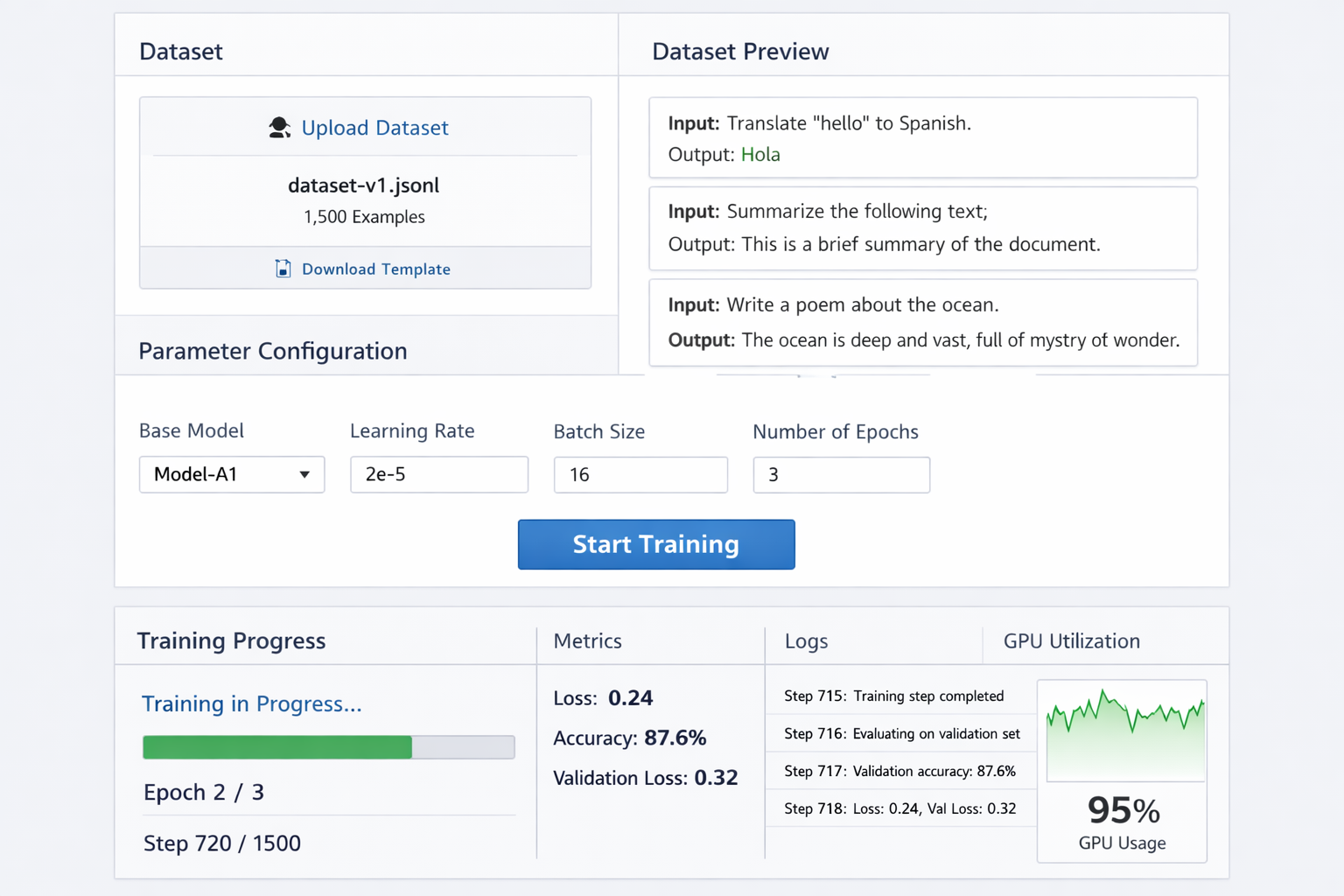
Screenshot of the model tuning interface showing dataset upload, parameter configuration, and training progress
Supervised fine-tuning involves training a model on input-output pairs specific to your use case. This process teaches the model to recognize patterns in your data and respond accordingly, resulting in more accurate and contextually appropriate outputs.
Benefits of Fine-Tuning:
Step 1: Prepare Training Data
Your training dataset should consist of high-quality input-output pairs in JSONL format:
# Example: Cloud Migration Benefits
{
  "input": "Explain the benefits of cloud migration for enterprise customers",
  "output": "Cloud migration offers enterprise customers several key advantages: 1) Cost Optimization - Reduce infrastructure expenses by up to 30% through pay-as-you-use models, 2) Scalability - Automatically scale resources based on demand without hardware investments, 3) Security - Enterprise-grade security with 99.9% uptime guarantees, 4) Innovation - Access to cutting-edge AI/ML services and development tools, 5) Compliance - Built-in compliance frameworks for industry regulations like SOC 2, HIPAA, and GDPR."
}

# Example: Data Backup & Recovery
{
  "input": "How do we handle data backup and recovery in the cloud?",
  "output": "Our cloud backup and recovery strategy includes: 1) Automated Daily Backups - All data backed up automatically with point-in-time recovery, 2) Multi-Region Redundancy - Data replicated across 3+ geographic regions for disaster recovery, 3) Instant Recovery - RTO of less than 4 hours with RPO of 15 minutes, 4) Compliance Tracking - Automated compliance reporting and audit trails, 5) Testing Protocols - Monthly backup integrity testing and quarterly disaster recovery drills."
}

# Example: Cloud Security Implications
{
  "input": "What are the security implications of moving to cloud infrastructure?",
  "output": "Cloud security involves several critical considerations: 1) Shared Responsibility Model - Understanding which security aspects you manage vs. the provider, 2) Data Encryption - End-to-end encryption for data in transit and at rest using AES-256, 3) Identity Management - Implementing zero-trust architecture with multi-factor authentication, 4) Network Security - Virtual private clouds with configurable firewalls and intrusion detection, 5) Compliance Monitoring - Continuous compliance scanning and threat detection with 24/7 SOC support."
}
Step 2: Configure Tuning Parameters
from google import genai
from google.genai.types import CreateTuningJobConfig, TuningDataset

client = genai.Client()

# Configure training dataset
training_dataset = TuningDataset(
    gcs_uri="gs://your-bucket/training-data.jsonl"
)

# Optional: Configure validation dataset
validation_dataset = TuningDataset(
    gcs_uri="gs://your-bucket/validation-data.jsonl"
)

# Create tuning job with optimized parameters
tuning_job = client.tunings.tune(
    base_model="gemini-2.5-flash",
    training_dataset=training_dataset,
    config=CreateTuningJobConfig(
        tuned_model_display_name="Enterprise Cloud Consultant",
        # Training parameters
        epochs=3,  # Number of complete passes through data
        learning_rate_multiplier=1.0,  # Adjust learning speed
        adapter_size="LARGE",  # Model capacity for learning
        # Validation configuration
        validation_dataset=validation_dataset,
        validation_config={
            "validation_interval": 10,  # Validate every 10 steps
            "early_stopping_patience": 5  # Stop if no improvement
        }
    )
)

print(f"Tuning job started: {tuning_job.name}")
Step 3: Monitor Training Progress
# Monitor tuning job status
import time

running_states = {"JOB_STATE_PENDING", "JOB_STATE_RUNNING"}

while tuning_job.state in running_states:
    print(f"Current state: {tuning_job.state}")

    # Get training metrics
    if hasattr(tuning_job, 'training_metrics'):
        latest_metrics = tuning_job.training_metrics[-1]
        print(f"Loss: {latest_metrics.loss:.4f}")
        print(f"Learning Rate: {latest_metrics.learning_rate:.6f}")

    time.sleep(60)  # Check every minute
    tuning_job = client.tunings.get(name=tuning_job.name)

print(f"Tuning completed with state: {tuning_job.state}")
print(f"Tuned model endpoint: {tuning_job.tuned_model.endpoint}")
Hyperparameter Grid Search
class TuningOptimizer:
    def __init__(self, base_model, training_data):
        self.base_model = base_model
        self.training_data = training_data
        self.results = []

    async def optimize_parameters(self):
        # Define parameter grid
        parameter_grid = {
            'epochs': [2, 3, 4, 5],
            'learning_rate_multiplier': [0.5, 1.0, 1.5, 2.0],
            'adapter_size': ['SMALL', 'MEDIUM', 'LARGE']
        }

        best_performance = 0
        best_config = None

        # Grid search over parameters
        for epochs in parameter_grid['epochs']:
            for lr_mult in parameter_grid['learning_rate_multiplier']:
                for adapter_size in parameter_grid['adapter_size']:

                    config = CreateTuningJobConfig(
                        tuned_model_display_name=f"model_e{epochs}_lr{lr_mult}_a{adapter_size}",
                        epochs=epochs,
                        learning_rate_multiplier=lr_mult,
                        adapter_size=adapter_size
                    )

                    # Train model with current parameters
                    performance = await self.train_and_evaluate(config)

                    self.results.append({
                        'config': config,
                        'performance': performance
                    })

                    if performance > best_performance:
                        best_performance = performance
                        best_config = config

        return best_config, best_performance

    async def train_and_evaluate(self, config):
        # Train model
        tuning_job = client.tunings.tune(
            base_model=self.base_model,
            training_dataset=self.training_data,
            config=config
        )

        # Wait for completion
        while tuning_job.state in running_states:
            await asyncio.sleep(60)
            tuning_job = client.tunings.get(name=tuning_job.name)

        # Evaluate performance
        if tuning_job.state == "JOB_STATE_SUCCEEDED":
            return await self.evaluate_model(tuning_job.tuned_model)
        else:
            return 0

    async def evaluate_model(self, tuned_model):
        # Comprehensive model evaluation
        evaluation_metrics = {
            'accuracy': 0,
            'relevance': 0,
            'consistency': 0,
            'fluency': 0
        }

        # Test model on validation set
        test_cases = await self.load_test_cases()

        for test_case in test_cases:
            response = await client.models.generate_content(
                model=tuned_model.endpoint,
                contents=test_case['input']
            )

            # Calculate metrics
            accuracy = self.calculate_accuracy(test_case['expected'], response.text)
            relevance = self.calculate_relevance(test_case['input'], response.text)
            consistency = self.calculate_consistency(response.text)
            fluency = self.calculate_fluency(response.text)

            evaluation_metrics['accuracy'] += accuracy
            evaluation_metrics['relevance'] += relevance
            evaluation_metrics['consistency'] += consistency
            evaluation_metrics['fluency'] += fluency

        # Average metrics
        num_tests = len(test_cases)
        return sum(evaluation_metrics.values()) / (len(evaluation_metrics) * num_tests)
Step 1: Model Validation and Testing
class ModelValidator:
    def __init__(self, tuned_model_endpoint):
        self.model_endpoint = tuned_model_endpoint
        self.validation_results = {}

    async def comprehensive_validation(self):
        """Run comprehensive validation suite before production deployment"""

        validation_tests = [
            self.test_response_accuracy,
            self.test_response_consistency,
            self.test_edge_cases,
            self.test_performance_metrics,
            self.test_safety_compliance
        ]

        for test in validation_tests:
            try:
                result = await test()
                self.validation_results[test.__name__] = result
                print(f"✓ {test.__name__}: {'PASS' if result['passed'] else 'FAIL'}")
            except Exception as e:
                print(f"✗ {test.__name__}: ERROR - {e}")
                self.validation_results[test.__name__] = {'passed': False, 'error': str(e)}

        return self.validation_results

    async def test_response_accuracy(self):
        """Test model accuracy on known good examples"""
        test_cases = [
            {
                'input': 'Explain our cloud security approach',
                'expected_elements': ['encryption', 'compliance', 'monitoring', 'access control']
            }
        ]

        passed_tests = 0
        for test_case in test_cases:
            response = await client.models.generate_content(
                model=self.model_endpoint,
                contents=test_case['input']
            )

            # Check if expected elements are present
            response_lower = response.text.lower()
            elements_found = sum(1 for element in test_case['expected_elements']
                               if element in response_lower)

            if elements_found >= len(test_case['expected_elements']) * 0.75:  # 75% threshold
                passed_tests += 1

        return {
            'passed': passed_tests == len(test_cases),
            'accuracy': passed_tests / len(test_cases),
            'details': f"{passed_tests}/{len(test_cases)} tests passed"
        }

    async def test_performance_metrics(self):
        """Test response time and quality metrics"""
        import time

        response_times = []
        quality_scores = []

        test_prompts = [
            "Describe our backup strategy",
            "Explain cloud migration benefits",
            "What are our security protocols?"
        ]

        for prompt in test_prompts:
            start_time = time.time()

            response = await client.models.generate_content(
                model=self.model_endpoint,
                contents=prompt
            )

            end_time = time.time()
            response_times.append(end_time - start_time)

            # Basic quality assessment
            quality_score = self.assess_response_quality(response.text)
            quality_scores.append(quality_score)

        avg_response_time = sum(response_times) / len(response_times)
        avg_quality = sum(quality_scores) / len(quality_scores)

        return {
            'passed': avg_response_time < 5.0 and avg_quality > 0.8,
            'avg_response_time': avg_response_time,
            'avg_quality_score': avg_quality,
            'details': f"Response time: {avg_response_time:.2f}s, Quality: {avg_quality:.2f}"
        }
Step 2: Production Deployment Configuration
class ProductionDeployment:
    def __init__(self, tuned_model_endpoint):
        self.model_endpoint = tuned_model_endpoint
        self.deployment_config = self.create_production_config()

    def create_production_config(self):
        return {
            'model_endpoint': self.model_endpoint,
            'generation_config': {
                'temperature': 0.3,  # Lower for consistency
                'max_output_tokens': 1024,
                'top_p': 0.8,
                'top_k': 40
            },
            'safety_settings': {
                'harm_category_harassment': 'BLOCK_MEDIUM_AND_ABOVE',
                'harm_category_hate_speech': 'BLOCK_MEDIUM_AND_ABOVE',
                'harm_category_sexually_explicit': 'BLOCK_MEDIUM_AND_ABOVE',
                'harm_category_dangerous_content': 'BLOCK_MEDIUM_AND_ABOVE'
            },
            'rate_limiting': {
                'requests_per_minute': 60,
                'requests_per_day': 10000
            },
            'monitoring': {
                'log_requests': True,
                'track_performance': True,
                'alert_on_errors': True
            }
        }

    async def deploy_to_production(self):
        """Deploy tuned model to production environment"""
        # Validate model before deployment
        validator = ModelValidator(self.model_endpoint)
        validation_results = await validator.comprehensive_validation()

        if not all(result.get('passed', False) for result in validation_results.values()):
            raise Exception("Model validation failed - not ready for production")

        # Deploy with monitoring
        deployment_result = await self.create_production_deployment()

        # Set up monitoring and alerting
        await self.setup_monitoring()
        return deployment_result

    async def create_production_deployment(self):
        """Create production-ready model deployment"""
        # Production deployment code
        return {
            'deployment_id': 'prod-enterprise-consultant-v1',
            'endpoint': self.model_endpoint,
            'status': 'active',
            'created_at': datetime.now().isoformat(),
            'config': self.deployment_config
        }
Google AI Studio's strength lies not just in experimentation but in its seamless transition path to production applications. The Google GenAI SDK provides robust support across multiple programming languages, enabling developers to move from prototype to production without major code rewrites
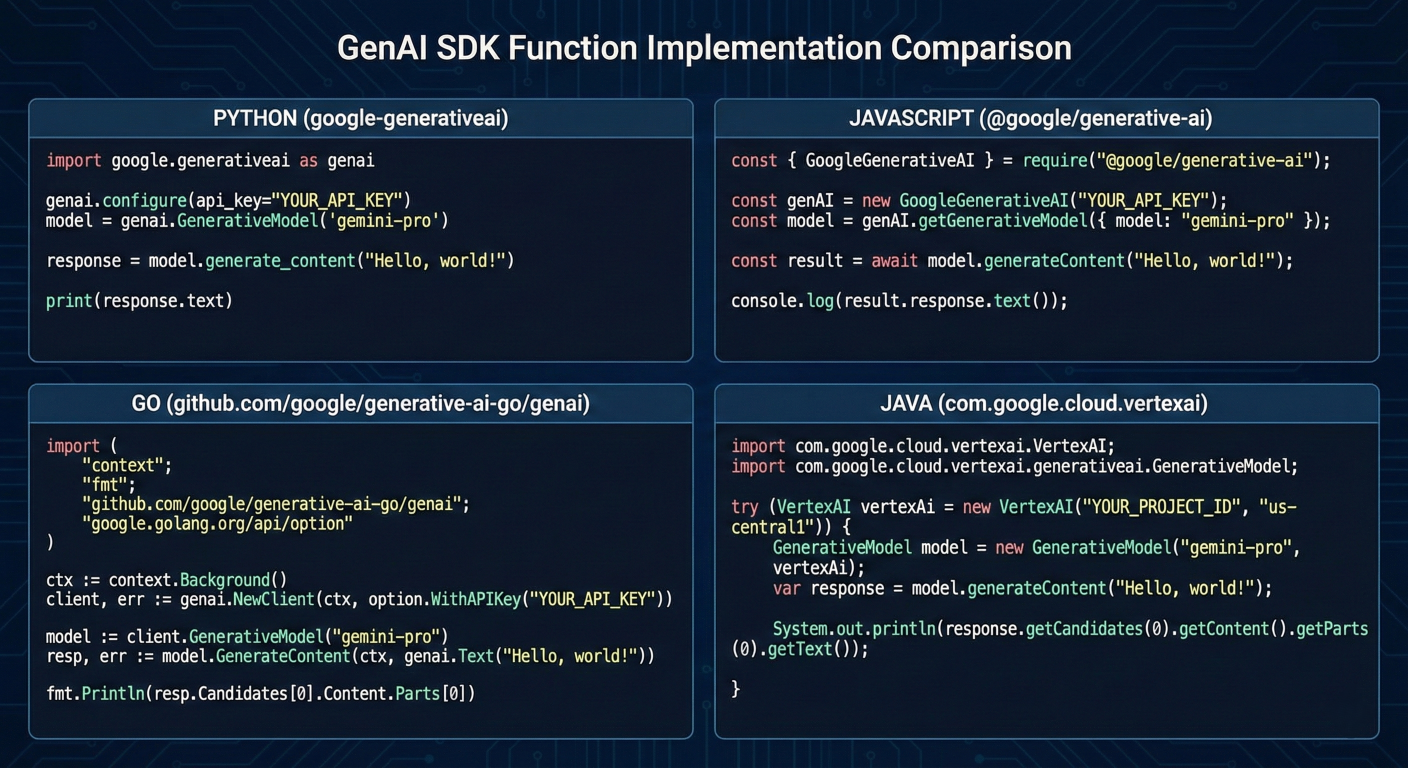
Code comparison showing the same function implemented in Python, JavaScript, Go, and Java using the GenAI SDK
The Google GenAI SDK represents a unified, production-ready library maintained by Google for the most popular programming languages. Unlike legacy libraries, the GenAI SDK works seamlessly with both Google AI Studio (for prototyping) and Vertex AI (for production), providing a consistent API experience.
Key Advantages:
Python Implementation
# Installation: pip install google-genai
from google import genai
from google.genai import types
import asyncio
import os

class ProductionAIService:
    def __init__(self, api_key=None, project_id=None):
        # Configure for AI Studio (prototyping) or Vertex AI (production)
        if project_id:
            # Production Vertex AI configuration
            self.client = genai.Client(
                vertexai=True,
                project=project_id,
                location="us-central1"
            )
        else:
            # AI Studio configuration
            self.client = genai.Client(api_key=api_key)

    async def generate_content(self, prompt, model="gemini-2.5-flash", **kwargs):
        """Production-ready content generation with error handling"""

        try:
            config = types.GenerateContentConfig(
                temperature=kwargs.get('temperature', 0.7),
                max_output_tokens=kwargs.get('max_tokens', 1024),
                top_p=kwargs.get('top_p', 0.8),
                safety_settings=self._get_safety_settings()
            )

            response = await self.client.models.generate_content_async(
                model=model,
                contents=prompt,
                config=config
            )

            return {
                'success': True,
                'content': response.text,
                'usage': {
                    'input_tokens': response.usage_metadata.prompt_token_count,
                    'output_tokens': response.usage_metadata.candidates_token_count,
                    'total_tokens': response.usage_metadata.total_token_count
                }
            }

        except Exception as e:
            return {
                'success': False,
                'error': str(e),
                'error_type': type(e).__name__
            }

    def _get_safety_settings(self):
        """Configure safety settings for production"""
        return [
            types.SafetySetting(
                category=types.HarmCategory.HARM_CATEGORY_HARASSMENT,
                threshold=types.HarmBlockThreshold.BLOCK_MEDIUM_AND_ABOVE
            ),
            types.SafetySetting(
                category=types.HarmCategory.HARM_CATEGORY_HATE_SPEECH,
                threshold=types.HarmBlockThreshold.BLOCK_MEDIUM_AND_ABOVE
            )
        ]

    async def batch_generate(self, prompts, model="gemini-2.5-flash"):
        """Efficient batch processing for multiple requests"""

        tasks = [
            self.generate_content(prompt, model)
            for prompt in prompts
        ]

        results = await asyncio.gather(*tasks, return_exceptions=True)

        return [
            result if not isinstance(result, Exception)
            else {'success': False, 'error': str(result)}
            for result in results
        ]

# Usage example
async def main():
    # Initialize service (switches automatically between AI Studio and Vertex AI)
    ai_service = ProductionAIService(
        project_id=os.getenv('GOOGLE_CLOUD_PROJECT')  # Use Vertex AI if project_id provided
    )

    # Single request
    result = await ai_service.generate_content(
        "Explain quantum computing in simple terms",
        temperature=0.3
    )

    print(f"Generated content: {result['content']}")
    print(f"Token usage: {result['usage']}")

    # Batch requests
    prompts = [
        "Summarize the benefits of cloud computing",
        "Explain machine learning fundamentals",
        "Describe cybersecurity best practices"
    ]

    batch_results = await ai_service.batch_generate(prompts)

    for i, result in enumerate(batch_results):
        if result['success']:
            print(f"Result {i+1}: {result['content'][:100]}...")
        else:
            print(f"Error {i+1}: {result['error']}")

# Run the example
# asyncio.run(main())
JavaScript/TypeScript Implementation
// Installation: npm install @google/genai
import { GoogleGenAI, Type, GenerateContentConfig } from '@google/genai';
interface AIResponse {
success: boolean;
content?: string;
usage?: {
inputTokens: number;
outputTokens: number;
totalTokens: number;
};
error?: string;
}
class ProductionAIService {
private client: GoogleGenAI;
constructor(apiKey?: string, projectConfig?: { projectId: string; location: string }) {
if (projectConfig) {
// Vertex AI configuration
this.client = new GoogleGenAI({
project: projectConfig.projectId,
location: projectConfig.location,
});
} else {
// AI Studio configuration
this.client = new GoogleGenAI({ apiKey });
}
}
async generateContent(
prompt: string,
model: string = 'gemini-2.5-flash',
options: Partial<GenerateContentConfig> = {}
): Promise<AIResponse> {
try {
const config: GenerateContentConfig = {
temperature: options.temperature || 0.7,
maxOutputTokens: options.maxOutputTokens || 1024,
topP: options.topP || 0.8,
safetySettings: this.getSafetySettings(),
...options
};
const response = await this.client.models.generateContent({
model,
contents: prompt,
config
});
return {
success: true,
content: response.text,
usage: {
inputTokens: response.usageMetadata?.promptTokenCount || 0,
outputTokens: response.usageMetadata?.candidatesTokenCount || 0,
totalTokens: response.usageMetadata?.totalTokenCount || 0
}
};
} catch (error) {
return {
success: false,
error: error instanceof Error ? error.message : String(error)
};
}
}
}
private getSafetySettings() {
return [
{
category: 'HARM_CATEGORY_HARASSMENT',
threshold: 'BLOCK_MEDIUM_AND_ABOVE'
},
{
category: 'HARM_CATEGORY_HATE_SPEECH',
threshold: 'BLOCK_MEDIUM_AND_ABOVE'
}
];
}
// Streaming response handling
async generateContentStream(
prompt: string,
model: string = 'gemini-2.5-flash',
onChunk: (chunk: string) => void
): PromiseGo Implementation
// Installation: go get google.golang.org/genai
package main

import (
    "context"
    "fmt"
    "log"

    "google.golang.org/genai"
    "google.golang.org/genai/genai/types"
)

type ProductionAIService struct {
    client *genai.Client
    ctx    context.Context
}

type AIResponse struct {
    Success bool                   `json:"success"`
    Content string                 `json:"content,omitempty"`
    Usage   *types.UsageMetadata   `json:"usage,omitempty"`
    Error   string                 `json:"error,omitempty"`
}

func NewProductionAIService(ctx context.Context, apiKey string, projectID string) (*ProductionAIService, error) {
    var client *genai.Client
    var err error

    if projectID != "" {
        // Vertex AI configuration
        client, err = genai.NewClient(ctx, &genai.ClientConfig{
            VertexAI: true,
            Project:  projectID,
            Location: "us-central1",
        })
    } else {
        // AI Studio configuration
        client, err = genai.NewClient(ctx, &genai.ClientConfig{
            APIKey: apiKey,
        })
    }

    if err != nil {
        return nil, fmt.Errorf("failed to create client: %v", err)
    }

    return &ProductionAIService{
        client: client,
        ctx:    ctx,
    }, nil
}

func (s *ProductionAIService) GenerateContent(prompt string, model string, options *types.GenerateContentConfig) (*AIResponse, error) {
    if model == "" {
        model = "gemini-2.5-flash"
    }

    if options == nil {
        options = &types.GenerateContentConfig{
            Temperature:     0.7,
            MaxOutputTokens: 1024,
            TopP:           0.8,
        }
    }

    // Set safety settings
    options.SafetySettings = s.getSafetySettings()

    request := &types.GenerateContentRequest{
        Model:    model,
        Contents: []string{prompt},
        Config:   options,
    }

    response, err := s.client.GenerateContent(s.ctx, request)
    if err != nil {
        return &AIResponse{
            Success: false,
            Error:   err.Error(),
        }, nil
    }

    return &AIResponse{
        Success: true,
        Content: response.Text,
        Usage:   response.UsageMetadata,
    }, nil
}

func (s *ProductionAIService) getSafetySettings() []*types.SafetySetting {
    return []*types.SafetySetting{
        {
            Category:  types.HarmCategoryHarassment,
            Threshold: types.HarmBlockThresholdMediumAndAbove,
        },
        {
            Category:  types.HarmCategoryHateSpeech,
            Threshold: types.HarmBlockThresholdMediumAndAbove,
        },
    }
}

func (s *ProductionAIService) BatchGenerate(prompts []string, model string) ([]*AIResponse, error) {
    results := make([]*AIResponse, len(prompts))

    // Create channels for concurrent processing
    jobs := make(chan int, len(prompts))
    resultsChan := make(chan struct {
        index int
        result *AIResponse
    }, len(prompts))

    // Worker pool for concurrent requests
    const numWorkers = 5
    for w := 0; w < numWorkers; w++ {
        go func() {
            for index := range jobs {
                result, err := s.GenerateContent(prompts[index], model, nil)
                if err != nil {
                    result = &AIResponse{
                        Success: false,
                        Error:   err.Error(),
                    }
                }
                resultsChan <- struct {
                    index int
                    result *AIResponse
                }{index, result}
            }
        }()
    }

    // Send jobs
    for i := range prompts {
        jobs <- i
    }
    close(jobs)

    // Collect results
    for i := 0; i < len(prompts); i++ {
        result := <-resultsChan
        results[result.index] = result.result
    }

    return results, nil
}

func ((s *ProductionAIService) Close()) error {
    return s.client.Close()
}

// Usage example
func main() {
    ctx := context.Background()

    // Initialize service
    aiService, err := NewProductionAIService(ctx, os.Getenv("GEMINI_API_KEY"), "")
    if err != nil {
        log.Fatal(err)
    }
    defer aiService.Close()

    // Single request
    response, err := aiService.GenerateContent(
        "Explain the benefits of microservices architecture",
        "gemini-2.5-flash",
        &types.GenerateContentConfig{
            Temperature:     0.3,
            MaxOutputTokens: 512,
        },
    )

    if err != nil {
        log.Printf("Error: %v", err)
        return
    }

    if response.Success {
        fmt.Printf("Generated content: %s\n", response.Content)
        fmt.Printf("Tokens used: %d\n", response.Usage.TotalTokenCount)
    } else {
        fmt.Printf("Generation failed: %s\n", response.Error)
    }

    // Batch requests
    prompts := []string{
        "Explain Docker containers",
        "Describe Kubernetes orchestration",
        "What is serverless computing?",
    }

    batchResults, err := aiService.BatchGenerate(prompts, "gemini-2.5-flash")
    if err != nil {
        log.Printf("Batch error: %v", err)
        return
    }

    for i, result := range batchResults {
        if result.Success {
            fmt.Printf("Result %d: %s\n", i+1, result.Content[:100] + "...")
        } else {
            fmt.Printf("Error %d: %s\n", i+1, result.Error)
        }
    }
}
Java Implementation
// Maven dependency: com.google.genai:google-genai:1.0.0
import com.google.genai.Client;
import com.google.genai.types.*;
import java.util.*;
import java.util.concurrent.*;

public class ProductionAIService {
    private final Client client;

    public ProductionAIService(String apiKey, String projectId, String location) {
        ClientConfig.Builder configBuilder = ClientConfig.newBuilder();

        if (projectId != null && !projectId.isEmpty()) {
            // Vertex AI configuration
            configBuilder.setVertexAI(true)
                        .setProject(projectId)
                        .setLocation(location != null ? location : "us-central1");
        } else {
            // AI Studio configuration
            configBuilder.setApiKey(apiKey);
        }

        this.client = new Client(configBuilder.build());
    }

    public static class AIResponse {
        private final boolean success;
        private final String content;
        private final UsageMetadata usage;
        private final String error;

        private AIResponse(boolean success, String content, UsageMetadata usage, String error) {
            this.success = success;
            this.content = content;
            this.usage = usage;
            this.error = error;
        }

        // Getters
        public boolean isSuccess() { return success; }
        public String getContent() { return content; }
        public UsageMetadata getUsage() { return usage; }
        public String getError() { return error; }

        // Factory methods
        public static AIResponse success(String content, UsageMetadata usage) {
            return new AIResponse(true, content, usage, null);
        }

        public static AIResponse error(String error) {
            return new AIResponse(false, null, null, error);
        }
    }

    public CompletableFuture<AIResponse> generateContentAsync(
            String prompt,
            String model,
            GenerateContentConfig config) {

        return CompletableFuture.supplyAsync(() -> {
            try {
                if (model == null || model.isEmpty()) {
                    model = "gemini-2.5-flash";
                }

                if (config == null) {
                    config = GenerateContentConfig.newBuilder()
                            .setTemperature(0.7)
                            .setMaxOutputTokens(1024)
                            .setTopP(0.8)
                            .addAllSafetySettings(getSafetySettings())
                            .build();
                }

                GenerateContentRequest request = GenerateContentRequest.newBuilder()
                        .setModel(model)
                        .addContents(prompt)
                        .setConfig(config)
                        .build();

                GenerateContentResponse response = client.generateContent(request);

                return AIResponse.success(
                    response.getText(),
                    response.getUsageMetadata()
                );

            } catch (Exception e) {
                return AIResponse.error(e.getMessage());
            }
        });
    }
    // Java code example

private List<SafetySetting> getSafetySettings() {
    return Arrays.asList(
        SafetySetting.newBuilder()
                .setCategory(HarmCategory.HARM_CATEGORY_HARASSMENT)
                .setThreshold(HarmBlockThreshold.BLOCK_MEDIUM_AND_ABOVE)
                .build(),
        SafetySetting.newBuilder()
                .setCategory(HarmCategory.HARM_CATEGORY_HATE_SPEECH)
                .setThreshold(HarmBlockThreshold.BLOCK_MEDIUM_AND_ABOVE)
                .build()
    );
}

public CompletableFuture<List<AIResponse>> batchGenerate(
        List<String> prompts,
        String model) {

    List<CompletableFuture<AIResponse>> futures = prompts.stream()
            .map(prompt -> generateContentAsync(prompt, model, null))
            .collect(Collectors.toList());

    return CompletableFuture.allOf(futures.toArray(new CompletableFuture[0]))
            .thenApply(v -> futures.stream()
                    .map(CompletableFuture::join)
                    .collect(Collectors.toList()));
}

// Function calling implementation
public CompletableFuture<AIResponse> executeWithFunctions(
        String prompt,
        List<FunctionDeclaration> functions,
        String model) {

    return CompletableFuture.supplyAsync(() -> {
        try {
            GenerateContentConfig config = GenerateContentConfig.newBuilder()
                    .addTools(Tool.newBuilder()
                            .addAllFunctionDeclarations(functions)
                            .build())
                    .build();

            GenerateContentRequest request = GenerateContentRequest.newBuilder()
                    .setModel(model != null ? model : "gemini-2.5-flash")
                    .addContents(prompt)
                    .setConfig(config)
                    .build();

            GenerateContentResponse response = client.generateContent(request);

            // Handle function calls
            if (!response.getFunctionCallsList().isEmpty()) {
                FunctionCall functionCall = response.getFunctionCallsList().get(0);

                // Execute function (implement your function execution logic)
                Object functionResult = executeFunctionCall(functionCall);

                // Get final response with function results
                GenerateContentRequest finalRequest = GenerateContentRequest.newBuilder()
                        .setModel(model != null ? model : "gemini-2.5-flash")
                        .addContents(Content.newBuilder()
                                .setRole("user")
                                .addParts(Part.newBuilder().setText(prompt))
                                .build())
                        .addContents(Content.newBuilder()
                                .setRole("model")
                                .addParts(Part.newBuilder().setFunctionCall(functionCall))
                                .build())
                        .addContents(Content.newBuilder()
                                .setRole("user")
                                .addParts(Part.newBuilder()
                                        .setFunctionResponse(FunctionResponse.newBuilder()
                                                .setName(functionCall.getName())
                                                .setResponse(functionResult)
                                                .build()))
                                .build())
                        .build();

                GenerateContentResponse finalResponse = client.generateContent(finalRequest);
                return AIResponse.success(finalResponse.getText(), finalResponse.getUsageMetadata());
            }

            return AIResponse.success(response.getText(), response.getUsageMetadata());

        } catch (Exception e) {
            return AIResponse.error(e.getMessage());
        }
    });
}
// Java code
private Object executeFunctionCall(FunctionCall functionCall) {
    // Implement your function execution logic here
    System.out.println("Executing function: " + functionCall.getName() +
                      " with args: " + functionCall.getArgs());

    // Return function result
    return Map.of(
        "status", "success",
        "result", "Function executed successfully"
    );
}

public void close() {
    try {
        client.close();
    } catch (Exception e) {
        System.err.println("Error closing client: " + e.getMessage());
    }
}

// Usage example
public static void main(String[] args) {
    ProductionAIService aiService = new ProductionAIService(
        System.getenv("GEMINI_API_KEY"),
        System.getenv("GOOGLE_CLOUD_PROJECT"),
        "us-central1"
    );

    try {
        // Single request
        CompletableFuture<AIResponse> future = aiService.generateContentAsync(
            "Explain the principles of clean code",
            "gemini-2.5-flash",
            GenerateContentConfig.newBuilder()
                    .setTemperature(0.3)
                    .setMaxOutputTokens(512)
                    .build()
        );

        AIResponse response = future.get(30, TimeUnit.SECONDS);

        if (response.isSuccess()) {
            System.out.println("Generated: " + response.getContent());
            System.out.println("Tokens used: " + response.getUsage().getTotalTokenCount());
        } else {
            System.err.println("Error: " + response.getError());
        }

        // Batch requests
        List<String> prompts = Arrays.asList(
            "What is dependency injection?",
            "Explain SOLID principles",
            "Describe design patterns"
        );

        CompletableFuture<List<AIResponse>> batchFuture = aiService.batchGenerate(
            prompts,
            "gemini-2.5-flash"
        );

        List<AIResponse> batchResults = batchFuture.get(60, TimeUnit.SECONDS);

        for (int i = 0; i < batchResults.size(); i++) {
            AIResponse result = batchResults.get(i);
            if (result.isSuccess()) {
                System.out.printf("Result %d: %s%n", i + 1,
                    result.getContent().substring(0, Math.min(100, result.getContent().length())) + "...");
            } else {
                System.out.printf("Error %d: %s%n", i + 1, result.getError());
            }
        }

    } catch (Exception e) {
        System.err.println("Application error: " + e.getMessage());
    } finally {
        aiService.close();
    }
  }
}Cloud Run Deployment (Direct from AI Studio)
# cloudbuild.yaml - Automated deployment from AI Studio
steps:
  - name: 'gcr.io/google.com/cloudsdktool/cloud-sdk'
    entrypoint: 'bash'
    args:
      - '-c'
      - |
        # Install dependencies
        pip install google-genai flask gunicorn

        # Build application
        python setup.py build

        # Deploy to Cloud Run
        gcloud run deploy ai-studio-app \
          --source . \
          --platform managed \
          --region us-central1 \
          --allow-unauthenticated \
          --set-env-vars="GEMINI_API_KEY=${_API_KEY}" \
          --memory=2Gi \
          --cpu=2 \
          --max-instances=100 \
          --concurrency=80

# app.py - Production Flask application
from flask import Flask, request, jsonify
from google import genai
import os

app = Flask(__name__)
client = genai.Client(api_key=os.getenv('GEMINI_API_KEY'))

@app.route('/generate', methods=['POST'])
def generate_content():
    try:
        data = request.get_json()

        response = client.models.generate_content(
            model=data.get('model', 'gemini-2.5-flash'),
            contents=data.get('prompt'),
            config=genai.types.GenerateContentConfig(
                temperature=data.get('temperature', 0.7),
                max_output_tokens=data.get('max_tokens', 1024)
            )
        )

        return jsonify({
            'success': True,
            'content': response.text,
            'usage': {
                'total_tokens': response.usage_metadata.total_token_count
            }
        })

    except Exception as e:
        return jsonify({
            'success': False,
            'error': str(e)
        }), 500

if __name__ == '__main__':
    app.run(host='0.0.0.0', port=int(os.environ.get('PORT', 8080)))
Kubernetes Deployment
# kubernetes-deployment.yaml
apiVersion: apps/v1
kind: Deployment
metadata:
  name: ai-studio-service
spec:
  replicas: 3
  selector:
    matchLabels:
      app: ai-studio-service
  template:
    metadata:
      labels:
        app: ai-studio-service
    spec:
      containers:
      - name: ai-service
        image: gcr.io/your-project/ai-studio-app:latest
        ports:
        - containerPort: 8080
        env:
        - name: GEMINI_API_KEY
          valueFrom:
            secretKeyRef:
              name: gemini-api-secret
              key: api-key
        resources:
          requests:
            memory: "1Gi"
            cpu: "500m"
          limits:
            memory: "2Gi"
            cpu: "1"
        livenessProbe:
          httpGet:
            path: /health
            port: 8080
          initialDelaySeconds: 30
          periodSeconds: 30
        readinessProbe:
          httpGet:
            path: /ready
            port: 8080
          initialDelaySeconds: 5
          periodSeconds: 10

---
apiVersion: v1
kind: Service
metadata:
  name: ai-studio-service
spec:
  selector:
    app: ai-studio-service
  ports:
  - port: 80
    targetPort: 8080
  type: LoadBalancer

---
apiVersion: autoscaling/v2
kind: HorizontalPodAutoscaler
metadata:
  name: ai-studio-hpa
spec:
  scaleTargetRef:
    apiVersion: apps/v1
    kind: Deployment
    name: ai-studio-service
  minReplicas: 3
  maxReplicas: 50
  metrics:
  - type: Resource
    resource:
      name: cpu
      target:
        type: Utilization
        averageUtilization: 70
  - type: Resource
    resource:
      name: memory
      target:
        type: Utilization
        averageUtilization: 80
One of the most important decisions for intermediate developers is understanding when to use Google AI Studio versus Vertex AI. While both platforms leverage the same underlying Gemini models, they serve distinctly different purposes in the AI development lifecycle.
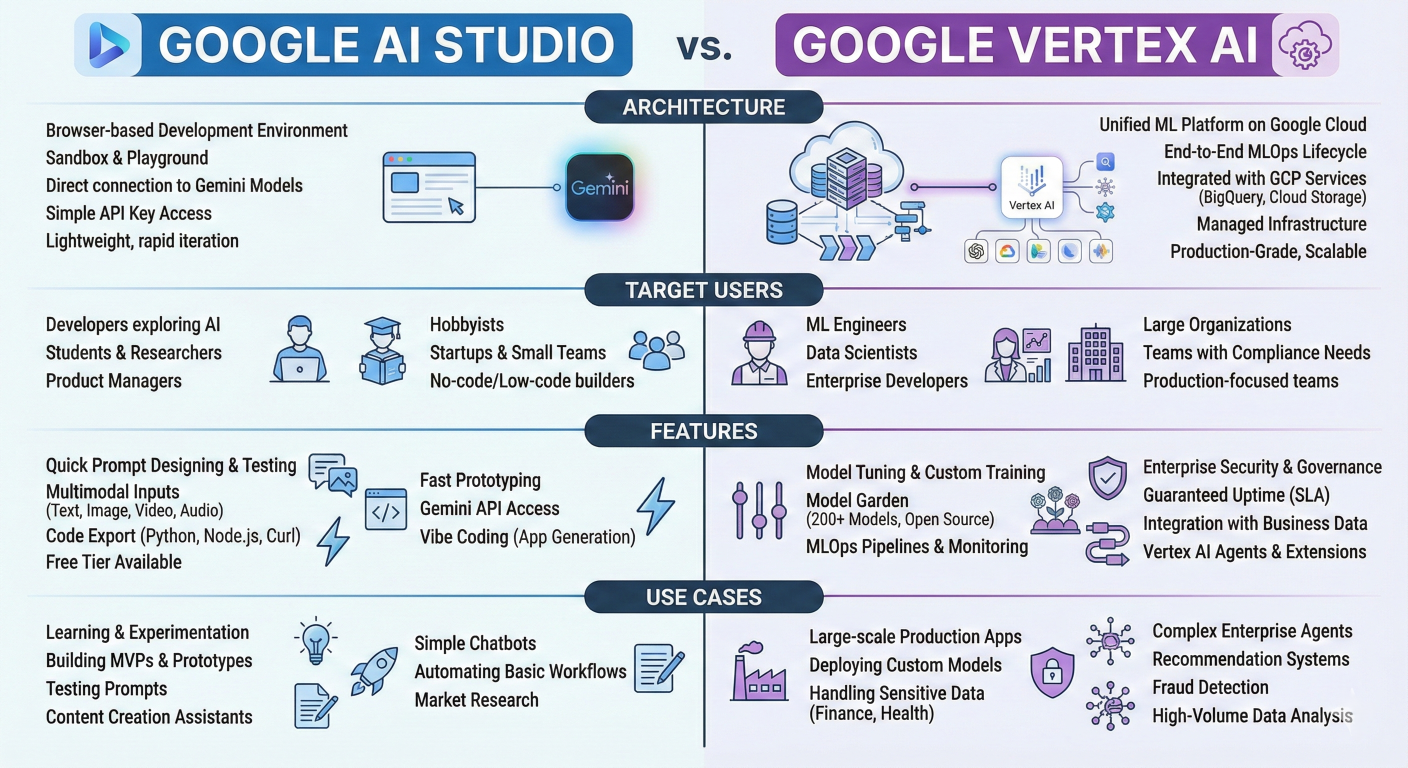
Comparison diagram showing AI Studio and Vertex AI architectures, target users, features, and use cases
Google AI Studio is specifically designed for rapid experimentation and prototyping. It prioritizes ease of use, accessibility, and quick iteration over enterprise-grade features
Core Characteristics:
Key Features and Limitations:
// AI Studio capabilities
const aiStudioFeatures = {
  strengths: [
    "Zero setup required",
    "Immediate access to latest Gemini models",
    "Built-in prompt playground",
    "Real-time collaboration",
    "Direct Google Drive integration",
    "One-click deployment to Cloud Run",
    "Free access to advanced models"
  ],
  limitations: [
    "Lower rate limits (15 RPM free tier)",
    "Basic collaboration features",
    "Limited customization options",
    "No enterprise security controls",
    "Minimal monitoring and analytics",
    "Simplified deployment options"
  ],
  idealUseCases: [
    "Learning AI development",
    "Prototyping new ideas",
    "Content generation experiments",
    "Educational projects",
    "Small-scale applications",
    "Proof-of-concept development"
  ]
};
Vertex AI represents Google's comprehensive machine learning platform designed for enterprise-scale applications with advanced MLOps capabilities.
Core Characteristics:
Advanced Enterprise Features:
# Vertex AI enterprise capabilities
class VertexAICapabilities:
    def __init__(self):
        self.enterprise_features = {
            "security_and_compliance": [
                "VPC native networking",
                "Customer-managed encryption keys (CMEK)",
                "Identity and Access Management (IAM)",
                "Audit logging and monitoring",
                "SOC 2, ISO 27001, HIPAA compliance",
                "Data residency controls"
            ],
            "scalability_and_performance": [
                "Auto-scaling deployments",
                "Multi-region availability",
                "Load balancing and traffic management",
                "Custom hardware acceleration (TPUs, GPUs)",
                "Batch prediction capabilities",
                "High-availability SLA guarantees"
            ],
            "mlops_and_governance": [
                "Model versioning and registry",
                "Automated ML pipelines",
                "A/B testing frameworks",
                "Model monitoring and drift detection",
                "Explainability and bias detection",
                "Automated retraining workflows"
            ],
            "advanced_customization": [
                "Custom training jobs",
                "Hyperparameter tuning",
                "Neural architecture search",
                "Model distillation",
                "Multi-objective optimization",
                "Custom model serving"
            ]
        }

    def get_production_config(self):
        return {
            "deployment_options": [
                "Online prediction endpoints",
                "Batch prediction jobs",
                "Streaming prediction pipelines",
                "Edge deployment optimization"
            ],
            "monitoring_capabilities": [
                "Real-time performance metrics",
                "Cost optimization insights",
                "Usage analytics and reporting",
                "Alert management",
                "Custom dashboard creation"
            ],
            "integration_ecosystTechnical Architecture Comparisonem": [
                "BigQuery data integration",
                "Cloud Storage optimization",
                "Dataflow processing pipelines",
                "Pub/Sub event handling",
                "Cloud Run serverless deployment"
            ]
        }
# Mermaid Flowchart representing AI Studio architecture
graph TD
    A[User Browser] --> B[AI Studio Web Interface]
    B --> C[Gemini API Gateway]
    C --> D[Gemini Models]
    D --> E[Response Processing]
    E --> F[Google Drive Storage]
    B --> G[One-Click Deploy]
    G --> H[Cloud Run]
# Mermaid graph showing Vertex AI architecture
graph TD
    A[Client Applications] --> B[Load Balancer]
    B --> C[Vertex AI API Gateway]
    C --> D[IAM Authentication]
    D --> E[Model Serving Infrastructure]
    E --> F[Auto-scaling Groups]
    F --> G[Gemini Model Instances]
    G --> H[Custom Hardware (TPU/GPU)]
    E --> I[Monitoring & Logging]
    I --> J[Cloud Operations Suite]
    E --> K[Model Registry]
K --> L[Version Control]Google designed the GenAI SDK to provide a seamless migration path from AI Studio prototypes to Vertex AI production deployments.
# Phase 1: AI Studio Prototype
import os
from google import genai

# Simple AI Studio configuration
def prototype_setup():
    return genai.Client(api_key=os.getenv('GEMINI_API_KEY'))

# Phase 2: Dual-Mode Development
def flexible_setup():
    """Support both AI Studio and Vertex AI with same code"""
    project_id = os.getenv('GOOGLE_CLOUD_PROJECT')

    if project_id:
        # Production Vertex AI configuration
        return genai.Client(
            vertexai=True,
            project=project_id,
            location=os.getenv('GOOGLE_CLOUD_REGION', 'us-central1')
        )
    else:
        # Development AI Studio configuration
        return genai.Client(api_key=os.getenv('GEMINI_API_KEY'))

# Phase 3: Full Vertex AI Production
class ProductionVertexAIService:
    def __init__(self, project_id, location="us-central1"):
        self.client = genai.Client(
            vertexai=True,
            project=project_id,
            location=location
        )
        self.project_id = project_id
        self.location = location

    async def deploy_production_model(self, model_config):
        """Deploy with enterprise features"""

        # Configure production deployment
        deployment_config = {
            "model_config": model_config,
            "scaling_config": {
                "min_replicas": 3,
                "max_replicas": 100,
                "target_cpu_utilization": 70
            },
            "security_config": {
                "enable_private_endpoint": True,
                "vpc_network": f"projects/{self.project_id}/global/networks/production",
                "encryption_key": f"projects/{self.project_id}/locations/{self.location}/keyRings/ai-keys/cryptoKeys/model-key"
            },
            "monitoring_config": {
                "enable_request_logging": True,
                "enable_model_monitoring": True,
                "alert_policies": ["high_latency", "error_rate", "drift_detection"]
            }
        }

        # Deploy with enterprise features
        endpoint = await self.create_managed_endpoint(deployment_config)

        # Set up monitoring
        await self.configure_monitoring(endpoint)

        # Enable auto-scaling
        await self.enable_autoscaling(endpoint)

        return endpoint

    async def create_managed_endpoint(self, config):
        """Create enterprise-grade model endpoint"""
        # Implementation for creating managed endpoint with all enterprise features enabled
        pass

    async def configure_monitoring(self, endpoint):
        """Set up comprehensive monitoring"""

        monitoring_config = {
            "metrics": [
                "prediction_latency",
                "prediction_count",
                "error_rate",
                "model_drift_score",
                "resource_utilization"
            ],
            "alerts": [
                {
                    "condition": "prediction_latency > 5000ms",
                    "action": "scale_up_replicas"
                },
                {
                    "condition": "error_rate > 5%",
                    "action": "notify_on_call_team"
                },
                {
                    "condition": "drift_score > 0.8",
                    "action": "trigger_model_retrain"
                }
            ]
        }

        # Configure monitoring (implementation details)
        pass
AI Studio Cost Model:
# AI Studio: Completely free with rate limits
ai_studio_costs = {
    "base_cost": "$0/month",
    "rate_limits": {
        "free_tier": "15 RPM, 1,500 RPD",
        "model_access": "All Gemini models included",
        "features": "Full feature set at no cost"
    },
    "hidden_costs": {
        "none": "No usage charges",
        "limitations": "Rate limits may affect scalability"
    }
}
Vertex AI Cost Model:
# Vertex AI: Pay-as-you-go with enterprise features
def calculate_vertex_ai_costs(monthly_requests, avg_input_tokens, avg_output_tokens):

    # Token pricing (example for Gemini 2.5 Flash)
    input_cost_per_1k = 0.15 / 1000  # $0.15 per 1M tokens
    output_cost_per_1k = 0.60 / 1000  # $0.60 per 1M tokens

    # Calculate monthly token costs
    monthly_input_cost = (monthly_requests * avg_input_tokens * input_cost_per_1k) / 1000
    monthly_output_cost = (monthly_requests * avg_output_tokens * output_cost_per_1k) / 1000

    # Additional Vertex AI costs
    additional_costs = {
        "model_hosting": 0.00,  # Included in prediction costs
        "monitoring": monthly_requests * 0.001,  # $0.001 per 1k requests
        "logging": monthly_requests * 0.0005,   # $0.0005 per 1k requests
        "network_egress": monthly_requests * 0.12 / 1000,  # $0.12 per GB
    }

    total_token_cost = monthly_input_cost + monthly_output_cost
    total_additional_cost = sum(additional_costs.values())

    return {
        "token_costs": total_token_cost,
        "additional_costs": total_additional_cost,
        "total_monthly_cost": total_token_cost + total_additional_cost,
        "cost_breakdown": {
            "input_tokens": monthly_input_cost,
            "output_tokens": monthly_output_cost,
            **additional_costs
        },
        "cost_optimization_tips": [
            "Use context caching for repeated prompts",
            "Implement batch processing",
            "Choose optimal model size for use case",
            "Monitor and optimize token usage",
            "Use regional deployments to reduce latency costs"
        ]
    }

# Example calculation for medium-scale application
example_costs = calculate_vertex_ai_costs(
    monthly_requests=100000,
    avg_input_tokens=500,
    avg_output_tokens=200
)

print(f"Estimated monthly cost: ${example_costs['total_monthly_cost']:.2f}")
class PlatformDecisionEngine:
    def __init__(self):
        self.decision_factors = {
            "development_stage": {
                "prototype": "AI_STUDIO",
                "mvp": "AI_STUDIO",
                "beta": "VERTEX_AI",
                "production": "VERTEX_AI"
            },
            "team_size": {
                "individual": "AI_STUDIO",
                "small_team": "AI_STUDIO",
                "enterprise_team": "VERTEX_AI"
            },
            "usage_volume": {
                "low": "AI_STUDIO",      # < 1000 requests/day
                "medium": "VERTEX_AI",   # 1000-10000 requests/day
                "high": "VERTEX_AI"      # > 10000 requests/day
            },
            "security_requirements": {
                "basic": "AI_STUDIO",
                "enterprise": "VERTEX_AI",
                "regulated_industry": "VERTEX_AI"
            },
            "budget_constraints": {
                "limited": "AI_STUDIO",
                "moderate": "VERTEX_AI",
                "enterprise": "VERTEX_AI"
            }
        }

    def recommend_platform(self, requirements):
        score = {"AI_STUDIO": 0, "VERTEX_AI": 0}

        for factor, value in requirements.items():
            if factor in self.decision_factors:
                recommendation = self.decision_factors[factor].get(value)
                if recommendation:
                    score[recommendation] += 1

        recommended_platform = max(score, key=score.get)
        confidence = score[recommended_platform] / len(requirements)

        return {
            "recommendation": recommended_platform,
            "confidence": confidence,
            "reasoning": self.get_reasoning(requirements, recommended_platform)
        }

    def get_reasoning(self, requirements, recommendation):
        reasons = []

        if recommendation == "AI_STUDIO":
            reasons.extend([
                "Ideal for prototyping and experimentation",
                "No setup or infrastructure management required",
                "Completely free for development",
                "Perfect for learning and small projects"
            ])
        else:
            reasons.extend([
                "Required for production-scale applications",
                "Enterprise security and compliance features",
                "Advanced monitoring and MLOps capabilities",
                "Scalable infrastructure with SLA guarantees"
            ])

        return reasons

# Usage example
decision_engine = PlatformDecisionEngine()

# Example: Startup building MVP
startup_requirements = {
    "development_stage": "mvp",
    "team_size": "small_team",
    "usage_volume": "low",
    "security_requirements": "basic",
    "budget_constraints": "limited"
}

recommendation = decision_engine.recommend_platform(startup_requirements)
print(f"Platform recommendation: {recommendation['recommendation']}")
print(f"Confidence: {recommendation['confidence']:.1%}")
print("Reasoning:", recommendation['reasoning'])

# Example: Enterprise production application
enterprise_requirements = {
    "development_stage": "production",
    "team_size": "enterprise_team",
    "usage_volume": "high",
    "security_requirements": "regulated_industry",
    "budget_constraints": "enterprise"
}

enterprise_recommendation = decision_engine.recommend_platform(enterprise_requirements)
print(f"\nEnterprise recommendation: {enterprise_recommendation['recommendation']}")
print(f"Confidence: {enterprise_recommendation['confidence']:.1%}")
Understanding the pricing structure and limitations of Google AI Studio and the Gemini API is crucial for planning your AI applications effectively. Google provides a generous free tier while offering scalable paid options for production deployments.
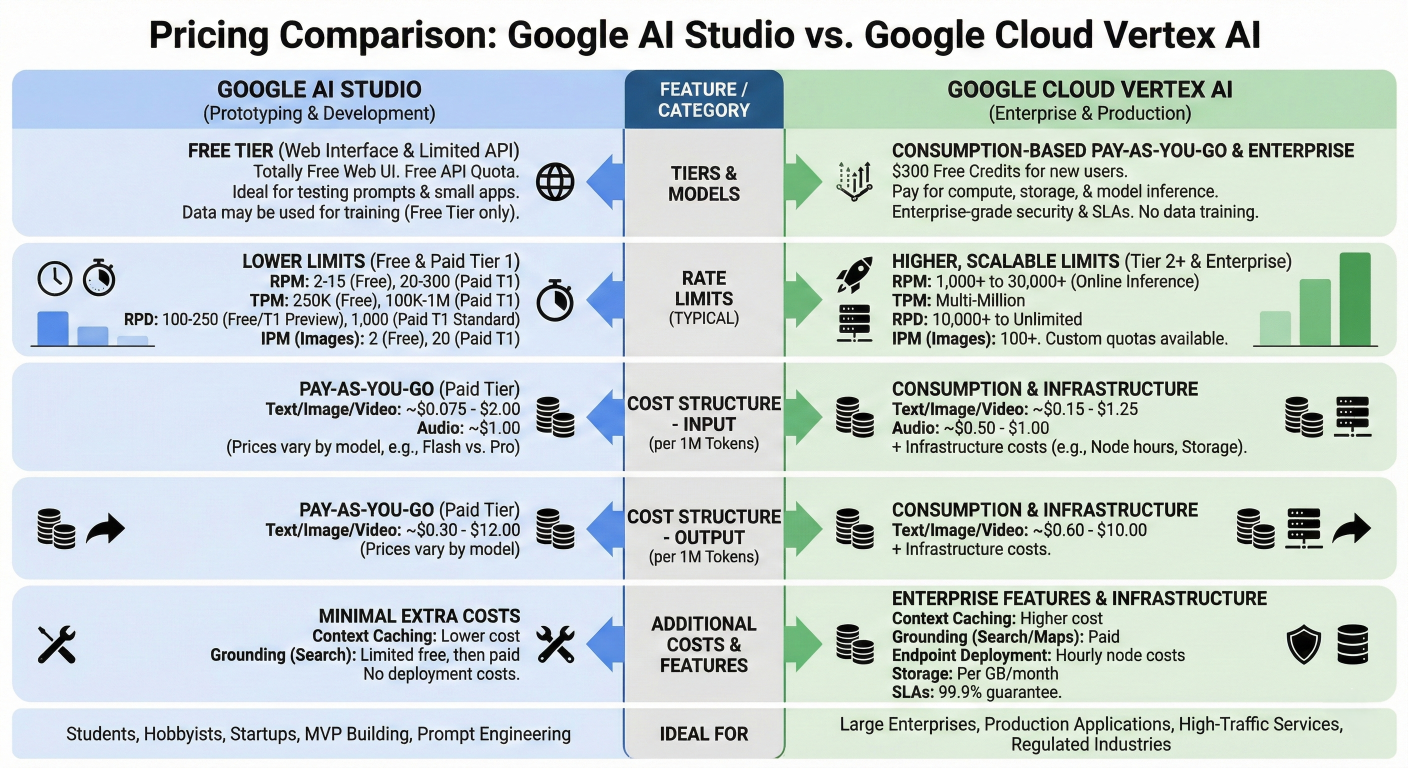
Pricing comparison chart showing different tiers, rate limits, and cost structures across AI Studio and Vertex AI
Google AI Studio offers completely free access to all Gemini models with reasonable usage limits designed for experimentation and learning.
# Google AI Studio Free Tier Limits (2025)
ai_studio_free_tier = {
    "cost": "$0 (permanently free)",
    "rate_limits": {
        "requests_per_minute": 15,
        "requests_per_day": 1500,
        "tokens_per_minute": "No specific limit",
        "concurrent_requests": 5
    },
    "model_access": {
        "gemini_2_5_pro": "Full access",
        "gemini_2_5_flash": "Full access",
        "gemini_2_0_flash": "Full access",
        "imagen_3": "Full access",
        "veo_2": "Limited preview access"
    },
    "features_included": [
        "All prompt engineering tools",
        "Structured output generation",
        "Function calling",
        "Grounding with Google Search (1500 queries/day)",
        "Conversation history storage",
        "Google Drive integration",
        "Real-time streaming",
        "One-click Cloud Run deployment"
    ],
    "storage_limits": {
        "conversation_history": "Unlimited (stored in Google Drive)",
        "uploaded_files": "Up to 20MB per file",
        "total_storage": "Limited by Google Drive quota"
    }
}The Gemini API uses a usage-based pricing model with multiple tiers designed to scale from individual developers to enterprise customers.
Comprehensive Tier Structure:
class GeminiAPITierManager:
    def __init__(self):
        self.tiers = {
            "free": {
                "qualifications": "Users in eligible countries",
                "rate_limits": {
                    "rpm": 15,
                    "rpd": 1500,
                    "tpm": None  # No token limit specified
                },
                "cost": "$0",
                "features": ["Basic API access", "Rate-limited usage"]
            },
            "tier_1": {
                "qualifications": "Billing account linked to project",
                "rate_limits": {
                    "rpm": 1000,
                    "rpd": 50000,
                    "tpm": 4000000  # 4M tokens per minute
                },
                "pricing": {
                    "gemini_2_5_flash": {
                        "input": "$0.075 per 1M tokens",
                        "output": "$0.30 per 1M tokens"
                    },
                    "gemini_2_5_pro": {
                        "input": "$1.25 per 1M tokens",
                        "output": "$5.00 per 1M tokens"
                    }
                }
            },
            "tier_2": {
                "qualifications": "Total spend > $250 and 30+ days since payment",
                "rate_limits": {
                    "rpm": 10000,
                    "rpd": 1000000,
                    "tpm": 40000000  # 40M tokens per minute
                },
                "pricing": "Same as Tier 1",
                "additional_features": [
                    "Higher rate limits",
                    "Priority support",
                    "Advanced monitoring"
                ]
            },
            "tier_3": {
                "qualifications": "Total spend > $1000 and 30+ days since payment",
                "rate_limits": {
                    "rpm": 20000,
                    "rpd": "Unlimited",
                    "tpm": 80000000  # 80M tokens per minute
                },
                "pricing": "Same as Tier 1",
                "additional_features": [
                    "Maximum rate limits",
                    "Dedicated support",
                    "Custom SLA options",
                    "Beta feature access"
                ]
            }
        }

    def calculate_monthly_cost(self, tier, monthly_requests, avg_input_tokens, avg_output_tokens, model="gemini_2_5_flash"):
        """Calculate estimated monthly costs for a given tier and usage"""

        if tier == "free":
            return {
                "monthly_cost": 0,
                "cost_breakdown": {"base": 0},
                "limitations": ["Rate limited to 1500 requests/day", "No SLA guarantees"]
            }

        tier_info = self.tiers[tier]
        model_pricing = tier_info["pricing"][model]

        # Parse pricing (remove $ and "per 1M tokens")
        input_cost_per_1m = float(model_pricing["input"].split("$")[1].split(" ")[0])
        output_cost_per_1m = float(model_pricing["output"].split("$")[1].split(" ")[0])

        # Calculate token costs
        total_input_tokens = monthly_requests * avg_input_tokens
        total_output_tokens = monthly_requests * avg_output_tokens

        input_cost = (total_input_tokens / 1_000_000) * input_cost_per_1m
        output_cost = (total_output_tokens / 1_000_000) * output_cost_per_1m

        # Additional service costs (if applicable)
        grounding_requests = min(monthly_requests, 45000)  # Free daily limit: 1500 * 30
        excess_grounding = max(0, monthly_requests - 45000)
        grounding_cost = (excess_grounding / 1000) * 35  # $35 per 1000 grounding requests

        total_cost = input_cost + output_cost + grounding_cost

        return {
            "monthly_cost": round(total_cost, 2),
            "cost_breakdown": {
                "input_tokens": round(input_cost, 2),
                "output_tokens": round(output_cost, 2),
                "grounding": round(grounding_cost, 2),
                "total_tokens": f"{(total_input_tokens + total_output_tokens):,}"
            },
            "rate_limit_status": self.check_rate_limits(tier, monthly_requests),
            "optimization_suggestions": self.get_cost_optimization_tips(monthly_requests, avg_input_tokens, avg_output_tokens)
        }

    def check_rate_limits(self, tier, monthly_requests):
        """Check if usage fits within tier rate limits"""

        tier_limits = self.tiers[tier]["rate_limits"]
        daily_requests = monthly_requests / 30

        # Check daily limits
        if tier_limits["rpd"] != "Unlimited" and daily_requests > tier_limits["rpd"]:
            return {
                "status": "EXCEEDED",
                "issue": f"Daily requests ({daily_requests:.0f}) exceed tier limit ({tier_limits['rpd']})",
                "recommendation": "Consider upgrading to higher tier"
            }

        # Estimate peak RPM (assuming 8-hour peak period)
        peak_rpm = (daily_requests * 0.6) / (8 * 60)  # 60% of traffic in 8 hours

        if peak_rpm > tier_limits["rpm"]:
            return {
                "status": "MAY_EXCEED",
                "issue": f"Peak RPM ({peak_rpm:.0f}) may exceed tier limit ({tier_limits['rpm']})",
                "recommendation": "Monitor actual usage patterns"
            }

        return {
            "status": "OK",
            "headroom": {
                "daily": f"{((tier_limits['rpd'] - daily_requests) / tier_limits['rpd'] * 100):.1f}%" if tier_limits["rpd"] != "Unlimited" else "Unlimited",
                "rpm": f"{((tier_limits['rpm'] - peak_rpm) / tier_limits['rpm'] * 100):.1f}%"
            }
        }

    def get_cost_optimization_tips(self, monthly_requests, avg_input_tokens, avg_output_tokens):
        """Provide cost optimization recommendations"""

        tips = []

        # Token optimization
        if avg_input_tokens > 1000:
            tips.append("Consider using context caching for repeated prompts to reduce input token costs")

        if avg_output_tokens > 500:
            tips.append("Set max_output_tokens to limit response length and reduce output costs")

        # Model selection
        if avg_input_tokens < 500 and avg_output_tokens < 300:
            tips.append("Consider using Gemini 2.5 Flash instead of Pro for simpler tasks")

        # Batch processing
        if monthly_requests > 10000:
            tips.append("Implement batch processing to reduce API overhead and improve efficiency")

        # Caching strategies
        if monthly_requests > 1000:
            tips.append("Implement response caching for frequently asked questions")

        return tips

# Example usage and cost calculation
tier_manager = GeminiAPITierManager()

# Small business scenario
small_business_usage = tier_manager.calculate_monthly_cost(
    tier="tier_1",
    monthly_requests=5000,
    avg_input_tokens=400,
    avg_output_tokens=150,
    model="gemini_2_5_flash"
)

print("Small Business Monthly Cost Analysis:")
print(f"Total Monthly Cost: ${small_business_usage['monthly_cost']}")
print(f"Cost Breakdown: {small_business_usage['cost_breakdown']}")
print(f"Rate Limit Status: {small_business_usage['rate_limit_status']['status']}")

# Enterprise scenario
enterprise_usage = tier_manager.calculate_monthly_cost(
    tier="tier_2",
    monthly_requests=100000,
    avg_input_tokens=800,
    avg_output_tokens=300,
    model="gemini_2_5_pro"
)

print("\nEnterprise Monthly Cost Analysis:")
print(f"Total Monthly Cost: ${enterprise_usage['monthly_cost']}")
print(f"Cost Breakdown: {enterprise_usage['cost_breakdown']}")
print("Optimization Tips:")
for tip in enterprise_usage['optimization_suggestions']:
    print(f"- {tip}")
For production deployments, it's important to understand how Vertex AI pricing compares to the direct Gemini API.
class VertexAIvsGeminiAPIComparison:
    def __init__(self):
        self.pricing_models = {
            "gemini_api": {
                "gemini_2_5_flash": {
                    "input": 0.075,   # per 1M tokens
                    "output": 0.30    # per 1M tokens
                },
                "additional_costs": {
                    "grounding": 35,  # per 1000 requests
                    "hosting": 0,     # No hosting fees
                    "monitoring": 0   # Basic monitoring included
                }
            },
            "vertex_ai": {
                "gemini_2_5_flash": {
                    "input": 0.125,   # per 1M tokens (slightly higher)
                    "output": 0.375   # per 1M tokens (slightly higher)
                },
                "additional_costs": {
                    "prediction_requests": 0.0001,  # per request
                    "online_prediction": 0.00,      # No base hosting fee
                    "monitoring": 0.001,             # per 1000 requests
                    "logging": 0.0005,               # per 1000 requests
                    "data_processing": 0.002         # per GB processed
                }
            }
        }

    def compare_costs(self, monthly_requests, avg_input_tokens, avg_output_tokens):
        """Compare costs between Gemini API and Vertex AI"""

        # Calculate Gemini API costs
        gemini_api_cost = self.calculate_gemini_api_cost(
            monthly_requests, avg_input_tokens, avg_output_tokens
        )

        # Calculate Vertex AI costs
        vertex_ai_cost = self.calculate_vertex_ai_cost(
            monthly_requests, avg_input_tokens, avg_output_tokens
        )

        # Calculate break-even analysis
        cost_difference = vertex_ai_cost["total"] - gemini_api_cost["total"]
        percentage_difference = (cost_difference / gemini_api_cost["total"]) * 100

        return {
            "gemini_api": gemini_api_cost,
            "vertex_ai": vertex_ai_cost,
            "comparison": {
                "cost_difference": cost_difference,
                "percentage_difference": percentage_difference,
                "recommendation": self.get_recommendation(cost_difference, monthly_requests)
            }
        }

    def calculate_gemini_api_cost(self, monthly_requests, avg_input_tokens, avg_output_tokens):
        pricing = self.pricing_models["gemini_api"]["gemini_2_5_flash"]

        input_cost = (monthly_requests * avg_input_tokens / 1_000_000) * pricing["input"]
        output_cost = (monthly_requests * avg_output_tokens / 1_000_000) * pricing["output"]

        # Grounding costs (first 1500 requests/day free)
        free_grounding_monthly = 1500 * 30
        excess_grounding = max(0, monthly_requests - free_grounding_monthly)
        grounding_cost = (excess_grounding / 1000) * self.pricing_models["gemini_api"]["additional_costs"]["grounding"]

        return {
            "input_tokens": input_cost,
            "output_tokens": output_cost,
            "grounding": grounding_cost,
            "total": input_cost + output_cost + grounding_cost
        }

    def calculate_vertex_ai_cost(self, monthly_requests, avg_input_tokens, avg_output_tokens):
        pricing = self.pricing_models["vertex_ai"]["gemini_2_5_flash"]
        additional = self.pricing_models["vertex_ai"]["additional_costs"]

        input_cost = (monthly_requests * avg_input_tokens / 1_000_000) * pricing["input"]
        output_cost = (monthly_requests * avg_output_tokens / 1_000_000) * pricing["output"]

        # Additional Vertex AI costs
        request_cost = monthly_requests * additional["prediction_requests"]
        monitoring_cost = (monthly_requests / 1000) * additional["monitoring"]
        logging_cost = (monthly_requests / 1000) * additional["logging"]

        # Estimate data processing (assume 1MB per request average)
        data_processing_cost = (monthly_requests * 0.001) * additional["data_processing"]

        total_additional = request_cost + monitoring_cost + logging_cost + data_processing_cost

        return {
            "input_tokens": input_cost,
            "output_tokens": output_cost,
            "request_fees": request_cost,
            "monitoring": monitoring_cost,
            "logging": logging_cost,
            "data_processing": data_processing_cost,
            "total": input_cost + output_cost + total_additional
        }

    def get_recommendation(self, cost_difference, monthly_requests):
        """Provide recommendation based on cost analysis"""

        if cost_difference < 10:  # Less than $10 difference
            if monthly_requests > 50000:
                return "Vertex AI recommended for enterprise features despite slightly higher cost"
            else:
                return "Gemini API recommended for cost efficiency"
        elif cost_difference < 0:  # Vertex AI is cheaper
            return "Vertex AI recommended for both cost and features"
        else:  # Gemini API significantly cheaper
            if monthly_requests > 100000:
                return "Consider Vertex AI for enterprise features, evaluate if cost difference justified"
            else:
                return "Gemini API recommended for cost savings"

# Cost comparison example
comparison_tool = VertexAIvsGeminiAPIComparison()

medium_scale_comparison = comparison_tool.compare_costs(
    monthly_requests=25000,
    avg_input_tokens=600,
    avg_output_tokens=250
)

print("Medium Scale Application Cost Comparison:")
print(f"Gemini API Total: ${medium_scale_comparison['gemini_api']['total']:.2f}")
print(f"Vertex AI Total: ${medium_scale_comparison['vertex_ai']['total']:.2f}")
print(f"Cost Difference: ${medium_scale_comparison['comparison']['cost_difference']:.2f} ({medium_scale_comparison['comparison']['percentage_difference']:.1f}%)")
print(f"Recommendation: {medium_scale_comparison['comparison']['recommendation']}")
Effective cost management requires continuous monitoring and optimization of your AI usage patterns.
class UsageOptimizer:
    def __init__(self):
        self.optimization_strategies = {
            "token_optimization": [
                "Implement context caching for repeated prompts",
                "Use streaming responses to optimize user experience",
                "Implement response length limits",
                "Cache common responses locally"
            ],
            "request_optimization": [
                "Batch multiple operations into single requests",
                "Implement request deduplication",
                "Use asynchronous processing for non-urgent tasks",
                "Implement intelligent retry with exponential backoff"
            ],
            "model_selection": [
                "Use Flash models for simple tasks",
                "Reserve Pro models for complex reasoning",
                "Implement model selection based on query complexity",
                "A/B test different models for cost-performance ratio"
            ]
        }

    def analyze_usage_patterns(self, usage_data):
        """Analyze usage patterns and provide optimization recommendations"""

        analysis = {
            "peak_hours": self.identify_peak_hours(usage_data),
            "request_patterns": self.analyze_request_patterns(usage_data),
            "token_efficiency": self.analyze_token_efficiency(usage_data),
            "cost_drivers": self.identify_cost_drivers(usage_data)
        }

        recommendations = self.generate_recommendations(analysis)

        return {
            "analysis": analysis,
            "recommendations": recommendations,
            "potential_savings": self.calculate_potential_savings(usage_data, recommendations)
        }

    def identify_peak_hours(self, usage_data):
        """Identify peak usage patterns for capacity planning"""
        # Implementation would analyze hourly request patterns
        return {
            "peak_hours": ["9AM-11AM", "2PM-4PM"],
            "peak_utilization": "65% of daily requests",
            "off_peak_opportunities": "Rate limit optimization during low usage"
        }

    def analyze_request_patterns(self, usage_data):
        """Analyze request patterns for optimization opportunities"""
        return {
            "duplicate_requests": "12% of requests are duplicates",
            "batch_opportunities": "35% of requests could be batched",
            "cache_hit_potential": "28% of responses could be cached"
        }

    def calculate_potential_savings(self, usage_data, recommendations):
        """Calculate potential cost savings from optimizations"""

        current_monthly_cost = usage_data.get("current_monthly_cost", 0)

        savings_potential = {
            "caching": current_monthly_cost * 0.15,
            "batching": current_monthly_cost * 0.08,
            "model_optimization": current_monthly_cost * 0.12,
            "token_optimization": current_monthly_cost * 0.10
        }

        total_potential_savings = sum(savings_potential.values())

        return {
            "monthly_savings_potential": total_potential_savings,
            "annual_savings_potential": total_potential_savings * 12,
            "roi_timeline": "2-3 months implementation time",
            "savings_breakdown": savings_potential
        }

# Example usage monitoring setup
def setup_usage_monitoring():
    """Set up comprehensive usage monitoring"""

    monitoring_config = {
        "metrics_to_track": [
            "request_count",
            "token_usage",
            "response_latency",
            "error_rates",
            "cost_per_request",
            "model_performance"
        ],
        "alert_thresholds": {
            "daily_cost": 100,
            "error_rate": 0.05,
            "avg_latency": 5000,
            "token_efficiency": 0.7
        },
        "automated_responses": {
            "high_cost": "Switch to more efficient models",
            "high_error_rate": "Enable request retry with backoff",
            "high_latency": "Scale up resources or optimize prompts"
        }
    }

    return monitoring_config

print("Usage optimization strategies configured")
print("Monitor key metrics: requests, tokens, costs, performance")
print("Implement automated alerts and responses for efficiency")
Ready to transform your AI development workflow with Google AI Studio? Here's your action plan:
Immediate Next Steps:
1. Access Google AI Studio: Visit aistudio.google.com and sign in with your Google account
2. Explore the Prompt Gallery: Try the pre-built examples to understand AI Studio's capabilities
3. Create Your First Structured Output: Use the JSON mode to build your first data extraction tool
4. Enable Chat History: Save your experiments and build on previous work
Ready for Enterprise Deployment?
Join the Community:
Advanced Topics to Explore Next:
This guide provides a comprehensive foundation, but AI development is an evolving field. Keep experimenting, building, and pushing the boundaries of what's possible with Google AI Studio and the Gemini family of models.
Remember: The key to success with AI Studio is hands-on practice. Start with simple experiments, gradually increase complexity, and always focus on solving real problems for real users.
Your journey into advanced AI development starts now. Google AI Studio provides the tools— this guide provides the roadmap. The rest is up to your creativity and determination to build the future of AI-powered applications.

SaratahKumar C
 Launch your Graphy