There are no items in your cart
Add More
Add More
| Item Details | Price | ||
|---|---|---|---|

Continuous Machine Learning (CML) represents a paradigm shift in how we approach machine learning operations. It's an open-source library that brings the proven practices of continuous integration and continuous delivery (CI/CD) to machine learning projects, enabling automated model training, evaluation, and deployment workflows
Unlike traditional machine learning approaches where models are trained once and deployed statically, CML creates living, breathing ML systems that continuously adapt to new data, automatically retrain when performance degrades, and maintain optimal accuracy through systematic monitoring and feedback loops
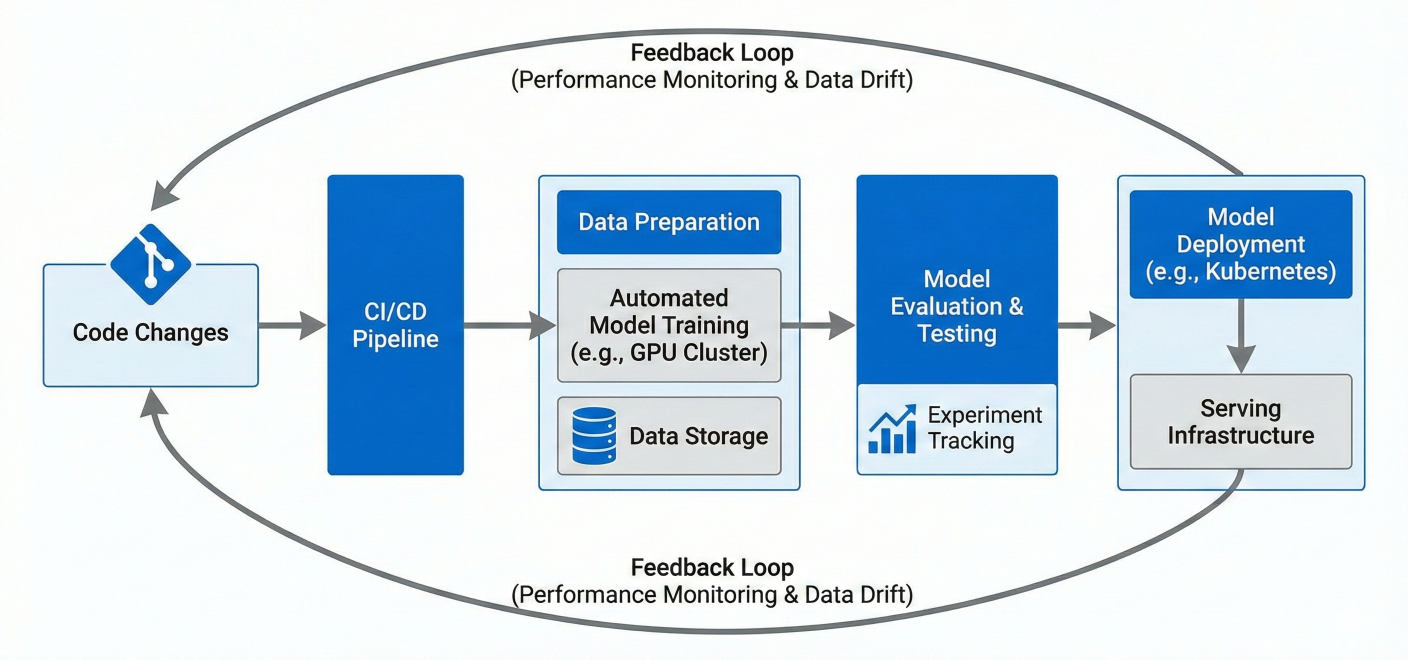
CML Architecture Diagram showing the continuous flow from code changes to automated model training, evaluation, and deployment with feedback loops
The machine learning landscape has evolved dramatically. We've moved from experimental notebook-based workflows to production-ready systems that handle millions of predictions daily. This evolution demands robust engineering practices that ensure reliability, reproducibility, and scalability.
The Traditional ML Problem: Most ML projects suffer from what experts call "technical debt" - models that become stale, data drift that goes undetected, and manual processes that don't scale. You've probably experienced this: you train a model that performs brilliantly in testing, deploy it to production, and watch its performance slowly degrade over time.
CML's Solution: By implementing continuous machine learning practices, you create automated systems that detect performance degradation, trigger retraining when necessary, and maintain model quality without manual intervention. It's like having a dedicated ML engineer monitoring your models 24/7.
At the heart of CML lies automated model training. Instead of manually running training scripts whenever you want to update your model, CML integrates with popular CI/CD platforms to trigger training automatically based on specific conditions.
# Example: Automated training trigger in Python
import os
from datetime import datetime
import joblib
from sklearn.ensemble import RandomForestClassifier
from sklearn.metrics import accuracy_score

def automated_training_pipeline():
    # Load latest training data
    X_train, y_train = load_latest_data()
    # Configure model with current best parameters
    model = RandomForestClassifier(
        n_estimators=100,
        max_depth=10,
        random_state=42
    )
    # Train model
    print(f"Starting training at {datetime.now()}")
    model.fit(X_train, y_train)
    # Evaluate performance
    X_test, y_test = load_test_data()
    accuracy = model.score(X_test, y_test)
    # Save model if performance meets threshold
    if accuracy > 0.85:  # Minimum acceptable accuracy
        joblib.dump(model, f'models/model_{datetime.now().strftime("%Y%m%d_%H%M%S")}.pkl')
        save_metrics(accuracy, datetime.now())
        return True
    else:
        print(f"Model accuracy {accuracy} below threshold. Retraining...")
        return False

def save_metrics(accuracy, timestamp):
    with open('metrics.txt', 'w') as f:
        f.write(f"Accuracy: {accuracy:.4f}\n")
        f.write(f"Training Date: {timestamp}\n")
CML extends traditional CI concepts to handle ML-specific challenges. While software CI focuses on code integration and testing, ML CI must also handle data dependencies, model validation, and performance regression testing.
GitHub Actions Example:
# .github/workflows/cml-pipeline.yml
name: CML Model Training Pipeline
on: [push, pull_request]
jobs:
train-and-evaluate:
runs-on: ubuntu-latest
container: docker://ghcr.io/iterative/cml:0-dvc2-base1
steps:
- uses: actions/checkout@v3
- name: Install dependencies
run: |
pip install -r requirements.txt
- name: Train model
env:
REPO_TOKEN: ${{ secrets.GITHUB_TOKEN }}
run: |
python train_model.py
# Generate performance report
echo "## Model Performance Report" > report.md
echo "" >> report.md
cat metrics.txt >> report.md
echo "" >> report.md
echo "" >> report.md
# Post report as comment
cml comment create report.md
- name: Model validation
run: |
python validate_model.py
if [ $? -ne 0 ]; then
echo "Model validation failed!"
exit 1
fi
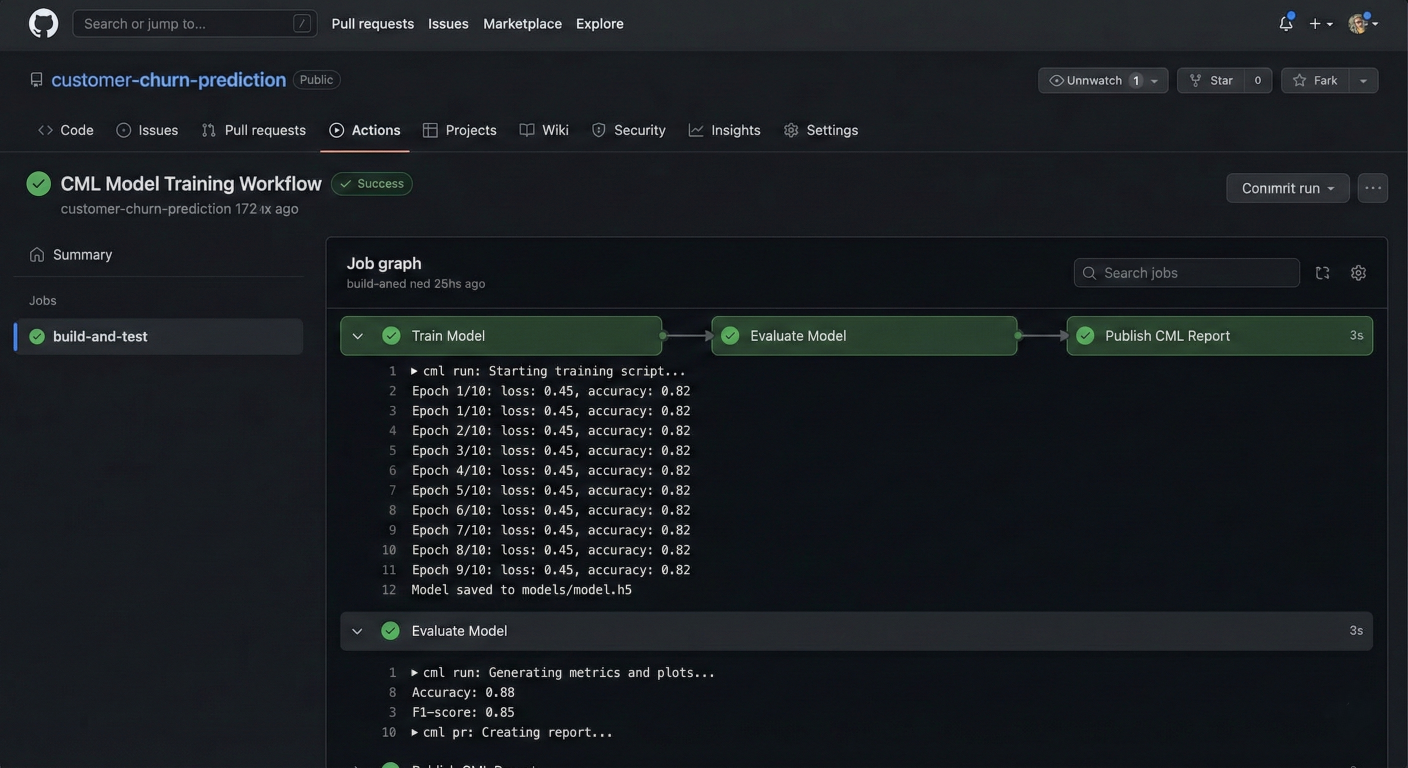
Screenshot of GitHub Actions workflow running CML pipeline with automated model training and evaluation steps
One of CML's most powerful features is its seamless integration with DVC (Data Version Control). This combination solves the notorious problem of tracking data changes alongside code changes - something Git alone cannot handle effectively.
DVC Pipeline Configuration:
# dvc.yaml - ML Pipeline Definition
stages:
  prepare_data:
    cmd: python src/prepare_data.py
    deps:
      - src/prepare_data.py
      - data/raw/dataset.csv
    outs:
      - data/processed/train.csv
      - data/processed/test.csv

  train_model:
    cmd: python src/train_model.py
    deps:
      - src/train_model.py
      - data/processed/train.csv
    params:
      - model.learning_rate
      - model.n_estimators
    outs:
      - models/classifier.pkl
    metrics:
      - metrics/train_metrics.json

  evaluate_model:
    cmd: python src/evaluate_model.py
    deps:
      - src/evaluate_model.py
      - models/classifier.pkl
      - data/processed/test.csv
    metrics:
      - metrics/test_metrics.json
    plots:
      - plots/confusion_matrix.png
      - plots/roc_curve.png
Integrating CML with DVC:
# .github/workflows/cml-dvc-pipeline.yml name: CML with DVC Pipeline on: [push] jobs: train-with-dvc: runs-on: ubuntu-latest steps: - uses: actions/checkout@v3 - name: Setup Python uses: actions/setup-python@v4 with: python-version: '3.9' - name: Setup CML uses: iterative/setup-cml@v1 - name: Setup DVC uses: iterative/setup-dvc@v1 - name: Pull data from remote storage env: AWS_ACCESS_KEY_ID: ${{ secrets.AWS_ACCESS_KEY_ID }} AWS_SECRET_ACCESS_KEY: ${{ secrets.AWS_SECRET_ACCESS_KEY }} run: | dvc pull data - name: Install dependencies run: | pip install -r requirements.txt - name: Run ML pipeline run: | dvc repro - name: Generate performance comparison run: | # Compare metrics with main branch git fetch --depth=1 origin main:main echo "## Model Performance Comparison" > report.md echo "" >> report.md # Show metrics difference dvc metrics diff --show-md main >> report.md echo "" >> report.md # Generate plots comparison dvc plots diff --target plots/roc_curve.png --show-vega main > vega.json vl2png vega.json > plot_comparison.png echo "" >> report.md - name: Create CML report env: REPO_TOKEN: ${{ secrets.GITHUB_TOKEN }} run: | cml comment create report.md
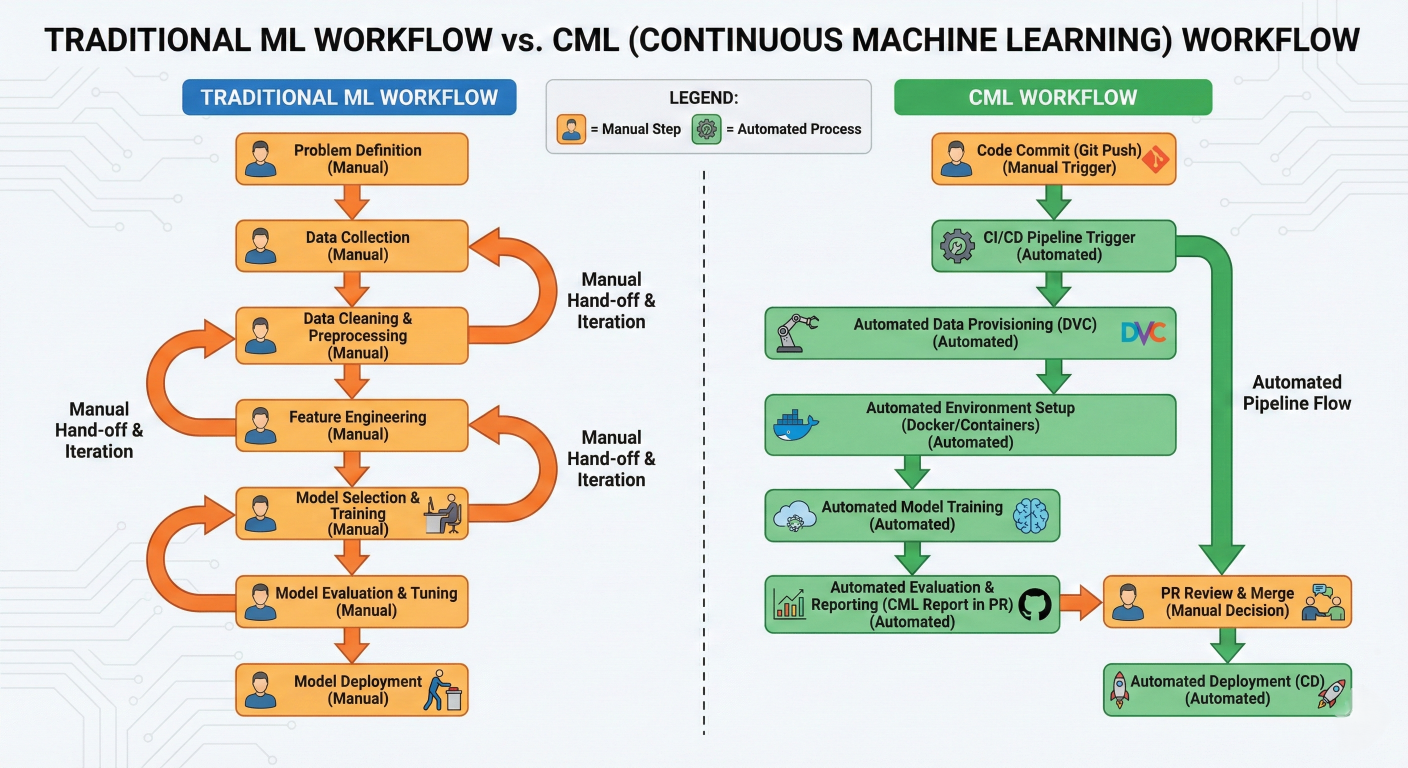
Comparison diagram showing Traditional ML workflow vs CML workflow side by side, highlighting manual steps vs automated processes
# Traditional: Manual model update process
def traditional_model_update():
    # Developer manually runs this when they remember to check performance
    print("Manually checking if model needs update...")
    # Load current model
    current_model = joblib.load('production_model.pkl')
    # Manually download new data
    new_data = manually_download_data()
    # Manually retrain
    retrained_model = manual_retrain(new_data)
    # Manually test
    performance = manual_test(retrained_model)
    # Manually deploy if good
    if performance > threshold:
        manually_deploy(retrained_model)

# CML: Automated continuous process
class ContinuousMLPipeline:
    def __init__(self):
        self.monitoring_active = True
        self.performance_threshold = 0.85

    def setup_automated_monitoring(self):
        """Set up automated performance monitoring"""
        # Monitor model performance continuously
        self.schedule_performance_checks()
        # Monitor data drift
        self.setup_drift_detection()
        # Set up automated retraining triggers
        self.configure_retraining_triggers()

    def automated_retraining_trigger(self, trigger_type, metadata):
        """Automatically triggered when conditions are met"""
        print(f"Automated retraining triggered by: {trigger_type}")
        if trigger_type == "performance_degradation":
            self.retrain_model_performance_based()
        elif trigger_type == "data_drift":
            self.retrain_model_drift_based()
        elif trigger_type == "scheduled":
            self.retrain_model_scheduled()

    def retrain_model_performance_based(self):
        """Retrain model when performance drops"""
        # Automatically fetch latest data
        latest_data = self.fetch_latest_data()
        # Automatically retrain
        new_model = self.train_with_best_params(latest_data)
        # Automatically validate
        if self.validate_model(new_model):
            self.deploy_model(new_model)
            self.notify_team("Model successfully retrained and deployed")
        else:
            self.alert_team("Automated retraining failed validation")
First, let's establish a proper project structure that supports continuous machine learning:
ml-project/
├── .github/workflows/
│   └── cml-pipeline.yml
├── data/
│   ├── raw/
│   └── processed/
├── src/
│   ├── data_preparation.py
│   ├── model_training.py
│   └── model_evaluation.py
├── models/
├── metrics/
├── plots/
├── requirements.txt
├── dvc.yaml
└── params.yaml
# src/model_training.py
import pandas as pd
import numpy as np
from sklearn.ensemble import RandomForestClassifier
from sklearn.model_selection import train_test_split
from sklearn.metrics import accuracy_score, classification_report
import joblib
import json
import yaml
from datetime import datetime
import matplotlib.pyplot as plt
from sklearn.metrics import confusion_matrix
import seaborn as sns

class MLModelTrainer:
    def __init__(self, config_path="params.yaml"):
        with open(config_path, 'r') as f:
            self.config = yaml.safe_load(f)
        self.model_params = self.config['model']
        self.data_params = self.config['data']

    def load_and_prepare_data(self):
        """Load and prepare training data"""
        print("Loading training data...")
        train_data = pd.read_csv(self.data_params['train_path'])
        test_data = pd.read_csv(self.data_params['test_path'])
        X_train = train_data.drop(columns=[self.data_params['target_column']])
        y_train = train_data[self.data_params['target_column']]
        X_test = test_data.drop(columns=[self.data_params['target_column']])
        y_test = test_data[self.data_params['target_column']]
        return X_train, X_test, y_train, y_test

    def train_model(self, X_train, y_train):
        """Train the ML model"""
        print("Training model...")
        model = RandomForestClassifier(
            n_estimators=self.model_params['n_estimators'],
            max_depth=self.model_params['max_depth'],
            random_state=self.model_params['random_state']
        )
        model.fit(X_train, y_train)
        return model

    def evaluate_model(self, model, X_test, y_test):
        """Evaluate model performance"""
        print("Evaluating model...")
        y_pred = model.predict(X_test)
        accuracy = accuracy_score(y_test, y_pred)
        metrics = {
            'accuracy': float(accuracy),
            'timestamp': datetime.now().isoformat(),
            'model_params': self.model_params
        }
        with open('metrics/train_metrics.json', 'w') as f:
            json.dump(metrics, f, indent=2)
        self.plot_confusion_matrix(y_test, y_pred)
        return metrics

    def plot_confusion_matrix(self, y_true, y_pred):
        """Generate and save confusion matrix plot"""
        cm = confusion_matrix(y_true, y_pred)
        plt.figure(figsize=(8, 6))
        sns.heatmap(cm, annot=True, fmt='d', cmap='Blues')
        plt.title('Confusion Matrix')
        plt.ylabel('True Label')
        plt.xlabel('Predicted Label')
        plt.tight_layout()
        plt.savefig('plots/confusion_matrix.png', dpi=300, bbox_inches='tight')
        plt.close()

    def save_model(self, model):
        """Save trained model"""
        model_path = f"models/model_{{datetime.now().strftime('%Y%m%d_%H%M%S')}}.pkl"
        joblib.dump(model, model_path)
# Also save as current production model
joblib.dump(model, "models/production_model.pkl") return model_path
def run_training_pipeline(self):
"""Execute the complete training pipeline"""
try:
# Load data
X_train, X_test, y_train, y_test = self.load_and_prepare_data()
# Train model
model = self.train_model(X_train, y_train)
# Evaluate model
metrics = self.evaluate_model(model, X_test, y_test)
# Save model
model_path = self.save_model(model)
print(f"Training completed successfully!")
print(f"Model accuracy: {metrics['accuracy']:.4f}")
print(f"Model saved to: {model_path}")
return True
except Exception as e:
print(f"Training pipeline failed: {str(e)}")
return False
if __name__ == "__main__":
trainer = MLModelTrainer()
success = trainer.run_training_pipeline()
if not success:
exit(1)
# params.yaml
data:
  train_path: "data/processed/train.csv"
  test_path: "data/processed/test.csv"
  target_column: "target"
model:
  n_estimators: 100
  max_depth: 10
  random_state: 42
training:
  validation_split: 0.2
  performance_threshold: 0.85
monitoring:
  drift_detection: true
  performance_monitoring: true
  retrain_schedule: "weekly"
# .github/workflows/cml-complete-pipeline.yml
name: Complete CML Pipeline
on:
push:
branches: [main, develop]
pull_request:
branches: [main]
schedule:
# Run weekly retraining on Sundays at 2 AM UTC
- cron: '0 2 * * 0'
jobs:
cml-training-pipeline:
runs-on: ubuntu-latest
container: docker://ghcr.io/iterative/cml:0-dvc2-base1
steps:
- name: Checkout repository
uses: actions/checkout@v3
with:
fetch-depth: 0 # Fetch full history for DVC
- name: Setup Python
uses: actions/setup-python@v4
with:
python-version: '3.9'
- name: Cache Python dependencies
uses: actions/cache@v3
with:
path: ~/.cache/pip
key: ${{ runner.os }}-pip-${{ hashFiles('**/requirements.txt') }}
- name: Install dependencies
run: |
python -m pip install --upgrade pip
pip install -r requirements.txt
- name: Pull data with DVC
env:
AWS_ACCESS_KEY_ID: ${{ secrets.AWS_ACCESS_KEY_ID }}
AWS_SECRET_ACCESS_KEY: ${{ secrets.AWS_SECRET_ACCESS_KEY }}
run: |
dvc pull data
- name: Run data preparation
run: |
python src/data_preparation.py
- name: Execute training pipeline
run: |
python src/model_training.py
- name: Model validation and testing
run: |
python src/model_evaluation.py
- name: Generate CML report
env:
REPO_TOKEN: ${{ secrets.GITHUB_TOKEN }}
run: |
# Create comprehensive report
echo "# 🤖 Automated ML Pipeline Results" > report.md
echo "" >> report.md
echo "**Training Date:** $(date)" >> report.md
echo "**Commit:** $GITHUB_SHA" >> report.md
echo "" >> report.md
echo "## 📊 Model Performance" >> report.md
echo "" >> report.md
cat metrics/train_metrics.json | jq -r '"**Accuracy:** " + (.accuracy * 100 | tos
echo "" >> report.md
echo "## 📈 Performance Visualizations" >> report.md
echo "" >> report.md
echo "" >> report.md
# Compare with previous version if available
if git rev-parse --verify HEAD~1 >/dev/null 2>&1; then
echo "" >> report.md
echo "## 🔄 Performance Comparison" >> report.md
echo "" >> report.md
if [ -f metrics/train_metrics.json ]; then
echo "Metrics comparison will be available in future runs" >> report.md
fi
fi
cml comment create report.md
- name: Push model artifacts (if performance meets threshold)
env:
REPO_TOKEN: ${{ secrets.GITHUB_TOKEN }}
run: |
ACCURACY=$(cat metrics/train_metrics.json | jq -r '.accuracy')
THRESHOLD=0.85
if (( $(echo "$ACCURACY > $THRESHOLD" | bc -l) )); then
echo "Model performance ($ACCURACY) meets threshold ($THRESHOLD)"
if [ "$GITHUB_REF" = "refs/heads/main" ]; then
git config --local user.email "action@github.com"
git config --local user.name "GitHub Action"
git add models/production_model.pkl
git add metrics/train_metrics.json
git add plots/confusion_matrix.png
git commit -m "🤖 Automated model update - Accuracy: $ACCURACY" || echo "No ch
git push
fi
else
echo "Model performance ($ACCURACY) below threshold ($THRESHOLD) - not deploying
exit 1
fi
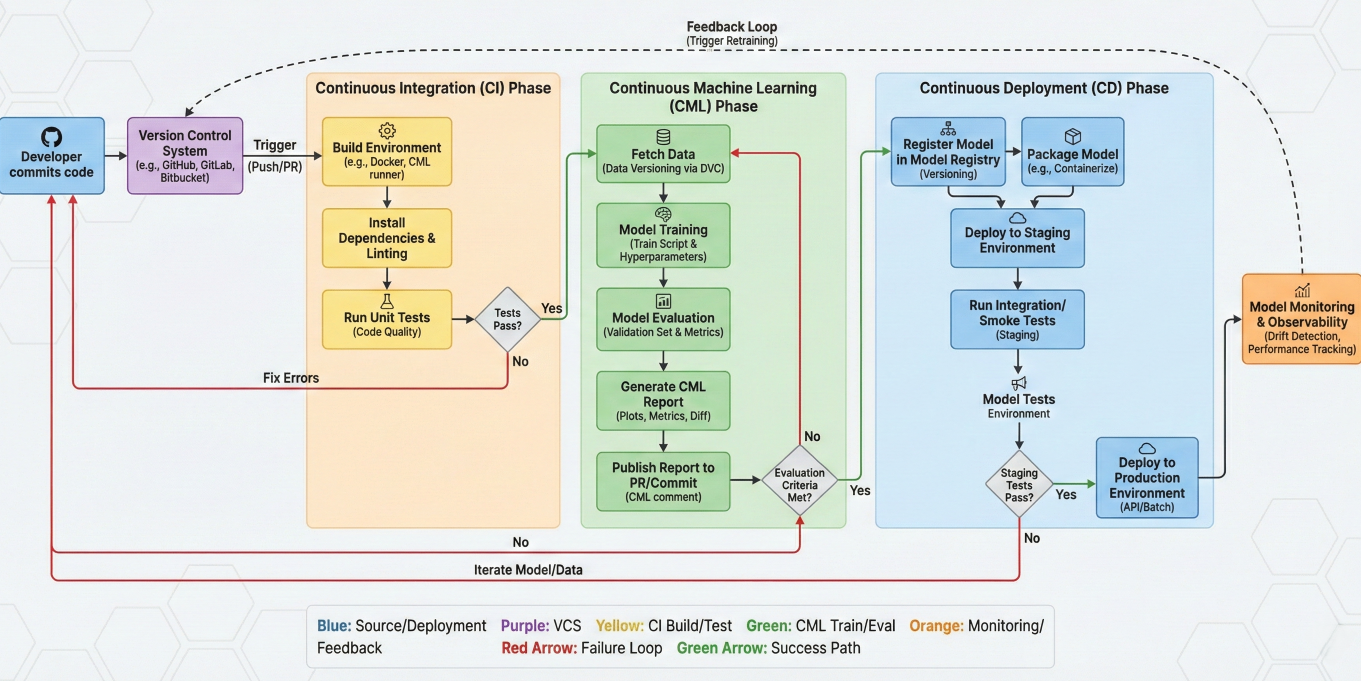
Flowchart showing the complete CML pipeline from code commit to automated model training, evaluation, and deployment
CML supports multiple sophisticated triggers for automated retraining:
# Advanced retraining trigger system
class AdvancedRetrainingSystem:
    def __init__(self):
        self.drift_detector = DriftDetector()
        self.performance_monitor = PerformanceMonitor()
        self.scheduler = RetrainingScheduler()

    def setup_trigger_system(self):
        """Setup comprehensive trigger system"""

        # 1. Performance-based triggers
        self.performance_monitor.set_threshold(
            accuracy_threshold=0.85,
            precision_threshold=0.80,
            recall_threshold=0.75
        )

        # 2. Data drift triggers
        self.drift_detector.configure(
            statistical_tests=['ks_test', 'chi2_test'],
            feature_importance_threshold=0.1,
            drift_threshold=0.05
        )

        # 3. Time-based triggers
        self.scheduler.set_schedule(
            daily_check=True,
            weekly_retrain=True,
            monthly_full_retrain=True
        )

        # 4. Data volume triggers
        self.setup_data_volume_triggers(
            new_data_threshold=1000,  # Retrain when 1000 new samples
            data_quality_threshold=0.95
        )

    def check_retraining_conditions(self):
        """Comprehensive retraining condition check"""
        triggers = []

        # Check performance degradation
        current_performance = self.performance_monitor.get_latest_metrics()
        if self.performance_monitor.detect_degradation(current_performance):
            triggers.append("performance_degradation")

        # Check data drift
        if self.drift_detector.detect_drift():
            triggers.append("data_drift")

        # Check schedule
        if self.scheduler.is_retraining_due():
            triggers.append("scheduled")

        # Check data volume
        if self.check_sufficient_new_data():
            triggers.append("new_data_available")

        return triggers

    def execute_smart_retraining(self, triggers):
        """Execute context-aware retraining based on triggers"""

        if "performance_degradation" in triggers:
            # Focus on recent data and hyperparameter optimization
            self.retrain_with_focus("performance_optimization")

        elif "data_drift" in triggers:
            # Full retraining with drift adaptation
            self.retrain_with_focus("drift_adaptation")

        elif "scheduled" in triggers:
            # Routine maintenance retraining
            self.retrain_with_focus("routine_maintenance")

    def retrain_with_focus(self, focus_type):
        """Context-specific retraining strategies"""

        if focus_type == "performance_optimization":
            # Hyperparameter tuning + recent data emphasis
            self.run_hyperparameter_optimization()
            self.retrain_with_weighted_recent_data()

        elif focus_type == "drift_adaptation":
            # Feature importance recalculation + full retrain
            self.recalculate_feature_importance()
            self.full_model_retrain()

        elif focus_type == "routine_maintenance":
            # Standard retraining with latest best practices
            self.standard_retrain_pipeline()
# Advanced retraining trigger system
class AdvancedRetrainingSystem:
    def __init__(self):
        self.drift_detector = DriftDetector()
        self.performance_monitor = PerformanceMonitor()
        self.scheduler = RetrainingScheduler()

    def setup_trigger_system(self):
        """Setup comprehensive trigger system"""

        # 1. Performance-based triggers
        self.performance_monitor.set_threshold(
            accuracy_threshold=0.85,
            precision_threshold=0.80,
            recall_threshold=0.75
        )

        # 2. Data drift triggers
        self.drift_detector.configure(
            statistical_tests=['ks_test', 'chi2_test'],
            feature_importance_threshold=0.1,
            drift_threshold=0.05
        )

        # 3. Time-based triggers
        self.scheduler.set_schedule(
            daily_check=True,
            weekly_retrain=True,
            monthly_full_retrain=True
        )

        # 4. Data volume triggers
        self.setup_data_volume_triggers(
            new_data_threshold=1000,  # Retrain when 1000 new samples
            data_quality_threshold=0.95
        )

    def check_retraining_conditions(self):
        """Comprehensive retraining condition check"""
        triggers = []

        # Check performance degradation
        current_performance = self.performance_monitor.get_latest_metrics()
        if self.performance_monitor.detect_degradation(current_performance):
            triggers.append("performance_degradation")

        # Check data drift
        if self.drift_detector.detect_drift():
            triggers.append("data_drift")

        # Check schedule
        if self.scheduler.is_retraining_due():
            triggers.append("scheduled")

        # Check data volume
        if self.check_sufficient_new_data():
            triggers.append("new_data_available")

        return triggers

    def execute_smart_retraining(self, triggers):
        """Execute context-aware retraining based on triggers"""

        if "performance_degradation" in triggers:
            # Focus on recent data and hyperparameter optimization
            self.retrain_with_focus("performance_optimization")

        elif "data_drift" in triggers:
            # Full retraining with drift adaptation
            self.retrain_with_focus("drift_adaptation")

        elif "scheduled" in triggers:
            # Routine maintenance retraining
            self.retrain_with_focus("routine_maintenance")

    def retrain_with_focus(self, focus_type):
        """Context-specific retraining strategies"""

        if focus_type == "performance_optimization":
            # Hyperparameter tuning + recent data emphasis
            self.run_hyperparameter_optimization()
            self.retrain_with_weighted_recent_data()

        elif focus_type == "drift_adaptation":
            # Feature importance recalculation + full retrain
            self.recalculate_feature_importance()
            self.full_model_retrain()

        elif focus_type == "routine_maintenance":
            # Standard retraining with latest best practices
            self.standard_retrain_pipeline()

# Comprehensive performance monitoring system
class MLModelMonitor:
    def __init__(self):
        self.baseline_metrics = {}
        self.alert_thresholds = {}
        self.monitoring_history = []

    def setup_monitoring(self):
        """Initialize comprehensive monitoring system"""
        # Set baseline performance metrics
        self.baseline_metrics = {
            'accuracy': 0.87,
            'precision': 0.85,
            'recall': 0.83,
            'f1_score': 0.84,
            'auc_roc': 0.91
        }
        # Define alert thresholds (% decrease from baseline)
        self.alert_thresholds = {
            'accuracy': 0.05,  # Alert if accuracy drops 5%
            'precision': 0.08, # Alert if precision drops 8%
            'recall': 0.08,   # Alert if recall drops 8%
            'f1_score': 0.07, # Alert if F1 drops 7%
            'auc_roc': 0.06   # Alert if AUC drops 6%
        }

    def continuous_monitoring_loop(self):
        """Main monitoring loop for production models"""
        while True:
            try:
                # Collect current performance metrics
                current_metrics = self.collect_current_metrics()
                # Analyze performance trends
                performance_analysis = self.analyze_performance_trends(current_metrics)
                # Check for alerts
                alerts = self.check_performance_alerts(current_metrics)
                # Log monitoring data
                self.log_monitoring_data(current_metrics, performance_analysis, alerts)
                # Handle alerts if any
                if alerts:
                    self.handle_performance_alerts(alerts)
                # Wait before next check (e.g., every hour)
                time.sleep(3600)
            except Exception as e:
                print(f"Monitoring error: {e}")
                time.sleep(300)  # Retry after 5 minutes

    def analyze_performance_trends(self, current_metrics):
        """Analyze performance trends over time"""
        analysis = {}
        for metric_name, current_value in current_metrics.items():
            # Get historical data for this metric
            historical_values = self.get_historical_values(metric_name, days=30)
            if len(historical_values) >= 7:  # Need at least a week of data
                # Calculate trend
                trend = self.calculate_trend(historical_values)
                # Detect anomalies
                is_anomaly = self.detect_anomaly(current_value, historical_values)
                analysis[metric_name] = {
                    'trend': trend,  # 'improving', 'stable', 'declining'
                    'is_anomaly': is_anomaly,
                    'current_value': current_value,
                    'week_average': np.mean(historical_values[-7:]),
                    'month_average': np.mean(historical_values)
                }
        return analysis

    def generate_monitoring_report(self):
        """Generate comprehensive monitoring report"""
        report = {
            'timestamp': datetime.now().isoformat(),
            'model_health': self.assess_overall_model_health(),
            'performance_trends': self.get_performance_trends(),
            'recommendations': self.generate_recommendations(),
            'alerts': self.get_active_alerts()
        }
        return report
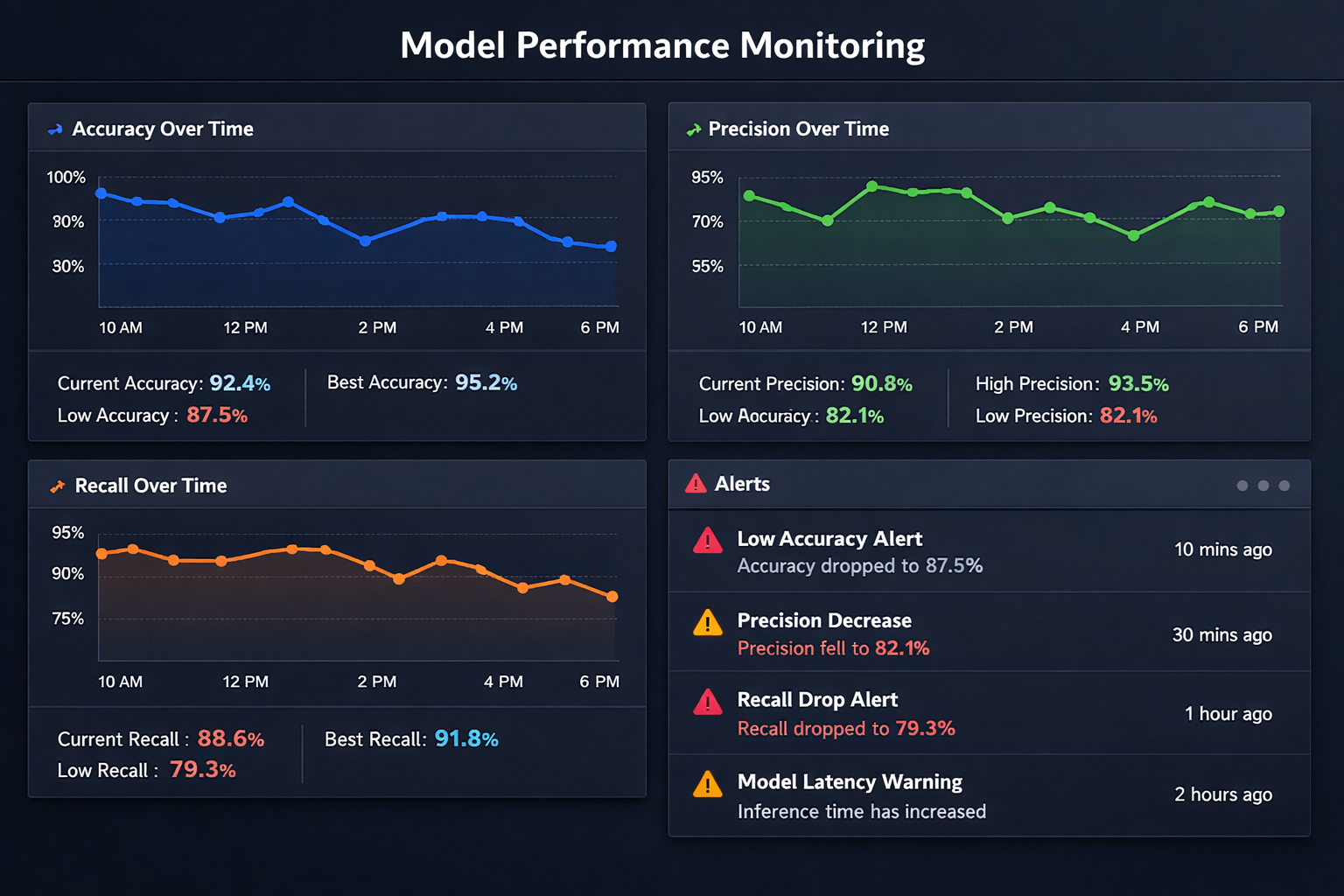
Dashboard mockup showing real-time model performance monitoring with charts for accuracy, precision, recall over time, and alert notifications
# Implement canary deployment for ML models
class CanaryModelDeployment:
    def __init__(self):
        self.production_model = None
        self.canary_model = None
        self.traffic_split = 0.05  # Start with 5% traffic to canary

    def deploy_canary_model(self, new_model):
        """Deploy new model as canary with limited traffic"""
        self.canary_model = new_model
        print(f"Deploying canary model with {self.traffic_split*100}% traffic")
        # Monitor canary performance
        self.monitor_canary_performance()

    def monitor_canary_performance(self):
        """Monitor canary vs production performance"""
        canary_metrics = self.collect_canary_metrics()
        production_metrics = self.collect_production_metrics()
        # Compare performance
        performance_comparison = self.compare_model_performance(
            canary_metrics, production_metrics
        )
        if performance_comparison['canary_better']:
            self.gradually_increase_traffic()
        elif performance_comparison['canary_worse']:
            self.rollback_canary()

    def gradually_increase_traffic(self):
        """Gradually increase traffic to canary if performing well"""
        if self.traffic_split < 1.0:
            self.traffic_split = min(self.traffic_split + 0.1, 1.0)
            print(f"Increasing canary traffic to {self.traffic_split*100}% ")
        if self.traffic_split >= 1.0:
            self.promote_canary_to_production()

    def promote_canary_to_production(self):
        """Promote canary model to full production"""
        self.production_model = self.canary_model
        self.canary_model = None
        self.traffic_split = 0.0
        print("Canary model promoted to production!")
# Comprehensive data quality monitoring
class DataQualityMonitor:
    def __init__(self):
        self.quality_checks = []
        self.quality_thresholds = {}

    def setup_quality_checks(self):
        """Setup comprehensive data quality monitoring"""
        self.quality_checks = [
            self.check_missing_values,
            self.check_data_types,
            self.check_value_ranges,
            self.check_duplicate_records,
            self.check_feature_distributions,
            self.check_data_freshness
        ]
        self.quality_thresholds = {
            'missing_value_threshold': 0.05, # Max 5% missing values
            'duplicate_threshold': 0.01, # Max 1% duplicates
            'distribution_shift_threshold': 0.1 # Max 10% distribution shift
        }

    def validate_incoming_data(self, new_data):
        """Validate new data before using for training/inference"""
        quality_report = {
            'overall_quality': 'PASS',
            'checks': {},
            'warnings': [],
            'errors': []
        }
        for check_function in self.quality_checks:
            try:
                check_result = check_function(new_data)
                quality_report['checks'][check_function.__name__] = check_result
                if check_result['status'] == 'FAIL':
                    quality_report['overall_quality'] = 'FAIL'
                    quality_report['errors'].append(check_result['message'])
                elif check_result['status'] == 'WARN':
                    quality_report['warnings'].append(check_result['message'])
            except Exception as e:
                quality_report['errors'].append(f"Quality check {check_function.__name__}")
        return quality_report

    def check_feature_distributions(self, new_data):
        """Check if feature distributions have shifted significantly"""
        distribution_shifts = {}
        for column in new_data.columns:
            if new_data[column].dtype in ['int64', 'float64']:
                # Use Kolmogorov-Smirnov test for numerical features
                shift_score = self.calculate_distribution_shift(column, new_data)
                distribution_shifts[column] = shift_score
        max_shift = max(distribution_shifts.values()) if distribution_shifts else 0
        if max_shift > self.quality_thresholds['distribution_shift_threshold']:
            return {
                'status': 'FAIL',
                'message': f"Significant distribution shift detected (max: {max_shift:.3f})",
                'details': distribution_shifts
            }
        else:
            return {
                'status': 'PASS',
                'message': f"Distribution shifts within acceptable range (max: {max_shift})",
                'details': distribution_shifts
            }
# Intelligent model rollback system
class ModelRollbackManager:
    def __init__(self):
        self.model_history = []
        self.performance_history = []
        self.rollback_triggers = []

    def setup_rollback_system(self):
        """Setup automated rollback system"""
        self.rollback_triggers = [
            self.check_performance_degradation,
            self.check_error_rate_spike,
            self.check_prediction_distribution_anomaly,
            self.check_system_health
        ]

    def monitor_and_rollback(self):
        """Continuously monitor and rollback if necessary"""
        current_performance = self.get_current_performance()
        # Check all rollback conditions
        rollback_needed = False
        rollback_reasons = []
        for trigger in self.rollback_triggers:
            trigger_result = trigger(current_performance)
            if trigger_result['should_rollback']:
                rollback_needed = True
                rollback_reasons.append(trigger_result['reason'])
        if rollback_needed:
            self.execute_rollback(rollback_reasons)

    def execute_rollback(self, reasons):
        """Execute intelligent rollback to best previous model"""
        print(f"Executing rollback due to: {', '.join(reasons)}")
        # Find best performing previous model
        best_previous_model = self.find_best_previous_model()
        if best_previous_model:
            # Deploy previous model
            self.deploy_model(best_previous_model)
            # Alert team
            self.alert_team_rollback(reasons, best_previous_model)
            # Log rollback event
            self.log_rollback_event(reasons, best_previous_model)
        else:
            # Emergency fallback
            self.emergency_fallback()

    def find_best_previous_model(self):
        """Find the best performing model from history"""
        if len(self.model_history) < 2:
            return None
        # Exclude current model, find best among previous ones
        previous_models = self.model_history[:-1]
        previous_performances = self.performance_history[:-1]
# Find model with best composite score
best_model_idx = np.argmax([perf['composite_score'] for perf in previous_performances])
return previous_models[best_model_idx]
# Real-world example: E-commerce product recommendation system with CML
class EcommerceRecommendationCML:
    def __init__(self):
        self.model_type = "collaborative_filtering"
        self.retrain_threshold = 0.15  # Retrain if click-through rate drops 15%
        self.data_freshness_days = 7  # Use data from last 7 days

    def setup_continuous_pipeline(self):
        """Setup continuous learning pipeline for recommendations"""
        # Data collection pipeline
        self.setup_data_collection()
        # Model training pipeline
        self.setup_training_pipeline()
        # Performance monitoring
        self.setup_performance_monitoring()
        # A/B testing framework
        self.setup_ab_testing()

    def data_collection_pipeline(self):
        """Continuously collect user interaction data"""
        # Collect user clicks, purchases, views, ratings
        user_interactions = self.collect_user_interactions()
        # Collect product catalog updates
        product_updates = self.collect_product_updates()
        # Process and validate data
        processed_data = self.process_interaction_data(user_interactions, product_updates)
        # Check if we have enough new data to trigger retraining
        if self.should_retrain_based_on_data(processed_data):
            self.trigger_model_retraining()

    def performance_monitoring_system(self):
        """Monitor recommendation system performance"""
        metrics = {
            'click_through_rate': self.calculate_ctr(),
            'conversion_rate': self.calculate_conversion_rate(),
            'user_engagement': self.calculate_engagement(),
            'recommendation_diversity': self.calculate_diversity(),
            'cold_start_performance': self.calculate_cold_start_performance()
        }
        # Check if performance has degraded
        if self.detect_performance_degradation(metrics):
            self.trigger_model_retraining()
        return metrics

    def ab_testing_integration(self):
        """A/B test new models before full deployment"""
        # Deploy new model to test group (10% of users)
        test_group_performance = self.deploy_to_test_group()
        # Compare with control group performance
        control_group_performance = self.get_control_group_performance()
        # Statistical significance testing
        is_significant = self.statistical_significance_test(
            test_group_performance, control_group_performance
        )
        if is_significant and test_group_performance > control_group_performance:
            self.promote_model_to_production()
        else:
            self.rollback_test_model()
# Real-world example: Real-time fraud detection with continuous learning
class FraudDetectionCML:
    def __init__(self):
        self.model_type = "ensemble_anomaly_detection"
        self.real_time_threshold = 100 # milliseconds
        self.false_positive_threshold = 0.02 # Max 2% false positive rate

    def setup_real_time_pipeline(self):
        """Setup real-time fraud detection with continuous learning"""
        # Real-time scoring pipeline
        self.setup_real_time_scoring()
        # Feedback collection system
        self.setup_feedback_collection()
        # Continuous model updating
        self.setup_incremental_learning()
        # Alert and response system
        self.setup_alert_system()

    def real_time_scoring_pipeline(self, transaction):
        """Real-time transaction scoring"""
        # Feature extraction (must be fast)
        features = self.extract_features_fast(transaction)
        # Model prediction
        fraud_probability = self.model.predict_proba(features)[0][1]
        # Risk scoring
        risk_score = self.calculate_risk_score(fraud_probability, transaction)
        # Decision making
        decision = self.make_fraud_decision(risk_score, transaction)
        # Log for continuous learning
        self.log_prediction(transaction, features, fraud_probability, decision)
        return decision

    def feedback_integration_system(self):
        """Integrate feedback for continuous model improvement"""
        # Collect confirmed fraud cases
        confirmed_frauds = self.collect_confirmed_frauds()
        # Collect false positive cases
        false_positives = self.collect_false_positives()
        # Update training data
        self.update_training_data(confirmed_frauds, false_positives)
        # Incremental model update
        if self.should_update_model():
            self.incremental_model_update()

    def incremental_model_update(self):
        """Perform incremental model updates without full retraining"""
        # Get new labeled data
        new_data = self.get_new_labeled_data()
        # Incremental learning update
        self.model.partial_fit(new_data['features'], new_data['labels'])
        # Validate updated model
        validation_results = self.validate_updated_model()
        if validation_results['performance_acceptable']:
            self.deploy_updated_model()
        else:
            self.rollback_model_update()
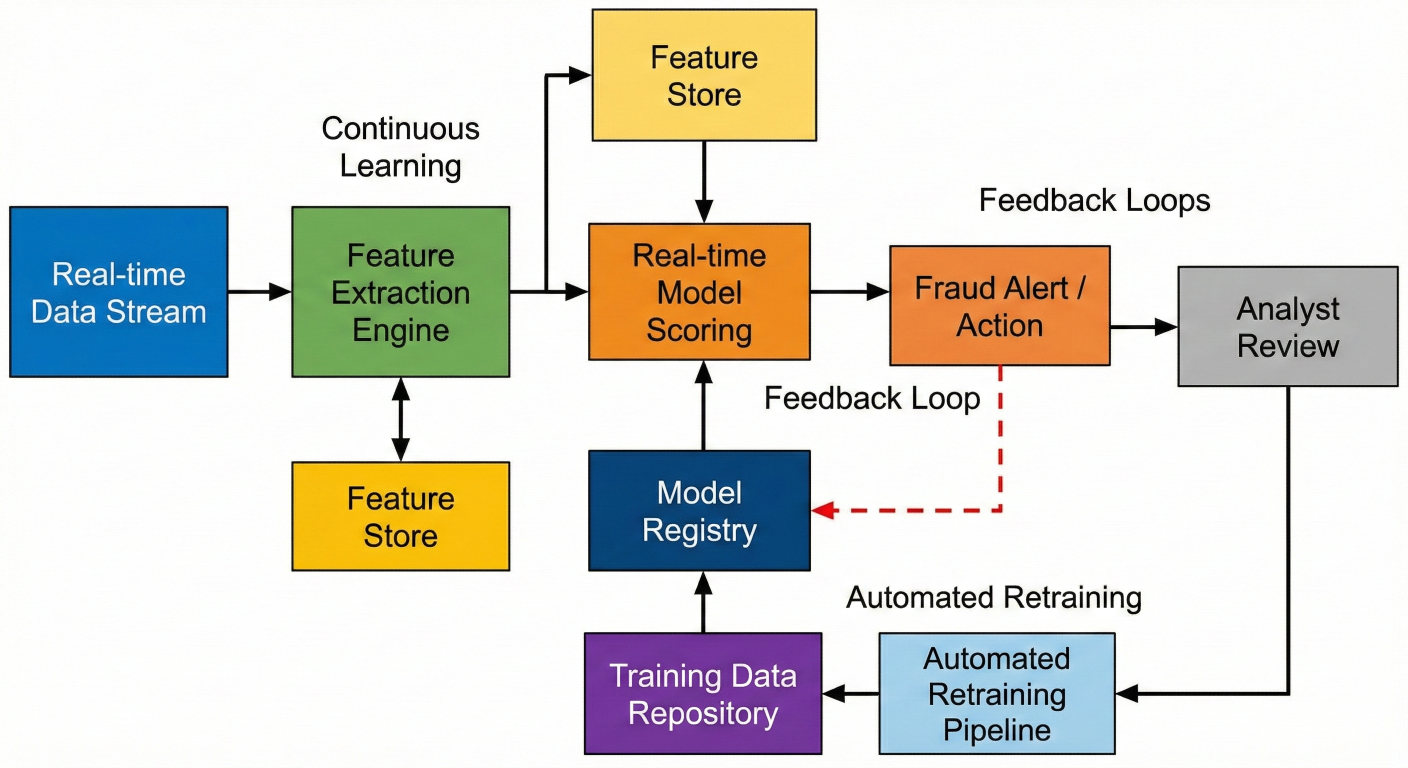
Architecture diagram showing real-time fraud detection system with continuous learning feedback loops, feature extraction, model scoring, and automated retraining
# Advanced monitoring and observability for CML systems
class CMLMonitoringSystem:
    def __init__(self):
        self.metrics_collector = MetricsCollector()
        self.alert_manager = AlertManager()
        self.dashboard_manager = DashboardManager()

    def setup_comprehensive_monitoring(self):
        """Setup end-to-end monitoring for CML pipeline"""
        # Model performance monitoring
        self.setup_model_monitoring()
        # Data quality monitoring
        self.setup_data_monitoring()
        # Infrastructure monitoring
        self.setup_infrastructure_monitoring()
        # Business metrics monitoring
        self.setup_business_monitoring()

    def model_performance_monitoring(self):
        """Monitor model performance in real-time"""
        performance_metrics = {
            'accuracy': self.calculate_real_time_accuracy(),
            'latency_p95': self.calculate_prediction_latency(),
            'throughput': self.calculate_prediction_throughput(),
            'error_rate': self.calculate_error_rate(),
            'drift_score': self.calculate_drift_score()
        }
        # Check thresholds and alert if necessary
        for metric_name, value in performance_metrics.items():
            if self.check_threshold_breach(metric_name, value):
                self.alert_manager.send_alert(
                    severity='HIGH',
                    message=f'{metric_name} breach: {value}',
                    context=performance_metrics
                )
        return performance_metrics

    def create_monitoring_dashboard(self):
        """Create comprehensive monitoring dashboard"""
        dashboard_config = {
            'model_performance': {
                'metrics': ['accuracy', 'precision', 'recall', 'f1_score'],
                'time_range': '24h',
                'refresh_interval': '1m'
            },
            'data_quality': {
                'metrics': ['missing_values', 'duplicates', 'drift_score'],
                'time_range': '7d',
                'refresh_interval': '5m'
            },
            'system_health': {
                'metrics': ['cpu_usage', 'memory_usage', 'disk_io'],
                'time_range': '1h',
                'refresh_interval': '30s'
            },
            'business_metrics': {
                'metrics': ['conversion_rate', 'revenue_impact', 'user_satisfaction'],
                'time_range': '30d',
                'refresh_interval': '1h'
            }
        }
        self.dashboard_manager.create_dashboard(dashboard_config)
# Systematic approach to diagnosing and fixing performance issues
class PerformanceDegradationDiagnostics:
    def __init__(self):
        self.diagnostic_steps = [
            self.check_data_drift,
            self.check_concept_drift,
            self.check_infrastructure_changes,
            self.check_feature_importance_changes,
            self.check_training_data_quality
        ]

    def diagnose_performance_degradation(self, performance_drop):
        """Systematically diagnose performance degradation"""
        diagnosis_report = {
            'performance_drop': performance_drop,
            'probable_causes': [],
            'recommended_actions': [],
            'diagnostic_details': {}
        }
        for diagnostic_step in self.diagnostic_steps:
            try:
                step_result = diagnostic_step()
                diagnosis_report['diagnostic_details'][diagnostic_step.__name__] = step_result
                if step_result['issue_detected']:
                    diagnosis_report['probable_causes'].append(step_result['issue_type'])
                    diagnosis_report['recommended_actions'].extend(step_result['recommendations'])
            except Exception as e:
                print(f"Diagnostic step {diagnostic_step.__name__} failed: {e}")
        return diagnosis_report

    def auto_fix_performance_issues(self, diagnosis_report):
        """Automatically attempt to fix identified issues"""
        for cause in diagnosis_report['probable_causes']:
            if cause == 'data_drift':
                self.handle_data_drift()
            elif cause == 'concept_drift':
                self.handle_concept_drift()
            elif cause == 'feature_importance_change':
                self.handle_feature_importance_change()
# Robust error handling and recovery for training pipelines
class TrainingPipelineRecovery:
    def __init__(self):
        self.recovery_strategies = {
            'data_loading_error': self.recover_from_data_error,
            'memory_error': self.recover_from_memory_error,
            'convergence_error': self.recover_from_convergence_error,
            'validation_error': self.recover_from_validation_error
        }

    def robust_training_pipeline(self):
        """Training pipeline with comprehensive error handling"""
        max_retries = 3
        retry_count = 0
        while retry_count < max_retries:
            try:
                # Execute training pipeline
                result = self.execute_training_pipeline()
                # Validate results
                if self.validate_training_results(result):
                    return result
                else:
                    raise ValidationError("Training results validation failed")
            except Exception as e:
                print(f"Training attempt {retry_count + 1} failed: {e}")
                # Attempt recovery
                recovery_success = self.attempt_recovery(e)
                if recovery_success:
                    print("Recovery successful, retrying training...")
                    retry_count += 1
                else:
                    print("Recovery failed, aborting training")
                    raise e
        raise Exception(f"Training failed after {max_retries} attempts")

    def attempt_recovery(self, error):
        """Attempt to recover from specific error types"""
        error_type = self.classify_error(error)
        if error_type in self.recovery_strategies:
            recovery_function = self.recovery_strategies[error_type]
            return recovery_function(error)
        else:
            print(f"No recovery strategy for error type: {error_type}")
            return False
The future of CML lies in seamless integration with Automated Machine Learning (AutoML) platforms. This combination will enable:
# Future: AutoML-powered continuous learning
class AutoMLContinuousLearning:
    def __init__(self):
        self.automl_engine = AutoMLEngine()
        self.performance_optimizer = PerformanceOptimizer()

    def autonomous_model_evolution(self):
        """Autonomous model architecture and hyperparameter evolution"""
        # Continuous architecture search
        optimal_architecture = self.automl_engine.search_optimal_architecture(
            performance_data=self.get_performance_history(),
            resource_constraints=self.get_resource_constraints()
        )
        # Adaptive hyperparameter optimization
        optimal_params = self.automl_engine.optimize_hyperparameters(
            architecture=optimal_architecture,
            performance_target=self.get_performance_target()
        )
        # Evolve model without human intervention
        evolved_model = self.evolve_model(optimal_architecture, optimal_params)
        return evolved_model
CML is expanding to support distributed learning scenarios:
# Future: Federated continuous learning
class FederatedContinuousLearning:
    def __init__(self):
        self.federated_nodes = []
        self.aggregation_strategy = "federated_averaging"

    def distributed_continuous_learning(self):
        """Continuous learning across distributed edge devices"""
        # Collect local model updates from edge devices
        local_updates = self.collect_local_updates()
        # Aggregate updates using privacy-preserving methods
        global_update = self.federated_aggregation(local_updates)
        # Distribute updated global model
        self.distribute_global_model(global_update)
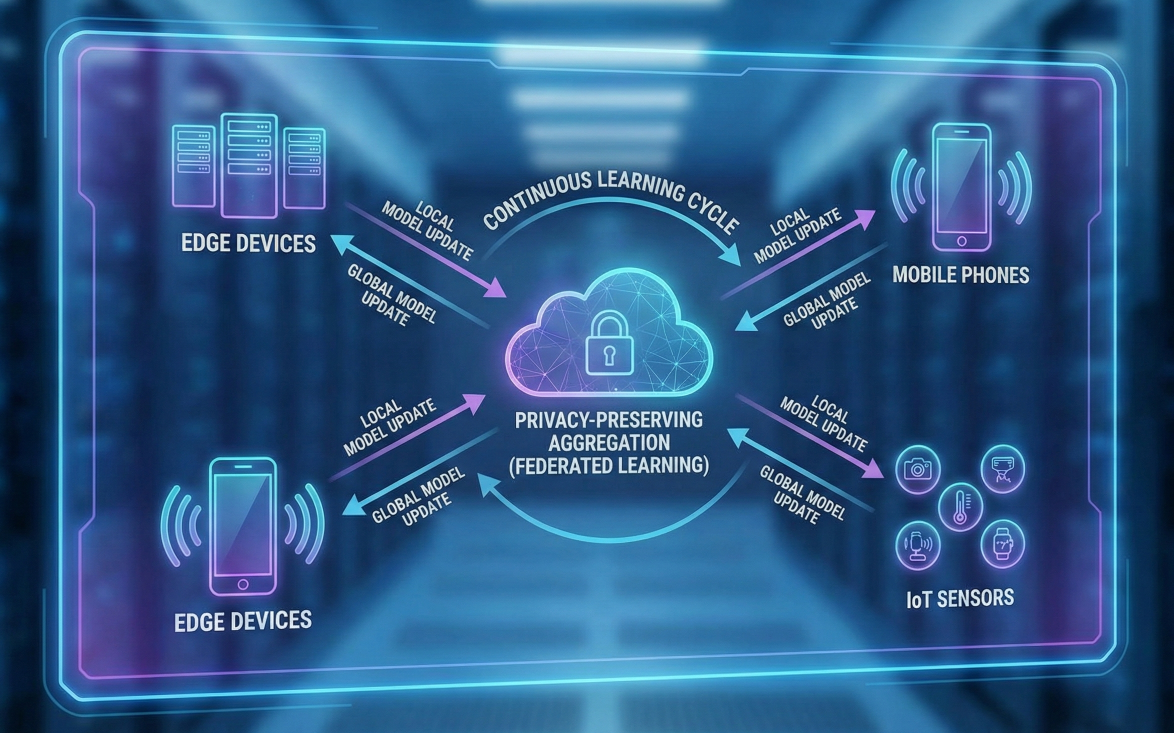
Futuristic diagram showing federated continuous learning across edge devices, mobile phones, and IoT sensors with privacy-preserving aggregation
Continuous Machine Learning represents a fundamental shift from static, one-time model training to dynamic, self-improving ML systems. By implementing CML practices, you're not just deploying models - you're creating intelligent systems that adapt, learn, and improve over time.
✅ Automation is Essential: Manual model management doesn't scale. CML automates the entire ML lifecycle from data validation to model deployment.
✅ Integration Matters: CML works best when integrated with existing development workflows using tools like GitHub Actions, GitLab CI, and DVC.
✅ Monitoring is Critical: Continuous monitoring enables proactive responses to model degradation, data drift, and performance issues.
✅ Gradual Deployment Reduces Risk: Implement canary deployments and A/B testing to minimize the risk of deploying underperforming models.
Ready to implement CML in your organization? Here's your action plan:
The future belongs to organizations that can rapidly adapt their ML systems to changing conditions. CML provides the framework to build these adaptive, intelligent systems.
1. Fork our CML starter template from GitHub and begin experimenting with automated ML workflows
2. Join the CML community on Discord to connect with other practitioners and get expert advice
3. Enroll in our Advanced MLOps course to master continuous machine learning techniques with hands-on projects
Don't let your models become obsolete. Embrace continuous machine learning and build ML systems that improve themselves.

SaratahKumar C
 Launch your Graphy