There are no items in your cart
Add More
Add More
| Item Details | Price | ||
|---|---|---|---|

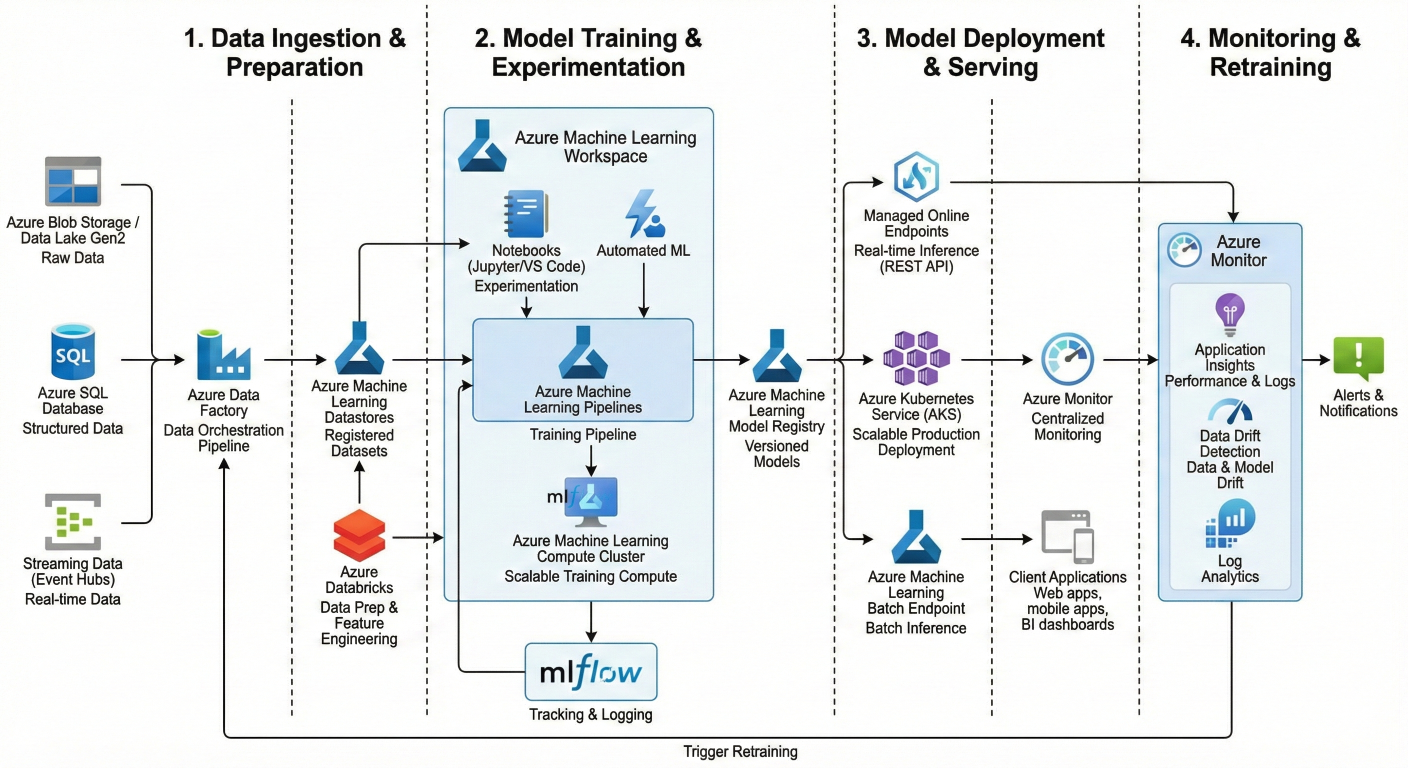
Architecture diagram showing complete MLOps workflow in Azure ML with data ingestion, model training, deployment, and monitoring components
MLOps isn't just about deploying models – it's about creating sustainable, scalable machine learning systems. Think of it as DevOps for machine learning, where you're managing not just code, but data and models too.
Traditional ML workflows look like this: data scientist builds model → throws it over the fence to engineering → hopes it works. MLOps flips that script completely.
Here's what MLOps brings to the table:
Faster experimentation and development – You can iterate quickly without breaking production systems.
Reliable deployments – Models get deployed consistently across environments.
Better quality assurance – Every model change gets tested and validated automatically.
End-to-end tracking – You know exactly what data trained which model version
Your workspace is your command center. Everything in Azure ML revolves around it – your experiments, models, compute resources, and deployments
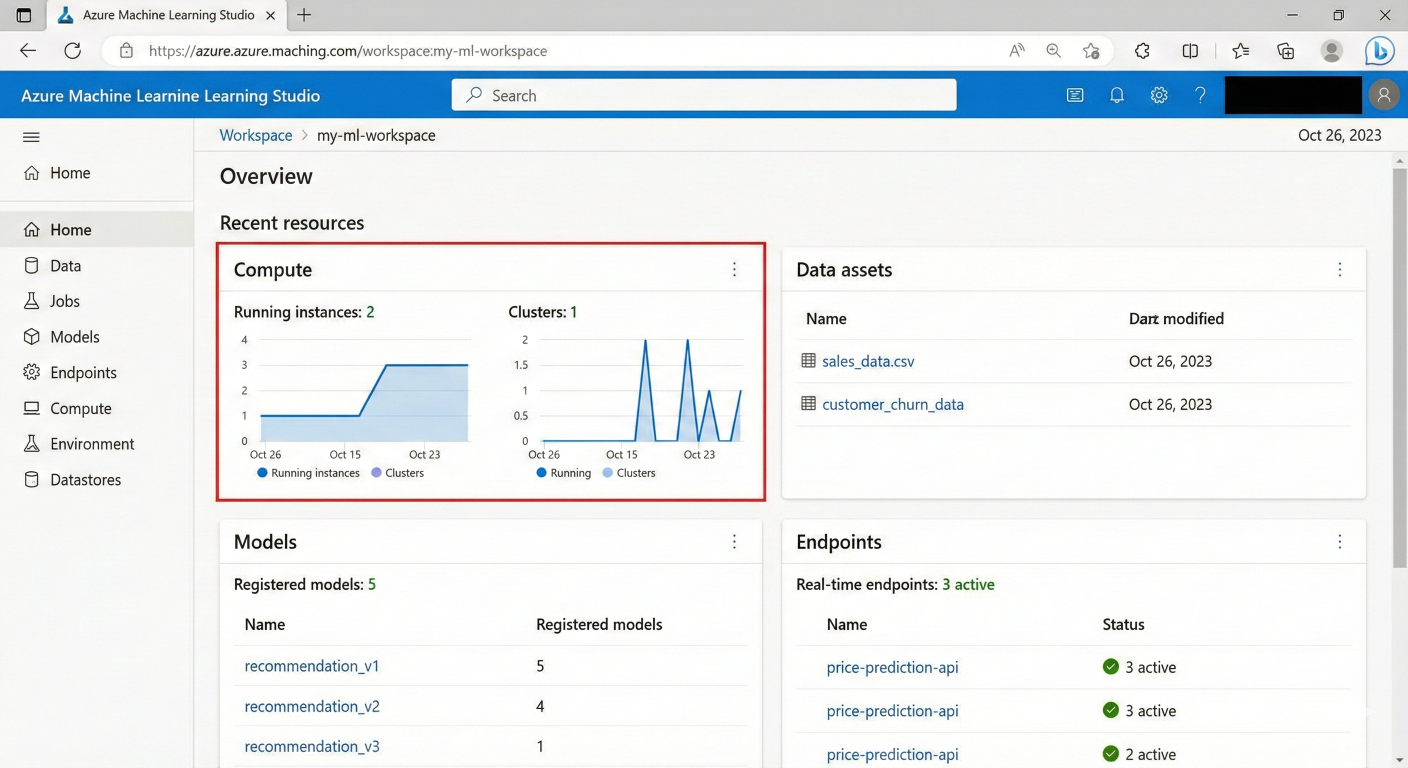
Screenshot of Azure ML Studio workspace overview showing key components like compute, data, models, and endpoints
Here's how to set it up properly:
from azure.ai.ml import MLClient
from azure.identity import DefaultAzureCredential

# Connect to your workspace
ml_client = MLClient(
    DefaultAzureCredential(),
    subscription_id="your-subscription-id",
    resource_group_name="your-resource-group",
    workspace_name="your-workspace-name"
)

# Verify connection
print(f"Connected to workspace: {ml_client.workspace_name}")
Pro tip: Use separate workspaces for development, staging, and production environments. This gives you proper isolation and governance.
Pipelines are where the magic happens. They're your automated workflows that handle everything from data preparation to model deployment
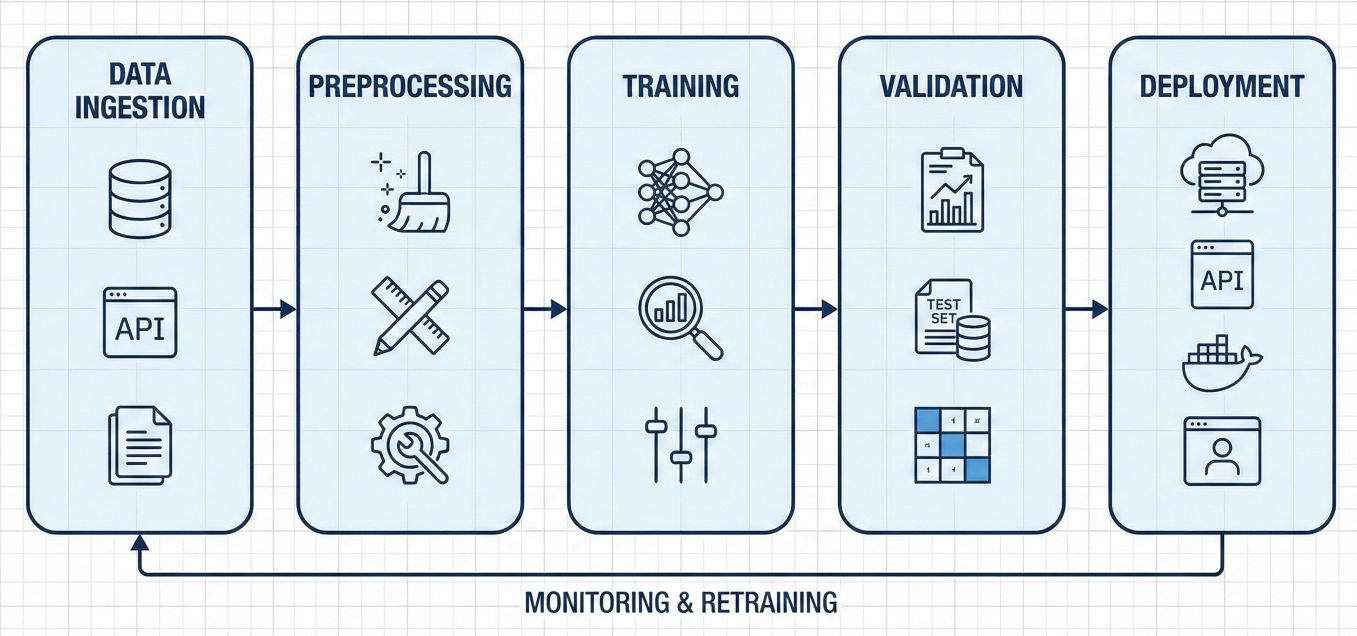
Flow diagram showing ML pipeline components: data ingestion → preprocessing → training → validation → deployment
Let's build a simple but complete pipeline:
from azure.ai.ml import command, pipeline, Input, Output
from azure.ai.ml.entities import Environment

# Define your components
@command
def data_prep_component(
    input_data: Input(type="uri_folder"),
    train_data: Output(type="uri_folder"),
    test_data: Output(type="uri_folder")
):
    return command(
        code="./src",
        command="python data_prep.py --input ${{inputs.input_data}} --train ${{outputs.train_data}} --test ${{outputs.test_data}}",
        environment="AzureML-sklearn-1.0-ubuntu20.04-py38-cpu@latest"
    )

@command
def train_component(
    train_data: Input(type="uri_folder"),
    model: Output(type="uri_folder")
):
    return command(
        code="./src",
        command="python train.py --train ${{inputs.train_data}} --model ${{outputs.model}}",
        environment="AzureML-sklearn-1.0-ubuntu20.04-py38-cpu@latest"
    )

# Build the pipeline
@pipeline()
def ml_training_pipeline(pipeline_input_data):
    # Data preparation step
    prep_step = data_prep_component(input_data=pipeline_input_data)

    # Training step
    train_step = train_component(train_data=prep_step.outputs.train_data)

    return {
        "trained_model": train_step.outputs.model,
        "test_data": prep_step.outputs.test_data
    }

# Create and submit the pipeline
pipeline_job = ml_training_pipeline(
    pipeline_input_data=Input(path="azureml://datastores/workspaceblobstore/paths/data/")
)

pipeline_job = ml_client.jobs.create_or_update(
    pipeline_job,
    experiment_name="mlops-demo"
)
This pipeline automatically handles dependencies between steps. If your data prep fails, training won't run. If training succeeds, you get a versioned model.
For production, you need more robust error handling and configuration:
@pipeline(
    default_compute="cpu-cluster",
    description="Production ML training pipeline"
)
def production_pipeline(
    pipeline_input_data,
    learning_rate: float = 0.01,
    max_epochs: int = 100
):
    # Data validation step
    validate_step = validate_data_component(input_data=pipeline_input_data)

    # Training with parameters
    train_step = train_component(
        train_data=validate_step.outputs.validated_data,
        learning_rate=learning_rate,
        max_epochs=max_epochs
    )

    # Model evaluation
    eval_step = evaluate_component(
        model=train_step.outputs.model,
        test_data=validate_step.outputs.test_data
    )

    # Only register if evaluation passes
    register_step = register_model_component(
        model=train_step.outputs.model,
        evaluation_results=eval_step.outputs.metrics
    )

    return {
        "registered_model": register_step.outputs.model_name
    }
Model versioning is where many teams stumble. Azure ML's model registry solves this elegantly.
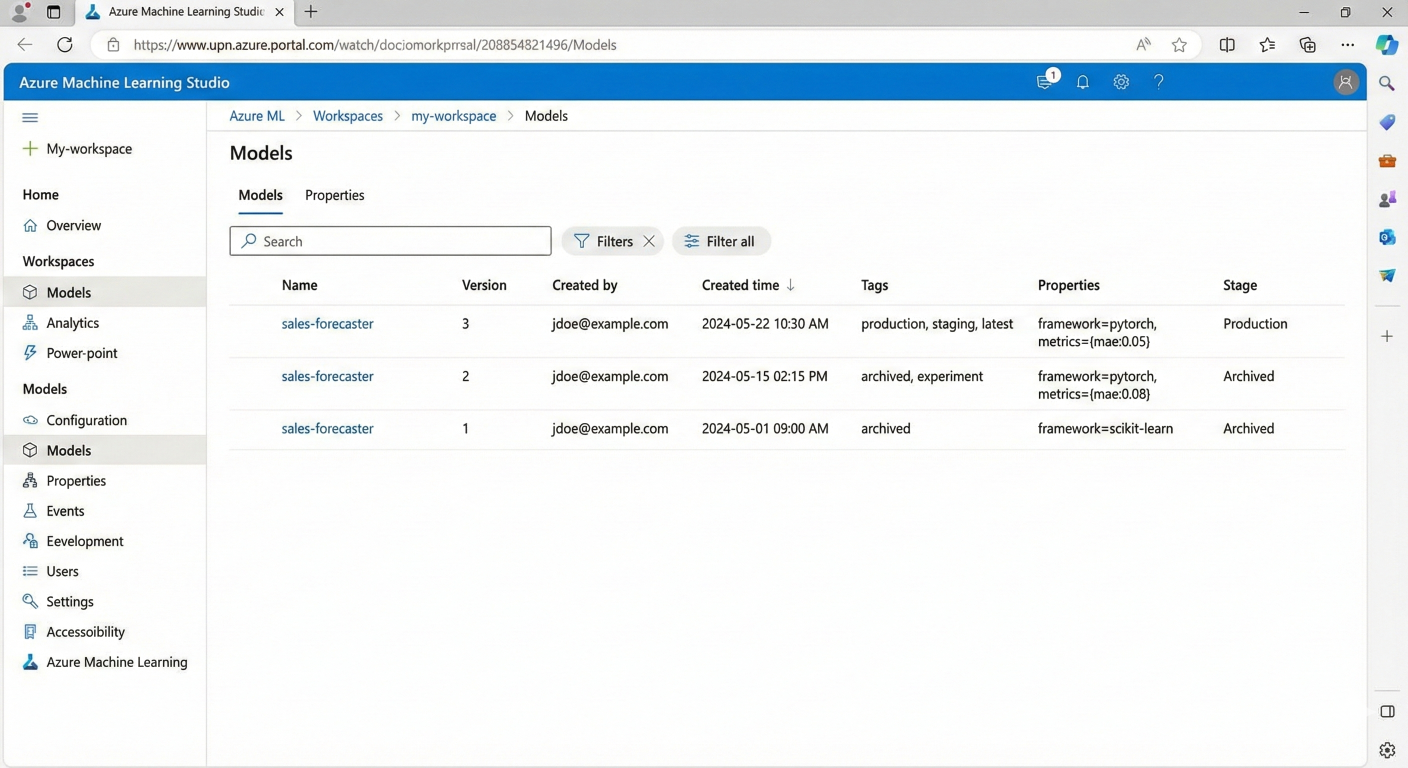
Screenshot of Azure ML model registry showing different model versions with metadata and tags
from azure.ai.ml.entities import Model

# Register with comprehensive metadata
model = Model(
    name="fraud-detection-model",
    version="1.0",
    path="./outputs/model",
    description="XGBoost model for credit card fraud detection",
    tags={{
        "accuracy": "0.95",
        "framework": "xgboost",
        "dataset_version": "2024-01",
        "training_date": "2024-01-15"
    }},
    properties={{
        "feature_count": "30",
        "model_size_mb": "15.2"
    }}
)

ml_client.models.create_or_update(model)
# Get latest version
latest_model = ml_client.models.get(name="fraud-detection-model", label="latest")

# Get specific version
specific_model = ml_client.models.get(name="fraud-detection-model", version="1.0")

# Get by tag
production_model = ml_client.models.list(
    name="fraud-detection-model",
    tag="environment=production"
)
The beauty of Azure ML's registry is that it automatically handles versioning. Each time you register with the same name, it creates a new version
Azure ML offers two deployment options, and choosing the right one is crucial.
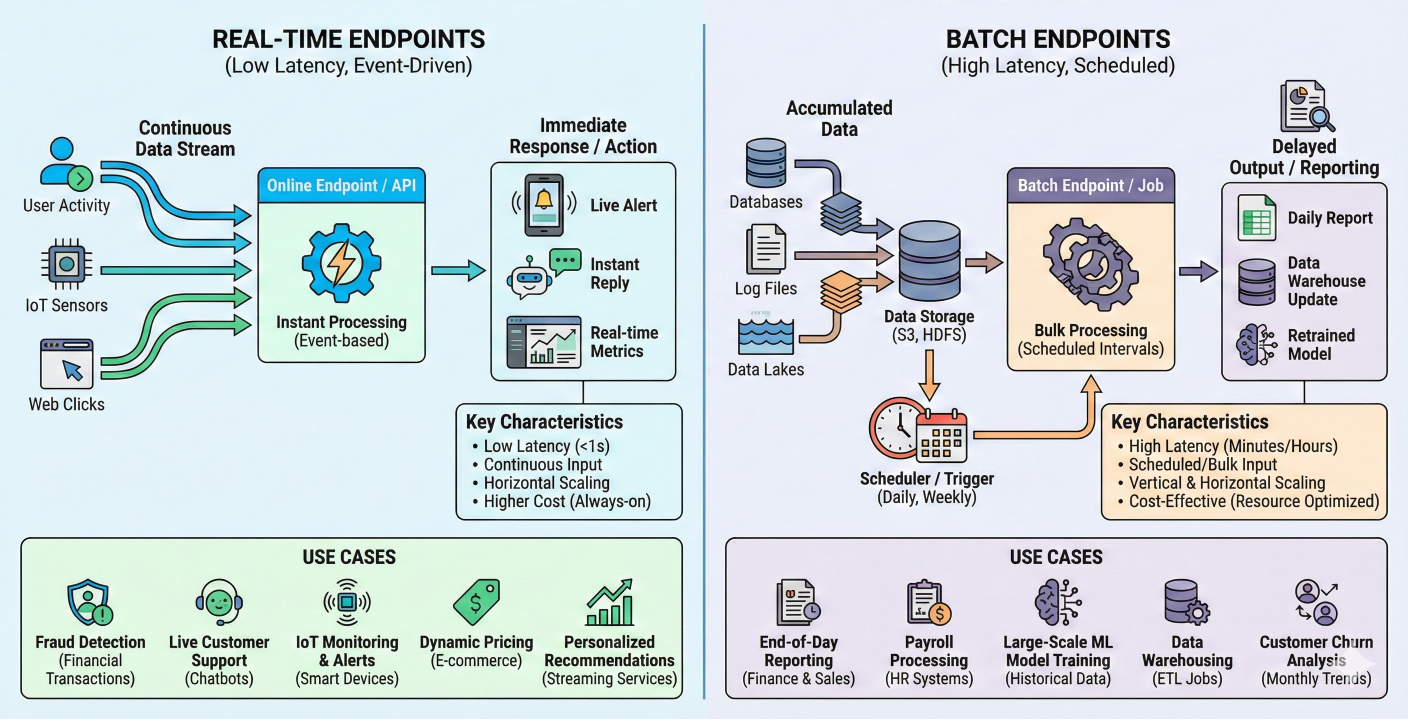
Comparison diagram showing real-time endpoints vs batch endpoints with use cases
Perfect for applications that need immediate responses:
from azure.ai.ml.entities import (
    ManagedOnlineEndpoint,
    ManagedOnlineDeployment,
    CodeConfiguration
)

# Create endpoint
endpoint = ManagedOnlineEndpoint(
    name="fraud-detection-endpoint",
    description="Real-time fraud detection API",
    auth_mode="key"
)

ml_client.online_endpoints.begin_create_or_update(endpoint).result()

# Create deployment
deployment = ManagedOnlineDeployment(
    name="blue",
    endpoint_name=endpoint.name,
    model=latest_model,
    code_configuration=CodeConfiguration(
        code="./score/",
        scoring_script="score.py"
    ),
    environment="AzureML-sklearn-1.0-ubuntu20.04-py38-cpu@latest",
    instance_type="Standard_DS3_v2",
    instance_count=2
)

ml_client.online_deployments.begin_create_or_update(deployment).result()

# Set traffic allocation
endpoint.traffic = {"blue": 100}
ml_client.online_endpoints.begin_create_or_update(endpoint).result()
When you need to process thousands of records:
from azure.ai.ml.entities import (
    BatchEndpoint,
    ModelBatchDeployment
)

# Create batch endpoint
batch_endpoint = BatchEndpoint(
    name="fraud-batch-scoring",
    description="Batch fraud detection for daily processing"
)

ml_client.batch_endpoints.begin_create_or_update(batch_endpoint).result()

# Create batch deployment
batch_deployment = ModelBatchDeployment(
    name="batch-v1",
    endpoint_name=batch_endpoint.name,
    model=latest_model,
    compute="cpu-cluster",
    instance_count=4,
    max_concurrency_per_instance=2,
    mini_batch_size=10,
    output_action="append_row"
)

ml_client.batch_deployments.begin_create_or_update(batch_deployment).result()
When to use which?
Deployed models aren't "set it and forget it." They need constant monitoring
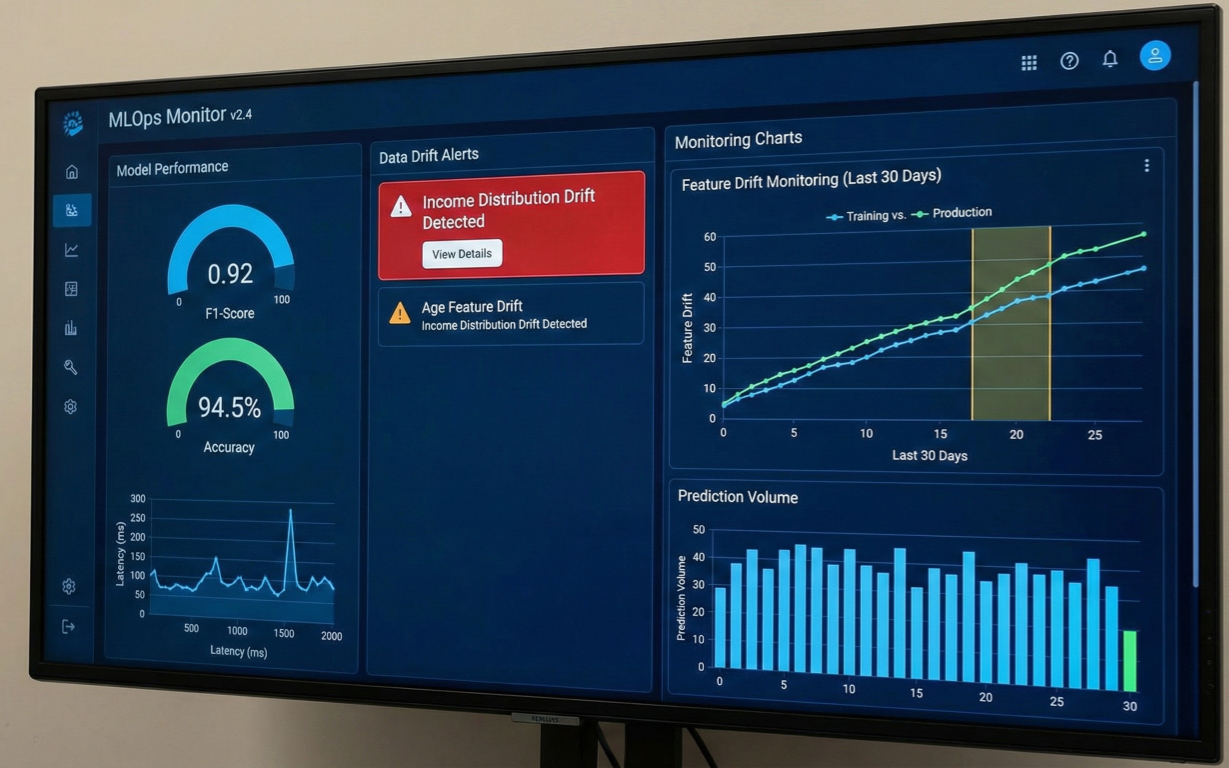
Dashboard showing model performance metrics, data drift alerts, and monitoring charts
Data drift happens when your production data changes from training data. Azure ML detects this automatically:
from azure.ai.ml.entities import (
    MonitorDefinition,
    MonitorSchedule,
    MonitoringTarget,
    AlertNotification
)

# Configure monitoring target
monitoring_target = MonitoringTarget(
    ml_task="classification",
    endpoint_deployment_id="azureml:fraud-detection-endpoint:blue"
)

# Set up alerts
alert_notification = AlertNotification(
    emails=['ml-team@company.com', 'ops-team@company.com']
)

# Create monitor definition
monitor_definition = MonitorDefinition(
    compute=ServerlessSparkCompute(
        instance_type="standard_e4s_v3",
        runtime_version="3.3"
    ),
    monitoring_target=monitoring_target,
    alert_notification=alert_notification
)

# Schedule monitoring
model_monitor = MonitorSchedule(
    name="fraud_detection_monitor",
    trigger=RecurrenceTrigger(
        frequency="day",
        interval=1,
        schedule=RecurrencePattern(hours=3, minutes=15)
    ),
    create_monitor=monitor_definition
)

ml_client.schedules.begin_create_or_update(model_monitor).result()
This automatically checks for drift daily and alerts your team when data patterns change.
This is where MLOps really shines – automated testing and deployment.
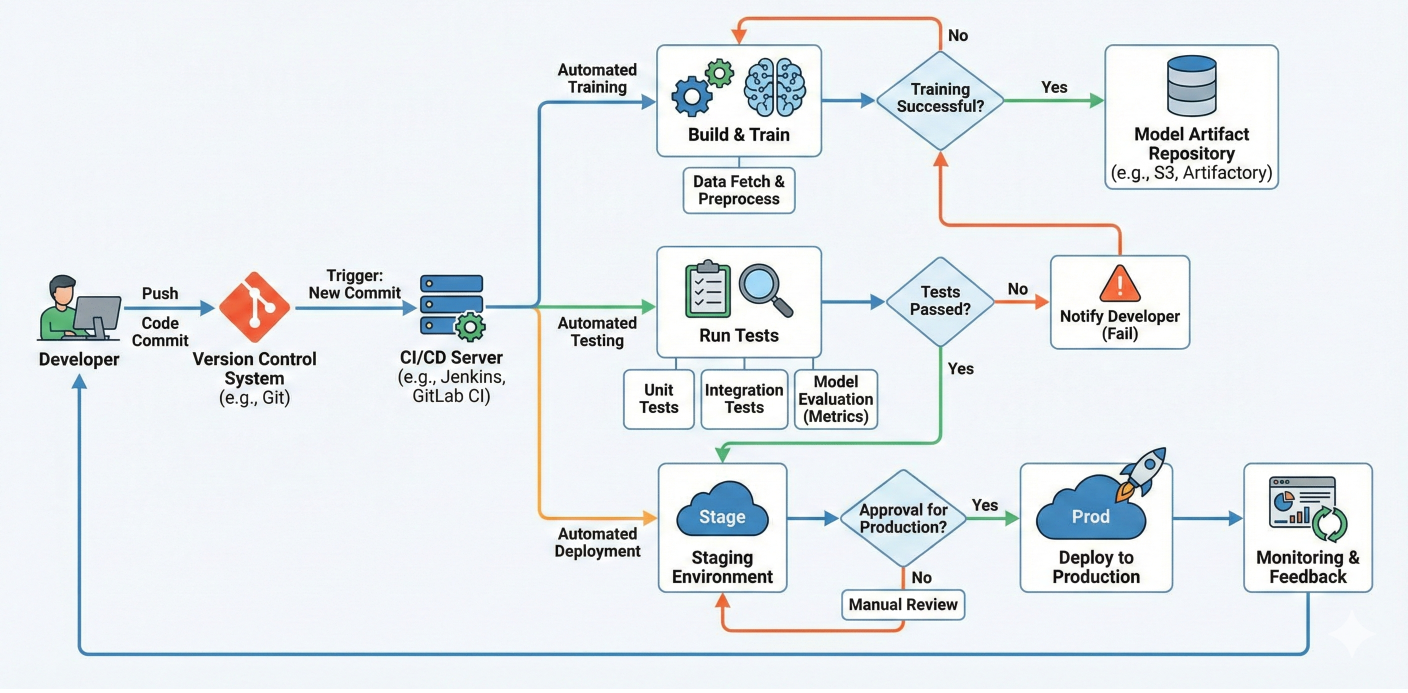
Flowchart showing CI/CD pipeline with code commits triggering automated training, testing, and deployment
Here's a complete workflow that trains, tests, and deploys automatically:
name: MLOps Pipeline

on:
  push:
    branches: [main]
  pull_request:
    branches: [main]

jobs:
  train-and-deploy:
    runs-on: ubuntu-latest

    steps:
    - uses: actions/checkout@v3

    - name: Azure Login
      uses: azure/login@v1
      with:
        creds: ${{ secrets.AZURE_CREDENTIALS }}

    - name: Setup Python
      uses: actions/setup-python@v3
      with:
        python-version: '3.8'

    - name: Install dependencies
      run: |
        pip install azure-ai-ml azure-identity

    - name: Train model
      run: |
        python scripts/train_pipeline.py
      env:
        SUBSCRIPTION_ID: ${{ secrets.AZURE_SUBSCRIPTION_ID }}
        RESOURCE_GROUP: ${{ secrets.AZURE_RESOURCE_GROUP }}
        WORKSPACE_NAME: ${{ secrets.AZURE_WORKSPACE_NAME }}

    - name: Deploy to staging
      if: github.event_name == 'pull_request'
      run: |
        python scripts/deploy_staging.py

    - name: Deploy to production
      if: github.ref == 'refs/heads/main'
      run: |
        python scripts/deploy_production.py
For enterprise environments, Azure DevOps provides more control:
# azure-pipelines.yml
trigger:
- main

pool:
  vmImage: 'ubuntu-latest'

stages:
- stage: Train
  jobs:
  - job: TrainModel
    steps:
    - task: AzureMLCLI@1
      displayName: 'Train ML Model'
      inputs:
        azureSubscription: 'Azure ML Service Connection'
        scriptLocation: 'inlineScript'
        inlineScript: |
          az ml job create --file pipeline.yml

- stage: Deploy
  dependsOn: Train
  condition: and(succeeded(), eq(variables['Build.SourceBranch'], 'refs/heads/main'))
  jobs:
  - deployment: DeployModel
    environment: 'production'
    strategy:
      runOnce:
        deploy:
          steps:
          - task: AzureMLCLI@1
            displayName: 'Deploy to Production'
            inputs:
              azureSubscription: 'Azure ML Service Connection'
              scriptLocation: 'inlineScript'
              inlineScript: |
                az ml online-deployment create --file deployment.yml
After working with hundreds of ML projects, here are the patterns that actually work:
Environment Management
Data Management
Model Governance
Security and Compliance
Pipeline Failures: Most failures happen during data preprocessing. Add robust error handling and data validation steps.
Deployment Issues: Environment mismatches are the #1 cause. Use the same environment definition across all stages.
Performance Degradation: Set up automated retraining when model performance drops below thresholds.
Cost Optimization: Use serverless compute for infrequent workloads, dedicated clusters for regular training
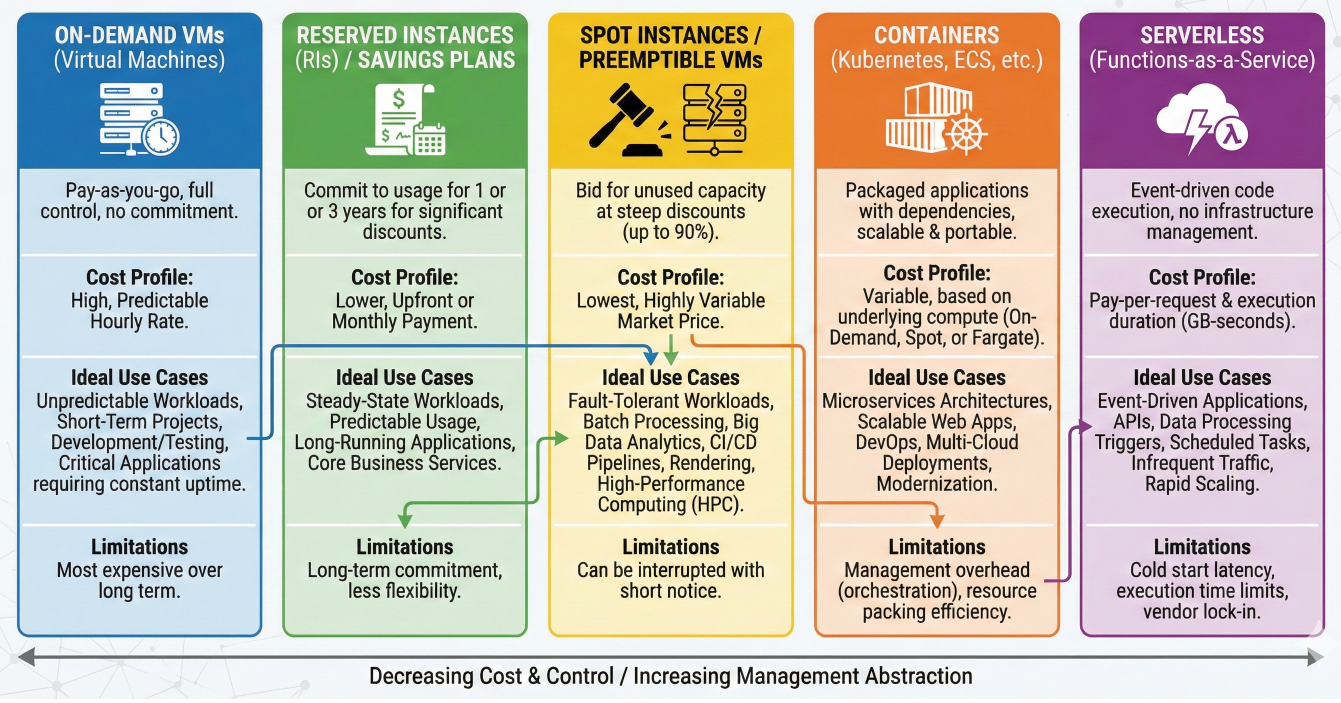
Cost optimization chart showing different compute options and their use cases
Let's put it all together with a complete fraud detection system:
# complete_mlops_pipeline.py
from azure.ai.ml import MLClient, command, pipeline, Input, Output
from azure.ai.ml.entities import Model, Environment

class FraudDetectionMLOps:
    def __init__(self, ml_client):
        self.ml_client = ml_client

    def create_training_pipeline(self):
        @pipeline(
            default_compute="cpu-cluster",
            description="Fraud detection training pipeline"
        )
        def fraud_training_pipeline(
            raw_data: Input,
            model_name: str = "fraud-model",
            test_size: float = 0.2
        ):
            # Data preprocessing
            prep_step = self.data_prep_component(
                raw_data=raw_data,
                test_size=test_size
            )

            # Feature engineering
            feature_step = self.feature_engineering_component(
                train_data=prep_step.outputs.train_data,
                test_data=prep_step.outputs.test_data
            )

            # Model training
            train_step = self.train_component(
                train_data=feature_step.outputs.train_features,
                test_data=feature_step.outputs.test_features
            )

            # Model evaluation
            eval_step = self.evaluate_component(
                model=train_step.outputs.model,
                test_data=feature_step.outputs.test_features
            )

            # Model registration
            register_step = self.register_component(
                model=train_step.outputs.model,
                model_name=model_name,
                metrics=eval_step.outputs.metrics
            )

            return {
                "registered_model": register_step.outputs.model_name,
                "model_metrics": eval_step.outputs.metrics
            }

        return fraud_training_pipeline

    def deploy_model(self, model_name: str, environment: str = "production"):
        # Get latest model version
        model = self.ml_client.models.get(name=model_name, label="latest")

        # Create endpoint configuration based on environment
        if environment == "production":
            instance_count = 3
            instance_type = "Standard_DS3_v2"
        else:
            instance_count = 1
            instance_type = "Standard_DS2_v2"

        # Deploy with zero-downtime deployment strategy
        self._deploy_with_blue_green(model, instance_count, instance_type)

    def _deploy_with_blue_green(self, model, instance_count, instance_type):
        # Implementation of blue-green deployment
        pass

# Usage
ml_client = MLClient.from_config()
fraud_mlops = FraudDetectionMLOps(ml_client)

# Create and run training pipeline
training_pipeline = fraud_mlops.create_training_pipeline()
pipeline_job = ml_client.jobs.create_or_update(
    training_pipeline(raw_data=Input(path="azureml://datasets/fraud-data/versions/latest")),
    experiment_name="fraud-detection-production"
)

# Deploy the trained model
fraud_mlops.deploy_model("fraud-model", "production")
You now have everything you need to build production-ready ML systems with Azure Machine Learning. But don't try to implement everything at once – start simple and gradually add complexity
Start with: Basic pipelines and model registration
Add next: Automated deployment and basic monitoring
Advanced: Full CI/CD integration and comprehensive governance
The key is building systems that your future self (and your team) will thank you for. Azure ML gives you all the tools – now it's time to put them to work.
Ready to transform your ML operations? Start with the Azure Machine Learning free tier and experiment with these concepts. Your production ML systems will never be the same.

SaratahKumar C
 Launch your Graphy