There are no items in your cart
Add More
Add More
| Item Details | Price | ||
|---|---|---|---|

Machine learning (ML) and artificial intelligence (AI) are no longer just buzzwords; they're essential capabilities that help organizations solve complex real-world problems and deliver incredible value to customers. But moving an ML model from a data scientist's notebook into a reliable, scalable production system is often where the real challenge begins. This is where MLOps comes in!
MLOps, or Machine Learning Operations, is a set of practices designed to automate and simplify the entire ML workflow and deployment process. Think of it as uniting the development (Dev) of ML applications with the system deployment and operations (Ops) of ML systems. Its core purpose is to manage the complete ML lifecycle, from initial development and experimentation all the way through deployment and continuous monitoring. The ultimate goal is to ensure that ML models are developed, tested, and deployed in a consistent, reliable, and scalable manner.
The Challenges MLOps Solves in the ML Lifecycle
Without MLOps, organizations often face significant hurdles when trying to operationalize their ML initiatives. One major issue is the inherent gap between development and operations teams. Data scientists focus on model accuracy, while operations teams prioritize system stability and scalability. This often leads to manual processes that create silos and communication breakdowns, hindering effective collaboration.
Beyond collaboration, several other challenges emerge:
Why AWS SageMaker is Your Go-To Platform for MLOps
Amazon SageMaker emerges as a powerful ally in navigating these MLOps complexities. It's a fully managed service that provides purpose-built tools covering the entire machine learning workflow. SageMaker is designed to automate and standardize processes across the ML lifecycle, effectively bridging that crucial development-operations gap.
The comprehensive nature of SageMaker directly addresses the inherent complexity of ML models compared to traditional software. ML models are often far more intricate, demanding specialized tools and techniques for their development and deployment. SageMaker provides a robust MLOps solution, with services like SageMaker Pipelines acting as a cornerstone. By offering a single, integrated suite of specialized tools for each stage of the ML lifecycle—from data processing and training to evaluation, registration, deployment, and monitoring—SageMaker abstracts away much of the underlying infrastructure complexity and the challenges of integrating disparate tools. This significantly simplifies the management of complex ML projects at scale.
A key advantage of SageMaker is its "fully managed" nature. For instance, SageMaker processing jobs are entirely managed, meaning you don't have to worry about setting up or tearing down compute clusters. This extends across many SageMaker services. The guidance to "Leverage Managed Services" within SageMaker's built-in capabilities helps simplify integration and reduce operational overhead. This means that a primary value proposition of SageMaker for MLOps isn't just providing a suite of services, but actively managing the underlying infrastructure for those services. This offloads a substantial operational burden—such as provisioning, scaling, and patching servers—from ML engineers and data scientists. The result is that these valuable team members can focus their energy on core ML development rather than infrastructure management, leading directly to improved efficiency and reduced operational costs.
The MLOps lifecycle is an iterative and interconnected process, quite different from a linear software development pipeline. It continuously evolves, with each phase influencing the others.
Let's quickly refresh our understanding of these critical phases:
The deep interconnectedness of these phases highlights the "continuous" nature of MLOps, which is a key differentiator from traditional software DevOps. As stated, "All three phases are interconnected and influence each other". This is why MLOps principles include "Continuous ML Training and Evaluation" and "Continuous Monitoring". Unlike standard software, ML models are prone to degradation over time due to data or concept drift. This necessitates a perpetual cycle of monitoring and retraining. This creates a vital feedback loop where insights from monitoring directly inform when and how to retrain models, and new data triggers new training cycles. This continuous feedback loop is a core element of MLOps, making the ML lifecycle a dynamic, perpetual process rather than a linear one.
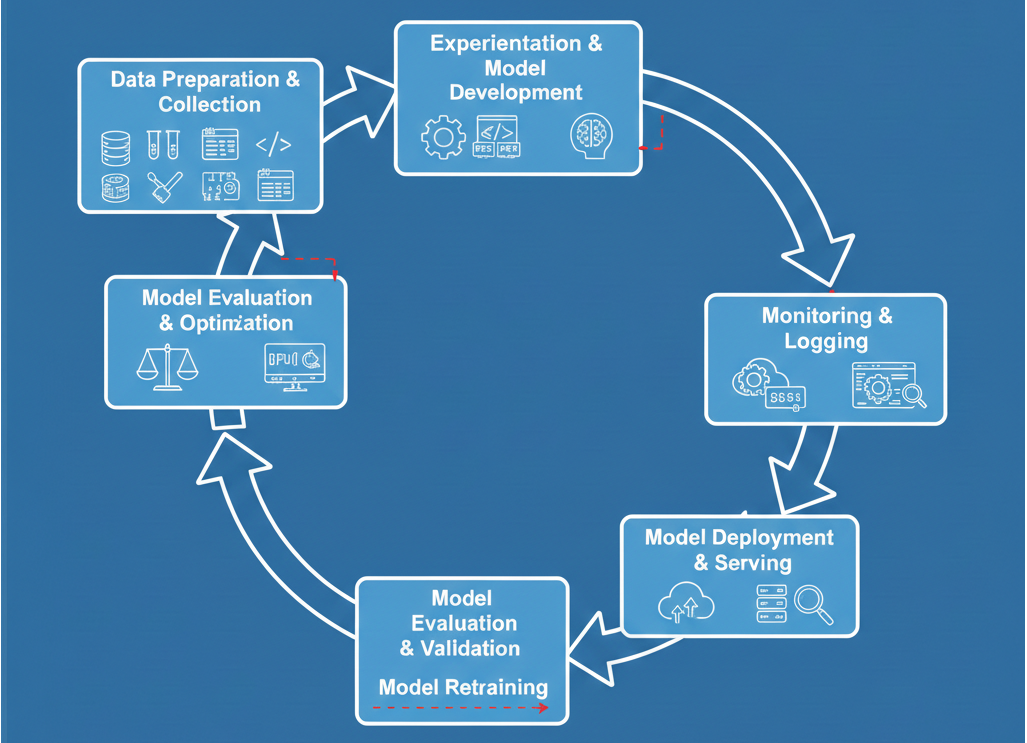
Diagram: Comprehensive MLOps Lifecycle Flowchart. This diagram should visually represent the iterative nature of the MLOps lifecycle, starting from data preparation, moving through experimentation, training, evaluation, deployment, and then looping back from monitoring to data preparation/retraining. It should clearly show feedback loops.
Amazon SageMaker offers a comprehensive suite of purpose-built tools specifically designed for MLOps. It helps automate and standardize processes across the entire ML lifecycle, effectively bridging the gap between ML development and operations.
SageMaker simplifies and automates the entire ML lifecycle by providing a unified platform for every step, from data labeling and model building to deployment and continuous monitoring. This significantly reduces repetitive manual steps, allowing data scientists to focus their valuable time and effort on building impactful ML models and discovering critical insights from data, rather than getting bogged down in infrastructure management.
To give you a clearer picture of how SageMaker empowers your MLOps journey, let's look at its key services and features:
SageMaker MLOps Services at a Glance
| SageMaker Service/Feature |
Primary MLOps Function | Key Benefits |
| SageMaker Studio & Projects | Standardized Environments, Infrastructure as Code, CI/CD Integration | Increased productivity, rapid project launch, consistent best practices across teams and environments |
| SageMaker Pipelines | Workflow Automation, Continuous Integration/Continuous Delivery (CI/CD) | Repeatable, auditable ML workflows; faster time-to-production; automated execution of ML stages |
| SageMaker Model Registry | Model Versioning, Governance, Centralized Management | Reproducibility, auditability, controlled deployment, simplified model selection and approval workflows |
| SageMaker Model Monitor | Continuous Monitoring (Data Drift, Concept Drift, Model Quality) | Proactive issue detection, real-time alerts for performance degradation, improved model reliability |
| SageMaker Clarify | Bias Detection & Explainability | Fairer and more ethical models, improved transparency, better interpretability of predictions |
| SageMaker Feature Store | Feature Management & Reuse | Consistency of features, reduced redundant data preparation time, improved collaboration among teams |
| ML Lineage Tracking | Reproducibility & Audit Trail | Easier troubleshooting, compliance support, clear understanding of model origins and transformations |
| MLflow Integration | Experiment Tracking & Collaboration | Improved repeatability of trials, shared insights across teams, efficient model selection |
| Model Deployment Options |
Optimized Inference (Performance/Cost) | High performance, low cost, broad selection of ML infrastructure and deployment strategies |
Let's dive deeper into some of these crucial SageMaker components and see how they empower your MLOps strategy.
SageMaker Studio provides an integrated development environment (IDE) for machine learning. Building on this, SageMaker Projects offer a powerful way to standardize your ML development. These projects provide pre-built templates that quickly provision standardized data science environments, complete with source control repositories, boilerplate code, and CI/CD pipelines. This effectively implements "infrastructure-as-code" for your ML workflows, ensuring consistency from the ground up.
The benefits of using SageMaker Projects are substantial. They significantly increase data scientist productivity by making it easy to launch new projects and seamlessly rotate data scientists across different initiatives. This standardization ensures consistent best practices are followed and maintains parity between development and production environments, reducing unexpected issues during deployment. For larger organizations, SageMaker Projects also support multi-account ML platforms. In such setups, ML engineers can create pipelines in GitHub repositories, and platform engineers can then convert these into AWS Service Catalog portfolios, making them easily consumable by data scientists across various accounts.
The strategic importance of SageMaker Projects for scaling MLOps across an organization cannot be overstated. The ability to standardize ML development environments directly translates to increased data scientist productivity and a faster pace of innovation. The mechanism where ML engineers define pipelines in GitHub and platform engineers transform them into Service Catalog portfolios for data scientists illustrates that SageMaker Projects are not merely tools for individual users. Instead, they facilitate a structured, governed approach to MLOps across an entire enterprise. This ensures consistency, enhances security, and aids compliance right from the inception of a project, which is fundamental for large-scale adoption and for mitigating operational risks.
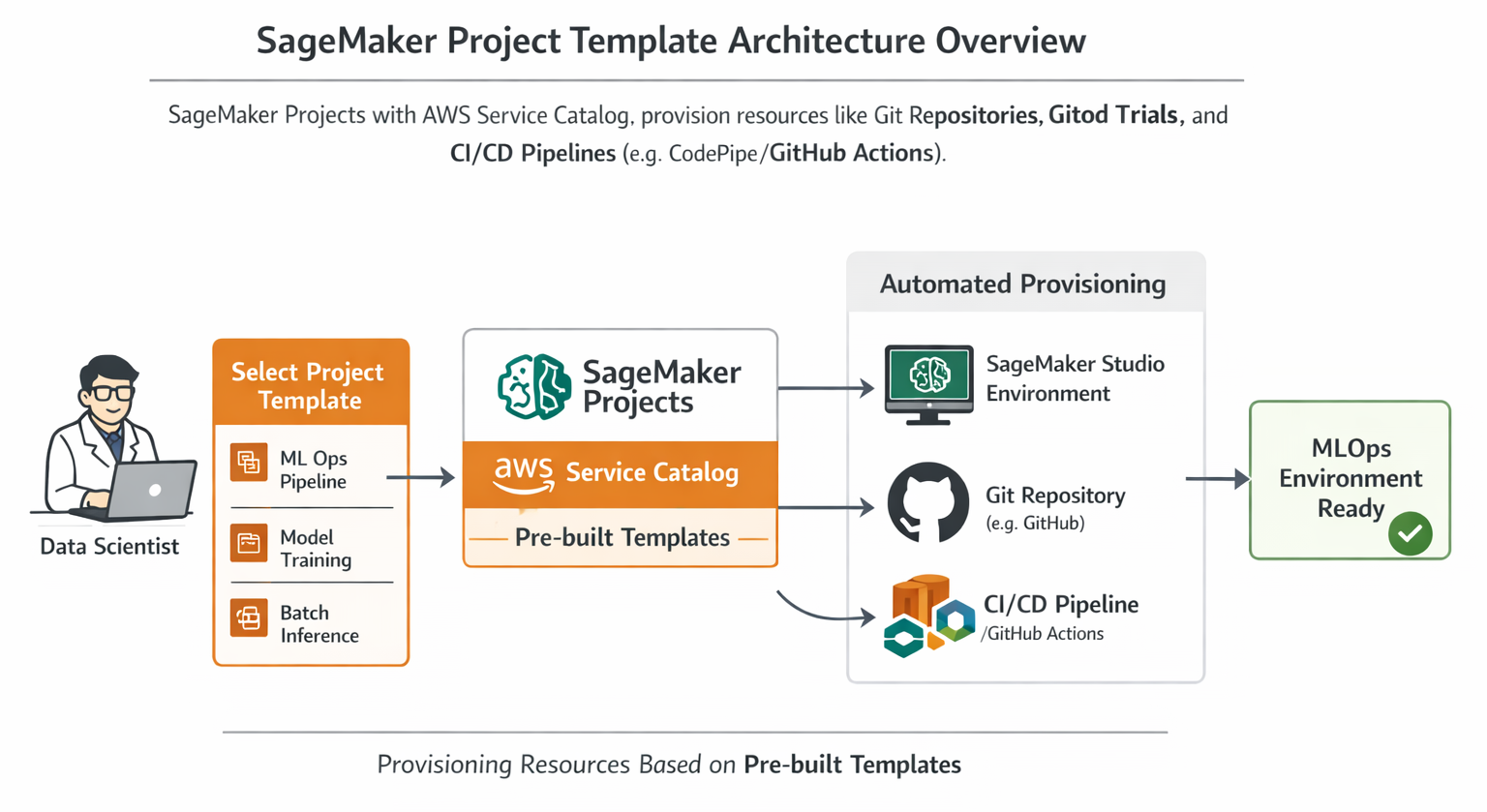
Diagram: SageMaker Project Template Architecture Overview. This diagram should illustrate how SageMaker Projects, integrating with AWS Service Catalog, provision resources like SageMaker Studio environments, Git repositories (e.g., GitHub), and CI/CD pipelines (e.g., CodePipeline/GitHub Actions) based on pre-built templates. It should show the flow from a data scientist selecting a template to the automated provisioning of their MLOps environment.
SageMaker Pipelines is a fully managed, scalable continuous integration and continuous delivery (CI/CD) service built specifically for machine learning workflows on AWS. It's a game-changer for automating your ML processes, allowing you to define, automate, and orchestrate complex ML workflows using modular, interconnected steps.
This service enables true end-to-end workflow automation:
SageMaker Pipelines significantly enhances reproducibility and traceability for your ML projects, and most importantly, it dramatically accelerates the time it takes to get models from development into production.
Here's a conceptual Python code snippet illustrating how you might define a basic SageMaker Pipeline:
from sagemaker.workflow.pipeline import Pipeline
from sagemaker.workflow.steps import ProcessingStep, TrainingStep, CreateModelStep
from sagemaker.processing import Processor
from sagemaker.estimator import Estimator
from sagemaker.model import Model
from sagemaker.workflow.model_step import ModelStep
from sagemaker.workflow.parameters import ParameterString, ParameterInteger

# Define pipeline parameters to make your pipeline flexible and reusable
processing_instance_type = ParameterString(name="ProcessingInstanceType", default_value="ml.m5.xlarge")
training_instance_type = ParameterString(name="TrainingInstanceType", default_value="ml.m5.xlarge")
model_approval_status = ParameterString(name="ModelApprovalStatus", default_value="PendingManualApproval")

# 1. Data Processing Step
# This step uses a SageMaker Processing job to prepare your raw data.
# You'd typically use a custom Docker image or a built-in SageMaker image for this.
processor = Processor(
    image_uri="<your-processing-image-uri>", # e.g., sagemaker.sklearn.processing.SKLearnProcessor.get_image_uri(...)
    role="<your-iam-role-arn>",
    instance_count=1,
    instance_type=processing_instance_type,
    base_job_name="data-processing-job"
)
processing_step = ProcessingStep(
    name="DataProcessing",
    processor=processor,
    inputs=[...], # Define input S3 data
    outputs=[...], # Define output S3 processed data
    code="preprocess.py"
)

# 2. Model Training Step
# This step trains your machine learning model using a SageMaker Estimator.
estimator = Estimator(
    image_uri="<your-training-image-uri>",
    role="<your-iam-role-arn>",
    instance_count=1,
    instance_type=training_instance_type,
    output_path="s3://<your-s3-bucket>/models",
    base_job_name="model-training-job"
)
training_step = TrainingStep(
    name="ModelTraining",
    estimator=estimator,
    inputs={"train": processing_step.properties.ProcessingOutputConfig.Outputs["train_data"].S3Output.S3Uri},
    code="train.py"
)

# 3. Model Registration Step
model = Model(
    image_uri=training_step.properties.AlgorithmSpecification.TrainingImage,
    model_data=training_step.properties.ModelArtifacts.S3ModelArtifacts,
    role="<your-iam-role-arn>"
)
register_model_step = ModelStep(
    name="RegisterModel",
    step_args=model.register(
        content_types=["text/csv"],
        response_types=["text/csv"],
        inference_instances=["ml.t2.medium", "ml.m5.large"],
        transform_instances=["ml.m5.xlarge"],
        model_package_group_name="<your-model-package-group-name>",
        approval_status=model_approval_status
    )
)

# Define the pipeline
pipeline = Pipeline(
    name="MyMLOpsPipeline",
    parameters=[
        processing_instance_type,
        training_instance_type,
        model_approval_status
    ],
    steps=[processing_step, training_step, register_model_step]
)

# To create or update:
# pipeline.upsert(role_arn="<your-iam-role-arn>")
# execution = pipeline.start()
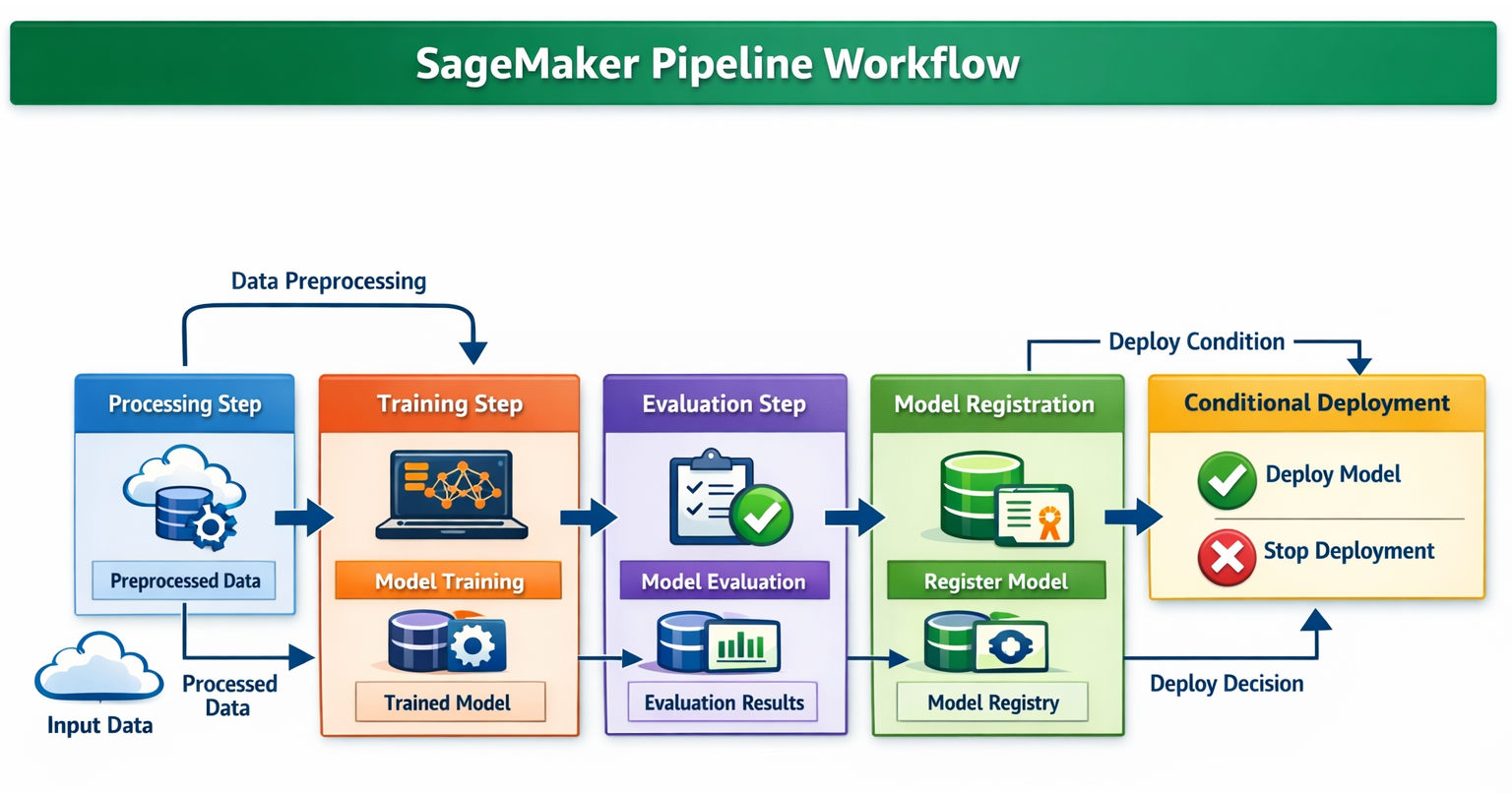
Diagram: Detailed SageMaker Pipeline Workflow. This diagram should show the sequential steps within a SageMaker Pipeline (Processing, Training, Evaluation, Registering, Conditional Deployment). It should highlight how data flows between steps and how artifacts are passed.
The SageMaker Model Registry serves as a central repository for all your machine learning models. It allows you to track model versions, their associated metadata (like the use case they belong to), and baseline performance metrics. This centralization is critical for effective MLOps.
The benefits of using the Model Registry are multifaceted:
The Model Registry functions as a critical "single source of truth" for ML models, which is foundational for enterprise-grade governance and risk management. The emphasis on "centrally track and manage model versions" and "automatically logs approval workflows for audit and compliance" underscores its role. Furthermore, the ability to ensure that every step in the ML lifecycle conforms to an organization's security, monitoring, and governance standards, thereby reducing overall risk, is directly supported by the Model Registry. By centralizing metadata, performance baselines, and approval statuses, it empowers organizations to meet regulatory requirements, effectively manage model risk, and guarantee that only validated, compliant models are deployed, leading to a significant reduction in overall operational risk.
Once your model is in production, its performance needs continuous oversight. SageMaker Model Monitor helps you maintain prediction quality by detecting crucial issues like model drift (when the model's performance degrades) and concept drift (when the relationship between input features and target changes) in real time. When these issues are detected, Model Monitor can send alerts, allowing you to take immediate action. It constantly monitors performance characteristics such as accuracy, ensuring your model remains effective.
Model Monitor is deeply integrated with SageMaker Clarify, a service that helps improve visibility into potential bias in your datasets and models. Clarify provides explainability insights, allowing you to understand why your model makes certain predictions. It can even detect bias before the data is fed into the model, helping you build fairer and more ethical AI systems from the outset.
Key monitoring capabilities include:
Here's a conceptual Python snippet for setting up a basic Model Monitor schedule:
from sagemaker.model_monitor import ModelMonitor, MonitoringSchedule, DataCaptureConfig
from sagemaker.model_monitor.dataset_format import DatasetFormat
from sagemaker import Session # Assuming sagemaker_session is defined

# Assume 'endpoint_name' is your deployed SageMaker endpoint
# Assume 'role' is your IAM role ARN
# Assume 'sagemaker_session' is an initialized SageMaker Session object

# 1. Enable Data Capture on your Endpoint (Crucial for Model Monitor)
# This configuration tells SageMaker to capture inference request and response data
# and store it in an S3 bucket for analysis by Model Monitor.
data_capture_config = DataCaptureConfig(
    enable_capture=True,
    sampling_percentage=100, # Capture all data for comprehensive monitoring
    destination_s3_uri="s3://<your-s3-bucket>/model-monitor-data-capture",
    kms_key_id="<your-kms-key-id>" # Optional: KMS key for encryption
)
# When deploying your model, you would pass this config:
# predictor = model.deploy(..., data_capture_config=data_capture_config)
# If your endpoint is already deployed, you would update its configuration to enable data capture.

# 2. Create a Model Monitor instance
# This defines the compute resources and role for the monitoring jobs.
my_monitor = ModelMonitor(
    role=role,
    instance_count=1,
    instance_type="ml.m5.xlarge", # Choose an appropriate instance type for monitoring jobs
    volume_size_in_gb=20,
    max_runtime_in_seconds=3600, # Max duration for a monitoring job
    sagemaker_session=sagemaker_session
)

# 3. Create a Baseline Job (from training data)
# Model Monitor establishes a baseline by analyzing your training data.
# This baseline includes statistics and constraints that are then used to detect deviations
# in your production inference data.
# For simplicity, let's assume you have a training dataset in S3.
training_data_s3_uri = "s3://<your-s3-bucket>/training-data/train.csv"
baseline_output_s3_uri = "s3://<your-s3-bucket>/model-monitor-baseline-output"

# Suggesting a baseline job for data quality
data_quality_baseline_job = my_monitor.suggest_baseline(
    baseline_dataset=training_data_s3_uri,
    dataset_format=DatasetFormat.csv(header=True),
    output_s3_uri=f"{baseline_output_s3_uri}/data_quality"
)
# You would typically run this job and wait for it to complete
# data_quality_baseline_job.wait(logs=False)

# 4. Create a Monitoring Schedule
# This sets up a recurring job to analyze the captured inference data against the baseline.
monitoring_schedule = MonitoringSchedule(
    endpoint_name=endpoint_name,
    monitor_app_output_uri="s3://<your-s3-bucket>/model-monitor-output", # Output location for monitoring reports
    role=role,
    sagemaker_session=sagemaker_session,
    schedule_name="my-model-monitoring-schedule",
    monitoring_schedule_interval_minutes=60, # Run monitoring job every hour
    data_quality_baseline_config=data_quality_baseline_job.get_baseline_config(), # Link to the generated baseline
    # You can add model_quality_baseline_config, bias_baseline_config, explainability_baseline_config similarly
)

# Start the monitoring schedule
# monitoring_schedule.start()
The continuous monitoring capabilities provided by Model Monitor and Clarify transform reactive troubleshooting into a proactive approach to model governance and ethical AI. The ability to constantly monitor performance and detect drift, along with sending alerts for "immediate action", is crucial. Furthermore, the emphasis on "Bias Detection & Explainability" via Clarify extends beyond simply keeping models operational. It ensures they remain
accurate, fair, and transparent over time. This proactive stance, enabled by automated monitoring and integrated bias detection, is fundamental for maintaining trust in ML systems, adhering to ethical AI principles, and reducing the long-term operational costs associated with model failures and reputational damage. This elevates MLOps beyond mere system uptime to continuous quality assurance and responsible AI.
Feature engineering is often one of the most time-consuming and complex parts of the ML workflow. The SageMaker Feature Store addresses this by centralizing feature storage for reuse across different teams and projects. It supports both online stores for low-latency, real-time inference and offline stores for training and batch inference.
The advantages of using a Feature Store are clear: it ensures consistency and reusability of features across your organization, significantly reduces redundant data preparation efforts, and fosters better collaboration among data scientists and engineers.
The Feature Store is a foundational component for scaling ML development and fostering collaboration. The observation that it "centralizes feature storage for reuse across teams and projects" and supports "Online and offline feature storage" for "feature reuse" points to a critical bottleneck solution in ML development: the often-repeated and inconsistent process of feature engineering. By providing a centralized, versioned, and easily accessible repository of features, the Feature Store accelerates experimentation, guarantees consistency between features used for training and those used for inference, and enables multiple teams to leverage the same high-quality features. This significantly boosts productivity and reduces errors across the entire organization.
Reproducibility and traceability are paramount in MLOps, especially for debugging, auditing, and compliance.
The combination of lineage tracking and MLflow integration is critical for building trust and ensuring compliance in ML systems. The emphasis on an "audit trail of model artifacts" and the ability to "reproduce models for troubleshooting" goes beyond simple debugging. The fact that "lineage tracking provides a view of a model's inflows and outflows" and serves as a "record from which all system processes can be recreated, and it provides an audit trail for analysis" highlights its deeper purpose. This is about establishing trust and accountability. In regulated industries or for critical business decisions, the ability to fully trace a model's journey from raw data to production—including all transformations, parameters, and code versions—is paramount for auditing, ensuring compliance, and explaining decisions made by the model.
While SageMaker Projects offer robust, built-in CI/CD capabilities, many organizations already have established CI/CD tools and practices, often centered around platforms like GitHub Actions. Integrating SageMaker with external CI/CD tools provides immense flexibility, allowing you to leverage existing investments and create complex, multi-stage workflows that might span beyond the AWS ecosystem.
GitHub Actions is a popular choice for CI/CD automation, offering powerful workflows for building, testing, and deploying ML models. It integrates well with popular machine learning frameworks like TensorFlow and PyTorch. This approach allows for a hybrid MLOps solution that combines the best of SageMaker's specialized ML services with the versatility of a general-purpose CI/CD platform.
The choice of CI/CD tool often reflects an organization's existing DevOps maturity and its broader hybrid cloud strategy. The explicit mention of GitHub Actions as a CI/CD automation tool, coupled with details on how SageMaker Projects can integrate with "third-party git repositories with CodePipeline" or directly with GitHub Actions, illustrates a key understanding. AWS recognizes that organizations frequently have pre-existing CI/CD investments and preferences. SageMaker's flexibility to integrate with external tools like GitHub Actions means it can adapt to diverse enterprise environments rather than forcing a complete migration to AWS-native CI/CD. This significantly lowers the barrier to MLOps adoption for many companies.
Before you can build an end-to-end MLOps pipeline using SageMaker and GitHub Actions, you'll need to set up a few prerequisites:
Contents (to read/write code) and Actions (to manage workflows, runs, and artifacts).iam/GithubActionsMLOpsExecutionPolicy.json) to allow GitHub Actions to deploy SageMaker endpoints and interact with other AWS services on your behalf.Your ML codebase, including your SageMaker pipeline definitions and CI/CD workflow files, will typically reside in a GitHub repository.
.github/workflows directory where your GitHub Actions workflow files (e.g., build.yml and deploy.yml) are stored. Your SageMaker pipeline definition scripts might reside in a seedcode/pipelines directory within your repository.AWS_ACCESS_KEY_ID and AWS_SECRET_ACCESS_KEY.production), you can enforce protection rules, such as requiring manual approval from designated reviewers before any code is deployed to that environment.The model build pipeline is responsible for preparing data, training, evaluating, and registering your ML model. This process is typically orchestrated by a GitHub Actions workflow.
build.yml workflow is usually configured to trigger automatically on code changes, such as pushes to your main branch in the ML code repository.build_pipeline.py located in your seedcode/pipelines directory) is executed. This script uses the SageMaker SDK to define and update your SageMaker Pipeline. This pipeline encapsulates the core ML workflow steps:PendingManualApproval status, requiring human review before deployment.Here's a conceptual build.yml workflow in YAML format:
name: SageMaker MLOps Build Pipeline

on:
  push:
    branches:
      - main # Trigger this workflow on pushes to the 'main' branch

env:
  AWS_REGION: us-east-1 # Your specific AWS region
  SAGEMAKER_PROJECT_NAME: MyMLProject # The name of your SageMaker Project

jobs:
  build:
    runs-on: ubuntu-latest # The type of runner to use for the job
    steps:
      - name: Checkout code
        uses: actions/checkout@v3 # Action to checkout your repository code

      - name: Configure AWS credentials
        uses: aws-actions/configure-aws-credentials@v2 # Action to configure AWS credentials
        with:
          aws-access-key-id: ${{ secrets.AWS_ACCESS_KEY_ID }} # Access key from GitHub Secrets
          aws-secret-access-key: ${{ secrets.AWS_SECRET_ACCESS_KEY }} # Secret key from GitHub Secrets
          aws-region: ${{ env.AWS_REGION }} # AWS region from environment variable

      - name: Set up Python
        uses: actions/setup-python@v4 # Action to set up Python environment
        with:
          python-version: '3.9' # Specify the Python version

      - name: Install dependencies
        run: |
          pip install -r requirements.txt # Install Python dependencies (e.g., sagemaker, boto3)

      - name: Run SageMaker Pipeline build script
        run: |
          python seedcode/pipelines/build_pipeline.py \
            --region ${{ env.AWS_REGION }} \
            --project-name ${{ env.SAGEMAKER_PROJECT_NAME }}
        # This Python script (build_pipeline.py) is responsible for defining and
        # upserting the SageMaker Pipeline that handles data processing,
        # model training, evaluation, and model registration.
Once a model is successfully built and registered, the deployment pipeline takes over to get it into production. This is often an event-driven process.
PendingManualApproval to Approved), an Amazon EventBridge rule can be configured to detect this event. This EventBridge rule then triggers an AWS Lambda function. The Lambda function, in turn, initiates the GitHub Actions deployment workflow, passing relevant information like the model package ARN.deploy.yml workflow in GitHub Actions handles the actual deployment to different environments. It can implement various deployment strategies:Here's a conceptual deploy.yml workflow in YAML format:
name: SageMaker MLOps Deploy Pipeline

on:
  workflow_dispatch: # Allows manual triggering of the workflow for testing purposes
  repository_dispatch: # Triggered by an external event (e.g., AWS Lambda/EventBridge)
    types: [model_approved] # Custom event type indicating a model has been approved

env:
  AWS_REGION: us-east-1 # Your specific AWS region
  SAGEMAKER_PROJECT_NAME: MyMLProject # The name of your SageMaker Project
  MODEL_PACKAGE_ARN: ${{ github.event.client_payload.model_package_arn }} # Model Package ARN passed from the triggering Lambda function

jobs:
  deploy-to-staging:
    runs-on: ubuntu-latest
    steps:
      - name: Checkout code
        uses: actions/checkout@v3

      - name: Configure AWS credentials
        uses: aws-actions/configure-aws-credentials@v2
        with:
          aws-access-key-id: ${{ secrets.AWS_ACCESS_KEY_ID }}
          aws-secret-access-key: ${{ secrets.AWS_SECRET_ACCESS_KEY }}
          aws-region: ${{ env.AWS_REGION }}

      - name: Set up Python
        uses: actions/setup-python@v4
        with:
          python-version: '3.9'

      - name: Install dependencies
        run: |
          pip install -r requirements.txt # Install Python dependencies

      - name: Deploy model to Staging
        run: |
          python deploy_model.py \
            --model-package-arn ${{ env.MODEL_PACKAGE_ARN }} \
            --environment staging \
            --region ${{ env.AWS_REGION }} \
            --endpoint-name "${{ env.SAGEMAKER_PROJECT_NAME }}-staging"
        # This script (deploy_model.py) would use the SageMaker SDK to deploy
        # the specified model package to a staging endpoint.

  deploy-to-production:
    needs: deploy-to-staging # This job runs only after 'deploy-to-staging' completes successfully
    if: success() # Ensure the previous job was successful
    runs-on: ubuntu-latest
    environment: production # This environment requires manual approval in GitHub settings
    steps:
      - name: Checkout code
        uses: actions/checkout@v3

      - name: Configure AWS credentials
        uses: aws-actions/configure-aws-credentials@v2
        with:
          aws-access-key-id: ${{ secrets.AWS_ACCESS_KEY_ID }}
          aws-secret-access-key: ${{ secrets.AWS_SECRET_ACCESS_KEY }}
          aws-region: ${{ env.AWS_REGION }}

      - name: Set up Python
        uses: actions/setup-python@v4
        with:
          python-version: '3.9'

      - name: Install dependencies
        run: |
          pip install -r requirements.txt

      - name: Deploy model to Production
        run: |
          python deploy_model.py \
            --model-package-arn ${{ env.MODEL_PACKAGE_ARN }} \
            --environment production \
            --region ${{ env.AWS_REGION }} \
            --endpoint-name "${{ env.SAGEMAKER_PROJECT_NAME }}-production" \
            --deployment-strategy BlueGreen # Example: Using a Blue/Green deployment strategy
        # This script would deploy the model package to a production endpoint,
        # potentially leveraging advanced deployment strategies offered by SageMaker.
The integration of SageMaker's specialized ML services with general-purpose CI/CD tools like GitHub Actions exemplifies the hybrid nature of modern MLOps. The approach outlined, where SageMaker Projects are configured with GitHub for CI/CD, and EventBridge and Lambda are used to trigger GitHub Actions based on SageMaker Model Registry events, demonstrates a crucial point. A truly robust MLOps solution often does not rely solely on a single platform's native tools. Instead, it strategically combines the strengths of specialized ML services, such as SageMaker's managed training, monitoring, and model registry, with the flexibility and widespread adoption of general-purpose CI/CD platforms like GitHub Actions for code management, approval workflows, and overall orchestration. This hybrid strategy enables organizations to build highly customized, secure, and efficient pipelines that are tailored to their unique operational landscape.
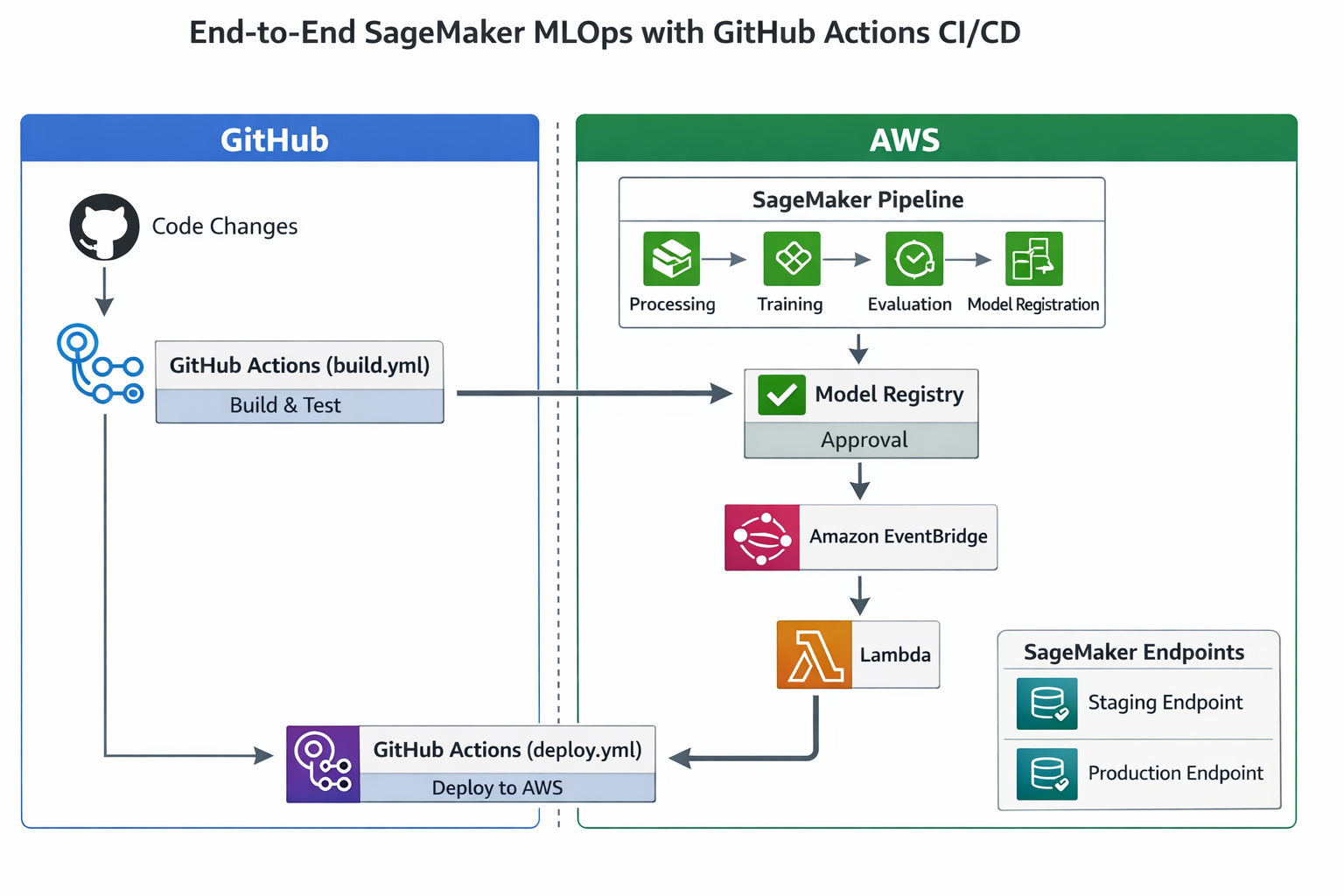
Architecture Diagram: End-to-End SageMaker MLOps with GitHub Actions CI/CD. This diagram should show the full flow: Code changes in GitHub -> GitHub Actions (build.yml) -> SageMaker Pipeline (Processing, Training, Evaluation, Model Registration) -> Model Registry (Approval) -> EventBridge -> Lambda -> GitHub Actions (deploy.yml) -> SageMaker Endpoints (Staging/Production). It should clearly delineate the roles of AWS services and GitHub.
To summarize how SageMaker aligns with core MLOps principles, let's look at this comprehensive table:
| MLOps Principle |
How SageMaker Addresses It |
Benefits |
| Continuous Integration (CI) | SageMaker Pipelines automate the ML workflow, integrating with CI/CD tools like SageMaker Projects for source control and automated builds. | Ensures code quality, automates testing (data, feature, unit, integration), and validates the ML system end-to-end, catching issues early. |
| Continuous Delivery (CD) | SageMaker Pipelines facilitate automated model deployment. SageMaker Model Registry manages model versions and approval. SageMaker offers various deployment strategies (Blue/Green, Canary) with auto-rollback. | Accelerates time-to-production, reduces deployment risk, ensures consistent and reliable model releases. |
| Continuous Training (CT) | SageMaker Pipelines can be configured to automatically retrain models based on new data or performance degradation triggers. | Maintains model relevance and accuracy over time, adapting to changing data patterns and business needs. |
| Continuous Monitoring (CM) | SageMaker Model Monitor detects data drift, concept drift, and model quality degradation in real time. SageMaker Clarify identifies bias and provides explainability. | Proactively identifies issues, sends alerts, ensures model reliability, and supports responsible AI practices. |
| Versioning & Reproducibility | SageMaker Model Registry centrally tracks model versions and metadata. ML Lineage Tracking provides an audit trail of all workflow steps and artifacts | Enables precise recreation of models, facilitates debugging, supports auditing, and ensures compliance. |
| Experimentation Management | MLflow Integration with SageMaker allows tracking of inputs, outputs, and metrics across training iterations. SageMaker Studio provides an integrated environment. | Improves repeatability of trials, fosters collaboration among data scientists, and streamlines model selection. |
| Data-centric Management | SageMaker Feature Store centralizes feature storage for reuse. SageMaker Processing jobs handle data preparation. | Ensures data consistency, reduces redundant feature engineering, and improves data governance. |
| Governance & Collaboration | SageMaker Projects provide standardized environments and enforce best practices. Model Registry logs approval workflows. Multi-account support enhances security and compliance. | Increases data scientist productivity, reduces operational risk, ensures security, and promotes cross-functional alignment |
| Scalability & Performance |
SageMaker's fully managed services handle compute infrastructure. Optimized deployment options (real-time, batch, serverless) ensure high performance and cost efficiency. |
Supports large-scale training and inference, automatically scales resources based on workload, and optimizes operational costs. |
This table provides a structured, comprehensive view, directly linking abstract MLOps principles to concrete SageMaker services and their benefits. It reinforces understanding by showing how SageMaker's features collectively contribute to a mature MLOps system, making it easier to grasp the "why" behind each component and how they fit into the bigger picture of MLOps best practices.
We've explored how AWS SageMaker provides a robust, comprehensive platform for implementing MLOps, transforming the often-complex journey of machine learning models from development to production. By offering purpose-built, fully managed services for every stage of the ML lifecycle—from standardized environments and automated pipelines to centralized model governance, continuous monitoring, and full traceability—SageMaker empowers organizations to build, deploy, and manage ML systems with unprecedented efficiency, reliability, and control.
The integration capabilities of SageMaker with external CI/CD tools like GitHub Actions further extend its versatility, allowing teams to leverage existing DevOps practices while benefiting from SageMaker's specialized ML functionalities. This hybrid approach ensures that your MLOps strategy can be tailored to your organization's unique needs, fostering collaboration, accelerating innovation, and ensuring the long-term success of your AI initiatives.

SaratahKumar C
 Launch your Graphy