There are no items in your cart
Add More
Add More
| Item Details | Price | ||
|---|---|---|---|

The landscape of artificial intelligence is rapidly evolving from single-agent systems to sophisticated multi-agent ecosystems where LLM-powered agents collaborate, negotiate, and coordinate tasks autonomously. Agent-to-Agent (A2A) interaction in Generative AI represents a paradigm shift from isolated AI assistants to intelligent teams that can tackle complex, multifaceted problems through structured collaboration and communication.
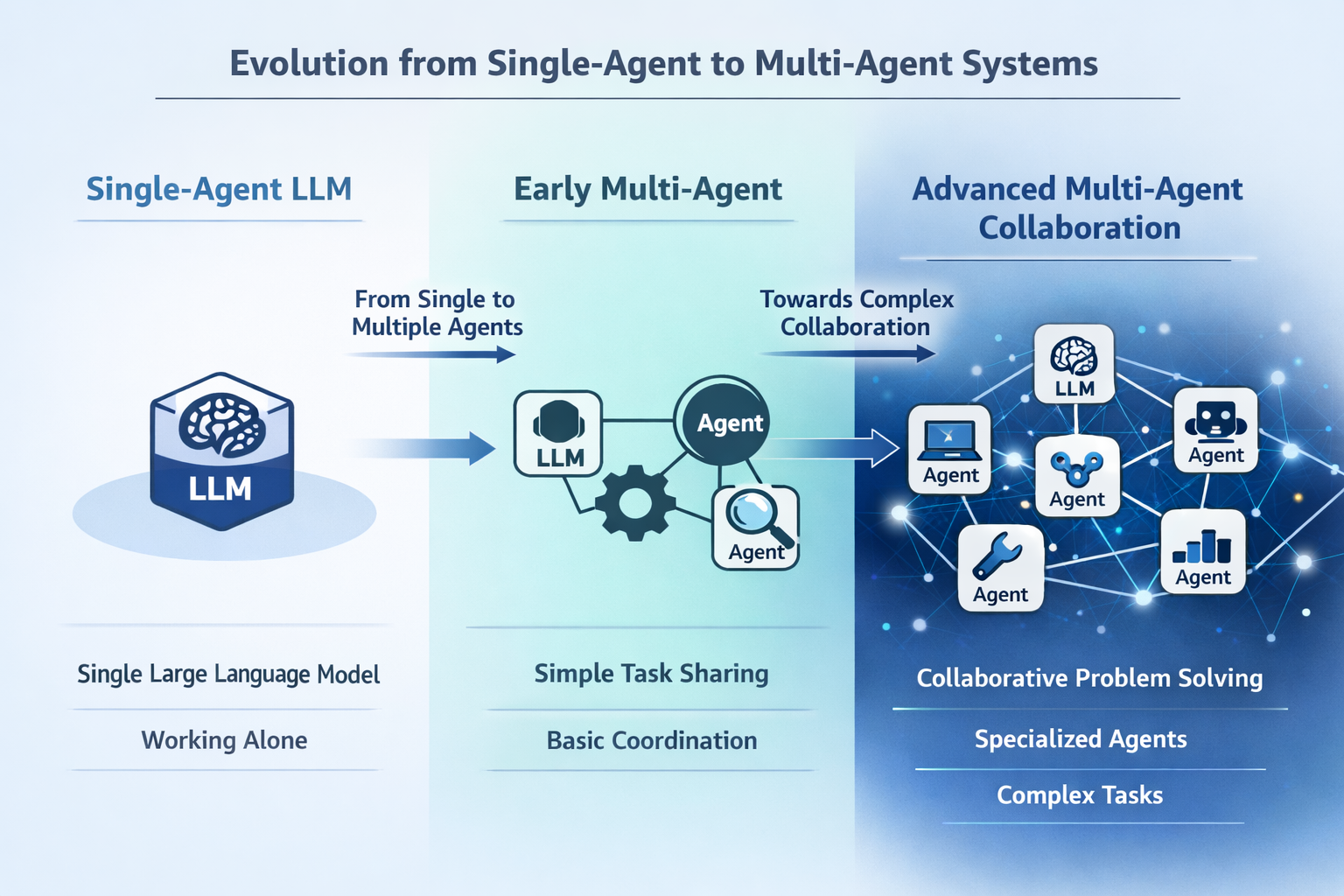
High-level conceptual diagram showing the evolution from single-agent to multi-agent systems, with visual progression from one isolated LLM to multiple interconnected agents collaborating on complex tasks
Agent-to-Agent (A2A) interaction refers to the standardized communication and coordination mechanisms that enable multiple LLM-powered agents to work together autonomously to solve complex tasks that would be challenging or impossible for any single agent to handle alone. Unlike traditional single-agent systems that operate in isolation, A2A interactions create dynamic ecosystems where specialized agents can discover each other's capabilities, delegate tasks, share context, and collaborate toward common objectives.
At its core, A2A interaction in the context of Generative AI involves three fundamental components:
Autonomous Agent Discovery: Agents can identify and connect with other agents that possess complementary capabilities without human intervention.
Structured Communication Protocols: Standardized methods for agents to exchange information, negotiate tasks, and coordinate actions using formats like JSON messages over HTTP or Server-Sent Events.
Dynamic Task Orchestration: The ability for agents to break down complex workflows, assign subtasks to specialized agents, and synthesize results into coherent outcomes.
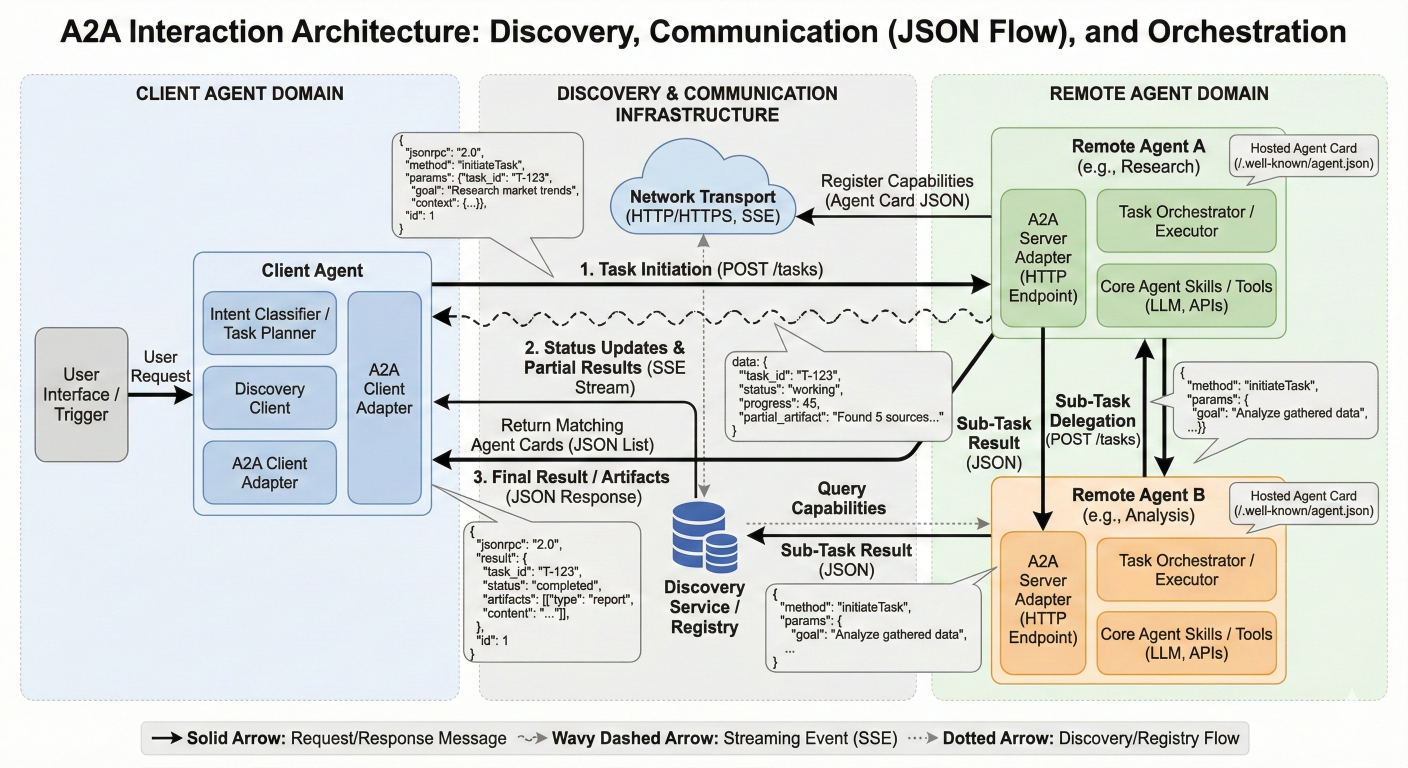
Detailed system architecture diagram showing A2A interaction components: Agent discovery mechanisms, communication protocols (showing JSON message flow), and task orchestration workflows with arrows indicating information flow between agents
The complexity of real-world problems often exceeds the capabilities of single LLM agents due to several inherent limitations:
Context Window Constraints: Individual LLMs have limited context windows that restrict their ability to process extensive information simultaneously. Multi-agent systems overcome this by distributing information processing across multiple agents, each handling specific segments while maintaining coherent understanding through collaboration.
Specialized Expertise Requirements: Complex tasks often require diverse skill sets—from data analysis and creative writing to technical problem-solving and quality assurance. Multi-agent systems allow each agent to specialize in specific domains while contributing to larger objectives.
Scalability and Parallel Processing: Single agents process tasks sequentially, creating bottlenecks in complex workflows. Multi-agent systems enable parallel execution of independent subtasks, dramatically improving efficiency and response times.
Error Reduction Through Cross-Validation: Multiple agents can verify each other's work, significantly reducing hallucinations and errors that are common in single-agent systems. This collaborative validation creates more reliable and accurate outputs.
Dynamic Problem Adaptation: Multi-agent systems can adapt their composition and coordination strategies based on the specific requirements of each task, providing flexibility that rigid single-agent architectures cannot match.
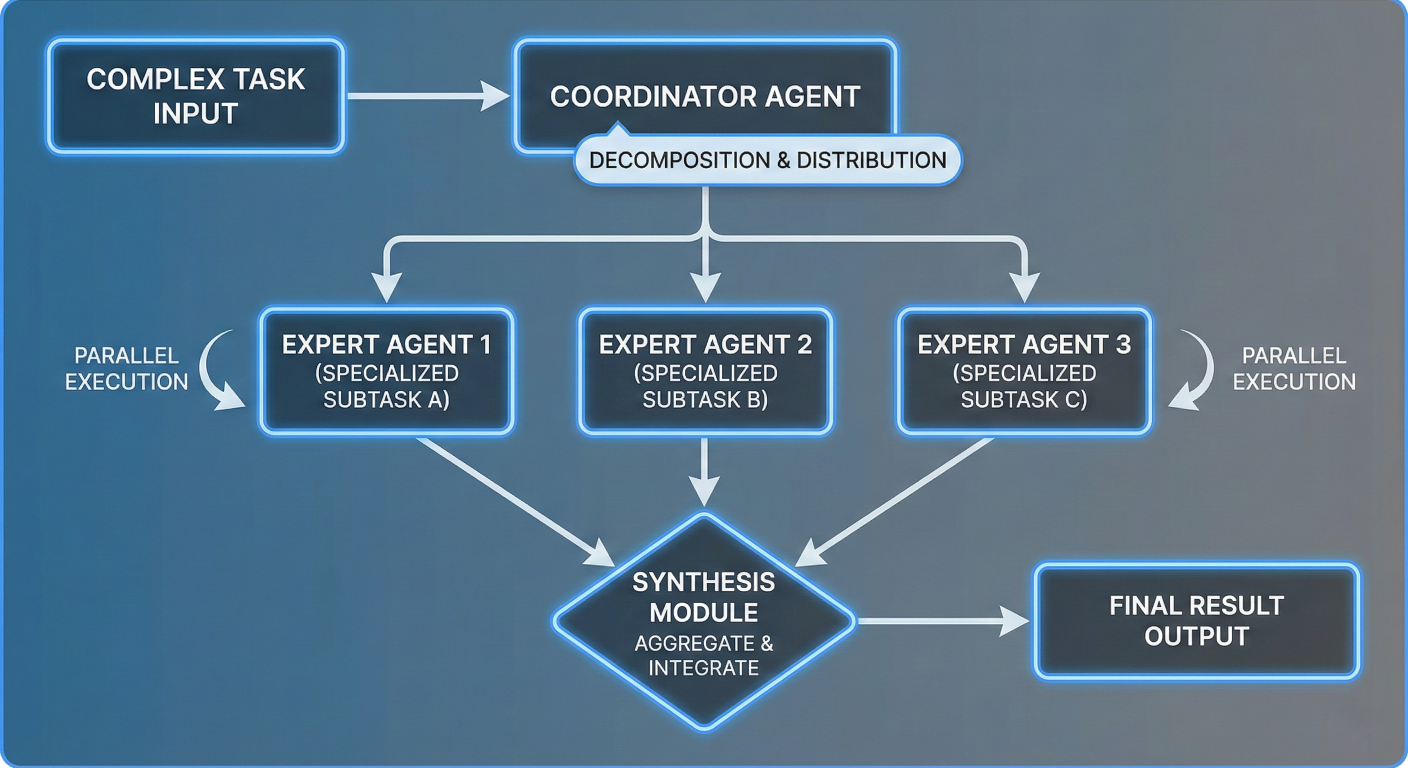
Process flow diagram illustrating how complex tasks get decomposed by a coordinator agent into specialized subtasks, distributed to expert agents, executed in parallel, and synthesized into final results
The foundation of effective A2A interaction lies in well-designed architectural patterns and robust communication protocols that enable seamless coordination between diverse agents.
Hierarchical Architecture
In hierarchical systems, agents are organized in tree-like structures with clear authority relationships. Higher-level coordinator agents manage strategy and task delegation, while specialized sub-agents focus on specific execution tasks.
class HierarchicalAgentSystem:
    def __init__(self):
        self.coordinator = CoordinatorAgent()
        self.specialist_agents = {
            'data_analysis': DataAnalysisAgent(),
            'content_generation': ContentGenerationAgent(),
            'quality_assurance': QualityAssuranceAgent()
        }

    def execute_task(self, task_description):
        # Coordinator analyzes task and creates execution plan
        plan = self.coordinator.create_execution_plan(task_description)

        # Delegate subtasks to specialist agents
        results = {}
        for subtask in plan.subtasks:
            agent = self.specialist_agents[subtask.agent_type]
            results[subtask.id] = agent.execute(subtask)

        # Coordinator synthesizes final result
        return self.coordinator.synthesize_results(results, plan)
Flat/Peer-to-Peer Architecture
Flat architectures feature decentralized agents operating at the same hierarchical level, communicating directly with each other without central coordination. This pattern excels in dynamic environments requiring rapid adaptation.
class PeerToPeerAgent:
    def __init__(self, agent_id, capabilities):
        self.agent_id = agent_id
        self.capabilities = capabilities
        self.peer_registry = {}

    async def discover_peers(self):
        # Agent discovery using A2A protocol
        available_agents = await self.query_agent_registry()
        for agent_info in available_agents:
            if self.can_collaborate_with(agent_info):
                self.peer_registry[agent_info.id] = agent_info

    async def delegate_task(self, task, required_capability):
        suitable_peers = [agent for agent in self.peer_registry.values()
                         if required_capability in agent.capabilities]

        if suitable_peers:
            chosen_peer = self.select_best_peer(suitable_peers, task)
            return await self.send_task_request(chosen_peer, task)

        return self.handle_task_locally(task)
Graph-Based Architecture
Graph architectures represent agents as nodes and their relationships as edges, enabling complex workflows with cycles, parallel execution paths, and conditional branching.
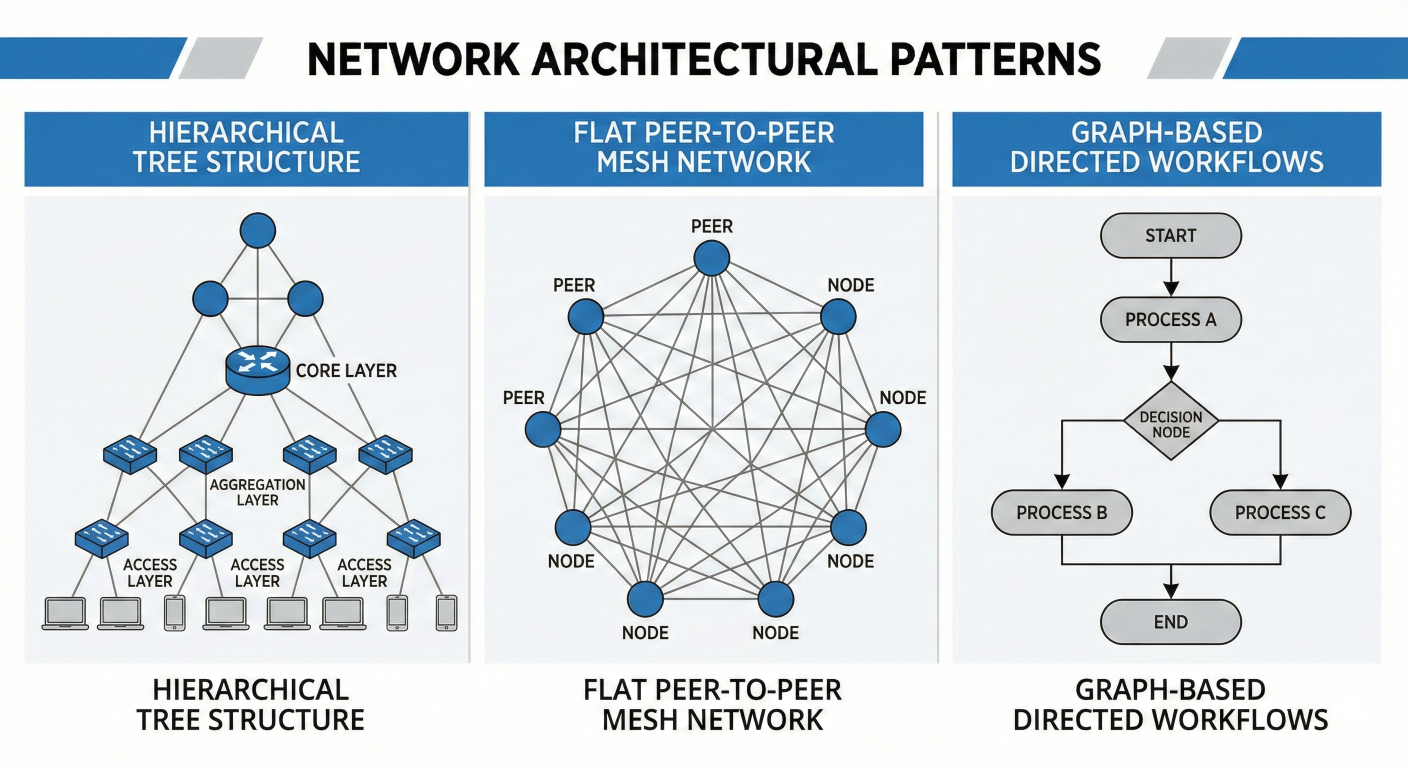
Network topology diagram showing different architectural patterns side by side: hierarchical tree structure, flat peer-to-peer mesh network, and graph-based directed workflows
Agent-to-Agent (A2A) Protocol
Google's A2A protocol provides a standardized HTTP-based communication model where agents are treated as interoperable services. Each agent exposes an "Agent Card"—a machinereadable description of its capabilities, similar to model cards for LLMs.
// Agent metadata configuration
{
  "@context": "https://a2a-protocol.org/context",
  "@type": "AgentCard",
  "id": "data-analysis-agent-v1.0",
  "name": "Advanced Data Analysis Agent",
  "capabilities": [
    {
      "type": "data_processing",
      "input_formats": ["csv", "json", "parquet"],
      "output_formats": ["json", "visualization", "report"]
    }
  ],
  "communication": {
    "protocols": ["http", "websocket"],
    "message_format": "json",
    "streaming": true
  }
}
// End of AgentCard configuration
Model Context Protocol (MCP)
MCP focuses on connecting LLMs with external data sources and tools through a JSON-RPC client-server interface, enabling secure context ingestion and structured tool invocation.
Agent Communication Protocol (ACP)
ACP introduces REST-native messaging with multi-part messages and asynchronous streaming to support multimodal agent responses and local multi-agent system coordination.
Effective multi-agent systems require clear role definitions and sophisticated task delegation mechanisms to ensure optimal resource utilization and outcome quality.
Capability-Based Role Assignment
Agents self-declare their capabilities through structured metadata, enabling dynamic role assignment based on task requirements.
class CapabilityBasedCoordinator:
    def __init__(self):
        self.agent_capabilities = {}

    def register_agent(self, agent_id, capabilities):
        self.agent_capabilities[agent_id] = capabilities

    def find_suitable_agents(self, task_requirements):
        suitable_agents = []
        for agent_id, capabilities in self.agent_capabilities.items():
            compatibility_score = self.calculate_compatibility(
                capabilities, task_requirements
            )
            if compatibility_score > 0.7:  # Threshold for suitability
                suitable_agents.append((agent_id, compatibility_score))

        return sorted(suitable_agents, key=lambda x: x[1], reverse=True)
Dynamic Task Decomposition
Coordinators analyze complex tasks and decompose them into manageable subtasks that can be distributed across specialized agents
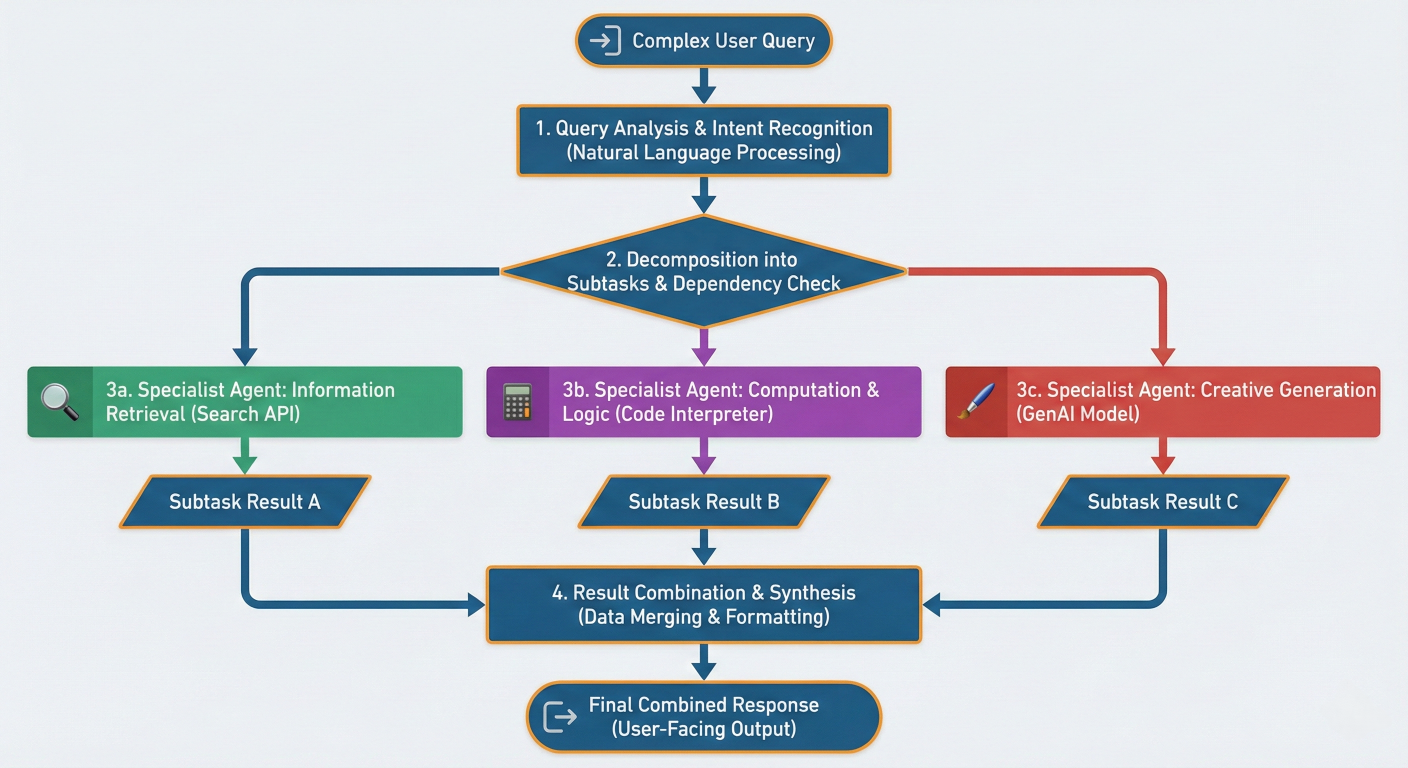
Task decomposition flowchart showing how a complex user query gets analyzed, broken down into subtasks, assigned to different specialist agents, and results get combined
When agents need to make collective decisions or resolve conflicts, consensus mechanisms ensure coherent and reliable outcomes.
Majority Voting
Multiple agents evaluate the same problem and vote on the best solution, with the majority decision being adopted.
class MajorityVotingConsensus:
    def __init__(self, agents):
        self.agents = agents

    async def reach_consensus(self, problem):
        solutions = []
        for agent in self.agents:
            solution = await agent.solve(problem)
            solutions.append(solution)

        # Count votes for each unique solution
        vote_counts = {}
        for solution in solutions:
            solution_key = self.normalize_solution(solution)
            vote_counts[solution_key] = vote_counts.get(solution_key, 0) + 1

        # Return solution with most votes
        winner = max(vote_counts.items(), key=lambda x: x[1])
        return winner[0]
Debate-Based Consensus
Agents engage in structured debates, presenting arguments and counter-arguments until reaching agreement or escalating to a higher authority.
Weighted Expert Consensus
Different agents have varying levels of expertise or confidence, and their contributions are weighted accordingly when making collective decisions.
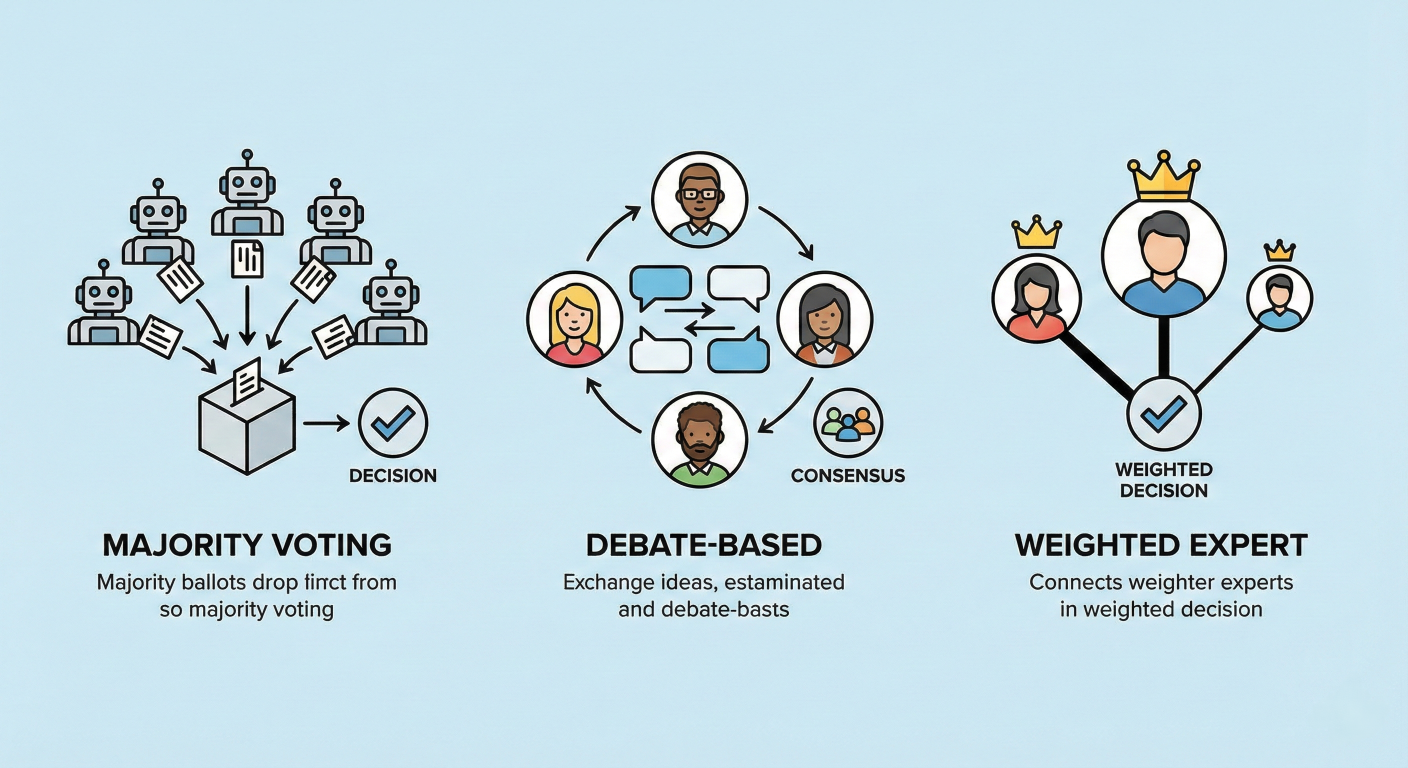
Consensus mechanism diagram showing different approaches: majority voting (multiple agents voting), debate-based (agents in discussion), and weighted expert (agents with different influence levels)
Multi-agent systems powered by A2A interactions are revolutionizing various domains by tackling complex challenges that require diverse expertise and sophisticated coordination.
Software development represents one of the most compelling applications of multi-agent systems, where different aspects of the development lifecycle require specialized knowledge and tools.
class SoftwareDevelopmentCrew:
    def __init__(self):
        self.architect = SoftwareArchitectAgent()
        self.developer = CodeDeveloperAgent()
        self.reviewer = CodeReviewAgent()
        self.tester = TestEngineerAgent()
        self.documenter = DocumentationAgent()

    async def develop_feature(self, requirements):
        # Architecture design
        architecture = await self.architect.design_system(requirements)

        # Code implementation
        code = await self.developer.implement_feature(
            requirements, architecture
        )

        # Code review and improvement
        review_feedback = await self.reviewer.review_code(code)
        if review_feedback.needs_changes:
            code = await self.developer.refactor_code(
                code, review_feedback
            )

        # Test generation and execution
        tests = await self.tester.generate_tests(code, requirements)
        test_results = await self.tester.run_tests(tests)

        # Documentation generation
        docs = await self.documenter.create_documentation(
            code, architecture, requirements
        )

        return {
            'code': code,
            'tests': tests,
            'documentation': docs,
            'test_results': test_results
        }
Real-World Example: Microsoft's AutoGen framework has been successfully implemented by Novo Nordisk for data science workflows, demonstrating significant productivity improvements in collaborative software development tasks
Traditional code reviews are time-intensive and often miss subtle issues. Multi-agent systems can perform comprehensive automated reviews covering different aspects simultaneously:
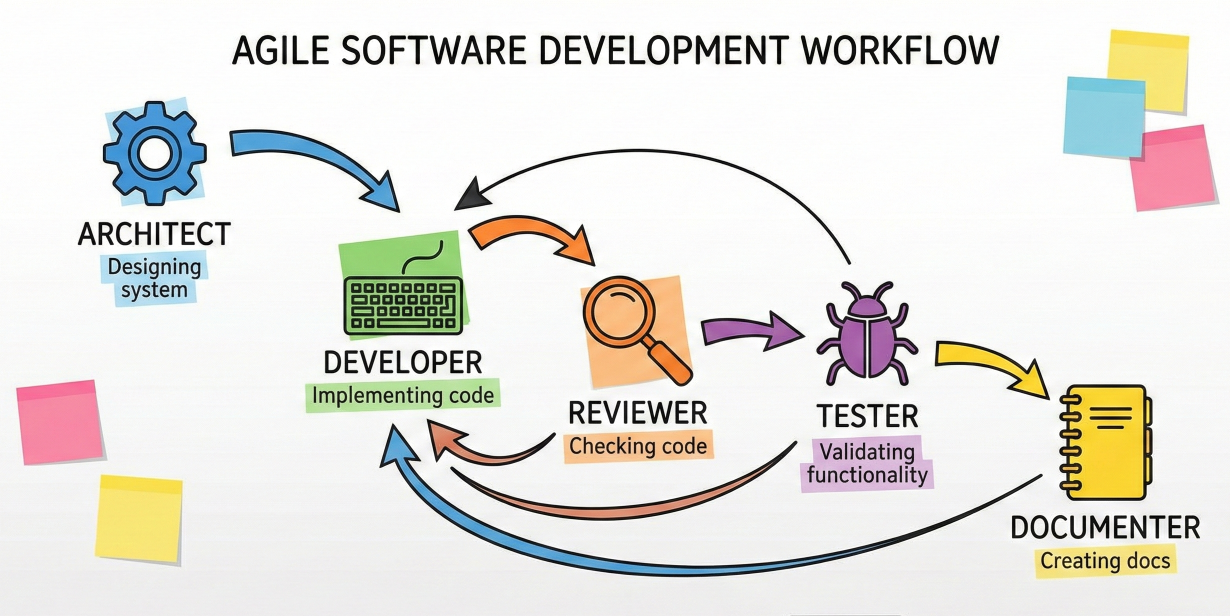
Software development workflow diagram showing agents collaborating: architect designing system, developer implementing, reviewer checking code, tester validating, and documenter creating docs, with feedback loops between stages
Data analysis projects often require expertise across multiple domains—statistics, domain knowledge, visualization, and interpretation. Multi-agent systems excel at coordinating these diverse skill sets.
class DataAnalysisCrew:
    def __init__(self):
        self.data_collector = DataCollectionAgent()
        self.statistician = StatisticalAnalysisAgent()
        self.domain_expert = DomainExpertiseAgent()
        self.visualizer = DataVisualizationAgent()
        self.interpreter = InsightInterpretationAgent()

    async def analyze_dataset(self, analysis_request):
        # Data collection and preparation
        dataset = await self.data_collector.collect_and_clean_data(
            analysis_request.data_sources
        )

        # Statistical analysis
        statistical_results = await self.statistician.perform_analysis(
            dataset, analysis_request.analysis_type
        )

        # Domain-specific interpretation
        domain_insights = await self.domain_expert.interpret_findings(
            statistical_results, analysis_request.domain
        )

        # Visualization creation
        visualizations = await self.visualizer.create_visualizations(
            dataset, statistical_results, analysis_request.visualization_preferences
        )

        # Comprehensive insight generation
        final_insights = await self.interpreter.synthesize_insights(
            statistical_results, domain_insights, visualizations
        )

        return {
            'dataset': dataset,
            'statistical_analysis': statistical_results,
            'domain_insights': domain_insights,
            'visualizations': visualizations,
            'final_report': final_insights
        }
Recent research demonstrates how multiple data selection agents can collaborate to improve dataset quality for LLM pretraining. Each agent specializes in different selection criteria:
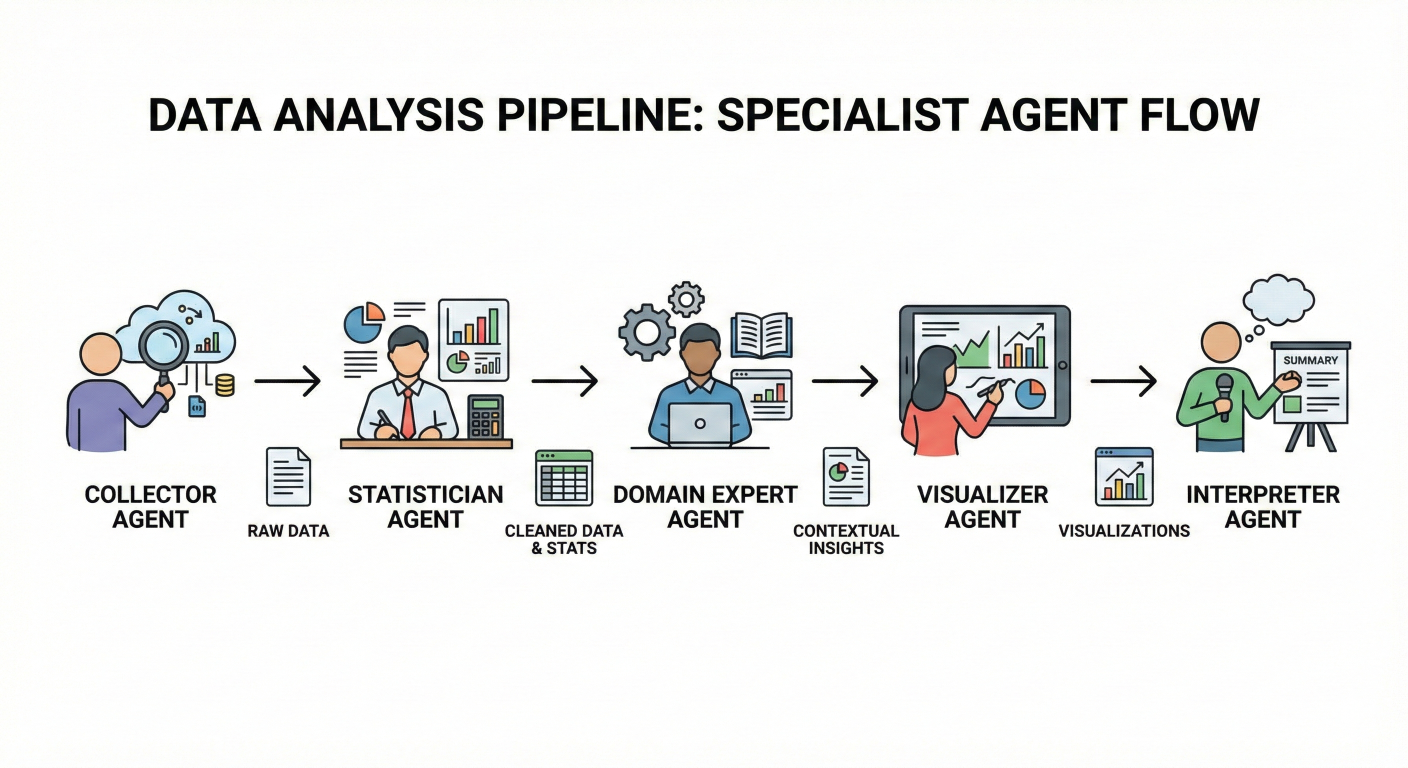
Data analysis pipeline diagram showing data flowing through multiple specialist agents: collector, statistician, domain expert, visualizer, and interpreter, with intermediate results being passed between agents
Multi-agent systems create sophisticated simulated environments for training, testing, and exploring complex scenarios across various domains.
class EconomicMarketSimulation:
    def __init__(self):
        self.market_maker = MarketMakerAgent()
        self.institutional_traders = [InstitutionalTraderAgent()
                                    for _ in range(5)]
        self.retail_traders = [RetailTraderAgent()
                             for _ in range(100)]
        self.regulatory_agent = RegulatoryComplianceAgent()
        self.news_agent = MarketNewsAgent()

    async def simulate_trading_day(self, market_conditions):
        # Initialize market conditions
        await self.market_maker.set_initial_conditions(market_conditions)

        # Generate market events
        events = await self.news_agent.generate_market_events()

        # Execute trading simulation with agent interactions
        for time_step in range(market_conditions.trading_hours):
            # Institutional trading strategies
            institutional_actions = await asyncio.gather(*[
                trader.make_trading_decision(market_conditions, events)
                for trader in self.institutional_traders
            ])

            # Retail trading responses
            retail_actions = await asyncio.gather(*[
                trader.react_to_market(market_conditions, events)
                for trader in self.retail_traders
            ])

            # Market maker adjustments
            market_adjustments = await self.market_maker.adjust_market(
                institutional_actions + retail_actions
            )

            # Regulatory compliance monitoring
            compliance_issues = await self.regulatory_agent.monitor_compliance(
                institutional_actions + retail_actions
            )

            # Update market conditions for next iteration
            market_conditions = self.update_market_state(
                market_conditions, market_adjustments, compliance_issues
            )

return self.generate_simulation_report(market_conditions)Multi-agent systems model complex traffic dynamics by representing each vehicle as an autonomous agent with individual behaviors and decision-making capabilities:
Environmental simulations benefit significantly from multi-agent approaches, where agents represent different species, environmental factors, or human interventions:
class EcosystemSimulation:
    def __init__(self):
        self.predator_agents = [PredatorAgent(species) for species in ['wolf', 'bear']]
        self.prey_agents = [PreyAgent(species) for species in ['deer', 'rabbit']]
        self.vegetation_agent = VegetationGrowthAgent()
        self.climate_agent = ClimateConditionsAgent()
        self.human_impact_agent = HumanActivityAgent()

    async def simulate_ecosystem_dynamics(self, simulation_parameters):
        for year in range(simulation_parameters.duration_years):
            # Update environmental conditions
            climate_conditions = await self.climate_agent.generate_yearly_conditions()
            vegetation_state = await self.vegetation_agent.update_vegetation(
                climate_conditions
            )

            # Predator-prey interactions
            for season in ['spring', 'summer', 'fall', 'winter']:
                season_conditions = {
                    'climate': climate_conditions[season],
                    'vegetation': vegetation_state[season]
                }

                # Prey behavior and population dynamics
                prey_actions = await asyncio.gather(*[
                    agent.seasonal_behavior(season_conditions)
                    for agent in self.prey_agents
                ])

                # Predator hunting and territory management
                predator_actions = await asyncio.gather(*[
                    agent.hunting_behavior(season_conditions, prey_actions)
                    for agent in self.predator_agents
                ])

                # Human impact assessment
                human_impact = await self.human_impact_agent.assess_impact(
                    season_conditions, prey_actions, predator_actions
                )

                # Update population dynamics
                self.update_population_dynamics(
                    prey_actions, predator_actions, human_impact
                )

        return self.generate_ecosystem_report()
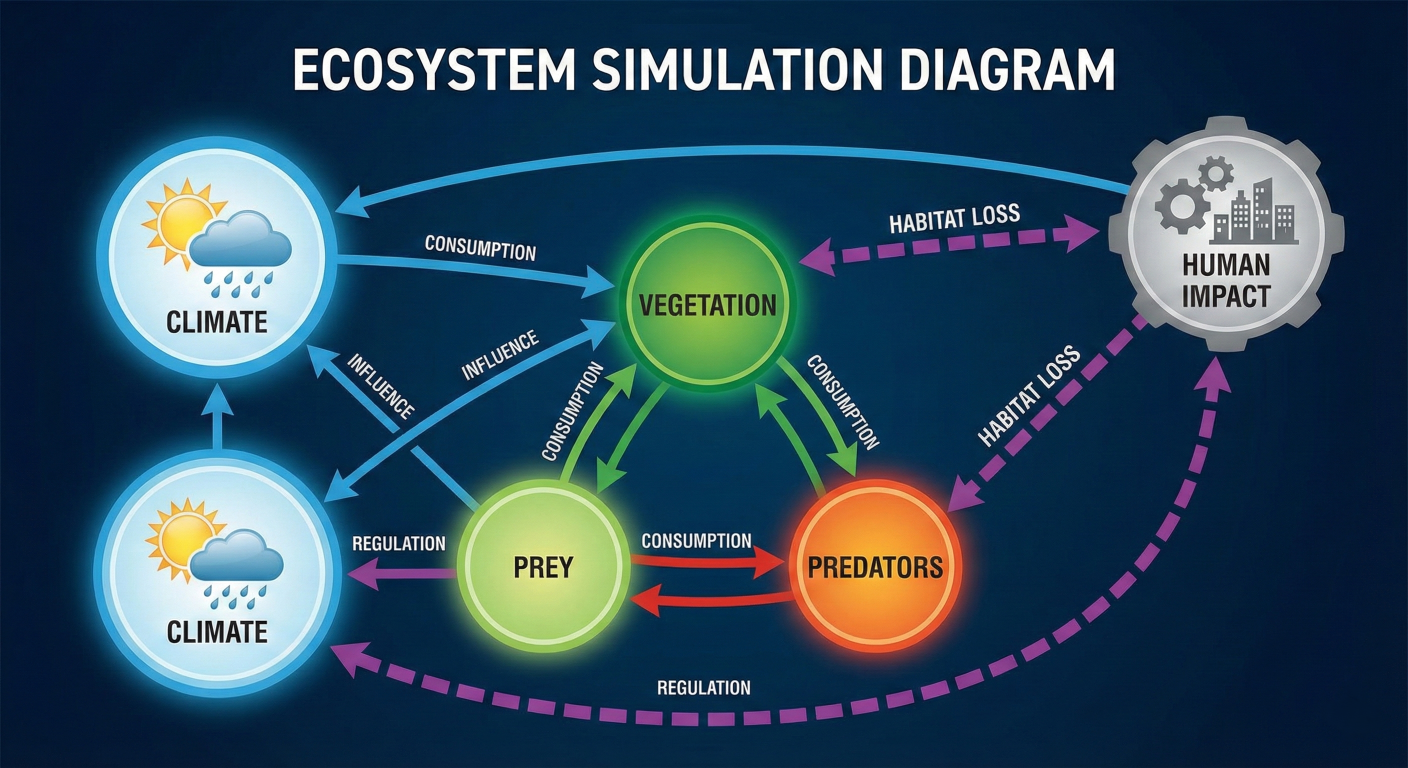
Ecosystem simulation diagram showing interconnected agents: predators, prey, vegetation, climate, and human impact agents, with arrows showing their interactions and influence on each other
Multi-agent systems excel at managing complex business processes that require coordination across multiple departments and expertise areas.
class CustomerServiceCrew:
    def __init__(self):
        self.intake_agent = CustomerIntakeAgent()
        self.technical_support = TechnicalSupportAgent()
        self.billing_specialist = BillingSpecialistAgent()
        self.escalation_manager = EscalationManagerAgent()
        self.satisfaction_monitor = CustomerSatisfactionAgent()

    async def handle_customer_inquiry(self, customer_inquiry):
        # Initial inquiry processing
        inquiry_analysis = await self.intake_agent.analyze_inquiry(customer_inquiry)

        # Route to appropriate specialist
        if inquiry_analysis.category == 'technical':
            resolution = await self.technical_support.resolve_issue(
                customer_inquiry, inquiry_analysis
            )
        elif inquiry_analysis.category == 'billing':
            resolution = await self.billing_specialist.handle_billing_issue(
                customer_inquiry, inquiry_analysis
            )
        else:
            resolution = await self.escalation_manager.handle_complex_case(
                customer_inquiry, inquiry_analysis
            )

        # Monitor customer satisfaction
        satisfaction_score = await self.satisfaction_monitor.evaluate_resolution(
            customer_inquiry, resolution
        )

        # Escalate if satisfaction is low
        if satisfaction_score < 0.7:
            resolution = await self.escalation_manager.improve_resolution(
                customer_inquiry, resolution, satisfaction_score
            )

        return {
            'resolution': resolution,
            'satisfaction_score': satisfaction_score,
            'handling_time': resolution.duration,
            'agent_involved': resolution.primary_agent
        }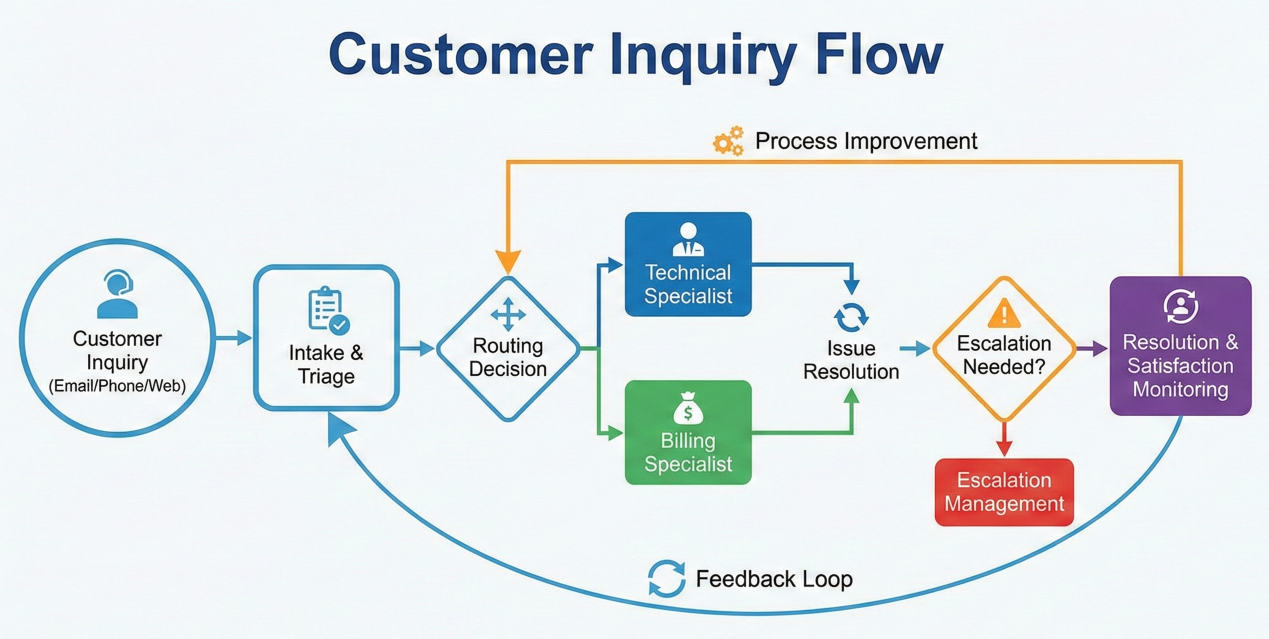
Business process workflow diagram showing customer inquiry flow through intake, routing to specialists (technical/billing), escalation management, and satisfaction monitoring with feedback loops
The multi-agent ecosystem has flourished with numerous open-source frameworks that simplify the development, deployment, and orchestration of A2A systems. Here's a comprehensive overview of the leading platforms and their unique strengths.
LangGraph stands out as the most sophisticated framework for building complex multi-agent workflows with its graph-based architecture that supports cycles, parallel execution, and sophisticated state management.
Key Features:
Implementation Example:
from langgraph.graph import StateGraph, END
from langgraph.checkpoint.memory import MemorySaver

class MultiAgentState(TypedDict):
    messages: List[BaseMessage]
    current_agent: str
    task_status: str
    intermediate_results: Dict[str, Any]

# Create specialized agent nodes
def research_agent_node(state: MultiAgentState):
    # Research agent implementation
    research_results = research_agent.invoke(state["messages"])
    return {
        "messages": state["messages"] + [research_results],
        "current_agent": "research",
        "intermediate_results": {
            **state["intermediate_results"],
            "research_data": research_results.content
        }
    }

def analysis_agent_node(state: MultiAgentState):
    # Analysis agent implementation
    analysis_results = analysis_agent.invoke(state["messages"])
    return {
        "messages": state["messages"] + [analysis_results],
        "current_agent": "analysis",
        "intermediate_results": {
            **state["intermediate_results"],
            "analysis": analysis_results.content
        }
    }

def reporting_agent_node(state: MultiAgentState):
    # Reporting agent implementation
    final_report = reporting_agent.invoke(state["messages"])
    return {
        "messages": state["messages"] + [final_report],
        "current_agent": "reporting",
        "task_status": "completed"
    }

# Build the workflow graph
workflow = StateGraph(MultiAgentState)
workflow.add_node("research", research_agent_node)
workflow.add_node("analysis", analysis_agent_node)
workflow.add_node("reporting", reporting_agent_node)

# Define workflow transitions
workflow.add_edge("research", "analysis")
workflow.add_edge("analysis", "reporting")
workflow.add_edge("reporting", END)

# Set entry point
workflow.set_entry_point("research")

# Compile with persistence
memory = MemorySaver()
app = workflow.compile(checkpointer=memory)
Best Use Cases:
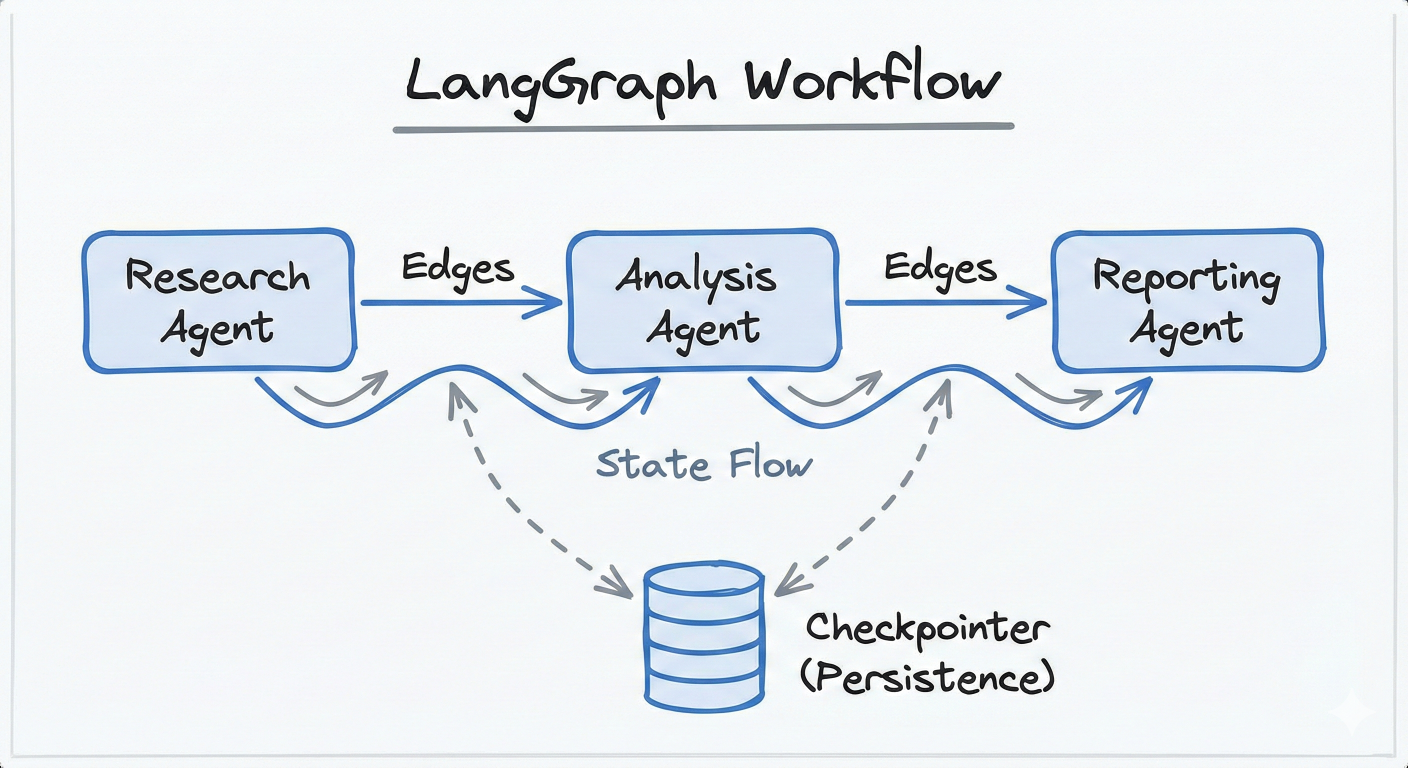
LangGraph workflow diagram showing nodes (research, analysis, reporting agents) connected by edges, with state flowing between them and a checkpointer for persistence
Microsoft's AutoGen excels at creating conversational multi-agent systems where agents engage in structured dialogues to solve problems collaboratively.
Key Features:
Implementation Example:
# Configure LLM settings
import autogen
# Configure LLM settings
config_list = [{
    "model": "gpt-4o",
    "api_key": os.environ["OPENAI_API_KEY"]
}]

llm_config = {
    "timeout": 600,
    "cache_seed": 42,
    "config_list": config_list,
    "temperature": 0.3,
}

# Create specialized agents
project_manager = autogen.AssistantAgent(
    name="ProjectManager",
    system_message="""You are a project manager responsible for coordinating
    software development tasks. Break down complex requirements into manageable
    tasks and delegate to appropriate team members.""",
    llm_config=llm_config,
)

developer = autogen.AssistantAgent(
    name="Developer",
    system_message="""You are a senior software developer. Implement features
    based on requirements and write clean, efficient code.""",
    llm_config=llm_config,
)

quality_assurance = autogen.AssistantAgent(
    name="QualityAssurance",
    system_message="""You are a QA engineer responsible for testing and
    validation. Review code for bugs, edge cases, and adherence to requirements.""",
    llm_config=llm_config,
)

user_proxy = autogen.UserProxyAgent(
    name="UserProxy",
    human_input_mode="TERMINATE",
    max_consecutive_auto_reply=10,
    is_termination_msg=lambda x: x.get("content", "").rstrip().endswith("TERMINATE"),
    code_execution_config={
        "work_dir": "development",
        "use_docker": True,
    },
    llm_config=llm_config,
)

# Create group chat for collaboration
groupchat = autogen.GroupChat(
    agents=[project_manager, developer, quality_assurance, user_proxy],
    messages=[],
    max_round=20,
    speaker_selection_method="round_robin"
)

manager = autogen.GroupChatManager(
    groupchat=groupchat,
    llm_config=llm_config
)

# Execute collaborative development task
user_proxy.initiate_chat(
    manager,
    message="""Develop a REST API for user authentication with the following requirements:
    - JWT token-based authentication
    - User registration and login endpoints
    - Password hashing and validation
    - Proper error handling and status codes"""
)
Best Use Cases:
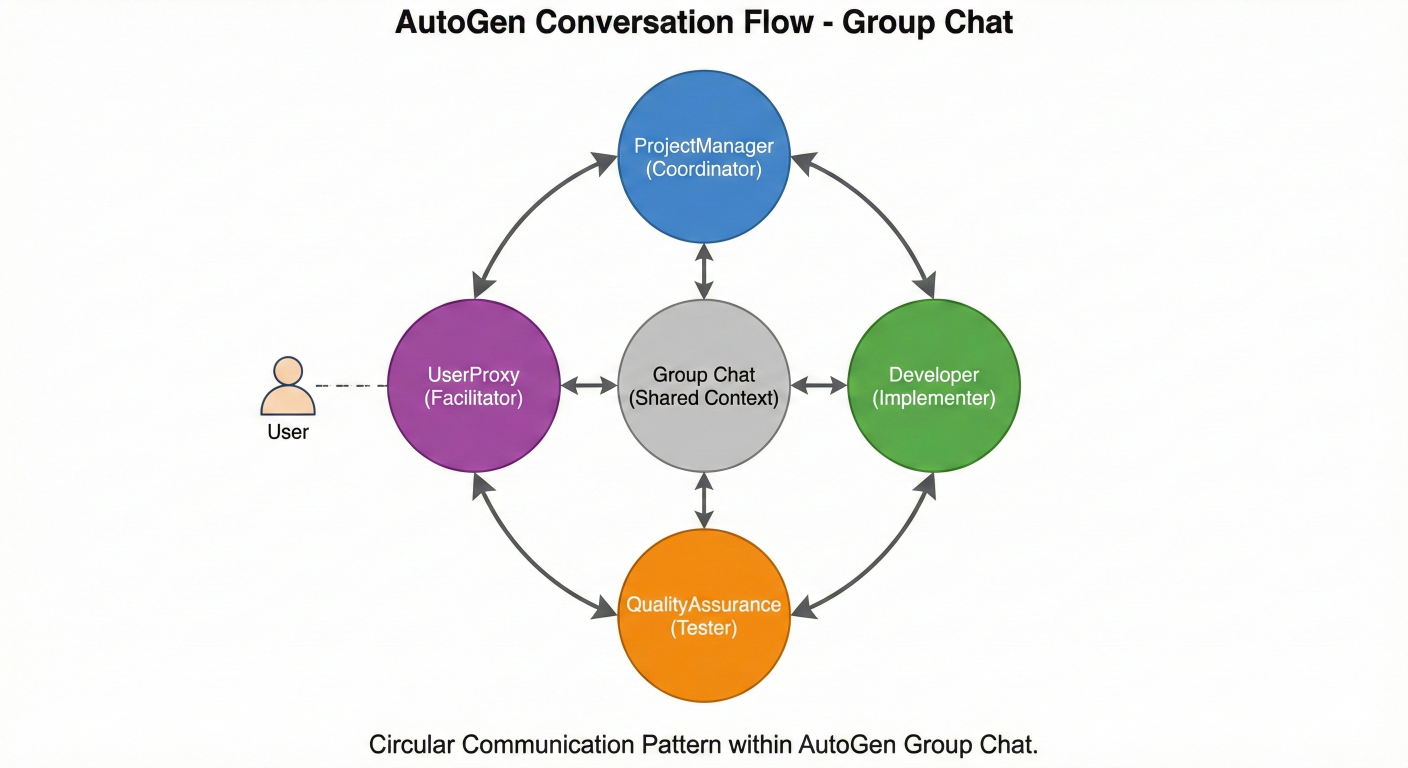
AutoGen conversation flow diagram showing agents in a group chat format: ProjectManager coordinating, Developer implementing, QualityAssurance testing, with UserProxy facilitating, all connected in a circular communication pattern
CrewAI specializes in orchestrating role-playing AI agents for collaborative tasks, offering a simpler implementation approach without complex dependencies.
Key Features:
Implementation Example:
# Import CrewAI and tools
from crewai import Agent, Task, Crew
from crewai_tools import WebSearchTool, FileWriterTool

# Create specialized agents
market_researcher = Agent(
    role='Market Research Analyst',
    goal='Conduct comprehensive market research and competitive analysis',
    backstory="""You are an expert market research analyst with 10 years of
    experience in technology markets. You excel at identifying market trends,
    competitor strategies, and growth opportunities.""",
    tools=[WebSearchTool()],
    verbose=True
)

content_strategist = Agent(
    role='Content Strategy Specialist',
    goal='Develop compelling content strategies based on market research',
    backstory="""You are a senior content strategist who translates market
    insights into actionable content plans. You understand audience psychology
    and engagement optimization.""",
    tools=[FileWriterTool()],
    verbose=True
)

social_media_manager = Agent(
    role='Social Media Manager',
    goal='Create engaging social media campaigns aligned with content strategy',
    backstory="""You are a creative social media expert who knows how to
    create viral content and build community engagement across platforms.""",
    tools=[FileWriterTool()],
    verbose=True
)

# Define collaborative tasks
market_research_task = Task(
    description="""Conduct comprehensive market research for AI-powered
    productivity tools. Analyze competitor strategies, target audience preferences,
    and emerging trends in the productivity software market.""",
    expected_output="""A detailed market research report including:
    - Competitive landscape analysis
    - Target audience personas
    - Market size and growth projections
    - Key trends and opportunities""",
    agent=market_researcher
)

content_strategy_task = Task(
    description="""Based on the market research, develop a comprehensive
    content strategy that addresses our target audience's needs and
    differentiates us from competitors.""",
    expected_output="""A content strategy document including:
    - Content pillars and themes
    - Content calendar framework
    - Distribution channel strategy
    - Success metrics and KPIs""",
    agent=content_strategist,
    dependencies=[market_research_task]
)

social_campaign_task = Task(
    description="""Create a social media campaign that implements the
    content strategy across multiple platforms.""",
    expected_output="""A social media campaign plan including:
    - Platform-specific content recommendations
    - Posting schedule and frequency
    - Engagement tactics and community building strategies
    - Performance tracking mechanisms""",
    agent=social_media_manager,
    dependencies=[content_strategy_task]
)

# Create and execute the crew
marketing_crew = Crew(
    agents=[market_researcher, content_strategist, social_media_manager],
    tasks=[market_research_task, content_strategy_task, social_campaign_task],
    verbose=2,
    process='sequential'
)

result = marketing_crew.kickoff()
Best Use Cases:
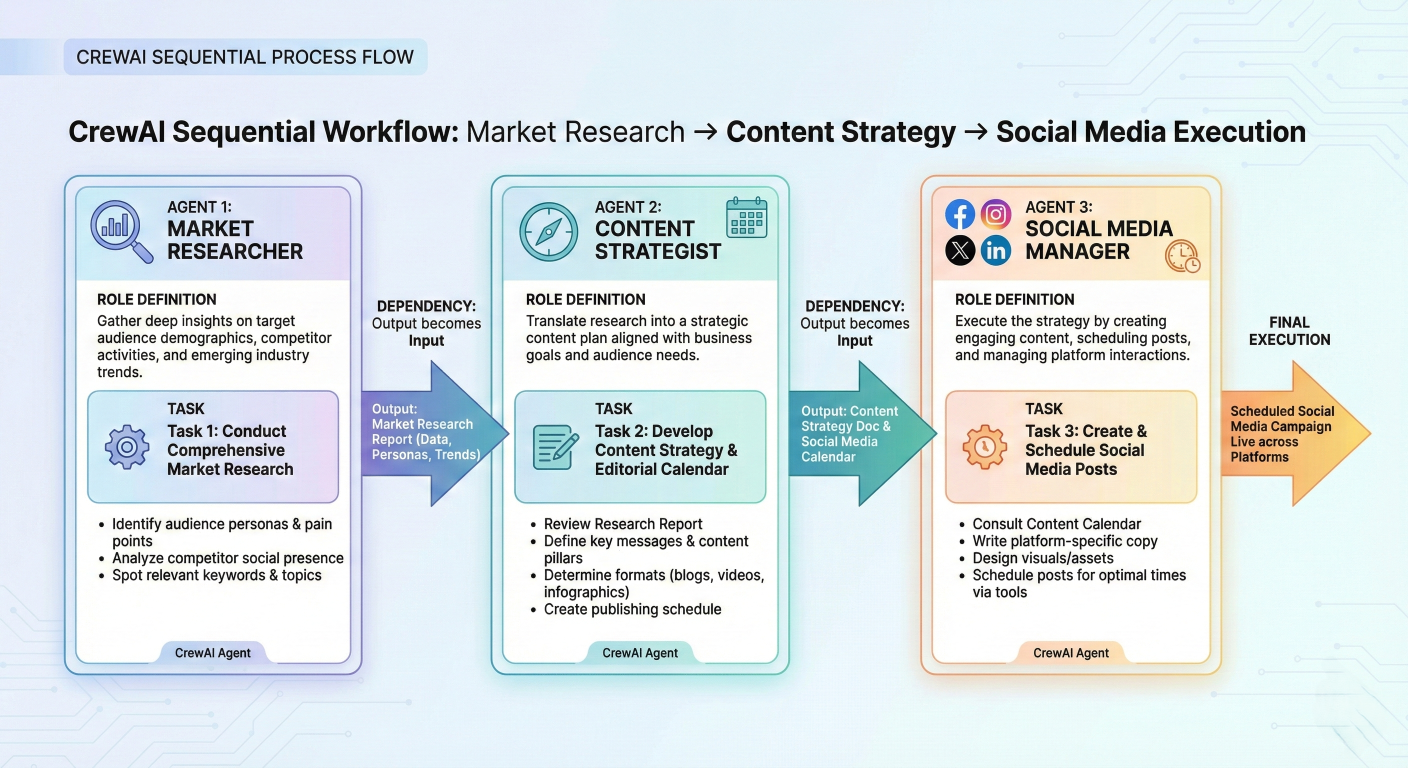
CrewAI workflow diagram showing sequential task execution: Market Researcher → Content Strategist → Social Media Manager, with clear role definitions and task dependencies
Microsoft's Semantic Kernel provides enterprise-grade agent orchestration with support for multiple programming languages and comprehensive orchestration patterns.
Key Features:
Implementation Example:
# Initialize Semantic Kernel
from semantic_kernel import Kernel
from semantic_kernel.agents import Agent, AgentGroupChat
from semantic_kernel.agents.orchestration import SequentialOrchestration

# Initialize Semantic Kernel
kernel = Kernel()

# Create specialized agents
data_analyst = Agent(
    name="DataAnalyst",
    description="Analyzes datasets and identifies patterns and insights",
    instructions="""You are a data analyst specialized in statistical analysis
    and pattern recognition. Process datasets and provide meaningful insights.""",
    kernel=kernel
)

report_writer = Agent(
    name="ReportWriter",
    description="Creates comprehensive reports from analysis results",
    instructions="""You are a technical writer who creates clear, comprehensive
    reports from data analysis results. Focus on actionable insights.""",
    kernel=kernel
)

quality_reviewer = Agent(
    name="QualityReviewer",
    description="Reviews and validates analysis and reports for accuracy",
    instructions="""You are a quality assurance specialist who reviews
    analytical work for accuracy, completeness, and clarity.""",
    kernel=kernel
)

# Configure sequential orchestration
orchestration = SequentialOrchestration([
    data_analyst,
    report_writer,
    quality_reviewer
])

# Execute coordinated workflow
async def execute_analysis_pipeline(dataset_path):
    initial_message = f"Please analyze the dataset at {dataset_path} and provide insights."

    result = await orchestration.invoke_async(initial_message)
    return result
Best Use Cases:
| Framework |
Best For |
Complexity | Strengths | Learning Curve |
| LangGraph | Complex workflows with cycles and sophisticated state management | High | Graph-based flexibility, time travel debugging, comprehensive monitoring | Steep |
| AutoGen | Conversational multi-agent systems and collaborative problem-solving | Medium | Natural dialogue patterns, enterprise reliability, extensive documentation | Moderate |
| CrewAI | Role-based task orchestration with minimal setup requirements | Low | Simple implementation, clear role definitions, independent framework | Gentle |
| Semantic Kernel |
Enterprise applications with multi-language and platform requirements |
MediumHigh | Enterprise integration, multiple language support, Microsoft ecosystem | ModerateSteep |
Selection Criteria:
Choose LangGraph if: You need sophisticated state management, cyclical workflows, and comprehensive debugging capabilities.
Choose AutoGen if: You want natural conversational interactions between agents and need enterprise-grade reliability.
Choose CrewAI if: You prefer simple setup and clear role-based task delegation without complex dependencies.
Choose Semantic Kernel if: You require enterprise integration, multi-language support, or deep Microsoft ecosystem integration.
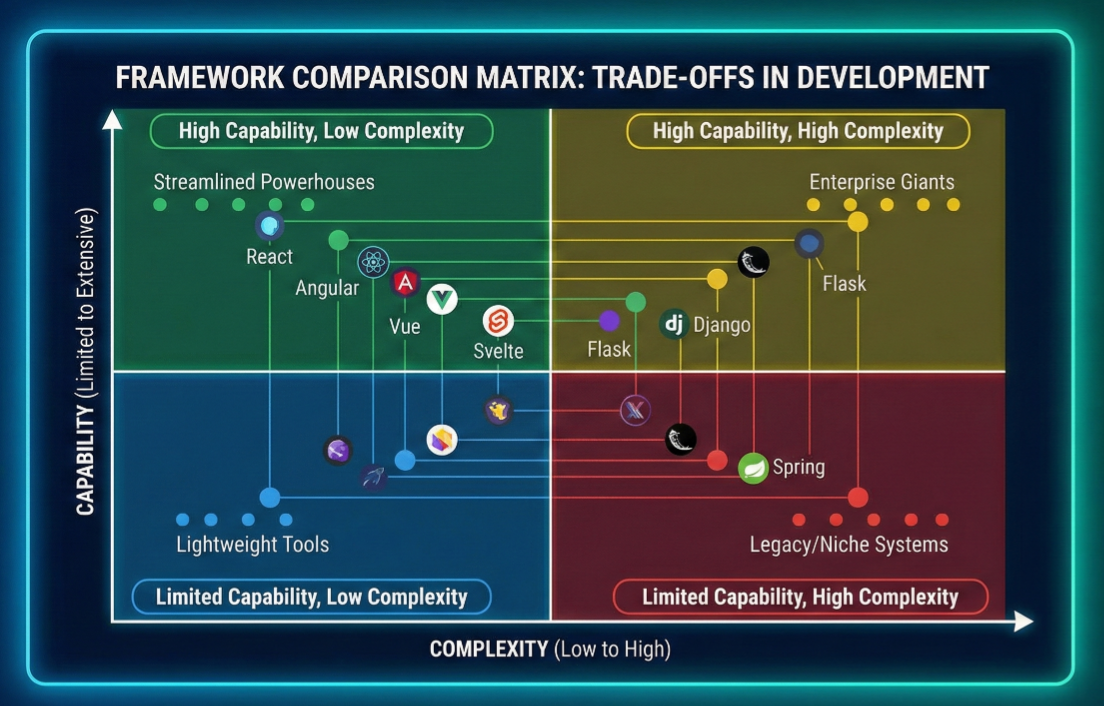
Comparison matrix visualization showing frameworks plotted on axes of complexity vs. capability, with different frameworks positioned in quadrants representing their trade-offs
Understanding A2A interactions requires examining concrete implementation patterns that demonstrate how agents communicate, coordinate, and collaborate. Here are comprehensive examples showcasing different aspects of multi-agent systems.
Let's start with a foundational example of creating communicating agents using a simplified framework:
# Python asyncio multi-agent framework
import asyncio
import json
from typing import Dict, List, Any
from dataclasses import dataclass
from enum import Enum

class MessageType(Enum):
    TASK_REQUEST = "task_request"
    TASK_RESPONSE = "task_response"
    CAPABILITY_INQUIRY = "capability_inquiry"
    CAPABILITY_RESPONSE = "capability_response"
    COLLABORATION_REQUEST = "collaboration_request"

@dataclass
class AgentMessage:
    sender_id: str
    receiver_id: str
    message_type: MessageType
    content: Dict[str, Any]
    timestamp: float
    correlation_id: str = None

class BaseAgent:
    def __init__(self, agent_id: str, capabilities: List[str]):
        self.agent_id = agent_id
        self.capabilities = capabilities
        self.message_queue = asyncio.Queue()
        self.active_tasks = {}
        self.peer_agents = {}

    async def send_message(self, target_agent, message: AgentMessage):
        """Send a message to another agent"""
        message.sender_id = self.agent_id
        message.receiver_id = target_agent.agent_id
        await target_agent.receive_message(message)

    async def receive_message(self, message: AgentMessage):
        """Receive and queue a message for processing"""
        await self.message_queue.put(message)

    async def process_messages(self):
        """Main message processing loop"""
        while True:
            try:
                message = await asyncio.wait_for(
                    self.message_queue.get(), timeout=1.0
                )
                await self.handle_message(message)
            except asyncio.TimeoutError:
                continue

    async def handle_message(self, message: AgentMessage):
        """Handle different types of incoming messages"""
        if message.message_type == MessageType.CAPABILITY_INQUIRY:
            await self.handle_capability_inquiry(message)
        elif message.message_type == MessageType.TASK_REQUEST:
            await self.handle_task_request(message)
        elif message.message_type == MessageType.COLLABORATION_REQUEST:
            await self.handle_collaboration_request(message)
            async def handle_capability_inquiry(self, message: AgentMessage):
    """Respond to capability inquiry from another agent"""
    response = AgentMessage(
        sender_id=self.agent_id,
        receiver_id=message.sender_id,
        message_type=MessageType.CAPABILITY_RESPONSE,
        content={
            "capabilities": self.capabilities,
            "current_load": len(self.active_tasks)
        },
        timestamp=asyncio.get_event_loop().time(),
        correlation_id=message.correlation_id
    )

    # Send response back to inquiring agent
    sender_agent = self.peer_agents.get(message.sender_id)
    if sender_agent:
        await self.send_message(sender_agent, response)

async def handle_task_request(self, message: AgentMessage):
    """Process incoming task requests"""
    task_id = message.content.get("task_id")
    task_description = message.content.get("description")

    # Check if we can handle this task
    if self.can_handle_task(task_description):
        # Accept and process the task
        result = await self.execute_task(task_description)

        response = AgentMessage(
            sender_id=self.agent_id,
            receiver_id=message.sender_id,
            message_type=MessageType.TASK_RESPONSE,
            content={
                "task_id": task_id,
                "status": "completed",
                "result": result
            },
            timestamp=asyncio.get_event_loop().time(),
            correlation_id=message.correlation_id
        )
    else:
        # Decline the task
        response = AgentMessage(
            sender_id=self.agent_id,
            receiver_id=message.sender_id,
            message_type=MessageType.TASK_RESPONSE,
            content={
                "task_id": task_id,
                "status": "declined",
                "reason": "Task outside capabilities"
            },
            timestamp=asyncio.get_event_loop().time(),
            correlation_id=message.correlation_id
        )

    sender_agent = self.peer_agents.get(message.sender_id)
    if sender_agent:
        await self.send_message(sender_agent, response)

def can_handle_task(self, task_description: str) -> bool:
    """Determine if agent can handle a given task"""
    # Simple capability matching - in practice this would be more sophisticated
    task_keywords = task_description.lower().split()
    return any(capability.lower() in task_keywords for capability in self.capabilities)

async def execute_task(self, task_description: str) -> Dict[str, Any]:
    """Execute a task - to be overridden by specific agent implementations"""
    # Simulate task execution
    await asyncio.sleep(0.5)  # Simulate processing time
    return {"status": "completed", "output": f"Processed: {task_description}"}

def register_peer(self, agent):
    """Register another agent as a peer for communication"""
    self.peer_agents[agent.agent_id] = agent
Now let's create specialized agents that demonstrate different capabilities and communication patterns:
class DataAnalysisAgent(BaseAgent):
    def __init__(self):
        super().__init__("data_analyst", ["data_analysis", "statistics", "visualization"])
        self.analysis_tools = ["pandas", "numpy", "matplotlib", "seaborn"]

    async def execute_task(self, task_description: str) -> Dict[str, Any]:
        """Execute data analysis tasks"""
        await asyncio.sleep(1.0)  # Simulate analysis time

        # Simulate different types of analysis based on task description
        if "trend" in task_description.lower():
            return {
                "analysis_type": "trend_analysis",
                "trends_identified": ["upward trend in Q3", "seasonal patterns detected"],
                "statistical_significance": 0.95,
                "visualization_created": True
            }
        elif "correlation" in task_description.lower():
            return {
                "analysis_type": "correlation_analysis",
                "correlations_found": [{"var1": "feature_a", "var2": "feature_b", "correlation": 0.73}],
                "p_value": 0.02,
                "visualization_created": True
            }
        else:
            return {
                "analysis_type": "general_analysis",
                "summary_statistics": {"mean": 42.5, "std": 12.3, "count": 1000},
                "outliers_detected": 15,
                "data_quality_score": 0.87
            }

class ContentGenerationAgent(BaseAgent):
    def __init__(self):
        super().__init__("content_generator", ["writing", "content_creation", "editing"])
        self.writing_styles = ["technical", "conversational", "formal", "creative"]

    async def execute_task(self, task_description: str) -> Dict[str, Any]:
        """Execute content generation tasks"""
        await asyncio.sleep(0.8)  # Simulate writing time

        if "report" in task_description.lower():
            return {
                "content_type": "analytical_report",
                "word_count": 1500,
                "sections": ["Executive Summary", "Analysis", "Conclusions", "Recommendations"],
                "readability_score": 8.2,
                "content": "# Analytical Report\n\n## Executive Summary\nThis report analyzes..."
            }
        elif "blog" in task_description.lower():
            return {
                "content_type": "blog_post",
                "word_count": 800,
                "tone": "conversational",
                "seo_optimized": True,
                "content": "# Blog Post Title\n\nEngaging introduction that hooks the reader..."
            }
        else:
            return {
                "content_type": "general_content",
                "word_count": 500,
                "style": "professional",
                "content": "Professional content tailored to requirements..."
            }

class QualityAssuranceAgent(BaseAgent):
    def __init__(self):
        super().__init__("quality_assurance", ["validation", "testing", "review"])
        self.quality_criteria = ["accuracy", "completeness", "clarity", "consistency"]

    async def execute_task(self, task_description: str) -> Dict[str, Any]:
        """Execute quality assurance tasks"""
        await asyncio.sleep(0.6)  # Simulate review time

        return {
            "review_type": "comprehensive_review",
            "quality_score": 8.5,
            "issues_found": [
                {"type": "minor", "description": "Inconsistent formatting in section 3"},
                {"type": "suggestion", "description": "Consider adding more examples"}
            ],
            "approval_status": "approved_with_minor_changes",
            "reviewer_confidence": 0.92
        }
Agents often need to interact with external tools and services. Here's how to implement tool integration:
from abc import ABC, abstractmethod

class Tool(ABC):
    @abstractmethod
    async def execute(self, parameters: Dict[str, Any]) -> Dict[str, Any]):
        pass

class WebSearchTool(Tool):
    async def execute(self, parameters: Dict[str, Any]) -> Dict[str, Any]):
        query = parameters.get("query")
        max_results = parameters.get("max_results", 5)

        # Simulate web search
        await asyncio.sleep(0.3)

        return {
            "tool": "web_search",
            "query": query,
            "results": [
                {"title": f"Result {i}", "url": f"https://example.com/result{i}",
                 "snippet": f"Relevant information about {query}"}
                for i in range(max_results)
            ],
            "total_results": max_results * 10
        }

class DataVisualizationTool(Tool):
    async def execute(self, parameters: Dict[str, Any]) -> Dict[str, Any]):
        chart_type = parameters.get("chart_type", "bar")
        data = parameters.get("data", [])

        # Simulate chart generation
        await asyncio.sleep(0.5)

        return {
            "tool": "data_visualization",
            "chart_type": chart_type,
            "chart_generated": True,
            "chart_path": f"/tmp/chart_{chart_type}.png",
            "data_points": len(data),
            "visualization_quality": "high"
        }
        class ToolCapableAgent(BaseAgent):
    def __init__(self, agent_id: str, capabilities: List[str]):
        super().__init__(agent_id, capabilities)
        self.available_tools = {}

    def register_tool(self, tool_name: str, tool: Tool):
        """Register a tool for use by this agent"""
        self.available_tools[tool_name] = tool

    async def use_tool(self, tool_name: str, parameters: Dict[str, Any]) -> Dict[str, Any]:
        """Use a registered tool"""
        if tool_name not in self.available_tools:
            return {"error": f"Tool {tool_name} not available"}

        tool = self.available_tools[tool_name]
        return await tool.execute(parameters)

class ResearchAgent(ToolCapableAgent):
    def __init__(self):
        super().__init__("research_agent", ["research", "fact_checking", "information_gathering"])

        # Register available tools
        self.register_tool("web_search", WebSearchTool())
        self.register_tool("data_viz", DataVisualizationTool())

    async def execute_task(self, task_description: str) -> Dict[str, Any]:
        """Execute research tasks using available tools"""
        research_results = {}

        # Extract search queries from task description
        if "search" in task_description.lower():
            search_query = self.extract_search_query(task_description)
            search_results = await self.use_tool("web_search", {
                "query": search_query,
                "max_results": 10
            })
            research_results["web_search"] = search_results

        # Generate visualizations if needed
        if "chart" in task_description.lower() or "graph" in task_description.lower():
            viz_results = await self.use_tool("data_viz", {
                "chart_type": "bar",
                "data": [1, 2, 3, 4, 5] # Sample data
            })
            research_results["visualization"] = viz_results

        return {
            "research_completed": True,
            "tools_used": list(research_results.keys()),
            "results": research_results,
            "confidence_score": 0.85
        }

    def extract_search_query(self, task_description: str) -> str:
        """Extract search query from task description - simplified implementation"""
        # In practice, this would use more sophisticated NLP
        words = task_description.split()
        return " ".join([word for word in words if word.lower() not in ["search", "for", "about", "find"]])
A coordinator agent manages complex multi-agent workflows:
import uuid
from typing import Optional
from enum import Enum
from dataclasses import dataclass
from typing import List, Dict, Any

class TaskStatus(Enum):
    PENDING = "pending"
    IN_PROGRESS = "in_progress"
    COMPLETED = "completed"
    FAILED = "failed"

@dataclass
class WorkflowTask:
    task_id: str
    description: str
    required_capabilities: List[str]
    assigned_agent: Optional[str] = None
    status: TaskStatus = TaskStatus.PENDING
    result: Optional[Dict[str, Any]] = None
    dependencies: List[str] = None

class CoordinatorAgent(BaseAgent):
    def __init__(self):
        super().__init__("coordinator", ["orchestration", "task_management", "workflow_coordination"])
        self.active_workflows = {}
        self.agent_capabilities = {}

    async def execute_workflow(self, workflow_description: str, participating_agents: List[BaseAgent]):
        """Execute a complex multi-agent workflow"""
        workflow_id = str(uuid.uuid4())

        # Register participating agents and their capabilities
        for agent in participating_agents:
            self.agent_capabilities[agent.agent_id] = agent.capabilities
            agent.register_peer(self)
            self.register_peer(agent)

        # Decompose workflow into tasks
        tasks = self.decompose_workflow(workflow_description)

        # Create workflow tracking
        self.active_workflows[workflow_id] = {
            "description": workflow_description,
            "tasks": {task.task_id: task for task in tasks},
            "status": "in_progress",
            "start_time": asyncio.get_event_loop().time()
        }

        # Execute tasks with dependency management
        return await self.execute_tasks_with_dependencies(workflow_id, tasks, participating_agents)

    def decompose_workflow(self, workflow_description: str) -> List[WorkflowTask]:
        """Decompose complex workflow into manageable tasks"""
        tasks = []

        # Simplified task decomposition - in practice, this would be more sophisticated
        if "data analysis report" in workflow_description.lower():
            tasks = [
                WorkflowTask(
                    task_id="task_1",
                    description="Collect and analyze relevant data",
                    required_capabilities=["data_analysis", "statistics"]
                ),
                WorkflowTask(
                    task_id="task_2",
                    description="Generate comprehensive report from analysis",
                    required_capabilities=["content_creation", "writing"],
                    dependencies=["task_1"]
                ),
                WorkflowTask(
                    task_id="task_3",
                    description="Review report for quality and accuracy",
                    required_capabilities=["validation", "review"],
                    dependencies=["task_2"]
                )
            ]
        async def execute_tasks_with_dependencies(self, workflow_id: str, tasks: List[WorkflowTask], agents: List[BaseAgent]):
    """Execute tasks while respecting dependencies"""
    completed_tasks = set()
    task_results = {}

    # Loop until all tasks are completed
    while len(completed_tasks) < len(tasks):
        # Find tasks ready for execution (dependencies satisfied)
        ready_tasks = [
            task for task in tasks
            if task.task_id not in completed_tasks and
            self.dependencies_satisfied(task, completed_tasks)
        ]

        # Execute ready tasks in parallel
        if ready_tasks:
            execution_tasks = [
                self.assign_and_execute_task(task, agents)
                for task in ready_tasks
            ]

            results = await asyncio.gather(*execution_tasks)

            # Update task status and results
            for task, result in zip(ready_tasks, results):
                task.result = result
                task.status = TaskStatus.COMPLETED if result.get("status") == "completed" else TaskStatus.FAILED
                completed_tasks.add(task.task_id)
                task_results[task.task_id] = result

        await asyncio.sleep(0.1)  # Brief pause before checking again

    # Workflow completion
    self.active_workflows[workflow_id]["status"] = "completed"
    self.active_workflows[workflow_id]["end_time"] = asyncio.get_event_loop().time()

    return {
        "workflow_id": workflow_id,
        "status": "completed",
        "task_results": task_results,
        "execution_time": self.active_workflows[workflow_id]["end_time"] - self.active_workflows[workflow_id]["start_time"]
    }

def dependencies_satisfied(self, task: WorkflowTask, completed_tasks: set) -> bool:
    """Check if task dependencies are satisfied"""
    if not task.dependencies:
        return True
    return all(dep_id in completed_tasks for dep_id in task.dependencies)

async def assign_and_execute_task(self, task: WorkflowTask, agents: List[BaseAgent]) -> Dict[str, Any]:
    """Assign task to most suitable agent and execute"""
    # Find best agent for this task
    best_agent = self.find_best_agent(task, agents)

    if not best_agent:
        return {"status": "failed", "reason": "No suitable agent found"}

    # Send task request to selected agent
    task_message = AgentMessage(
        sender_id=self.agent_id,
        receiver_id=best_agent.agent_id,
        message_type=MessageType.TASK_REQUEST,
        content={
            "task_id": task.task_id,
            "description": task.description,
            "required_capabilities": task.required_capabilities
        },
        timestamp=asyncio.get_event_loop().time(),
        correlation_id=str(uuid.uuid4())
    )

    await self.send_message(best_agent, task_message)

    # Wait for response (simplified - in practice would have timeout handling)
    response = await self.wait_for_task_response(task_message.correlation_id)
    return response
        return tasks

        def find_best_agent(self, task: WorkflowTask, agents: List[BaseAgent]) -> Optional[BaseAgent]:
    """Find the best agent for a given task based on capabilities"""
    best_agent = None
    best_score = 0

    for agent in agents:
        if agent.agent_id == self.agent_id:  # Skip coordinator
            continue

        # Calculate capability match score
        matching_capabilities = set(agent.capabilities) & set(task.required_capabilities)
        score = len(matching_capabilities) / len(task.required_capabilities)

        if score > best_score:
            best_score = score
            best_agent = agent

    return best_agent if best_score > 0.5 else None

async def wait_for_task_response(self, correlation_id: str) -> Dict[str, Any]:
    """Wait for task response with correlation ID"""
    # Simplified implementation - in practice would have proper timeout and error handling
    timeout = 30  # seconds
    start_time = asyncio.get_event_loop().time()

    while asyncio.get_event_loop().time() - start_time < timeout:
        try:
            message = await asyncio.wait_for(self.message_queue.get(), timeout=1.0)
            if (message.message_type == MessageType.TASK_RESPONSE and
                message.correlation_id == correlation_id):
                return message.content
            else:
                # Put message back if it's not what we're waiting for
                await self.message_queue.put(message)
        except asyncio.TimeoutError:
            continue

    return {'status': 'timeout', 'reason': 'Agent response timeout'}
Here's a comprehensive example demonstrating the complete A2A interaction workflow:
async def main():
    """Main example demonstrating A2A multi-agent workflow"""

    # Create specialized agents
    data_agent = DataAnalysisAgent()
    content_agent = ContentGenerationAgent()
    qa_agent = QualityAssuranceAgent()
    research_agent = ResearchAgent()
    coordinator = CoordinatorAgent()

    # Start agent message processing loops
    agents = [data_agent, content_agent, qa_agent, research_agent, coordinator]
    processing_tasks = [asyncio.create_task(agent.process_messages()) for agent in agents]

    try:
        # Execute a complex workflow
        workflow_description = "Create a comprehensive data analysis report on market trends"

        result = await coordinator.execute_workflow(
            workflow_description,
            [data_agent, content_agent, qa_agent, research_agent]
        )

        print("Workflow Execution Results:")
        print(f"Workflow ID: {result['workflow_id']}")
        print(f"Status: {result['status']}")
        print(f"Execution Time: {result['execution_time']:.2f} seconds")

        print("\nTask Results:")
        for task_id, task_result in result['task_results'].items():
            print(f"  {task_id}: {task_result.get('status', 'unknown')}")

    finally:
        # Clean up processing tasks
        for task in processing_tasks:
            task.cancel()

        await asyncio.gather(*processing_tasks, return_exceptions=True)

# Run the example
if __name__ == "__main__":
    asyncio.run(main())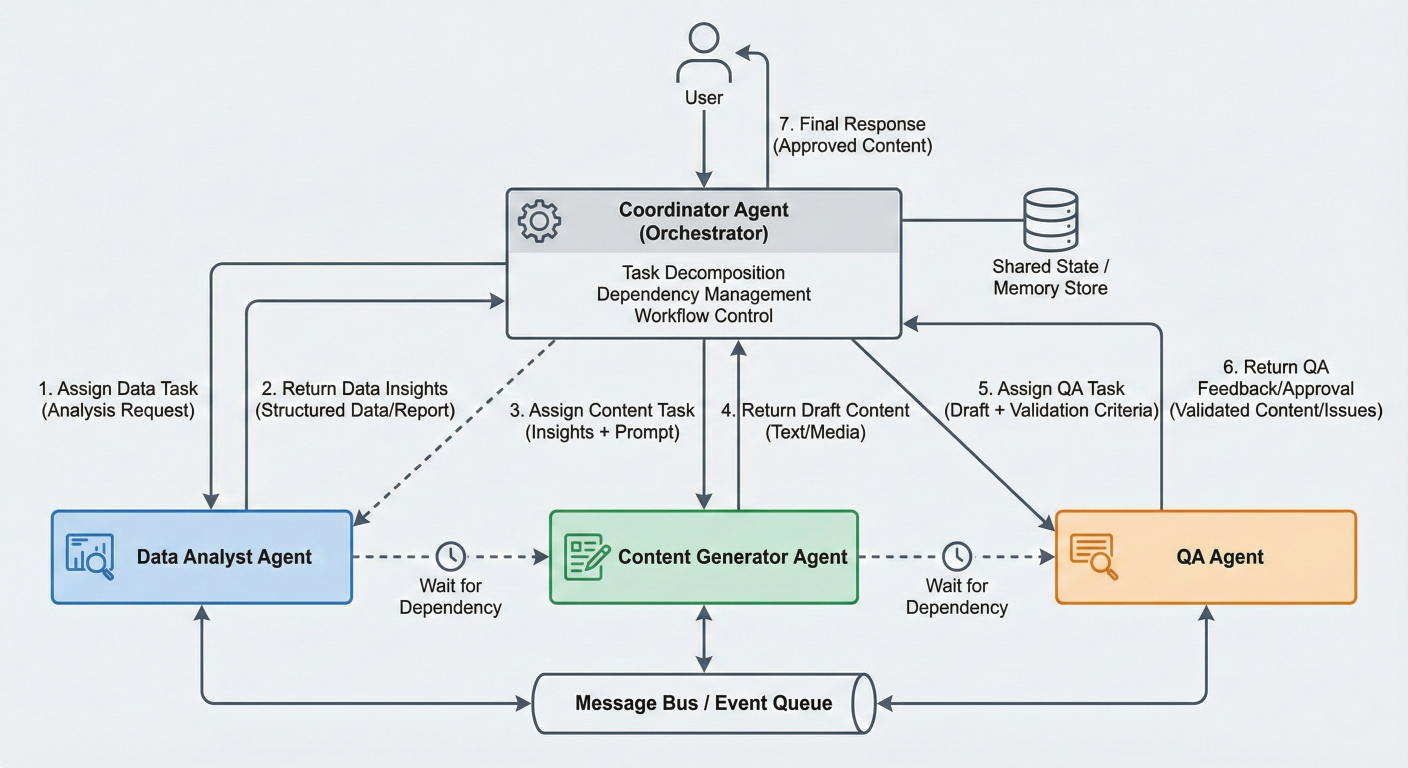
Code execution flow diagram showing the complete workflow: coordinator decomposing task, assigning to specialized agents (data analyst, content generator, QA), with message flows and dependency handling
These code examples demonstrate the fundamental patterns of A2A interaction:
Agent Communication: Structured messaging between agents using defined protocols
Task Decomposition: Breaking complex workflows into manageable subtasks
Capability Matching: Assigning tasks to agents based on their specialized abilities
Tool Integration: Agents using external tools to enhance their capabilities
Workflow Orchestration: Coordinated execution of multi-step processes with dependency management
Error Handling: Robust handling of failures and timeouts in distributed agent systems
These patterns form the foundation for building sophisticated multi-agent systems that can tackle complex real-world challenges through collaborative AI intelligence
Agent-to-Agent (A2A) interaction in Generative AI represents more than just a technological advancement—it's a fundamental paradigm shift toward truly collaborative artificial intelligence. As we've explored throughout this comprehensive guide, the evolution from single-agent systems to sophisticated multi-agent ecosystems opens unprecedented possibilities for tackling complex, real-world challenges that require diverse expertise, dynamic coordination, and intelligent collaboration.
The core value proposition of A2A systems lies in their ability to combine the specialized strengths of individual agents while mitigating the inherent limitations of isolated AI systems. Through standardized communication protocols like the A2A protocol, MCP, and ACP, we've seen how agents can discover each other's capabilities, negotiate task distribution, and coordinate complex workflows with minimal human intervention.
Our exploration of architectural patterns—from hierarchical coordinator-subordinate relationships to peer-to-peer collaboration networks—demonstrates that the optimal approach depends heavily on specific use case requirements. Graph-based architectures, exemplified by frameworks like LangGraph, provide the flexibility needed for complex workflows with cycles and sophisticated state management, while simpler sequential patterns excel in predictable, pipeline-oriented tasks.
The consensus mechanisms we examined—majority voting, debate-based resolution, and weighted expert systems—show how multi-agent systems can achieve reliable decision-making even when individual agents disagree. This collaborative validation significantly reduces the hallucination problems that plague single-agent systems.
The current landscape of open-source frameworks reveals a maturing ecosystem with distinct specializations. LangGraph's graph-based approach excels in complex, stateful workflows requiring sophisticated debugging capabilities. AutoGen's conversational framework brings natural dialogue patterns to agent coordination, making it ideal for collaborative problem-solving scenarios. CrewAI's role-based orchestration provides the simplicity needed for rapid prototyping and straightforward task delegation.
This diversity in framework approaches reflects the varied needs of different application domains—from software development teams requiring structured workflows to research applications demanding flexible, exploratory interactions.
The Python implementation examples throughout this guide illustrate several critical patterns:
Modular Agent Design: Separating capabilities, communication handling, and task execution enables flexible agent composition and reuse across different workflows.
Protocol Standardization: Using structured message formats with correlation IDs, message types, and capability declarations ensures reliable inter-agent communication.
Error Resilience: Implementing timeout handling, retry mechanisms, and graceful degradation prevents individual agent failures from cascading through the entire system.
Tool Integration: Enabling agents to access external tools and services exponentially expands their capabilities while maintaining clean separation of concerns.
Several trends are shaping the future of A2A interactions:
Protocol Standardization: The emergence of protocols like Google's A2A standard signals industry recognition of the need for interoperable agent communication. This standardization will enable the development of agent marketplaces where specialized agents can be discovered and integrated dynamically.
Enterprise Integration: Frameworks like Microsoft's Semantic Kernel and AutoGen demonstrate growing enterprise adoption, with features specifically designed for production deployment, monitoring, and compliance.
Autonomous Orchestration: Advanced systems are moving beyond predefined workflows toward dynamic task decomposition and agent selection based on real-time capability assessment and performance metrics.
Cross-Modal Collaboration: Future systems will integrate agents specialized in different modalities—text, vision, audio, and code—enabling richer, more comprehensive problem-solving approaches.
For organizations considering A2A implementation:
Start Simple: Begin with clear, well-defined use cases using frameworks like CrewAI for straightforward task delegation before progressing to complex orchestration patterns.
Focus on Protocol Design: Invest time in designing robust communication protocols and message formats that can evolve with your system's growing complexity.
Monitor and Observe: Implement comprehensive logging and monitoring from the beginning. The distributed nature of multi-agent systems makes observability crucial for debugging and optimization.
Plan for Scale: Design agent discovery and coordination mechanisms that can handle growing numbers of agents and increasing task complexity without performance degradation.
Embrace Specialization: Create agents with narrow, well-defined capabilities rather than trying to build generalist agents that handle everything. The power of multi-agent systems lies in collaborative specialization.
A2A interactions in Generative AI represent a crucial step toward more capable, reliable, and scalable artificial intelligence systems. By enabling AI agents to collaborate, negotiate, and coordinate autonomously, we're moving closer to AI systems that can handle the complexity and nuance of real-world challenges across domains from scientific research and software development to business process automation and creative collaboration.
The implications extend beyond technical capabilities to organizational structures and human-AI collaboration patterns. Multi-agent systems that can dynamically form teams, delegate responsibilities, and adapt to changing requirements offer a compelling model for augmenting human capabilities rather than simply automating isolated tasks.
As this field continues to evolve, the principles and patterns explored in this guide— standardized communication, specialized agent roles, robust orchestration, and collaborative decision-making—will remain fundamental to building effective A2A systems. The future of artificial intelligence is collaborative, and A2A interactions provide the foundation for AI systems that can work together as effectively as they work with humans.
The journey from single-agent AI to collaborative multi-agent systems represents one of the most significant advances in artificial intelligence architecture. By mastering these concepts,implementation patterns, and best practices, developers and organizations can build the next generation of AI systems that leverage collective intelligence to solve problems no single agent could tackle alone.

SaratahKumar C
 Launch your Graphy