
There are no items in your cart
Add More
Add More
| Item Details | Price | ||
|---|---|---|---|
In the dynamic world of machine learning, professionals are constantly dealing with datasets that are growing in size, often reaching gigabytes or even terabytes. While Git stands as an incredible tool for versioning code, it was not designed to handle such massive binary files directly. Attempting to commit large datasets into a Git repository can lead to incredibly bloated repositories, painfully slow operations, and can even render the repository unusable. This presents significant challenges for collaboration and makes it nearly impossible to consistently reproduce experiments. Traditional Git, for instance, is not advisable for maintaining large data files, such as a 50 GB data file with multiple versions, directly within the repository due to its design for code versioning.
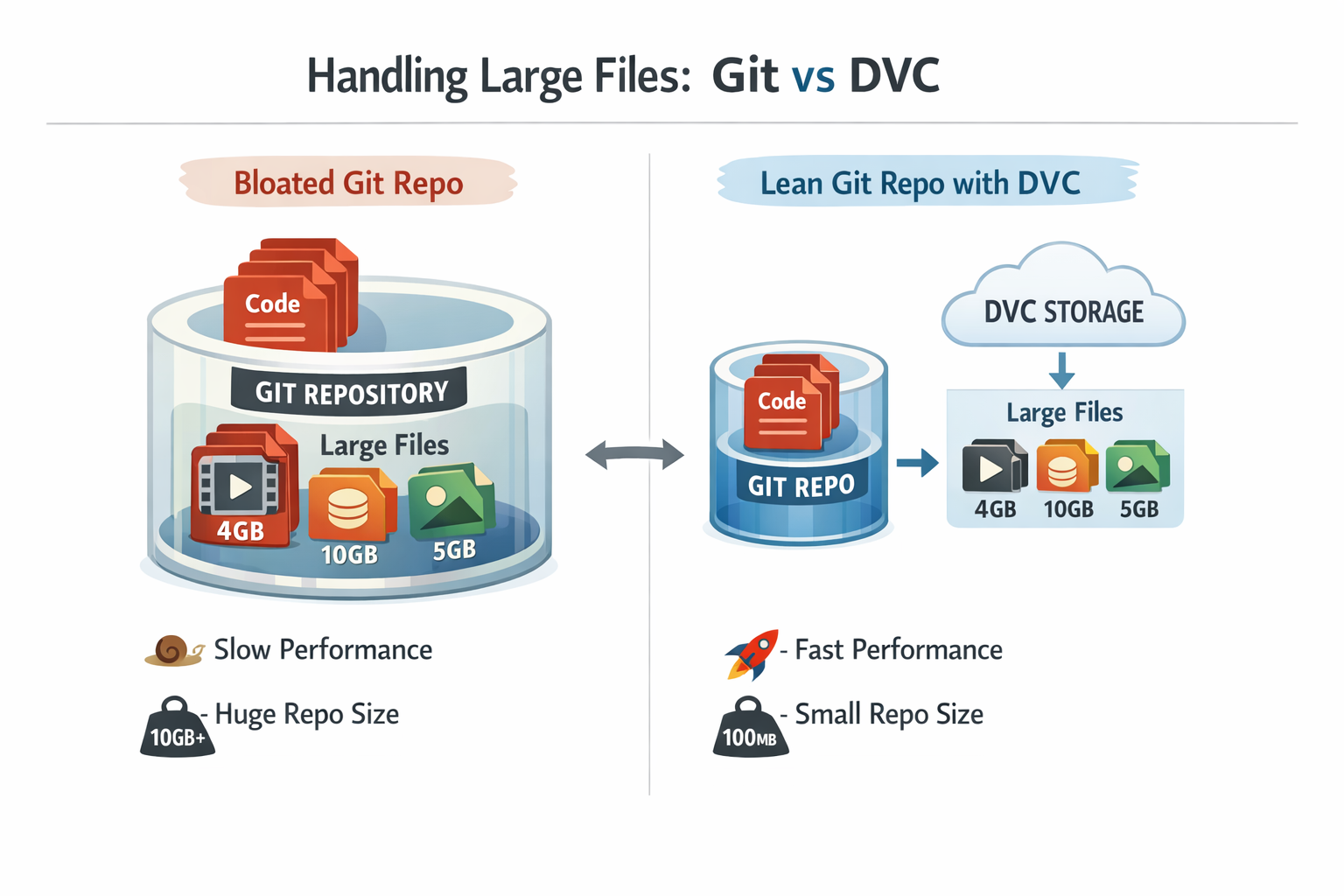 Diagram: A visual comparison of Git's limitations with large files versus DVC's efficient handling.
This is precisely where DVC (Data Version Control) becomes essential. DVC acts as Git's highly specialized partner for data, seamlessly extending existing Git workflows to manage and version large datasets and machine learning models with remarkable ease. The primary objective is to ensure that an entire ML project—from the code written to the data used for training and the models produced—is fully versioned, perfectly reproducible, and effortlessly shareable among a team. DVC is an open-source tool specifically built to address these unique challenges prevalent in data science and machine learning.
The consistent emphasis on "reproducibility" across various sources highlights its fundamental role in establishing reliable MLOps practices. The ability to precisely reproduce a past experiment, encompassing the exact code, the exact data, and the exact environment, is the bedrock of trustworthy experimental results. Without this capability, debugging becomes incredibly difficult, and the scientific validation of models is compromised. DVC directly addresses this by creating a robust link between data versions and code versions through Git commits. This capacity to capture an immutable snapshot of an entire experiment indicates that DVC is not merely a convenience tool but a critical enabler for maintaining scientific rigor and operational stability in machine learning. Without it, the entire MLOps lifecycle, from initial experimentation to deployment and ongoing monitoring, is significantly compromised.
It is crucial to understand that DVC is not a replacement for Git; rather, it operates in harmony with Git. Git continues to be the primary tool for versioning source code, scripts, configuration files, and even DVC's own metadata files. DVC assumes the specialized role of handling the versioning of large data files and machine learning models. It functions as an intelligent bridge that connects a Git repository to the chosen data storage solution, whether that is local disk or a cloud service. It is important to note that DVC is not a version control system in itself; it manipulates
.dvc files, which define data file versions, allowing Git to version data alongside code.
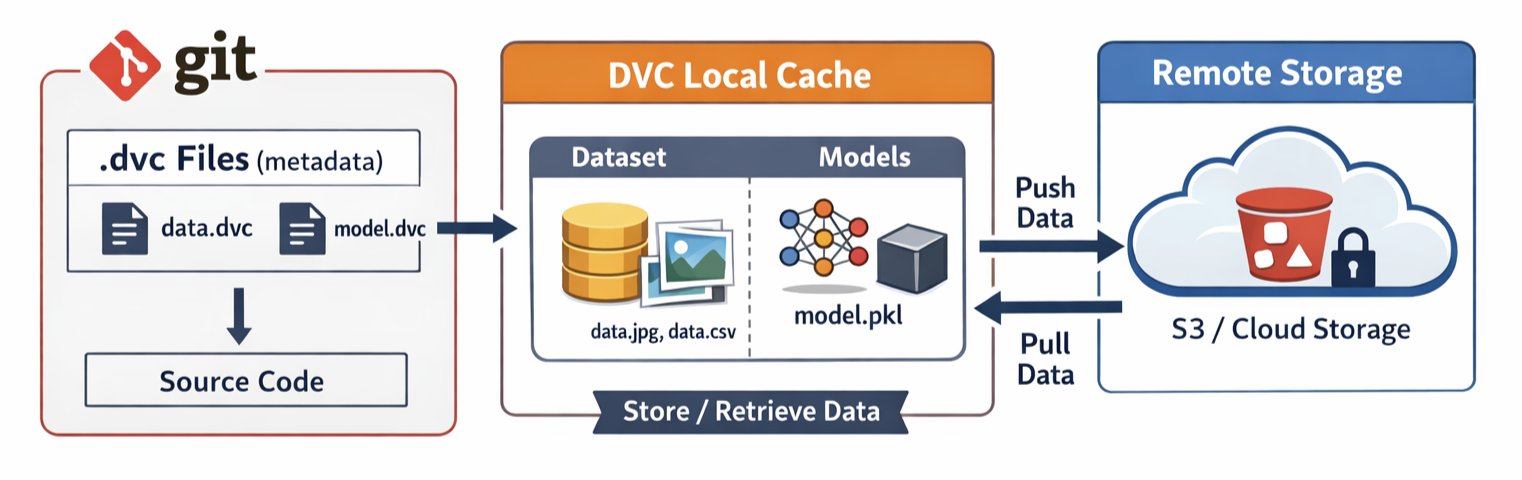 Block Diagram: Illustrate DVC's architecture showing Git tracking
 .dvc files, DVC managing data in a local cache, and data being pushed/pulled from remote storage (e.g., S3)DVC addresses several core problems in data science and machine learning workflows:
.dvc files) that contain pointers, such as MD5 hashes, to these large assets. This ingenious approach ensures that the Git repository remains incredibly lean and fast, facilitating efficient code versioning without bloat.The core problems DVC addresses—the unwieldy nature of large data in Git, the challenge of reproducibility, and the complexities of team collaboration—are not isolated technical glitches. They represent fundamental barriers to achieving mature and robust MLOps practices. DVC acts as a direct enabler for MLOps best practices, such as versioning and automation, by providing a solid versioning layer for data and models. This versioning is a non-negotiable prerequisite for building reliable CI/CD pipelines in machine learning. Without the ability to version data, one cannot confidently automate model retraining with new data, nor can one reliably roll back to a previous model version if issues arise in production. This implies that adopting DVC is more than just a tool adoption; it is a strategic move that elevates the entire machine learning development and deployment process to a more professional, reliable, and scalable level, significantly reducing technical debt and mitigating the risk of costly mistakes. It transforms ad-hoc ML scripting into a disciplined engineering practice.
DVC offers a suite of powerful features designed to streamline data and model management in machine learning projects.
When DVC is instructed to track a file or an entire directory using the dvc add command, it does not copy the raw data into the Git repository. Instead, DVC generates a small metadata file, typically named with a .dvc extension (e.g., images.dvc for an images folder). This .dvc file contains crucial information about the tracked data, including its path, size, and, most importantly, a unique MD5 hash. This MD5 hash serves as a cryptographic fingerprint of the data; if even a single bit within the data changes, the entire MD5 hash will be different. Git then tracks only this small .dvc file, not the potentially massive data file itself.
Under the hood, DVC intelligently manages the actual data. When a file is added with dvc add, DVC copies that data into a hidden internal cache directory, typically located at .dvc/cache. This cache is where DVC stores all the different versions of the tracked data. To prevent Git from inadvertently tracking these large data files directly, DVC automatically adds the original data file's path to the project's .gitignore file. Thus, when subsequent changes are made to a tracked data file, DVC detects the change, updates the MD5 hash within its corresponding .dvc file, and one simply git add and git commit that updated .dvc file.
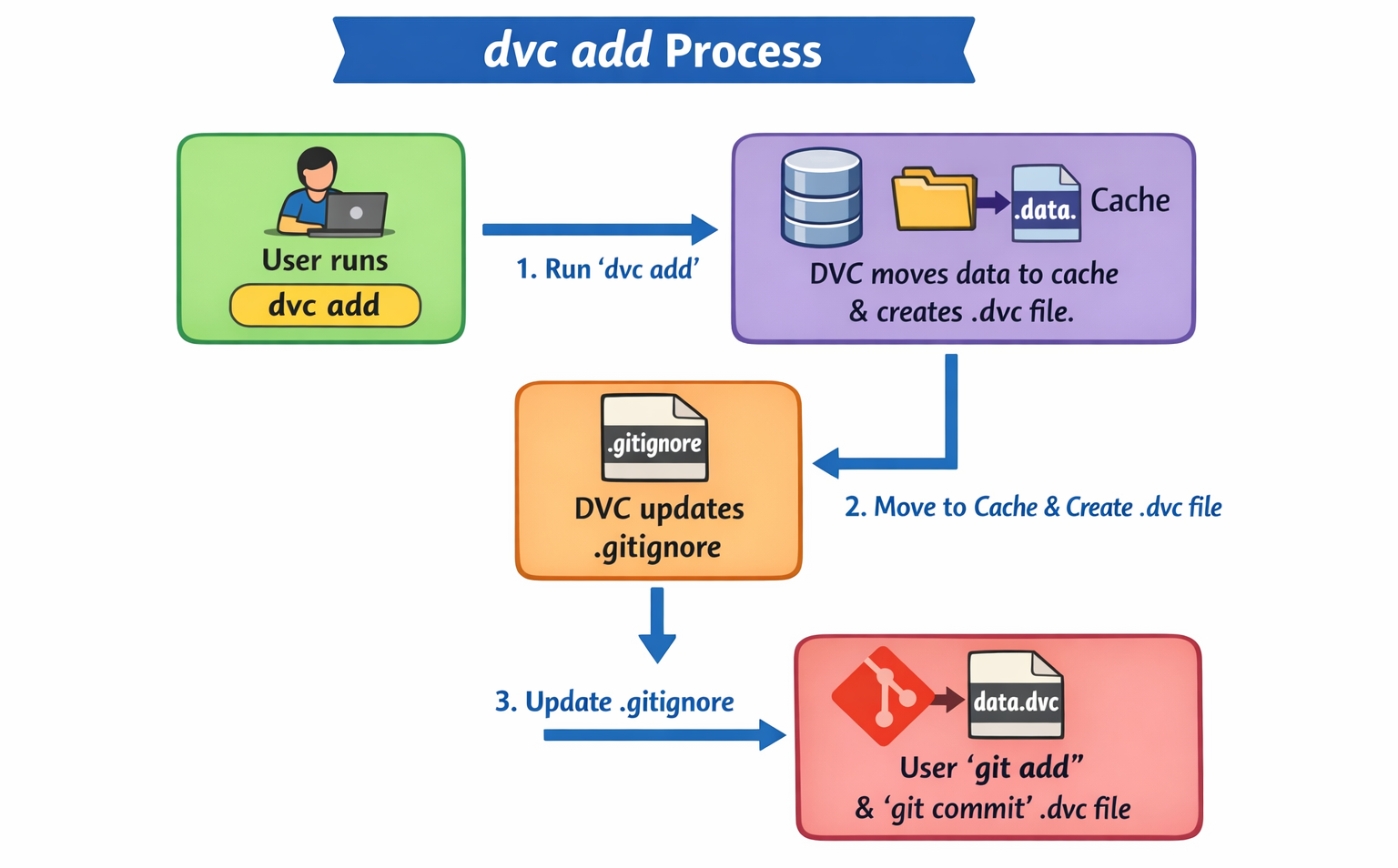 Flowchart: A step-by-step diagram illustrating the
 dvc add process: User runs dvc add -> DVC moves data to cache and creates .dvc file -> DVC updates .gitignore -> User git add and git commit the .dvc file.DVC's fundamental reliance on MD5 hashes is a core driver of its efficiency and scalability. By using these cryptographic fingerprints, DVC can instantaneously detect whether a data file has changed without needing to perform a byte-by-byte comparison of potentially massive file contents, which would be prohibitively slow. Furthermore, DVC's intelligent caching strategy optimizes storage by avoiding full data duplication for minor changes within large directories and even allows for centralized caches in network environments. This design minimizes redundant storage and network transfer, leading to faster development cycles.
In data science and machine learning, projects rarely consist of a single step. They typically involve a sequence of interconnected stages: loading raw data, preprocessing it, performing feature engineering, training a model, evaluating its performance, and so on. DVC provides a robust build system that allows for the definition and management of these complex, multi-stage workflows as a reproducible pipeline.
Instead of manually executing each script in a workflow, DVC enables the formal definition of each step as a "stage" using the dvc stage add command. This command specifies:
-n: A descriptive name for the stage (e.g., split, train_model).-d: The dependencies of the stage, which typically include the script that runs the stage and any input data files it requires (e.g., data/raw_data.csv, src/preprocess.py).-o: The outputs produced by the stage (e.g., data/processed_data.csv, model.pkl).python src/preprocess.py). DVC then records this pipeline definition in a dvc.yaml file (or adds to an existing one), which Git tracks.dvc repro command. The truly intelligent aspect of DVC pipelines is their ability to detect changes. If a script in a later stage (e.g., train.py) is modified, DVC will intelligently re-run only that changed stage and any subsequent stages that depend on its output, skipping all upstream stages whose dependencies have not changed.[1] This saves immense amounts of time and computational resources during iterative development and experimentation. DVC pipelines are often likened to "Makefiles for ML".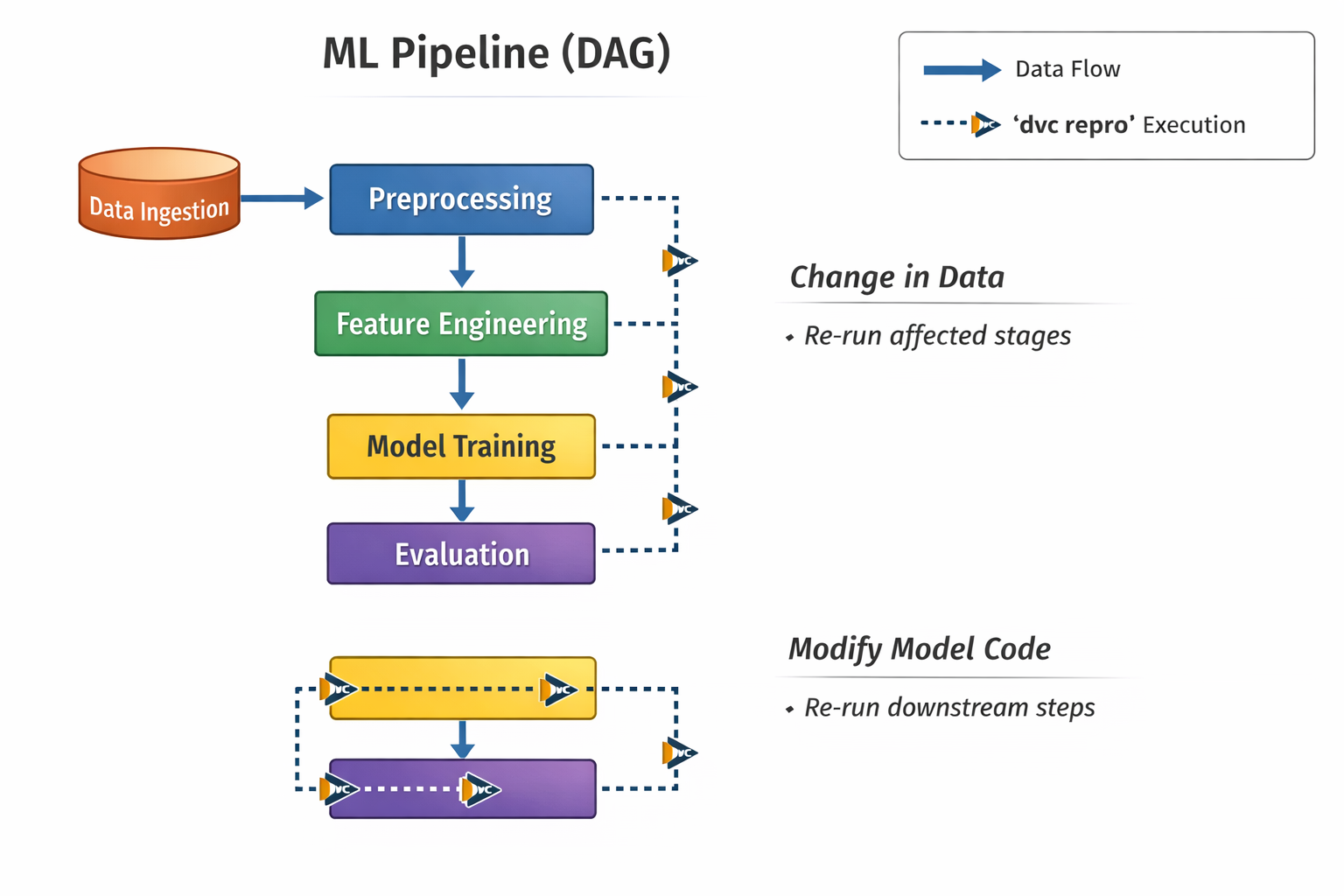 Block Diagram: A Directed Acyclic Graph (DAG) representing a typical ML pipeline (e.g., Data Ingestion -> Preprocessing -> Feature Engineering -> Model Training -> Evaluation). Show how stages are connected by dependencies and how
 dvc repro intelligently executes only changed parts.The "Makefile for ML" analogy is a powerful conceptual model for understanding DVC's pipeline management. It implies that DVC constructs an implicit directed acyclic graph (DAG) of the ML workflows dependencies. The intelligent re-execution of dvc repro is a direct, practical manifestation of this underlying DAG. DVC tracks the MD5 hashes of all inputs and outputs for each stage. If the input hashes for a particular stage remain unchanged, DVC determines that stage does not need to be re-run, even if a downstream stage's code has been modified. This is not just automation; it is intelligent automation. This capability is crucial for optimizing compute time, especially in complex, multi-stage ML workflows, by ensuring that only necessary computations are performed. This directly translates to faster iteration cycles and significant resource efficiency in development.
DVC extends beyond just data and pipeline management; it is also a powerful, lightweight tool for tracking machine learning experiments. It helps maintain a clear record of precisely what data, what code, and what hyperparameters were used to produce which model, and what performance metrics that model achieved.
By tightly integrating with Git, DVC ensures that all the inputs to experiments (specific data versions, code changes, and parameter configurations) and their corresponding outputs (trained models, evaluation metrics) are linked to a unique Git commit. This comprehensive capture makes experiments inherently reproducible, allowing for recreation of any past result with precision. DVC offers a suite of commands to manage and compare experiments effectively. For instance,
dvc exp show displays a table summarizing experiments, their parameters, and their key metrics. This makes it incredibly easy to compare different runs, identify the best-performing models, and even "apply" a previous experiment's configuration to quickly re-run or build upon it. DVC can track experiments in the local Git repository without needing servers, and it can compare any data, code, parameters, models, or performance plots.
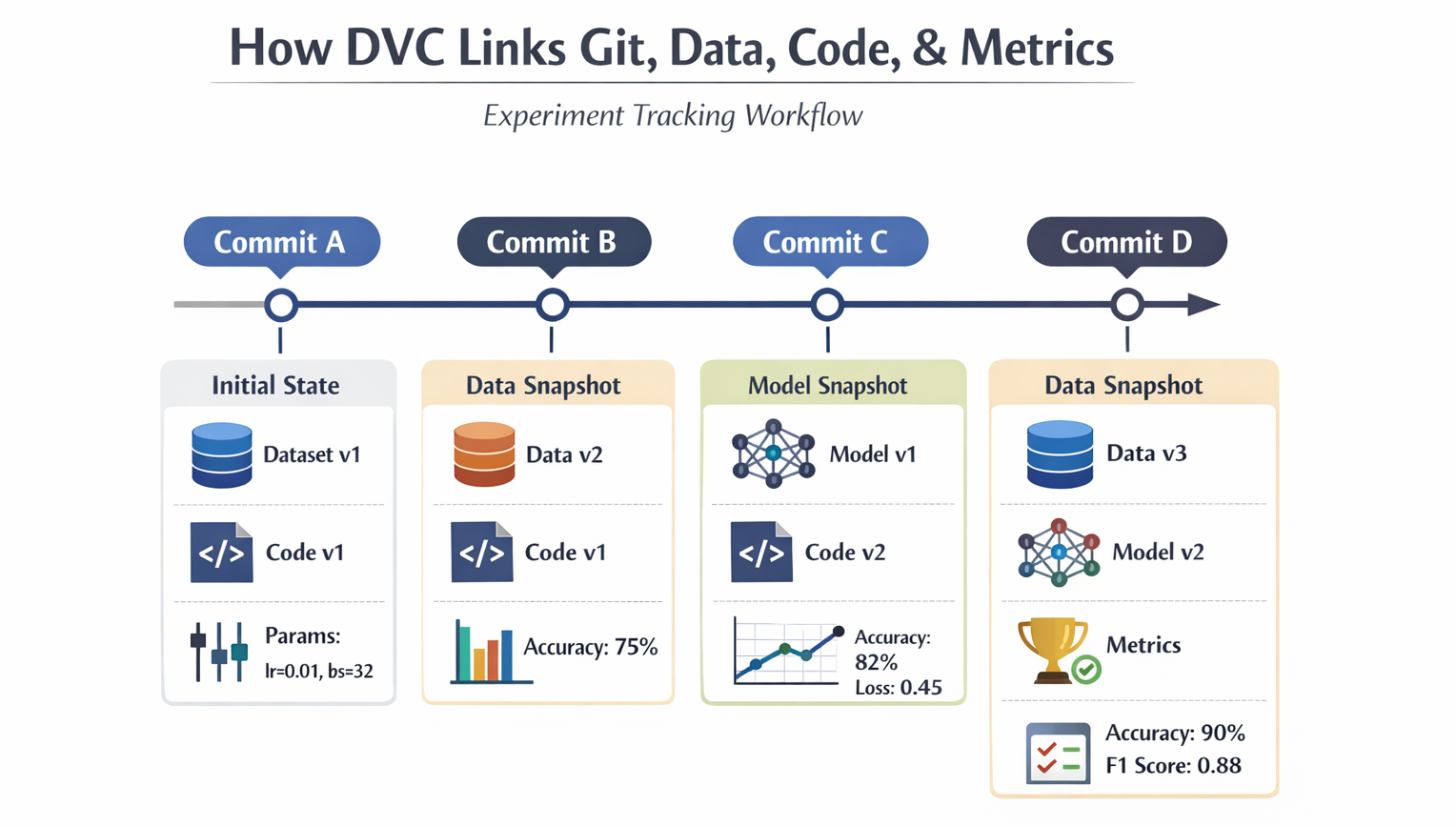 Diagram: A visual representation of how DVC links Git commits, data versions, code, parameters, and metrics for experiment tracking. Show a timeline of commits with associated data/model/metric snapshots.
The significant aspect of DVC's experiment tracking is that it operates within the local Git repository, eliminating the need for external servers. This contrasts sharply with many other MLOps platforms that typically require a centralized server infrastructure for managing experiment metadata. DVC's design choice leverages Git's inherently distributed nature, promoting a "GitOps" approach to MLOps. In this paradigm, Git becomes the single source of truth for all project artifacts—code, data metadata, pipeline definitions, and experiment results. This approach significantly reduces infrastructure overhead, simplifies the setup process, and aligns machine learning workflows more closely with established software engineering best practices. The implication is a more lightweight, flexible, and accessible MLOps stack that empowers data scientists to integrate seamlessly with existing DevOps practices without needing to learn entirely new, proprietary platforms.
While DVC manages data locally in a cache, for true collaboration and robust backup, a central place to store large datasets and models is necessary. DVC integrates seamlessly with various remote storage solutions. This is absolutely essential for several reasons:
DVC is highly flexible and supports a wide array of remote storage types. This includes popular cloud providers like Amazon S3, Google Cloud Storage (GCS), Azure Blob Storage, Google Drive, and even on-premise solutions like SSH/SFTP servers, HDFS, and WebDAV.
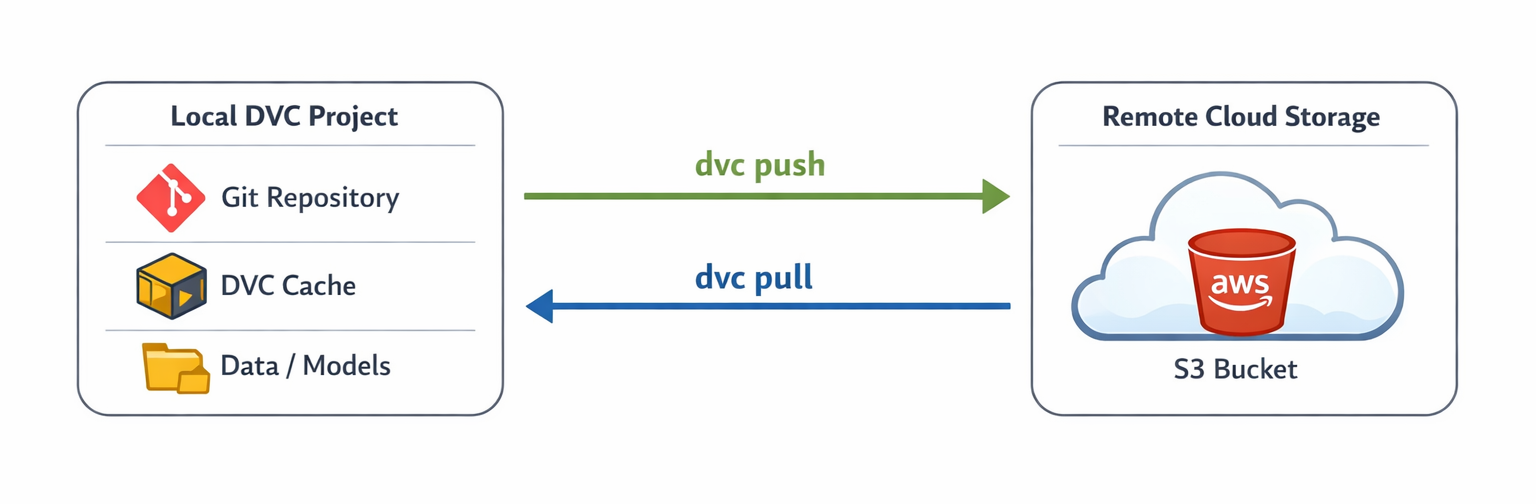 Architecture Diagram: Show the flow of data between a local DVC project (Git repo + DVC cache) and a remote cloud storage bucket (e.g., AWS S3). Illustrate
 dvc push and dvc pull operationsDVC's architecture for remote storage fundamentally decouples the physical storage location of large data assets from their version control mechanism. Git tracks only the pointers (the .dvc files) to the data, while DVC manages the actual data blobs in a separate, configurable backend. This design choice offers immense flexibility: users can select the most cost-effective, performant, or geographically appropriate storage solution (e.g., AWS S3 for cloud-native, NFS for on-premise, or even Google Drive for simplicity) without altering their core versioning workflow. This adaptability is a significant advantage, allowing organizations to optimize for specific cost, performance, and compliance requirements, rather than being constrained by a versioning tool that dictates storage. It promotes a highly adaptable and future-proof data management strategy.
This table provides a quick reference for the most frequently used DVC commands related to data versioning.
| Command |
Description |
Example Usage |
dvc init | Initializes DVC in a project directory. | dvc init |
dvc add <file/folder> | Tells DVC to start tracking data files or directories, creating a corresponding .dvc file. | dvc add data/raw_data.csv |
dvc status | Checks the status of tracked data, showing changes relative to the cache. | dvc status |
dvc commit | Commits changes to data tracked by DVC, updating its hash in the .dvc file. | dvc commit |
dvc checkout | Switches between different versions of data, syncing the workspace with the .dvc files. | dvc checkout |
dvc pull | Retrieves data from remote storage into the local DVC cache and workspace. | dvc pull |
dvc push |
Uploads data from the local DVC cache to the configured remote storage. |
dvc push |
This table helps users quickly understand the variety of remote storage options DVC supports and their typical use cases.
| Storage Type |
Common Use Case |
DVC Package (if applicable) | Example URL Prefix |
| AWS S3 | Cloud-native object storage, highly scalable, cost-effective. | dvc[s3] or dvc-s3 | s3://<bucket-name>/<path> |
| Google Cloud Storage (GCS) | Cloud-native object storage for GCP users. | dvc[gs] or dvc-gs | gs://<bucket-name>/<path> |
| Azure Blob Storage | Cloud-native object storage for Azure users. | dvc[azure] or dvc-azure | azure://<container-name>/<path> |
| Google Drive | Personal cloud storage, good for small teams/individual projects. | dvc[gdrive] or dvc-gdrive | gdrive://<folder-id>/<path> |
| Local/NFS/SSH |
On-premise storage, network file systems, or SSH servers. |
dvc (base package) | /path/to/local/store or ssh://user@host:/path/to/store |
To begin leveraging DVC, the tool must first be installed and configured within a project environment.
Before versioning data, DVC needs to be installed on the system. As DVC is primarily a Python-based tool, pip and conda are the most common and recommended installation methods.[3]
For Python users, pip is straightforward:
pip install dvcFor those who plan to use DVC with cloud storage, which is almost always the case for MLOps, it is advisable to install the relevant optional dependencies immediately. For example, for AWS S3:
pip install 'dvc[s3]'Alternatively, dvc[all] can be installed to cover all common remote storage types.
If conda is preferred (especially in Anaconda or Miniconda environments), it is often recommended to install mamba first for faster dependency resolution:
conda install -c conda-forge mamba # Installs much faster than conda
mamba install -c conda-forge dvc
Similar to pip, specific packages for cloud remotes will need to be installed, e.g., conda install dvc-s3.
DVC is also available via platform-specific package managers like Snapcraft (for Linux: snap install dvc --classic), Chocolatey (for Windows: choco install dvc), and Homebrew (for macOS: brew install dvc). A VS Code extension is also available for a more graphical interface, though the core DVC still needs to be installed separately.
The availability of multiple installation methods and the clear guidance on optional dependencies reveal a core design principle of DVC: its versatility and extensibility. DVC is not a closed, monolithic platform; it is designed to seamlessly integrate into existing development environments (whether Python-centric, OS-specific, or IDE-driven) and connect with preferred cloud providers. This modularity minimizes vendor lock-in and empowers users to construct a customized MLOps stack that fits their specific needs. This flexibility is a key differentiator, fostering broader adoption and allowing DVC to adapt to diverse organizational infrastructures and preferences, aligning with the modern MLOps philosophy of extending traditional software tools.
The first step for any DVC project involves setting up a standard Git repository. DVC then initializes itself within that Git repository, creating the necessary configuration files.
To begin, create a new directory for the project and initialize Git:
mkdir my_ml_project
cd my_ml_project
git init
Next, initialize DVC within this Git repository:
dvc initUpon running dvc init, DVC creates a hidden .dvc/ directory. Inside, a config file (.dvc/config) stores DVC's settings, and a .gitignore file (.dvc/.gitignore) instructs Git to ignore DVC's internal cache. Crucially, these .dvc files are themselves tracked by Git.
These initial DVC files should then be committed to Git:
git add .dvc/ .gitignore .dvc/config
git commit -m "Initialize DVC"

<--- Diagram: A simple visual showing a Git repository folder before and after dvc init, highlighting the creation of the .dvc/ directory and its contents (config, .gitignore)--->
The explicit sequence of git init before dvc init, coupled with the fact that DVC's own configuration files (.dvc/config, .dvc/.gitignore) are designed to be Git-tracked, highlights a profound "Git-first" philosophy. DVC is not a standalone system but rather an extension of an existing Git workflow. This means that the entire project state—including how DVC is configured and what data it tracks—is versioned and collaborative through Git. This design choice simplifies team onboarding and ensures consistency across different development environments. When a new team member clones the Git repository, they automatically receive all the necessary DVC configurations, making it straightforward to begin working with DVC-tracked data. This reinforces the concept of a unified code-and-data repository, centralizing project state management.
A common scenario involves tracking a dataset and subsequently managing changes to it.
To start, create a dummy data file. In the my_ml_project directory, create a data folder and a raw_data.csv file:
mkdir data
echo "col1,col2\n1,A\n2,B" > data/raw_data.csv
Now, instruct DVC to begin tracking this file:
dvc add data/raw_data.csvExecuting this command will cause DVC to create a small data/raw_data.csv.dvc file. It will also move the actual raw_data.csv into DVC's internal cache and add data/raw_data.csv to the project's .gitignore file.
Finally, commit the .dvc file (which Git does track) to the Git repository:
git add data/raw_data.csv.dvc .gitignore
git commit -m "Add initial raw data with DVC"
To illustrate "time travel," simulate a change to the data and then revert to a previous version.
Modify raw_data.csv by adding a new row:
echo "3,C" >> data/raw_data.csvInform DVC about the change, and then commit the updated .dvc file to Git:
dvc add data/raw_data.csv
git add data/raw_data.csv.dvc
git commit -m "Updated raw data with new entry"
To revert to the first version of the data, use Git to find the commit ID of the "Add initial raw data" commit:
git log --oneline(The short commit ID for the first commit should be copied.)
Then, use Git to checkout the specific .dvc file from that previous commit, and instruct DVC to synchronize the workspace:
git checkout <first_commit_ID> data/raw_data.csv.dvc
dvc checkout
After running dvc checkout, DVC will retrieve the exact version of raw_data.csv that was associated with that first_commit_ID from its cache and place it back in the data/ directory.
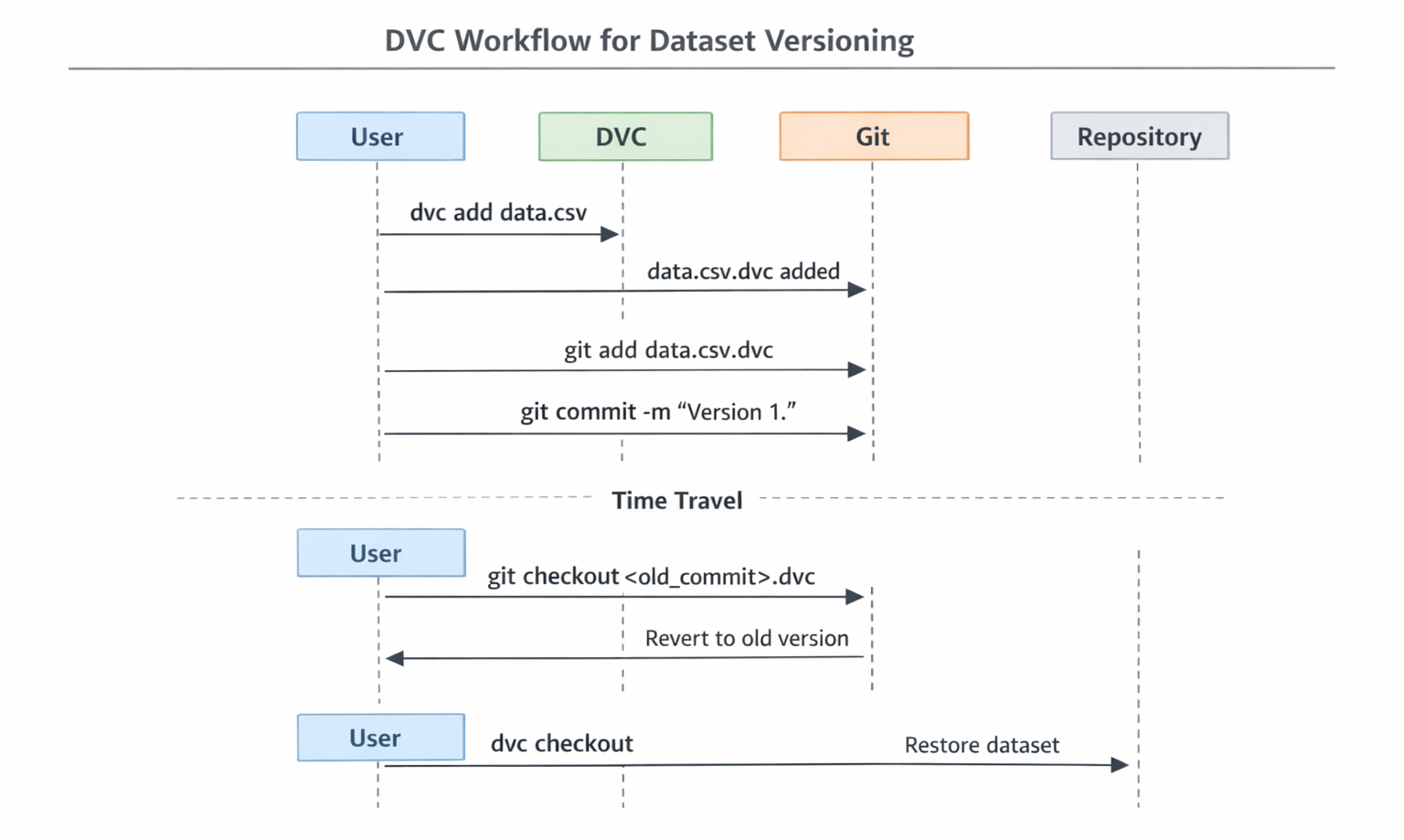 Flowchart: A sequence diagram illustrating the basic DVC workflow for versioning a dataset, including
 dvc add, git add.dvc, git commit, and then git checkout.dvc followed by dvc checkout for "time travel.")The fundamental workflow of using dvc add followed by git add.dvc and git commit demonstrates a critical concept: atomic versioning. This means that every time code changes are committed, the exact version of the data that code depends on is simultaneously committed. This tight, explicit coupling is what makes machine learning experiments truly reproducible and debugging highly efficient. If a model's performance unexpectedly drops, one can precisely pinpoint the specific code and data changes that were introduced at that commit. This capability transcends simple data backup; it is about building a verifiable, auditable, and immutable history of an entire ML project's state. This is absolutely vital for quality assurance, regulatory compliance, and responsible AI development in production environments, providing a clear lineage for every model.
One of DVC's most powerful features is its ability to define and manage reproducible machine learning pipelines. A simple pipeline can be set up with two stages: data preparation and model training.
For this example, the project structure should resemble the following (dummy files can be created if needed):
my_ml_project/
├── data/
│   └── raw_data.csv
├── src/
│   ├── prepare.py
│   └── train.py
├── dvc.yaml # This will be created by dvc stage add
└── .gitignore
First, create the dummy Python scripts.
src/prepare.py:
# src/prepare.py
import pandas as pd
print("Running data preparation...")
df = pd.read_csv('data/raw_data.csv')
df['processed_col'] = df['col1'] * 2 + 5 # Simple transformation
df.to_csv('data/processed_data.csv', index=False)
print("Data prepared and saved to data/processed_data.csv")
src/train.py:
# src/train.py
import pandas as pd
import json
print("Running model training...")
df = pd.read_csv('data/processed_data.csv')
# Simulate a simple model training and evaluation
accuracy = 0.85 # Dummy accuracy
f1_score = 0.78 # Dummy F1 score
metrics = {"accuracy": accuracy, "f1_score": f1_score}
with open('metrics.json', 'w') as f:
    json.dump(metrics, f, indent=4)
# Simulate saving a model file
with open('model.pkl', 'w') as f:
    f.write("This is a dummy model file.")
print(f"Model trained and metrics saved: {metrics}")
Now, define these as DVC stages.
Add the prepare stage:
dvc stage add -n prepare \
    -d data/raw_data.csv -d src/prepare.py \
    -o data/processed_data.csv \
    python src/prepare.py
This command instructs DVC: "There is a stage named 'prepare'. It depends on raw_data.csv and prepare.py. It produces processed_data.csv. To run it, execute python src/prepare.py".
Add the train stage:
# Add a DVC stage for model training
dvc stage add -n train \
    -d data/processed_data.csv -d src/train.py \
    -o model.pkl -M metrics.json \
    python src/train.py
Here, -M metrics.json is crucial, as it tells DVC to track metrics.json as a metric file, which is useful for experiment comparison later.
With the stages defined, running the entire pipeline is as simple as:
dvc repro
DVC will execute prepare.py first, then train.py. The intelligence manifests when a change is introduced. If data/raw_data.csv is modified and dvc repro is run again, DVC will detect the change in the input to the prepare stage and re-run both prepare and train. However, if only src/train.py is modified, DVC is smart enough to realize that data/raw_data.csv and data/processed_data.csv have not changed, so it will only re-run the train stage, saving valuable computation time.
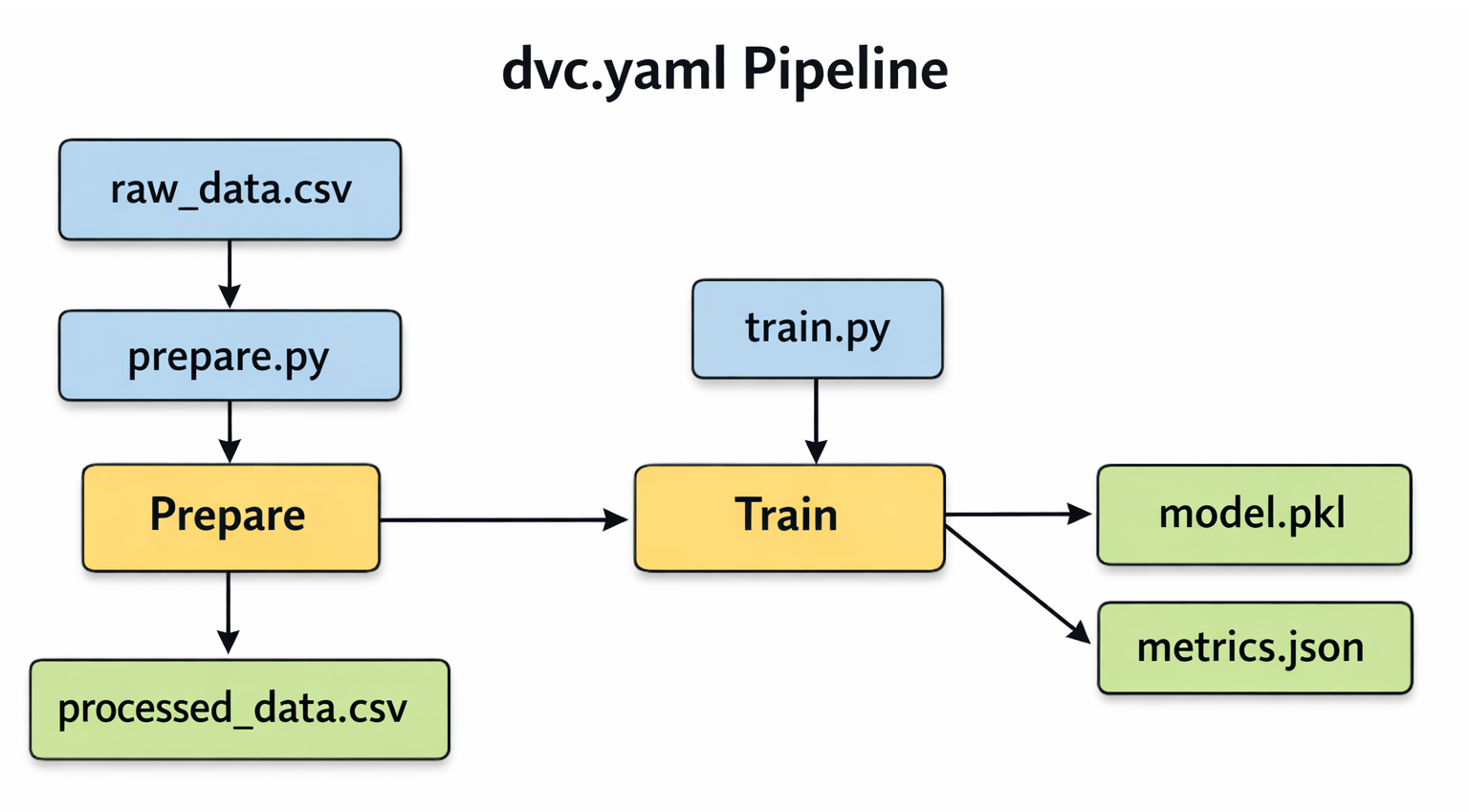 Block Diagram: A simple DAG illustrating the
 dvc.yaml pipeline with two stages: prepare and train. Show raw_data.csv and prepare.py as inputs to prepare, producing processed_data.csv. Then show processed_data.csv and train.py as inputs to train, producing model.pkl and metrics.json.The process of defining pipelines with dvc stage add and executing them with dvc repro is more than just a convenience; it is the foundation for automated reproducibility. This capability directly facilitates the integration of machine learning workflows into Continuous Integration/Continuous Delivery (CI/CD) systems. When new data becomes available or code changes are pushed, a CI/CD pipeline can automatically trigger dvc repro. This ensures that the model is re-trained with the correct data and all its dependencies are met, eliminating manual steps and significantly reducing human error. This automation accelerates the deployment of updated models, which is a core tenet of MLOps automation. The intelligent re-execution feature further optimizes this for continuous integration environments, only re-running what is necessary, thus saving compute resources and time.
To truly enable collaboration and ensure valuable data and models are backed up, configuring a remote storage location is essential. The following steps outline setting up AWS S3, a common choice for MLOps projects.
dvc remote add and dvc push:Install DVC S3 dependency: If not already installed, install the necessary DVC package for S3 support:
pip install 'dvc[s3]'
Configure AWS credentials: DVC leverages existing AWS CLI configuration. AWS credentials should be set up, typically in ~/.aws/credentials (e.g., aws_access_key_id and aws_secret_access_key). The AWS user will need specific S3 permissions such as s3:ListBucket, s3:GetObject, s3:PutObject, s3:DeleteObject.
Create an S3 bucket: If one does not exist, create a new S3 bucket. S3 bucket names must be globally unique.
aws s3 mb s3://your-unique-dvc-bucket-name
Add the S3 bucket as a DVC remote: Inform DVC about the new remote storage.
dvc remote add aws-remote s3://your-unique-dvc-bucket-name dvc remote default aws-remote # Optional: set this as the default remote
This command adds the remote configuration to the .dvc/config file, which Git tracks.[1, 4, 8]
Push the DVC cache to S3: This synchronizes the local DVC cache (where all data versions are stored) with the S3 bucket.
dvc push
This command will upload all DVC-tracked data and model versions to the S3 remote.
Commit DVC config changes to Git: Since .dvc/config was modified, commit this change to Git so team members know where to find the data.
git add .dvc/config
git commit -m "Configure AWS S3 remote for DVC"
git push # Push code and DVC config to GitHub/GitLab
Team Collaboration: When a teammate clones the Git repository, they will automatically receive the code files, DVC configurations, and the .dvc files. To obtain the actual data, they simply need to ensure their own AWS credentials are set up with appropriate access to the S3 bucket, and then run:
dvc pull
This will pull the necessary data from S3 into their local DVC cache and workspace.
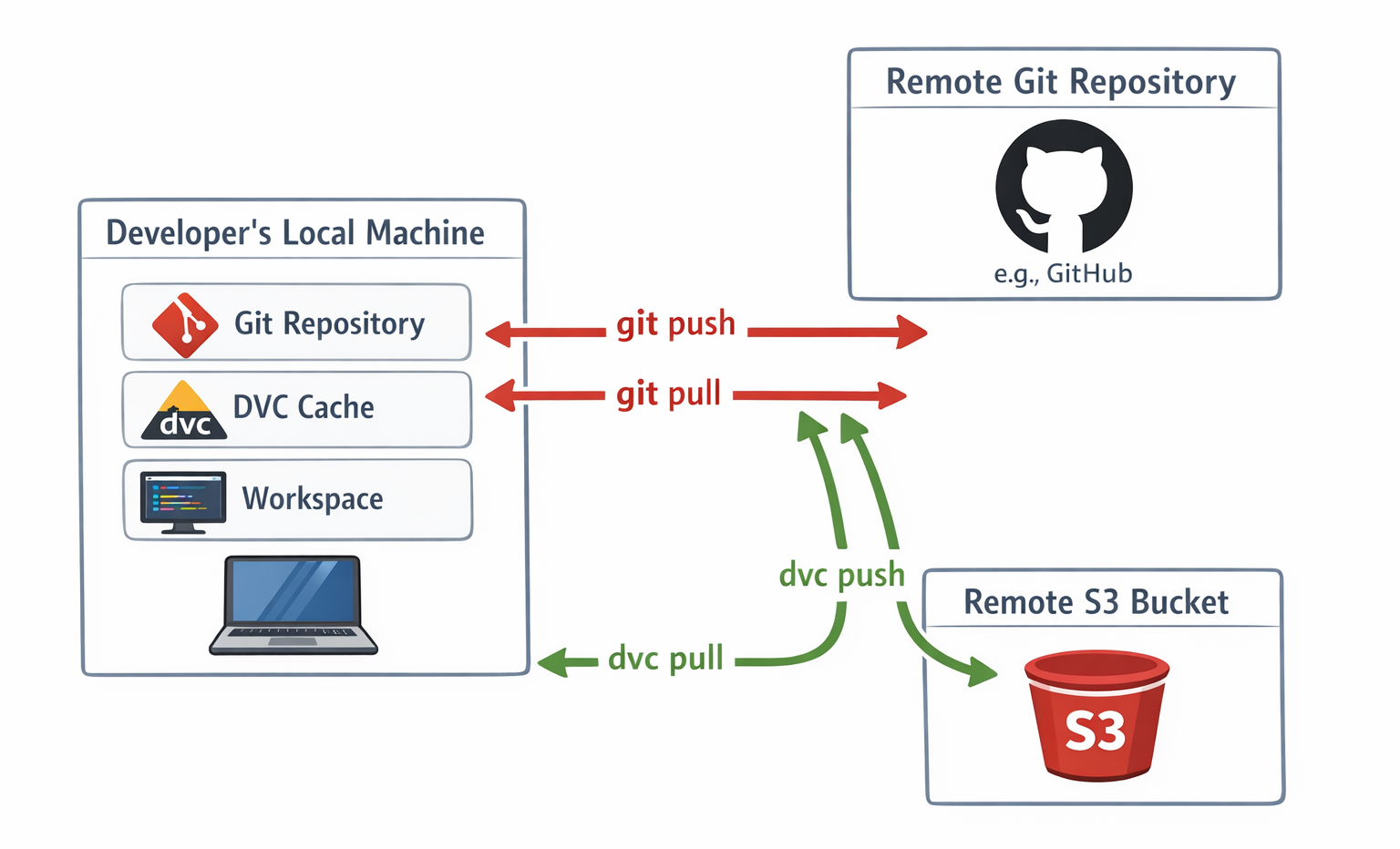 Architecture Diagram: A detailed diagram showing the interaction between a developer's local machine (Git repo, DVC cache, workspace), a remote Git repository (e.g., GitHub), and a remote S3 bucket. Illustrate the flow of code with
 git push/pull and data with dvc push/pull.The detailed step-by-step AWS S3 setup and the dvc pull mechanism for team members illustrate how DVC enables truly distributed and collaborative data management. This capability is paramount for large-scale or geographically dispersed machine learning teams, where data scientists might be located in different regions or work on diverse machines. By centralizing the actual data in a cloud storage solution, DVC facilitates seamless collaboration, significantly reduces data transfer bottlenecks (as data is pulled efficiently from a high-bandwidth cloud service), and ensures data consistency across all team members, regardless of their physical location. This directly supports the goals of sharing a single development computer between teammates and sharing experiments, making DVC an enabler for efficient global ML operations.
To truly maximize DVC's benefits and maintain a clean, efficient, and reliable MLOps workflow, several best practices should be adopted.
dvc stage add, descriptive names that clearly indicate the purpose of each step (e.g., data-ingest, feature-engineering, model-training, evaluation) should be chosen. This transforms the dvc.yaml file into a self-documenting blueprint of the ML workflow, making it much easier for team members to understand and navigate the pipeline.data/raw directory for original, immutable datasets and a data/processed or data/features directory for transformed or engineered data. This separation prevents accidental modification of source data and clearly delineates the inputs and outputs of different pipeline stages.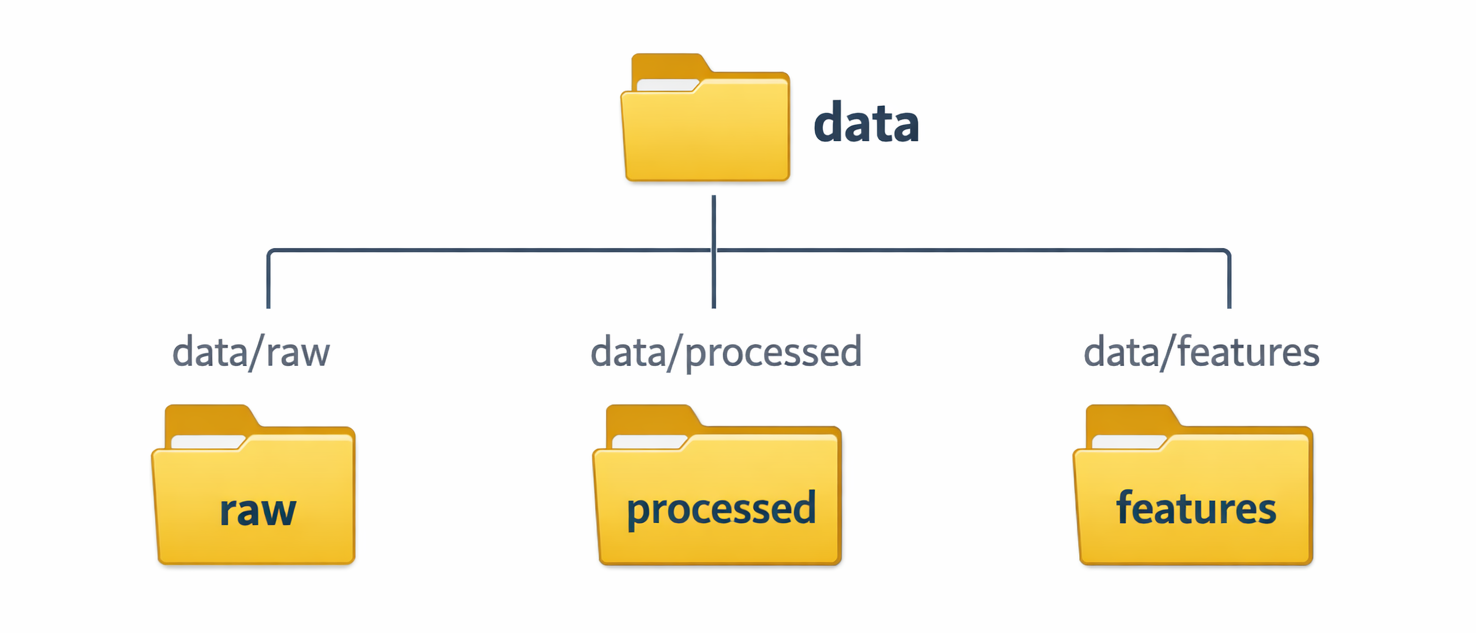 Diagram: A simple folder structure diagram illustrating the recommended separation of raw and processed data (e.g.,
 data/raw, data/processed, data/features)..gitignore to prevent large files from being inadvertently added to the Git repository, keeping it lean: While DVC automatically adds tracked files to .gitignore upon dvc add, it is good practice to manually ensure that any other large, untracked files (such as very large intermediate outputs not intended for versioning, or temporary files) are also explicitly excluded from Git. This proactive approach ensures the Git repository remains lightweight and performs optimally.git push is essential for synchronizing code commits with a remote Git repository, dvc push is equally crucial for synchronizing the DVC data cache with the configured remote storage. It should be a habit to dvc push frequently, especially after significant data changes, pipeline updates, or model training runs. This ensures data is backed up and readily available for the entire team.train or evaluate stages, the -M flag in dvc stage add should be used to specify metrics files (e.g., metrics.json). DVC can then track these metrics. Commands like dvc exp show display a tabular summary of experiments, their parameters, and their performance metrics. dvc metrics diff can show how metrics have changed between different commits. This capability is invaluable for systematically comparing different model iterations and understanding the impact of code or data changes on model performance.The outlined best practices and the overarching philosophy behind DVC strongly advocate for applying the same rigorous principles of traditional software engineering to machine learning projects. Practices such as using meaningful naming conventions, maintaining clear separation between raw and processed data, diligently using .gitignore, performing regular pushes, and systematically tracking metrics are all standard practices in robust software development. By applying these methodologies to ML projects, especially with the aid of DVC, the gap between data science and engineering is significantly bridged. This convergence leads to the development of more robust, maintainable, and ultimately, production-ready machine learning systems. Furthermore, this approach directly counters the "ML silo" problem, fostering seamless and efficient collaboration between data scientists and software engineers within an organization.
Even with the most powerful tools, occasional snags can occur. DVC is robust, but understanding common issues can save significant time and frustration. The following table outlines frequent DVC hurdles and their solutions.
| Issue |
Common Cause | Solution |
Failed to pull data from the cloud or WARNING: Cache 'xxxx' not found. | Changes were pushed to Git without the corresponding data being uploaded to the DVC remote. | Ensure dvc push is run from the original project before pushing Git changes. |
[Errno 24] Too many open files (especially with S3 on macOS). | Too many concurrent file operations (often due to high --jobs value) exceeding system limits. | Increase the open file descriptors limit (e.g., ulimit -n 1024 on UNIX-like systems) or use a lower JOBS value. |
Unable to find credentials, Unable to connect, or Bucket does not exist. | AWS/Cloud provider credentials not set up correctly, network issues, or incorrect bucket name/region. | Verify AWS/Cloud provider credentials (e.g., ~/.aws/credentials), check network connectivity, and confirm bucket name/region with dvc remote modify. |
Unable to acquire lock. | Another DVC process is running, or a previous process terminated abruptly, leaving a lock file. | If no other process is running, manually remove the lock file at .dvc/tmp/lock. For network filesystems (NFS, Lustre), try dvc config core.hardlink_lock true. |
Cannot add files in symlinked directory. | DVC only supports symlinked files as targets for dvc add, not directory symlinks or paths containing them. | Ensure the target path is a direct file, not a symlinked directory. |
No possible cache types. | DVC cannot find a valid file link type (e.g., hardlink, symlink) supported by the file system to link data from cache to workspace. | Reconfigure DVC to use an alternative link type supported on the machine, then run dvc checkout --relink. |
DVC cannot authenticate to Git remote (for experiment sharing). |
Missing Git authentication for DVC's experiment commands. | Use SSH for authentication, or configure a Git credential helper (like Git Credential Manager) for HTTP remotes. Ensure global/system configuration for dvc import. |
Throughout this post, the discussion has demonstrated how DVC empowers professionals to manage large datasets and machine learning models with the same level of precision, ease, and rigor applied to code. It is an indispensable tool that tackles some of the most pressing challenges in modern MLOps by enabling:
Do not just read about it, try DVC today! Readers are encouraged to explore more advanced features like dvc plots for visualizing metrics, dvc diff for comparing data and model changes, and integrating DVC with popular CI/CD platforms.
 Launch your Graphy